Escalating Privileges With SSRF
 Published on kuldeep.io
This post is regarding my recent findings on Synack Red Team which consisted of a total of 4 SSRF vulnerabilities. Three of them were authenticated SSRFs and the last was a fully unauthenticated SSRF.
The full write-up lives on its author's site
It belongs to its author, so we link to it rather than copy it. The other two tabs are our own rewrites, checked against it.
Context
This is a write-up of four SSRF vulnerabilities found on a Synack Red Team target: three authenticated and one fully unauthenticated. The target was an API made up of several services, each exposed as its own Postman sub-collection. The researcher notes that the target had been live for 11 hours and 47 minutes before the report was filed, and that nobody else had reported it despite the relatively small attack surface.
Five services were actually performing operations:
- XXXIntegration
- AssetManagement
- Billing
- CustomerManagement
- OLS
The remaining collections were for authentication and other purposes. Each service requires its own service-specific access token: a Billing token does not work against AssetManagement, and vice versa.
The feature at the centre of the finding is an event endpoint that takes a JSON body describing an event and a list of URLs. The url field inside payload.urls is meant to point at an XXXIntegration service URL so the API can fetch data from it. In practice, the API fetched whatever URL was supplied.
Setup
The researcher loaded the provided Postman collection and Postman environment files into Postman, then started Burp Suite to view and manipulate requests. An access token for the AssetManagement service was obtained and set in the Postman environment so the collection would work. Testing was done request by request, manually.
Finding it
While going through the requests one by one, the researcher came across the XXXService - /xxxevent request:
POST /api/xxx/xxxevent HTTP/1.1
Content-Type: application/json
Authorization: Bearer redacted
Host: AssetManagement-service-host
Content-Length: 507
{
  "event_id": "redacted",
  "event_type": "redacted",
  "event_time": "2022-07-06T14:55:00.00Z",
  "correlation_id" : "redacted",
  "payload": {
    "urls": [
      {
        "url_type": "XXXIntegration",
        "url": "https://XXXIntegration-service-host/api/xxxhistory/xxx/1234"
      }
    ]
  }
}
The parameters mean the following:
| Parameter | Explanation |
|---|---|
event_id |
A UUID for a particular event. |
event_type |
Set to "public" by default in the collection; most probably identifies whether the event is public or private. |
event_time |
The time of the event. |
url_type |
Set to XXXIntegration, showing that the XXXIntegration service is being requested. |
url |
The parameter of interest: it specifies an XXXIntegration service URL to fetch data from. A user can modify it to hold any arbitrary URL and the API will send requests to that URL. |
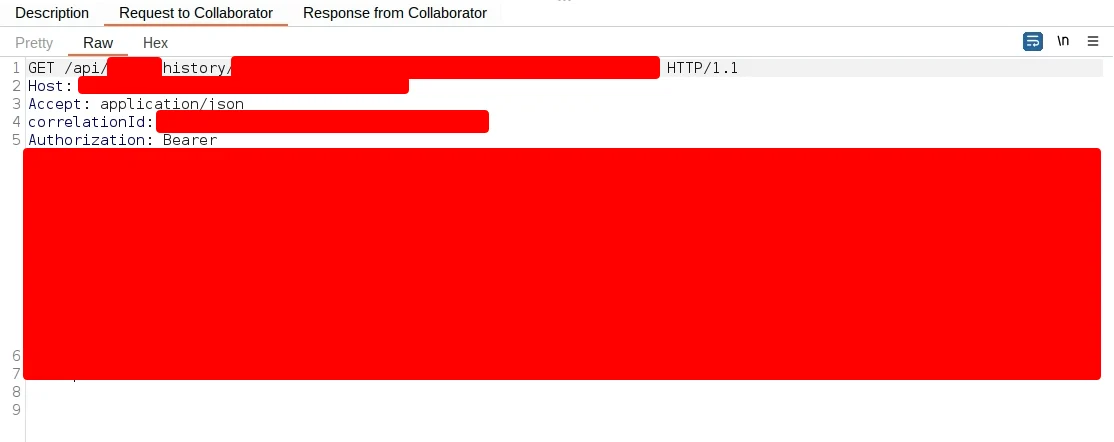
The response to the original request was a 500 Internal Server Error page with no verbose errors, so nothing looked interesting at first. The researcher then supplied a Synack Burp Collaborator URL in the url field, and the API sent an HTTP request to it.
Exploitation
Step 1: Noticing the leaked token and the wrong assumption
The Collaborator request contained an authorization token. The researcher initially assumed it was their own token, forwarded by the server from the original request. That kind of behaviour has almost no impact on its own, because stealing your own bearer token yields nothing; it would need to be chained with something like CSRF, for example by making a victim send a request to an attacker-controlled domain.
Step 2: Bypassing the blacklist for a partial SSRF
The researcher then tried to make the API send a request to localhost, to see whether a local port scan was possible. The API had a blacklist in place. These payloads were tried:
localhost[redacted][redacted]127.1
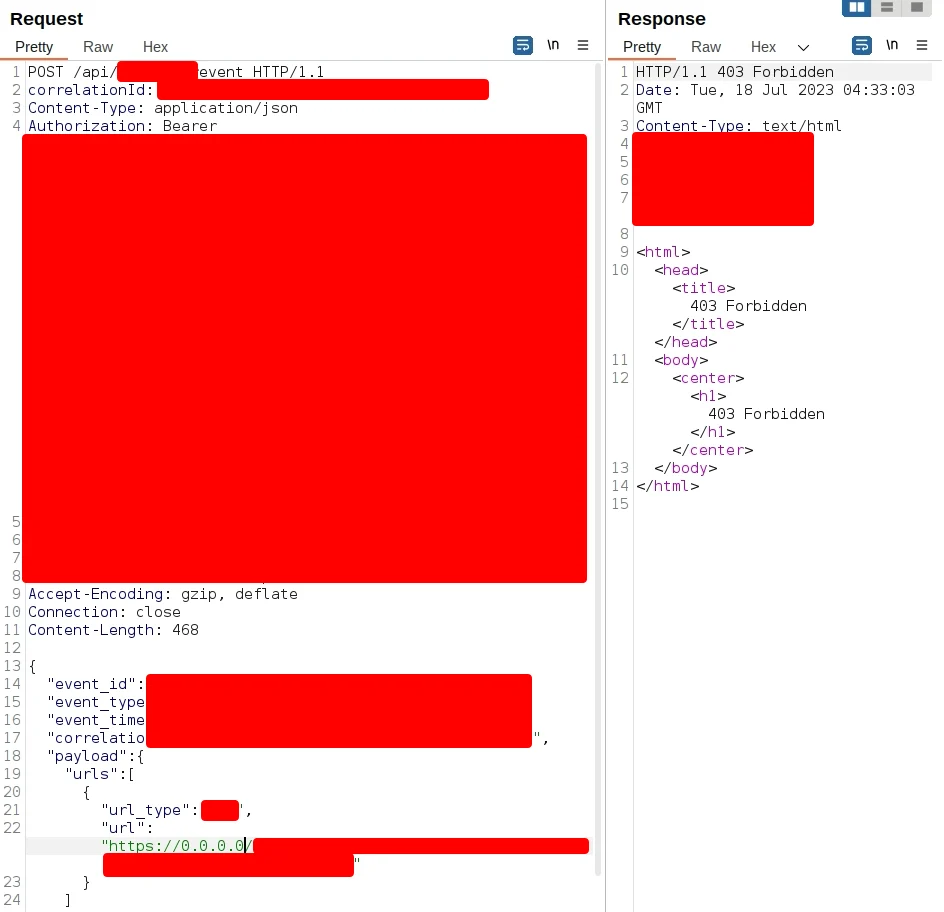
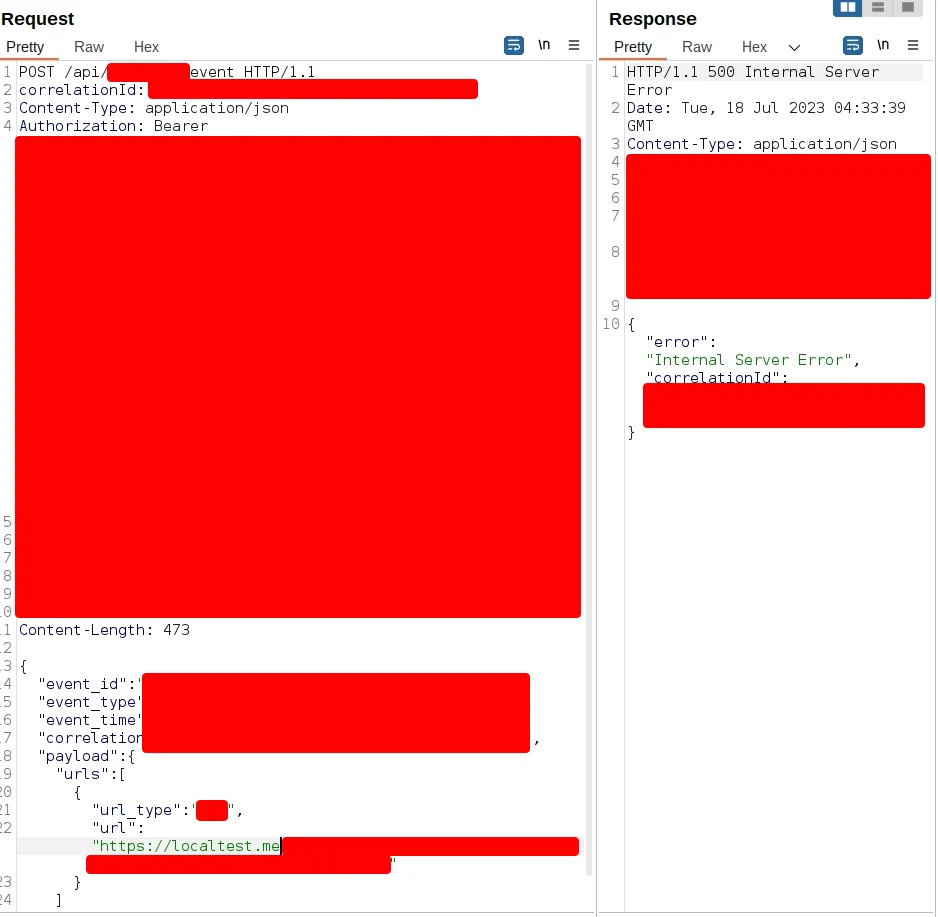
All were filtered. Because the API allowed requests to arbitrary domains, the next idea was a domain name that resolves to [redacted]. Using the localtest.me domain bypassed the blacklist. The bypass was confirmed by the response: a filtered payload returned 403 Forbidden, while the bypass returned 500 Internal Server Error.
API normally:
API when using localtest.me:
At this point a local port scan PoC would have been enough to submit a partial SSRF, but the researcher set it aside to try to escalate the issue for a better payout, and started looking at other functionality that could be used to exploit the SSRF.
Step 3: Confirming the leaked token belongs to someone else
The researcher went back to the token received in the Collaborator and confirmed it was different from the one in the original request. Both tokens were decoded with jwt.io and compared side by side, which confirmed they were different. No screenshot of that comparison is included. Even after confirming the token came from a different user or service, there was still no idea where the token was used. Fuzzing every endpoint of every service with the token was considered, to look for anything other than 401 Unauthorized, but fuzzing was avoided: there were endpoints performing different CRUD operations, and a wrong request could break the API.
Step 4: Working out which service the token belongs to
Looking again at the vulnerable request:
{
	"url_type": "XXXIntegration",
	"url": "https://XXXIntegration-service-host/api/xxxhistory/xxx/1234"
}
XXXIntegration specifies that the XXXIntegration service is being requested, and XXXIntegration-service-host is the host for that same service, which is one of the five services listed earlier. The hypothesis was that if the original request was being sent to the XXXIntegration-service-host host, the access token must belong to the same service.
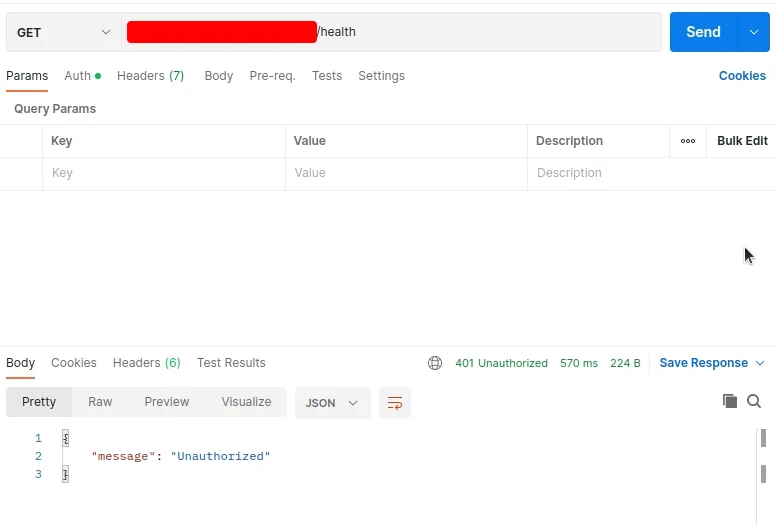
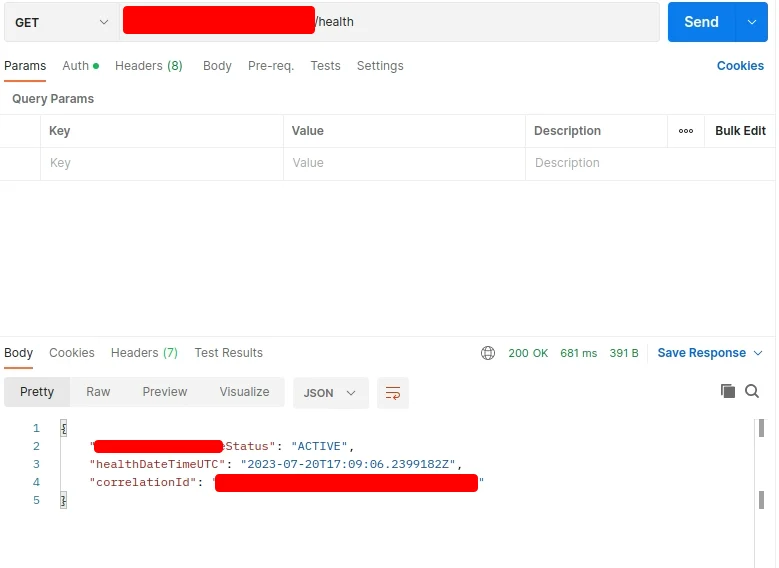
To confirm it, the token from the Collaborator was pasted into the health check endpoint of the XXXIntegration-service-host host. That endpoint was ideal for the test because it returned 401 Unauthorized for invalid credentials and 200 OK for valid ones. With the leaked token set, the response was 200 OK, confirming the token belonged to the XXXIntegration service.
Before setting the authorization token:
After setting the authorization token leaked in the Collaborator:
To make sure the endpoint was not simply accepting any valid token, a request was sent to the same health check endpoint with an AssetManagement access token. It failed, because the application had proper access control checks in place.
The researcher later confirmed that an access token of any service can be exfiltrated by naming that service in the url_type parameter: replacing XXXIntegration with Billing in the vulnerable request makes the Collaborator request yield a Billing service access token.
At that point the full SSRF report had three parts:
- A request to an arbitrary URL.
- The API leaking an access token of another service.
- Privilege escalation using that access token.
Step 5: Finding more endpoints, including an unauthenticated one
While writing the report, the researcher accidentally closed all Postman tabs. Searching for the event keyword with Postman's filter option returned 9 endpoints ending in event. All of them were checked and all were vulnerable, so instead of one report there were now four.
The first three reports were written. The last endpoint was accessible without any authentication:
POST /api/xxx/xxxevent HTTP/1.1
Content-Type: application/json
Host: CustomerManagement-service-host
Content-Length: 622

{
	"event_id": "redacted",
	"event_type": "redacted",
	"event_time": "2022-08-30T09:00:00.0000000Z",
	"correlation_id": "redacted",
	"payload": {
		"urls": [
      {
        "url_type": "CustomerManagement",
        "url": "https://CustomerManagement-service-host/api/xxx/customer/1234"
      },
			{
				"url_type": "XXXIntegration",
				"url": "https://XXXIntegration-service-host/api/xxxhistory/xxx/1234"
			}
		]
	}
}
No form of authentication was required. A remote unauthenticated attacker could obtain valid authorization tokens for different services simply by naming the service they want to interact with and a URL to send the authenticated access token to. The server sends the credentials without asking for anything.
All four reports were sent to Synack and accepted, with a generous bounty amount.
Root cause
The API takes a user-supplied URL in the payload.urls[].url field and makes a server-side request to it; the request that arrived at the Collaborator carried an access token. The service name is also user-controlled, so the caller chooses which service's credentials are attached to the outbound request. The blacklist filtered literal loopback forms such as localhost, [redacted], [redacted] and 127.1, but a domain that resolves to [redacted] got through, which is how localtest.me bypassed it. The access control on the individual services was correct: an AssetManagement token was rejected by the XXXIntegration health check. The failure was in the event endpoint, which sent requests to an arbitrary destination and leaked a service access token, and on the last endpoint did so without requiring authentication at all.
Impact
An authenticated user could make the API send requests to arbitrary URLs, including internal addresses reached through a resolving domain, giving a partial SSRF usable for a local port scan. More importantly, the API leaked valid access tokens for other services, and the url_type value let the attacker choose which service's token was leaked. The leaked token was accepted by the corresponding service's health check, a privilege escalation from the AssetManagement token the researcher held. On the final endpoint, none of this required authentication, so a remote unauthenticated attacker could obtain valid authorization tokens for different services. The report does not describe what operations those tokens permitted beyond the health check.
Fix
The report does not say what was changed. Based on the finding, the event endpoint should not attach service credentials to a user-supplied URL, and should restrict outbound destinations to the intended service hosts rather than relying on a blacklist of loopback literals. The unauthenticated endpoint should require authentication like the others.
Variants to test
- Supply a Collaborator or other out-of-band URL in any field that looks like a fetch target and watch for inbound requests. A positive result is an HTTP request arriving at your listener.
- Try a domain that resolves to
[redacted](for examplelocaltest.me) where literal loopback addresses are blocked. A positive result is a different response from the filtered one, such as500instead of403. - Compare the token received out of band with the token you sent. A positive result is a different token, which suggests the server is attaching its own service credentials.
- Change the service name field (here
url_type) to another service and check the token that arrives. A positive result is a token for that other service. - Replay the leaked token against that service's health check or a read endpoint. A positive result is
200 OKwhere an unauthenticated request gives401 Unauthorized. - Repeat the same request without any
Authorizationheader. A positive result is the same outbound request and token leak with no credentials supplied. - Search the collection for other endpoints sharing the same naming pattern (here, everything ending in
event) and test each one, since sibling endpoints may share the same flaw.
What happened, in plain words
A security researcher was given access to a testing target on a bug bounty platform called Synack Red Team. A bug bounty platform is a place where companies put up copies of their systems and pay researchers to try to break them, so that real attackers cannot. The target was an API. An API is the part of a website that programs talk to, rather than people clicking buttons: one program sends a request to another and gets data back. You can think of it as a waiter in a restaurant. You do not walk into the kitchen yourself; you tell the waiter what you want, and the waiter goes to the kitchen and brings it back. An API is that waiter for software.
The researcher found four separate bugs of the same kind, called SSRF. SSRF stands for Server-Side Request Forgery. In plain words: a website has a feature where it fetches something from a web address for you, and you can trick it into fetching a web address it was never supposed to fetch. Imagine a hotel concierge who will go and pick up a parcel from any address you write on a form. Normally you write a shop address. But if nobody checks the form, you could write the address of the hotel's own staff room, and the concierge would walk in there and bring back whatever is inside. The concierge is the server, the form is the request you send, and the staff room is an internal system that outsiders should not reach.
Three of the four bugs required the researcher to be logged in. One required no login at all, which makes it much more serious, because anyone on the internet could use it.
The researcher also notes that the target had only been live for 11 hours and 47 minutes before the report was filed, and that nobody else had reported the issue, even though there was not much to test.
The setup: what the target looked like
The target was not one single program. It was a group of services. A service here means a separate piece of software that does one job, like a department in a company. The researcher lists five services that were actually doing something:
- XXXIntegration
- AssetManagement
- Billing
- CustomerManagement
- OLS
The other parts of the collection were for logging in and other housekeeping.
Each service needs its own key to get in. The report calls this a service-specific access token. A token is a long string of characters that proves who you are, a bit like a wristband at a festival: you show it at the gate and you are let in. The important detail is that each service has its own wristband. A Billing token does not open the AssetManagement door, and an AssetManagement token does not open the Billing door. This matters later, because the whole bug is about getting hold of a wristband for a door you were not given.
The feature at the centre of the finding is an event endpoint. An endpoint is one specific address inside an API, like one specific counter in a large office. This endpoint accepts a description of an event, plus a list of web addresses. The idea is that the API will go and fetch data from those addresses. The field called url inside payload.urls is meant to point at an XXXIntegration service address, so the API can pull data from it. In practice, the API fetched whatever address was supplied, no matter what it was.
Getting ready to test
The researcher loaded two files into a program called Postman. Postman is a tool for sending requests to APIs without writing any code: you fill in a form, press send, and see the reply. The two files were a Postman collection, which is a saved list of ready-made requests, and a Postman environment file, which holds values like addresses and tokens that the requests use. Then Burp Suite was started. Burp Suite is a program that sits between your browser or your Postman and the target, so you can see every request going out and every reply coming back, and change them before they are sent. Think of it as a post office clerk who lets you read and rewrite every letter before it goes out.
An access token for the AssetManagement service was obtained and put into the Postman environment, so the saved requests would work. Testing was then done one request at a time, by hand.
Finding the first bug
While going through the requests one by one, the researcher came across a request named XXXService - /xxxevent. Here it is:
POST /api/xxx/xxxevent HTTP/1.1
Content-Type: application/json
Authorization: Bearer redacted
Host: AssetManagement-service-host
Content-Length: 507
{
  "event_id": "redacted",
  "event_type": "redacted",
  "event_time": "2022-07-06T14:55:00.00Z",
  "correlation_id" : "redacted",
  "payload": {
    "urls": [
      {
        "url_type": "XXXIntegration",
        "url": "https://XXXIntegration-service-host/api/xxxhistory/xxx/1234"
      }
    ]
  }
}
Line by line, in plain words:
POST /api/xxx/xxxevent HTTP/1.1is the first line of the request.POSTmeans "I am sending data to you", as opposed toGET, which means "give me a page"./api/xxx/xxxeventis the address of the endpoint.HTTP/1.1is the version of the language being spoken.Content-Type: application/jsontells the server that the body is written in JSON. JSON is just a way of writing data as labelled boxes: a name, a colon, a value, all wrapped in curly brackets.Authorization: Bearer redactedis the line that carries the token.Bearermeans "the person holding this string is allowed in". The actual token has been replaced withredactedhere so it is not published.Host: AssetManagement-service-hostsays which server the request is aimed at.Content-Length: 507says how many bytes long the body is.- The body is the JSON block.
event_idis a unique label for the event.event_typesays what kind of event it is.event_timeis when it happened.correlation_idis another label used to tie related events together. payloadis the part that carries the interesting data. Inside it,urlsis a list. Each item in the list has aurl_type, which names a service, and aurl, which is the address to fetch.
The parameters mean the following:
| Parameter | Explanation |
|---|---|
event_id |
A UUID for a particular event. A UUID is a long random-looking identifier, like a serial number. |
event_type |
Set to "public" by default in the collection; most probably identifies whether the event is public or private. |
event_time |
The time of the event. |
url_type |
Set to XXXIntegration, showing that the XXXIntegration service is being requested. |
url |
The parameter of interest: it specifies an XXXIntegration service address to fetch data from. A user can change it to hold any address at all, and the API will send requests to that address. |
The reply to the original request was a 500 Internal Server Error page with no detailed error message. A 500 is the server saying "something went wrong on my side". It looked boring, so nothing seemed interesting at first. Then the researcher put a Synack Burp Collaborator address into the url field, and the API sent an HTTP request to it.
A Collaborator is a special address provided by the testing platform that records any request sent to it. It is like leaving a fake mailbox with a camera pointed at it: if anything arrives, you know someone posted something. This is called out-of-band testing, because the proof comes back through a different channel than the one you sent the request on.
The first wrong assumption
The request that arrived at the Collaborator contained an authorization token. The researcher first assumed it was their own token, simply forwarded by the server from the original request. That is a reasonable guess: the server had just received a token from the researcher, so it might be passing it along.
That kind of behaviour has almost no impact on its own. Stealing your own wristband gains you nothing, because you already had it. To be useful, it would need to be chained with another attack, such as CSRF. CSRF stands for Cross-Site Request Forgery: it is when an attacker makes your browser send a request you did not intend, using the login you already have. For example, the attacker could make a victim send a request to an attacker-controlled address, and the victim's own token would go with it. That is a real attack, but it is a different one, and it depends on the victim doing something.
Getting past the blocklist
The researcher then tried to make the API send a request to localhost, to see whether a local port scan was possible. A port scan means asking a machine, one numbered door at a time, which doors are open. Each service on a computer listens on a numbered port, like rooms in a corridor. If you can make the server scan its own corridor, you learn what is running inside, which outsiders normally cannot see. This is called a partial SSRF, because you can reach internal addresses but you cannot yet do anything more.
The API had a blocklist in place. A blocklist is a list of things that are forbidden. These values were tried:
localhost[redacted][redacted]127.1
All of them were filtered. localhost and [redacted] are two ways of writing "this same computer". [redacted] is a special address that also ends up meaning the local machine in many setups. 127.1 is a shortened form of [redacted]. The blocklist knew all of these spellings.
Because the API allowed requests to any domain name, the next idea was a domain name that resolves to [redacted]. A domain name is the human-friendly name of a website, like example.com. Resolving means looking that name up in the internet's phone book, called DNS, to find the numeric address behind it. If the blocklist only checks the text you typed, then a name that looks innocent but points at the local machine will slip through. Using the localtest.me domain did exactly that and bypassed the blocklist.
The bypass was confirmed by the reply. A filtered value returned 403 Forbidden, which means "you are not allowed". The bypass returned 500 Internal Server Error, which means the request got further and then failed for a different reason. Different replies mean different code paths, and that is the signal.
API normally:
API when using localtest.me:
At this point, a local port scan proof of concept would have been enough to submit a partial SSRF. A proof of concept is a small demonstration that shows the bug is real, without doing any harm. But the researcher set it aside to try to escalate the issue for a better payout, and started looking at other functionality that could be used to exploit the SSRF. Escalate here means turning a small bug into a bigger one.
Checking whether the leaked token was someone else's
The researcher went back to the token received in the Collaborator and confirmed it was different from the one in the original request. Both tokens were decoded with jwt.io and compared side by side, which confirmed they were different. A JWT, or JSON Web Token, is a token that carries readable information inside it. It is written as three chunks separated by dots, and the first two chunks are just encoded text, not secret. Decoding is not the same as breaking: anyone can read what is inside, which is why you should never put secrets in a JWT. No screenshot of that comparison is included, for obvious reasons: publishing a working token would be irresponsible.
Even after confirming the token came from a different user or service, there was still no idea where the token was used. Fuzzing every endpoint of every service with the token was considered. Fuzzing means firing lots of automatically generated requests to see what comes back, looking for anything other than 401 Unauthorized. A 401 Unauthorized means "I do not recognise your credentials". But fuzzing was avoided: there were endpoints performing different CRUD operations, and a wrong request could break the API. CRUD stands for Create, Read, Update, Delete: the four basic things you can do to stored data. Sending random requests at those endpoints is like pressing every button in a control room; you might switch something off by accident.
Working out which service the token belonged to
Looking again at the vulnerable request:
{
	"url_type": "XXXIntegration",
	"url": "https://XXXIntegration-service-host/api/xxxhistory/xxx/1234"
}
- The outer curly brackets hold one object, which is a set of labelled values.
"url_type": "XXXIntegration"says which service is being asked for. The value is a name, written in quotes."url": "https://XXXIntegration-service-host/api/xxxhistory/xxx/1234"is the address to fetch.https://is the secure version of the web's address scheme.XXXIntegration-service-hostis the name of the machine. The rest is the path to a specific piece of data.
XXXIntegration specifies that the XXXIntegration service is being requested, and XXXIntegration-service-host is the address of that same service, which is one of the five services listed earlier. The hypothesis was simple: if the original request was being sent to the XXXIntegration-service-host machine, then the access token attached to it must belong to the same service. A hypothesis is an educated guess that you then test.
To confirm it, the token from the Collaborator was pasted into the health check endpoint of the XXXIntegration-service-host machine. A health check endpoint is a small address that services use to say "I am alive". It was ideal for this test because it returned 401 Unauthorized for invalid credentials and 200 OK for valid ones. 200 OK means "that worked". So the health check acts like a lock that tells you whether your key fits, without opening any door behind it.
With the leaked token set, the reply was 200 OK, confirming the token belonged to the XXXIntegration service.
Before setting the authorization token:
After setting the authorization token leaked in the Collaborator:
To make sure the endpoint was not simply accepting any valid token, a request was sent to the same health check endpoint with an AssetManagement access token. It failed, because the application had proper access control checks in place. Access control means the system checks not just that you are logged in, but that you are allowed to do this particular thing. The individual services were doing this correctly. The problem was elsewhere.
The researcher later confirmed that an access token of any service can be stolen by naming that service in the url_type parameter. Replacing XXXIntegration with Billing in the vulnerable request makes the Collaborator request yield a Billing service access token. In other words, the attacker chooses which department's wristband the concierge brings back.
At that point the full SSRF report had three parts:
- A request to an arbitrary address.
- The API leaking an access token of another service.
- Privilege escalation using that access token. Privilege escalation means going from a low level of access to a higher one, like a visitor's badge turning into a manager's badge.
Finding more endpoints, including one with no login at all
While writing the report, the researcher accidentally closed all Postman tabs. Searching for the event keyword with Postman's filter option returned 9 endpoints ending in event. All of them were checked and all were vulnerable, so instead of one report there were now four.
The first three reports were written. The last endpoint was accessible without any authentication:
POST /api/xxx/xxxevent HTTP/1.1
Content-Type: application/json
Host: CustomerManagement-service-host
Content-Length: 622

{
	"event_id": "redacted",
	"event_type": "redacted",
	"event_time": "2022-08-30T09:00:00.0000000Z",
	"correlation_id": "redacted",
	"payload": {
		"urls": [
      {
        "url_type": "CustomerManagement",
        "url": "https://CustomerManagement-service-host/api/xxx/customer/1234"
      },
			{
				"url_type": "XXXIntegration",
				"url": "https://XXXIntegration-service-host/api/xxxhistory/xxx/1234"
			}
		]
	}
}
Line by line:
POST /api/xxx/xxxevent HTTP/1.1is the same kind of request line as before: send data to this endpoint.Content-Type: application/jsonsays the body is JSON.Host: CustomerManagement-service-hostsays this request is aimed at the CustomerManagement machine.Content-Length: 622is the size of the body.- There is no
Authorizationline at all. That is the whole point: no wristband is needed. - The body has the same shape as before.
event_id,event_type,event_timeandcorrelation_idare labels for the event. payload.urlsis a list with two items this time. The first namesCustomerManagementand points at a customer address. The second namesXXXIntegrationand points at the integration service address. Because the list can hold more than one entry, one request can ask the server to fetch several addresses.
No form of authentication was required. A remote unauthenticated attacker could obtain valid authorization tokens for different services simply by naming the service they want to interact with and an address to send the authenticated access token to. The server sends the credentials without asking for anything. Remote means from anywhere on the internet. Unauthenticated means without logging in.
All four reports were sent to Synack and accepted, with a generous bounty amount. A bounty is the payment a company makes for a valid bug report.
Why it worked
The API takes an address supplied by the user in the payload.urls[].url field and makes a request to it from the server; the request that arrived at the Collaborator carried an access token. The service name is also controlled by the user, so the caller chooses which service's credentials are attached to the outgoing request. The blocklist filtered literal loopback forms such as localhost, [redacted], [redacted] and 127.1, but a domain name that resolves to [redacted] got through, which is how localtest.me bypassed it. Loopback means the machine talking to itself.
The access control on the individual services was correct: an AssetManagement token was rejected by the XXXIntegration health check. The failure was in the event endpoint, which sent requests to an arbitrary destination and leaked a service access token, and on the last endpoint did so without requiring authentication at all.
What the impact was
An authenticated user could make the API send requests to arbitrary addresses, including internal addresses reached through a resolving domain, giving a partial SSRF usable for a local port scan. More importantly, the API leaked valid access tokens for other services, and the url_type value let the attacker choose which service's token was leaked. The leaked token was accepted by the corresponding service's health check, a privilege escalation from the AssetManagement token the researcher held. On the final endpoint, none of this required authentication, so a remote unauthenticated attacker could obtain valid authorization tokens for different services. The report does not describe what operations those tokens permitted beyond the health check.
What should be fixed
The report does not say what was changed. Based on the finding, the event endpoint should not attach service credentials to an address supplied by the user, and should restrict outgoing destinations to the intended service machines rather than relying on a blocklist of loopback spellings. The unauthenticated endpoint should require authentication like the others.
Things to try on a similar target
- Put a Collaborator or other out-of-band address in any field that looks like a fetch target and watch for incoming requests. A positive result is an HTTP request arriving at your listener.
- Try a domain that resolves to
[redacted](for examplelocaltest.me) where literal loopback addresses are blocked. A positive result is a different reply from the filtered one, such as500instead of403. - Compare the token received out of band with the token you sent. A positive result is a different token, which suggests the server is attaching its own service credentials.
- Change the service name field (here
url_type) to another service and check the token that arrives. A positive result is a token for that other service. - Replay the leaked token against that service's health check or a read endpoint. A positive result is
200 OKwhere an unauthenticated request gives401 Unauthorized. - Repeat the same request without any
Authorizationheader. A positive result is the same outgoing request and token leak with no credentials supplied. - Search the collection for other endpoints sharing the same naming pattern (here, everything ending in
event) and test each one, since sibling endpoints may share the same flaw.
Glossary
- API: the part of a system that programs talk to, sending requests and getting data back, rather than a page a person clicks.
- Access token: a long string that proves who you are, like a wristband; each service here has its own.
- Authentication: proving who you are, usually by logging in or presenting a token.
- Authorization header: the line in a request that carries the token, usually starting with
Bearer. - Blocklist: a list of forbidden values that a system refuses to accept.
- Bounty: the payment a company makes for a valid bug report.
- Burp Collaborator: a service that records any request sent to a special address, used to prove a server made a request out of band.
- Burp Suite: a tool that sits between you and the target so you can read and change every request and reply.
- CRUD: Create, Read, Update, Delete, the four basic operations on stored data.
- CSRF: Cross-Site Request Forgery, making a victim's browser send a request they did not intend, using their existing login.
- DNS: the internet's phone book, turning domain names into numeric addresses.
- Domain name: the human-friendly name of a site, like
example.com. - Endpoint: one specific address inside an API, like one counter in a large office.
- Escalation: turning a small bug or low access level into a bigger one.
- Fuzzing: firing many automatically generated requests to see what comes back.
- Health check endpoint: a small address a service uses to say it is alive; often returns
200 OKfor valid credentials and401 Unauthorizedfor invalid ones. - HTTP: the language browsers and servers use to exchange requests and replies.
- JSON: a way of writing data as labelled boxes, with names, colons and values in curly brackets.
- JWT: JSON Web Token, a token whose first two parts are readable by anyone who decodes them.
- localhost: a name meaning "this same computer".
- Loopback: a machine talking to itself, usually through
[redacted]. - Out-of-band: proving something through a different channel than the one you sent the request on, such as a Collaborator.
- Partial SSRF: an SSRF that reaches internal addresses but does not yet do more than that, for example a port scan.
- Port scan: asking a machine, one numbered door at a time, which doors are open.
- Postman: a tool for sending requests to APIs by filling in a form, without writing code.
- Postman collection: a saved list of ready-made requests.
- Postman environment: a file holding values like addresses and tokens that the requests use.
- Privilege escalation: going from a low level of access to a higher one.
- Proof of concept: a small demonstration that shows a bug is real without doing harm.
- Remote: from anywhere on the internet, not from inside the company.
- Resolve: look up a domain name in DNS to find the numeric address behind it.
- Service: a separate piece of software that does one job, like a department in a company.
- SSRF: Server-Side Request Forgery, tricking a server into fetching an address it was never supposed to fetch.
- Synack Red Team: a bug bounty platform where researchers test targets that companies put up.
- Token: see access token.
- Unauthenticated: without logging in or presenting any credentials.
- UUID: a long random-looking identifier, like a serial number.
200 OK: the reply meaning the request worked.401 Unauthorized: the reply meaning the credentials were not recognised.403 Forbidden: the reply meaning you are not allowed to do this.500 Internal Server Error: the reply meaning something went wrong on the server's side.