Exfiltrating AWS Credentials via PDF Rendering of Unsanitized Input
 Published on cristivlad.medium.com
I know the title is a mouthful; submissions are open for better candidates. If you have one, suggest it below!
The full write-up lives on its author's site
It belongs to its author, so we link to it rather than copy it. The other two tabs are our own rewrites, checked against it.
Context
During a recent penetration test for a client, the scope included a banking and financial application. From the start, almost nothing worked from the tester's side, which the author reads as a sign of a solid application. Testing for broken access controls and permissions was close to impossible because of how the session handling behaved.
The interesting feature was a way to download a void check. It let a user preview a check carrying their details together with the company's logo and name. Clicking the download button took the user to an API of the company where the voided check was rendered. The URL looked something like this:
https://example.com/api/docs/check?name=MarcusAu&address=12 Main Street&checkNo=12&accNo=12&routing=12
It was a simple GET request, unauthenticated. The URL carries parameters named name, address, checkNo, accNo and routing.
Setup
There were no special tools involved. The precondition that shaped the whole engagement was the session model: the session token had a TTL of 10 minutes, after which the user was logged out. The app would then hang for a few minutes, presumably a technical glitch, and the tester had to log in again with password and 2FA.
Setting up two accounts for testing took 2 to 3 minutes, which left roughly 6 to 7 minutes of testing before being logged out again. That made systematic testing of access controls and permissions impractical.
Finding it
While cataloguing the functionalities of the app, the author found the void check download feature and followed the download button to the rendering API. The request was a plain unauthenticated GET with all of the document's content supplied as query parameters.
The reasoning was straightforward: an application with hardened security would surely validate or sanitise all of these URL parameters. To check, the author replaced name=MarcusAu with name=<h1>this</h1>that.
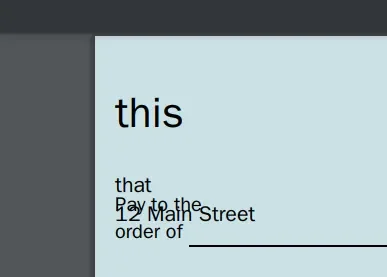
The result is shown in the screenshot that follows.
Exploitation
Step 1: Confirm HTML injection
Replace the name value with markup:
name=<h1>this</h1>that
The response rendered the heading, confirming that user-controlled input reaches the generated document as HTML.
Step 2: Try classic XSS payloads
Next came generic XSS payloads using alert, prompt and confirm. None of them worked: when one of these was submitted, the request hung indefinitely. Something was clearly happening in the backend, but the author, by their own account not XSS astute, could not tell what.
Step 3: Check whether script tags execute at all
Stepping back from the dialog functions, the author tested whether script tags could be used at all:
<script>document.write(window.location)</script>
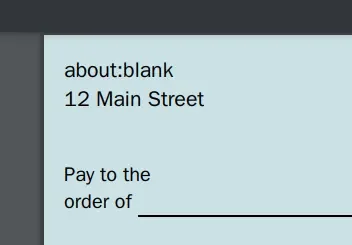
The screenshot that follows shows the outcome.
Step 4: Probe the browser API
A range of browser API calls were tried and all of them worked, including obtaining some location information and details about the operating system. None of it seemed important enough to demonstrate real impact.
Step 5: Reach the instance metadata service
Recalling a write-up about obtaining metadata via XSS, the author crafted a payload that redirects the rendering context to the instance metadata endpoint:
<script>window.location=”http://[redacted]/latest/meta-data/iam/security-credentials/<hostname>"</script>
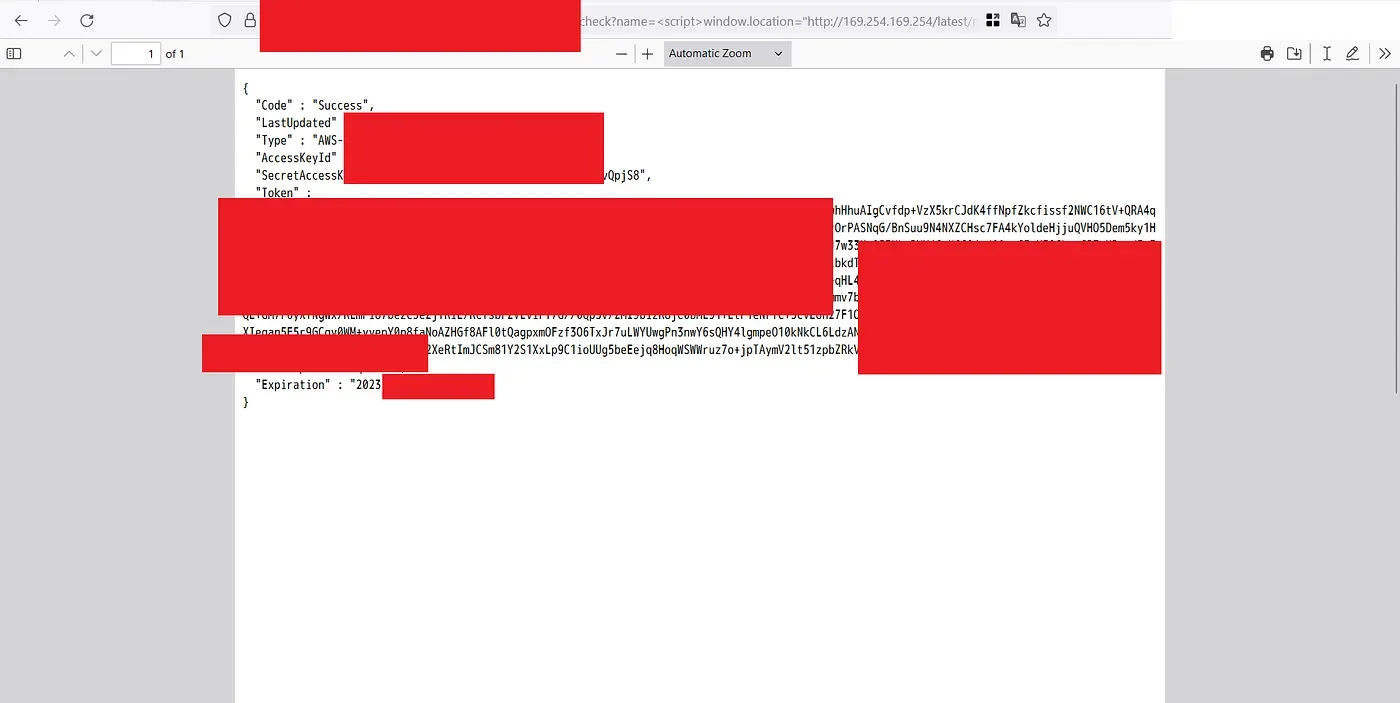
The payload points the browser at the link-local metadata address, on the path that lists the IAM security credentials role names for the instance, with <hostname> standing in for the role name to request.
Root cause
The name parameter, and by implication the other document parameters, is interpolated into the rendered document without sanitisation or escaping. The rendering service executes the resulting markup, including script tags. The application's otherwise strong controls on permissions, authorisation, broken access control and input sanitisation did not cover this unauthenticated rendering endpoint, so a single unsanitised parameter was enough to bypass them.
Impact
With this vulnerability the author could have simply reported the ability to inject HTML and recommended sanitising the parameter. Instead the metadata payload was crafted to target the IAM security credentials of the instance. In the author's words, you only need one malicious actor to get their hands on your secret keys to spell disaster. The exposure depends on the rendering host having access to the metadata service and on credentials being retrievable from it; the report does not show the response returned by the metadata endpoint.
Fix
The report does not describe a fix applied by the client. The implied remediation is to validate and properly sanitise the URL parameters before they are rendered into the document, so that injected markup and script are not executed by the rendering service.
Variants to test
- Other document parameters. Submit markup through
address,checkNo,accNoandroutingrather thanname. A positive result is any of them rendering as HTML in the generated document. - Other unauthenticated rendering endpoints. Look for sibling endpoints that generate PDFs or images from query parameters. A positive result is a parameter whose value appears unescaped in the output.
- Script execution checks. Where dialog functions hang, test with
document.write(window.location)or similar to establish whether script runs at all. A positive result is the script's output appearing in the rendered document. - Metadata reachability. From a confirmed script execution context, request
http://[redacted]/latest/meta-data/iam/security-credentials/and then the role name. A positive result is a listing of role names followed by credential material in the response. - Browser API reconnaissance. Enumerate location and operating system details from the rendering context. A positive result is any of that information being returned, which confirms the execution context before moving to higher-impact payloads.
What happened, in plain words
A security tester was hired by a bank to try to break into its web application, a job called a penetration test. For most of the engagement nothing worked, which is a good sign for the bank. But one small feature, a page that lets you download a preview of a void check, turned out to accept text from the address bar and print it straight into the document without checking it. That let the tester run their own code inside the page that builds the check. From there, the code was pointed at the cloud server's secret login keys. The report does not show what came back.
This article walks through the same steps for someone who has never done security testing. You only need to know how to use a browser.
The setting: a bank app and a very short login
The tester's job was to look for weaknesses in a banking and financial application. The client gave permission to test it, which is what makes this legal and different from attacking a system you do not own.
Almost nothing the tester tried worked at first. In security terms that is a compliment: the app was well built.
One part of the app was especially hard to test: the rules about who is allowed to see or do what. Security people call these access controls and permissions. Think of a hotel where your key card only opens your room, the gym and the pool, and not the other guests' rooms. Testing whether those rules hold is a core part of a penetration test.
It was close to impossible here because of how logins worked. After you log in, the server gives your browser a session token: a short string that acts like a wristband at an event, proving to the server on every later request that you are already logged in. This app's token had a TTL of 10 minutes. TTL stands for time to live: the token stops being accepted after ten minutes, and you are logged out.
Worse, after those ten minutes the app would hang for a few minutes, presumably a technical glitch, and then you had to log in again with your password and 2FA. 2FA means two-factor authentication: a second proof of identity beyond the password, such as a code from a phone app.
Setting up two accounts for testing took 2 to 3 minutes. That left roughly 6 to 7 minutes of actual testing before being logged out again. The tester calls this frustrating, and it is easy to see why: testing access controls means comparing what account A can do with what account B can do, and that needs uninterrupted time.
The feature: downloading a void check
While going through the app's features one by one, the tester found a way to download a void check. A void check is a sample cheque marked as not valid for payment, often used to show your account details to an employer or a payment provider. This feature let you preview a check carrying your details together with the company's logo and name.
Clicking the download button took the browser to an API of the company, where the voided check was rendered. An API is a behind-the-scenes address on a server that a program or a page talks to, rather than a page meant for people to read. Rendering here means turning data into a finished document, in this case the check image or PDF.
The URL looked something like this:
https://example.com/api/docs/check?name=MarcusAu&address=12 Main Street&checkNo=12&accNo=12&routing=12
Line by line, in plain words:
https://example.comis the company's web server.example.comis a placeholder name used in examples, not the real bank./api/docs/checkis the path on that server that builds the check document.- The
?marks the start of the query string: extra pieces of information sent along with the request. name=MarcusAusays the name to print on the check is MarcusAu.&separates one piece from the next.address=12 Main Streetis the address to print.checkNo=12is the check number.accNo=12is the account number.routing=12is the routing number, a code that identifies a bank in the payment system.
Each of these pieces is called a parameter: a named value handed to the server so it can do something with it. The whole thing was a simple GET request, which is the ordinary kind of request a browser makes when you type an address or click a link. And it was unauthenticated: no login was needed. Anyone who knew the address could ask the server to build a check.
Harmless, right? That was the tester's first thought too. A team with hardened security for the rest of the app would surely validate or properly sanitise all these URL parameters. Validating means checking that a value is the kind of thing you expect, for example that a name contains only letters. Sanitising means cleaning a value so that any dangerous characters in it cannot do harm. The tester was not so sure, and decided to check.
Finding it: a heading where a name should be
The test was simple. Replace name=MarcusAu with name=<h1>this</h1>that.
In HTML, the language web pages are written in, <h1> marks the start of a large heading and </h1> marks its end. So this value is not a name at all: it is a piece of page markup. If the server treats it as text, the check will literally show the characters <h1>this</h1>that. If the server treats it as HTML, the check will show a big heading reading "this" followed by the word "that".
The image shows the result: the markup was rendered. The parameter was not being escaped before it reached the document. Escaping means converting special characters into harmless stand-ins so they appear as text instead of being interpreted. This is called HTML injection: getting your own HTML into a page that was not supposed to accept it.
Exploitation
Step 1: Confirm HTML injection
The first step was to replace the name value with markup:
name=<h1>this</h1>that
name=is the parameter being changed.<h1>opens a large heading.thisis the text that will appear inside the heading.</h1>closes the heading.thatis ordinary text after it.
The response rendered the heading, which confirmed that input controlled by the user reaches the generated document as HTML. In other words, the server was pasting whatever it was given into the page without checking it first.
Step 2: Try classic XSS payloads
HTML injection is interesting, but the bigger prize is XSS, short for cross-site scripting: getting your own JavaScript to run inside a page. JavaScript is the programming language browsers run, and it can read data, change the page and send requests. A payload is simply the piece of input you send to try to trigger a bug.
So the tester tried the classic XSS payloads, the ones built around the browser functions alert, prompt and confirm. These pop up a small dialog box. Testers use them because a dialog appearing is unmistakable proof that code ran.
None of them worked. When one of these was submitted, the request hung indefinitely: the browser waited and waited and never got a proper answer. Something was clearly happening in the backend, meaning on the server side, but the tester, by their own account not XSS astute, could not tell what. Not being an expert in a topic is normal; the useful move is to change the question.
Step 3: Check whether script tags execute at all
Instead of asking "can I make a dialog appear?", the tester stepped back and asked a simpler question: can script tags be used at all? A script tag, <script>, is the HTML element that tells the browser "what follows is JavaScript, run it".
<script>document.write(window.location)</script>
<script>starts a block of JavaScript.document.write(...)is a JavaScript instruction that writes text into the page as it loads.window.locationis the browser's record of the current address, the URL of the page you are on.</script>closes the script block.
So the whole payload means: run some code that writes the current page address into the document. If the address appears in the rendered check, code is running.
The screenshot that follows shows the outcome. The rendering context is the environment in which the document is built. That distinction matters later, because code running there acts with that server's identity, not the tester's.
Step 4: Probe the browser API
Next the tester tried a range of browser API calls. A browser API is the set of built-in abilities a browser offers to JavaScript, such as asking about the current location or the operating system. All of them worked, including obtaining some location information and details about the operating system.
None of it seemed important enough to demonstrate real impact. In a paid penetration test you have to show the client why a finding matters, not just that it exists. Knowing roughly where a server is and what system it runs is mildly interesting; it does not make anyone say "we must fix this today".
Step 5: Reach the instance metadata service
The tester then remembered a write-up, meaning a public account of a past finding, about someone obtaining metadata via XSS. Metadata here means information a cloud platform makes available to a running server about itself. Cloud providers such as Amazon Web Services run your application on virtual machines, called instances, and give each instance a special internal address it can ask for information about itself. That address is the instance metadata service.
After some back and forth, the final crafted payload was:
<script>window.location=”http://[redacted]/latest/meta-data/iam/security-credentials/<hostname>"</script>
<script>starts the JavaScript.window.location=tells the browser to navigate to a new address, replacing the current page.http://[redacted]is the link-local address of the metadata service. Link-local means an address that is only meaningful on the local network of the machine itself; it is not reachable from the ordinary internet./latest/meta-data/iam/security-credentials/is the path that lists the names of the security credentials roles attached to the instance. IAM stands for Identity and Access Management, the cloud provider's system for deciding what a machine or person is allowed to do. A role is a named set of permissions.<hostname>stands in for the role name to request. The report does not say what value was used in place of this placeholder.</script>closes the script.
The payload points the browser at the link-local metadata address, on the path that lists the IAM security credentials role names for the instance, with <hostname> standing in for the role name to request.
Root cause
The name parameter, and by implication the other document parameters, is interpolated into the rendered document without sanitisation or escaping. Interpolated means inserted into a template, the way a mail merge drops a name into a letter. The rendering service executes the resulting markup, including script tags.
The application's otherwise strong controls on permissions, authorisation, broken access control and input sanitisation did not cover this unauthenticated rendering endpoint. Authorisation is the decision about what a logged-in user is allowed to do; broken access control is when that decision goes wrong. Because the endpoint needed no login at all, none of those checks applied to it. A single unsanitised parameter was enough to bypass them.
Impact
With this vulnerability the tester could have simply reported the ability to inject HTML and recommended sanitising the parameter. That would have been a correct but modest finding. Instead the metadata payload was crafted to target the IAM security credentials of the instance. Those credentials are the secret keys a server uses to prove to the cloud provider who it is, much like a password for a machine.
In the tester's words, you only need one malicious actor to get their hands on your secret keys to spell disaster. The exposure depends on the rendering host having access to the metadata service and on credentials being retrievable from it.
Fix
The implied remediation is to validate and properly sanitise the URL parameters before they are rendered into the document, so that injected markup and script are not executed by the rendering service.
Variants to test
If you want to look for the same kind of bug yourself, these are the directions the report suggests. Only test systems you own or have written permission to test.
- Other document parameters. Submit markup through
address,checkNo,accNoandroutingrather thanname. A positive result is any of them rendering as HTML in the generated document. - Other unauthenticated rendering endpoints. Look for sibling endpoints that generate PDFs or images from query parameters. A positive result is a parameter whose value appears unescaped in the output.
- Script execution checks. Where dialog functions hang, test with
document.write(window.location)or similar to establish whether script runs at all. A positive result is the script's output appearing in the rendered document. - Metadata reachability. From a confirmed script execution context, request
http://[redacted]/latest/meta-data/iam/security-credentials/and then the role name. A positive result is a listing of role names followed by credential material in the response. - Browser API reconnaissance. Enumerate location and operating system details from the rendering context. A positive result is any of that information being returned, which confirms the execution context before moving to higher-impact payloads.
Glossary
- 2FA (two-factor authentication): logging in with a password plus a second proof, such as a code from a phone.
- Access controls: the rules deciding who may see or do what in an application.
- API: an address on a server that programs and pages talk to, rather than a page meant for people to read.
- Authorisation: the decision about what an identified user is allowed to do.
- Broken access control: a flaw where those decisions go wrong and someone can do more than intended.
- Browser API: the built-in abilities a browser offers to JavaScript, such as reading the current address.
- Escaping: converting special characters into harmless stand-ins so they show as text instead of being interpreted.
- GET request: the ordinary kind of request a browser makes when you open an address or click a link.
- HTML: the language web pages are written in, using tags such as
<h1>for a heading. - HTML injection: getting your own HTML into a page that was not meant to accept it.
- IAM (Identity and Access Management): a cloud provider's system for deciding what a machine or person may do.
- Instance: a virtual machine running your application in a cloud provider's data centre.
- Instance metadata service: a special internal address a cloud instance can ask for information about itself, including its credentials.
- Interpolation: inserting a value into a template, like a mail merge dropping a name into a letter.
- JavaScript: the programming language browsers run, able to read data, change the page and send requests.
- Link-local address: an address only meaningful on the local network of the machine itself, not reachable from the internet.
- Parameter: a named value handed to a server in a URL so it can do something with it.
- Payload: the piece of input you send to try to trigger a bug.
- Penetration test: an authorised attempt to break into a system to find its weaknesses.
- Query string: the part of a URL after the
?, carrying parameters. - Rendering: turning data into a finished document, such as an image or PDF.
- Rendering context: the environment in which that document is built, here the server-side software doing the rendering.
- Role: a named set of permissions in a cloud provider's access system.
- Sanitising: cleaning a value so dangerous characters in it cannot do harm.
- Script tag: the HTML element
<script>that tells the browser to run the JavaScript that follows. - Session token: a short string the server gives your browser after login, proving on later requests that you are logged in.
- TTL (time to live): how long something stays valid before it expires.
- Unauthenticated: usable without logging in.
- Validating: checking that a value is the kind of thing you expect, such as a name containing only letters.
- Void check: a sample cheque marked as not valid for payment, often used to share account details.
- Write-up: a public account of a past security finding.
- XSS (cross-site scripting): getting your own JavaScript to run inside someone else's page.



