Exploits Explained: Permission misconfiguration within Salesforce JavaScript Remoting tokens used for Apex Controllers
The JavaScript remoting tokens used for Apex controllers had permissions on many classes beyond the intended ContentDocument object, allowing retrieval of records from any object class. An attacker could fetch employee account details and all submitted applications, including partial passwords, and delete any uploaded document.
 Published on synack.com
During a late-night hacking session, I tested a website built using the Salesforce Visualforce platform. This website allowed users to enter an application, submit it and retrieve the entry later by providing the reference number and password.
The full write-up lives on its author's site
It belongs to its author, so we link to it rather than copy it. The other two tabs are our own rewrites, checked against it.
Context
The target was a website built on the Salesforce Visualforce platform. The site let users enter an application, submit it, and later retrieve the entry by supplying the reference number and password. The application form also offered an option to upload documents and an option to delete uploaded documents.
The feature at the centre of the report is "JavaScript remoting for Apex controllers". It lets developers make asynchronous calls from JavaScript in Visualforce pages to methods in an Apex controller, and it requires an authorisation token with sufficient permissions. The bug was that the tokens issued for individual methods carried far more permission than the method needed.
Setup
The report does not describe any special accounts, roles, tools or versions. The testing was done against the live site as a normal user of the application form, during what the author describes as a late-night hacking session.
Finding it
While submitting an application, the author noticed the upload and delete options. Deleting an uploaded document sent a POST request similar to the one below.

The first idea was to reach documents uploaded by other users. That looked impractical because the document IDs were randomised, so brute forcing a valid ID was not realistic.
Exploitation
Step 1: read the client-side JavaScript
Instead of guessing IDs, the author examined the JavaScript that generated the delete request and found the following code snippet.
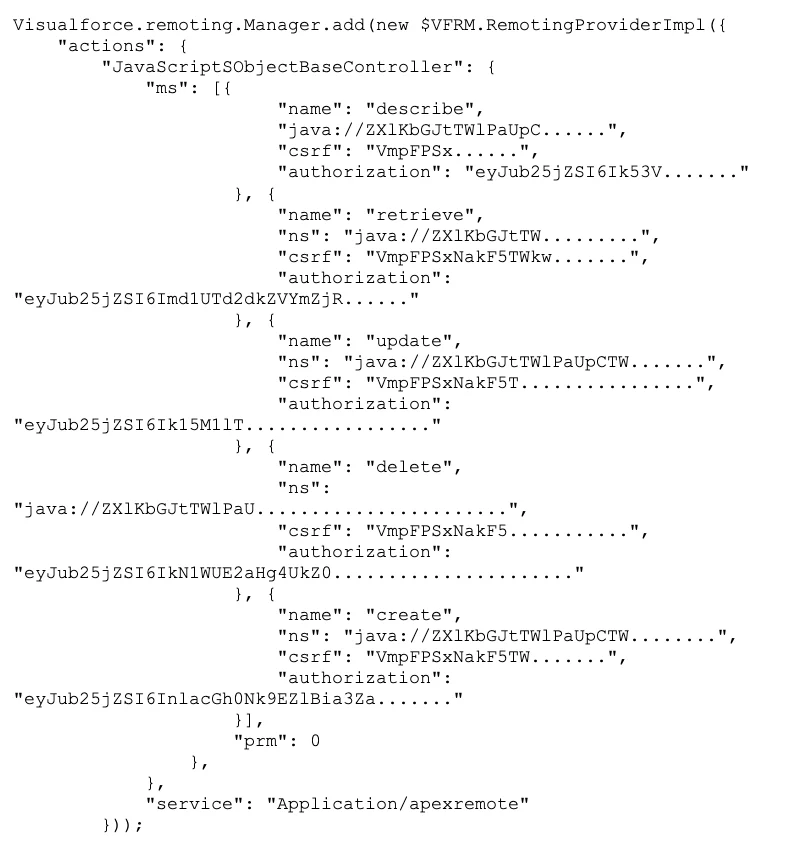
The snippet showed multiple tokens for methods other than "delete". Searching for these led to the JavaScript remoting for Apex controllers feature, which explains why each method call carries an authorisation token.
Step 2: test the tokens against other object classes
After some trial and error with the API, the author found that the authorisation tokens associated with each method had permissions on many classes other than the ContentDocument object class. Records under any object class could be retrieved by sending an API call with the following request body.
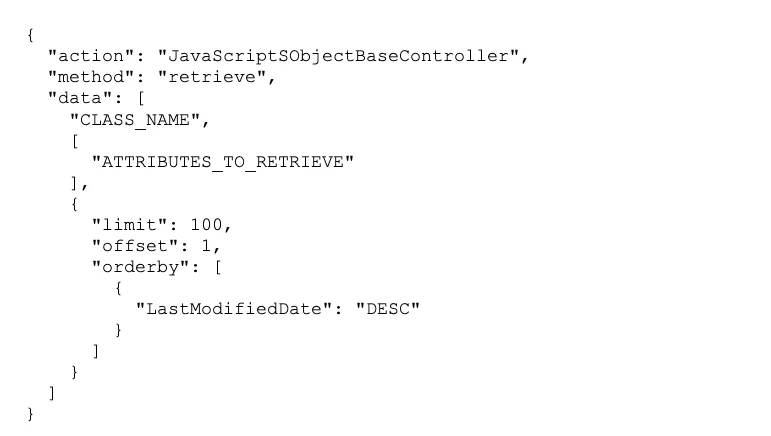
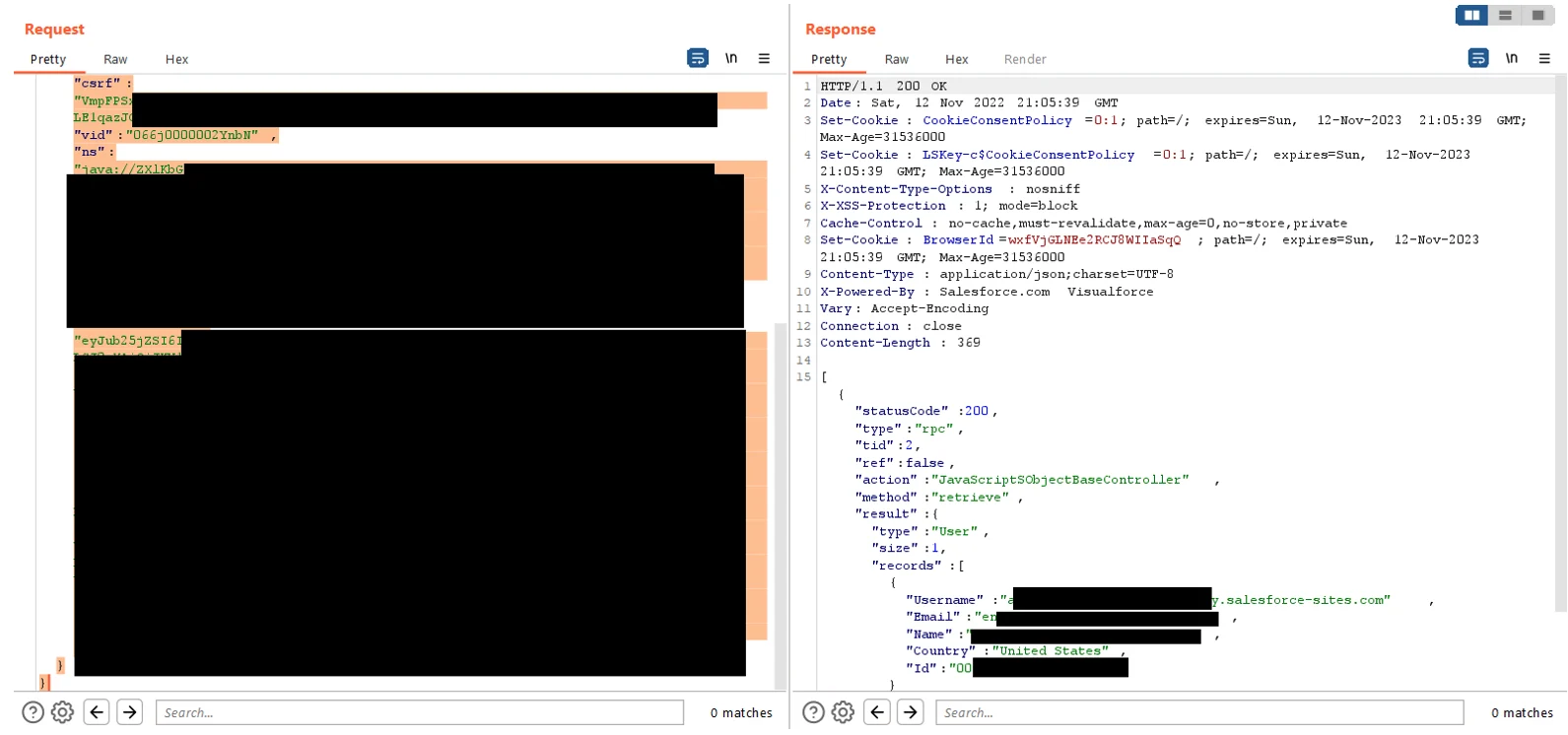
This made it possible to fetch records under standard object classes with known attributes. The User object, for example, returned employees' account details.
Step 3: enumerate the custom object
Users' submitted applications were saved under a custom object, New_Dealer_Application__c, which was returned in the HTML source code of the application form. The object had custom attributes whose names were not generic enough to guess. The author retrieved them with the describe method.
Step 4: pull the data
With the attribute names known, the author could retrieve a list of all submitted applications, including the last few characters of the application password, which were returned in the Internal_Password__c attribute.
A list of all uploaded documents could also be retrieved, since they were accessible through the ContentDocument class. That access would have allowed any document to be deleted.
Root cause
The authorisation tokens issued for the individual remoting methods were not scoped to the method or the object class they were meant to serve. A token created for the delete method, and the tokens for the other methods found in the JavaScript, carried permissions on many classes beyond ContentDocument. The server accepted those tokens for API calls against object classes beyond ContentDocument. The report does not describe the server-side code or the exact mechanism.
Impact
Under the conditions described, an attacker holding one of these tokens could:
- read records under any object class, including standard objects such as
User, which returned employees' account details; - enumerate the custom object
New_Dealer_Application__cand read all submitted applications, including the last few characters of each application password stored inInternal_Password__c; - list all uploaded documents and delete any of them.
Fix
The author submitted a detailed report describing the vulnerability and suggested limiting the access levels of the tokens. The Synack vulnerability operations team reviewed the submission, and after a few days an effective fix was implemented. A patch verification request followed, and the author confirmed that the patch had successfully restricted the tokens' access to the Apex controller.
Variants to test
- Other Visualforce remoting endpoints. Look for JavaScript that builds remoting calls and extract the tokens for each method. A positive result is a token for one method returning records from an object class unrelated to that method.
- Standard objects with known attributes. Send the token against
Useror similar objects. A positive result is employee or account records coming back where the page never displayed them. - Custom objects named in page source. Check the HTML of forms for custom object names, then use the
describemethod to recover attribute names. A positive result is a full field list for an object the user should not see. - Document and file classes. Test whether
ContentDocumentor equivalent classes are reachable for read and delete through a token issued for an unrelated method. A positive result is listing or deleting a document the session did not upload. - Token reuse across methods.
What happened, in plain words
A security researcher was testing a website that lets people fill in an application form, submit it, and later come back to check on it using a reference number and a password. The site was built on a platform called Salesforce, using a part of it called Visualforce, which is a way of building web pages that talk to Salesforce's database.
While using the form, the researcher noticed that the site let you upload documents and also delete them. When you delete a document, your browser sends a small message to the server saying "please delete this one". The researcher looked at that message and at the JavaScript code behind it (JavaScript is the programming language that runs inside your browser and makes pages interactive). Hidden in that code were special strings called tokens.
A token is like a cloakroom ticket: it is a short piece of text the server gives you so that, when you come back, the server recognises you and knows what you are allowed to do, without you having to prove who you are again every time. The problem was that these particular tokens were far too powerful. A token handed out for one small job (deleting a document) also worked for reading all sorts of other data in the system, including employee account details and every submitted application, along with part of each application's password.
The researcher reported this, and the Synack vulnerability operations team reviewed the submission; after a few days an effective fix was implemented. A bug bounty programme is a scheme where companies pay or thank independent researchers for finding security problems before criminals do.
Background: what the site and the feature do
The website
The target was a website built on the Salesforce Visualforce platform. Visualforce is Salesforce's way of building custom web pages that sit on top of Salesforce's database. Think of Salesforce as a very large, very organised filing cabinet in the cloud, and Visualforce as the shop counter where customers interact with it.
The site let users:
- enter an application;
- submit it;
- later retrieve the entry by supplying the reference number and password.
The application form also offered an option to upload documents and an option to delete uploaded documents.
The feature at the centre of the report
The feature is called "JavaScript remoting for Apex controllers". That name sounds intimidating, so let us unpack it:
- Apex is Salesforce's programming language, used to write the logic that runs on the server (the computer that stores the data and answers requests).
- An Apex controller is a piece of Apex code that handles the requests coming from a particular page. It is the shop assistant behind the counter.
- JavaScript remoting lets the JavaScript running in your browser call methods (named actions) in that Apex controller directly, without reloading the page. It is like phoning the shop assistant directly instead of walking back to the counter.
- Each such call requires an authorisation token with sufficient permissions. The token is the cloakroom ticket: it proves the call is allowed.
The bug was that the tokens issued for individual methods carried far more permission than the method needed. In cloakroom terms: the ticket you were given for one coat also opened every locker in the building.
What "permission misconfiguration" and "broken access control" mean
- Permission is a rule saying who may do what. In a filing cabinet, permission might be "you may read the blue drawer but not write to it".
- A misconfiguration is a setting that was set up wrongly, not a flaw in the software's design. Like a building where the master key was accidentally copied to every visitor's badge.
- Broken access control is the general name for this class of bug: the system does not properly check whether the person asking is allowed to do what they are asking. The lock exists, but it opens for the wrong people.
Setup
The report does not describe any special accounts, roles, tools or versions. The testing was done against the live site as a normal user of the application form, during what the author describes as a late-night hacking session. In other words: no special access, no insider knowledge, just a browser and curiosity.
Finding it
While submitting an application, the author noticed the upload and delete options. Deleting an uploaded document sent a POST request similar to the one below.
A POST request is one of the standard ways a browser talks to a server. When you fill in a form and press submit, or when a page quietly sends data in the background, it is usually a POST. Think of it as posting a letter with contents, as opposed to a GET request, which is more like asking to see a page.
The screenshot shows the request that the browser sent when the researcher clicked delete. It contains the address the request went to, the data sent along with it, and the response that came back.
The first idea was to reach documents uploaded by other users. That looked impractical because the document IDs were randomised, so brute forcing a valid ID was not realistic.
- A document ID is the unique label the system gives each uploaded file, so it can tell one from another. Like a library shelf mark.
- Brute forcing means trying every possible value until one works, like trying every combination on a padlock. If the IDs are long and random, there are so many possibilities that trying them all would take far too long.
So the researcher changed approach: instead of guessing IDs, look at how the browser builds the request.
Exploitation
Step 1: read the client-side JavaScript
Instead of guessing IDs, the author examined the JavaScript that generated the delete request and found the following code snippet.
Client-side means code that runs in your browser, on your computer, rather than on the server. Because it runs on your machine, you can read it: open the browser's developer tools (usually with F12) and look at the page's source. That is exactly what the researcher did.
The snippet showed multiple tokens for methods other than "delete". In other words, the page contained not just one cloakroom ticket but a whole strip of them, one for each action the page could perform.
Searching for these led to the JavaScript remoting for Apex controllers feature, which explains why each method call carries an authorisation token. Once the researcher understood that the tokens were the keys to the controller, the next question was obvious: what else do these keys open?
Step 2: test the tokens against other object classes
After some trial and error with the API, the author found that the authorisation tokens associated with each method had permissions on many classes other than the ContentDocument object class. Records under any object class could be retrieved by sending an API call with the following request body.
A few terms here:
- An API (Application Programming Interface) is a way for one piece of software to talk to another. Think of it as the service hatch at a restaurant: you do not go into the kitchen, you pass a request through the hatch and get a dish back. Here, the researcher was talking to Salesforce's API directly, rather than through the website's buttons.
- An object class in Salesforce is a type of record.
ContentDocumentis the class for uploaded documents.Useris the class for user accounts.New_Dealer_Application__c(seen later) is a custom class for applications. Think of classes as the different kinds of card in a filing cabinet: personnel cards, invoice cards, application cards. - A request body is the contents of the message you send to the API. If the request is a letter, the body is the letter's text.
The screenshot shows the request body the researcher sent. The key point is that the tokens were accepted for requests about a completely different class of record.
This made it possible to fetch records under standard object classes with known attributes. The User object, for example, returned employees' account details.
- A standard object is one that comes built into Salesforce, as opposed to a custom object that a customer creates.
Useris standard. - An attribute is a field on a record: a name, an email, a phone number. Think of a record as a row in a spreadsheet and attributes as the column headings.
The screenshot shows the response: employee account details coming back from the User object. The tokens were now returning staff records.
Step 3: enumerate the custom object
Users' submitted applications were saved under a custom object, New_Dealer_Application__c, which was returned in the HTML source code of the application form. The object had custom attributes whose names were not generic enough to guess. The author retrieved them with the describe method.
- HTML source code is the text that makes up a web page. You can view it in any browser (right-click, "View page source"). Developers sometimes leave useful names in there, such as the name of the object that stores the form's data.
- Enumerate means to list out systematically, one by one. Like going through a drawer and writing down every folder's label.
- The
describemethod is a built-in Salesforce API call that returns the structure of an object: its fields and their names. It is like asking the librarian for the index card that lists every column in a particular catalogue.
So the researcher did not have to guess the field names. The system helpfully described them.
Step 4: pull the data
With the attribute names known, the author could retrieve a list of all submitted applications, including the last few characters of the application password, which were returned in the Internal_Password__c attribute.
This is significant because the site's own design said that to retrieve an application you needed both the reference number and the password. If part of the password leaks, the amount of guessing needed to get in shrinks. The report does not state how the partial passwords could be combined with the reference numbers.
A list of all uploaded documents could also be retrieved, since they were accessible through the ContentDocument class. That access would have allowed any document to be deleted.
So the impact was not just reading: it was also the ability to destroy other people's files.
Root cause
The authorisation tokens issued for the individual remoting methods were not scoped to the method or the object class they were meant to serve. A token created for the delete method, and the tokens for the other methods found in the JavaScript, carried permissions on many classes beyond ContentDocument. The server accepted those tokens for API calls against object classes beyond ContentDocument.
That is the classic broken access control pattern: the restriction exists in the user interface, but not where it matters, on the server.
Impact
Under the conditions described, an attacker holding one of these tokens could:
- read records under any object class, including standard objects such as
User, which returned employees' account details; - enumerate the custom object
New_Dealer_Application__cand read all submitted applications, including the last few characters of each application password stored inInternal_Password__c; - list all uploaded documents and delete any of them.
Fix
The author submitted a detailed report describing the vulnerability and suggested limiting the access levels of the tokens. The Synack vulnerability operations team reviewed the submission, and after a few days an effective fix was implemented. A patch verification request followed, and the author confirmed that the patch had successfully restricted the tokens' access to the Apex controller.
A patch is a small update that fixes a specific problem, like a plaster over a crack. Patch verification means the researcher was asked to check that the fix actually worked, which is good practice: it stops a fix from being declared done when it is not.
Variants to test
If you want to look for similar problems yourself, here are some angles to try. Each one is a different way of asking the same question: does this key open more doors than it should?
- Other Visualforce remoting endpoints. Look for JavaScript that builds remoting calls and extract the tokens for each method. A positive result is a token for one method returning records from an object class unrelated to that method.
- Standard objects with known attributes. Send the token against
Useror similar objects. A positive result is employee or account records coming back where the page never displayed them. - Custom objects named in page source. Check the HTML of forms for custom object names, then use the
describemethod to recover attribute names. A positive result is a full field list for an object the user should not see. - Document and file classes. Test whether
ContentDocumentor equivalent classes are reachable for read and delete through a token issued for an unrelated method. A positive result is listing or deleting a document the session did not upload. - Token reuse across methods.
Glossary
- API (Application Programming Interface): a way for one piece of software to talk to another, like a service hatch between a customer and a kitchen.
- Apex: Salesforce's programming language for code that runs on the server.
- Apex controller: a piece of Apex code that handles requests coming from a particular page.
- Attribute: a field on a record, such as a name or an email address.
- Authorisation token: a short piece of text the server gives you so it can recognise you and know what you are allowed to do, like a cloakroom ticket.
- Broken access control: a class of bug where the system does not properly check whether the person asking is allowed to do what they are asking.
- Brute forcing: trying every possible value until one works, like trying every combination on a padlock.
- Client-side: code that runs in your browser, on your computer, rather than on the server.
- Custom object: a type of record that a customer creates in Salesforce, as opposed to one that comes built in.
describemethod: a built-in Salesforce API call that returns the structure of an object, including its field names.- Document ID: the unique label the system gives each uploaded file.
- Enumerate: to list out systematically, one by one.
- HTML source code: the text that makes up a web page, viewable in any browser.
- JavaScript: the programming language that runs inside your browser and makes pages interactive.
- JavaScript remoting: a Salesforce feature that lets JavaScript in a page call methods in an Apex controller directly, without reloading the page.
- Misconfiguration: a setting that was set up wrongly, rather than a flaw in the software's design.
- Object class: in Salesforce, a type of record, such as
UserorContentDocument. - Patch: a small update that fixes a specific problem.
- Permission: a rule saying who may do what.
- POST request: a standard way a browser sends data to a server, usually when submitting a form or sending data in the background.
- Request body: the contents of the message you send to an API.
- Standard object: a type of record that comes built into Salesforce, such as
User. - Visualforce: Salesforce's way of building custom web pages on top of its database.