Exposed Docker Registries Server as Critical Reminder on Container Security
An exposed Docker Registry API allowed unauthenticated access to list and download container images. An attacker could dump images and potentially poison them, and inspect layers for sensitive information.
 Published on emad0x90.medium.com
Docker is a computer program that performs operating-system-level virtualization, also known as “containerization”.
The full write-up lives on its author's site
It belongs to its author, so we link to it rather than copy it. The other two tabs are our own rewrites, checked against it.
Context
Docker performs operating-system-level virtualisation, commonly called containerisation. The Docker Registry HTTP API is the protocol that distributes images to the Docker engine. It talks to instances of the Docker registry, a service that stores and manages information about Docker images and makes their distribution possible.
A Docker registry is a storage and distribution system for named Docker images. The same image can have several versions, each identified by a tag. A registry is organised into Docker repositories, and a repository holds every version of one specific image. Users can pull images locally and push new images to the registry, subject to whatever access permissions apply.
The target here is a host at XX.target.com running a Docker Registry HTTP API v2 exposed to the internet. The report does not name the organisation or the bug bounty programme.
Setup
The researcher automated the enumeration part of reconnaissance and the search for bugs. The toolset was Subfinder, httprobe, FFuF and Nuclei, plus a personal bash-script recon tool that ran them on a VPS. Experience in the field was used to extend the recon methodology towards logical vulnerabilities and weak points.
No accounts, roles or credentials are involved: the whole point of the finding is that the registry answers without authentication. The only precondition is that the registry API is exposed to the internet and reachable over HTTP.
Finding it
While the recon scripts were running on the VPS, one of them raised an alert for an endpoint that looked like:
https://XX.target.com/v2/catalog/
At first the nature of the issue was not clear, so the description file of the Nuclei template that matched was opened and read. The template is published at:
https://github.com/CharanRayudu/Custom-Nuclei-Templates/blob/main/docker-registry.yaml
From there the researcher poked around to understand the logic behind the exposure and to get the strongest possible impact out of it. To maximise what could be done and how far it could go, the preparation was:
- Watching a number of tutorials about Docker.
- Researching and reading many reports about this vulnerability on HackerOne and other sources.
- Reading many articles and write-ups on similar vulnerabilities.
The exposed endpoint is the registry's catalogue route. A registry that answers it without authentication is disclosing the list of repositories it holds, which is the entry point for everything that follows.
Exploitation
Step 1: list the repositories
Go to:
https://XX.target.com
The Docker Registry exposes a REST API that can be queried over HTTP. When a registry is exposed to the internet, every Docker image uploaded there can be listed by requesting:
https:// XX.target.com /v2/_catalog/
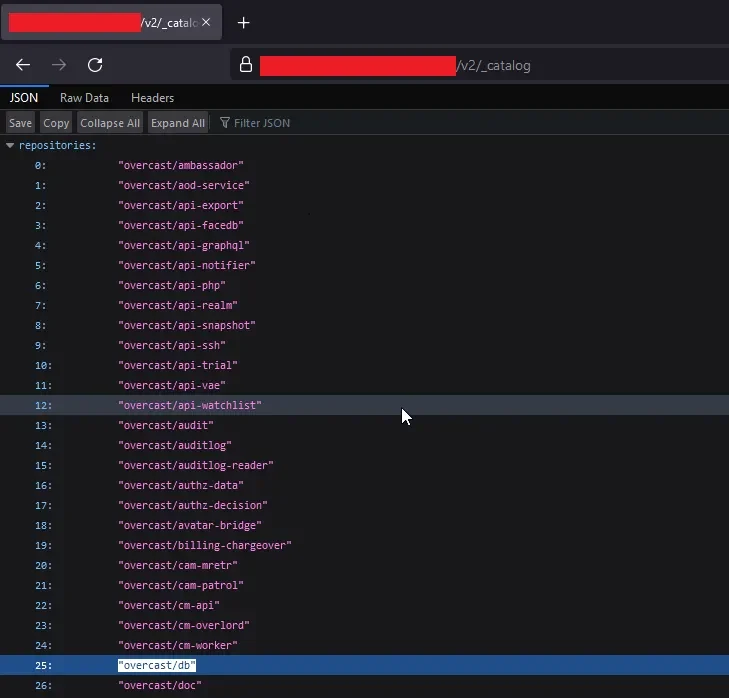
The response is the catalogue of repositories stored in the registry. The report does not reproduce the response body; the screenshot shows the catalogue being returned.
Step 2: list the tags of an image
The tags of each image can be retrieved with:
https:// XX.target.com /v2/overcast/db/tags/list
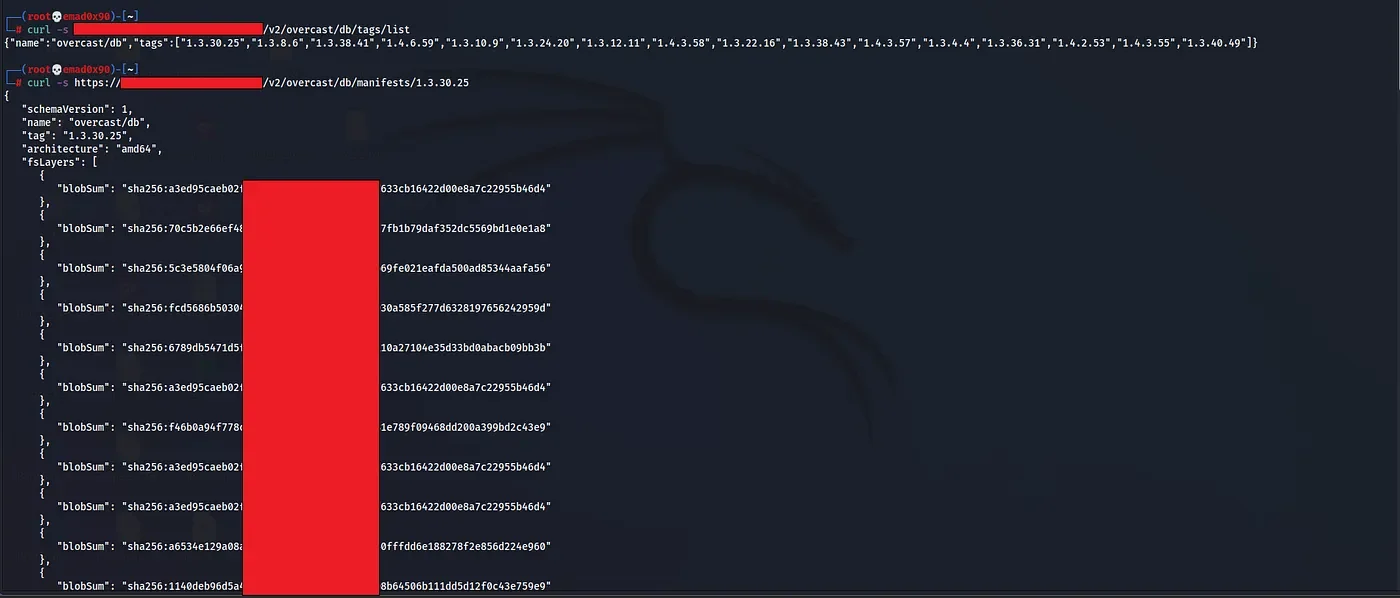
In the example, the image overcast/db has only one tag, named latest.
Step 3: fetch the manifest
While an image is built, Docker creates a layer for each instruction, or step, that makes up the image. Information about every layer is available from:
https:// XX.target.com /v2/overcast/db/manifests/[redacted]
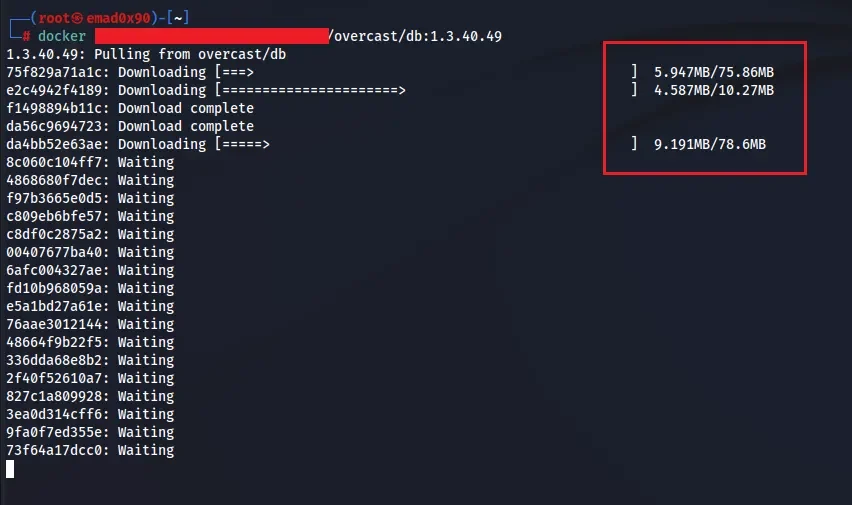
The request downloads a file that can be opened with any text editor. Each sha256 hash in that file represents a layer of the Docker image.
Step 4: download a layer blob
With the hashes known, the contents of each layer can be downloaded through another API request. The sha256 of the layer has to be specified:
https:// XX.target.com /v2/overcast/db/blobs/sha256:73f64a17dcc090d65a83e07e7bd4a1**************b27a396b32af0
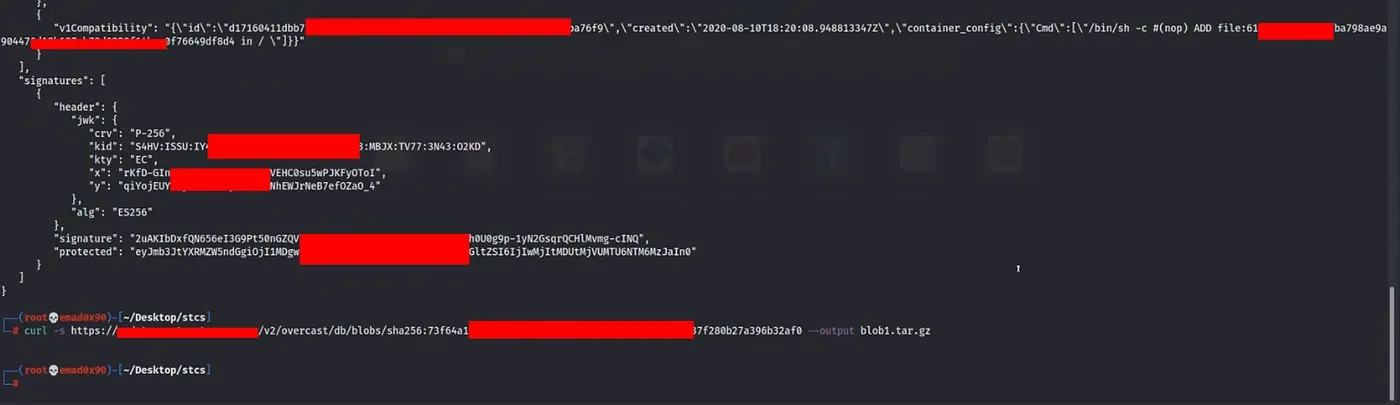
The response is a file with a .tar.gz extension.
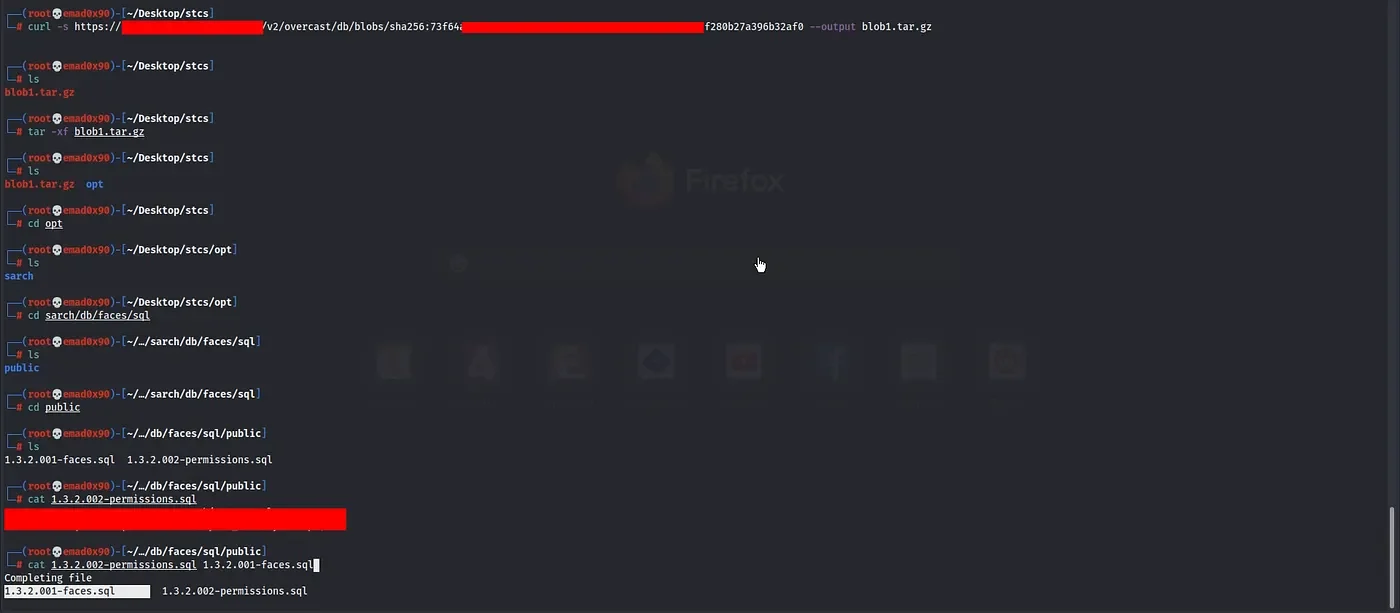
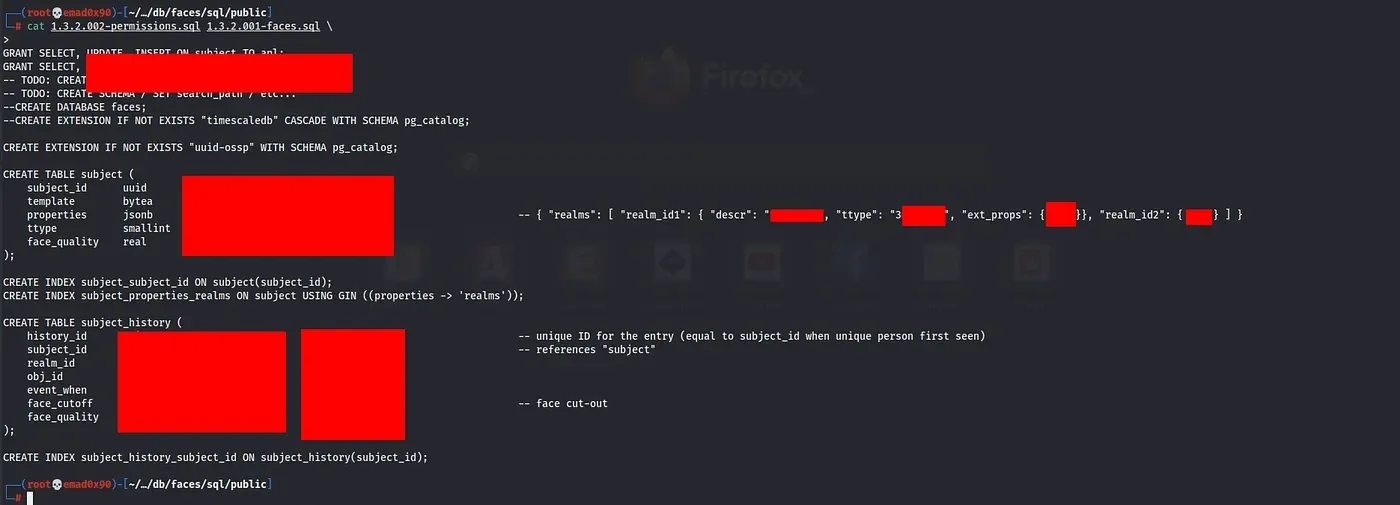
Once downloaded, the archive can be decompressed and inspected, which shows the state of the Docker image's filesystem in that particular layer.
This is where the interesting data tends to be. Developers sometimes enter passwords or other sensitive information during the build process and remove it in later layers. Inspecting every layer matters because a layer can hold sensitive information that is not present in the final image.
Step 5: attach the registry to a local Docker client
So far only direct interaction with the registry API has been covered. It is also possible to add the remote registry to a local Docker installation and interact with it through the Docker client. The following information has to be added to the daemon.json file under the /etc/docker path:
The report does not reproduce the contents of that file.
Root cause
The registry API v2 answers without authentication. Version 2 of the API supports several token-based authentication schemes, such as bearer and OAuth, The report recommends implementing token-based authentication such as bearer or OAuth when deploying the registry API. The report does not describe any other defence that was present and bypassed; the exposure is the absence of authentication on a service that was reachable from the internet.
Impact
The report rates the impact as critical. A Docker Registry HTTP API v2 exposed over HTTP without authentication leads to dumping and poisoning of Docker images: an attacker can use it to dump the images and to poison them.
The practical consequences described are that every image in the registry can be enumerated, every tag resolved, every manifest read and every layer downloaded and inspected, including layers whose contents were deleted in later build steps. The report stresses that the impact can be critical and very powerful for organisations and companies, particularly when the person attacking understands Docker and how Docker layers work.
Fix
The report gives two mitigations:
- Version 2 of the Docker Registry API supports multiple token-based authentication methods, such as bearer and OAuth. These should be implemented when the registry API is deployed.
- Enable Content Trust to enforce client-side signing and verification of image tags.
Variants to test
- Request the catalogue on any host that might run a registry:
https://host/v2/_catalog/. A positive result is a catalogue of repositories instead of a refusal. - Request the API version check at
https://host/v2/. - Take a repository from the catalogue and request its tags at
https://host/v2/<name>/tags/list. A positive result is a list of tags for that image. - Request the manifest for a tag at
https://host/v2/<name>/manifests/<tag>. A positive result is a manifest document whosesha256entries can be used as layer identifiers. - Download a layer at
https://host/v2/<name>/blobs/sha256:<hash>. A positive result is a.tar.gzarchive that decompresses to a filesystem layer, which can then be searched for credentials and other secrets left behind by earlier build steps. - Add the remote registry to a local Docker installation through
daemon.jsonand interact with it using the Docker client, to confirm the exposure from a second client rather than only through raw HTTP.
On the methodology side, the report's own advice is not to rely on automated enumeration tools alone during recon. Treat them as the first step: they can point out paths to take, but they do not lead to the vulnerability directly.
What happened, in plain words
A company had a service on the internet that stores the building blocks of its software, called Docker images. That service, a Docker registry, is supposed to be private or at least protected by a login. On this host it answered anyone who asked, with no password and no token. The researcher found it with automated scanning, then walked through the registry's public web addresses one by one: first listing every image stored there, then the versions of one image, then the recipe that describes how the image was built, and finally downloading the actual files inside it. Because old build steps stay inside those files even when a later step deletes them, secrets typed in during a build can still be recovered. The report calls the impact critical and recommends putting authentication in front of the registry.
This article explains each of those steps from zero. You only need a browser and a computer to follow the reasoning; you do not need to run anything.
Background: what Docker and a registry are
Docker is a program that performs operating-system-level virtualisation, commonly called containerisation. A simple comparison: instead of shipping a whole computer to someone, you ship a sealed lunchbox that already contains the food, the cutlery and the napkin, and it opens the same way on any table. A container is that lunchbox: an application plus everything it needs to run, packaged together so it behaves identically on a developer's laptop and on a server.
The Docker Registry HTTP API is the protocol that distributes images to the Docker engine. An API (application programming interface) is the set of addresses and rules one program uses to talk to another, like a restaurant menu: you do not walk into the kitchen, you order from a fixed list and food comes back. HTTP is the ordinary language of the web, the same one your browser uses when it loads a page. So the registry is a service you can talk to with a browser or a command, using fixed addresses.
A Docker registry is a storage and distribution system for named Docker images. The same image can have several versions, each identified by a tag. A tag is a label such as latest or [redacted] that points at one particular version, much like a book edition: same title, different printings. A registry is organised into Docker repositories, and a repository holds every version of one specific image. Users can pull images locally (download them) and push new images to the registry (upload them), subject to whatever access permissions apply. Permissions are the key phrase: a registry is meant to check who you are before letting you pull or push.
The target here is a host at XX.target.com running a Docker Registry HTTP API v2 exposed to the internet. Version 2 is simply the generation of the API that the requests below use. The report does not name the organisation or the bug bounty programme.
How the researcher prepared
The researcher automated the enumeration part of reconnaissance and the search for bugs. Reconnaissance (recon) is the survey phase: finding out which machines and services an organisation has exposed, before trying anything against them. Enumeration means listing things one by one, such as subdomains or URLs, rather than guessing.
The toolset was Subfinder, httprobe, FFuF and Nuclei, plus a personal bash-script recon tool that ran them on a VPS. In plain terms:
- Subfinder finds subdomains, the
something.example.comnames that belong to a domain. - httprobe checks which of those names actually answer over HTTP or HTTPS.
- FFuF tries many possible paths on a host quickly, looking for ones that respond.
- Nuclei runs ready-made checks, called templates, that recognise known problems.
- A VPS is a rented server in a data centre, useful because scans run from it continuously and do not depend on the researcher's own machine.
Experience in the field was used to extend the recon methodology towards logical vulnerabilities and weak points. A logical vulnerability is a flaw in how a system is configured or in the rules it applies, rather than a bug in its code: here, the rule "you must authenticate" was simply missing.
No accounts, roles or credentials are involved: the whole point of the finding is that the registry answers without authentication. Authentication means proving who you are, usually with a username and password or a token. The only precondition is that the registry API is exposed to the internet and reachable over HTTP.
Finding it
While the recon scripts were running on the VPS, one of them raised an alert for an endpoint that looked like:
https://XX.target.com/v2/catalog/
An endpoint is one specific address on a server that does one specific job, like a single counter in a large office. This one, /v2/catalog/, is the registry's catalogue route: the address that lists what the registry contains. The alert pointed the researcher at that endpoint.
At first the nature of the issue was not clear, so the description file of the Nuclei template that matched was opened and read. A template is a small recipe a scanner follows to recognise one kind of problem, and its description explains what the problem is and why it matters. The template is published at:
https://github.com/CharanRayudu/Custom-Nuclei-Templates/blob/main/docker-registry.yaml
From there the researcher poked around to understand the logic behind the exposure and to get the strongest possible impact out of it. To maximise what could be done and how far it could go, the preparation was:
- Watching a number of tutorials about Docker.
- Researching and reading many reports about this vulnerability on HackerOne and other sources.
- Reading many articles and write-ups on similar vulnerabilities.
HackerOne is a platform where security researchers report bugs to companies. Reading other reports is how you learn what a finding is worth and how far it can be taken, before you write anything up yourself.
The exposed endpoint is the registry's catalogue route. A registry that answers it without authentication is disclosing the list of repositories it holds, which is the entry point for everything that follows. Think of a warehouse whose front desk hands out an inventory list to anyone who walks in: the list itself is not the goods, but it tells you exactly which shelves to visit.
Exploitation
Step 1: list the repositories
Go to:
https://XX.target.com
This is just the front door of the host, to confirm it is alive and to see what it presents. The Docker Registry exposes a REST API that can be queried over HTTP. REST is a common style of API where each address represents a thing and the address itself describes what you want, which is why the paths below read almost like file paths. When a registry is exposed to the internet, every Docker image uploaded there can be listed by requesting:
https:// XX.target.com /v2/_catalog/
Line by line: https:// is the scheme, the web language used; XX.target.com is the host, the machine being queried; /v2/ selects version 2 of the registry API; _catalog is the route that returns the list of repositories; the trailing / ends the path. The spaces around the host are how the address appears in the report, not something you would type.
The request lists the Docker images uploaded to the registry.
Step 2: list the tags of an image
The tags of each image can be retrieved with:
https:// XX.target.com /v2/overcast/db/tags/list
Line by line: the scheme and host are the same as before; /v2/ again selects the API version; overcast/db is the name of one repository taken from the catalogue, where overcast is a namespace and db the image inside it; tags/list asks for the list of versions of that image. This step matters because the catalogue only gives names. To fetch anything real you need a version, and the tag is how you name one.
In the example, the image overcast/db has only one tag, named latest. latest is the conventional default label for the most recent build, so this repository has a single version to look at.
Step 3: fetch the manifest
While an image is built, Docker creates a layer for each instruction, or step, that makes up the image. A useful comparison is a stack of transparent sheets: each sheet is one instruction, such as installing a package or copying a file, and the final picture is all the sheets on top of each other. Information about every layer is available from:
https:// XX.target.com /v2/overcast/db/manifests/[redacted]
Line by line: /v2/ is the API version; overcast/db is the repository; manifests asks for the manifest, the document that describes the image; [redacted] is the reference being requested, the version identifier used in this example. A manifest is the packing list of the image: it says which layers make it up and in what order.
The request downloads a file that can be opened with any text editor. Each sha256 hash in that file represents a layer of the Docker image. A hash is a short fingerprint computed from a file's contents: change one byte and the fingerprint changes, which is why it can be used as a reliable name for a layer. sha256 is the specific fingerprinting method used here. This step is the bridge between knowing an image exists and being able to ask for its actual contents.
Step 4: download a layer blob
With the hashes known, the contents of each layer can be downloaded through another API request. The sha256 of the layer has to be specified:
https:// XX.target.com /v2/overcast/db/blobs/sha256:73f64a17dcc090d65a83e07e7bd4a1**************b27a396b32af0
Line by line: /v2/ is the API version; overcast/db is the repository; blobs is the route that serves the raw stored data of a layer; sha256: introduces the fingerprint, and the long string after it is the hash copied from the manifest, shown partly masked with asterisks in the report. A blob is simply a chunk of binary data stored under a name, in this case one layer of the image.
The response is a file with a .tar.gz extension. A .tar file bundles many files into one, and .gz means it was compressed to take less space, like vacuum-packing a suitcase. Your computer can unpack it with any standard archive tool.
Once downloaded, the archive can be decompressed and inspected, which shows the state of the Docker image's filesystem in that particular layer. The filesystem is the arrangement of files and folders as the program inside the container saw them at that moment.
This is where the interesting data tends to be. Developers sometimes enter passwords or other sensitive information during the build process and remove it in later layers. Inspecting every layer matters because a layer can hold sensitive information that is not present in the final image. The transparent-sheets comparison explains why: painting over a sheet does not remove what is written on the sheet underneath. If a password was typed in step three and deleted in step five, the final image looks clean, but the layer from step three still contains it.
Step 5: attach the registry to a local Docker client
So far only direct interaction with the registry API has been covered. It is also possible to add the remote registry to a local Docker installation and interact with it through the Docker client. The Docker client is the ordinary command-line program developers use to work with images, so this step confirms the exposure from the same tool a developer would use, not only from raw web requests. The following information has to be added to the daemon.json file under the /etc/docker path:
daemon.json is a settings file read by the Docker service when it starts, and /etc/docker is the folder where that file lives on a Linux machine. The report does not reproduce the contents of that file.
Root cause
The registry API v2 answers without authentication. Version 2 of the API supports several token-based authentication schemes, such as bearer and OAuth, The report recommends implementing token-based authentication such as bearer or OAuth when deploying the registry API. A token is a short piece of proof, like a cloakroom ticket: you show it and the service knows you were allowed in, without you repeating your password each time. Bearer and OAuth are two standard ways of issuing and presenting such tokens. The report does not describe any other defence that was present and bypassed; the exposure is the absence of authentication on a service that was reachable from the internet.
Impact
The report rates the impact as critical. A Docker Registry HTTP API v2 exposed over HTTP without authentication leads to dumping and poisoning of Docker images: an attacker can use it to dump the images and to poison them. Dumping means copying everything out. Poisoning means putting altered content back in, so that the next person who pulls the image receives the attacker's version. CVSS is a standard scoring scale for the severity of a vulnerability.
The practical consequences described are that every image in the registry can be enumerated, every tag resolved, every manifest read and every layer downloaded and inspected, including layers whose contents were deleted in later build steps. The report stresses that the impact can be critical and very powerful for organisations and companies, particularly when the person attacking understands Docker and how Docker layers work.
Fix
The report gives two mitigations:
- Version 2 of the Docker Registry API supports multiple token-based authentication methods, such as bearer and OAuth. These should be implemented when the registry API is deployed. In everyday terms: put a doorman at the entrance and check tickets before serving any request.
- Enable Content Trust to enforce client-side signing and verification of image tags. Content Trust means images carry a cryptographic signature, and the client checks that signature before using the image, so a tampered image is rejected even if it was served by the registry.
Variants to test
- Request the catalogue on any host that might run a registry:
https://host/v2/_catalog/. A positive result is a catalogue of repositories instead of a refusal. JSON is a plain text format for structured data, the kind of thing a browser shows as text with curly brackets and quoted names. 200is the standard HTTP code for success and401is the code for "you are not authorised".- Take a repository from the catalogue and request its tags at
https://host/v2/<name>/tags/list. A positive result is a list of tags for that image. - Request the manifest for a tag at
https://host/v2/<name>/manifests/<tag>. A positive result is a manifest document whosesha256entries can be used as layer identifiers. - Download a layer at
https://host/v2/<name>/blobs/sha256:<hash>. A positive result is a.tar.gzarchive that decompresses to a filesystem layer, which can then be searched for credentials and other secrets left behind by earlier build steps. - Add the remote registry to a local Docker installation through
daemon.jsonand interact with it using the Docker client, to confirm the exposure from a second client rather than only through raw HTTP.
On the methodology side, the report's own advice is not to rely on automated enumeration tools alone during recon. Treat them as the first step: they can point out paths to take, but they do not lead to the vulnerability directly. The scanner told the researcher that something answered at /v2/catalog/; understanding what that answer meant, and how far it could be pushed, took reading, tutorials and other people's reports.
Glossary
- API: the fixed set of addresses and rules one program uses to talk to another, like a menu you order from.
- Authentication: proving who you are before a service lets you in, usually with a password or a token.
- Bearer token: a token presented as proof of access, where simply holding it is enough, like a cloakroom ticket.
- Blob: a chunk of binary data stored under a name; here, one layer of a Docker image.
- Bash script: a text file of commands for the Linux shell, used here to run several recon tools automatically.
- Containerisation: packaging an application with everything it needs so it runs identically anywhere; what Docker does.
- Content Trust: a Docker feature that signs image tags and verifies the signature on the client before an image is used.
- CVSS: a standard scale for scoring how severe a vulnerability is.
- daemon.json: the settings file read by the Docker service at startup, located in
/etc/dockeron Linux. - Docker: a program that performs operating-system-level virtualisation, packaging applications into containers.
- Docker client: the command-line program developers use to pull, push and run images.
- Docker engine: the part of Docker that actually runs and manages containers.
- Docker image: a packaged application plus its dependencies, built in layers.
- Docker registry: a storage and distribution service for named Docker images, organised into repositories.
- Docker Registry HTTP API v2: the version 2 protocol a registry speaks over HTTP, with routes such as
_catalog,tags/list,manifestsandblobs. - Dumping: copying data out of a system in bulk.
- Endpoint: one specific address on a server that performs one specific job.
- Enumeration: listing items one by one, such as subdomains, paths or repositories.
- FFuF: a tool that tries many possible paths on a host quickly.
- Hash (sha256): a fingerprint computed from a file's contents;
sha256is the method used here, and the same contents always give the same fingerprint. - HackerOne: a platform where researchers report vulnerabilities to companies.
- HTTP: the ordinary language of the web, used by browsers and APIs to exchange requests and responses.
- HTTPS: HTTP wrapped in encryption.
- httprobe: a tool that checks which hostnames answer over HTTP or HTTPS.
- JSON: a plain text format for structured data, with curly brackets and quoted names.
- Layer: one step of a Docker image's build, stored as a separate blob; layers stack to form the final image.
- Logical vulnerability: a flaw in configuration or in the rules a system applies, rather than a coding bug.
- Manifest: the document describing an image, listing its layers and their hashes.
- Nuclei: a scanner that runs ready-made templates to recognise known problems.
- OAuth: a standard way of issuing and presenting access tokens.
- Poisoning: putting altered content into a system so that others receive the attacker's version.
- Pull / push: downloading an image from a registry / uploading one to it.
- Reconnaissance (recon): the survey phase of finding which machines and services are exposed.
- Repository: a named collection holding every version of one specific Docker image.
- REST: a common API style where each address represents a thing and the path describes what you want.
- Subfinder: a tool that finds subdomains belonging to a domain.
- Tag: a label such as
latestidentifying one version of an image. - Template (Nuclei): a small recipe a scanner follows to recognise one kind of problem.
- Token: a short piece of proof of access, shown instead of repeating a password.
- VPS: a rented server in a data centre, used here to run scans continuously.
.tar.gz: an archive that bundles many files into one and compresses them.



