Facebook Symlink Local File Inclusion
A zip archive containing a symbolic link could be uploaded to Facebook's servers, and when the archive was extracted the link pointed to a local file such as the password file. An attacker could then read files from the server through the extracted link.

josipfranjkovic.blogspot.hk
Published on josipfranjkovic.blogspot.hk
The original lives on josipfranjkovic.blogspot.hk
We do not hold its text, so we link to it rather than copy it. The other two tabs are our own rewrites, checked against it.
What the report shows
The write-up is short and covers a single technique: reading local files from Facebook's server by uploading a zip archive that contains a symbolic link. The title marks the issue as fixed.
The researcher's starting point was reading other people's write-ups. The report says plainly that the idea of uploading a zip with symlinks would not have occurred without reading Facebook's blog, and it points to Philippe's list of Facebook bugs as a useful collection.
The whole demonstration is two shell commands. First, create a symlink that points at a local file:
ln -s /etc/passwd link
Then package that symlink into a zip archive, preserving it as a link rather than following it and storing the file contents:
zip --symlinks test.zip link
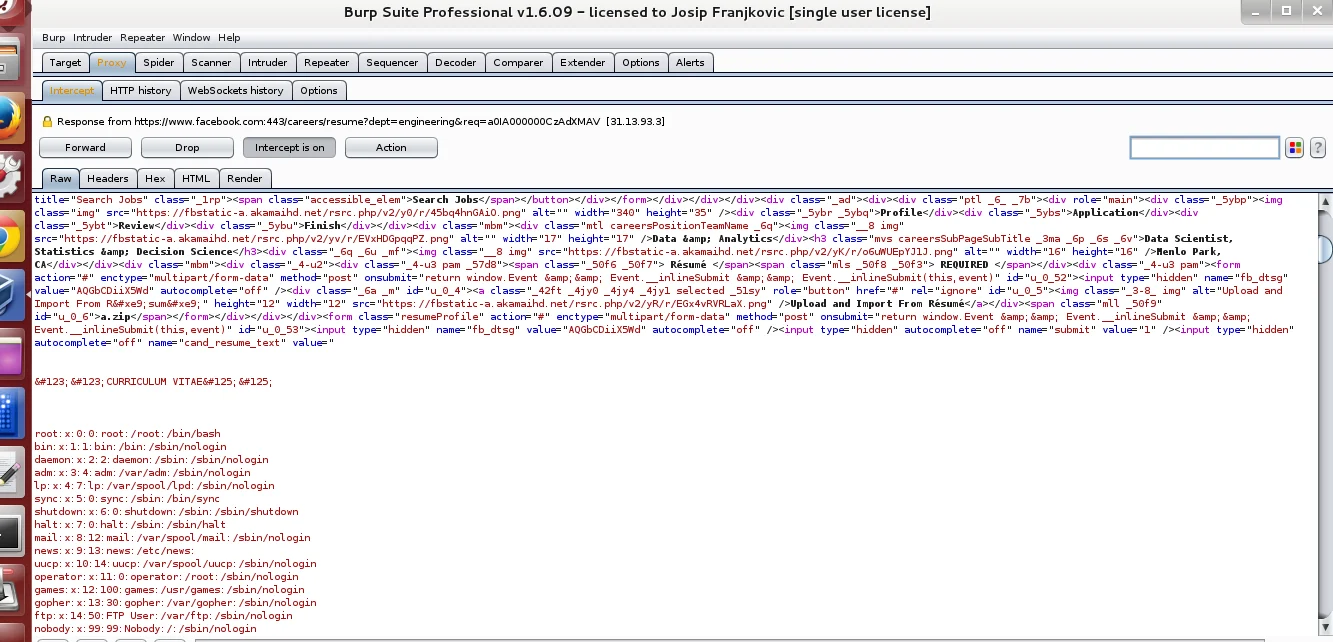
The report places an image after the two commands but does not describe what it shows. The report does not describe the upload endpoint, the request that carried the archive, the server-side processing that followed, or the exact response beyond that outcome. It also gives no bounty amount, no severity rating and no timeline; the only status information is the word "fixed" in the heading.
The closing note is a reminder that some bugs are not what they look like, which fits a file that appears to be an ordinary archive entry but is actually a pointer to somewhere else on disk.
Root cause
When an extractor honours a symlink inside an archive, it creates a link on the filesystem that points to the target path recorded in the archive. The archive is the attacker's input; the symlink turns that input into a reference to a path the attacker never had access to.
Impact
The commands in the report target /etc/passwd, a local file on the server. That file is a proof of concept rather than a prize: it confirms the primitive works. What an attacker could reach beyond that depends on the process's privileges and on which files the follow-up step will read, and the report does not enumerate any of that.
How this kind of bug works
Archives can carry more than regular files. Zip, tar and similar formats support entries that are symbolic links, hard links, or paths containing .. segments. A safe extractor treats these as data to be validated; an unsafe one applies them to the filesystem. Two failure modes follow:
- Symlink following. The archive contains a link entry pointing at an absolute path or a path outside the extraction directory. Extraction creates the link, and a subsequent read of that entry resolves to the target.
- Path traversal on extraction. An entry name such as
../../etc/passwdcauses the extractor to write outside the intended directory, sometimes called a zip slip.
The symlink case is subtler because nothing is written outside the directory at extraction time; the damage happens when the link is dereferenced. That is why the bug often surfaces in features that unpack user archives and then process the contents: image pipelines, document converters, backup restores, plugin or theme installers, and build systems.
How to test for it
- Find features that accept an archive: avatar or media uploads that take zips, bulk import, theme or plugin installation, backup restore, data export re-import.
- Build a benign archive first and confirm the application processes it, so you know which follow-up step touches the extracted files.
- Create a symlink entry pointing at a harmless, world-readable file such as
/etc/passwdor a file you know exists in the application directory, and package it with the link preserved. - Upload it and observe the follow-up step: a preview, a converted file, a rendered page, a download, or an error message that quotes file contents.
- If the link is followed, try targets that reveal more: application configuration, environment files, key material, logs. Keep to files needed to prove impact.
A positive result is content from a path you never supplied as a regular file appearing in a response, a generated artefact, or an error. Common false positives: the server rejects the archive outright; the extractor stores the link as a plain file containing the target path as text; the follow-up step refuses to open anything that is not a regular file; or the file you targeted is unreadable by the service account, producing an empty or permission error that looks like a hit. Confirm by comparing against a control archive with a regular file of known content.
How it is fixed
- Reject archive entries whose type is a symlink or hard link, and entries whose resolved path escapes the extraction root.
- Extract into a fresh directory and validate each entry's normalised path before writing.
- Open extracted files with flags that refuse to follow links, or check with a stat call that the entry is a regular file before reading it.
- Run extraction and any follow-up processing as an unprivileged user with access only to the working directory.
- Where the format allows it, use a library mode that disables link creation entirely.
Hunting notes
This class hides wherever user-supplied archives are unpacked and then consumed by another component. Recon signals worth watching: upload forms that accept .zip, .tar, .gz or .tgz; features described as import, restore, migrate, bulk upload or theme/plugin install; error messages mentioning extraction paths; and any flow where an uploaded file is later converted, thumbnailed or parsed. Keep the proof file innocuous and stop at the first confirmation; a clear demonstration of the mechanism is what makes the report actionable.
What happened, in plain words
This is a short write-up about one technique: getting a web server to hand back files that live on its own disk, by uploading a zip archive that contains a symbolic link. The heading marks the issue as fixed.
A few everyday comparisons first, because the whole thing rests on them.
- A server is the computer that runs a website and answers your browser's requests. It has its own files on its own disk, which visitors are not supposed to see.
- A zip archive is a single file that bundles other files together, like a cardboard box holding several items. You make one when you compress files to send them somewhere.
- A symbolic link (or symlink) is a shortcut. It is a tiny file whose only content is the address of another file. Double-clicking the shortcut opens the target, not the shortcut itself. On a normal desktop you might have a shortcut on your desktop that points to a folder buried deep in your drive.
The researcher's starting point was reading other people's write-ups. The report says plainly that the idea of uploading a zip with symlinks would not have occurred without reading Facebook's blog, and it points to Philippe's list of Facebook bugs as a useful collection. That is worth noticing on its own: reading how others found bugs is how you learn to find them.
The whole demonstration is two shell commands. A shell is the text window where you type commands to your own computer, as opposed to clicking around in a browser.
First, create a symlink that points at a local file:
ln -s /etc/passwd link
Line by line:
lnis the command that makes links.-smeans "symbolic", so make a shortcut rather than a second name for the same file./etc/passwdis the target: a well-known file on Unix-like systems that lists user accounts. It is a classic harmless test target, because it exists on almost every such machine and contains no passwords despite the name.linkis the name of the shortcut being created in the current folder.
Why this step matters: you now have a file called link that, when opened, gives you the contents of /etc/passwd. On your own machine that is uninteresting. On the server, it is the whole point.
Then package that symlink into a zip archive, preserving it as a link rather than following it and storing the file contents:
zip --symlinks test.zip link
Line by line:
zipis the command that builds archives.--symlinkstells it to store the shortcut as a shortcut. Without this option, zip would follow the link and store a copy of the target file's contents instead, which would defeat the purpose.test.zipis the archive being created.linkis the item being put inside it.
Why this step matters: the archive now contains an entry that is not a normal file but a pointer to /etc/passwd. To anything that inspects the archive casually, it looks like an ordinary entry.
The report places an image after the two commands but does not describe what it shows. The report does not describe the upload endpoint, the request that carried the archive, the server-side processing that followed, or the exact response beyond that outcome. It also gives no bounty amount, no severity rating and no timeline; the only status information is the word "fixed" in the heading.
The closing note is a reminder that some bugs are not what they look like, which fits a file that appears to be an ordinary archive entry but is actually a pointer to somewhere else on disk.
In general, how this kind of bug works
This class of bug is often called a local file inclusion: the application is made to include, that is to read and use, a file from its own machine that the person supplying the input was never meant to reach.
When an extractor honours a symlink inside an archive, it creates a link on the filesystem that points to the target path recorded in the archive. The archive is the attacker's input; the symlink turns that input into a reference to a path the attacker never had access to.
Archives can carry more than regular files. Zip, tar and similar formats support entries that are symbolic links, hard links, or paths containing .. segments. A safe extractor treats these as data to be validated; an unsafe one applies them to the filesystem. Two failure modes follow:
- Symlink following. The archive contains a link entry pointing at an absolute path or a path outside the extraction directory. Extraction creates the link, and a subsequent read of that entry resolves to the target.
- Path traversal on extraction. An entry name such as
../../etc/passwdcauses the extractor to write outside the intended directory, sometimes called a zip slip.
The symlink case is subtler because nothing is written outside the directory at extraction time; the damage happens when the link is dereferenced. That is why the bug often surfaces in features that unpack user archives and then process the contents: image pipelines, document converters, backup restores, plugin or theme installers, and build systems.
The commands in the report target /etc/passwd, a local file on the server. That file is a proof of concept rather than a prize: it confirms the primitive works. What an attacker could reach beyond that depends on the process's privileges and on which files the follow-up step will read, and the report does not enumerate any of that.
How to test for it
- Find features that accept an archive: avatar or media uploads that take zips, bulk import, theme or plugin installation, backup restore, data export re-import.
- Build a benign archive first and confirm the application processes it, so you know which follow-up step touches the extracted files.
- Create a symlink entry pointing at a harmless, world-readable file such as
/etc/passwdor a file you know exists in the application directory, and package it with the link preserved. - Upload it and observe the follow-up step: a preview, a converted file, a rendered page, a download, or an error message that quotes file contents.
- If the link is followed, try targets that reveal more: application configuration, environment files, key material, logs. Keep to files needed to prove impact.
A positive result is content from a path you never supplied as a regular file appearing in a response, a generated artefact, or an error. Common false positives: the server rejects the archive outright; the extractor stores the link as a plain file containing the target path as text; the follow-up step refuses to open anything that is not a regular file; or the file you targeted is unreadable by the service account, producing an empty or permission error that looks like a hit. Confirm by comparing against a control archive with a regular file of known content.
How it is fixed
- Reject archive entries whose type is a symlink or hard link, and entries whose resolved path escapes the extraction root.
- Extract into a fresh directory and validate each entry's normalised path before writing.
- Open extracted files with flags that refuse to follow links, or check with a stat call that the entry is a regular file before reading it.
- Run extraction and any follow-up processing as an unprivileged user with access only to the working directory.
- Where the format allows it, use a library mode that disables link creation entirely.
Hunting notes
This class hides wherever user-supplied archives are unpacked and then consumed by another component. Recon signals worth watching: upload forms that accept .zip, .tar, .gz or .tgz; features described as import, restore, migrate, bulk upload or theme/plugin install; error messages mentioning extraction paths; and any flow where an uploaded file is later converted, thumbnailed or parsed. Keep the proof file innocuous and stop at the first confirmation; a clear demonstration of the mechanism is what makes the report actionable.
Glossary
- Server: the computer that runs a website and answers requests from browsers.
- Request: the message a browser sends to a server asking for a page or an action.
- Response: the message the server sends back, containing the page, a file or an error.
- Zip archive: a single file that bundles other files together, usually compressed.
- Symbolic link (symlink): a shortcut file whose content is the address of another file; opening it opens the target.
- Shell: a text interface where you type commands to your own computer.
/etc/passwd: a standard file on Unix-like systems listing user accounts; a common harmless test target.- Extraction: the process of unpacking an archive's entries onto a disk.
- Local file inclusion: a bug where an application is made to read a file from its own machine that the input supplier should not reach.
- Path traversal: using
..segments in a file path to climb out of the intended directory. - Zip slip: path traversal performed through entry names inside an archive.
- Dereference: following a link to reach the file it points at.
- Proof of concept: a minimal demonstration that a bug works, without causing further harm.
- False positive: a result that looks like a successful attack but is not one.
- Unprivileged user: an account with limited permissions, so a mistake cannot reach sensitive parts of the system.



