Fail2Install — CVE-2026–132165 Understandings
Drupal's installer treated a database error as meaning the site was not installed, so an attacker could flood the database to make it busy and reopen the installer on a live site. The attacker could then create their own admin account and store a PHP file to run code on the server.

An easy-to-understand explanation of how a “database busy” error can trick Drupal into letting a stranger reinstall a live website, and how that leads to Remote Code Execution.
The full write-up lives on its author's site
It belongs to its author, so we link to it rather than copy it. The other two tabs are our own rewrites, checked against it.
Context
Drupal ships a web installer, install.php, which is the screen where an operator picks a database and creates the first administrator account. Once a site is set up, that installer is supposed to be locked for good. Drupal decides whether a site is already installed by checking the settings file and the database, and the flaw described here lives in how the installer handles that check.
The vulnerability is tracked as CVE-2026-132165 and nicknamed Fail2Install. In short, Drupal's web installer read a database error as "this site isn't installed yet", which let an attacker reopen the installer on a live site and take it over.
Drupal patched it on 18 November 2026. Attackers were exploiting it by 19 November, and CISA added it to the Known Exploited Vulnerabilities (KEV) catalogue on 24 November. Drupal rates it 20/25, and CVSS scores on trackers sit around 9.2 to 9.8.
Setup
The relevant preconditions are architectural rather than procedural:
- A Drupal site whose installer is reachable over the web.
- A database that can be pushed into returning errors, either by exhausting its connection limit or by exhausting the client's TCP source ports.
- Older Drupal 7 and Drupal 8 before 8.9 are safe, because they block installation whenever database settings already exist.
Finding it
The core observation is a fail-open versus fail-closed distinction. A safe system that cannot decide should say no. Drupal said yes, start installing.
During the installation check the installer talks to the database several times. The public research shows this sequence:
Check 1: database busy → FAIL
Check 2: database busy → FAIL   (error ignored → "not installed")
Check 3: database free → SUCCESS → installer starts on a LIVE site
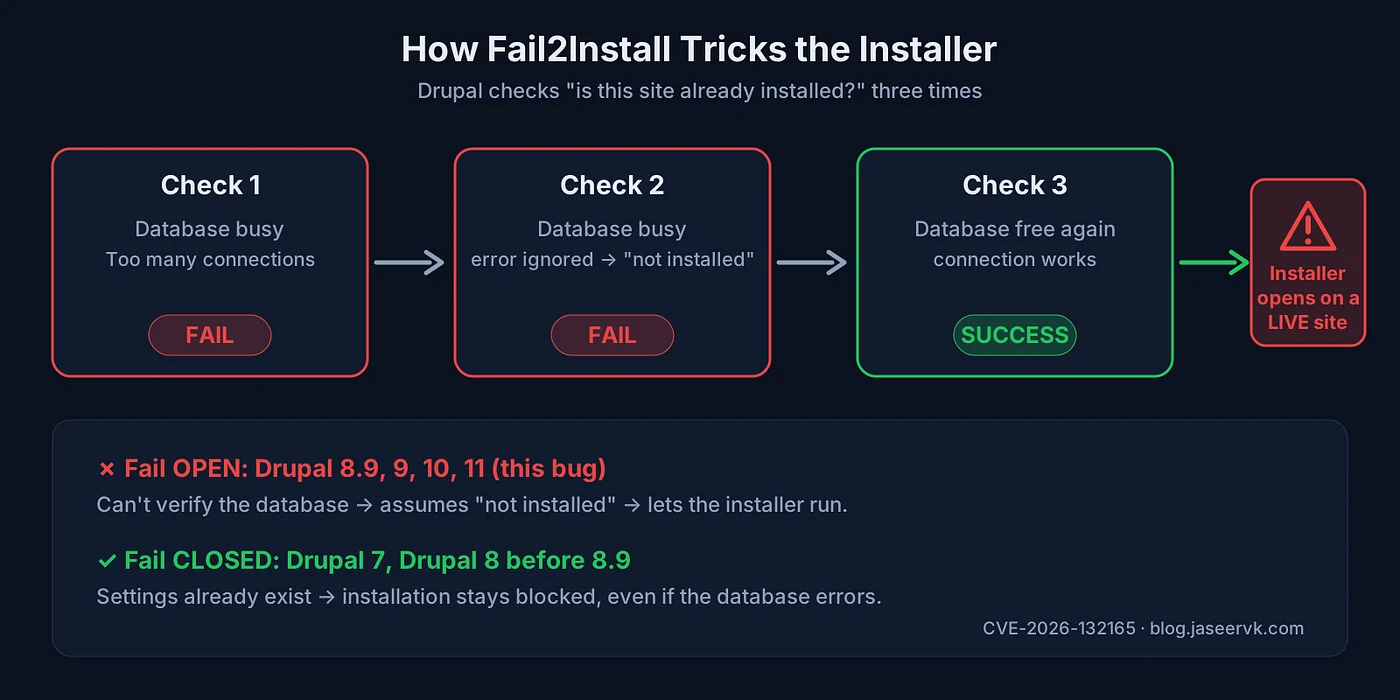
The middle step is the bug: a database error is ignored and the site is classified as not installed, rather than the request being aborted.
Exploitation
Step 1: make the database busy
Searchlight Cyber showed two ways to create the error.
Technique A: exhaust database connections (Apache sites). Every database accepts a limited number of connections. PostgreSQL defaults to about 100 and MySQL to 151. Apache can run 150 workers, so a flood of requests that hold connections open can fill the database. The analogy in the write-up is a restaurant with 100 tables: 150 people rush in, the first 100 sit and never leave, and the next person is told there is no table available. The attacker is the crowd, and Drupal is the host who reads "no table" as "restaurant is closed".
Technique B: exhaust TCP source ports (PHP-FPM sites). Closed connections linger for about 60 seconds, and Linux has only about 28,000 ports to hand out. Roughly 470 new database connections per second can use them all up, after which new connections fail with "Cannot assign requested address."
This is a race, not a one-click hack. Apache with PostgreSQL is the easiest target. PHP-FPM setups need far more traffic, and multiple replicas make it harder. It was shown to work on stock configurations, and attackers are already doing it.
Step 2: reopen the installer on a live site
With the database returning errors, the installer concludes the site is not installed and starts running on a live site.
Step 3: choose a database file and plant PHP
Once the installer reopens, the attacker controls the site:
Flood the database
      ↓
Installer reopens on a live site
      ↓
Attacker picks their own database file (a .php file)
      ↓
PHP code is saved inside it (via the "site name" field)
      ↓
Attacker opens that file → code runs on your server
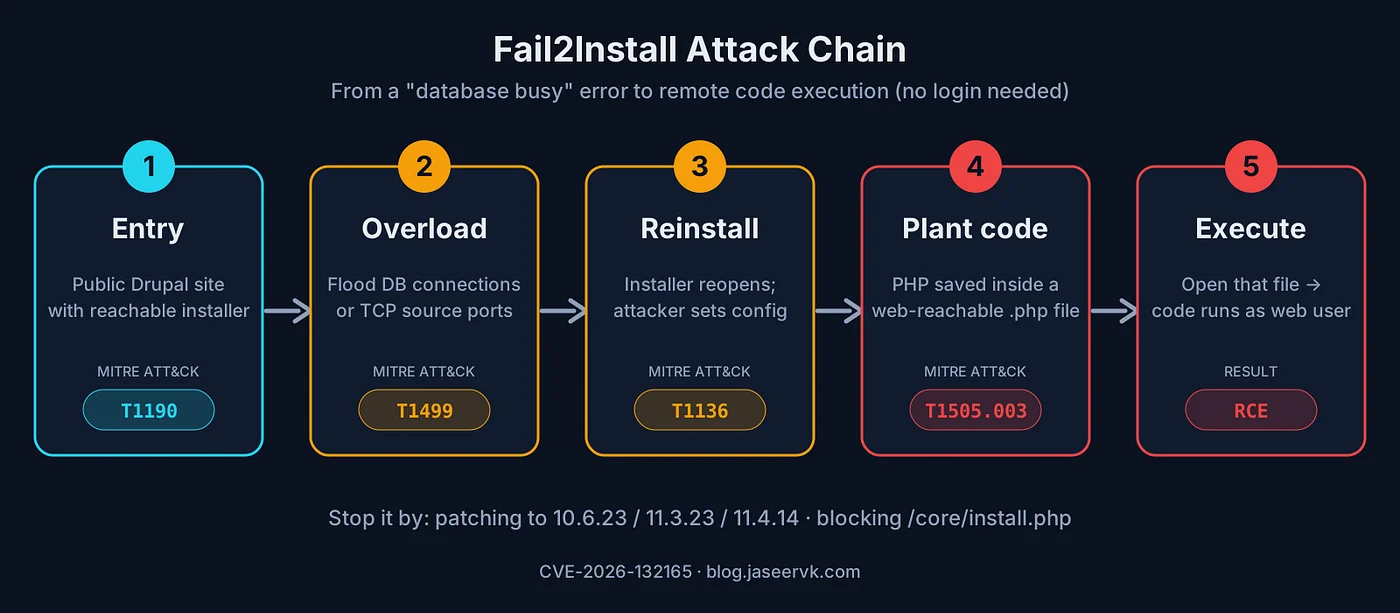
The attacker picks their own database file with a .php extension, and PHP code is saved inside it via the "site name" field. Requesting that file executes the code on the server.
Step 4: map the chain to ATT&CK
The write-up aligns the stages with MITRE ATT&CK:
| Stage | What happens | MITRE ATT&CK |
|---|---|---|
| Entry | Public Drupal site with reachable installer | T1190 Exploit Public-Facing Application |
| Overload | Request flood exhausts DB connections/ports | T1499 Endpoint Denial of Service |
| Takeover | Attacker creates their own admin/site config | T1136 Create Account |
| Persistence | PHP payload stored as a web-reachable file | T1505.003 Web Shell |
Root cause
The installer's installation check treats a database error as a negative result. When the database is busy, the error is ignored and the site is classified as "not installed", so installation proceeds on a live site. The correct behaviour would be to fail closed: if the check cannot be completed, refuse to install.
Older Drupal 7 and Drupal 8 before 8.9 avoided this because they block installation whenever database settings already exist, so the database error never becomes the deciding signal.
Impact
The result is full site takeover, theft of user and subscriber data, and code execution as the web server user. Drupal runs government, university and media sites, so the blast radius is big. Exploitation is a race rather than a one-click hack, easiest on Apache with PostgreSQL and harder on PHP-FPM with multiple replicas.
Affected versions and fix
| Branch | Affected | Fixed in | Safest target* |
|---|---|---|---|
| Drupal 10 | before 10.6.22 | 10.6.22 | 10.6.23 |
| Drupal 11.3.x | up to 11.3.21 | 11.3.22 | 11.3.23 |
| Drupal 11.4.x | up to 11.4.12 | 11.4.13 | 11.4.14 |
| 11.2.x and older, 10.5.x and older, Drupal 8.9, Drupal 9 | Affected (end-of-life) | No fix | Move to a supported branch |
| Drupal 7 | Not affected | N/A | N/A |
*The newest versions also fix the follow-up bug described below.
Remediation:
- Update to 10.6.23 / 11.3.23 / 11.4.14.
- Run
update.phpright after updating. - Leave end-of-life branches. They won't get patches.
Mitigation if you cannot patch today:
- Block the installer at the web server. Nginx example:
location = /core/install.php { return 404; }
- Apache
.htaccessexample:
<FilesMatch "^install\.php$">
  Require all denied
</FilesMatch>
Unblock it only when installing a brand-new site, and test the config before reloading.
- Make
settings.phpnon-writable by the web server user. Drupal says this blocks some, but not all, attack paths. - Sites on Drupal Steward (Drupal's WAF service) are covered for the known attack paths, but should still update.
The follow-up bug
On 25 November, Drupal published SA-CORE-2026-019 (CVE-2026-136716), another installer access bypass. It is also exploited, rated 21/25, and it survives the first patch. Any site whose installer was reachable after the first fix could already be compromised. The lesson is that a live website should never expose its installer.
Hunting notes
Defenders should watch for:
- Spikes of requests to
/core/install.phpor/core/authorize.php - Database errors like
Too many connectionsorCannot assign requested address - New
.phpfiles undermodules/orsites/(use FIM, for example Wazuh syscheck) - Unexpected changes to the user 1 admin account or its email address
If you think you were exposed, treat the site as compromised: restore from a clean backup and rotate credentials.
The lesson is that an availability problem can become a security hole when software turns an error into trust. A busy database made Drupal forget that it was already installed, and attackers took the invitation.
What happened, in plain words
Imagine a shop. A clerk guards the setup desk with one rule: "If the shop is already set up, nobody touches this desk."
To check, the clerk asks the back-office computer. Now a crowd floods the computer with requests, and it replies: "Error. Too busy."
A careless clerk thinks: "No answer… so the shop must not be set up yet." He walks the stranger straight to the setup desk.
That is Fail2Install (CVE-2026-132165). Drupal's web installer, install.php, read a database error as "this site isn't installed yet."
Drupal patched it on 18 November 2026. Attackers were exploiting it by 19 November, and CISA added it to the Known Exploited Vulnerabilities (KEV) catalogue on 24 November. Drupal rates it 20/25, and CVSS scores on trackers sit around 9.2 to 9.8.
A few words before we start, because the rest of this article uses them constantly.
Drupal is a content management system (CMS): software that runs a website and lets people publish pages, articles and images without writing code. Many governments, universities and media organisations use it.
A database is the organised storage behind a website. It holds the pages, the user accounts, the comments and the settings. The website asks the database questions ("who is user number 5?", "give me the article with id 42") and the database answers.
A web installer is a set-up wizard that runs in your browser. You open a special address, answer a few questions, and it builds the site for you: it connects to a database and creates the first administrator account. It is meant to be used once, on a brand-new site, and then never again.
A vulnerability is a mistake in software that lets someone use it in a way the maker did not intend. A CVE is simply a public catalogue number for one such mistake, so that everyone in the world can talk about the same bug without confusion. Fail2Install is the nickname given to this one.
Remote code execution (RCE) is the worst kind of outcome: an attacker somewhere on the internet gets their own instructions to run on your server, as if they were sitting at its keyboard.
1. What Is install.php?
Every Drupal site has an installer. It's the screen where you pick a database and create the first admin account. After setup, it should be locked forever.
Drupal decides "is this site already installed?" by checking the settings file and the database. The bug lives in how it handles that check.
Two more terms here. The settings file (called settings.php) is a small text file on the server that tells Drupal where its database is and how to log in to it. It is created during installation, so its presence is a strong hint that the site already exists.
And install.php is the file that powers the installer. When you visit the installer in your browser, you are really asking the web server for that file, and the file runs the wizard. Because it is a normal web address, anyone on the internet can reach it unless something blocks it.
So Drupal has two sources of truth: the settings file on disk, and the live database. The bug is about what happens when the second one gives an unclear answer.
2. The Bug: It Fails Open, Not Closed
A safe system that can't decide should say no (fail closed). Drupal said yes, start installing (fail open).
Fail closed means: when in doubt, refuse. Think of a bank vault door that stays locked if the key reader is broken. Fail open means: when in doubt, allow. Think of the same door swinging wide because the reader is broken. For a security check, fail closed is almost always the right choice, because an attacker can deliberately break the check.
During the check, the installer talks to the database several times. The public research shows this sequence:
Check 1: database busy → FAIL
Check 2: database busy → FAIL   (error ignored → "not installed")
Check 3: database free → SUCCESS → installer starts on a LIVE site
Line by line:
- Check 1: database busy → FAIL. The installer asks the database a question. The database is overloaded and cannot answer, so the attempt fails.
- Check 2: database busy → FAIL (error ignored → "not installed"). The installer tries again, gets the same failure, and this time treats the failure as information. Because it could not find a working database, it concludes there is no database, and therefore no installed site. This is the bug. A failure to answer is not the same as the answer "no".
- Check 3: database free → SUCCESS → installer starts on a LIVE site. The flood stops, the database recovers, and the installer now gets a normal answer. But it has already made up its mind that the site is new, so it starts the setup wizard on a site that is very much live and in use.
The middle step is the whole vulnerability: a database error is treated as evidence that no database exists, rather than as an inconclusive result that should abort the request.
Older Drupal 7 and Drupal 8 before 8.9 are safe, because they block installation whenever database settings already exist. In other words, they block installation whenever database settings already exist, so a confused database never gets to cast the deciding vote.
3. How Do Attackers Make the Database "Busy"?
Searchlight Cyber showed two ways to create the error.
Before the techniques, one concept: a connection. A website does not keep one permanent line open to its database. Instead it opens a short conversation, asks its questions, and closes it. Each open conversation is a connection, and every database has a hard limit on how many can be open at once, because each one costs memory and attention. When the limit is reached, new requests are turned away with an error.
Technique A: Exhaust database connections (Apache sites) Every database accepts a limited number of connections. PostgreSQL defaults to about 100 and MySQL to 151. Apache can run 150 workers, so a flood of requests that hold connections open can fill the database.
Apache is web server software: the program that receives visitors' requests and hands them to the website code. It handles several visitors at once using workers, which are like cashiers serving queues. PostgreSQL and MySQL are two popular database programs.
Example: A restaurant has 100 tables. 150 people rush in, and the first 100 sit and never leave. The next person gets "no table available." The attacker is the crowd, and Drupal is the host who reads "no table" as "restaurant is closed."
The trick is that the attacker's requests do not politely finish. They keep their database connections occupied, so the database's table limit is reached and every other request, including the installer's check, is refused.
Technique B: Exhaust TCP source ports (PHP-FPM sites) Closed connections linger for about 60 seconds, and Linux has only about 28,000 ports to hand out. Roughly 470 new database connections per second can use them all up, and then new connections fail with "Cannot assign requested address."
PHP-FPM is another way of running website code, common on Linux servers. TCP ports need a short explanation. When one computer talks to another, every conversation is labelled with a number called a port, so replies can find their way back. The server's side uses a fixed port (the database listens on its own), but the client's side picks a free number from a limited range, roughly 28,000 of them on Linux. A closed conversation is not freed instantly; the system waits about 60 seconds to be sure no stray replies arrive. If an attacker opens new connections fast enough, every number is taken and the next attempt fails with "Cannot assign requested address." That error is exactly the kind of unclear answer the installer misreads.
***Reality check:***This is a race, not a one-click hack. Apache with PostgreSQL is the easiest target. PHP-FPM setups need far more traffic, and multiple replicas make it harder. But it was shown to work on stock configurations, and attackers are already doing it.
Stock configuration means the software as shipped, with default settings, not specially tuned. Replicas means running several copies of the same site behind a load balancer, so the flood has to overwhelm all of them at once. The point of the reality check is honesty: this takes effort and timing, but it is not theoretical.
4. From Reinstall to Remote Code Execution
Once the installer reopens, the attacker controls the site:
Flood the database
      ↓
Installer reopens on a live site
      ↓
Attacker picks their own database file (a .php file)
      ↓
PHP code is saved inside it (via the "site name" field)
      ↓
Attacker opens that file → code runs on your server
Line by line:
- Flood the database. The attacker sends so many requests that the database cannot answer the installer's check, as described in section 3.
- Installer reopens on a live site. Because of the fail-open bug, the setup wizard starts even though the site already exists.
- Attacker picks their own database file (a .php file). The wizard normally asks you to point it at a database. The attacker instead picks their own database file and gives it a
.phpextension. PHP is the programming language Drupal is written in, and a.phpfile is not just data: when the web server is asked for it, the server runs it as code. - PHP code is saved inside it (via the "site name" field). The wizard has text boxes, one of which is the site name. The attacker types PHP code into that box, and the installer writes it into the file. A text field that is supposed to hold a name ends up holding executable instructions.
- Attacker opens that file → code runs on your server. The attacker then simply visits the file's web address. The server recognises the
.phpextension, executes the contents, and the attacker's instructions run with the web server's permissions.
A web shell is the general name for this outcome: a file on the server that an attacker can reach through a browser and use to run commands. It is the difference between reading someone's website and operating their server.
The write-up aligns the stages with MITRE ATT&CK, which is a public catalogue of attacker techniques, used by defenders to describe what an intrusion looked like in a shared language.
| Stage | What happens | MITRE ATT&CK |
|---|---|---|
| Entry | Public Drupal site with reachable installer | T1190 Exploit Public-Facing Application |
| Overload | Request flood exhausts DB connections/ports | T1499 Endpoint Denial of Service |
| Takeover | Attacker creates their own admin/site config | T1136 Create Account |
| Persistence | PHP payload stored as a web-reachable file | T1505.003 Web Shell |
Persistence means keeping access after the first break-in, so that fixing the original hole does not remove the attacker. A payload is the part of an attack that actually does the damage, here the PHP code inside the file.
5. Who Is Affected?
| Branch | Affected | Fixed in | Safest target* |
|---|---|---|---|
| Drupal 10 | before 10.6.22 | 10.6.22 | 10.6.23 |
| Drupal 11.3.x | up to 11.3.21 | 11.3.22 | 11.3.23 |
| Drupal 11.4.x | up to 11.4.12 | 11.4.13 | 11.4.14 |
| 11.2.x and older, 10.5.x and older, Drupal 8.9, Drupal 9 | Affected (end-of-life) | No fix | Move to a supported branch |
| Drupal 7 | Not affected | N/A | N/A |
*The newest versions also fix the follow-up bug described below.
A branch is a line of development, such as "Drupal 11.3". Version numbers like 11.3.22 are like edition numbers: bigger means newer. End-of-life means the makers have stopped supporting that line, so no more security fixes will ever arrive for it. That is why the table says "No fix" for those rows: the only safe move is to a branch that is still supported.
6. Remediation and Mitigation
Remediation means fixing the actual problem. Mitigation means reducing the risk while you cannot fix it yet.
Fix (remediation):
- Update to 10.6.23 / 11.3.23 / 11.4.14.
- Run
update.phpright after updating. - Leave end-of-life branches. They won't get patches.
update.php is Drupal's own maintenance script. It applies the database changes that a new version of the code expects. Skipping it can leave the site broken, which is why it comes immediately after the update.
Can't patch today? (mitigation):
- Block the installer at the web server. Nginx example:
location = /core/install.php { return 404; }
Nginx is web server software, an alternative to Apache. This rule says: whenever anyone asks for the installer's address, do not run it, just reply "not found". A 404 is the standard "page does not exist" answer, so the installer becomes invisible from the outside.
- Apache
.htaccessexample:
<FilesMatch "^install\.php$">
  Require all denied
</FilesMatch>
.htaccess is a small configuration file that Apache reads for a folder. Line by line: <FilesMatch "^install\.php$"> starts a rule that matches any file named exactly install.php; Require all denied tells Apache to refuse every request for it; </FilesMatch> closes the rule. The backslashes are just how the dot is written so it means a literal dot rather than "any character".
Unblock it only when installing a brand-new site, and test the config before reloading. Testing first matters because a typo in a web server configuration can take the whole site offline, not just the installer.
- Make
settings.phpnon-writable by the web server user. Drupal says this blocks some, but not all, attack paths. If the installer cannot write to the settings file, some routes to takeover close, but not every one. - Sites on Drupal Steward (Drupal's WAF service) are covered for the known attack paths, but should still update. A WAF, or web application firewall, sits in front of a site and blocks requests that look like known attacks. It buys time; it is not a substitute for the patch.
What defenders should watch for:
- Spikes of requests to
/core/install.phpor/core/authorize.php - Database errors like
Too many connectionsorCannot assign requested address - New
.phpfiles undermodules/orsites/(use FIM, for example Wazuh syscheck) - Unexpected changes to the user 1 admin account or its email address
A spike is a sudden burst of traffic far above normal. /core/authorize.php is another Drupal maintenance address that should not be busy on a settled site. User 1 is Drupal's original administrator account, created during installation, so unexpected changes to it are worth watching. FIM stands for file integrity monitoring: software that records what files should look like and alerts you when one appears or changes. Wazuh syscheck is one such tool.
If you think you were exposed, treat the site as compromised: restore from a clean backup and rotate credentials. Rotating credentials means changing every password and key that the site used, because an attacker who got in may have copied them.
7. The Twist: The Patch Wasn't Enough
On 25 November, Drupal published SA-CORE-2026-019 (CVE-2026-136716), another installer access bypass. It is also exploited, rated 21/25, and it survives the first patch. Any site whose installer was reachable after the first fix could already be compromised.
An access bypass is a flaw that lets someone reach something they should not be allowed to reach. SA-CORE is Drupal's own naming for its core security announcements. "Survives the first patch" means updating to the fixed version from section 5 does not close this second hole.
The lesson: a live website should never expose its installer.
Conclusion
Fail2Install shows that "just an availability problem" can become a security hole when software turns an error into trust. A busy database made Drupal forget that it was already installed, and attackers took the invitation.
Patch, lock the installer, and check your logs.
Glossary
- Access bypass: a flaw that lets someone reach something they should not be allowed to reach.
- Apache: web server software that receives visitors' requests and passes them to the website code.
- ATT&CK (MITRE ATT&CK): a public catalogue of attacker techniques, used by defenders to describe intrusions in a shared language.
- Branch: a line of development of a product, such as Drupal 11.3.
- CISA: the US Cybersecurity and Infrastructure Security Agency, which publishes the KEV catalogue.
- CMS (content management system): software that runs a website and lets people publish content without writing code.
- Connection: a short open conversation between the website and its database, limited in number.
- CVE: a public catalogue number for a specific security vulnerability.
- CVSS: a scoring system that rates how severe a vulnerability is.
- Database: the organised storage behind a website, holding pages, accounts and settings.
- End-of-life: a product line the makers no longer support, so no further security fixes arrive.
- Fail closed: when a check cannot decide, refuse. The safe behaviour.
- Fail open: when a check cannot decide, allow. The unsafe behaviour behind this bug.
- FIM (file integrity monitoring): software that records what files should look like and alerts when one appears or changes.
.htaccess: a configuration file that Apache reads for a folder.- KEV catalogue: CISA's list of vulnerabilities known to be exploited in the wild.
- Mitigation: reducing risk while the real fix is not yet applied.
- MySQL: a popular database program.
- Nginx: web server software, an alternative to Apache.
- Payload: the part of an attack that does the damage, here the PHP code inside a file.
- Persistence: keeping access after the first break-in, so fixing the original hole does not remove the attacker.
- PHP: the programming language Drupal is written in;
.phpfiles are executed by the web server when requested. - PHP-FPM: a common way of running website code on Linux servers.
- Port (TCP port): a number that labels a network conversation so replies find their way back; the client side has a limited range of them.
- PostgreSQL: a popular database program.
- Remediation: fixing the actual problem, usually by updating the software.
- Remote code execution (RCE): an attacker getting their own instructions to run on your server.
- Replica: one of several copies of the same site running behind a load balancer.
- Rotate credentials: change every password and key the site used, because an attacker may have copied them.
- SA-CORE: Drupal's naming for its core security announcements.
- Settings file (
settings.php): the file on the server that tells Drupal where its database is and how to log in. - Spike: a sudden burst of traffic far above normal.
- Stock configuration: software as shipped, with default settings.
- User 1: Drupal's original administrator account, created during installation.
- Vulnerability: a mistake in software that lets someone use it in a way the maker did not intend.
- WAF (web application firewall): software that sits in front of a site and blocks requests that look like known attacks.
- Wazuh syscheck: a file integrity monitoring tool.
- Web installer: a set-up wizard that runs in a browser and builds a site, meant to be used once.
- Web shell: a file on a server that an attacker can reach through a browser to run commands.
- Worker: one of the parallel handlers a web server uses to serve several visitors at once.


