Finding Stored Cross-Site Scripting (XSS) in a Live Chat Feature | Bug Bounty Research
A live chat panel on an online learning platform rendered user messages as HTML instead of plain text, so an injected image tag with an error handler ran JavaScript. The same message also executed in a second participant's browser, showing the script was stored and served to other viewers.

Cybersecurity
The full write-up lives on its author's site
It belongs to its author, so we link to it rather than copy it. The other two tabs are our own rewrites, checked against it.
Context
The target was an online learning platform that offered live sessions. Inside a live session, participants could communicate with each other through a chat panel: you join a session, open the chat, type a message and send it, and the message is shown to the other participants in the same session.
The researcher, Rahul Kumar (RAHUL -Nj), keeps the organisation and the identifying details of the target anonymous in the write-up. The finding is a Stored Cross-Site Scripting (XSS) issue in that live chat feature.
Setup
The testing used authorised test accounts. Two accounts were needed: one to send the message and a second one to view the same live session and its chat as another participant. No special tools, versions or configuration are described in the report; the work was done through the normal web interface of the platform.
The precondition for the test was simply being able to join an available live learning session and open its chat panel.
Finding it
The chat looked ordinary at first. What made the researcher look closer was a set of questions about how the application handled the message text:
- Is the application treating my message as plain text?
- What happens if I submit HTML instead of an ordinary message?
- Will the browser display the input safely, or interpret it as code?
To answer them, a harmless proof-of-concept payload was submitted to the chat input to see whether the feature was vulnerable to HTML and JavaScript injection.
Exploitation
Step 1: log in and join a live session
The researcher logged in with an authorised test account and joined an available live learning session, then opened the chat panel.
Step 2: submit the proof-of-concept payload
The following payload was sent as a chat message:
<img src="x" onerror="alert(1)">
The src attribute points to x, which does not resolve to an image, so the browser fires the onerror handler. The handler contains alert(1), a harmless JavaScript call used only to show that script execution is possible. Nothing destructive was sent.
Step 3: observe execution in the sender's browser
After the message was sent, the alert appeared in the sender's own browser. The message was not displayed as plain text: the browser interpreted the HTML and executed the JavaScript. That was the first indication that the chat rendered user-controlled input unsafely.
Step 4: check the same message with a second account
An alert in your own browser only proves that your own input is rendered unsafely. The more important question was whether the message affected anyone else. The researcher opened the same live session with another authorised test account and checked the chat. The injected JavaScript executed in that second participant's browser as well.
Because the payload was stored with the message and executed for another viewer, the behaviour confirmed a Stored XSS vulnerability in the live chat functionality. The issue was not limited to the person who sent the message: other users viewing the shared chat could be affected too.
The validation process, in the researcher's own summary:
- Logged in using an authorized test account.
- Joined an available live learning session.
- Opened the chat panel.
- Submitted a harmless XSS proof-of-concept payload.
- Observed JavaScript execution in the sender's browser.
- Checked the same message using another authorized account.
- Confirmed that the behaviour also affected the second viewer.
No collection of sensitive user information was necessary to demonstrate the behaviour.
Root cause
The chat feature stored user-submitted messages and later rendered them in a way that let the browser interpret part of the content as executable markup instead of text. In other words, the message was inserted into the page without adequate output encoding, so the <img> element and its onerror handler were treated as HTML and JavaScript rather than as literal characters.
The report does not describe the server-side or client-side code, so the exact rendering path is not stated. The failure is the classic one for this class: user-controlled content is stored and then displayed without context-aware encoding, and the browser does the rest.
Impact
Because the payload was stored and executed for a second participant viewing the same chat, an attacker who can post in a live session's chat could run JavaScript in the browser of other participants of that session. The researcher notes that, depending on the application's architecture and security controls, Stored XSS can potentially be abused for:
- Phishing content displayed inside a trusted website.
- Unauthorized actions performed through a victim's session.
- Exposure of information accessible to injected scripts.
- Attacks targeting moderators or other privileged users.
- Redirection to malicious websites.
These are potential consequences of the vulnerability class, not impacts that were demonstrated in this test. What was demonstrated is script execution in the sender's browser and in a second authorised account viewing the same session.
Fix
It lists the preventive practices developers should apply:
- Treat user input as untrusted, even when it comes from a logged-in user.
- Encode output correctly, using context-aware output encoding so that submitted HTML is displayed as text rather than interpreted as executable markup.
- Avoid unsafe HTML rendering: use safe text-rendering methods instead of inserting untrusted input directly into the page's HTML.
- Sanitise rich text when formatting features are genuinely required, using a maintained HTML sanitisation library with a strict allowlist.
- Add a restrictive Content Security Policy as an additional layer of defence, while noting that it does not replace fixing the unsafe rendering.
- Include shared features such as chat messages, comments and notifications in regular security testing.
Variants to test
- Other shared user-generated content. Comments, notifications, profile descriptions and discussion posts are the same class of feature. A positive result is the payload executing when a different account views the content, not only in the sender's browser.
- Different HTML contexts. Try payloads that break out of attribute values, link
hrefattributes or other markup contexts, since encoding requirements differ per context. A positive result is execution from a context where plain text was expected. - Rich text and formatting features. Where the application allows some markup, check whether the sanitiser can be bypassed with unusual tags or attributes. A positive result is any markup surviving sanitisation that can execute script.
- Persistence over time. Revisit the stored content later and from a fresh session. A positive result is the payload still executing, confirming the content is stored rather than reflected.
What happened, in plain words
A security researcher was testing an online learning platform, the kind of website where people sign up for courses and attend live classes in their browser. Inside a live class, there is a chat panel: a box where you type a message and press send, and everyone else in that class sees your message appear.
The researcher typed a short piece of text into that chat box that was not really a message at all. It was a tiny piece of web page code. When the message was sent, the website did not show that code as text on the screen. Instead, the browser ran it as a small program. The researcher then logged in with a second account, joined the same class, and looked at the chat. The little program ran there too, in the second person's browser.
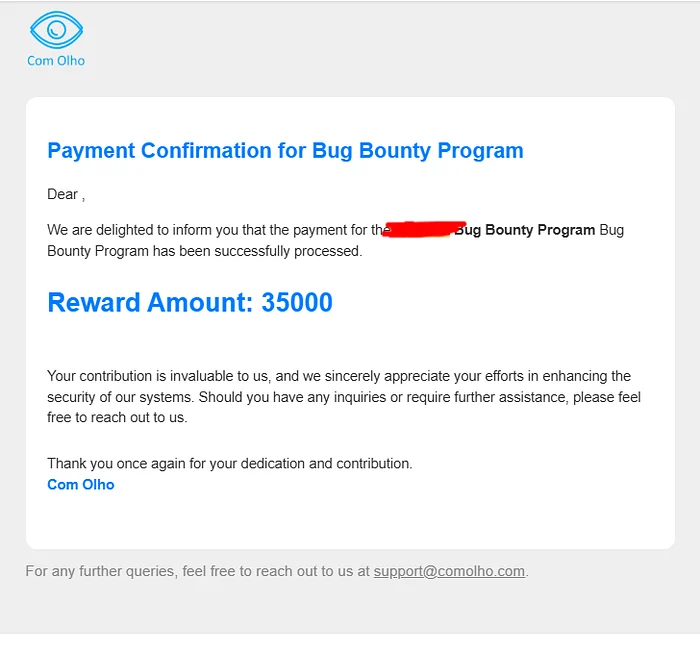
That is the whole finding. A chat message that should have been treated as harmless text was treated as code, and it ran for other people who opened the same chat. This kind of bug is called Stored Cross-Site Scripting, or Stored XSS for short. The researcher reported it through the organisation's bug bounty programme and received a reward of approximately $400 USD. The organisation and the exact website are kept anonymous in the write-up.
The feature that was tested
The target was an online learning platform that offered live sessions. A live session is a scheduled class that happens in real time: you join it in your browser, and while it runs, participants can communicate with each other through a chat panel. You join a session, open the chat, type a message and send it, and the message is shown to the other participants in the same session.
That is a normal, everyday feature. Nothing about it looks dangerous. But it has one property that matters for security: whatever you type is stored by the website and then shown to other people. Any feature that does that, chat, comments, reviews, profile descriptions, is worth a careful look.
The researcher, Rahul Kumar (RAHUL -Nj), keeps the organisation and the identifying details of the target anonymous in the write-up. The finding is a Stored Cross-Site Scripting (XSS) issue in that live chat feature.
Setting up the test
The testing used authorised test accounts. An authorised test account is an account the platform owner has given permission to use for security testing, usually under the rules of a bug bounty programme. A bug bounty programme is a scheme where an organisation invites outside researchers to look for security problems and report them, often paying a reward for valid findings. Testing without that permission would be unauthorised and is not what happened here.
Two accounts were needed:
- One account to send the message.
- A second account to view the same live session and its chat as another participant.
The second account is the important one. If you type something into a website and only your own browser reacts, that could just be your own browser doing something odd. If a different person, logged in separately, sees the same effect, then the problem belongs to the website, not to you.
No special tools, versions or configuration are described in the report. The work was done through the normal web interface of the platform, the same pages and buttons any ordinary user would use. The only precondition for the test was being able to join an available live learning session and open its chat panel.
How the researcher found it
The chat looked ordinary at first. What made the researcher look closer was a set of questions about how the application handled the message text:
- Is the application treating my message as plain text?
- What happens if I submit HTML instead of an ordinary message?
- Will the browser display the input safely, or interpret it as code?
These questions need a little unpacking.
A web page is built from HTML. HTML is the language that describes what is on a page: this bit is a paragraph, this bit is an image, this bit is a button. HTML is written with tags, which look like <img> or <p>, and tags can carry extra settings called attributes, written inside the tag. A browser reads HTML and turns it into the page you see.
JavaScript is a programming language that browsers can run. It is what makes pages interactive: menus that open, forms that check your typing, messages that appear without reloading. JavaScript can also do things on behalf of the page, such as read what is on the screen or send requests to the website.
When a website shows you text that another user typed, it has a choice. It can treat that text as literal characters, so that if someone types <img> you literally see the characters <img> on screen. Or it can treat that text as HTML, so the browser builds an actual image element from it. The first choice is safe. The second choice is where XSS comes from, because HTML can carry JavaScript, and JavaScript runs.
So the researcher's questions were really one question: does this chat box treat my message as text, or as code? To answer it, a harmless proof-of-concept payload was submitted to the chat input. A payload, in this context, is simply the piece of input you send to test how the application reacts. A proof of concept is a minimal demonstration that a problem exists, without doing any damage.
Sending the test message
Step 1: log in and join a live session
The researcher logged in with an authorised test account and joined an available live learning session, then opened the chat panel. This step is just about getting to the feature in its normal state, the way a real participant would.
Step 2: submit the proof-of-concept payload
The following payload was sent as a chat message:
<img src="x" onerror="alert(1)">
Here is what each part means, in plain words:
<img ...>is an HTML tag that tells the browser to display an image.src="x"is an attribute that tells the browser where the image file is. Here it points tox, which is not a real address, so there is no image to load.onerror="..."is an attribute that tells the browser what to do if loading the image fails. Becausexcannot be loaded, the loading does fail, so the browser runs whatever is insideonerror.alert(1)is a very small piece of JavaScript. It tells the browser to show a pop-up box with the number 1 in it. It does nothing else: no data is read, nothing is changed, nothing is sent anywhere.
So the whole payload is a trap that only springs if the browser treats the message as HTML. If the chat shows the message as plain text, the visitor sees the literal characters <img src="x" onerror="alert(1)"> and nothing happens. If the chat lets the browser build an image element, the image fails to load, the error handler fires, and the pop-up appears. The pop-up is the signal: it means JavaScript ran.
Nothing destructive was sent. The payload exists only to answer the question "does code run here?".
Step 3: watch what happens in the sender's browser
After the message was sent, the alert appeared in the sender's own browser. The message was not displayed as plain text: the browser interpreted the HTML and executed the JavaScript. That was the first indication that the chat rendered user-controlled input unsafely.
Rendering, in this context, means turning stored content into what you actually see on the page. Unsafe rendering means the website handed the message to the browser as HTML instead of as text.
Step 4: check the same message with a second account
An alert in your own browser only proves that your own input is rendered unsafely. It does not yet prove that anyone else is affected. The more important question was whether the message affected anyone else.
The researcher opened the same live session with another authorised test account and checked the chat. The injected JavaScript executed in that second participant's browser as well.
This is the step that turns a curiosity into a real finding. The message had been stored by the platform, and when a different person opened the chat, the platform served that stored message to them, and their browser ran the code inside it. The person did not click anything, did not download anything, and did not type anything unusual. They simply opened the chat.
Because the payload was stored with the message and executed for another viewer, the behaviour confirmed a Stored XSS vulnerability in the live chat functionality. The issue was not limited to the person who sent the message: other users viewing the shared chat could be affected too.
The validation process, in the researcher's own summary:
- Logged in using an authorized test account.
- Joined an available live learning session.
- Opened the chat panel.
- Submitted a harmless XSS proof-of-concept payload.
- Observed JavaScript execution in the sender's browser.
- Checked the same message using another authorized account.
- Confirmed that the behaviour also affected the second viewer.
No collection of sensitive user information was necessary to demonstrate the behaviour. The pop-up alone was enough evidence.
What Stored XSS actually is
Stored Cross-Site Scripting happens when a website saves something a user typed, and later shows that saved content to other people in a way that lets the browser run it as code instead of displaying it as text.
An everyday comparison: imagine a shared noticeboard in an office. You write a note and pin it up. Everyone who walks past reads it. Now imagine that the noticeboard has a strange rule: if a note contains the words "please ring the bell", the bell actually rings. Someone could pin up a note that looks like an ordinary message but contains that phrase, and the bell would ring every time anyone walked past, long after the author had gone home. The note was stored, and its effect kept happening for other people. That is the shape of Stored XSS: the input is saved, and its effect repeats for every viewer.
Contrast that with reflected XSS, where the malicious input is not saved. It is bounced straight back to the person who sent it, usually through a crafted link. If you do not click the link, nothing happens. Stored XSS is different because the content sits in the application and affects users who view it later, including users who never interacted with the attacker at all.
That is why shared features such as chat rooms, comments and discussion boards deserve careful security testing. They are built to store one person's words and show them to many others, which is exactly the pattern this bug needs.
Why the finding mattered
The most interesting part of this finding was not simply that a JavaScript alert appeared. It was the fact that the behaviour could affect another participant.
Depending on the application's architecture and security controls, Stored XSS can potentially be abused for:
- Phishing content displayed inside a trusted website.
- Unauthorised actions performed through a victim's session.
- Exposure of information accessible to injected scripts.
- Attacks targeting moderators or other privileged users.
- Redirection to malicious websites.
A few of those terms are worth explaining.
Phishing means tricking someone into believing something is genuine so they hand over information or take an action. Phishing is much more convincing when it appears inside a website the person already trusts, such as their learning platform, rather than in a strange email.
A session is how a website remembers that you are logged in. When you log in, the site gives your browser a small piece of data, often called a cookie or a token, and your browser sends it back with every request so the site knows who you are. If code runs in your browser while you are logged in, it may be able to act as you, because the browser will attach your session data to whatever the code asks it to do.
Moderators and other privileged users are people with extra powers on the site, such as the ability to remove messages or manage a session. If code runs in their browser, the consequences can be larger than for an ordinary participant.
These are potential consequences of the vulnerability class, not claims that every impact was demonstrated in the test. What was demonstrated is script execution in the sender's browser and in a second authorised account viewing the same session.
The key lesson: never judge an XSS vulnerability only by the alert box. Understand where the input is rendered, who can see it, and which users might be affected.
How developers can prevent it
Stored XSS can often be prevented through well-established secure development practices. The report lists six.
- Treat user input as untrusted. Never assume that a message is safe just because it comes from a logged-in user. Being logged in says who someone is, not that what they type is harmless.
- Encode output correctly. Use context-aware output encoding so that user-submitted HTML is displayed as text rather than interpreted as executable markup. Encoding means converting characters that have a special meaning in HTML into a form that displays them literally. Context-aware means doing it differently depending on where the text lands on the page, because the rules differ between, say, a paragraph and a link address.
- Avoid unsafe HTML rendering. Use safe text-rendering methods instead of directly inserting untrusted input into the page's HTML. In practice, this means telling the browser "put this string here as text" rather than "treat this string as page structure".
- Sanitise rich text when necessary. If users genuinely need formatting features, use a maintained HTML sanitisation library with a strict allowlist. Sanitising means cleaning input by removing anything dangerous. An allowlist is a list of things that are permitted, with everything else rejected by default.
- Add a Content Security Policy. A restrictive CSP provides an additional layer of defence, although it does not replace fixing unsafe rendering. A Content Security Policy is a set of instructions a website sends to the browser saying which sources of code are allowed to run. It is a seatbelt, not a fix for the broken rendering.
- Test shared features. Chat messages, comments, notifications and other user-generated content should be included in regular security testing.
Responsible disclosure
After validating the finding, the researcher submitted a report through the organisation's bug bounty programme. The write-up says the submission happened in January, but the sentence is cut off at that point.
The organisation and identifying target details are intentionally kept anonymous in the write-up.
Responsible disclosure is an important part of security research. Finding a vulnerability is one step; communicating it clearly and giving the organisation an appropriate opportunity to investigate and remediate it is just as important. Remediate means fix. The idea is that the people who can fix the problem hear about it privately, with enough time to act, before any public description appears.
Always follow the applicable bug bounty rules and obtain any required permission before publishing a finding.
What the researcher took away
This finding reminded the researcher of something worth repeating: do not ignore the simple features.
We often spend time looking at authentication, APIs, access control and complicated business logic. Those areas are important, but ordinary features can also contain security weaknesses.
- Authentication is the process of proving who you are, usually by logging in.
- An API is the way one piece of software talks to another, for example a mobile app asking a website for data. Think of it as a service counter: you ask for something specific and get it back, without going into the back room yourself.
- Access control is the set of rules about who is allowed to do what.
- Business logic is the set of rules that describe how a feature is supposed to work, such as "only the host can end a session".
A chat box might look harmless. A comment field might seem boring. A profile description might appear insignificant. But if an application handles user input incorrectly, any of these features can become an entry point for an attack.
The researcher's approach is simple: stay curious, test carefully, verify the impact, and never go beyond the scope you are authorised to test. Scope means the list of systems and features a programme has given you permission to test.
Final thoughts
One chat message led the researcher to investigate an unexpected behaviour, validate JavaScript execution, and confirm that another participant could also be affected.
For the researcher, that is one of the most interesting parts of bug bounty hunting: you start with a question, follow the evidence, and discover what the application is actually doing behind the scenes.
And the takeaway to remember: a field that accepts text should not automatically be trusted to handle that text safely.
The finding earned a bounty reward of approximately $400 USD.
Glossary
- Alert: a small pop-up box a browser can show using JavaScript. Here it was used only as a harmless signal that code had run.
- Allowlist: a list of things that are explicitly permitted, with everything not on the list rejected.
- API: the way one piece of software requests data or actions from another, without needing to know how the other side works internally.
- Attribute: an extra setting written inside an HTML tag, such as where an image file is located.
- Authentication: the process of proving who you are, usually by logging in.
- Authorised test account: an account the platform owner has permitted to be used for security testing, typically under a bug bounty programme.
- Bug bounty programme: a scheme where an organisation invites outside researchers to find and report security problems, often in exchange for a reward.
- Business logic: the rules describing how a feature is meant to work.
- Content Security Policy (CSP): instructions a website sends to the browser saying which sources of code may run. An extra layer of defence, not a replacement for safe rendering.
- Context-aware output encoding: converting special characters so they display literally, using rules that match the place on the page where the text appears.
- Cookie: a small piece of data a website stores in your browser, often used to remember that you are logged in.
- Cross-Site Scripting (XSS): a bug where a website lets content supplied by a user be treated as code by someone's browser.
- Encoding: converting characters into a form that is displayed literally rather than interpreted as page structure.
- HTML: the language that describes the structure of a web page, using tags such as
<img>and<p>. - HTML sanitisation: cleaning user-supplied markup by removing anything not on an allowlist.
- Impact: the real-world consequence of a vulnerability, as opposed to the mere fact that it exists.
- Injection: getting input into a place where it is treated as instructions rather than as data.
- JavaScript: the programming language browsers run to make pages interactive.
- Moderator: a user with extra powers on a site, such as removing messages or managing a session.
- Payload: the specific piece of input sent to test how an application reacts.
- Phishing: tricking someone into believing something is genuine so they hand over information or take an action.
- Proof of concept: a minimal demonstration that a problem exists, without causing damage.
- Reflected XSS: an XSS variant where the input is not stored but bounced straight back to the person who sent it, usually via a crafted link.
- Remediate: to fix a security problem.
- Rendering: turning stored content into what you actually see on the page.
- Responsible disclosure: reporting a vulnerability privately to the organisation and giving it time to fix it before details are published.
- Scope: the systems and features a programme has authorised a researcher to test.
- Session: the period during which a website remembers you are logged in, usually tracked with a cookie or token.
- Stored XSS: an XSS variant where the input is saved by the application and later shown to other users, so the code runs for viewers rather than only for the sender.
- Tag: a piece of HTML syntax, such as
<img>, that tells the browser what to build. - Token: a piece of data used to identify you or your session to a website, similar in role to a cookie.
- Unauthorised: done without the permission of the system owner.
- Unsafe rendering: inserting user-supplied content into a page in a way that lets the browser treat it as code.



