Firebase API Keys: Got a Callback From A Potential Client
Google Cloud and Firebase API keys that were historically treated as non-secret identifiers could, once the Gemini API was enabled on the same project, be used to call Gemini endpoints and run billable inference workloads. Attackers or bots scraping exposed keys could therefore run up large charges on the key owner's account.

medium.com
Published on medium.com
Gcp
The full write-up lives on its author's site
It belongs to its author, so we link to it rather than copy it. The other two tabs are our own rewrites, checked against it.
Context
This is not a bug report against a single target. It is an account of a security model change in Google Cloud and Firebase, and of what that change did to one startup whose founder called the author for advice. The product involved is the Gemini Developer API (the Generative Language API), and the feature at the centre of it is the Google API key: the credential that developers have historically embedded in browser JavaScript for Firebase, Maps and similar client-side products.
A standard Google API key, typically starting with AIza, is a project credential. Google states that it associates requests with a Cloud project for billing and quota, but does not identify the caller. It can be restricted by API, application, IP address or HTTP referrer, but the key itself is not an IAM identity. Firebase API keys were documented as public by design when restricted to Firebase-related APIs, and developers were encouraged to embed them in client code.
When the Generative Language API was enabled on a project, those same keys could reach Gemini endpoints and be used as billable AI credentials. The article covers the disclosure, Google's response and the new auth-key model.
Setup
The scenario is a startup that went live without a security architecture review and without penetration testing. The founder is a serial entrepreneur whom the author has known for over ten years and had worked with before. The author had proposed an architecture review covering the app, the site, the GCP infrastructure and the LLM application driving the product. The proposal was under $10K USD; the founder was bootstrapping and did not have the money, so the review did not happen. The author had previously given him free consulting hours two years earlier, and the version of the system seen then did not use Firebase.
No accounts, roles, tools or versions are given for the incident itself. The technical preconditions that matter are on the Google side: a GCP project with a Firebase or Google API key exposed in client code, and the Generative Language API enabled on the same project.
Finding it
In the February 2026 time frame, when these reports were first appearing, the author contacted every client from the past five years to tell them to lock down their Firebase keys. The founder was not among those warned about Firebase specifically, because the version of his app the author had seen did not use it.
A few weeks before the call, his GCP spend spiked by many thousands of dollars overnight. Keys that had previously been treated as public information could suddenly be used to access Gemini resources unless explicitly disabled. He locked the keys down and disabled Gemini spend, but by then more had been spent in one 24-hour period than the architecture review would have cost. His databases were not compromised as far as he could tell, no customer data was lost and the platform stayed intact; the motive appears to have been free Gemini spend on his account. He was talking to his GCP account representative about reversing the charges; Google had not refused, but was slow to say what it would do.
Exploitation
The article does not walk through an attack against a specific target. It describes the mechanism and the timeline, and gives one illustrative request shape.
Step 1: A key that was already public
A standard key looks like this:
AIza...
Such keys were commonly embedded in browser JavaScript. Google explicitly documents that Firebase API keys are not secrets when appropriately restricted to Firebase-related APIs.
Step 2: Use the key against the Generative Language API
The article illustrates the request as:
GET /v1beta/modelsx-goog-api-key: AIza...
Google associates the request with project X and charges quota to project X. It does not establish that service account Y made the call. If the Generative Language API is enabled on that project, the key can be used for Gemini inference, which is billed per token, image or video generated.
Step 3: Scale the spend
Because Gemini usage is usage-based and scales quickly under automation, a valid key can be used for high-volume inference, continuous image, video or text generation, and account drain before alerts fire. The article lists reported examples of roughly $10K in hours from a single key misuse, roughly $54K in about 13 hours through an unrestricted Firebase browser key, and roughly $82K in about 48 hours in a startup compromise.
Timeline
- February 25, 2026: Truffle Security publicly disclosed that existing Google API keys, including keys intentionally exposed in Maps and Firebase applications, could gain access to Gemini when the Generative Language API was enabled in the same project. Google had first classified Truffle's November 2025 report as intended behaviour, then reclassified it as a bug in December 2025 after Truffle demonstrated it with Google's own publicly exposed keys.
- May 21, 2026: Google published an official Google Cloud Blog post, "Securing Your Gemini and Google API Keys", saying a Gemini API key is a standard Google API key behind the scenes, telling developers to restrict keys to the minimum APIs required, and warning that Firebase-created keys can have a broad API allowlist and should be audited.
- After May 21, 2026: Firebase documentation draws the distinction more explicitly: Firebase API keys are public by design when restricted to Firebase-related APIs, the Generative Language API should not be put on a publicly accessible Firebase key, and a Gemini Developer API key should never be included in application code or configuration files.
- June 29, 2026: Truffle reported that Google had fixed the privilege escalation by moving Gemini toward separate service-account-backed auth keys. Truffle reported that Gemini would reject unrestricted standard API keys and was scheduled to reject standard API keys entirely by September 2026.
- September 30, 2026: Google's migration documentation says Gemini is transitioning from standard API keys to auth keys, with migration required by that date.
Root cause
The problem is a mismatch between two security models. In the Firebase and Maps era, keys were treated as identifiers that were reasonably safe to expose. In the Gemini era, the same keys could trigger high-cost AI compute. Enabling Gemini on a project implicitly extended capability to existing keys, many of which were embedded in frontend apps, present in public code and never intended for AI access. There was no obvious opt-in migration step for many developers and no expectation that public keys now mapped to expensive compute.
Existing defences did not stop it because the key was valid and the API was enabled: usage is not inherently blocked just because the caller is unauthorised. Billing alerts arrive hours behind usage, budget caps often do not stop execution immediately, and support responses vary, with some users reporting charges treated as valid usage, limited or no refunds, and accounts suspended while disputes are reviewed.
What an auth key changes
An auth key is still technically an API key. Google distinguishes standard API keys from authorisation (auth) keys for the Gemini Developer API.
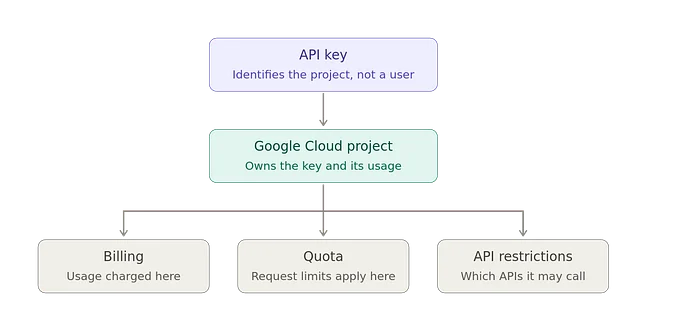
A standard key is a project credential, as described above.
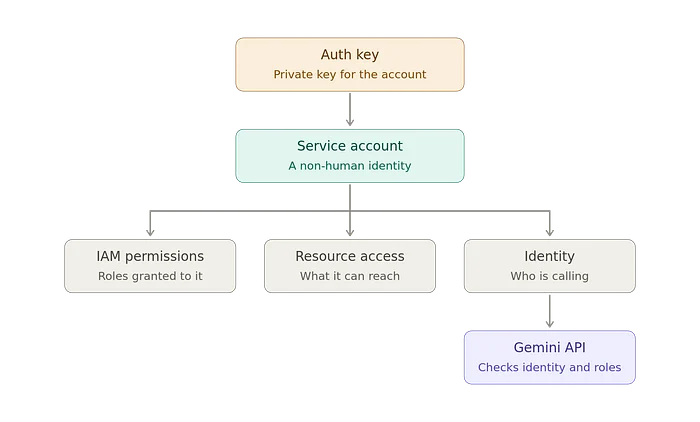
An auth key is bound directly to a Google Cloud service account. Google's documentation says requests made with an auth key are processed under the identity of the bound service account, allowing more granular access control, and auth keys are restricted to the Generative Language API by default. Instead of a key associated with project 123, you have a credential representing service account X.
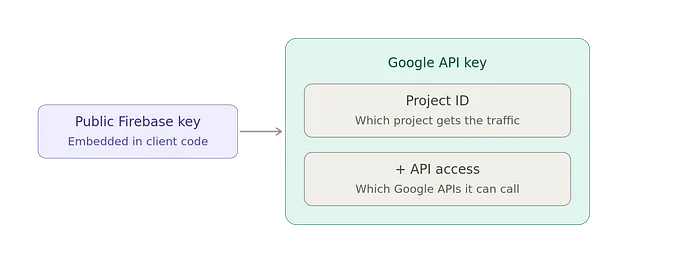
The old model was roughly a key associated with a project, commonly embedded in browser JavaScript.
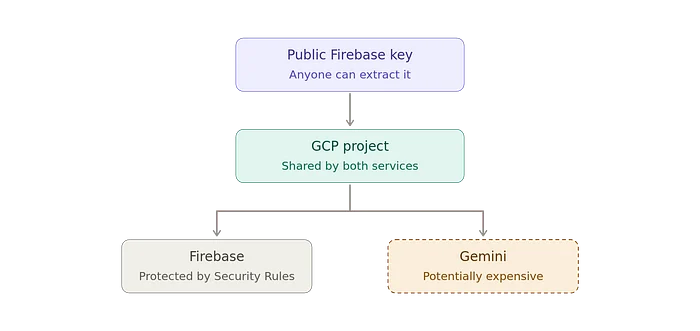
The Gemini-era model exposed the problem: those keys could reach Gemini.
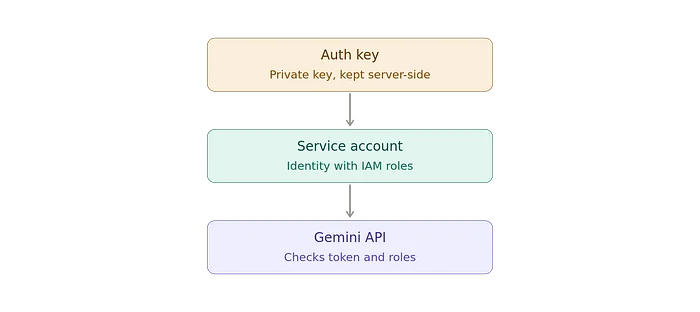
The auth-key model establishes an identity boundary, closer to conventional cloud workload authentication.
One nuance: an auth key is not an API key that has IAM permissions. Standard keys associate requests with a project; auth keys are bound to a service account and requests run under that identity. Since May 28, 2026, new Gemini API keys created in AI Studio are auth keys by default, and standard keys are being phased out for Gemini with migration required by September 30, 2026. For Firebase, Firebase AI Logic has moved away from standard Gemini keys and now uses a Google-managed service account (P4SA) to authorise Gemini Developer API access.
Impact
The impact is financial and, in the reported cases, not a data breach. An exposed key in a project with Gemini enabled can be used by an attacker or by bots scraping exposed keys to run inference at scale and drain the account. The author's client lost more in one day than the review would have cost, with no customer data lost and the platform intact. The article lists the figures as examples reported in documented incidents.
Fix
The article recommends the following, and notes that migrating to auth keys is the approach going forward.
- Rotate and audit all API keys immediately. Cover Firebase keys, Google Cloud keys (
AIza...) and any key used in frontend or mobile apps. Delete unused keys and regenerate new ones. - Restrict API keys. In Google Cloud Console, restrict keys to specific APIs such as Firebase Auth or Firestore, never leave them unrestricted, add HTTP referrer restrictions for browser keys and IP restrictions for server keys. The article calls this the biggest control lever.
- Disable Gemini APIs where not needed. If AI features are not in use, disable the Generative Language or Gemini API, or isolate it in a separate project with separate credentials.
- Add hard usage limits. Budget alerts are for visibility, not prevention. Use quotas per API key where possible, rate limits on endpoints and server-side request mediation instead of direct client calls.
- Move sensitive AI calls server-side. Never expose keys in frontend JavaScript, mobile apps without mediation or public repositories. Use backend proxies and service accounts where appropriate.
- Monitor in near real time. Use Cloud Logging for API requests, anomaly detection for token usage spikes and automated key revocation when thresholds are exceeded.
- Migrate the project to auth keys.
Variants to test
These are general directions suggested by the model change, not steps from the article.
- Audit every project with the Generative Language API enabled for keys that predate the change. A positive result is a key reachable from client code that can call Gemini endpoints.
- Check Firebase-created keys for broad API allowlists. A positive result is a key whose allowlist includes APIs beyond what the app uses.
- Test whether standard keys are still accepted on a project. A positive result is a standard key returning a successful Gemini response rather than a rejection.
- Review billing alert latency and budget caps against actual usage. A positive result is spend continuing after a cap should have stopped it.
- Check whether Firebase AI Logic is in use and whether it relies on the managed service account rather than a standard key. A positive result is a standard Gemini key still present in client configuration.
What happened, in plain words
A friend of the author, a startup founder, called him one morning. The founder had launched his app without a security review, and then his Google Cloud bill suddenly jumped by many thousands of dollars overnight. Nobody had stolen customer data. Somebody had found a key that was sitting in his website's code, a key that used to be harmless, and used it to run Google's Gemini AI service on the founder's account. The founder paid for someone else's AI usage.
The reason this was possible is a change on Google's side. For years, developers were told that certain Google API keys were fine to put in public web pages. Then Google enabled Gemini on projects, and those same public keys could suddenly be used to call Gemini, which costs money for every request. The article explains what changed, the timeline, and what developers should do now.
Before going further, a few words that come up constantly:
- API (Application Programming Interface): a way for one piece of software to ask another piece of software to do something. Think of a restaurant: you do not walk into the kitchen, you give your order to a waiter, and the waiter brings back food. An API is the waiter between your app and Google's servers.
- API key: a long string of characters that identifies your app to that API, like a membership card. The server checks the card and decides whether to serve the request and whose bill to put it on.
- Gemini / Generative Language API: Google's AI service. You send it text, images or video prompts, and it generates content. Each request costs money, billed by how much text, image or video is produced.
- Firebase: a set of Google tools for building apps, especially the parts that run in a user's browser. Firebase projects use Google API keys.
- GCP (Google Cloud Platform): Google's collection of cloud services, where projects, billing and API keys live.
- Billing: the money Google charges your project for using its services.
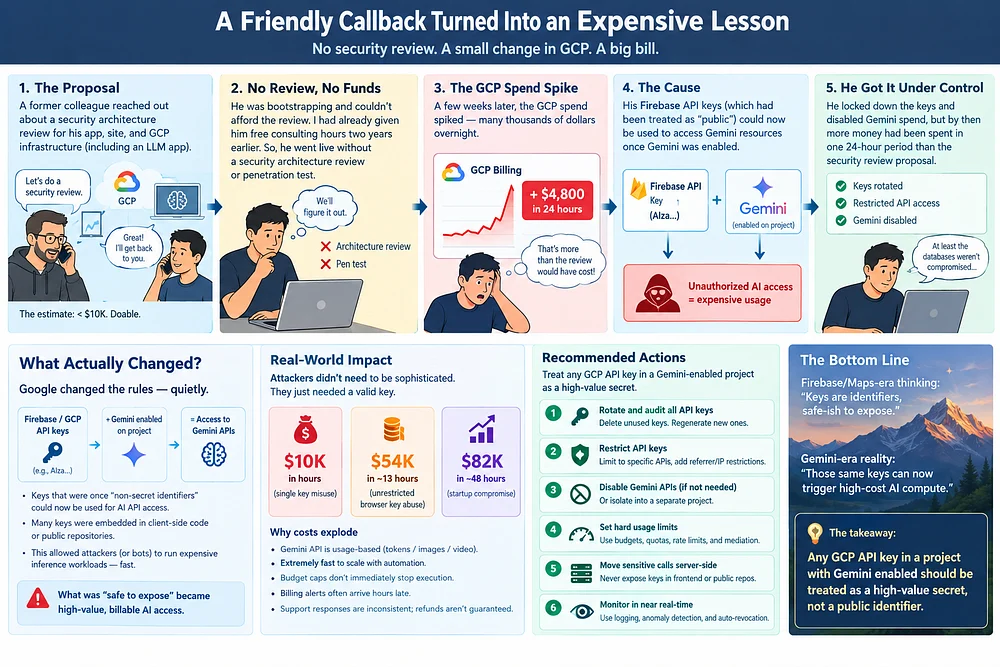
The setup: a startup that skipped the review
The founder is a serial entrepreneur, meaning he has started several companies. The author has known him for over ten years and had worked with him before. Earlier in the year they discussed a security architecture review: a structured look at how the app, the website, the Google Cloud infrastructure and the AI application were put together, to spot obvious design mistakes before launch. The author is clear that this is not a penetration test. A penetration test is an active attempt to break in, like hiring someone to try the doors and windows. An architecture review is more like a building inspector reading the blueprints before anyone moves in.
The proposal was under $10K USD. The founder was funding the startup himself and could not afford it, so the review did not happen. The author had already given him free consulting hours two years earlier, and the version of the system he saw back then did not use Firebase. That detail matters later: it is why the founder was not specifically warned about Firebase keys.
The technical conditions that made the incident possible were all on Google's side: a Google Cloud project with a Firebase or Google API key exposed in code that runs in the browser, and the Generative Language API (Gemini) switched on in the same project.
How it was found: the bill
In the February 2026 time frame, when these reports were first appearing, the author messaged every client from the past five years, telling them to lock down their Firebase keys. The founder was not among those warned about Firebase, because the app the author had seen did not use it.
A few weeks before the call, his Google Cloud spend spiked by many thousands of dollars overnight. Keys that had been treated as public information could suddenly be used to reach Gemini resources unless they were explicitly disabled. He locked the keys down and turned off Gemini spending, but by then more had been spent in a single 24-hour period than the architecture review would have cost.
His databases were not compromised as far as he could tell, no customer data was lost, and the platform stayed up. Somebody just wanted the free Gemini spend on his account. He was talking to his Google Cloud account representative about getting the charges reversed. Google had not said no, but was slow to say what it would do.
How the abuse works
The article does not walk through an attack on one specific target. It explains the mechanism, gives a timeline, and shows one example of what a request looks like.
Step 1: a key that was already public
A standard Google API key looks like this:
AIza...
This is the beginning of the key string. The AIza prefix is how these keys are recognised. Such keys were commonly placed inside browser JavaScript, the code that runs on the visitor's own computer when a page loads. Anyone who opens the page can read that code, so anyone can read the key. Google explicitly documents that Firebase API keys are not secrets when they are appropriately restricted to Firebase-related APIs. In other words: the key is visible, but it is supposed to be harmless because it can only do a narrow set of things.
Step 2: use the key against the Generative Language API
The article illustrates the request like this:
GET /v1beta/modelsx-goog-api-key: AIza...
Line by line:
GETis the HTTP method, the verb that says "give me something". It is the same kind of request your browser sends when you open a page./v1beta/modelsis the path on Google's server, pointing at the models endpoint of the Generative Language API.v1betais the version of the API.x-goog-api-key: AIza...is a header, a small label sent along with the request. This one carries the API key. The header name isx-goog-api-keyand the value is the key itself.
When Google receives this, it associates the request with project X and charges the quota and the bill to project X. It does not establish that service account Y made the call. A service account is a non-human identity, an account that belongs to software rather than a person. The key proves which project is paying, not who is asking. If the Generative Language API is enabled on that project, the key can be used for Gemini inference, billed per token, image or video generated. A token here is a small chunk of text the AI processes; you pay per chunk.
Step 3: scale the spend
Gemini usage is usage-based: you pay for what you consume. It also scales very quickly when automated. A valid key can be used for high-volume inference, generating images, video or text continuously, and draining the account before alerts fire. The article lists reported examples: roughly $10K in hours from a single misused key, roughly $54K in about 13 hours through an unrestricted Firebase browser key, and roughly $82K in about 48 hours in a startup compromise.
Timeline
- February 25, 2026: Truffle Security, a security research firm, publicly disclosed that existing Google API keys, including keys deliberately exposed in Maps and Firebase applications, could gain access to Gemini when the Generative Language API was enabled in the same project. Google had first classified Truffle's November 2025 report as intended behaviour, meaning "this is how it is supposed to work", then reclassified it as a bug in December 2025 after Truffle demonstrated it using Google's own publicly exposed keys.
- May 21, 2026: Google published an official Google Cloud Blog post, "Securing Your Gemini and Google API Keys". It said a Gemini API key is a standard Google API key behind the scenes, told developers to restrict keys to the minimum APIs required, and warned that Firebase-created keys can have a broad API allowlist and should be audited. An allowlist is the list of APIs a key is permitted to call; broad means it permits many.
- After May 21, 2026: Firebase documentation draws the distinction more explicitly. Firebase API keys are public by design when restricted to Firebase-related APIs, the Generative Language API should not be put on a publicly accessible Firebase key, and a Gemini Developer API key should never be included in application code or configuration files.
- June 29, 2026: Truffle reported that Google had fixed the privilege escalation by moving Gemini toward separate service-account-backed auth keys. Privilege escalation means a credential that was meant to have limited power ends up with more power than intended. Truffle reported that Gemini would reject unrestricted standard API keys and was scheduled to reject standard API keys entirely by September 2026.
- September 30, 2026: Google's migration documentation says Gemini is transitioning from standard API keys to auth keys, with migration required by that date.
Root cause
The problem is a mismatch between two security models. In the Firebase and Maps era, keys were treated as identifiers that were reasonably safe to expose. In the Gemini era, the same keys could trigger high-cost AI compute. Turning on Gemini in a project implicitly extended capability to existing keys, many of which were embedded in frontend apps, present in public code and never intended for AI access. There was no obvious opt-in migration step for many developers, and no expectation that public keys now mapped to expensive compute.
Existing defences did not stop it because the key was valid and the API was enabled. Usage is not inherently blocked just because the caller is unauthorised. Billing alerts arrive hours behind usage, budget caps often do not stop execution immediately, and support responses vary. Some users reported charges treated as valid usage, limited or no refunds, and accounts suspended while disputes were reviewed.
What an auth key changes
An auth key is still technically an API key. Google distinguishes standard API keys from authorisation (auth) keys for the Gemini Developer API.
A standard key is a project credential, as described above.
An auth key is bound directly to a Google Cloud service account. Google's documentation says requests made with an auth key are processed under the identity of the bound service account, which allows more granular access control, and auth keys are restricted to the Generative Language API by default. Instead of a key associated with project 123, you have a credential representing service account X.
The old model was roughly a key associated with a project, commonly embedded in browser JavaScript.
The Gemini-era model exposed the problem: those keys could reach Gemini.
The auth-key model establishes an identity boundary, closer to conventional cloud workload authentication. An identity boundary means the credential says who is acting, not just which project pays, so access rules can be applied to that identity.
One nuance: an auth key is not an API key that has IAM permissions. IAM (Identity and Access Management) is Google's system for granting permissions to identities. Standard keys associate requests with a project; auth keys are bound to a service account and requests run under that identity. Since May 28, 2026, new Gemini API keys created in AI Studio are auth keys by default, and standard keys are being phased out for Gemini with migration required by September 30, 2026. For Firebase, Firebase AI Logic has moved away from standard Gemini keys and now uses a Google-managed service account (P4SA) to authorise Gemini Developer API access.
Impact
The impact is financial, and in the reported cases it is not a data breach. An exposed key in a project with Gemini enabled can be used by an attacker, or by bots that scrape exposed keys, to run inference at scale and drain the account. The author's client lost more in one day than the review would have cost, with no customer data lost and the platform intact. The article lists the figures as examples reported in documented incidents.
Fix
The article recommends the following, and notes that migrating to auth keys is the approach going forward.
- Rotate and audit all API keys immediately. Cover Firebase keys, Google Cloud keys (
AIza...) and any key used in frontend or mobile apps. Delete unused keys and regenerate new ones. Rotating means replacing a key with a new one so the old one stops working. - Restrict API keys. In Google Cloud Console, restrict keys to specific APIs such as Firebase Auth or Firestore, never leave them unrestricted, add HTTP referrer restrictions for browser keys and IP restrictions for server keys. An HTTP referrer restriction means the key only works when the request comes from your own website's address. An IP restriction means it only works from a specific server address. The article calls this the biggest control lever.
- Disable Gemini APIs where not needed. If AI features are not in use, disable the Generative Language or Gemini API, or isolate it in a separate project with separate credentials.
- Add hard usage limits. Budget alerts are for visibility, not prevention. Use quotas per API key where possible, rate limits on endpoints and server-side request mediation instead of direct client calls. A quota is a hard ceiling on how much can be used; a rate limit caps how many requests can be made in a period.
- Move sensitive AI calls server-side. Never expose keys in frontend JavaScript, mobile apps without mediation or public repositories. Use backend proxies and service accounts where appropriate. A proxy is a server in the middle that holds the key and forwards requests, so the key never reaches the browser.
- Monitor in near real time. Use Cloud Logging for API requests, anomaly detection for token usage spikes and automated key revocation when thresholds are exceeded. Revocation means switching a key off.
- Migrate the project to auth keys.
Variants to test
These are general directions suggested by the model change, not steps from the article.
- Audit every project with the Generative Language API enabled for keys that predate the change. A positive result is a key reachable from client code that can call Gemini endpoints.
- Check Firebase-created keys for broad API allowlists. A positive result is a key whose allowlist includes APIs beyond what the app uses.
- Test whether standard keys are still accepted on a project. A positive result is a standard key returning a successful Gemini response rather than a rejection.
- Review billing alert latency and budget caps against actual usage. A positive result is spend continuing after a cap should have stopped it.
- Check whether Firebase AI Logic is in use and whether it relies on the managed service account rather than a standard key. A positive result is a standard Gemini key still present in client configuration.
Glossary
- API: a way for one piece of software to ask another to do something, like a waiter taking your order to the kitchen.
- API key: a long string that identifies your app to an API and tells the server whose bill to charge.
- Auth key: an API key bound to a Google Cloud service account, so requests run under that identity.
- Billing: the money Google charges a project for using its services.
- Budget alert: a notification that spending has reached a level; it does not stop the spending.
- Cloud Logging: Google's service for recording what requests hit your project.
- Firebase: Google's set of tools for building apps, especially browser-side parts.
- Firebase AI Logic: Firebase's feature for calling Gemini from an app, now using a Google-managed service account.
- Frontend: the code that runs in the user's browser, visible to anyone who opens the page.
- GCP: Google Cloud Platform, Google's collection of cloud services.
- Gemini / Generative Language API: Google's AI service that generates text, images and video, billed per use.
- Header: a small label sent with an HTTP request, such as one carrying an API key.
- HTTP referrer restriction: a rule that a key only works when the request comes from a specified website address.
- IAM: Google's Identity and Access Management system for granting permissions to identities.
- Identity boundary: a security boundary where a credential says who is acting, not just which project pays.
- Inference: one run of an AI model producing output from a prompt.
- IP restriction: a rule that a key only works from a specified server address.
- P4SA: a Google-managed service account used by Firebase AI Logic to authorise Gemini access.
- Penetration test: an active attempt to break into a system, like testing the doors and windows.
- Privilege escalation: when a credential meant to have limited power ends up with more power than intended.
- Proxy: a server in the middle that holds a secret and forwards requests, so the secret never reaches the browser.
- Quota: a hard ceiling on how much of a service can be used.
- Rate limit: a cap on how many requests can be made in a period.
- Revocation: switching a key off so it no longer works.
- Rotation: replacing a key with a new one so the old one stops working.
- Security architecture review: a structured look at how a system is designed, to spot obvious mistakes before launch.
- Service account: a non-human identity belonging to software rather than a person.
- Token: a small chunk of text an AI model processes; you pay per chunk.
- Usage-based: pricing where you pay for what you consume.

