Forging OAuth tokens using discovered client id and client secret

Below is a short story about leaked OAuth client id and client secret which I found in the page source that led to generating foreign tokens.
The full write-up lives on its author's site
It belongs to its author, so we link to it rather than copy it. The other two tabs are our own rewrites, checked against it.
Context
This is a short account of a leaked OAuth client ID and client secret found in the page source of a web application, and of how those credentials were used to mint tokens. The target is described only as site.com in the requests; the write-up does not name the product or the organisation behind it. The feature involved is the OAuth client credentials flow: a client authenticates to an authorisation server with its client ID and client secret and receives an access token that it can use to call an API on its own behalf, outside the context of any user.
The author quotes a general description of OAuth as an open-standard authorisation protocol or framework that gives applications the ability for "secure designated access", using the familiar example of telling Facebook that it is acceptable for Instagram to access your profile or post updates without handing over your Facebook password.
Setup
No accounts, roles, tools or versions are described. The only precondition is access to the application's main page and its page source. The researcher's stated habit is to look at the main domain before using any tool or starting the recon process.
Finding it
Opening the page source of the main domain revealed a configuration block containing OAuth client credentials. The block as published is:
{ "ENV": "prod", "SERVICE_CLIENT_ID": "[redacted]", "SERVICE_CLIENT_SECRET": "2a548s56-as84-d8fg-asd5-ahsndksj12sh", "MARKETO_CLIENT_ID": "safsfads-ascd-vcxd-dsfds-adhdnmajkss", "MARKETO_CLIENT_SECRET": "[redacted]", "SERVICE_OAUTH_CLIENT_API_VERSION": "v2"};Disclaimer: all values were replaced
The author notes that all values were replaced. The block shows a production environment flag, a service client ID and secret, a second pair of Marketo client credentials, and an API version of v2. Credentials of this kind are meant to stay server side; their presence in page source means anyone who can load the page can read them.
Exploitation
Step 1: Confirm the credentials are valid
The researcher wanted to check whether the client ID and client secret were still valid. The write-up notes that a token can be included in calls either as an HTTP header or as a query string parameter, and that the HTTP header method was used, with the credentials encoded as:
Authorization: Basic <base64 Client_id:Client_secret>
The client credentials grant type is used by clients to obtain an access token outside of the context of a user. The service authenticates the client either through additional request parameters client_id and client_secret, or by accepting the client ID and secret in the HTTP Basic auth header.
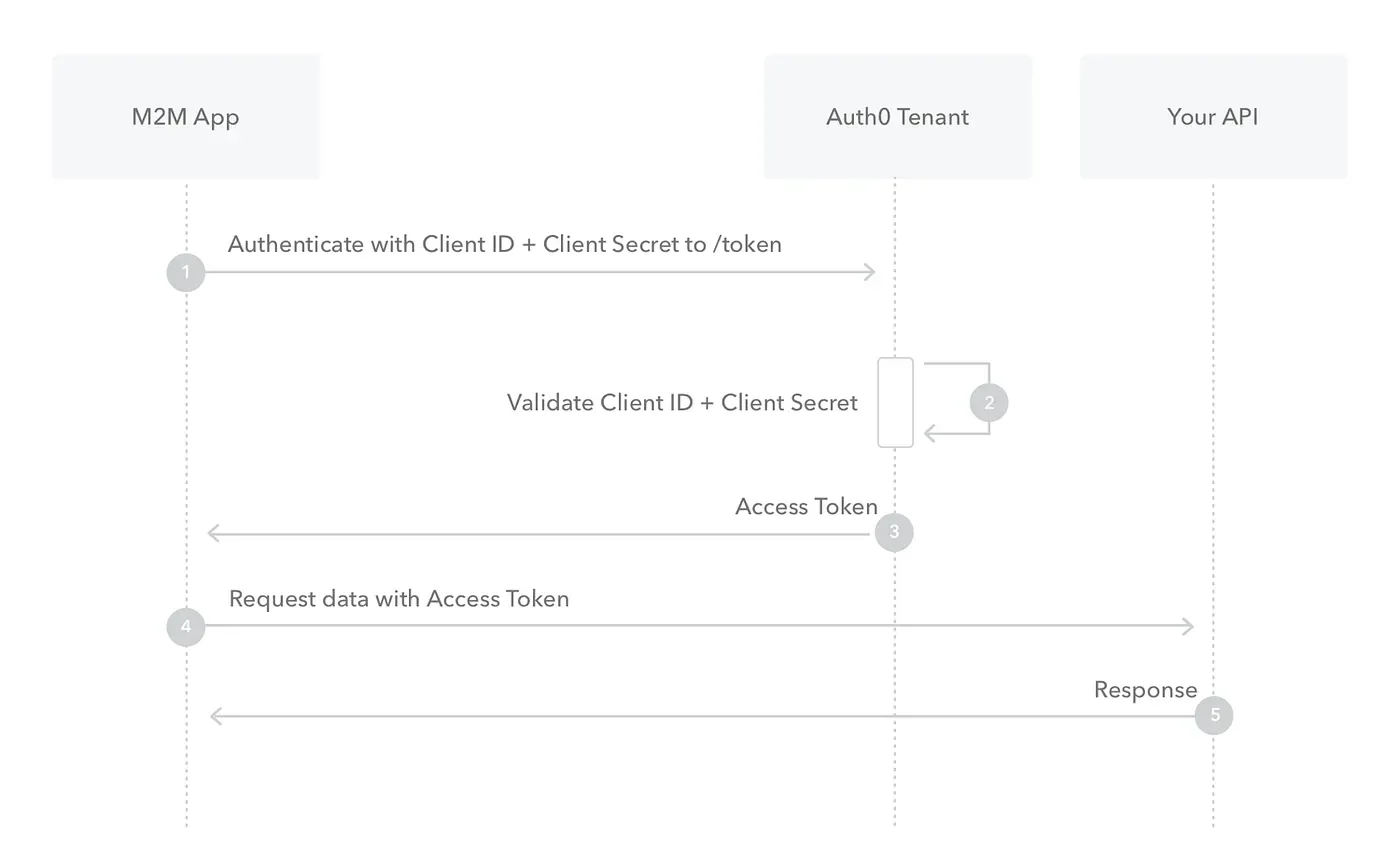
The image illustrates the client credentials exchange: the client authenticates to the authorisation server, the server validates the client ID and secret, and responds with an access token that the application can then use to call an API on behalf of itself.
The request sent was:
POST /{identity url}/oauth/v1/token HTTP/1.1Host: site.comAuthorization: Basic [redacted]==Content-Type: application/x-www-form-urlencodedContent-Length: 29grant_type=client_credentials
The path points at the identity service's token endpoint, /oauth/v1/token. The Authorization header carries the Base64-encoded client ID and secret, and the body sets grant_type=client_credentials, which asks for a token for the client itself rather than for a user. The response was:
HTTP/1.1 200 OKDate: Thu, 05 May 2022 21:15:28 GMTContent-Type: application/jsonContent-Length: 1008Connection: closeCache-Control: no-cache, no-store, no-transform{"token_type":"bearer","access_token":"eyJ0[…redacted…]"}
The server accepted the credentials and returned a bearer token. The author notes that the token returned was a JWT.
Step 2: Use the token against the API
The token was then used to retrieve data:
POST /api/v1/users HTTP/1.1Host: site.comAuthorization: Bearer eyJ0[…redacted…]Content-Type: application/x-www-form-urlencoded
The bearer token from the previous step is presented in the Authorization header. The response was:
HTTP/1.1 200 OK[...]{ "username":”Name”, "id":"BLALALALA", "phone":"21254488"{ "username":”Name", "id":"BLALALALA", "phone":"21254488" }
The response body contained a username, an identifier and a phone number. The write-up does not say how many records the endpoint returns or what access the token otherwise grants.
Root cause
Client credentials, which are meant to authenticate a confidential client to the authorisation server, were embedded in the page source of the production site. Because the client credentials flow issues a token to whoever presents a valid ID and secret, anyone reading the page could obtain a token.
Impact
The leaked credentials allowed the researcher to obtain a bearer JWT and to call an API with it, receiving user data including usernames, identifiers and phone numbers. The write-up does not establish the full scope of what the token could reach, how long it remained valid, or how many users were exposed. The report was accepted as a high severity.
Fix
Variants to test
- Search page source and bundled JavaScript for configuration objects with keys such as
CLIENT_ID,CLIENT_SECRET,ENVor API version fields. A positive result is a pair of credentials in a production configuration block. - Try the discovered pair against the identity service's token endpoint with
grant_type=client_credentialsand HTTP Basic authentication. A positive result is a200response containing anaccess_token. - Present the returned token as a bearer token to API endpoints. A positive result is a
200response containing data the client should not be able to read. - Check whether the same credentials are accepted as
client_idandclient_secretrequest parameters instead of the Basic header, since the service may accept either form. A positive result is a token issued through the parameter form.
What happened, in plain words
A website's page source contained a secret password. The password belonged to the website's own software account, the kind of account a program uses to talk to another program. Anyone who opened the page and looked at its hidden source code could read that password, then use it to ask the website's login service for a key. With that key, the researcher called the site's API and received user data. The site's owners accepted the report as a high severity issue.
This article walks through the same steps the researcher took, explaining each idea from scratch. You only need a browser and a computer to follow along.
Background ideas you need first
Before the story makes sense, here are a few everyday ideas.
An API is a way for one piece of software to ask another for something, like a waiter in a restaurant. You do not walk into the kitchen yourself; you tell the waiter what you want, and the waiter brings it back. In web terms, an API is a set of addresses (called endpoints) that a program can send requests to, and it answers with data.
A token is like a cloakroom ticket. You hand over your coat, you get a small ticket, and later you show the ticket to get the coat back. You do not need to carry the coat around all evening. On the web, a token is a short string of characters that proves you were allowed in earlier, so you do not have to send your password with every request.
OAuth is a set of rules for handing out those tickets safely. The researcher quotes a description of it as an open-standard authorisation protocol or framework that gives applications the ability for "secure designated access". The familiar example: you can tell Facebook that it is acceptable for Instagram to access your profile or post updates without giving Instagram your Facebook password. If Instagram is later breached, your Facebook password stays safe.
A client ID and client secret are a username and password for a piece of software rather than a person. The client ID is the public name, like a badge number. The client secret is the private password that goes with it. Together they let a program prove to a login service who it is.
The client credentials flow is one specific OAuth routine. A program shows its client ID and client secret to an authorisation server (the login service), and the server hands back an access token. The program then uses that token to call an API on its own behalf, not on behalf of any particular user. Think of a company card: the card belongs to the company, not to the employee holding it, and it can be used without asking any individual customer.
Page source is the raw text a browser receives before it draws the page. You can see it in most browsers by right-clicking and choosing to view the page source, or by opening the developer tools. Anything in that text is visible to every visitor, even if it is not shown on screen.
Base64 is a way of writing any data using only ordinary letters, digits and a few symbols, so it can travel safely inside text-based messages such as HTTP headers. It is not encryption; anyone can decode it. It is more like spelling a word out letter by letter so it survives a phone line.
HTTP Basic authentication is a simple way of sending a username and password in a request. The two are joined with a colon, encoded with Base64, and placed after the word Basic in an Authorization header. The header is a labelled line at the top of a request, like the address block on an envelope.
A JWT (JSON Web Token) is a particular token format. It is a long string that carries information inside it, and it can be checked by the receiver without looking anything up in a database.
A bearer token is a token that works for whoever holds it, like a bearer bond or a cinema ticket. The server does not check who you are beyond seeing the token, so anyone who gets a copy can use it.
Setup
The write-up describes no accounts, roles, tools or versions. The only precondition is access to the application's main page and its page source. The researcher's stated habit is to look at the main domain before using any tool or starting the recon process. Recon here simply means looking around before attacking anything, the way a burglar might walk past a house first to see which windows are open.
Finding it
Opening the page source of the main domain revealed a configuration block containing OAuth client credentials. The block as published is:
{ "ENV": "prod", "SERVICE_CLIENT_ID": "[redacted]", "SERVICE_CLIENT_SECRET": "2a548s56-as84-d8fg-asd5-ahsndksj12sh", "MARKETO_CLIENT_ID": "safsfads-ascd-vcxd-dsfds-adhdnmajkss", "MARKETO_CLIENT_SECRET": "[redacted]", "SERVICE_OAUTH_CLIENT_API_VERSION": "v2"};Disclaimer: all values were replaced
Line by line, in plain words:
- The outer braces
{and}mark the start and end of a block of settings written in JSON, a common text format for configuration. "ENV": "prod"says this is the production environment, meaning the live site that real users see, not a test copy."SERVICE_CLIENT_ID"and"SERVICE_CLIENT_SECRET"are the public name and private password for the site's own software account."MARKETO_CLIENT_ID"and"MARKETO_CLIENT_SECRET"are a second pair of credentials."SERVICE_OAUTH_CLIENT_API_VERSION": "v2"records which version of the API the service uses.- The trailing note says all values were replaced, so the strings shown are stand-ins, not the real secrets.
Credentials of this kind are meant to stay on the server, the machine that runs the site and is not visible to visitors. Their presence in page source means anyone who can load the page can read them. It is like leaving the key to the staff entrance taped to the front door.
Exploitation
Step 1: Confirm the credentials are valid
The researcher wanted to check whether the client ID and client secret were still valid. A leaked password is only useful if it still works, so the first move is to try it. The write-up notes that a token can be included in calls either as an HTTP header or as a query string parameter, and that the HTTP header method was used, with the credentials encoded as:
Authorization: Basic <base64 Client_id:Client_secret>
This line is a template. Authorization is the name of the header, the labelled line at the top of a request. Basic says which scheme is being used. The angle brackets are a placeholder: in a real request you put the client ID, a colon, and the client secret, all encoded with Base64, in place of <base64 Client_id:Client_secret>.
The client credentials grant type is used by clients to obtain an access token outside of the context of a user. The service authenticates the client either through additional request parameters client_id and client_secret, or by accepting the client ID and secret in the HTTP Basic auth header. In other words, the login service accepts the credentials in two possible ways, and the researcher chose the header form.
The image illustrates the client credentials exchange: the client authenticates to the authorisation server, the server validates the client ID and secret, and responds with an access token that the application can then use to call an API on behalf of itself.
The request sent was:
POST /{identity url}/oauth/v1/token HTTP/1.1Host: site.comAuthorization: Basic [redacted]==Content-Type: application/x-www-form-urlencodedContent-Length: 29grant_type=client_credentials
Line by line:
POST /{identity url}/oauth/v1/token HTTP/1.1is the first line of the request.POSTis the method, used when you are sending data to the server. The path points at the identity service's token endpoint,/oauth/v1/token, which is the address that hands out tokens.HTTP/1.1is the version of the protocol being spoken. The{identity url}part is a placeholder for the identity service's address.Host: site.comtells the server which site the request is for. The write-up usessite.comas a stand-in and does not name the real product or organisation.Authorization: Basic [redacted]==carries the Base64-encoded client ID and secret. The long string is what the pair looks like after encoding.Content-Type: application/x-www-form-urlencodedsays the body is formatted like a web form, withname=valuepairs.Content-Length: 29says the body is 29 bytes long, so the server knows how much to read.grant_type=client_credentialsis the body. It asks for a token for the client itself rather than for a user.
The response was:
HTTP/1.1 200 OKDate: Thu, 05 May 2022 21:15:28 GMTContent-Type: application/jsonContent-Length: 1008Connection: closeCache-Control: no-cache, no-store, no-transform{"token_type":"bearer","access_token":"eyJ0[…redacted…]"}
Line by line:
HTTP/1.1 200 OKis the status line.200means the request succeeded.Date: Thu, 05 May 2022 21:15:28 GMTis when the server answered.Content-Type: application/jsonsays the answer is in JSON format.Content-Length: 1008says the answer is 1008 bytes long.Connection: closesays the connection will be closed after this answer.Cache-Control: no-cache, no-store, no-transformtells browsers and proxies not to save or alter the response, which is sensible for anything containing a token.- The body
{"token_type":"bearer","access_token":"eyJ0[…redacted…]"}says the token is a bearer token and gives its value. The value is shortened here, and the write-up notes that the token returned was a JWT.
The server accepted the credentials and returned a bearer token. The leaked password still worked.
Step 2: Use the token against the API
The token was then used to retrieve data:
POST /api/v1/users HTTP/1.1Host: site.comAuthorization: Bearer eyJ0[…redacted…]Content-Type: application/x-www-form-urlencoded
Line by line:
POST /api/v1/users HTTP/1.1sends a request to the users endpoint of the API, version 1. The path suggests it deals with user records.Host: site.comagain names the site.Authorization: Bearer eyJ0[…redacted…]presents the token from the previous step.Bearersays the token works for whoever holds it, and the shortened string is the token itself.Content-Type: application/x-www-form-urlencodedsays the body is form-formatted.
The response was:
HTTP/1.1 200 OK[...]{ "username":”Name”, "id":"BLALALALA", "phone":"21254488"{ "username":”Name", "id":"BLALALALA", "phone":"21254488" }
Line by line:
HTTP/1.1 200 OKmeans the request succeeded.[...]stands for response headers the write-up left out.- The body contains user records, each with a
username, anidand aphonenumber. The values shown are placeholders.
The API returned user records containing a username, an identifier and a phone number. The write-up does not say how many records the endpoint returns or what access the token otherwise grants.
Why this works
Client credentials, which are meant to authenticate a confidential client to the authorisation server, were embedded in the page source of the production site. Because the client credentials flow issues a token to whoever presents a valid ID and secret, anyone reading the page could obtain a token. The write-up does not describe any control that should have prevented this. It is like a members-only club that checks only whether you have a membership card, not whether the card is yours.
Impact
The leaked credentials allowed the researcher to obtain a bearer JWT and to call an API with it, receiving user data including usernames, identifiers and phone numbers. The write-up does not establish the full scope of what the token could reach, how long it remained valid, or how many users were exposed. The report was accepted as a high severity.
Fix
Rotating means replacing the old secret with a new one, so the old one stops working.
Variants to test
If you want to look for the same kind of mistake on other sites, here is a checklist.
- Search page source and bundled JavaScript for configuration objects with keys such as
CLIENT_ID,CLIENT_SECRET,ENVor API version fields. A positive result is a pair of credentials in a production configuration block. - Try the discovered pair against the identity service's token endpoint with
grant_type=client_credentialsand HTTP Basic authentication. A positive result is a200response containing anaccess_token. - Present the returned token as a bearer token to API endpoints. A positive result is a
200response containing data the client should not be able to read. - Check whether the same credentials are accepted as
client_idandclient_secretrequest parameters instead of the Basic header, since the service may accept either form. A positive result is a token issued through the parameter form.
Glossary
- API: a set of addresses a program can send requests to in order to get data or perform actions, like a waiter taking orders to a kitchen.
- Access token: a short string that proves a program or user was allowed in earlier, so a password does not need to be sent with every request.
- Authorisation server: the login service that checks credentials and hands out tokens.
- Base64: a way of writing data using ordinary characters so it can travel inside text messages; it is encoding, not encryption.
- Bearer token: a token that works for whoever holds it, with no further check of identity.
- Client credentials flow: an OAuth routine in which a program shows its client ID and secret and receives a token for itself, not for a user.
- Client ID: the public name of a piece of software, like a badge number.
- Client secret: the private password that goes with a client ID.
- Endpoint: a specific address on a server that accepts requests, such as
/oauth/v1/token. - HTTP Basic authentication: a simple scheme that sends a username and password joined by a colon and Base64-encoded in an
Authorizationheader. - HTTP header: a labelled line at the top of a request or response carrying extra information, like the address block on an envelope.
- JSON: a common text format for configuration and data, built from braces, brackets, names and values.
- JWT (JSON Web Token): a token format that carries information inside the string and can be checked without a database lookup.
- OAuth: an open-standard authorisation protocol or framework that gives applications the ability for "secure designated access".
- Page source: the raw text a browser receives before drawing the page, visible to every visitor.
- Production environment: the live site that real users see, as opposed to a test copy.
- Recon: looking around a target before attacking it, to see what is exposed.
- Rotate: replace a secret with a new one so the old one stops working.
- Severity: a rating of how serious a security issue is.
- Token: a short string that stands in for credentials, like a cloakroom ticket.




