Foscam MQTT-to-P2P Camera Compromise
The Foscam mobile app bundled a PKCS#12 client credential whose password was recoverable from the app code, and the MQTT broker allowed wildcard subscriptions outside the user's own device namespace. An attacker could receive other users' device property reports containing local camera credentials and P2P parameters, then reuse those parameters to establish an unauthorised P2P session and access live video and controls.

medium.com
Published on medium.com
Cybersecurity
The full write-up lives on its author's site
It belongs to its author, so we link to it rather than copy it. The other two tabs are our own rewrites, checked against it.
Context
Foscam is a camera vendor whose devices are managed through the Foscam App for Android and iOS. The app talks to a cloud backend over MQTT for device telemetry and uses a P2P path to open live sessions to cameras. The two flows meet in the app's device-connectivity logic: property reports arriving over MQTT carry the parameters that the P2P connection routine later consumes.
The research described here covers a vulnerability chain in that combination. A client credential used for MQTT authentication is shipped inside the Android application, its decryption password is recoverable from decompiled code, and the broker accepts wildcard subscriptions that reach beyond the authenticated user's own device namespace. The resulting property reports contain device identifiers, local camera credentials and P2P connection parameters, and those parameters are enough to open a live P2P session to a camera belonging to someone else.
Foscam confirmed the affected product as the Foscam App for Android and iOS, with affected versions from 3.2.1 up to, but not including, 5.3.25. The vulnerable functionality sits in the app's MQTT authentication and device-connectivity flow. The issue therefore affected both mobile clients using this backend path, not a single camera model or a single tested device.
Setup
The work started from the Foscam Android application version 5.3.24-1108. The researcher used static analysis of the APK, a researcher-owned Foscam account, and a second tester-controlled Foscam camera for runtime validation. A Frida hook was used later to observe and substitute P2P parameters at runtime.
The tested broker endpoint was app-access.ivyiot.io on TCP port 18883, using MQTT over TLS. The client identifier used during testing came from the researcher's own authenticated application session.
Finding it
During review of the decompiled application, the SSLSocketFactory construction path stood out. It loaded a bundled security-iot-mqtt.client.p12 PKCS#12 file and supplied a password directly from application code.

The screenshot shows the hardcoded PKCS#12 password used by SSLSocketFactory.
This matters because the PKCS#12 material is not just a server trust anchor. It contains client-side authentication material used to establish the TLS/MQTT session. The application also revealed the topic hierarchy: device topics begin with /device/ and include device-specific path components.
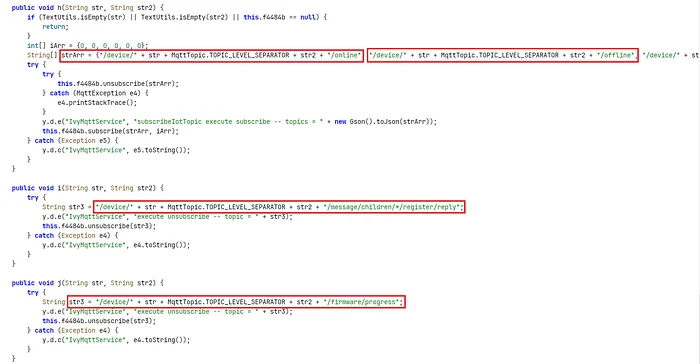
The second screenshot shows the MQTT topic patterns identified in the application.
A correctly isolated MQTT authorisation model should restrict each authenticated client to the device topics associated with that user's authorised devices. The question was whether the broker actually enforced that.
Exploitation
Step 1: Recover the MQTT client credential
Using the password recovered from the decompiled code, the bundled PKCS#12 file was decrypted and the MQTT authentication material extracted. The recovered material included a client certificate, the corresponding private key and broker CA material.
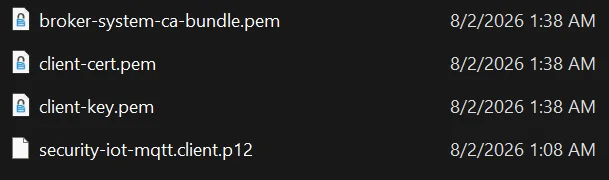
The extracted MQTT TLS material is shown here.
Additional connection parameters were recovered through APK analysis and normal use of a researcher-owned Foscam account. The broker endpoint was app-access.ivyiot.io on TCP port 18883 over MQTT over TLS, and the client identifier came from the researcher's own authenticated application session.
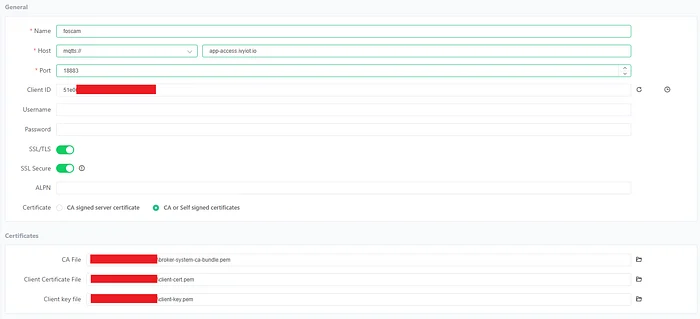
The MQTT client configuration used for the connection.

A successful connection to the broker.
Step 2: Subscribe outside the authorised namespace
Authorisation testing showed that the broker accepted a wildcard subscription to:
/device/+/+/message/property/report
In MQTT, the + wildcard matches one topic level. This subscription therefore requests message/property/report events regardless of the first two device-specific path components. The broker accepted it instead of restricting the subscription to the researcher's authorised device namespace.
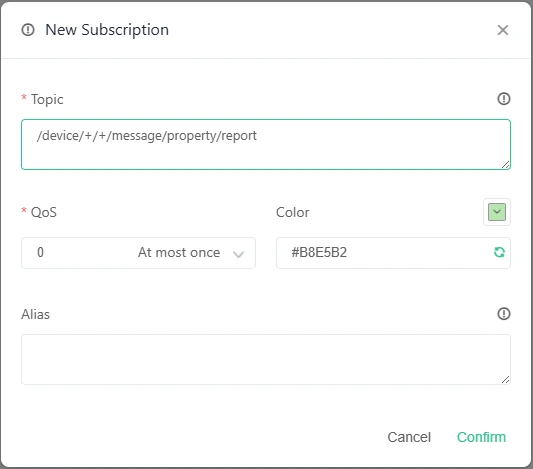
The wildcard cross-device subscription as accepted by the broker.
Step 3: Observe cross-device property reports
Immediately after subscribing, the client began receiving a high volume of messages associated with many different device and product identifiers. During observation the incoming rate reached approximately 100 messages per second.
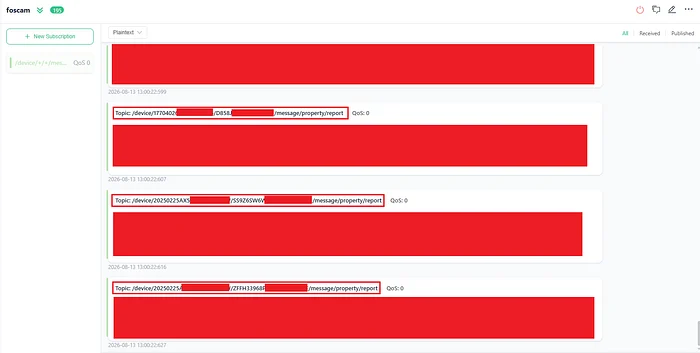
Cross-device messages arriving after the wildcard subscription.
Inspection of the returned property-report payloads showed considerably more than benign status telemetry. Observed fields included device identity and connectivity information: device name, product name, firmware version, P2P UID, IP address, service ports, MAC-related values and security configuration.
Critically, some observed property reports included values corresponding to the camera's local username and password. Because the MQTT authorisation issue exposes property reports belonging to unrelated devices, these fields become cross-customer credential disclosure.
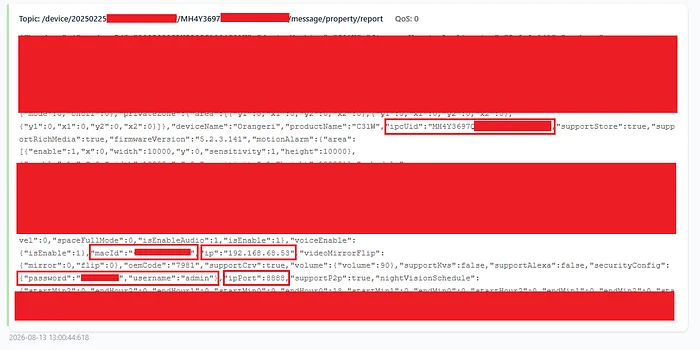
Sensitive values exposed in a property report, including the local camera credentials.
Other device topic families were also identified and may expose additional telemetry or diagnostic information. The report focuses on message/property/report because it presented the most direct security impact through credential and connection-parameter exposure.
During a short observation period, approximately 103,000 credential-bearing device records were observed in MQTT traffic. That figure reflects researcher-observed messages during testing and should be validated by Foscam against broker telemetry before being treated as the number of unique affected customers or devices.
Step 4: Trace the exposed values into the P2P connection path
After identifying the exposed connection values, further APK analysis was performed to determine whether they were security-relevant beyond information disclosure. Tracing the camera connection logic led to the application's createEx path, which passes the parameters required to initialise the camera connection into native code.
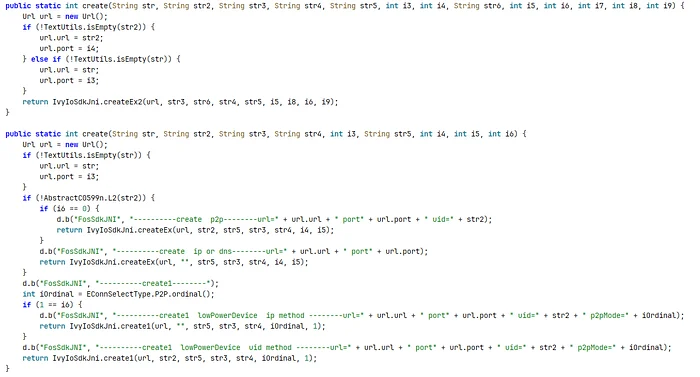
The Java createEx connection path.

The native createEx declaration.
Step 5: Validate unauthorised P2P access at runtime
A Frida hook was placed on the relevant createEx invocation to observe and substitute the P2P connection parameters at runtime. For validation, a second tester-controlled Foscam camera was used, and its exposed connection parameters were supplied to the application's P2P connection flow. The application successfully established a live camera session to the second test device, confirming that the MQTT-exposed information was sufficient to cross the expected account/device authorisation boundary and establish P2P access.
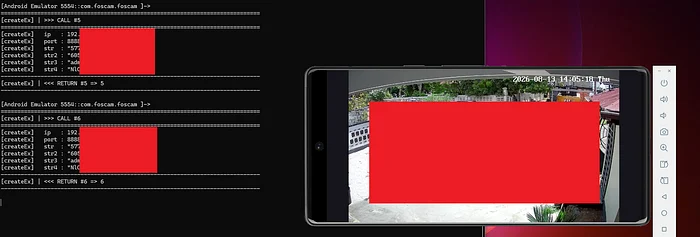
Runtime validation of unauthorised P2P access to the second tester-controlled camera.
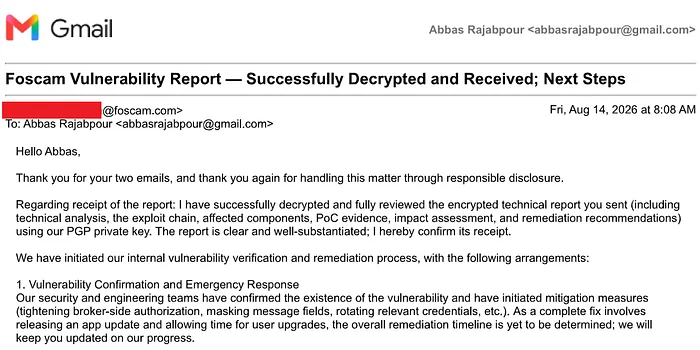
Foscam's security and engineering teams independently reviewed the report and confirmed the existence of the vulnerability. They initiated an emergency remediation process covering tighter broker-side authorisation, masking of sensitive message fields, rotation of relevant credentials, and preparation of an application update to fully address the issue.
Root cause
The chain has two design mistakes that reinforce each other.
- A shared client credential shipped in the app. The PKCS#12 file
security-iot-mqtt.client.p12is bundled with the application and its password is hardcoded in theSSLSocketFactoryconstruction path. Anyone who downloads the APK can extract the client certificate and private key and authenticate to the broker as an application client. The credential is not per-user, so the broker cannot distinguish one app instance from another on the basis of it alone. - Authorisation that does not bind a client to its own devices. The broker accepted
/device/+/+/message/property/report, a wildcard that spans the first two device-specific path components. A correctly isolated model would restrict each authenticated client to the topics of the devices associated with that user. Here the subscription was accepted rather than rejected or narrowed.
The property reports themselves then carry more than status telemetry: local camera username and password values and the P2P parameters consumed by createEx. Because the broker does not scope the subscription, those fields cross the customer boundary. The substituted parameters were accepted by the P2P connection flow, which opened a session to the second camera.
Impact
An attacker who can obtain the bundled client credential, which is recoverable from the public application, can authenticate to the MQTT broker and subscribe outside their own device namespace. From the resulting stream they obtain, for unrelated Foscam devices, device identity and connectivity information (device name, product name, firmware version, P2P UID, IP address, service ports, MAC-related values, security configuration) and, in observed messages, the camera's local username and password.
Those values are the parameters the app's createEx routine consumes. In controlled testing, substituting a different device's parameters into the P2P flow produced a live camera session to that device, without interaction from the camera owner. The demonstrated access was a live camera session to the second test device.
The 103,000 credential-bearing records figure is a researcher observation over a short window, not a count of unique affected customers or devices. Foscam's broker telemetry would be needed to establish that number.
Fix
Foscam deployed server-side mitigations to close the cross-account data exposure path and introduced additional hardening in Foscam App version 5.3.25, the fixed release. The remediation process included tightening broker-side authorisation, masking sensitive message fields, rotating relevant credentials, and preparing an application update.
On 2026-08-20 Foscam completed major platform-side remediation and provided an updated Android application for verification. The changes included MQTT authorisation restrictions and a new per-device P2P signature mechanism. Verification on 2026-08-21 confirmed the original MQTT cross-account credential exposure was no longer reproducible, but found a server-side validation issue: the new P2P token could be omitted. Foscam confirmed this as a server-side validation bug, deployed a fix requiring valid device-specific signatures, and on 2026-08-22 the researcher confirmed that missing or invalid P2P tokens were rejected and the bypass could no longer be reproduced.
Variants to test
- Bundled client credentials in other IoT apps. Decompile the APK and look for PKCS#12, JKS or PEM material loaded by
SSLSocketFactoryor similar classes, with a password supplied from code. A positive result is a decryptable keystore containing a client certificate and private key that authenticates to the vendor's broker. - Wildcard subscriptions against MQTT brokers. With a legitimate account, try
+and#at each level of the device topic hierarchy, for example/device/+/+/message/property/report. A positive result is the broker accepting the subscription and delivering messages for device identifiers outside your account. - Property-report field review. Inspect the payloads for credentials, P2P identifiers, IP addresses, ports and security configuration rather than status only. A positive result is any field that can be replayed into a connection routine.
- P2P parameter substitution. Hook the connection routine (for example
createExwith Frida) and substitute parameters from another device. A positive result is a live session to a device you do not own, with no interaction from its owner. - Token omission after a fix. Where a per-device signature or token is introduced, retry the connection with the token missing, empty or invalid. A positive result is the server accepting the connection without a valid device-specific signature, which is the same validation gap found during this remediation.
- Other topic families. Enumerate sibling topics under
/device/beyondmessage/property/reportand check whether they expose diagnostic or telemetry data across accounts.
What happened, in plain words
Foscam makes security cameras. You set one up at home, point it at your door or your garden, and watch the video from a phone app. The Foscam App runs on Android and iOS and talks to Foscam's cloud servers. Two separate conversations happen behind the scenes:
- The app asks the cloud for status information about your camera: is it online, what firmware does it run, what is its address. This uses a messaging protocol called MQTT.
- When you tap to watch live video, the app opens a direct connection to the camera itself, called P2P (peer to peer). The cloud helps the two ends find each other, then the video flows between them.
The research described here found that these two conversations fit together in a dangerous way. The app carries a secret inside it that lets it log in to Foscam's message server. That secret can be pulled out of the app by anyone who downloads it. Once logged in, the message server lets the app listen to status messages for cameras that belong to other people, not just your own. Those messages contain the camera's local username and password and the details needed to open a live video connection. With those details, a researcher was able to open a live session to a camera belonging to someone else, without that person doing anything.
Foscam confirmed the problem. The affected product is the Foscam App for Android and iOS, versions 3.2.1 up to but not including 5.3.25. The fixed release is 5.3.25, and Foscam also changed things on its servers so the cross-account data leak stopped. The issue was not limited to one camera model or one tested device: it affected both mobile clients that use this backend path.
A few words before we start, because they come up constantly:
- App (application): the program you install on your phone. On Android it is distributed as an APK file, which is really a zip archive containing code and resources.
- Server / backend / cloud: the computers run by the vendor that your app talks to over the internet.
- Protocol: an agreed language for two computers to exchange messages, like the rules of a phone call.
- MQTT: a lightweight messaging protocol built around topics. Think of a topic as a labelled noticeboard, such as
/device/1234/status. A client subscribes to topics it wants to hear about and publishes messages to topics. A central server called a broker receives published messages and forwards them to subscribers. - P2P (peer to peer): a connection where two devices talk directly to each other rather than through a central server. Here the app and the camera connect directly, with the cloud only helping them find each other.
- Credential: anything that proves who you are, such as a password, a certificate or a key.
- Vulnerability: a weakness in a system that someone can abuse to do something the designers did not intend.
- Vulnerability chain: several separate weaknesses that, joined together, produce a bigger problem than any one of them alone.
Context
Foscam is a camera vendor whose devices are managed through the Foscam App for Android and iOS. The app talks to a cloud backend over MQTT for device telemetry and uses a P2P path to open live sessions to cameras. The two flows meet in the app's device-connectivity logic: property reports arriving over MQTT carry the parameters that the P2P connection routine later consumes.
In plain terms: the app receives regular status reports about a camera over the messaging system, and those reports happen to contain the very details the app needs to start a live video connection. If the status reports can be read for cameras that are not yours, then so can the details needed to connect to them.
The research described here covers a vulnerability chain in that combination. A client credential used for MQTT authentication is shipped inside the Android application, its decryption password is recoverable from decompiled code, and the broker accepts wildcard subscriptions that reach beyond the authenticated user's own device namespace. The resulting property reports contain device identifiers, local camera credentials and P2P connection parameters, and those parameters are enough to open a live P2P session to a camera belonging to someone else.
Some of those words need unpacking:
- Client credential: proof of identity used by a client, meaning the app, when it connects to a server. It is like a membership card the app shows at the door.
- Decompiled code: an APK contains compiled code, which is not meant to be read by humans. Tools can turn it back into something close to readable source code. This is called decompiling, and it is how researchers inspect what an app really does.
- Broker: the MQTT server that receives messages and forwards them to subscribers.
- Wildcard subscription: a subscription that uses special characters to match many topics at once instead of one exact topic. It is like asking the post office for "all letters addressed to any street in the city" rather than just your own address.
- Namespace: the collection of topic names that belong to one user or one device. Staying inside your namespace means only seeing your own things.
- Property report: a status message a camera publishes about itself: its name, its firmware, its network details and so on.
Foscam confirmed the affected product as the Foscam App for Android and iOS, with affected versions from 3.2.1 up to, but not including, 5.3.25. The vulnerable functionality sits in the app's MQTT authentication and device-connectivity flow. The issue therefore affected both mobile clients using this backend path, not a single camera model or a single tested device.
Setup
The work started from the Foscam Android application version 5.3.24-1108. The researcher used static analysis of the APK, a researcher-owned Foscam account, and a second tester-controlled Foscam camera for runtime validation. A Frida hook was used later to observe and substitute P2P parameters at runtime.
What each of those tools is:
- Static analysis: examining a program without running it, by reading its files and code. It is like reading the blueprint of a building instead of walking through it.
- Researcher-owned account: an ordinary Foscam account the researcher created and controls, used so that any testing starts from a legitimate, logged-in position.
- Tester-controlled camera: a second camera the researcher owns, used as the target for the final test so that no real customer's device is touched.
- Runtime validation: checking a finding while the program is actually running, as opposed to only reading its code.
- Frida: a tool that lets a researcher attach to a running app and watch or change what functions do while they execute. Think of it as a transparent window plus a pair of tweezers inside a running machine.
- Hook: the act of placing that window on a specific function so its inputs and outputs can be seen or altered.
The tested broker endpoint was app-access.ivyiot.io on TCP port 18883, using MQTT over TLS. The client identifier used during testing came from the researcher's own authenticated application session.
- Endpoint: the address of a service, here a hostname plus a port number.
- TCP port: a numbered door on a server. One machine can run many services, each listening on its own port number.
- TLS: the encryption layer behind the padlock in your browser. It protects data in transit so that someone watching the network cannot read it.
- Client identifier: a name the app gives itself when it connects to the broker, so the broker can tell one connection from another.
Finding it
During review of the decompiled application, the SSLSocketFactory construction path stood out. It loaded a bundled security-iot-mqtt.client.p12 PKCS#12 file and supplied a password directly from application code.
SSLSocketFactory: the part of the app responsible for setting up encrypted (TLS) connections. It is the code that builds the secure channel.- Bundled file: a file packed inside the APK itself, so it is downloaded to every phone that installs the app.
- PKCS#12: a standard file format for storing certificates and private keys together in one container, usually protected by a password. Think of it as a locked wallet holding identity documents.
- Hardcoded password: a password written directly into the program's code instead of being kept secret elsewhere. Anyone who can read the code can read the password.
The screenshot shows the hardcoded PKCS#12 password used by SSLSocketFactory.
This matters because the PKCS#12 material is not just a server trust anchor. It contains client-side authentication material used to establish the TLS/MQTT session. The application also revealed the topic hierarchy: device topics begin with /device/ and include device-specific path components.
- Trust anchor: a certificate used to verify that you are talking to the right server. It is public by design and harmless if leaked.
- Client-side authentication material: the opposite. It proves the client's identity to the server. If it leaks, someone else can pretend to be a legitimate client. That is why finding it inside a downloadable app is serious.
- Topic hierarchy: topics are arranged like folders in a path, with levels separated by slashes.
/device/is the top folder, and the levels after it identify a specific device.
The second screenshot shows the MQTT topic patterns identified in the application.
A correctly isolated MQTT authorisation model should restrict each authenticated client to the device topics associated with that user's authorised devices. The question was whether the broker actually enforced that.
- Authorisation: what you are allowed to do once you are logged in. Authentication is proving who you are; authorisation is what the system then lets you touch. A hotel key card that opens every room is an authorisation failure even if the card is genuine.
Exploitation
Step 1: Recover the MQTT client credential
Using the password recovered from the decompiled code, the bundled PKCS#12 file was decrypted and the MQTT authentication material extracted. The recovered material included a client certificate, the corresponding private key and broker CA material.
- Decrypt: unlock the protected file using its password.
- Client certificate: a digital identity document that the client presents to the server.
- Private key: the secret half of a cryptographic key pair. The certificate is the public half; the private key proves you own it. Anyone holding both can act as that client.
- CA material: certificates from the certificate authority, the organisation that signs certificates, used to check that the server's certificate is genuine.
The extracted MQTT TLS material is shown here.
Additional connection parameters were recovered through APK analysis and normal use of a researcher-owned Foscam account. The broker endpoint was app-access.ivyiot.io on TCP port 18883 over MQTT over TLS, and the client identifier came from the researcher's own authenticated application session.
- Connection parameters: the settings needed to connect: address, port, encryption mode, identity.
- Authenticated application session: the state of being logged in. The researcher logged in normally with their own account and observed what the app did.
The MQTT client configuration used for the connection.
A successful connection to the broker.
Step 2: Subscribe outside the authorised namespace
Authorisation testing showed that the broker accepted a wildcard subscription to:
/device/+/+/message/property/report
Line by line, reading the topic from left to right:
/device/is the top level, the folder for all device-related messages.- The first
+is a wildcard that matches exactly one level. It stands in for whatever identifies a device or account at that position. - The second
+matches exactly one more level, again standing in for any value. message/property/reportis the fixed tail: the kind of message being requested, namely property reports.
So the whole line means: "give me every property report, for any device, whoever it belongs to." In MQTT, the + wildcard matches one topic level. This subscription therefore requests message/property/report events regardless of the first two device-specific path components. The broker accepted it instead of restricting the subscription to the researcher's authorised device namespace.
The wildcard cross-device subscription as accepted by the broker.
Step 3: Observe cross-device property reports
Immediately after subscribing, the client began receiving a high volume of messages associated with many different device and product identifiers. During observation the incoming rate reached approximately 100 messages per second.
Cross-device messages arriving after the wildcard subscription.
Inspection of the returned property-report payloads showed considerably more than benign status telemetry. Observed fields included device identity and connectivity information: device name, product name, firmware version, P2P UID, IP address, service ports, MAC-related values and security configuration.
- Payload: the actual content of a message, as opposed to its address or label.
- Telemetry: automatic status data a device reports about itself.
- Firmware version: the version of the software running inside the camera.
- P2P UID: the identifier the P2P system uses to find a particular camera.
- IP address: the numeric address of a device on a network.
- Service ports: the numbered doors on the camera that accept connections.
- MAC-related values: information tied to the hardware network address of the device, which is normally fixed per network card.
- Security configuration: settings that control how the device is protected.
Critically, some observed property reports included values corresponding to the camera's local username and password. Because the MQTT authorisation issue exposes property reports belonging to unrelated devices, these fields become cross-customer credential disclosure.
- Local username and password: the login used to access the camera directly on your own network, separate from your Foscam cloud account.
- Cross-customer credential disclosure: one customer's secrets being shown to a different customer. This is the heart of the problem: the messages were never meant to leave their owner's account.
Sensitive values exposed in a property report, including the local camera credentials.
Other device topic families were also identified and may expose additional telemetry or diagnostic information. The report focuses on message/property/report because it presented the most direct security impact through credential and connection-parameter exposure.
- Topic families: groups of related topics under the same path, for example other message types besides property reports.
During a short observation period, approximately 103,000 credential-bearing device records were observed in MQTT traffic. That figure reflects researcher-observed messages during testing and should be validated by Foscam against broker telemetry before being treated as the number of unique affected customers or devices.
In other words, 103,000 is a count of messages seen in a short window, not a count of people. The same device can report many times, so the number of distinct affected customers or devices could be different, and only Foscam's own server records could settle it.
Step 4: Trace the exposed values into the P2P connection path
After identifying the exposed connection values, further APK analysis was performed to determine whether they were security-relevant beyond information disclosure. Tracing the camera connection logic led to the application's createEx path, which passes the parameters required to initialise the camera connection into native code.
- Information disclosure: a weakness where data that should be secret is revealed. On its own it can be serious, but here the question was whether the revealed data could be used to do more.
createEx: the name of the function in the app that sets up a camera connection. TheExsuffix is just part of the name.- Native code: code compiled for the phone's processor directly, often written in C or C++, rather than in the higher-level language the rest of the app uses. It is harder to read and inspect.
The Java createEx connection path.
The native createEx declaration.
Step 5: Validate unauthorised P2P access at runtime
A Frida hook was placed on the relevant createEx invocation to observe and substitute the P2P connection parameters at runtime. For validation, a second tester-controlled Foscam camera was used, and its exposed connection parameters were supplied to the application's P2P connection flow. The application successfully established a live camera session to the second test device, confirming that the MQTT-exposed information was sufficient to cross the expected account/device authorisation boundary and establish P2P access.
- Invocation: a single call to a function while the program runs.
- Substitute: swap one value for another at the moment it is used, without editing the app on disk.
- Authorisation boundary: the line the system is supposed to draw between what belongs to you and what belongs to everyone else. Crossing it means reaching something you were never granted access to.
Runtime validation of unauthorised P2P access to the second tester-controlled camera.
Foscam's security and engineering teams independently reviewed the report and confirmed the existence of the vulnerability. They initiated an emergency remediation process covering tighter broker-side authorisation, masking of sensitive message fields, rotation of relevant credentials, and preparation of an application update to fully address the issue.
- Remediation: the work of fixing the problem.
- Masking sensitive fields: hiding or removing secret values from messages so they are no longer visible to anyone who should not see them.
- Credential rotation: replacing secrets with new ones, so that any copy that leaked stops working. It is like changing the locks after losing a key.
Root cause
The chain has two design mistakes that reinforce each other.
- A shared client credential shipped in the app. The PKCS#12 file
security-iot-mqtt.client.p12is bundled with the application and its password is hardcoded in theSSLSocketFactoryconstruction path. Anyone who downloads the APK can extract the client certificate and private key and authenticate to the broker as an application client. The credential is not per-user, so the broker cannot distinguish one app instance from another on the basis of it alone. - Authorisation that does not bind a client to its own devices. The broker accepted
/device/+/+/message/property/report, a wildcard that spans the first two device-specific path components. A correctly isolated model would restrict each authenticated client to the topics of the devices associated with that user. Here the subscription was accepted rather than rejected or narrowed.
The property reports themselves then carry more than status telemetry: local camera username and password values and the P2P parameters consumed by createEx. Because the broker does not scope the subscription, those fields cross the customer boundary. The substituted parameters were accepted by the P2P connection flow, which opened a session to the second camera.
- Shared credential: one secret used by every copy of the app, rather than one per user. If it leaks once, it leaks for everyone.
- Per-user credential: a secret unique to each account, so that one leak does not open everyone's door.
- Bind a client to its own devices: make the server check, on every request, that the client is only asking about devices it is allowed to see.
- Scope the subscription: narrow it to the caller's own namespace.
- Device-specific signature: a cryptographic proof, made with a key tied to one particular device, that a request really concerns that device. Without it, the server has no way to tell a genuine request from one carrying copied parameters.
Impact
An attacker who can obtain the bundled client credential, which is recoverable from the public application, can authenticate to the MQTT broker and subscribe outside their own device namespace. From the resulting stream they obtain, for unrelated Foscam devices, device identity and connectivity information (device name, product name, firmware version, P2P UID, IP address, service ports, MAC-related values, security configuration) and, in observed messages, the camera's local username and password.
Those values are the parameters the app's createEx routine consumes. In controlled testing, substituting a different device's parameters into the P2P flow produced a live camera session to that device, without interaction from the camera owner. The demonstrated access was a live camera session to the second test device.
- Live stream: the actual video feed from the camera.
- Supported controls: the actions the app can perform on the camera.
- Without interaction from the camera owner: the owner did not have to click anything, approve anything or even be aware. The attacker did not need the owner's help.
The 103,000 credential-bearing records figure is a researcher observation over a short window, not a count of unique affected customers or devices. Foscam's broker telemetry would be needed to establish that number.
Fix
Foscam deployed server-side mitigations to close the cross-account data exposure path and introduced additional hardening in Foscam App version 5.3.25, the fixed release. The remediation process included tightening broker-side authorisation, masking sensitive message fields, rotating relevant credentials, and preparing an application update.
- Server-side mitigation: a fix made on the vendor's servers, which takes effect immediately for everyone without users having to update anything.
- Hardening: extra protective measures added on top of the direct fix.
On 2026-08-20 Foscam completed major platform-side remediation and provided an updated Android application for verification. The changes included MQTT authorisation restrictions and a new per-device P2P signature mechanism. Verification on 2026-08-21 confirmed the original MQTT cross-account credential exposure was no longer reproducible, but found a server-side validation issue: the new P2P token could be omitted. Foscam confirmed this as a server-side validation bug, deployed a fix requiring valid device-specific signatures, and on 2026-08-22 the researcher confirmed that missing or invalid P2P tokens were rejected and the bypass could no longer be reproduced.
- Verification: going back and testing whether the fix actually works, rather than assuming it does.
- No longer reproducible: the original attack no longer succeeds when tried again.
- Token: a short piece of data that proves a request is legitimate, here the per-device signature.
- Validation bug: a flaw in the code that checks incoming data. The check existed but could be skipped by leaving the value out entirely, which is like a guard who checks badges but lets through anyone with no badge at all.
- Bypass: a way around a protection that is supposed to stop you.
Variants to test
These are the general lessons, written as things another researcher could try on other products. Each one is a pattern worth looking for, not a claim about any particular vendor.
- Bundled client credentials in other IoT apps. Decompile the APK and look for PKCS#12, JKS or PEM material loaded by
SSLSocketFactoryor similar classes, with a password supplied from code. A positive result is a decryptable keystore containing a client certificate and private key that authenticates to the vendor's broker.- IoT: the Internet of Things, everyday devices such as cameras, doorbells and plugs that connect to the internet.
- JKS and PEM: two other common file formats for storing certificates and keys.
- Keystore: a file that holds keys and certificates.
- Wildcard subscriptions against MQTT brokers. With a legitimate account, try
+and#at each level of the device topic hierarchy, for example/device/+/+/message/property/report. A positive result is the broker accepting the subscription and delivering messages for device identifiers outside your account.#wildcard: in MQTT, matches every remaining level below the current point, not just one. It is the broadest possible request.
- Property-report field review. Inspect the payloads for credentials, P2P identifiers, IP addresses, ports and security configuration rather than status only. A positive result is any field that can be replayed into a connection routine.
- Replay: take a value captured from one place and use it again somewhere else, as if it were your own.
- P2P parameter substitution. Hook the connection routine (for example
createExwith Frida) and substitute parameters from another device. A positive result is a live session to a device you do not own, with no interaction from its owner. - Token omission after a fix. Where a per-device signature or token is introduced, retry the connection with the token missing, empty or invalid. A positive result is the server accepting the connection without a valid device-specific signature, which is the same validation gap found during this remediation.
- Other topic families. Enumerate sibling topics under
/device/beyondmessage/property/reportand check whether they expose diagnostic or telemetry data across accounts.- Enumerate: list out systematically, one by one.
- Sibling topics: topics at the same level of the hierarchy, next to the one already known.
Glossary
- APK: the installable file format for an Android app; a zip archive containing code and resources.
- Authentication: proving who you are, for example by logging in.
- Authorisation: what the system allows you to do once you are identified.
- Authorisation boundary: the line between what belongs to you and what belongs to others.
- Backend / cloud: the vendor's servers that apps talk to over the internet.
- Bind a client to its own devices: make the server check that each request only concerns devices the caller is allowed to see.
- Broker: the central MQTT server that receives messages and forwards them to subscribers.
- Bundled file: a file packed inside the app itself, downloaded to every phone that installs it.
- CA material: certificates from a certificate authority, used to verify that a server's certificate is genuine.
- Client certificate: a digital identity document a client presents to a server.
- Client credential: proof of identity used by a client, such as the app, when connecting to a server.
- Client identifier: the name a client gives itself when connecting to the broker.
- Connection parameters: the settings needed to connect, such as address, port, encryption mode and identity.
- Credential: anything that proves identity, such as a password, certificate or key.
- Credential rotation: replacing secrets with new ones so leaked copies stop working.
createEx: the function in the app that sets up a camera connection.- Decompiled code: compiled program code turned back into something close to readable source by a tool.
- Decrypt: unlock a protected file using its password or key.
- Device-specific signature: cryptographic proof, made with a key tied to one device, that a request really concerns that device.
- Firmware version: the version of the software running inside a device such as a camera.
- Frida: a tool that lets a researcher attach to a running app and observe or change what its functions do.
- Hardcoded password: a password written directly into program code instead of being kept secret elsewhere.
- Hardening: extra protective measures added on top of a direct fix.
- Hook: placing a window on a specific function so its inputs and outputs can be seen or altered while the program runs.
- IoT: the Internet of Things; everyday devices such as cameras and plugs that connect to the internet.
- JKS / PEM: common file formats for storing certificates and keys.
- Live stream: the actual video feed from a camera.
- Local username and password: the login used to access a camera directly on its own network, separate from a cloud account.
- MAC-related values: information tied to the hardware network address of a device.
- Masking sensitive fields: hiding or removing secret values from messages.
- MQTT: a lightweight messaging protocol built around topics, with a broker forwarding messages from publishers to subscribers.
- Namespace: the collection of topic names belonging to one user or device.
- Native code: code compiled directly for the phone's processor, often in C or C++, rather than in a higher-level language.
- Per-user credential: a secret unique to each account, so one leak does not open everyone's door.
- PKCS#12: a standard file format for storing certificates and private keys together, usually protected by a password.
- Private key: the secret half of a cryptographic key pair; the certificate is the public half.
- Property report: a status message a camera publishes about itself.
- Protocol: an agreed language for two computers to exchange messages.
- Remediation: the work of fixing a problem.
- Replay: taking a captured value and using it again somewhere else as if it were your own.
- Runtime validation: checking a finding while the program is actually running.
- Scope the subscription: narrow a subscription to the caller's own namespace.
- Security configuration: settings that control how a device is protected.
- Server-side mitigation: a fix made on the vendor's servers, effective immediately for everyone.
- Service ports: the numbered doors on a device that accept connections.
- Shared credential: one secret used by every copy of an app, rather than one per user.
- Sibling topics: topics at the same level of a hierarchy, next to one already known.
- Supported controls: the actions an app can perform on a camera.
- TCP port: a numbered door on a server, where one service listens.
- Tester-controlled camera: a camera owned by the researcher, used as a safe target for testing.
- TLS: the encryption layer behind the padlock in a browser, protecting data in transit.
- Token: a short piece of data that proves a request is legitimate.
- Topic families: groups of related topics under the same path.
- Topic hierarchy: topics arranged like folders in a path, with levels separated by slashes.
- Trust anchor: a certificate used to verify that you are talking to the right server; public by design.
- Validation bug: a flaw in the code that checks incoming data, allowing a check to be skipped.
- Verification: going back and testing whether a fix actually works.
- Vulnerability chain: several separate weaknesses that, joined together, produce a bigger problem than any one alone.
- Wildcard subscription: a subscription using special characters to match many topics at once instead of one exact topic.
+wildcard: in MQTT, matches exactly one topic level.#wildcard: in MQTT, matches every remaining level below the current point.

