Found a Critical Security Vulnerability in Microsoft UFO- CVE-2026-73296
The Mobile MCP HTTP services in Microsoft UFO were created without an authentication provider, so any network client that could reach them could invoke tools that collect Android screen data and perform device-control actions through ADB. The author validated this with a fake ADB executable, showing an unauthenticated tap request reached the ADB command boundary.
 Published on medium.com
Cybersecurity
The full write-up lives on its author's site
It belongs to its author, so we link to it rather than copy it. The other two tabs are our own rewrites, checked against it.
Context
Microsoft UFO is an open-source framework that supports intelligent automation across applications and devices. Its Mobile MCP functionality lets UFO interact with Android devices through Android Debug Bridge (ADB).
During a security review of the project, the researcher found that the Mobile MCP implementation exposed two HTTP services without any authentication. What first looked like an authentication gap turned out to allow an unauthenticated network client to read information from an ADB-connected Android device and to invoke device-control operations.
The two services are:
| Service | Port | Purpose |
|---|---|---|
| Mobile Data Collection | 8020 | Collects screenshots, UI hierarchy and device information |
| Mobile Action | 8021 | Performs taps, swipes, text input, app launches and other device actions |
These are legitimate automation capabilities, but they also mean that anyone who can reach the services may be interacting with functionality that has direct access to a connected device. That makes authentication and access control particularly important.
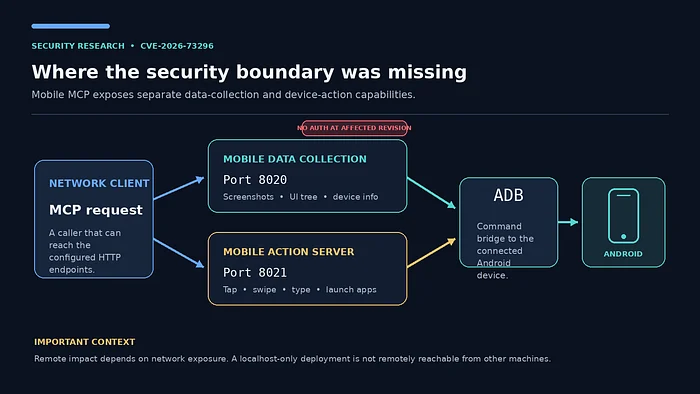
Figure 1: How the two Mobile MCP services communicate with ADB and an Android device.
Setup
The review covered the Microsoft UFO project at the affected revision, with validation in a controlled local test environment. No accounts, roles or special tooling are described beyond a controlled local test environment, which is covered in the exploitation section. The published vulnerability details are:
| Detail | Value |
|---|---|
| Product | Microsoft UFO |
| CVE | CVE-2026-73296 |
| GitHub Advisory | GHSA-24fq-m9rr-g3mm |
| Severity | Critical |
| CVSS 3.1 | 9.4 |
| Affected versions | Up to and including v3.0.7 |
| Fixed version | v3.0.8 |
| CWE | CWE-306, CWE-862 |
The CVSS vector is:
CVSS:3.1/AV:N/AC:L/PR:N/UI:N/S:U/C:H/I:H/A:L
The important factors are network accessibility, low attack complexity, no required privileges and no user interaction.
Finding it
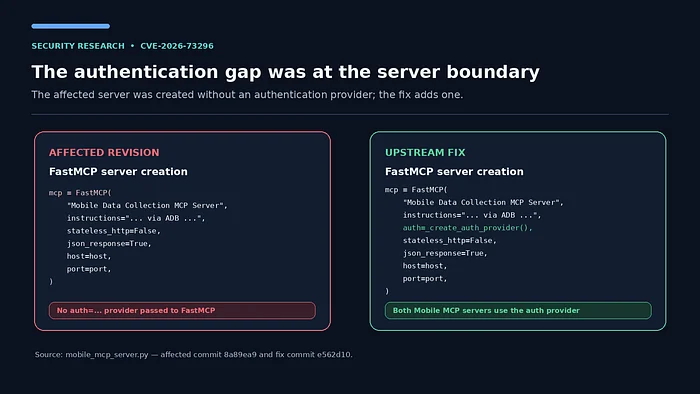
The researcher examined how the two HTTP MCP servers were created. At the affected revision, both servers were initialised using FastMCP without an authentication provider. The relevant part of the server creation logic looked like this:
mcp = FastMCP( "Mobile Data Collection MCP Server", instructions="...", stateless_http=False, json_response=True, host=host, port=port,)
The important observation was that no authentication provider was configured. A client able to reach the exposed HTTP service therefore did not need to present an API key or any other authentication credential before invoking its tools. The same gap existed in the Mobile Action server.
This was particularly concerning because these were not ordinary read-only endpoints. They exposed functionality that could collect device information and perform actions through ADB.
Exploitation
Step 1: Trace the exposed functionality
After identifying the missing authentication check, the researcher traced what each service exposes. Depending on the service being accessed, an unauthenticated network client could potentially perform the following operations.
Through the Mobile Data Collection server:
- Capture screenshots from the connected Android device.
- Retrieve the UI hierarchy.
- Collect device information.
- Access application and screen-related information.
Through the Mobile Action server:
- Perform taps and swipes.
- Enter text.
- Press device keys.
- Launch applications.
- Interact with UI controls.
In simple terms, one service could expose information displayed on the device, while the other could allow someone to interact with it.
Step 2: Build a controlled test environment
Rather than report a theoretical issue based only on reading the source code, the researcher wanted to demonstrate that an unauthenticated request could actually reach the device-control execution path. A controlled local test environment was used with a fake ADB executable. Instead of connecting a physical Android device, the fake executable recorded the commands it received in a temporary marker file.
Step 3: Send an unauthenticated tap
An unauthenticated tap operation was tested:
tap(x=17, y=29)
The fake ADB executable recorded the following command:
shell input tap 17 29
This was an important result. It demonstrated that the request had reached the ADB command-execution boundary without requiring authentication. No physical Android device was used, and no real device interaction took place during the test. The purpose was to prove the missing security boundary safely, without affecting an actual device.
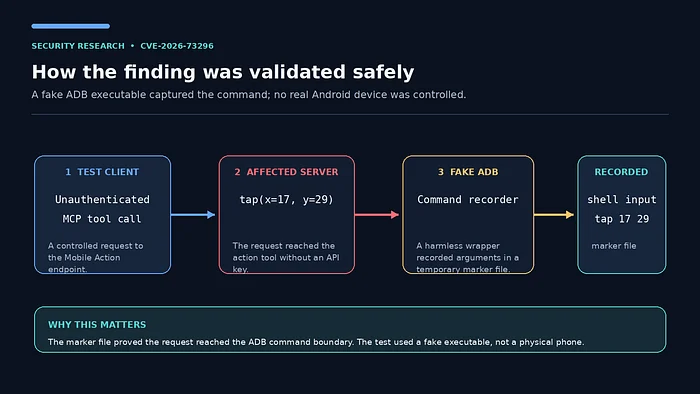
Figure 3: The controlled validation process using a fake ADB executable and a temporary marker file.
Root cause
The mistake was in how the two HTTP MCP servers were constructed: both were initialised with FastMCP without an authentication provider, so the service boundary itself enforced no credential check. Any client that could reach the exposed HTTP service could invoke its tools directly. The same gap existed in both the Mobile Data Collection server and the Mobile Action server.
Because the tools behind those servers wrap ADB operations, the missing check sat directly in front of functionality that reads from and acts on a connected device. In the controlled test with a fake ADB executable, an unauthenticated request reached the ADB command-execution boundary.
Impact
The issue had two major security implications.
Confidentiality impact. An unauthorised client could potentially retrieve screenshots and device information. Depending on what was displayed on the screen, this could expose sensitive information.
Integrity impact. An unauthorised client could invoke device-control operations such as tapping, entering text and launching applications.
The combination of information disclosure and unauthorised device interaction made this more serious than a simple missing-authentication issue on an ordinary endpoint.
There is an important condition: the attacker would need network access to the exposed MCP endpoints, and an Android device would need to be connected through ADB. This does not mean that every default UFO installation was automatically exposed to the internet. A localhost-only deployment would not be remotely reachable from other machines.
Fix
The upstream fix introduced bearer-token authentication for both Mobile MCP servers. The server now reads the credential from an environment variable:
UFO_MCP_API_KEY
The authentication provider checks the supplied token using:
hmac.compare_digest(token, self._api_key)
If the credential is missing, the server refuses to start. If an incoming request has an invalid credential, it is rejected instead of reaching the MCP tools. The authorised client must also provide the matching bearer credential. This closes the missing authentication boundary identified during the review.
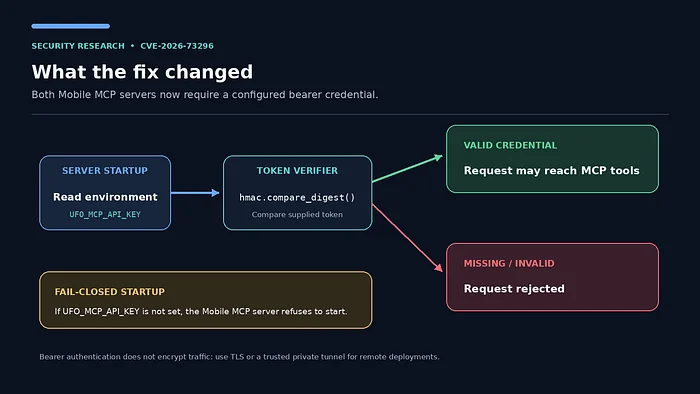
The fix was included in Microsoft UFO v3.0.8. One additional point: bearer authentication does not encrypt network traffic, so remote deployments should also use TLS or a trusted private tunnel to protect credentials in transit.
Disclosure timeline
- August 6, 2026: the private security report was submitted.
- August 10, 2026: the upstream v3.0.8 release and public GitHub security advisory were published.
- August 12, 2026: CVE-2026-73296 was assigned.
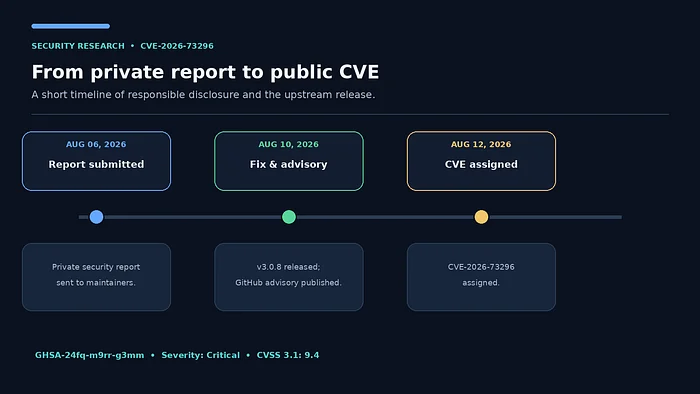
Figure 5: Timeline from the initial report to the public advisory and CVE assignment.
Variants to test
- Other MCP servers built on FastMCP without an auth provider. Look for server construction calls that pass host and port but no authentication provider. A positive result is a tool invocation that succeeds from a client holding no credential.
- Both halves of a paired service. When a project splits read and write functionality across two ports, test each one separately. A positive result is that the read service returns device or screen data and the write service executes an action, both unauthenticated.
- Execution-path validation with a fake backend. Replace the real device or command target with a stub that records what it receives, then send an unauthenticated action. A positive result is a recorded command in the marker file, proving the request crossed the execution boundary.
- Startup behaviour when the credential is absent. After a fix, check whether the service refuses to start without its key. A positive result for the defender is a failed start; a service that starts anyway suggests the check is not enforced.
- Credential comparison implementation. Review how the supplied token is compared.
- Transport protection on remote deployments. Bearer tokens travel in clear text without TLS.
What happened, in plain words
Microsoft UFO is a piece of software, published openly for anyone to download and inspect, that automates tasks across applications and devices. One part of it, called Mobile MCP, lets UFO talk to Android phones and tablets through a tool called Android Debug Bridge (ADB). ADB is the standard way a computer sends commands to an Android device: tap here, type this, take a screenshot.
While reviewing that part of the project, the researcher found that two small web services inside it had no lock on the door at all. Anyone who could reach them over a network could ask them to read things from a connected Android device, or to act on it, without proving who they were. The issue was reported privately, fixed by the maintainers, and published as CVE-2026-73296 with a CVSS score of 9.4, rated Critical.
This article walks through the same investigation from the beginning, explaining each idea as it comes up.
1. Understanding the component before looking for vulnerabilities
Before testing anything, the researcher wanted to understand what Mobile MCP actually does. That is a sensible first step: you cannot judge whether something is protected properly until you know what it is protecting.
Microsoft UFO is an open-source framework that supports intelligent automation across applications and devices. Its Mobile MCP functionality allows UFO to interact with Android devices through ADB.
Two HTTP services were identified during the review:
| Service | Port | Purpose |
|---|---|---|
| Mobile Data Collection | 8020 | Collects screenshots, UI hierarchy and device information |
| Mobile Action | 8021 | Performs taps, swipes, text input, app launches and other device actions |
A few of those words need unpacking.
HTTP service. HTTP is the language web browsers and web servers use to exchange pages and data. A service that speaks HTTP is simply a program listening on the network for requests written in that language. Think of it as a counter in a shop: anyone who walks up can ask for something.
Port. A computer can run many network services at once, so each one listens on a numbered channel called a port. It works like an extension number on a phone system: the same building, but a different desk answers. Here, one service answers on port 8020 and the other on port 8021.
API. An API (application programming interface) is a defined set of requests a program accepts. Instead of a human clicking buttons, another program sends a request and gets an answer back. It is like a restaurant menu: you may only order the dishes listed, but the kitchen will prepare them for you.
Screenshot. A picture of whatever is currently shown on the device screen.
UI hierarchy. A structured description of the elements on the screen: which buttons, text fields and labels exist and where they sit. Automation tools use it to find the right thing to tap.
Device information. Details about the phone or tablet itself, such as its model and state.
These are useful automation capabilities. However, they also mean that anyone who can access the services may be interacting with functionality that has direct access to a connected device. That made authentication and access control particularly important.
Authentication means proving who you are, like showing a membership card at the door. Access control means deciding what each person is allowed to do once inside. Neither was in place here, which is the heart of the story.
Figure 1: How the two Mobile MCP services communicate with ADB and an Android device.
The diagram shows how the two Mobile MCP services communicate with ADB and an Android device. Anything that gets past the services can reach the device.
2. Identifying the authentication gap
The researcher then examined how the two HTTP MCP servers were created. In other words: how does the program build these two counters, and does it put a guard in front of them?
At the affected revision, both servers were initialised using FastMCP without an authentication provider. FastMCP is a toolkit for building MCP servers. MCP, the Model Context Protocol, is a standard way for an AI system to be offered a set of tools it can call. FastMCP handles the plumbing so a developer only has to describe the tools. An authentication provider is the optional part that checks credentials before any tool is called.
The relevant part of the server creation logic looked like this:
mcp = FastMCP( "Mobile Data Collection MCP Server", instructions="...", stateless_http=False, json_response=True, host=host, port=port,)
Line by line, in plain words:
mcp = FastMCP(starts building a new server and gives it the namemcpso the rest of the program can refer to it."Mobile Data Collection MCP Server"is the human-readable name of this server.instructions="..."is a placeholder for descriptive text handed to whoever connects.stateless_http=Falseis a setting about how connections are remembered between requests.json_response=Truesays replies should be formatted as JSON, a common text format for structured data.host=hostandport=portsay which network address and which numbered channel the server should listen on.- The closing
)finishes the call.
The important observation was that there was no authentication provider configured. Nothing in that call asks for a password, a key or any other proof of identity. This meant that a client able to reach the exposed HTTP service did not need to present an API key or another authentication credential before invoking its tools.
An API key is a long secret string that acts like a password for programs rather than people. A client is whatever program is making the request. A credential is any proof of identity: a password, a key, a token.
The same security gap existed in the Mobile Action server. Both counters were open.
This was particularly concerning because these were not ordinary read-only endpoints. They exposed functionality that could collect device information and perform actions through ADB. A read-only endpoint is like a noticeboard: you can look, but you cannot change anything. These were more like a control panel.
3. Understanding the possible impact
After identifying the missing authentication check, the researcher traced the functionality exposed by both services. The question was no longer just "is there a lock?" but "what is behind the door?".
The impact was not limited to accessing an endpoint. Depending on the service being accessed, an unauthenticated network client could potentially perform operations such as:
Through the Mobile Data Collection server:
- Capture screenshots from the connected Android device.
- Retrieve the UI hierarchy.
- Collect device information.
- Access application and screen-related information.
Through the Mobile Action server:
- Perform taps and swipes.
- Enter text.
- Press device keys.
- Launch applications.
- Interact with UI controls.
In simple terms, one service could expose information displayed on the device, while the other could allow someone to interact with it. One is a window; the other is a hand.
There is an important condition here: the attacker would need network access to the exposed MCP endpoints, and an Android device would need to be connected through ADB. This does not mean that every default UFO installation was automatically exposed to the internet. A localhost-only deployment would not be remotely reachable from other machines.
Localhost means the same computer. A service bound only to localhost can only be reached by programs running on that machine, like a shop that only serves staff in the back room. The danger appears when the service is reachable across a network.
4. Validating the issue without using a real Android device
The researcher did not want to report a theoretical issue based only on reading the source code. Reading code tells you what should happen; a test tells you what does happen. The objective was to demonstrate that an unauthenticated request could actually reach the device-control execution path.
For this, a controlled local test environment was used with a fake ADB executable. An executable is a program file the computer can run. The real ADB program would send commands to a phone. The fake one does nothing to any phone: instead, it writes down every command it receives in a temporary marker file. A marker file is just a small file used as evidence, like a receipt that proves a request arrived.
This is the equivalent of testing a doorbell by wiring it to a light in your own room instead of to the actual house: you can see whether the button works without disturbing anyone.
An unauthenticated tap operation was then tested:
tap(x=17, y=29)
This is a request to tap at coordinates x=17, y=29. A pixel is one dot on the screen, so the coordinates say exactly where the tap should land. No credential of any kind accompanies the request.
The fake ADB executable recorded the following command:
shell input tap 17 29
This is the command ADB would normally pass to the Android device: run a shell command that injects a tap at those coordinates. A shell is a way of giving a device direct text commands. Seeing this line in the marker file means the request reached the ADB command-execution boundary without authentication.
This was an important result. It demonstrated that the request had reached the ADB command-execution boundary without requiring authentication. The execution boundary is the line where a request stops being data and starts causing something to happen.
No physical Android device was used, and no real device interaction took place during this test. The purpose was to prove the missing security boundary safely, without affecting an actual device.
Figure 3: The controlled validation process using a fake ADB executable and a temporary marker file.
5. Security impact and severity
The issue had two major security implications. Security professionals split harm into a few standard kinds, and two of them apply here.
Confidentiality impact. An unauthorised client could potentially retrieve screenshots and device information. Depending on what was displayed on the screen, this could expose sensitive information. Confidentiality means keeping information away from people who should not see it. Depending on what is displayed, a screenshot could expose sensitive information.
Integrity impact. An unauthorised client could invoke device-control operations, such as tapping, entering text, and launching applications. Integrity means keeping things as they should be. If someone else can tap and type on your device, they can change what happens on it.
The combination of information disclosure and unauthorised device interaction made this more serious than a simple missing-authentication issue on an ordinary endpoint.
The published vulnerability details are:
| Detail | Value |
|---|---|
| Product | Microsoft UFO |
| CVE | CVE-2026-73296 |
| GitHub Advisory | GHSA-24fq-m9rr-g3mm |
| Severity | Critical |
| CVSS 3.1 | 9.4 |
| Affected versions | Up to and including v3.0.7 |
| Fixed version | v3.0.8 |
| CWE | CWE-306, CWE-862 |
A CVE is a public catalogue number given to a known security flaw so everyone can refer to the same thing. A GitHub Advisory is the notice published on the code hosting site where the project lives. CVSS is a scoring system from 0 to 10 that summarises how serious a flaw is; 9.4 is near the top. CWE is a catalogue of weakness types; CWE-306 means missing authentication for a critical function, and CWE-862 means missing authorisation.
The CVSS vector is:
CVSS:3.1/AV:N/AC:L/PR:N/UI:N/S:U/C:H/I:H/A:L
This string is the recipe behind the score. Each part is a short code:
AV:Nmeans the attack can happen over a network rather than requiring hands on the machine.AC:Lmeans low complexity: no special conditions are needed.PR:Nmeans no privileges are required; the attacker needs no account.UI:Nmeans no user interaction; nobody has to click anything.S:Umeans the impact stays within the affected component.C:HandI:Hmean high impact on confidentiality and integrity.A:Lmeans low impact on availability, meaning whether the service keeps running.
The important factors are network accessibility, low attack complexity, no required privileges, and no user interaction.
6. Responsible disclosure and the fix
Once sufficient evidence had been gathered, the finding was submitted through the project's private security disclosure process. Responsible disclosure means telling the people who can fix a problem first, privately, and giving them time to do so before the details become public. It is the difference between warning a shop about a broken lock and publishing the address.
The issue was handled through responsible disclosure, allowing the maintainers to investigate and address it before public disclosure.
The upstream fix introduced bearer-token authentication for both Mobile MCP servers. A bearer token is a secret string that the client sends along with each request, like a wristband at an event: whoever bears it is treated as allowed. The server now reads the credential from an environment variable:
UFO_MCP_API_KEY
An environment variable is a named setting kept outside the program, so the secret is not written into the code itself. The program looks up that name when it starts.
The authentication provider checks the supplied token using:
hmac.compare_digest(token, self._api_key)
In plain words: token is what the client sent, self._api_key is the secret the server expects, and hmac.compare_digest compares the two in a way that takes the same amount of time whether they match early or late. That timing detail matters because a naive comparison can leak information through how long it takes to fail.
If the credential is missing, the server refuses to start. If an incoming request has an invalid credential, it is rejected instead of reaching the MCP tools. The authorised client must also provide the matching bearer credential. This closes the missing authentication boundary that was identified during the review.
The fix was included in Microsoft UFO v3.0.8.
One additional point is worth mentioning: bearer authentication does not encrypt network traffic. Encryption scrambles data so that anyone listening on the network sees gibberish. Bearer authentication does not encrypt network traffic, so credentials sent without TLS are not protected in transit. Remote deployments should also use TLS or a trusted private tunnel to protect credentials in transit. TLS is the technology behind the padlock in a browser address bar; a private tunnel is an encrypted path between two machines.
7. Disclosure timeline
The disclosure process progressed as follows:
- August 6, 2026: the private security report was submitted.
- August 10, 2026: the upstream v3.0.8 release and public GitHub security advisory were published.
- August 12, 2026: CVE-2026-73296 was assigned.
Figure 5: Timeline from the initial report to the public advisory and CVE assignment.
8. What I learned from this finding
One thing this investigation reinforced is that a service designed primarily for local automation still needs strong security controls when it is exposed over a network. "It was only meant for local use" is an assumption, not a control.
A service that can access device screens, collect information, or perform actions on behalf of a user should never rely on assumptions about who is allowed to connect. Authentication needs to be enforced at the service boundary itself, at the counter, not somewhere further inside.
Validating the actual execution path is also important. Source-code observations can help identify a potential issue, but a controlled and reproducible test makes it much easier to demonstrate the real security impact. A reproducible test is one someone else can repeat and get the same result.
The issue went through responsible disclosure and the maintainers addressed it, with thanks to the Microsoft UFO maintainers for their coordination throughout the process.
Glossary
- ADB (Android Debug Bridge): the standard tool a computer uses to send commands to an Android device.
- API: a defined set of requests a program accepts from another program.
- API key: a long secret string that acts as a password for programs.
- Authentication: proving who you are before being allowed in.
- Authentication provider: the optional part of a server framework that checks credentials before tools are called.
- Authorisation / access control: deciding what an identified person or program is allowed to do.
- Bearer token: a secret string sent with each request; whoever bears it is treated as allowed.
- Client: the program making a request to a service.
- Confidentiality: keeping information away from those who should not see it.
- Credential: any proof of identity, such as a password, key or token.
- CVE: a public catalogue number for a known security flaw.
- CVSS: a 0 to 10 scoring system for the severity of a flaw.
- CVSS vector: the coded string of factors that produces the CVSS score.
- CWE: a catalogue of weakness types, such as CWE-306 (missing authentication) and CWE-862 (missing authorisation).
- Encryption: scrambling data so that eavesdroppers cannot read it.
- Environment variable: a named setting kept outside a program, often used to hold secrets.
- Executable: a program file the computer can run.
- Execution boundary: the point where a request stops being data and starts causing an action.
- FastMCP: a toolkit for building MCP servers.
- GitHub Advisory: the public notice about a flaw published on the code hosting site.
- HMAC compare_digest: a comparison function that takes the same time regardless of where two strings differ, avoiding timing leaks.
- HTTP: the language browsers and servers use to exchange requests and responses.
- Integrity: keeping things as they should be, so nobody else can change them.
- JSON: a common text format for structured data.
- Localhost: the same computer; a service bound to localhost is only reachable from that machine.
- Marker file: a small file used as evidence that something happened.
- MCP (Model Context Protocol): a standard way to offer a set of tools to an AI system.
- Open source: software whose code is published for anyone to read and inspect.
- Pixel: one dot on a screen; coordinates in pixels say exactly where a tap lands.
- Port: a numbered channel on a computer that a network service listens on.
- Reproducible test: a test someone else can repeat and get the same result.
- Responsible disclosure: reporting a flaw privately to those who can fix it, before making it public.
- Screenshot: a picture of what is currently shown on a screen.
- Shell: a way of giving a device direct text commands.
- TLS: the encryption behind the padlock in a browser address bar.
- UI hierarchy: a structured description of the elements on a screen and where they sit.
- Unauthenticated: without proving identity.
- Upstream: the original project that a fix is made in.

