Four Vulnerabilities With Ai-Agent, One Subdomain : Exploring the Hidden Attack Surface of a…
Four separate flaws on a pricing research subdomain let unauthenticated users create and rename studies, change study statuses, submit fabricated survey responses, and obtain valid completion or termination credentials for approved studies. An attacker could interfere with research data and survey workflows without any account.

Bug Bounty
The full write-up lives on its author's site
It belongs to its author, so we link to it rather than copy it. The other two tabs are our own rewrites, checked against it.
Context
The target is a public Bugcrowd program, referred to throughout as target.com. The researcher, Momen Samir (0xmannaf), found a newly appeared subdomain, https://cognitive.target.com, and describes it as a pricing research and customer intelligence platform. Its purpose is to help the company understand how customers value its products and services, how much they are willing to pay, and which product configurations or service options they prefer. On first visit the subdomain looked like it had been built using vibe coding, judging by its styling, features and overall design.
The four findings below all sit on that one subdomain. The first three concern study creation and participation, the fourth concerns survey completion and termination credentials issued to respondents.
Setup
The researcher runs a monitoring service that collects new subdomains for several targets and notifies him when one appears. That is how cognitive.target.com was discovered. No accounts, roles, tool versions or special preconditions are described beyond this: the findings below were reached partly with the help of an AI agent and partly by manual testing, and the requests shown are unauthenticated.
Finding it
The starting point was the study creation flow. The endpoint /saveFirstForm accepts a POST request and normally creates a study from one of the 12 existing study templates, with users able to choose only one template at a time, so that participants can give their opinions about the company's products.
The agent found a parameter named studyName with a value of null. Changing that parameter to any value caused the submitted name to be saved and rendered in the UI for other users as a trusted study. The researcher calls this low-hanging fruit and continued manually from there.
Exploitation
F1: Unauthenticated persistent study injection (P3)
While working manually on the same endpoint, the researcher found another parameter, businessJustification. Its value was displayed throughout the study process to users, and it also rendered URLs as clickable links. An attacker-controlled URL could therefore be inserted:
https://evil.com
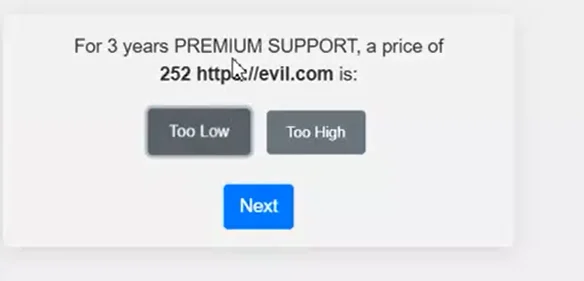
The report was initially triaged as P4. The researcher contacted the customer directly and explained the impact, and the priority was updated from P4 to P3. The bounty was $750.
F2: Unauthenticated study status change (P2)
After the first bug was resolved, the researcher went back to retest. The fix restricted the study creation process to specific users who received invitations from an admin; the admin would then review the study and approve or reject it.
The agent found an endpoint that returned the studies' data and their current statuses:
GET /api/conjoint-studies
The statuses returned were Approved, Rejected, Finished and Submitted. By changing the request method to PUT, the agent was able to change the status of any study from Approved to Rejected, an operation that required admin privileges.
The vulnerable endpoint was:
PUT /conjoint/study-status
With a request like:
{ "FormId": "<study-id>", "status": "Rejected"}
The server accepted the request and persisted the status change without requiring authentication.
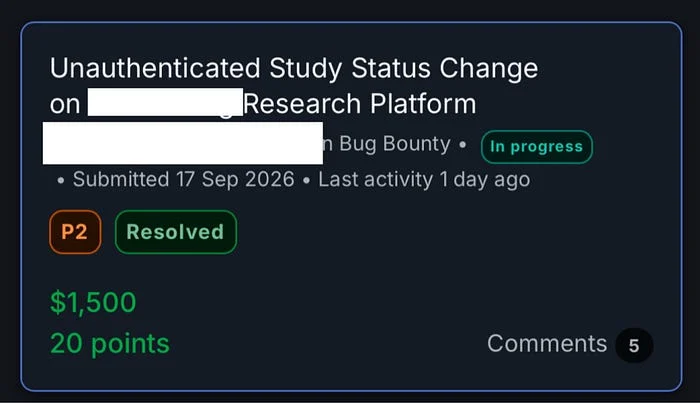
He submitted the report and got $1,500.
F3: Injection of fake pricing data into production surveys (P3)
The agent found this bug during the same session in which it found the previous one. The earlier fix restricted study creation to specific users, but participant verification was still missing. An external user could create their own participant ID and submit responses without proving they were a legitimate survey participant.
The process involved several API endpoints.
1. Retrieve active studies
GET /api/conjoint-studies
This returns available production studies and their IDs.
2. Reserve a participant slot
POST /reservation/{FormId}
By sending an arbitrary participantId, the server returned a valid groupId without verifying the participant's identity.
3. Retrieve pricing options
GET /getTaskAndOptionByGroupId/{groupId}
This returns the pricing options associated with the reserved study.
4. Submit fabricated responses
PUT /conjoint/makeSelectedBatch
The attacker could submit their own selections using the generated groupId and participantId. The server accepted the submission and returned:
{ "ok": true, "totalRowsAffected": 18, "fulfilled": true}
This confirmed that the backend had processed the submitted responses and marked the participant group as completed. An attacker could introduce fabricated responses into legitimate research, potentially influencing pricing analysis, customer preference measurements and other business insights derived from the collected data.
This report was marked as a duplicate two days later.
F4: Unauthenticated access to live Audience-Align completion and termination credentials (P2)
The company's pricing research platform allowed unauthenticated users to obtain valid survey completion and termination credentials for every approved study.
The first endpoint allowed enumeration of the available study combinations:
GET /api/form-url-combinations
The vulnerable endpoint was:
POST /redirect
By providing an approved study's formId and requesting either complete or terminate, the server returned a credential without requiring authentication or a valid participant session. The credentials were also static: repeating the same request returned identical values.
To verify their validity, the researcher tested them against Audience-Align's external respondent API:
POST /webservices/user/updateRespondentData
The external platform recognised the two credential types differently:
resstatus |
Meaning |
|---|---|
1 |
Completion |
2 |
Termination |
Both credential types were obtained for all four approved studies identified during testing. This confirmed that the credentials were not arbitrary redirect values: the external platform actually recognised them.
The root cause was missing authentication and participant-level authorisation when generating these credentials. The researcher verified credential recognition using a dummy respondent ID; the final respondent credit or incentive state was not established.
The bounty was $1,500.
Root cause
Study creation accepted attacker-controlled values for studyName and businessJustification without authentication, and the second value was rendered as a clickable link. The status endpoint accepted a PUT that changed any study's state without an admin session. The participation flow issued a groupId for an arbitrary participantId and then accepted submitted selections, so nothing tied a response to a verified participant. The redirect endpoint issued completion and termination credentials for any approved formId without authentication or a participant session, and returned the same static values on repeat requests.
The fix after F1 restricted study creation to invited users and added an admin review step. The report does not describe fixes for the status change, the participation flow or the credential generation.
Impact
F1 allowed an unauthenticated attacker to create studies with attacker-chosen names and with a businessJustification value that was shown to users throughout the study process and rendered as a clickable link, so a malicious URL could be presented to them as part of a trusted study.
F2 allowed an unauthenticated attacker to change the status of any study, for example from Approved to Rejected, an operation that required admin privileges.
F3 allowed an external user to fabricate survey responses and have them processed as completed participant data. The researcher notes this could influence pricing analysis, customer preference measurements and other business insights derived from the collected data. The report was closed as a duplicate.
F4 allowed an unauthenticated attacker to obtain credentials that the external survey platform recognised as completion or termination signals, for all four approved studies identified during testing. This could allow unauthorised interference with survey workflows and compromise the integrity of the research process. The researcher verified recognition with a dummy respondent ID; whether a respondent would actually receive credit or an incentive was not established.
Fix
The only fix described is the one applied after F1: study creation was restricted to specific users who received invitations from an admin, with the admin reviewing the study and approving or rejecting it. The report does not describe fixes for F2, F3 or F4. Based on the root causes above, the changes those findings call for are authentication and role checks on the study status endpoint, verification of participant identity before a groupId is issued and before responses are accepted, and authentication plus participant-level authorisation before completion or termination credentials are generated, with those credentials made non-static.
Variants to test
- Method switching on read endpoints. Take a
GETthat returns objects and their states, and tryPUT,PATCHorPOSTagainst the corresponding write path with the object identifier and a new state. A positive result is a state change persisted without an authenticated admin session. - Hidden fields in creation forms. On any form that creates a record, look for parameters that are not in the UI, such as names and free-text justification fields, and set them to attacker-controlled values. A positive result is the value being stored and rendered to other users, especially if URLs become clickable.
- Participant and reservation flows. Send an arbitrary participant identifier to a reservation endpoint and see whether a group or session identifier comes back. A positive result is a valid identifier issued without identity verification, followed by accepted submissions under it.
- Credential-issuing redirects. Request completion and termination values for approved studies without a session, then repeat the request. A positive result is a credential returned unauthenticated that is identical on repeat, and that an external platform recognises.
- Enumeration endpoints. Check whether endpoints such as form and URL combination listings return data for every approved study without authentication. A positive result is a full list of study identifiers that can be fed into the credential endpoint.
What happened, in plain words
A security researcher called Momen Samir, who goes by the handle 0xmannaf, found four separate security problems on one subdomain of a company's website. The company runs a public bug bounty programme on Bugcrowd, which means it invites people to look for security problems and pays them for reporting what they find. In the write-up the company is called target.com so that its real name stays private.
The subdomain he found was https://cognitive.target.com. A subdomain is a smaller section of a website, like a separate department inside the same building. If target.com is the main building, cognitive.target.com is one office inside it. It is still run by the same company, but it can be built and maintained separately.
That subdomain is a pricing research and customer intelligence platform. In plain words: it is a website where the company runs surveys to find out how much customers value its products, how much they would be willing to pay, and which product options they prefer. Think of it as a digital clipboard that the company hands to customers so they can tick boxes and give opinions, and the company then uses those answers to decide its prices.
When he first opened the subdomain, he thought it looked like it had been built using vibe coding. That is a casual term for building software quickly by describing what you want to an AI assistant and accepting the code it produces, often with less review than a traditional development process. He judged this from the styling, the features and the overall design.
He found four bugs on that one subdomain. The first three are about creating and taking part in studies. The fourth is about the codes that tell the survey system a person has finished or been stopped. He was paid $750 for the first, $1,500 for the second, the third was closed as a duplicate, and he was paid $1,500 for the fourth.
How he found the subdomain
He runs a monitoring service. This is a small program that watches a target's domain names and tells him when a new one appears. A domain name is the address you type into a browser, like target.com. Companies constantly add new subdomains for new projects, and a freshly added one is often less tested than the main site, which makes it interesting to a researcher.
One day the service told him a new subdomain had appeared: https://cognitive.target.com. He opened it and started looking around.
He mentions that some of the findings were reached with the help of an AI agent and some by testing manually. An AI agent here means a tool that can send requests and try variations on its own, while manual testing means he sat and tried things himself. All the requests shown in the write-up were sent unauthenticated, which means without logging in. That matters a lot: if a stranger who has never created an account can do something, the website is trusting anyone who knocks.
A few ideas you need before the findings
Before the bugs make sense, three everyday ideas help.
An API. A website has two sides. One is what you see in the browser: buttons, forms, pages. The other is the set of addresses the browser talks to behind the scenes to fetch and save data. That second side is the API (Application Programming Interface). Think of a restaurant: the menu and the dining room are the website you see, and the kitchen door where orders go in and plates come out is the API. When you click a button, your browser sends a request to an API address and the server sends data back. In this write-up, API addresses look like /api/conjoint-studies or /saveFirstForm.
HTTP methods. Every request to a web server carries a method, which is a verb saying what you want to do. The common ones:
GETmeans "give me something". Reading.POSTmeans "here is some data, create something". Writing.PUTmeans "replace or update this thing". Changing.
A well-built site checks who you are before it lets you use the writing and changing verbs. Many of the bugs below exist because it did not.
Parameters. When a request carries data, that data comes as named parameters, like labelled boxes. A parameter called studyName holds the name of a study. A parameter called status holds the state of a study. If the server accepts a parameter from anyone and acts on it, an attacker can put whatever they like in the box.
One more term you will see: persistent. A persistent problem is one where what you send is stored on the server and shown to other people later. The opposite is reflected, where your input bounces straight back to you and is gone. Persistent is worse, because your content reaches other users.
Finding 1: putting your own content into studies (rated P3)
The starting point was the flow for creating a study. A study here is one survey project: a set of questions the company wants customers to answer. The endpoint /saveFirstForm accepts a POST request and normally creates a study from one of 12 existing templates. A template is a ready-made starting point, like a form letter you fill in. A user can pick only one template at a time.
The AI agent noticed a parameter called studyName whose value was null. null is programming for "nothing here". By changing that parameter to any value, the name he submitted was saved and then shown in the interface to other users, presented as a trusted study. So a stranger could make a study appear with a name of their choosing, and other people would see it as if the company had created it.
He calls this low-hanging fruit: an easy win, like fruit you can pick without a ladder. So he kept going by hand on the same endpoint.
He then found another parameter, businessJustification. Its value was displayed to users throughout the study process, and the page also turned any URL in it into a clickable link. That means he could put a link of his choosing into a field that other users would see inside a trusted study:
https://evil.com
This block is just the value he typed into the businessJustification field. evil.com is a placeholder domain researchers use to stand for "a website the attacker controls". The point is not that specific address; the point is that any address placed there became a clickable link shown to other users. A link inside a trusted study is far more likely to be clicked than a link in a random email, which is why this matters.
The report was first triaged as P4. Bug bounty programmes use priority ratings, often P1 to P5, where a lower number means more serious. P4 is fairly minor. He contacted the customer directly, explained the impact, and the priority was raised from P4 to P3. He was paid $750.
Finding 2: changing the state of any study (rated P2)
After the first bug was fixed, he went back to test again. Retesting is standard practice: you check whether the fix actually works and whether anything nearby is still broken.
The fix restricted study creation to specific users who had received an invitation from an admin. An admin is a privileged user who manages the platform. The admin would then review a study and approve or reject it. So creating a study now needed an invitation and a human check.
The agent then found an endpoint that returned the studies' data and their current statuses:
GET /api/conjoint-studies
Line by line: GET is the read verb, so this request only asks for information. /api/conjoint-studies is the address of the list of studies. "Conjoint" is a type of survey used in pricing research where respondents compare combinations of features. The studies had one of four statuses: Approved, Rejected, Finished or Submitted. Think of these as the stages of a document moving through an office: waiting, approved, rejected, done.
By changing the request method to PUT, the agent was able to change the status of any study from Approved to Rejected. Changing a study's status is an operation that should require admin privileges. The vulnerable endpoint was:
PUT /conjoint/study-status
Line by line: PUT is the update verb, so this request asks the server to change something. /conjoint/study-status is the address that handles status changes. The important part is that the server did not check whether the caller was an admin. It simply did what the verb asked.
With a request like:
{ "FormId": "<study-id>", "status": "Rejected"}
This is a JSON body, a common text format for sending structured data, where names and values sit in curly brackets separated by commas. Line by line: "FormId": "<study-id>" says which study to act on; <study-id> is a placeholder for the real identifier of a study. "status": "Rejected" says what the new state should be. So the whole body means "take this study and mark it rejected".
The server accepted the request and saved the status change without requiring authentication. In other words, anyone at all could reject any study, including one an admin had just approved. That is why this was rated P2, more serious than the first.
He submitted the report and was paid $1,500.
Finding 3: fake answers in real surveys (rated P3)
The agent found this one in the same session as the previous bug. The earlier fix had restricted who could create studies, but participant verification was still missing. A participant is a person taking part in a survey. Verification means proving you are who you claim to be. Here, an outside user could make up their own participant ID and submit answers without proving they were a legitimate survey participant.
The process involved several API endpoints, used in order.
1. Retrieve active studies
GET /api/conjoint-studies
This is the same read request as before. It returns the available production studies and their IDs. Production means the real, live surveys, not test ones. He needed this list to know which study to target.
2. Reserve a participant slot
POST /reservation/{FormId}
Line by line: POST is the create verb. /reservation/{FormId} is the address for reserving a place in a study; {FormId} is a placeholder for the study's identifier, which you fill in from step 1. By sending an arbitrary participantId, the server returned a valid groupId without verifying the participant's identity. An arbitrary value means one he made up himself. A groupId is an identifier the server returned for the reservation. The server handed out the ticket to anyone who asked.
3. Retrieve pricing options
GET /getTaskAndOptionByGroupId/{groupId}
Line by line: GET reads. /getTaskAndOptionByGroupId/{groupId} asks for the tasks and options belonging to the group whose identifier you put in place of {groupId}. This returns the pricing options associated with the reserved study, in other words the actual questions and choices a real participant would see.
4. Submit fabricated responses
PUT /conjoint/makeSelectedBatch
Line by line: PUT updates. /conjoint/makeSelectedBatch is the address that accepts a batch of selected answers. The attacker could submit their own selections using the generated groupId and participantId. The server accepted the submission and returned:
{ "ok": true, "totalRowsAffected": 18, "fulfilled": true}
Line by line: "ok": true means the server says the request succeeded. Together this confirmed that the backend had processed the submitted responses and treated them as a finished participant's data.
Why does this matter? Because the whole point of the platform is to collect real opinions to guide pricing. An attacker could introduce fabricated responses into legitimate research, potentially influencing pricing analysis, customer preference measurements and other business insights derived from the collected data. In everyday terms: if you can stuff the suggestion box with your own notes, the company may set prices based on opinions nobody actually holds.
Unfortunately, this report was marked as a duplicate two days later. A duplicate means someone else had already reported the same issue, so the programme does not pay twice for it.
Finding 4: free passes that say "finished" or "stopped" (rated P2)
The agent found that the platform allowed unauthenticated users to obtain valid survey completion and termination credentials for every approved study. A credential here is a short code that the survey system accepts as proof of something, in this case proof that a respondent finished a survey or was stopped partway through. Completion means the person answered everything. Termination means they were screened out, for example because they did not fit the target group.
The first endpoint allowed enumeration of the available study combinations:
GET /api/form-url-combinations
Line by line: GET reads. /api/form-url-combinations allowed enumeration of the available study combinations. Enumeration means listing things out one by one, like reading names off a register. He needed this list to know which studies existed and which identifiers to use next.
The vulnerable endpoint was:
POST /redirect
Line by line: POST sends data. By providing an approved study's formId and requesting either complete or terminate, the server returned a credential without requiring authentication or a valid participant session. A session is the server's memory of you being logged in, usually held in a cookie, a small piece of data your browser stores and sends back with each request. No session, no proof of identity, yet the code was still issued.
The credentials were also static: repeating the same request returned identical values. Static means unchanging. A good credential should be unique and hard to guess, like a one-time ticket. A static one is like a door code that is the same for everyone and never changes, so once it is known it works forever.
To verify their validity, he tested them against Audience-Align's external respondent API:
POST /webservices/user/updateRespondentData
Line by line: POST sends data. /webservices/user/updateRespondentData is an address on Audience-Align's external respondent API. "External" means it is not part of target.com; it is a separate service the platform talks to. Sending the credentials there was a way of asking a neutral party: do you actually accept these codes?
The external platform recognised the two credential types differently:
resstatus |
Meaning |
|---|---|
1 |
Completion |
2 |
Termination |
A value of 1 means the person completed the survey; 2 means they were terminated. The fact that the external system sorted the two codes into these meanings proved the codes were real, not just random text.
He was able to obtain both credential types for all four approved studies identified during testing. That confirmed the credentials were not arbitrary redirect values: the external platform actually recognised them.
Impact. An external attacker could obtain credentials recognised by the external survey platform as completion or termination signals, potentially allowing unauthorised interference with survey workflows and compromising the integrity of the research process. In plain terms: if you can hand the survey system a code that says "this person finished", you can interfere with survey workflows without taking part.
The root cause was missing authentication and participant-level authorisation when generating these credentials. Authentication is checking who you are. Authorisation is checking what you are allowed to do. The platform did neither before handing out the codes.
He verified the credential recognition using a dummy respondent ID; the final respondent credit or incentive state was not established. A dummy ID is a made-up identifier used only for testing. So he proved the codes were accepted, but not whether a real person would actually receive money or a reward because of them.
He was paid another $1,500.
Why all four happened
Study creation accepted attacker-controlled values for studyName and businessJustification without authentication, and the second value was shown as a clickable link. The status endpoint accepted a PUT that changed any study's state without an admin session. The participation flow issued a groupId for an arbitrary participantId and then accepted submitted answers, so nothing tied a response to a verified participant. The redirect endpoint issued completion and termination credentials for any approved formId without authentication or a participant session, and returned the same static values on repeat requests.
The fix after the first finding restricted study creation to invited users and added an admin review step. The write-up does not describe fixes for the other three.
What each bug allowed, and what was fixed
The first bug let an unauthenticated attacker create studies with names of their choosing and with a businessJustification value shown to users throughout the study process and rendered as a clickable link, so a malicious URL could be presented to them as part of a trusted study.
The second let an unauthenticated attacker change the status of any study, for example from Approved to Rejected, something that should require admin privileges.
The third let an outside user fabricate survey responses and have them processed as completed participant data, which could influence pricing analysis, customer preference measurements and other business insights. That report was closed as a duplicate.
The fourth let an unauthenticated attacker obtain credentials the external survey platform recognised as completion or termination signals, for all four approved studies identified during testing. That could allow unauthorised interference with survey workflows and compromise the integrity of the research process. Recognition was verified with a dummy respondent ID; whether a respondent would actually receive credit or an incentive was not established.
The only fix described is the one applied after the first finding: study creation was restricted to specific users who received invitations from an admin, with the admin reviewing the study and approving or rejecting it. Based on the causes above, what those findings call for is authentication and role checks on the study status endpoint, verification of participant identity before a groupId is issued and before answers are accepted, and authentication plus participant-level authorisation before completion or termination credentials are generated, with those credentials made non-static.
Things worth trying on other sites
These are patterns you can look for elsewhere, described so a beginner can follow the reasoning.
- Method switching on read endpoints. Take a
GETthat returns objects and their states, and tryPUT,PATCHorPOSTagainst the corresponding write path with the object identifier and a new state. A positive result is a state change saved without an authenticated admin session. The idea: a site may protect the page but forget the address behind it. - Hidden fields in creation forms. On any form that creates a record, look for parameters that are not in the visible interface, such as names and free-text justification fields, and set them to values of your choosing. A positive result is the value being stored and shown to other users, especially if URLs become clickable.
- Participant and reservation flows. Send an arbitrary participant identifier to a reservation endpoint and see whether a group or session identifier comes back. A positive result is a valid identifier issued without identity verification, followed by accepted submissions under it.
- Credential-issuing redirects. Request completion and termination values for approved studies without a session, then repeat the request. A positive result is a credential returned unauthenticated that is identical on repeat, and that an external platform recognises.
- Enumeration endpoints. Check whether endpoints such as form and URL combination listings return data for every approved study without authentication. A positive result is a full list of study identifiers that can be fed into the credential endpoint.
Glossary
- Subdomain: a smaller section of a website, like
cognitive.target.comundertarget.com. - Bug bounty programme: a scheme where a company invites people to find security problems and pays for reports.
- Bugcrowd: the platform hosting the programme in this write-up.
- Pricing research platform: a website used to run surveys about how customers value products and what they would pay.
- Vibe coding: building software quickly by describing what you want to an AI assistant and accepting its output, often with less review.
- Monitoring service: a program that watches for new subdomains and notifies the researcher.
- AI agent: a tool that can send requests and try variations on its own.
- Unauthenticated: done without logging in, by anyone at all.
- API: the set of addresses a website's pages talk to behind the scenes to read and save data.
- HTTP method: the verb on a request, such as
GET(read),POST(create) orPUT(update). - Endpoint: a specific address on a server that handles a particular action.
- Parameter: a named box of data sent with a request, such as
studyNameorstatus. null: programming for "nothing here".- Persistent: stored on the server and shown to other people later.
- Study: one survey project on the platform.
- Template: a ready-made starting point for a study.
- Low-hanging fruit: an easy win that needs little effort.
- Triaged: reviewed and given a priority rating by the programme.
- P1 to P5: priority ratings, where a lower number means more serious.
- Admin: a privileged user who manages the platform.
- Retesting: going back after a fix to check it works and nothing nearby is still broken.
- Conjoint: a type of survey where respondents compare combinations of features.
- JSON: a text format for structured data, using names and values in curly brackets.
- Participant: a person taking part in a survey.
- Participant verification: proving that a participant is who they claim to be.
- Production: the real, live system, as opposed to a test one.
- Arbitrary: a value the attacker makes up themselves.
groupId: an identifier for a group of responses, effectively a ticket to answer.- Backend: the server-side part of a system that stores and processes data.
- Duplicate: a report of an issue someone else already reported, so it is not paid twice.
- Credential: a short code accepted as proof of something, here completion or termination.
- Completion: a respondent answered the whole survey.
- Termination: a respondent was screened out partway through.
- Enumeration: listing things out one by one.
- Session: the server's memory of you being logged in.
- Cookie: a small piece of data your browser stores and sends back with each request, often holding a session.
- Static: unchanging, so the same value every time.
- External: belonging to a different company's system, here Audience-Align.
resstatus: the field the external system uses for a respondent's status,1for completion and2for termination.- Integrity: the assurance that data has not been tampered with.
- Authentication: checking who you are.
- Authorisation: checking what you are allowed to do.
- Dummy respondent ID: a made-up identifier used only for testing.
- Incentive: a reward, such as money or a voucher, given to a survey respondent.
- Root cause: the underlying reason a bug exists.
GET,POST,PUT,PATCH: HTTP methods for reading, creating, updating and partially updating data.

