From Arbitrary File Download to Admin Panel and Database Access
A download endpoint accepted arbitrary filenames, letting the author retrieve PHP source files including an admin login script with cleartext credentials and a database configuration file. Using those credentials the author logged into the admin panel, uploaded a PHP file manager and a database tool, and gained file management and database access.

medium.com
Published on medium.com
Ethical Hacking
The full write-up lives on its author's site
It belongs to its author, so we link to it rather than copy it. The other two tabs are our own rewrites, checked against it.
Context
The target was a website the author came across by chance while browsing the source code of various GitHub projects and looking into frameworks and services. The author used a PHP download endpoint to fetch PDF files containing guides and course materials, and the site also had an admin login panel.
The feature at the centre of the write-up is the download endpoint. Normally it takes a file name and returns the corresponding PDF to the visitor. The second feature that matters is the admin panel's file upload functionality, which the author reached later in the chain.
Setup
No accounts, tools or versions are described beyond what the chain itself required. The author worked from the public site, used the download endpoint to retrieve application source files, and later logged in to the admin panel with credentials found in that source. For the file-management step the author used the standalone PHP file manager TinyFileManager, and for the database step a standalone PHP database-management tool such as Adminer. The write-up does not name the target or give any version numbers.
Finding it
The first thing the author noticed was that the site appeared to be vulnerable to arbitrary file download, also described as arbitrary local file read. The endpoint used to download the PDF guides and course materials looked like this:
https://target.com/download.php?file=*.pdf
What made it interesting was the behaviour when a PHP file name was supplied instead of a PDF: the application returned the actual PHP file for download rather than executing it. For example:
https://target.com/download.php?file=download.php
A download endpoint that hands back the raw contents of server-side scripts is a source code disclosure primitive, so the author went looking for more interesting files. The site also had an admin login panel at:
https://target.com/admin/auth.php
The natural question was whether that file could be retrieved through the same vulnerability.
Exploitation
Step 1: Download the admin authentication source
The author requested the admin panel's authentication script through the download endpoint:
https://target.com/download.php?file=auth.php
The file was downloaded successfully. That is where, in the author's words, things started to get interesting.
Step 2: Read credentials out of the source
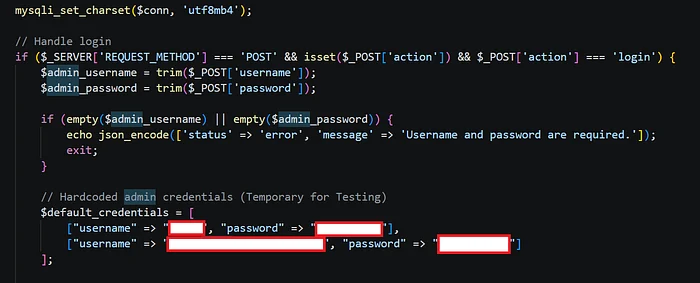
Going through the downloaded source, the author found a temporary login mechanism in which the username and password were stored directly in the code in cleartext. The sensitive values are redacted in the published screenshot.
With one of those credentials the author logged in to the admin panel.
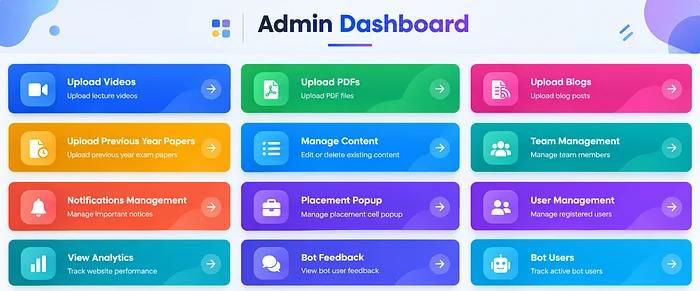
At this point the chain had already moved past a simple file download:
Arbitrary File Download ↓Source Code Disclosure ↓Credential Disclosure ↓Admin Panel Access
Step 3: Test the PDF upload with a PHP shell
Inside the admin panel the first thing the author tested was the file upload functionality. The panel had several upload features, including PDF and image uploads, and the author started with the Upload PDFs section.
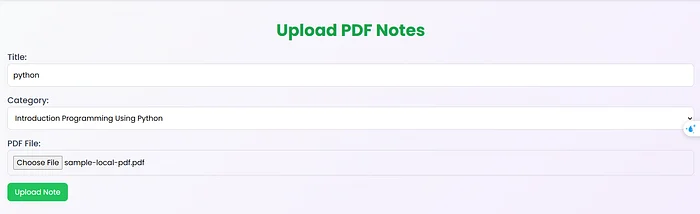
For the initial test a very simple PHP shell was used:
<?php system($_GET['c']); ?>
There did not seem to be any effective file-extension validation, and the PHP file was uploaded successfully. Finding the upload path was also relatively easy, because the application source code already in hand revealed where uploaded files were stored. The uploaded file was reachable at a path similar to:
https://target.com/admin/uploads/shell.php?c=id
The expectation at this point was operating system command execution through the c parameter, that is, RCE. The command produced no output.
Step 4: Check the PHP configuration
To understand what was blocking command execution, the author uploaded a simple PHP file containing phpinfo() and checked the PHP configuration. A number of potentially dangerous PHP functions had been disabled in the environment, which is what prevented the initial approach from working.

Disabled Functions in phpinfo
The direct path to OS command execution was therefore not available in the way the author had expected. The chain did not have to stop there.
Step 5: Upload a standalone file manager
The author had previously read about cases where PHP-based file-management functionality remains useful in environments that restrict direct command execution through functions such as system(), shell_exec() and similar. Rather than concentrating entirely on OS command execution, the author switched to a standalone PHP file manager, looking at projects such as TinyFileManager.
The reasoning was simple: if a full-featured file manager could be uploaded through the existing upload functionality, its file-management capabilities could be used to explore the environment without relying directly on system() or similar functions.
One of the source-code files was uploaded through the same PDF upload functionality. It uploaded successfully and executed without any issues, presenting the TinyFileManager login page.
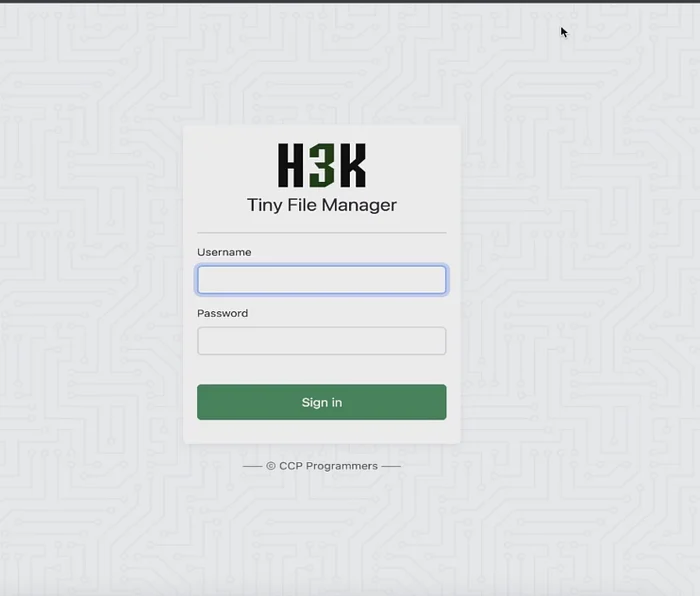
The file manager could be accessed with the default credentials provided in the tool's own source code; those credentials are not included in the public write-up. After logging in, TinyFileManager ran normally and offered functionality such as viewing and managing files, deleting files, and accessing other files within the directories available to it.
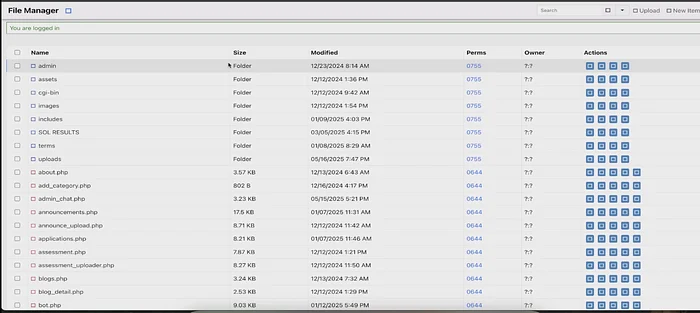
TinyFileManager After Login
Even without direct OS command RCE, the author now had a significant amount of access to the server's file environment.
Step 6: Pull the database configuration
While continuing to review the application's source code, the author came across another file named db.php.
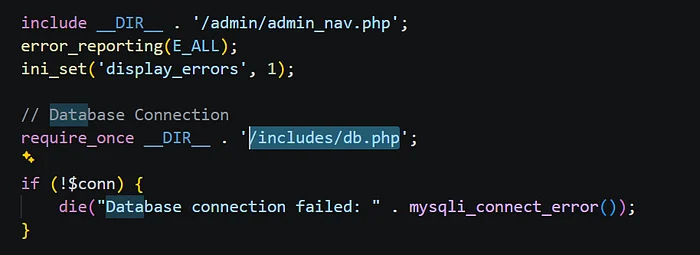
Because the original arbitrary file download vulnerability was still available, that file was downloaded as well. It contained the credentials the application uses to connect to its database.
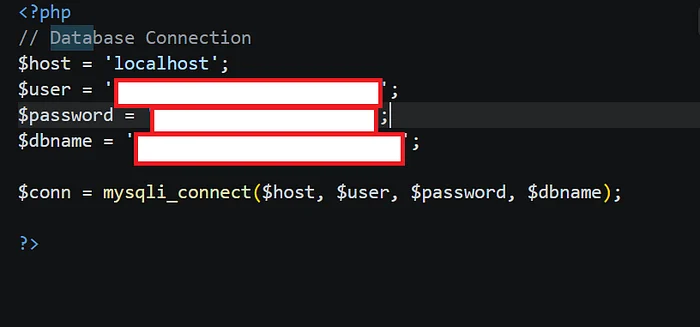
db.php
This opened a second important path:
Arbitrary File Download
 ↓
 Source Code Disclosure
 ↓
 db.php
↓
 Database Credential Disclosure
 ↓
 Database Access
Step 7: Connect to the database
At this point a standalone PHP database-management tool such as Adminer could also be used. After uploading the PHP file and supplying the database username and password obtained from db.php, it was possible to connect to the database and perform various database-management operations, including creating a backup or dump of the database.
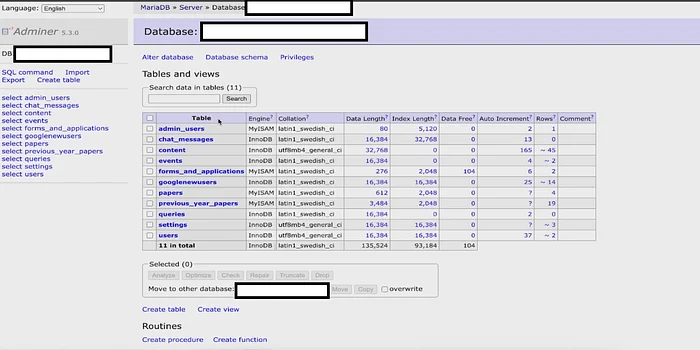
So even without direct OS command execution, the original vulnerability had led to:
- Sensitive credential disclosure
- Admin panel access
- Access to server-side files
- Database credential disclosure
- Database access
- Database backup/dump capability
The complete chain
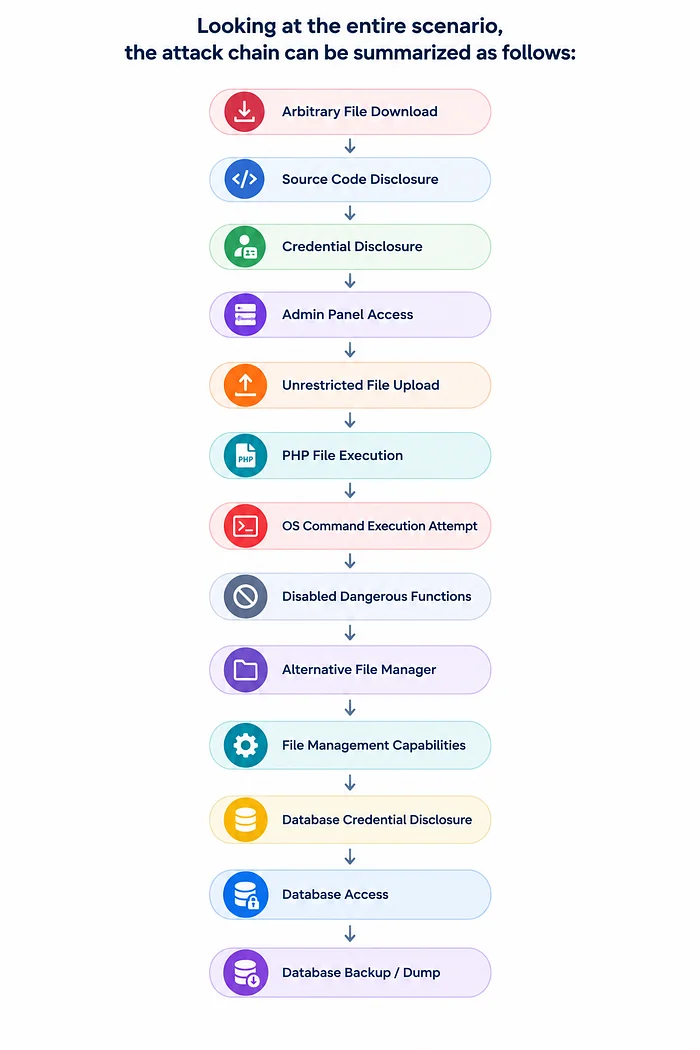
The File Manager and Database Credential paths can also be considered separate branches of the attack chain. Reaching OS command RCE was not necessarily required to demonstrate significant impact.
Root cause
The chain rests on two mistakes. The download endpoint takes a user-supplied file name and returns the file's contents without restricting which files may be read, so any server-side script, including auth.php and db.php, can be retrieved as plain text. Because PHP files are served as downloads rather than executed, the source is disclosed in full.
The second mistake is the presence of cleartext credentials in that source: a temporary login mechanism in auth.php with the username and password written directly into the code, and the database connection credentials in db.php. The admin panel's upload handling then accepted a PHP file in the Upload PDFs section, with no effective file-extension validation, and stored it under a web-reachable path. The PHP configuration blocked the shell: dangerous functions were disabled, which prevented the initial approach from working. That restriction did not prevent the uploaded file from executing at all, which is why a full file manager could run and why the database path remained open.
Impact
Under the conditions described, an attacker could read arbitrary server-side files through the download endpoint, obtain admin panel credentials from source, log in to the admin panel, upload and execute PHP files, run a file manager with access to the directories available to it, and use database credentials from db.php to connect to the database and dump it. The write-up does not state which data the database held or how many users were affected. Direct OS command execution was not achieved because of the disabled functions, and the author is explicit that RCE is not required for the impact shown here.
Fix
The measures its findings point to are: constrain the download endpoint so that it can only serve the intended documents, for example by resolving the requested name against a fixed directory and an allow-list of extensions rather than passing it to the filesystem; remove cleartext credentials from source and load them from configuration outside the web root; enforce server-side validation of uploaded file type and extension and store uploads outside the web root or in a location where they cannot execute; and keep disable_functions and similar hardening in place, since it prevented the uploaded shell from running commands.
Variants to test
- Download endpoint with a script name. Request a server-side script through the download parameter, for example
download.php?file=index.php. A positive result is the raw source of the script coming back instead of a rendered page or an error. - Download endpoint with traversal. Try names that climb out of the intended directory, such as
download.php?file=../config.php. A positive result is any file outside the document directory being returned. - Authentication scripts as a source of credentials. Pull the login handler of an admin panel and read it for hardcoded or temporary accounts. A positive result is a cleartext username and password that work against the panel.
- Upload sections that accept documents. Submit a PHP file to a PDF or image upload feature. A positive result is the file being stored and reachable at a predictable path, which the application source often reveals.
- Execution after upload. Request the uploaded file with a parameter, as in
shell.php?c=id. A positive result is command output; no output may meandisable_functionsrather than a failed upload, so confirm with aphpinfo()file. - File manager as a fallback. When command execution is blocked, upload a standalone PHP file manager and try its default credentials from its own source. A positive result is a working file browser over the directories the web server can reach.
- Database configuration files. Look for names such as
db.phpin the disclosed source and download them through the same endpoint. A positive result is connection credentials that work against the database with a tool such as Adminer, including the ability to dump it.
What happened, in plain words
A security researcher was browsing GitHub, looking at the source code of various projects and reading about frameworks and services, when he came across a website that caught his attention. The site let visitors download PDF files containing guides and course materials, and it also had an admin login panel. The researcher noticed that the download feature would hand back the site's own PHP files if you asked for them by name. Those files turned out to contain a username and password for the admin panel, written directly in the code. With that login he got into the admin area, found an upload feature that accepted a PHP file (a file the server can run as a program), and used it to place a file manager on the server. From the same leaked source code he also found the database password, connected to the database, and was able to make a backup of it. He never managed to run operating system commands on the server, because the server had those functions switched off, but he still reached a lot of sensitive material. This article walks through the whole chain slowly, explaining each idea as it appears.
Background ideas you need first
Before the steps make sense, a few everyday concepts.
A web server and its files. A website is a folder of files on a computer somewhere, plus a program (the web server) that sends those files to visitors who ask for them. When you type an address into your browser, you are asking that program for a particular file.
PHP. PHP is a programming language used to build web pages. A file ending in .php is not a plain document: it is a set of instructions. When a visitor requests a .php file, the server normally runs it and sends back whatever the instructions produce, usually an HTML page. The visitor never sees the instructions themselves. Think of a restaurant: you order a dish and get the finished plate, not the recipe and the raw ingredients.
Source code. The instructions inside a .php file are called its source code. Source code often contains things that were never meant for visitors: comments, internal addresses, and sometimes passwords. If a visitor can download the source code instead of the finished page, that is called source code disclosure, and it is a serious problem because it is like being handed the recipe book along with the keys to the kitchen.
A URL parameter. Look at an address like download.php?file=guide.pdf. Everything after the ? is extra information sent to the server. Here the parameter is named file and its value is guide.pdf. The server program reads that value and decides what to do with it. Parameters are the main way a visitor tells a website which thing they want.
Arbitrary file download / arbitrary local file read. This is the name of the weakness at the centre of the story. "Arbitrary" means "whatever the attacker chooses". The download feature is supposed to serve only the PDF guides, but it does not check which file name it is given. So an attacker can ask for any file that lives on the server, and the server obediently sends it. The everyday comparison: a library clerk who is supposed to hand out only the brochures by the door, but who will fetch any document from any shelf if you simply name it.
Credentials. A username and password pair. "Cleartext" means stored as readable text, not scrambled or hashed, so anyone who sees the file can read the password directly.
The admin panel. Most websites have a public side (what visitors see) and a private management side, usually at an address containing /admin/. The admin panel is where staff manage content, upload files and change settings. Getting into it is valuable because it gives far more power than the public site.
File upload and why it is dangerous. An upload feature lets an authorised user put a file onto the server. If the server does not check what kind of file is being uploaded, an attacker can upload a .php file, and if that file is stored somewhere the web server can reach, the server may run it as a program. That is the difference between uploading a photo and uploading a small program that the server then executes on your behalf.
RCE (remote code execution). When an attacker can make the server run commands of their choosing, that is called remote code execution. It is usually the most severe outcome, because the attacker effectively controls the machine. "OS command execution" means running commands in the server's operating system, for example id, which prints which user the server is running as.
disable_functions. A PHP setting that lists functions (built-in capabilities of the language) that are switched off. Server administrators use it to remove dangerous abilities, such as starting operating system commands, so that even if an attacker gets a PHP file running, it cannot do the worst things.
A database. A organised store of data, usually with tables of rows and columns, that a website uses to keep its content, user accounts and so on. To read or change it, a program needs a database username and password. A dump or backup is a full copy of the database's contents in one file.
A file manager. A small web application that lets you browse, view, upload and delete files on a server through your browser, like the file explorer on your own computer but for the remote machine. TinyFileManager is one such free tool.
Adminer. A single-file web tool for managing a database through a browser: you give it the database address, username and password, and it lets you browse tables and export a dump.
How the researcher found the site
While browsing the source code of different GitHub projects and looking into frameworks and services, the researcher came across a website by chance. The first thing he noticed was that the site appeared to be vulnerable to arbitrary file download, also called arbitrary local file read.
The site used a download endpoint to serve PDF files containing guides and course materials. The address looked like this:
https://target.com/download.php?file=*.pdf
Line by line: https://target.com is the site. /download.php is the program that handles downloads. ?file=*.pdf is the parameter telling that program which document to send; *.pdf stands for "some PDF file name". In normal use, a visitor clicks a link like this and receives a PDF.
The interesting part was what happened when the researcher put the name of a PHP file into the same parameter instead of a PDF. The application returned the actual PHP file for download rather than running it. For example:
https://target.com/download.php?file=download.php
Line by line: the same download program is asked for download.php, which is the download program's own source file. Instead of executing it, the server packaged it up and sent it to the researcher as a file. This is the source code disclosure primitive: the download feature is a window into the server's own files.
Because the site also had an admin login panel at this address:
https://target.com/admin/auth.php
Line by line: /admin/ is the private management area, and auth.php is the program that handles logging in to it. The natural question was whether that file could also be retrieved through the same download weakness. If the login program's source could be read, it might reveal how logins are checked, and possibly the credentials themselves.
Step 1: Download the admin login program
The researcher requested the admin panel's authentication script through the download endpoint:
https://target.com/download.php?file=auth.php
Line by line: the download program is asked for auth.php, the login handler. The file was downloaded successfully. In the researcher's words, that is where things started to get interesting: the login program's instructions were now sitting on his computer as a readable text file.
Step 2: Read the credentials out of the source
Going through the downloaded source, the researcher found a temporary login mechanism in which the username and password were stored directly in the code in cleartext. In the published screenshot the sensitive values have been redacted, meaning blacked out so readers cannot see them.
The screenshot shows the relevant part of the source code with the username and password hidden. The lesson is general: code that checks a login by comparing against a password written into the file is only as private as the file. Once the file leaks, the password leaks with it.
With one of those credentials the researcher logged in to the admin panel.
The screenshot shows the admin panel after a successful login. At this point the chain had already moved well past a simple file download:
Arbitrary File Download ↓Source Code Disclosure ↓Credential Disclosure ↓Admin Panel Access
Read the diagram top to bottom: the ability to download any file led to reading source code, which led to learning a password, which led to getting into the admin area. Each arrow is a consequence of the step above it. This is what people mean by an "attack chain": a series of small weaknesses where each one unlocks the next.
Step 3: Test the PDF upload with a tiny PHP program
Inside the admin panel, the first thing the researcher tested was the file upload functionality. The panel had several upload features, including PDF and image uploads, and he started with the Upload PDFs section.
The screenshot shows the Upload PDFs section of the admin panel. The reasoning for starting here: an upload feature that is meant for documents may not be strict about what it accepts, and if it accepts a PHP file and stores it where the web server can reach it, that file can be run.
For the initial test a very simple PHP shell was used:
<?php system($_GET['c']); ?>
Line by line: <?php and ?> mark the start and end of PHP instructions inside a file. system(...) is a PHP function that runs an operating system command and prints its output. $_GET['c'] means "take the value of the URL parameter named c". So the whole line means: run whatever command the visitor puts in the c parameter, and show the result. It is called a "shell" because it gives the attacker a way to issue commands, like a terminal window on the server.
There did not seem to be any effective file-extension validation, meaning the upload feature did not properly check that the file ended in .pdf. The PHP file was uploaded successfully. Finding where it landed was also relatively easy, because the application source code already in hand revealed where uploaded files were stored. The uploaded file was reachable at a path similar to:
https://target.com/admin/uploads/shell.php?c=id
Line by line: /admin/uploads/shell.php is the uploaded file, sitting in the uploads folder. ?c=id passes the command id to it through the c parameter. id is a standard operating system command that reports which user the server is running as. The expectation was that the server would run the uploaded file, which would run id, and print the answer: that would be operating system command execution, or RCE.
The command produced no output. Something was stopping the command from running, and the next step was to find out what.
Step 4: Look at the PHP configuration
To understand what was blocking command execution, the researcher uploaded a simple PHP file containing phpinfo() and checked the PHP configuration. phpinfo() is a built-in PHP function that prints a long page describing how PHP is set up on that server: which version, which settings, which functions are available. It is the standard way to see the server's configuration from the inside.
It turned out that a number of potentially dangerous PHP functions had been disabled in the environment, which is what prevented the initial approach from working.
Disabled Functions in phpinfo
The screenshot shows the phpinfo() page with the list of disabled functions. This is the disable_functions setting at work: the server administrator has switched off functions such as the ones that start operating system commands. So the uploaded shell could run, but the specific ability it relied on was removed. The direct path to OS command execution was therefore not available in the way the researcher had expected. The chain did not have to stop there, though, because the uploaded file itself still executed.
Step 5: Upload a standalone file manager instead
The researcher had previously read about cases where PHP-based file-management functionality remains useful in environments that restrict direct command execution through functions such as system(), shell_exec() and similar. shell_exec() is another PHP function for running operating system commands. Rather than concentrating entirely on OS command execution, he switched to a standalone PHP file manager, looking at projects such as TinyFileManager.
The reasoning was simple: if a full-featured file manager could be uploaded through the existing upload functionality, its file-management capabilities could be used to explore the environment without relying directly on system() or similar functions. In other words, the shell needed a command function to work, but a file manager only needs PHP's ordinary ability to read and write files, which was still available.
One of the source-code files was uploaded through the same PDF upload functionality. It uploaded successfully and executed without any issues, presenting the TinyFileManager login page.
The screenshot shows the TinyFileManager login page, reached through the uploaded file. The file manager could be accessed with the default credentials provided in the tool's own source code; those credentials are not included in the public write-up. "Default credentials" means the username and password that ship with the tool out of the box, which many people never change. After logging in, TinyFileManager ran normally and offered functionality such as viewing and managing files, deleting files, and accessing other files within the directories available to it.
TinyFileManager After Login
The screenshot shows the file manager after login, with its file browsing interface. Even without direct OS command RCE, the researcher now had a significant amount of access to the server's file environment: he could look around the folders the web server could reach, read files, and delete them.
Step 6: Pull the database configuration
While continuing to review the application's source code, the researcher came across another file named db.php.
The screenshot shows where db.php appeared in the source. The name is a strong hint: db stands for database, and files like this usually hold the settings a website uses to connect to its database, including the username and password.
Because the original arbitrary file download vulnerability was still available, that file was downloaded as well. It contained the credentials the application uses to connect to its database.
db.php
The screenshot shows the contents of db.php, with the database credentials. This opened a second important path:
Arbitrary File Download
 ↓
 Source Code Disclosure
 ↓
 db.php
↓
 Database Credential Disclosure
 ↓
 Database Access
Read it top to bottom: the download weakness exposed source code, the source code included db.php, db.php contained the database password, and that password opened the database. Notice this branch does not go through the admin panel at all: it is a separate route from the same starting point.
Step 7: Connect to the database
At this point a standalone PHP database-management tool such as Adminer could also be used. Adminer is a single PHP file you upload and open in a browser; it asks for the database address, username and password, and then gives you a full interface for the database. After uploading the PHP file and supplying the database username and password obtained from db.php, it was possible to connect to the database and perform various database-management operations, including creating a backup or dump of the database.
The screenshot shows the database being managed through the tool, including the ability to export a dump. A dump is a complete copy of the database's contents, which is exactly what an attacker would take if they wanted to steal the data.
So even without direct OS command execution, the original vulnerability had led to:
- Sensitive credential disclosure
- Admin panel access
- Access to server-side files
- Database credential disclosure
- Database access
- Database backup/dump capability
The complete chain
The screenshot shows the whole attack chain drawn out as a diagram. The File Manager and Database Credential paths can also be considered separate branches of the attack chain: they both start from the same download weakness, but one goes through the admin panel and the other goes straight to the database. Reaching OS command RCE was not necessarily required to demonstrate significant impact.
Why it worked
The chain rests on two mistakes. The download endpoint takes a file name supplied by the visitor and returns that file's contents without restricting which files may be read. So any server-side script, including auth.php and db.php, can be retrieved as plain text. Because PHP files are served as downloads rather than executed, the source is disclosed in full.
The second mistake is the presence of cleartext credentials in that source: a temporary login mechanism in auth.php with the username and password written directly into the code, and the database connection credentials in db.php. The admin panel's upload handling then accepted a PHP file in the Upload PDFs section, with no effective file-extension validation, and stored it under a web-reachable path. The PHP configuration blocked the shell: dangerous functions were disabled, which prevented the initial approach from working. That restriction did not prevent the uploaded file from executing at all, which is why a full file manager could run and why the database path remained open.
What it means
Under the conditions described, an attacker could read arbitrary server-side files through the download endpoint, obtain admin panel credentials from source, log in to the admin panel, upload and execute PHP files, run a file manager with access to the directories available to it, and use database credentials from db.php to connect to the database and dump it. The write-up does not state which data the database held or how many users were affected. Direct OS command execution was not achieved because of the disabled functions, and the researcher is explicit that RCE is not required for the impact shown here.
How to fix it
The write-up does not say what was changed. The measures its findings point to are: constrain the download endpoint so that it can only serve the intended documents, for example by resolving the requested name against a fixed directory and an allow-list of extensions rather than passing it to the filesystem; remove cleartext credentials from source and load them from configuration outside the web root; enforce server-side validation of uploaded file type and extension and store uploads outside the web root or in a location where they cannot execute; and keep disable_functions and similar hardening in place, since it prevented the uploaded shell from running commands.
Things to try on your own targets
These are the same checks the researcher performed, written as a checklist. Only test systems you own or have permission to test.
- Download endpoint with a script name. Request a server-side script through the download parameter, for example
download.php?file=index.php. A positive result is the raw source of the script coming back instead of a rendered page or an error. - Download endpoint with traversal. Try names that climb out of the intended directory, such as
download.php?file=../config.php. A positive result is any file outside the document directory being returned. - Authentication scripts as a source of credentials. Pull the login handler of an admin panel and read it for hardcoded or temporary accounts. A positive result is a cleartext username and password that work against the panel.
- Upload sections that accept documents. Submit a PHP file to a PDF or image upload feature. A positive result is the file being stored and reachable at a predictable path, which the application source often reveals.
- Execution after upload. Request the uploaded file with a parameter, as in
shell.php?c=id. A positive result is command output; no output may meandisable_functionsrather than a failed upload, so confirm with aphpinfo()file. - File manager as a fallback. When command execution is blocked, upload a standalone PHP file manager and try its default credentials from its own source. A positive result is a working file browser over the directories the web server can reach.
- Database configuration files. Look for names such as
db.phpin the disclosed source and download them through the same endpoint. A positive result is connection credentials that work against the database with a tool such as Adminer, including the ability to dump it.
Glossary
- Admin panel: the private management area of a website, usually under
/admin/, where staff manage content and settings. - Adminer: a single-file PHP tool for managing a database through a browser.
- Arbitrary file download / arbitrary local file read: a weakness where a download feature will return any file on the server that the attacker names, instead of only the intended documents.
- Attack chain: a series of weaknesses where each step makes the next one possible.
- Cleartext: stored as readable text, not scrambled or hashed.
- Credentials: a username and password pair used to log in.
- Database: an organised store of data, usually tables of rows and columns, used by a website.
- Database dump / backup: a complete copy of a database's contents in one file.
- Default credentials: the username and password a tool ships with, which many people never change.
disable_functions: a PHP setting that switches off chosen built-in functions, often the ones that start operating system commands.- Endpoint: a specific address on a website that performs a particular job, such as
download.php. - File extension validation: checking that an uploaded file ends in an allowed extension, such as
.pdf. - File manager: a web application for browsing, viewing, uploading and deleting files on a server through a browser.
- File upload: a feature that lets a user put a file onto the server.
phpinfo(): a PHP function that prints a page describing the server's PHP configuration.- PHP: a programming language used to build web pages;
.phpfiles are run by the server rather than shown to visitors. - RCE (remote code execution): when an attacker can make the server run commands of their choosing.
- Redacted: hidden or blacked out so readers cannot see the sensitive value.
- Source code: the instructions inside a program file.
- Source code disclosure: a weakness that lets a visitor read a program's source code instead of only its output.
system()/shell_exec(): PHP functions that run operating system commands.- TinyFileManager: a free standalone PHP file manager.
- URL parameter: the part of an address after
?, which tells the server which thing the visitor wants. - Web server: the program that sends website files to visitors who request them.



