**From Auth Bypass to IDOR to Stored XSS: Completing the Attack Chain (PART 3)**
The application stored user-supplied profile and public form input without sanitisation and rendered it on the Members page, allowing stored cross-site scripting. An attacker could inject JavaScript that executes in other users' browsers, potentially leading to session abuse or account takeover if session material is accessible.
Muhammad Rizqi Ramadhan Follow
 Published on medium.com
Bug Bounty
The full write-up lives on its author's site
It belongs to its author, so we link to it rather than copy it. The other two tabs are our own rewrites, checked against it.
Context
This is the third part of a series on a single web application. Parts 1 and 2 covered an authentication bypass in the "Forgot Password" feature and an IDOR in the Members feature. This part covers a Stored Cross-Site Scripting (Stored XSS) vulnerability in the "Edit User Profile" feature, and how the three findings chain together.
The feature at the centre of this report is user profile editing. The application accepts input in several profile fields, stores it, and later renders that data on the Members page. The report does not name the application, its stack or its version.
Stored XSS occurs when an application accepts user input, stores it on a server or in a database, and later displays it without adequate sanitisation or output encoding. Unlike Reflected XSS, which needs a victim to open a specific URL or request, Stored XSS is persistent: the payload is stored and executes when another user opens the page that displays the data.
Setup
The report does not describe specific tools, versions or a test environment. The preconditions it establishes are:
- A public form on the application's homepage that accepts user input and whose data is later reused on the Members page.
- A Members page that renders stored profile data to other users.
- An "Edit User Profile" feature, reachable after login, with fields such as "Name".
- For the authenticated path, a session obtained through the Part 1 authentication bypass, so that an unverified account can reach the dashboard.
Finding it
After gaining access to the application and understanding how user data was processed, the researcher began exploring the "Edit User Profile" feature. Several profile fields accept input that the application stores and subsequently renders on the Members page. That flow, input stored in one place and rendered to other users in another, is what made the feature worth testing for persistent script execution.
Exploitation
The researcher used one payload throughout:
<img src=x onerror=alert(1)>
The failure fires the onerror handler, which runs alert(1). The payload is enough to show that the input broke out of the ordinary data context and was executed as JavaScript by the browser.
Step 1: Stored XSS without authentication
The researcher started at the web application's homepage and found a form that accepts user input. Instead of plain text, the same payload was entered:
<img src=x onerror=alert(1)>
The form was then submitted. The application received the input and stored it. Because the input would be reused on the Members page, the payload did not disappear after the request completed; it became part of the data stored within the application. When another user opened the Members page, the browser rendered the data and the payload executed.
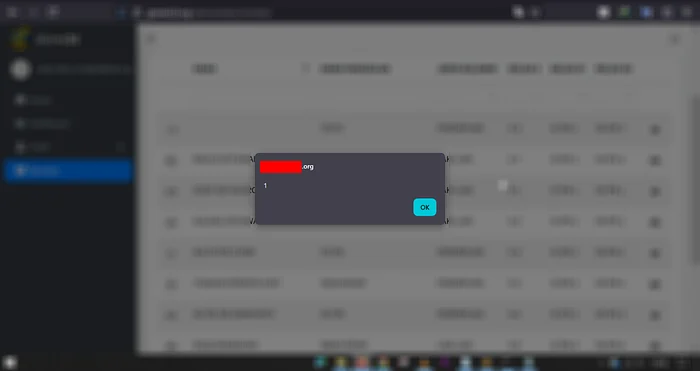
The screenshot shows the alert triggered by the payload.
The flow is:
Attacker is not logged in → enters payload → payload is stored → another user opens Members → attacker's JavaScript is executed.
This is the key characteristic of Stored XSS, and the report stresses that the attacker does not need a verified account to inject the payload.
Step 2: Stored XSS after authentication
The second scenario starts after the attacker has gained access to the application, which is where the Part 1 finding matters. The admin verification process could be bypassed via the "Forgot Password" feature, so an attacker who initially lacked dashboard access could obtain a session and enter the application without the required verification.
After logging in, the researcher navigated to the "Edit User Profile" feature and modified fields such as "Name" using the same payload:
<img src=x onerror=alert(1)>
After clicking Save, the application stored the payload. When another user accessed the Members page, the profile data was displayed and the payload executed in the victim's browser.
That gives two paths to the same destination, the Members page:
Unauthenticated path
Public Form → Stored Payload → Members → XSS
Authenticated path
Auth Bypass → Dashboard → Edit Profile → Stored Payload → Members → XSS
Root cause
The report describes the weakness at the level of behaviour rather than code: certain inputs in the application could be stored without sanitisation or secure output encoding, and were later rendered on the Members page. The public form and the "Edit User Profile" fields both fed data into that rendering path.
Why the existing defences did not stop it is not shown in the report. The report does not include the relevant code, so this remains an inference.
Impact
An alert(1) only proves that JavaScript executed. The report is careful about what follows from there.
JavaScript running in the application's origin can, under certain conditions, perform actions on behalf of the user viewing the page. One scenario the report highlights is session theft or session abuse: an attacker might try to read session information available to JavaScript and send it to infrastructure they control. Whether that works depends heavily on how the application manages sessions and whether cookies carry flags such as HttpOnly.
Victim opens Members → Stored XSS executes → session material potentially exposed → attacker impersonate victim
In the worst case, where the victim holds elevated privileges such as administrator, Stored XSS can escalate from client-side code execution into privilege escalation or account takeover. The report explicitly notes that XSS does not automatically lead to account takeover: the impact depends on session mechanisms, cookie security, CSRF protection, authorisation and the victim's privileges.
The complete attack chain
With the three findings connected, the chain reads:
Authentication Bypass → Unauthorized Access → IDOR → Stored XSS → Potential Account Takeover
1. Authentication bypass
The attacker creates a new account that remains unverified. Normally the account is rejected at login:
User → Login → Verification Check → Access Denied
Because the password reset flow does not implement the same verification status check, the application creates a session and grants access to the dashboard:
User → Forgot Password → Reset Password → Session Created → Dashboard
2. IDOR
After gaining access, the attacker explores the Members feature. The identifier in the endpoint can be manipulated, allowing access to another user's resources without proper authorisation checks:
Authenticated User → Modify Identifier → Other User's Resource
This exposes member data that should not be available to that user.
3. Stored XSS
Inputs in the application could be stored without sanitisation or secure output encoding. Payloads were injected via public forms or the "Edit Profile" feature:
Attacker Input → Server Storage → Members Page → Browser → JavaScript Execution
4. Potential account takeover
If the Stored XSS executes in the victim's browser and the session mechanism allows session material to be accessed or sensitive actions to be performed through that browser, the impact can escalate to impersonation or account takeover, especially when the victim holds elevated privileges.
The bigger picture
The three findings share one lesson: security controls must not be applied to only one part of an application. Authentication must verify who is permitted to enter, authorisation must determine what they may access, and input handling must ensure user data is not turned into executable code. Each layer had a weakness:
| Layer | Weakness |
|---|---|
| Authentication | Verification bypass via password reset |
| Authorisation | IDOR on Members |
| Input security | Stored XSS on user-generated content |
Any one of these would already be a serious issue in isolation. Chained together, the impact is greater.
Fix
Based on the described weakness, the fixes would be contextual output encoding of stored values when rendering the Members page, and server-side validation that rejects markup in profile and public form fields. The authentication and authorisation gaps from Parts 1 and 2 would need to be closed as well, since the chain depends on them.
Variants to test
- Public forms that feed internal pages. Submit the payload into any unauthenticated form and check whether the value later appears on a page rendered to other users. A positive result is the alert firing in a different user's session.
- Profile fields rendered to other users. Change fields such as "Name" and check the Members listing. A positive result is the payload executing when the listing is opened by another account.
- Different rendering contexts. Try payloads suited to attribute, URL and script contexts, not only the HTML body. A positive result is execution in a context where plain text was expected.
- Session cookie flags. After confirming execution, check whether session cookies are readable from JavaScript.
- Chaining with access control bugs. Combine a stored payload with an IDOR or authentication bypass to reach pages that render the data to higher-privileged users.
What happened, in plain words
This is the third part of a series about one web application. In Part 1, the researcher found that the "Forgot Password" feature could be used to get into an account that had never been verified. In Part 2, the researcher found that the Members feature let one user reach another user's data by changing an identifier in the request. This part is about a third problem, found in the "Edit User Profile" feature, and about how all three fit together into one attack.
The third problem is called Stored Cross-Site Scripting, or Stored XSS for short. The idea is simple: a website lets a visitor type something into a form, saves that text, and later shows it to other people without cleaning it up. If the text is not ordinary text but a small piece of code that a browser knows how to run, the browser runs it. Because the text was saved, it runs for every person who later opens the page that shows it.
The researcher used one small piece of code, called a payload, to prove this. Seeing that pop-up is proof that the browser treated the saved text as code rather than as plain words.
The report does not name the application, the technology it is built with, or its version. It also does not say whether the problem was fixed.
The pieces you need to know before we start
Before walking through the steps, here are the everyday ideas behind the words used in this report. Each one is explained again where it first appears, so you can also read straight through and come back here when needed.
- A web application is a program that lives on a server (a computer somewhere else) and that you use through your browser. When you type an address, click a button or fill in a form, your browser sends a message to that program and shows you what comes back.
- A form is the part of a page with boxes you can type into and a button to send what you typed. Think of it like a paper form at a counter: you write in the boxes and hand it over.
- An endpoint is the specific address inside an application that receives a particular kind of request. If the application were a building, the endpoint would be the exact desk you walk up to. You normally never see it, because the page's buttons send the request for you.
- A request is the message your browser sends to the application. It says what you want (for example, "save this profile") and carries the data you typed.
- A response is the message the application sends back, usually the next page or a confirmation.
- A session is how the application remembers who you are between requests. When you log in, the application gives your browser a small piece of identification, and your browser sends it back with every later request. Think of it like a wristband you get at an event: the door staff check the wristband instead of asking for your name every time.
- A cookie is one common way that identification is stored in your browser. It is a small labelled value that the browser keeps and attaches to requests for that site.
- A dashboard is the private area you see after logging in, as opposed to the public pages anyone can open.
- Sanitisation means cleaning up what a user typed so that anything dangerous is removed or neutralised before it is used.
- Output encoding means converting saved text into a safe form at the moment it is placed into a page, so the browser shows it as text instead of treating it as instructions. A useful comparison is a museum label: a visitor can write anything on a comment card, but the museum prints it as words on a card, not as a set of instructions for the next visitor to follow.
- JavaScript is the programming language that browsers run. It is what makes pages interactive, and it is also what an attacker tries to get a page to run.
- A payload is the specific piece of text an attacker types in to test or exploit a weakness. It is the "test sentence" you submit to see what the application does with it.
- An alert is a JavaScript command that makes the browser show a small pop-up box. Security testers use it because it is harmless and instantly visible: if the box appears, code ran.
- An identifier is a number or code that names a specific record, such as a particular user's profile. Changing it is like changing the seat number on a cinema ticket to sit in someone else's seat.
- An API is the set of addresses and rules an application exposes so that pages (or other programs) can ask it for data and actions. You can think of it as the service counter behind the shop floor: the page you see is the shop floor, and the API is where the actual requests are handled.
- Authentication is the process of proving who you are, usually by logging in.
- Authorisation is the process of deciding what a proven user is allowed to do. Authentication is the wristband; authorisation is the list of rooms that wristband opens.
- An authentication bypass is a way to get past the login or verification step without meeting its conditions.
- IDOR stands for Insecure Direct Object Reference. It means the application lets you ask for a record by its identifier and does not check whether that record belongs to you. It is like a hotel that hands out room keys by number without checking that the room is yours.
- Reflected XSS is the kind where the text is echoed back immediately in the response to one specific request. It needs the victim to open a particular link or send a particular request.
- Stored XSS is the kind where the text is saved by the application and shown later to other people. It is persistent: the payload stays put and runs whenever the page that displays it is opened.
- Account takeover means an attacker gains control of someone else's account, for example by getting hold of their session.
- Privilege escalation means moving from a low level of access to a higher one, such as from an ordinary user to an administrator.
- HttpOnly is a setting on a cookie that tells the browser to keep that cookie away from JavaScript. It is like a sealed envelope: the browser still carries it, but page scripts cannot read it.
- CSRF protection (Cross-Site Request Forgery protection) is a set of measures that stop another website from making your browser perform actions on a site where you are logged in.
The feature at the centre of this report
The feature being examined is user profile editing. The application accepts input in several profile fields, saves it, and later shows that saved data on the Members page. The Members page is a listing of members that other users can open.
That flow, where text is typed in one place, saved, and then shown to other people in another place, is exactly the situation where Stored XSS can exist. The reason is that the text has to survive a round trip: it is not just echoed back to the person who typed it, it is stored and later placed into a page for someone else. If the application does not clean the text or encode it safely when building that page, the browser of the next visitor will treat it as instructions.
Stored XSS, in the report's own definition, occurs when an application accepts user input, stores it on a server or in a database, and later displays it without adequate sanitisation or output encoding. Unlike Reflected XSS, which needs a victim to open a specific URL or request, Stored XSS is persistent: the payload is stored and executes when another user opens the page that displays the data.
What you need before you can reproduce this
The report does not describe specific tools, versions or a test environment. What it does establish as preconditions is this list:
- A public form on the application's homepage that accepts user input and whose data is later reused on the Members page. "Public" means you do not need to be logged in to use it.
- A Members page that renders stored profile data to other users. This is the page where the saved text is shown, and therefore the page where any code in it would run.
- An "Edit User Profile" feature, reachable after login, with fields such as "Name".
- For the authenticated path, a session obtained through the Part 1 authentication bypass, so that an unverified account can reach the dashboard. In other words, the login problem from Part 1 is what makes the second scenario possible.
Finding it
After gaining access to the application and understanding how user data was processed, the researcher began exploring the "Edit User Profile" feature. Several profile fields accept input that the application stores and subsequently renders on the Members page.
Why start there? Because the researcher already knew how the application handled user data from the earlier parts. The interesting question was not whether the profile page saves what you type (it is supposed to), but where that saved text ends up afterwards. Once you know that a value typed in one place is shown in another place to other people, that path is worth testing for persistent script execution. The researcher was following the data, not guessing at random pages.
The payload, and what each part does
The researcher used one payload throughout:
<img src=x onerror=alert(1)>
Line by line, in plain words:
<imgstarts an image element. In HTML, the language pages are written in, an element is a building block such as a picture, a paragraph or a button. This one tells the browser "here comes a picture".src=xis the attribute that says where the picture file is. The browser will try to fetch a file calledxrelative to the page's address. No such file exists, so the fetch will fail.onerror=alert(1)is an event handler. An event handler is a piece of code the browser keeps ready and runs when something specific happens. Here the event is "the picture failed to load". When that failure happens, the browser runsalert(1), which shows a pop-up box containing the number 1.>closes the element.
The src=x attribute points at a resource that does not exist, so the image fails to load. The failure fires the onerror handler, which runs alert(1). The payload is enough to show that the input broke out of the ordinary data context and was executed as JavaScript by the browser.
"Broke out of the ordinary data context" means the application placed the typed text into the page as if it were part of the page's structure, not as plain words to display. If the application had encoded it properly, a visitor would have seen the literal characters <img src=x onerror=alert(1)> printed on the page, and nothing would have run.
Step 1: Stored XSS without authentication
The most interesting aspect of this vulnerability, in the report's words, is that an attacker does not need to log in first to inject the payload.
The researcher started at the web application's homepage and found a form that accepts user input. Instead of entering plain text, the same payload was entered:
<img src=x onerror=alert(1)>
Line by line:
- The first line is the payload itself, typed into the form's input box where a name or a message would normally go.
- Nothing else is needed: no special tool, no account, no login. The form is public, so anyone can submit it.
The form was then submitted. The application received the input and stored it. Because the input would be reused on the Members page, the payload did not disappear after the request completed; it became part of the data stored within the application. When another user opened the Members page, the browser rendered the data and the payload executed.
The screenshot shows the alert triggered by the payload: the pop-up box appearing in the browser is the visible proof that the saved text ran as code.
The flow is:
Attacker is not logged in → enters payload → payload is stored → another user opens Members → attacker's JavaScript is executed.
Line by line:
Attacker is not logged inis the starting condition: the person submitting the form has no account and no session.enters payloadis the action of typing the payload into the public form.payload is storedis what the application does with it: it saves the text instead of discarding it.another user opens Membersis the trigger: a different person, with their own session, visits the page that displays the saved data.attacker's JavaScript is executedis the result: the browser of that other person runs the code that was saved earlier.
This is the key characteristic of Stored XSS, and the report stresses that the attacker does not need a verified account to inject the payload. That matters because many applications treat verification as a gate: you cannot do anything meaningful until an administrator or an email check confirms you. Here the gate does not help, because the injection point is in front of it.
Step 2: Stored XSS after authentication
The second scenario starts after the attacker has gained access to the application, which is where the Part 1 finding matters. The admin verification process could be bypassed via the "Forgot Password" feature, so an attacker who initially lacked dashboard access could obtain a session and enter the application without the required verification.
In plain words: normally, a new account that has not been verified is refused at login. In Part 1, the researcher found that the password reset flow did not perform the same verification check, so completing a password reset produced a working session and access to the dashboard. That is the authentication bypass: the door that should have been locked opened through a side route.
After logging in, the researcher navigated to the "Edit User Profile" feature and modified fields such as "Name" using the same payload:
<img src=x onerror=alert(1)>
Line by line:
- The payload is the same one as before, unchanged. The point of reusing it is to show that the same weakness exists on a second path, not to find a cleverer trick.
- It is placed in a profile field, here the "Name" field, which is a field the application saves and later shows to other people.
After clicking Save, the application stored the payload. When another user accessed the Members page, the profile data was displayed and the payload executed in the victim's browser.
That gives two paths to the same destination, the Members page:
Unauthenticated path
Public Form → Stored Payload → Members → XSS
Line by line:
Public Formis the entry point: a form anyone can use without logging in.Stored Payloadis the application saving the text.Membersis the page that displays the saved text to other people.XSSis the code running in those other people's browsers.
Authenticated path
Auth Bypass → Dashboard → Edit Profile → Stored Payload → Members → XSS
Line by line:
Auth Bypassis the Part 1 weakness: getting a session without passing verification.Dashboardis the private area that session opens.Edit Profileis the feature where the payload is typed.Stored Payloadis the application saving it.Membersis the page that displays it.XSSis the code running in other users' browsers.
Both paths ultimately lead to the same destination: the Members page. The difference is only how the attacker got to the point of typing the payload. One path needs no account at all; the other needs a session, which the Part 1 bypass supplies.
Why the application was vulnerable
The report describes the weakness at the level of behaviour rather than code: certain inputs in the application could be stored without sanitisation or secure output encoding, and were later rendered on the Members page. The public form and the "Edit User Profile" fields both fed data into that rendering path.
Why the existing defences did not stop it is not shown in the report. The report does not include the relevant code, so this remains an inference.
In plain words: the application treated what users typed as part of the page's structure rather than as text to display. A safe application would either refuse to save markup, or convert it to harmless text at the moment it builds the page. Here neither happened on the path to the Members page.
What an attacker could do with it
An alert(1) only proves that JavaScript executed. The report is careful about what follows from there.
JavaScript running in the application's origin can, under certain conditions, perform actions on behalf of the user viewing the page. "Origin" here means the site's own identity in the browser: code that runs as part of the site can do the things the site can do, including reading what the site has stored in the browser and sending requests to the site as the logged-in user.
One scenario the report highlights is session theft or session abuse: an attacker might try to read session information available to JavaScript and send it to infrastructure they control. Whether that works depends heavily on how the application manages sessions and whether cookies carry flags such as HttpOnly. If a session cookie is marked HttpOnly, the browser will not let page scripts read it, which closes this particular route.
Victim opens Members → Stored XSS executes → session material potentially exposed → attacker impersonate victim
Line by line:
Victim opens Membersis the trigger: an ordinary user visits the page that shows the saved data.Stored XSS executesis the saved code running in that user's browser, as part of the site.session material potentially exposedis the possible consequence: whatever the site keeps in the browser to identify the user might be readable by that code. "Potentially" is important: it depends on the protections in place.attacker impersonate victimis the worst case: with the victim's session, the attacker can act as that person.
In the worst case, where the victim holds elevated privileges such as administrator, Stored XSS can escalate from client-side code execution into privilege escalation or account takeover. The report explicitly notes that XSS does not automatically lead to account takeover: the impact depends on session mechanisms, cookie security, CSRF protection, authorisation and the victim's privileges.
That caution is worth taking seriously. Finding that code runs is the start of the impact question, not the end of it. The next questions are: whose browser does it run in, what can that browser reach, and what protections stand between the code and the account?
The complete attack chain
With the three findings connected, the chain reads:
Authentication Bypass → Unauthorized Access → IDOR → Stored XSS → Potential Account Takeover
Line by line:
Authentication Bypassis the Part 1 weakness in the password reset flow.Unauthorized Accessis the result: a session and dashboard access that should not have been granted.IDORis the Part 2 weakness: reaching other users' data by changing an identifier.Stored XSSis this part's weakness: saved code that runs for other users.Potential Account Takeoveris the possible end state, if the session protections allow it.
Each arrow means "makes the next step possible". The chain is what makes the three findings more serious together than apart.
1. Authentication bypass
The attacker creates a new account that remains unverified. Normally the account is rejected at login:
User → Login → Verification Check → Access Denied
Line by line:
Useris the person trying to log in.Loginis the normal login step with the new account's details.Verification Checkis the application asking whether the account has been verified.Access Deniedis the correct outcome for an unverified account.
Because the password reset flow does not implement the same verification status check, the application creates a session and grants access to the dashboard:
User → Forgot Password → Reset Password → Session Created → Dashboard
Line by line:
Useris the same person, still unverified.Forgot Passwordis the reset feature being used.Reset Passwordis completing the reset.Session Createdis the application handing out a working session, without the verification check that the login path performs.Dashboardis the private area that session now opens.
The lesson in one sentence: the same rule was enforced on one door and not on the other.
2. IDOR
After gaining access, the attacker explores the Members feature. The identifier in the endpoint can be manipulated, allowing access to another user's resources without proper authorisation checks:
Authenticated User → Modify Identifier → Other User's Resource
Line by line:
Authenticated Useris the attacker, now holding a session.Modify Identifieris changing the number or code that names a record in the request.Other User's Resourceis the record that belongs to someone else, returned because the application did not check ownership.
This exposes member data that should not be available to that user.
3. Stored XSS
Inputs in the application could be stored without sanitisation or secure output encoding. Payloads were injected via public forms or the "Edit Profile" feature:
Attacker Input → Server Storage → Members Page → Browser → JavaScript Execution
Line by line:
Attacker Inputis the payload typed into a form or profile field.Server Storageis the application saving it.Members Pageis the page that later displays it.Browseris the browser of whoever opens that page.JavaScript Executionis the saved code running there.
4. Potential account takeover
If the Stored XSS executes in the victim's browser and the session mechanism allows session material to be accessed or sensitive actions to be performed through that browser, the impact can escalate to impersonation or account takeover, especially when the victim holds elevated privileges.
The bigger picture
The three findings share one lesson: security controls must not be applied to only one part of an application. Authentication must verify who is permitted to enter, authorisation must determine what they may access, and input handling must ensure user data is not turned into executable code. Each layer had a weakness:
| Layer | Weakness |
|---|---|
| Authentication | Verification bypass via password reset |
| Authorisation | IDOR on Members |
| Input security | Stored XSS on user-generated content |
Any one of these would already be a serious issue in isolation. Chained together, the impact is greater.
A useful comparison is a building with three separate checks: a door that checks your badge, a corridor that checks which rooms your badge opens, and a rule that visitors cannot leave notes that other visitors will mistake for instructions. If the door check can be skipped, the corridor check becomes the only barrier. If the corridor check is also weak, the note rule is all that is left. Each layer is meant to hold even if another fails.
What a fix would look like
Based on the described weakness, the fixes would be contextual output encoding of stored values when rendering the Members page, and server-side validation that rejects markup in profile and public form fields. The authentication and authorisation gaps from Parts 1 and 2 would need to be closed as well, since the chain depends on them.
In plain words: encode the saved text at the moment it is placed into the page, so the browser shows it as words; and check on the server, not just in the browser, that the input does not contain markup. Then close the two earlier gaps, because the chain only works while all three remain open.
Variants to test
If you want to look for the same kind of problem on an application you are allowed to test, these are the directions the report suggests.
- Public forms that feed internal pages. Submit the payload into any unauthenticated form and check whether the value later appears on a page rendered to other users. A positive result is the alert firing in a different user's session.
- Profile fields rendered to other users. Change fields such as "Name" and check the Members listing. A positive result is the payload executing when the listing is opened by another account.
- Different rendering contexts. Try payloads suited to attribute, URL and script contexts, not only the HTML body. A positive result is execution in a context where plain text was expected.
- Session cookie flags. After confirming execution, check whether session cookies are readable from JavaScript.
- Chaining with access control bugs. Combine a stored payload with an IDOR or authentication bypass to reach pages that render the data to higher-privileged users.
Glossary
- Account takeover: gaining control of someone else's account, for example by obtaining their session.
- Alert: a JavaScript command that makes the browser show a small pop-up box; used in testing because it is harmless and instantly visible.
- API: the set of addresses and rules an application exposes so that pages or other programs can request data and actions.
- Attribute: a setting written inside an HTML element, such as where an image file is located.
- Authentication: the process of proving who you are, usually by logging in.
- Authentication bypass: a way to get past a login or verification step without meeting its conditions.
- Authorisation: the process of deciding what a proven user is allowed to do.
- Cookie: a small labelled value a browser stores for a site and sends back with later requests, often used to identify a session.
- CSRF protection: measures that stop another website from making your browser perform actions on a site where you are logged in.
- Dashboard: the private area of an application seen after logging in.
- Element: a building block of an HTML page, such as an image, a paragraph or a button.
- Endpoint: the specific address inside an application that receives a particular kind of request.
- Event handler: a piece of code a browser keeps ready and runs when a specific event happens, such as an image failing to load.
- Form: the part of a page with boxes to type into and a button to send what was typed.
- HttpOnly: a cookie setting that keeps the cookie away from JavaScript in the page.
- IDOR (Insecure Direct Object Reference): a weakness where an application lets you request a record by its identifier without checking that the record belongs to you.
- Identifier: a number or code that names a specific record, such as a particular user's profile.
- JavaScript: the programming language browsers run, used to make pages interactive.
- Origin: the site's own identity in the browser; code running as part of the site can do what the site can do.
- Output encoding: converting saved text into a safe form when placing it into a page, so the browser shows it as text rather than instructions.
- Payload: the specific piece of text an attacker types in to test or exploit a weakness.
- Privilege escalation: moving from a lower level of access to a higher one, such as from an ordinary user to an administrator.
- Reflected XSS: XSS where the text is echoed back immediately in the response to one specific request, requiring the victim to open a particular link or send a particular request.
- Request: the message a browser sends to an application asking for something.
- Response: the message an application sends back to the browser.
- Sanitisation: cleaning up user input so anything dangerous is removed or neutralised before use.
- Session: how an application remembers who you are between requests, usually via a value stored in the browser.
- Stored XSS: XSS where the text is saved by the application and shown later to other people, so it runs whenever the page displaying it is opened.
- Web application: a program on a server that you use through your browser.



