From Disclosure to High Severity: Leveraging Dyte API Key for Maximum Impact
A JavaScript file exposed a Dyte API key and organisation ID, which the author used to authenticate to Dyte's REST API and create a meeting. This could allow an attacker to abuse the video service under the organisation's account.
 Published on padsalatushal.medium.com
As a bug bounty hunter engaged in a VDP program, I recently uncovered a JavaScript file that unveiled a trove of sensitive API keys and tokens. Among them was the Dyte API key, an unfamiliar entity in my exploration.
The full write-up lives on its author's site
It belongs to its author, so we link to it rather than copy it. The other two tabs are our own rewrites, checked against it.
Context
Dyte provides real-time video and voice integration for websites, mobile apps and desktop applications. Its REST APIs authenticate requests with API keys over HTTP Basic Auth. The researcher found a JavaScript file on a target in a VDP program that exposed a set of credentials, including a Dyte organisation ID (DYTE_ORG_ID) and a Dyte API key (DYTE_KEY), alongside other well-known keys such as Google Developer, Stripe API and Firebase credentials.
The report does not name the affected organisation or the program.
Setup
No accounts, roles or special tooling are described. The starting point was a JavaScript file on the target that contained credentials. The researcher used a Google search to learn what Dyte is, and the public Dyte API documentation at https://docs.dyte.io/guides/rest-apis/quickstart to understand how the keys are used.
A useful precondition: the researcher checked the Keyhacks GitHub repository, which collects exploitation notes for leaked keys, and found nothing there for the Dyte API key, in particular for the DYTE_ORG_ID and DYTE_KEY pair. The exploitation path had to be worked out from the vendor documentation.
Finding it
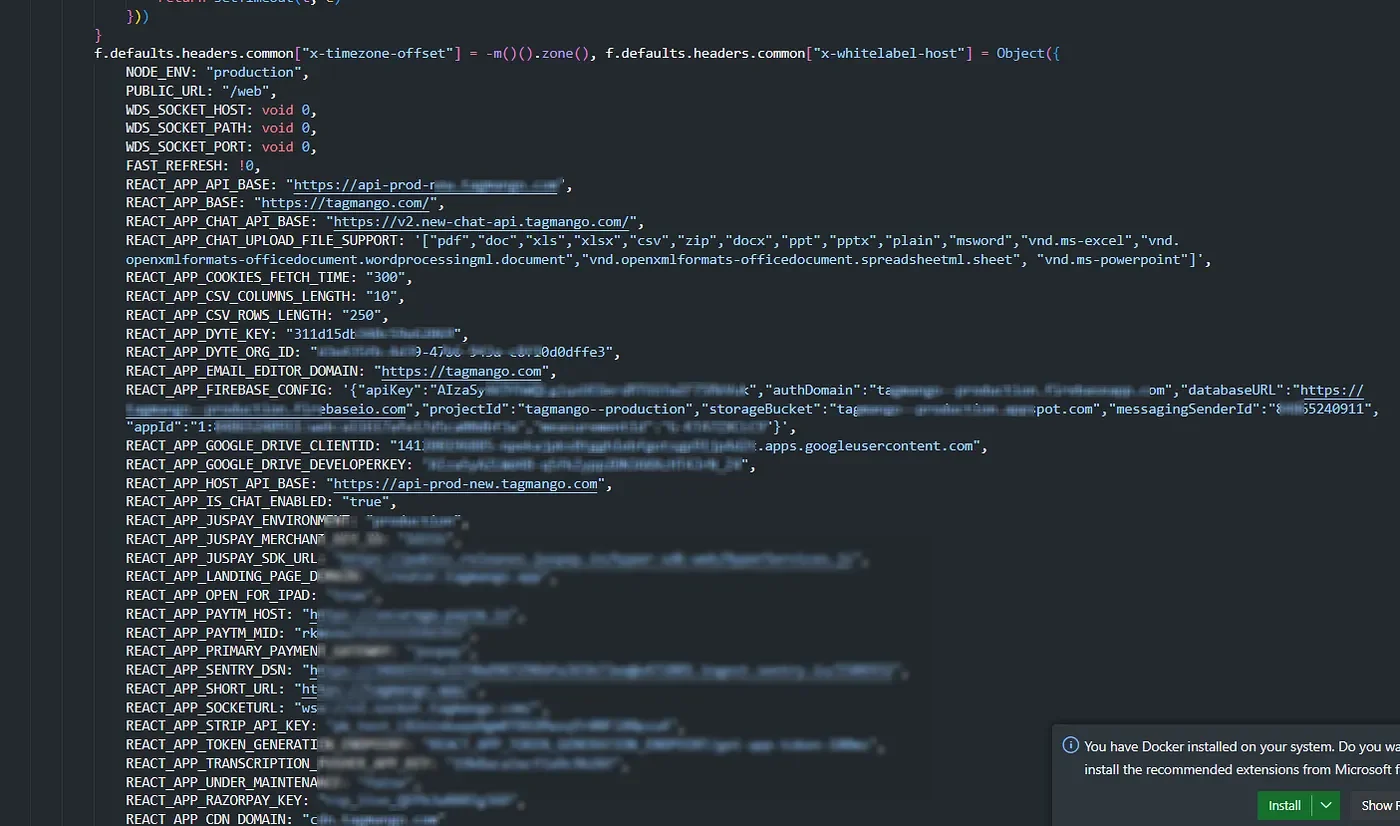
The JavaScript file exposed several credentials at once. The Dyte pair stood out because it was unfamiliar and undocumented in the usual key-exploitation references. The file looked like this:
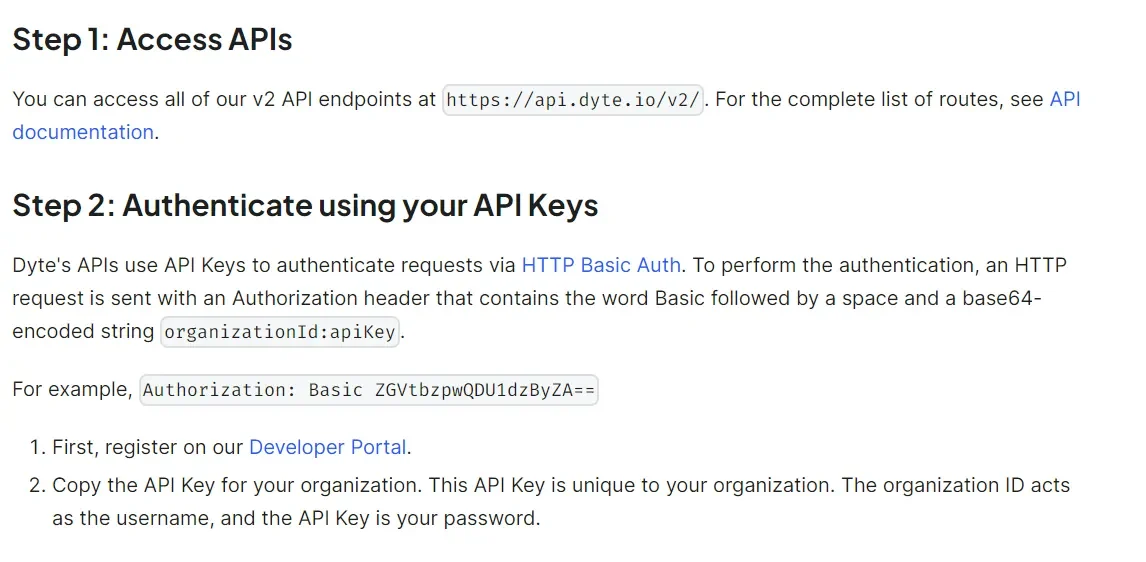
What made the pair worth pursuing was the documentation: Dyte's APIs rely on API keys for request authentication through HTTP Basic Auth. A request carries an Authorization header containing the word Basic, a space, and a base64-encoded string made up of the organisation ID and the API key. That means a leaked pair is directly usable as a credential against the Dyte REST API, with no further secret required.
Exploitation
Step 1: Build the Basic Auth value
The researcher base64-encoded the organisation ID and the API key in the format organizationId:apiKey, keeping that order, exactly as the documentation specifies. The result is the value that goes after Basic in the Authorization header.
Step 2: Create a meeting with the leaked key
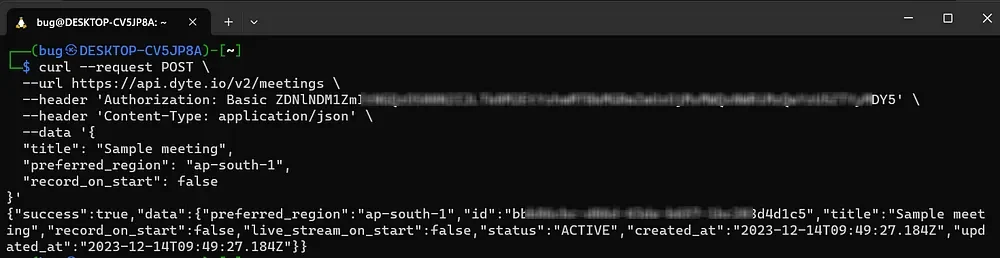
With the header value in hand, the researcher sent a request to create a simple test meeting:
curl — request POST \ — url https://api.dyte.io/v2/meetings \ — header ‘Authorization: Basic BASE64_VALUE’ \ — header ‘Content-Type: application/json’ \ — data ‘{ “title”: “Sample meeting”, “preferred_region”: “ap-south-1”, “record_on_start”: false}’
The request targets https://api.dyte.io/v2/meetings with POST. The Authorization header carries the Basic value built in step 1, Content-Type is set to application/json, and the body asks for a meeting titled Sample meeting in the ap-south-1 region with recording disabled at start. The write-up shows the curl request sent to create a test meeting; it does not describe the response.
Root cause
The JavaScript file shipped to clients contained the Dyte organisation ID and API key in plaintext. Because Dyte authenticates API calls with HTTP Basic Auth built from exactly those two values, anyone who can read the file can act as the key's owner against the API.
Impact
The researcher sent a request to create a test meeting with the leaked key. The write-up's title frames the finding as a path from disclosure to maximum impact, but no severity rating is given. but it does not enumerate further actions against the Dyte API, and no bounty amount or CVSS score is given.
Fix
The report records that the issue was triaged on 16 December 2023 and resolved on 19 December 2023, two days after it was reported on 14 December 2023. The general remedy for this class of finding is to remove the credentials from client-side JavaScript and rotate the exposed key pair, since a key that has been public must be treated as compromised.
Variants to test
- Grep JavaScript bundles for vendor-specific key names such as
DYTE_ORG_IDandDYTE_KEY. A positive result is a pair that, once base64-encoded asorganizationId:apiKey, returns a successful response from the vendor's API. - Check other collaboration and media SDKs whose keys are embedded in front-end code. A positive result is an authenticated call that creates a resource, as the meeting creation did here.
- Look for keys that are not covered by public exploitation references such as Keyhacks, and read the vendor's own API documentation for the authentication scheme. A positive result is a documented Basic Auth or header scheme that accepts the leaked values directly.
- Test whether a leaked key can create resources, not just read them. A positive result is a
POSTthat returns a newly created object rather than an authentication error.
What happened, in plain words
A security researcher was taking part in a bug bounty programme. In a bug bounty programme, an organisation invites people outside the company to look for security mistakes in its systems and report them, often for a reward. While looking at one of the programme's websites, the researcher opened a JavaScript file and found several secret keys written inside it.
A JavaScript file is one of the files a website sends to your browser so the page can work. Normally it contains instructions for the browser, such as how a button should behave. Because the browser has to download it, anyone can read it: you can open it with your browser's developer tools or simply view it. If a secret is written inside such a file, it is not secret at all. Think of it like writing your house key on a note and taping the note to your front door: the door is locked, but the key is on display for anyone who walks past.
Among the keys in that file was a pair for a service called Dyte. Dyte is a product that lets a website, a mobile app or a desktop application add live video and voice calls. If you have ever joined a video call inside a web page, a service like Dyte may have been running the call behind the scenes. The two values were named DYTE_ORG_ID and DYTE_KEY. The first identifies which Dyte account (organisation) the key belongs to, and the second is the key itself, the password-like value that proves you are allowed to use that account.
The same file also contained other well-known keys, such as Google Developer, Stripe API and Firebase credentials. Those are all services with their own secret values, and each one is sensitive in its own way. The Dyte pair was unfamiliar to the researcher and not covered in Keyhacks.
Before going further, the researcher checked a public collection of notes called Keyhacks, a GitHub repository that lists ways to test leaked keys from many services. There was nothing there about the Dyte API key, and in particular nothing about the DYTE_ORG_ID and DYTE_KEY pair. So the researcher had to work out from scratch whether the pair could actually be used, and how.
This article walks through that process: what the keys are, how Dyte expects them to be presented, how the researcher built a valid request with them, and what happened when the request was sent. It is written for someone who has never done anything like this before, so every term is explained as it comes up.
Background: what an API is, and what these keys unlock
Before the steps, two ideas need to be clear.
An API (Application Programming Interface) is a way for one piece of software to talk to another. A simple comparison: when you order food at a restaurant, you do not walk into the kitchen and cook it yourself. You tell the waiter what you want, the waiter takes the order to the kitchen, and the kitchen sends the food back. The API is the waiter. Your program asks for something in an agreed format, the service does the work, and the answer comes back. Dyte's API lets a program create and manage video meetings on Dyte's servers without a person clicking around a website.
A key (also called an API key or token) is a long string of characters that acts like a password for a program. When a program calls an API, it includes the key so the service knows who is asking. If someone else gets your key, they can pretend to be your program. That is why keys must never be published, and why finding one in a file that every visitor can download is a problem.
Dyte's public documentation explains how its API expects the key. The researcher found that documentation at https://docs.dyte.io/guides/rest-apis/quickstart. According to it, Dyte's APIs authenticate requests with API keys using HTTP Basic Auth.
HTTP is the language browsers and servers use to exchange requests and responses on the web. Every time you load a page, your browser sends an HTTP request and the server sends an HTTP response. A request can carry extra pieces of information called headers: labelled lines such as Content-Type that tell the server something about the request. Authentication simply means proving who you are. HTTP Basic Auth is one standard way of doing that: the client puts a username and a password (or, here, an organisation ID and an API key) into a header, and the server checks them.
The documentation describes the exact format. The request includes an Authorization header. That header contains the word Basic, then a space, then a base64-encoded string made from the organisation ID and the API key.
Base64 is a way of turning any text into a set of plain letters, digits and a couple of symbols. It is not encryption and it hides nothing: anyone can decode it back in a second. Its purpose is only to make sure the values travel safely through systems that expect simple text. A useful comparison is writing a phone number in a form that a computer can read without confusion; the number is still readable by a person who knows the trick.
The important consequence: the leaked pair is directly usable as a credential against the Dyte API. No further secret is needed. Anyone who can read the JavaScript file can build the same header and call the API as the owner of that key.
Finding it
The starting point was a JavaScript file on the target that contained credentials. "Hardcoded" means the values were written directly into the file by whoever built the site, rather than being fetched from somewhere safe at runtime. The file exposed several credentials at once. The Dyte pair stood out because it was unfamiliar and because the usual key-exploitation references had nothing on it. The file looked like this:
What made the pair worth pursuing was the documentation: because Dyte authenticates API calls with HTTP Basic Auth built from exactly the organisation ID and the API key, a leaked pair is a working credential. The researcher used a Google search to learn what Dyte is, and the public documentation to understand how the keys are used. No accounts, roles or special tools are described; the whole path was worked out from the vendor's own documentation.
Exploitation
Step 1: Build the Basic Auth value
The first job was to produce the value that goes after the word Basic in the Authorization header. The documentation says it is a base64 encoding of the organisation ID and the API key, joined in the format organizationId:apiKey, with the organisation ID first and the API key second, separated by a colon. The researcher encoded the two values in exactly that order. The researcher encoded the two values in exactly that order, as the documentation specifies.
Step 2: Create a meeting with the leaked key
With the header value in hand, the researcher sent a request to create a simple test meeting. The researcher sent a request to create a simple test meeting. The request was:
curl — request POST \ — url https://api.dyte.io/v2/meetings \ — header ‘Authorization: Basic BASE64_VALUE’ \ — header ‘Content-Type: application/json’ \ — data ‘{ “title”: “Sample meeting”, “preferred_region”: “ap-south-1”, “record_on_start”: false}’
Line by line, in plain words:
curlis a command-line tool for sending HTTP requests. You type a request, press Enter, and the server's answer is printed on screen. It is the programmer's version of typing an address into a browser, with more control over what is sent.— request POSTchooses the type of request.POSTis the HTTP method used when you want the server to create something new. Loading a page is usually aGET; creating a meeting is aPOST.— url https://api.dyte.io/v2/meetingsis the address being called.api.dyte.iois Dyte's API server, and/v2/meetingsis the part of the API that deals with meetings.— header ‘Authorization: Basic BASE64_VALUE’attaches the credential.BASE64_VALUEis a placeholder for the base64 string built in step 1 fromorganizationId:apiKey. This is the line that proves to Dyte who is calling.— header ‘Content-Type: application/json’tells the server that the body of the request is written in JSON, a simple text format for structured data. It is how programs agree on the shape of information they exchange: curly braces, names in quotes, values after colons.— data ‘{ “title”: “Sample meeting”, “preferred_region”: “ap-south-1”, “record_on_start”: false}’is the body of the request, the actual order being placed. It asks for a meeting titledSample meeting, in theap-south-1region (a geographic area for Dyte's servers), with recording switched off at the start (record_on_startset tofalse).
The write-up shows the request being sent; it does not describe the response.
Why this is a security problem
The JavaScript file shipped to clients contained the Dyte organisation ID and API key in plaintext. Because Dyte authenticates API calls with HTTP Basic Auth built from exactly those two values, anyone who can read the file can act as the key's owner against the API. The report does not describe any server-side control that would have limited what the leaked key could do, and it does not say how the file came to include the credentials.
The researcher sent a request to create a test meeting with the leaked key. The write-up's title frames the finding as a path from disclosure to maximum impact, but no severity rating is given. but it does not enumerate further actions against the Dyte API, and no bounty amount or CVSS score is given.
How it was fixed
The report records that the issue was triaged on 16 December 2023 and resolved on 19 December 2023, two days after it was reported on 14 December 2023. "Triaged" means the receiving team reviewed the report and accepted it as a real issue worth acting on. The general remedy for this class of finding is to remove the credentials from client-side JavaScript and rotate the exposed key pair, since a key that has been public must be treated as compromised. "Rotate" means replacing the old key with a new one and disabling the old one, so that anyone who copied it can no longer use it.
Variants to test
If you want to look for similar issues yourself, these are the directions the researcher suggests, each with the sign that you have found something real:
- Grep JavaScript bundles for vendor-specific key names such as
DYTE_ORG_IDandDYTE_KEY. "Grep" means searching text for a pattern. A positive result is a pair that, once base64-encoded asorganizationId:apiKey, returns a successful response from the vendor's API. - Check other collaboration and media SDKs whose keys are embedded in front-end code. An SDK is a ready-made set of code that developers add to their product to get a feature, such as video calls. A positive result is an authenticated call that creates a resource, as the meeting creation did here.
- Look for keys that are not covered by public exploitation references such as Keyhacks, and read the vendor's own API documentation for the authentication scheme. A positive result is a documented Basic Auth or header scheme that accepts the leaked values directly.
- Test whether a leaked key can create resources, not just read them. A positive result is a
POSTthat returns a newly created object rather than an authentication error.
Glossary
- API: a way for one program to ask another program to do something, in an agreed format.
- API key: a long string that acts like a password for a program calling an API.
- Authentication: proving who you are to a system.
- Authorization header: the part of an HTTP request that carries proof of identity, such as a key.
- Base64: a reversible encoding that turns text into plain letters, digits and symbols; it hides nothing.
- Bug bounty programme: a scheme where an organisation invites outsiders to find and report security problems, often for a reward.
- Client-side JavaScript: code that runs in the visitor's browser and can therefore be read by anyone.
- Content-Type: an HTTP header that says what format the body of a request is in.
- Credential: any value that proves identity, such as a key or password.
- curl: a command-line tool for sending HTTP requests.
- CVSS: a standard scoring system for the severity of a security issue.
- Dyte: a service that adds live video and voice calls to websites, mobile apps and desktop applications.
- Firebase: a Google platform for building apps, with its own credentials.
- GET / POST: HTTP methods;
GETusually fetches something,POSTusually creates something. - Hardcoded: written directly into a file by the developer instead of being stored safely elsewhere.
- Header: a labelled line of extra information attached to an HTTP request or response.
- HTTP: the language browsers and servers use to exchange requests and responses.
- HTTP Basic Auth: a standard authentication method where a username and password (or ID and key) are sent in an
Authorizationheader. - JSON: a simple text format for structured data, using curly braces, quoted names and values.
- Keyhacks: a public GitHub repository collecting ways to test leaked keys from many services.
- Organisation ID: the value that identifies which account a key belongs to.
- Plaintext: readable text with no encoding or encryption applied.
- Rotate: replace a key with a new one and disable the old one.
- SDK: a ready-made set of code that developers add to their product to get a feature.
- Stripe: a payment service, with its own API keys.
- Token: another word for a key or credential value.
- Triaged: reviewed and accepted as a real issue by the receiving team.
- VDP: a vulnerability disclosure programme, a bug bounty programme that may not offer a reward.




