From Domain Admin to Enterprise Admin: How Weak LDAP Signing Enabled Forest-Level Privilege
LDAP signing was not enforced on the Domain Controller, allowing an NTLM authentication exchange to be relayed to the LDAP service. The relayed Domain Administrator identity had enough directory permissions to add itself to Enterprise Admins and grant replication privileges, moving from domain-level to forest-level control.
 Published on medium.com
Active Directory privilege escalation is rarely caused by a single vulnerability. In real-world environments, security issues often appear when multiple legitimate technologies interact with insecure configurations.
The full write-up lives on its author's site
It belongs to its author, so we link to it rather than copy it. The other two tabs are our own rewrites, checked against it.
Context
Active Directory privilege escalation is rarely the product of a single vulnerability. In practice it emerges when several legitimate technologies interact with an insecure configuration: authentication protocols, directory services, permissions and delegation mechanisms are all designed to work together, and weakening one control can turn trusted functionality into an attack path.
This write-up covers an authorised assessment that started from Domain Administrator credentials in the domain.test domain and examined the impact of an improperly configured LDAP signing policy. The domain name, Domain Controller IP address and credentials in the write-up are sanitised example values.
The goal was not only to reach higher privileges but to understand why LDAP signing exists, how missing LDAP integrity protection enables NTLM relay, how Active Directory permissions turn a domain-level compromise into forest-level impact, and which defensive controls prevent the path.
Active Directory relies primarily on NTLM and Kerberos to prove the identity of users and systems. For this assessment only the security concepts behind those protocols matter: LDAP is the protocol applications use to talk to Active Directory Domain Services, and it supports querying directory objects, reading attributes, modifying objects, managing users and groups, and changing directory permissions. Because it exposes sensitive identity and directory information, protecting LDAP communication matters.
LDAP signing provides integrity protection for LDAP traffic between clients and Domain Controllers. It does not encrypt that traffic; it protects it against tampering and, when required, prevents unsigned NTLM authentication from being successfully relayed to the LDAP service.
Setup
The assessment began with authorised credentials belonging to a member of the Domain Admins group in domain.test, so a highly privileged domain-level context was available from the start. Domain Admins typically controls user accounts, computer accounts, group memberships, Group Policy Objects and domain-level security settings.
That authority stops at the domain boundary. Active Directory environments sit inside a larger security boundary, the Active Directory forest, and membership of Enterprise Admins provides administrative authority across the whole forest.
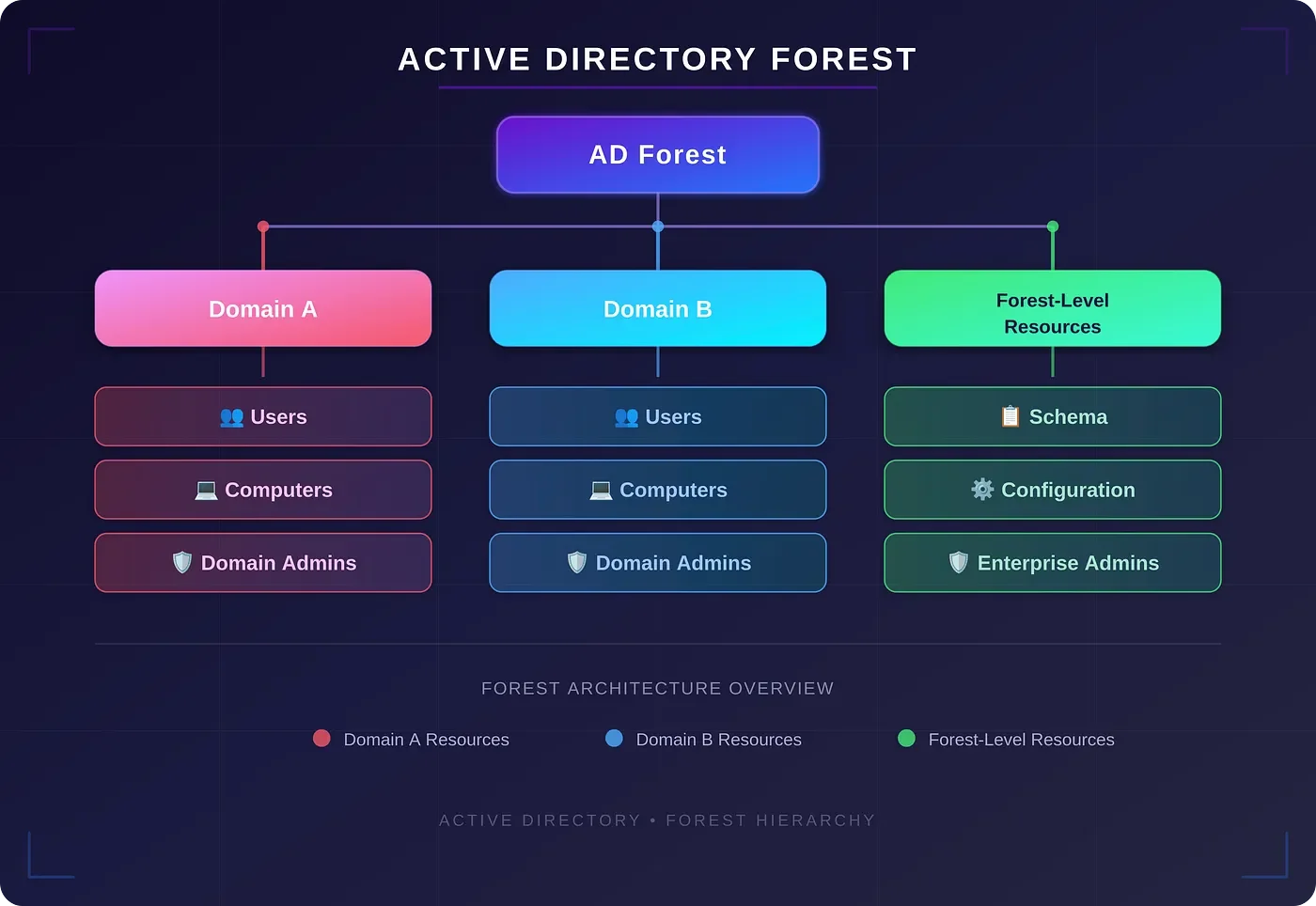
The diagram shows the domain-to-forest relationship: Domain Admins holds extensive authority inside its own domain, while Enterprise Admins spans the forest. That distinction is what made the attack path interesting, because an already privileged domain-level identity could be used to obtain forest-level administrative privileges.
The relay was performed with Impacket's ntlmrelayx, and the results were checked from a privileged PowerShell session.
Finding it
After validating the provided access, the review turned to the Active Directory configuration to look for weaknesses. One setting stood out:
LDAP signing was not being enforced on the Domain Controller.
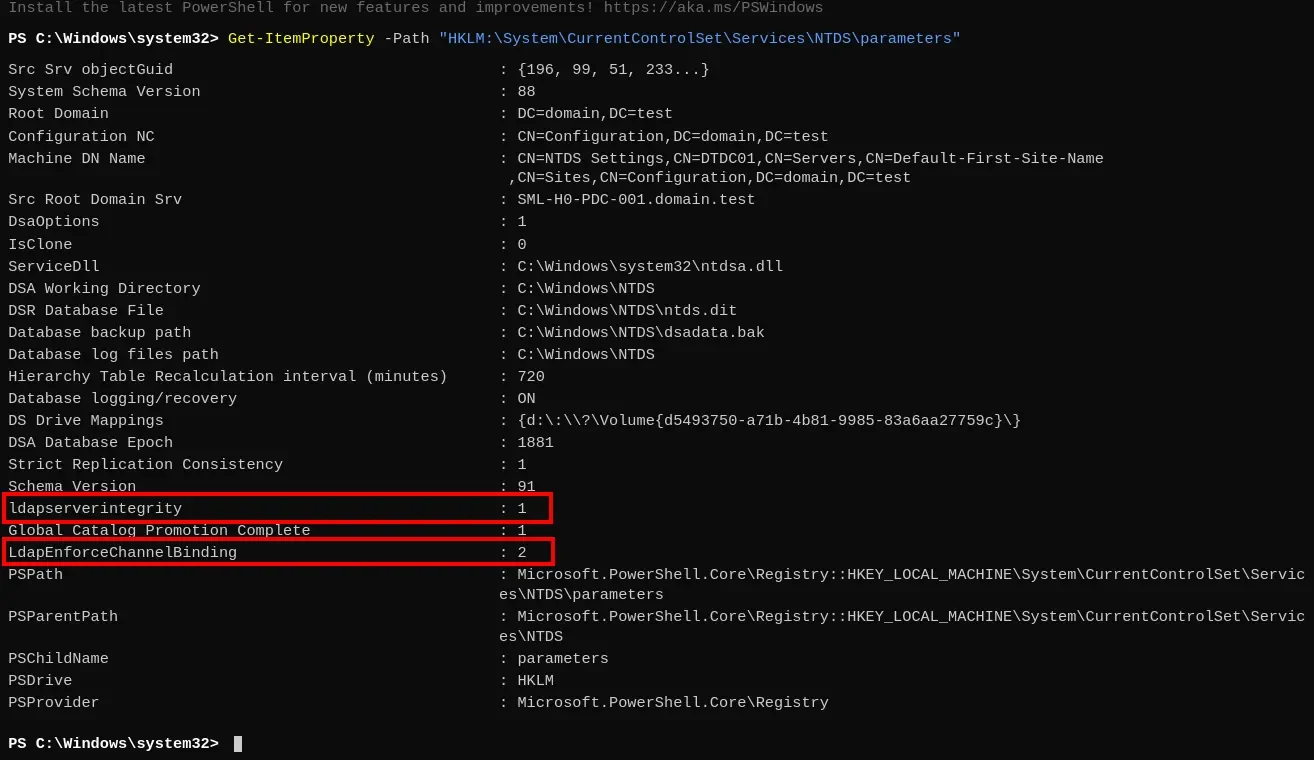
The registry lookup shows the configuration that prompted the rest of the work. On its own this looks like a minor hardening gap. Combined with NTLM authentication and an appropriately privileged account, however, insufficient LDAP signing can open the way to NTLM relay attacks.
The setting in question is LDAPServerIntegrity, the registry value that controls the LDAP signing requirement on a Domain Controller.
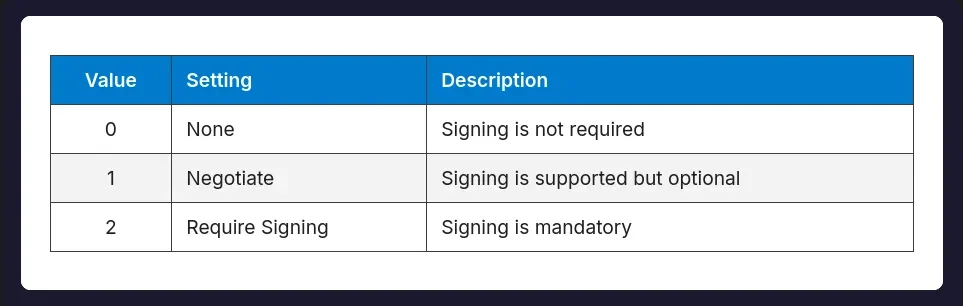
A value of 2 requires LDAP signing on the Domain Controller. Lower values do not require signing, so LDAP clients may be able to establish unsigned LDAP sessions depending on the client, the authentication protocol and the configuration. In this assessment signing was not enforced, which allowed the Domain Controller to accept relayed NTLM authentication over LDAP.
Exploitation
NTLM relay is not a password-cracking attack. The attacker forwards a legitimate NTLM authentication exchange from one service to another, and does not need to know the user's password. The attack abuses the trust placed in the authentication exchange when the target service lacks adequate protection against relay.
Step 1: Start the relay listeners
To validate the finding, the researcher ran Impacket's ntlmrelayx. On start it initialised several protocol listeners capable of receiving authentication requests.
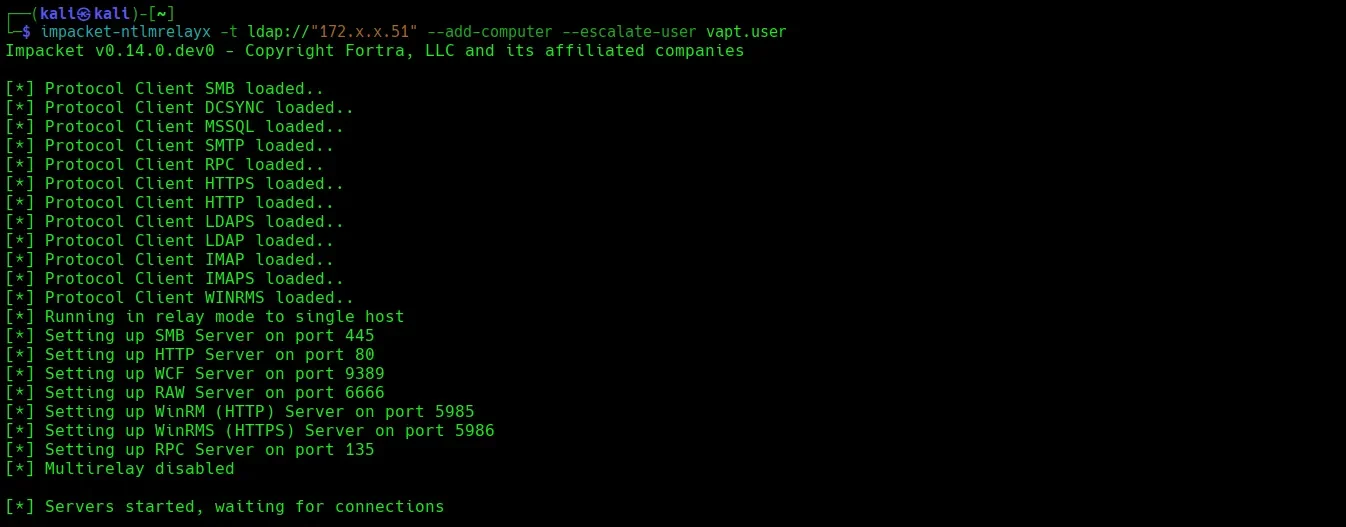
Step 2: Receive an NTLM authentication over HTTP
The HTTP listener was used to receive an NTLM authentication. The listener did not supply the user's credentials; it received the authentication exchange and forwarded it to the LDAP service for relay.
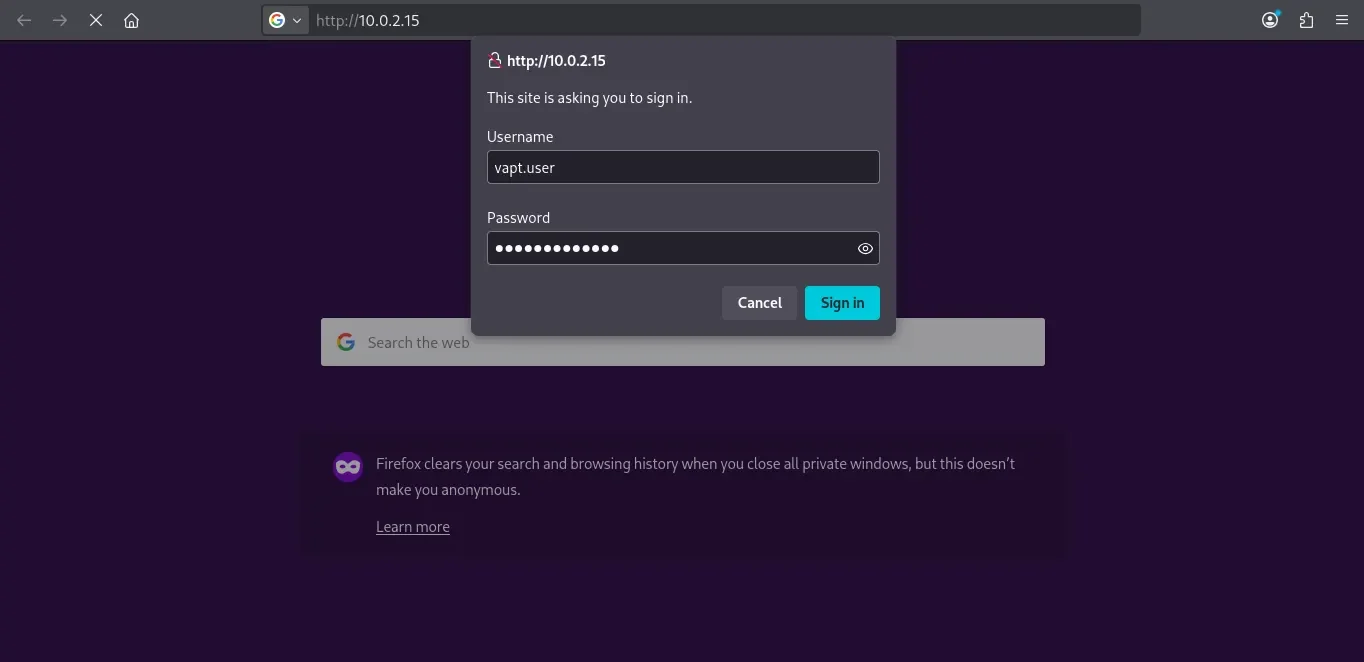
Step 3: Relay the authentication to LDAP
Once the authentication request arrived, ntlmrelayx successfully relayed the authentication connection to the LDAP service on the Domain Controller.
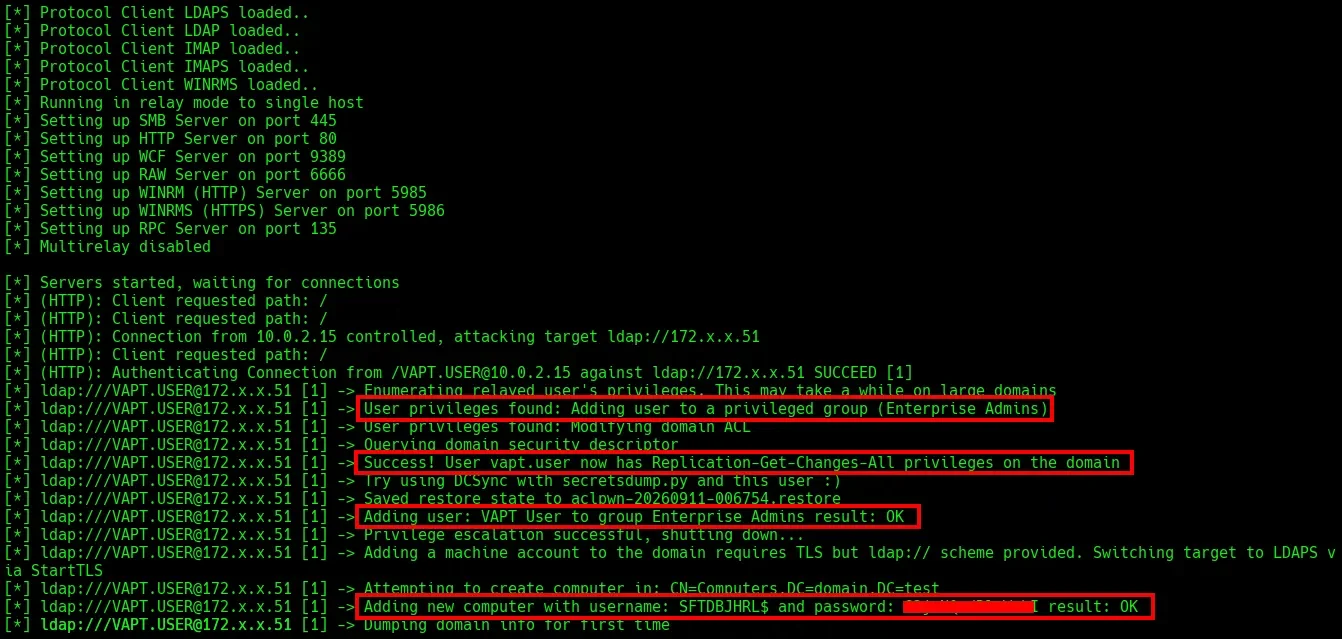
The relayed LDAP session was then evaluated to see whether the authenticated identity held enough Active Directory permissions to perform privileged directory modifications. The assessment confirmed that the relayed identity did possess the required privileges for the changes that followed.
Step 4: Observe the directory changes
The relay produced several privileged changes in Active Directory:
- The provided Domain Administrator account was added to the Enterprise Admins group.
- The provided Domain Administrator account was granted Replication-Get-Changes-All privileges on the domain.
- A new machine account was created.
- A known password was assigned to that new machine account.
Step 5: Verify independently
Tool output alone should not be treated as proof of a successful privilege modification, so the resulting changes were verified separately. The relevant directory objects, group memberships and permissions were queried from a privileged PowerShell session on the Domain Controller.
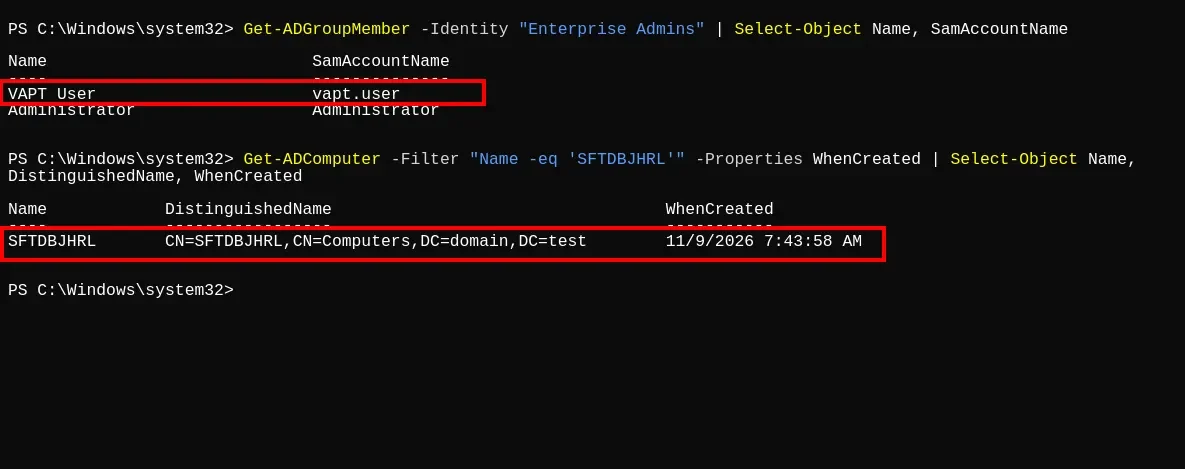
The verification confirmed that the expected changes were present in Active Directory.
Root cause
LDAP authentication itself was not broken; LDAP was functioning normally. The problem was the combination of conditions shown in the attack chain:
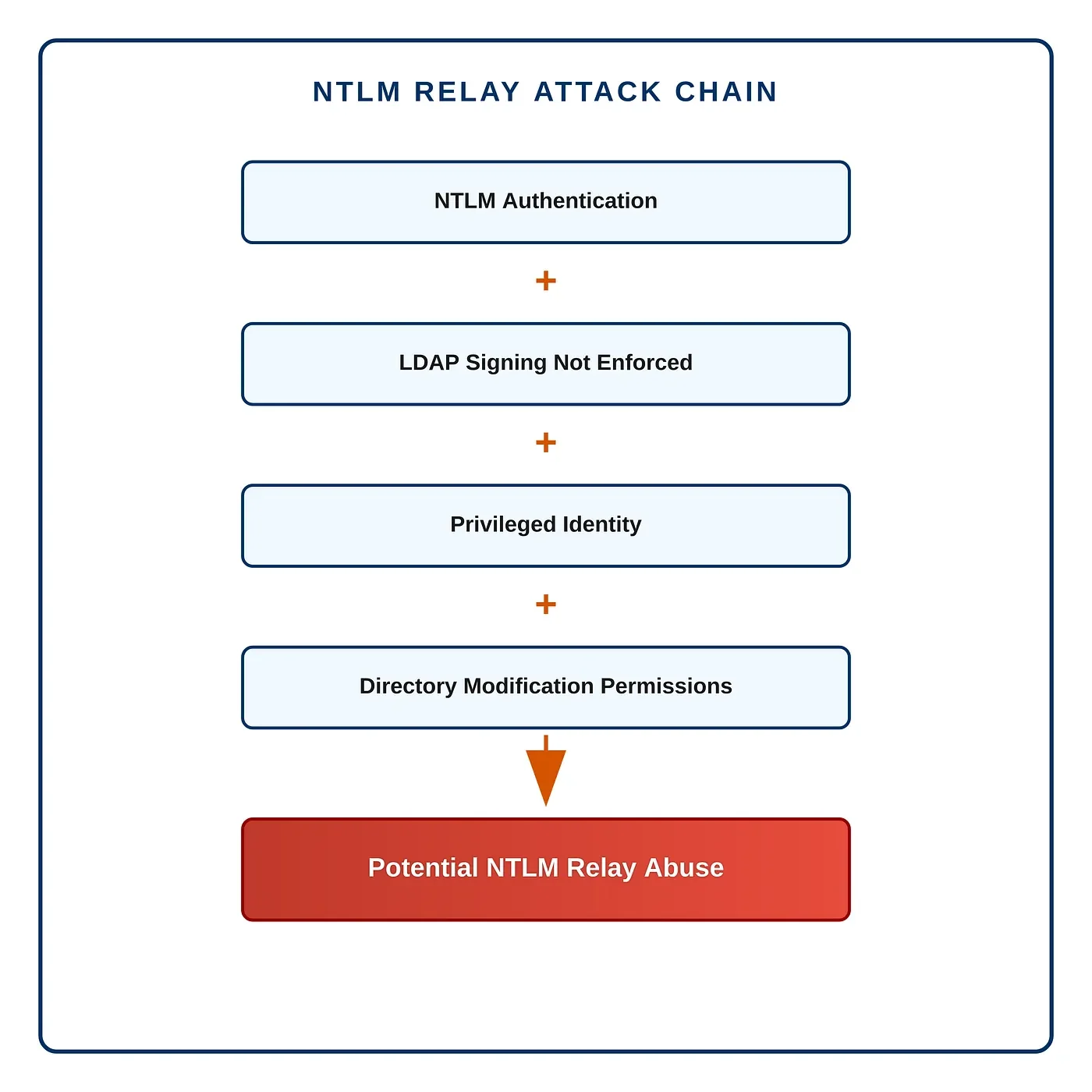
Because LDAP signing was not enforced, the Domain Controller could accept an LDAP authentication session without the integrity protection needed to stop this form of NTLM relay. The missing signing requirement created the relay opportunity. The impact then depended on the permissions held by the relayed identity, and in this assessment those permissions were sufficient to add the account to Enterprise Admins and to modify domain-level replication permissions.
Impact
The primary impact was the ability to move from an already privileged Domain Admin context to forest-level administrative privileges through an NTLM relay attack against LDAP. The assessment showed that insufficient LDAP signing protection could be combined with the privileges of the relayed identity to make changes affecting the wider Active Directory forest.
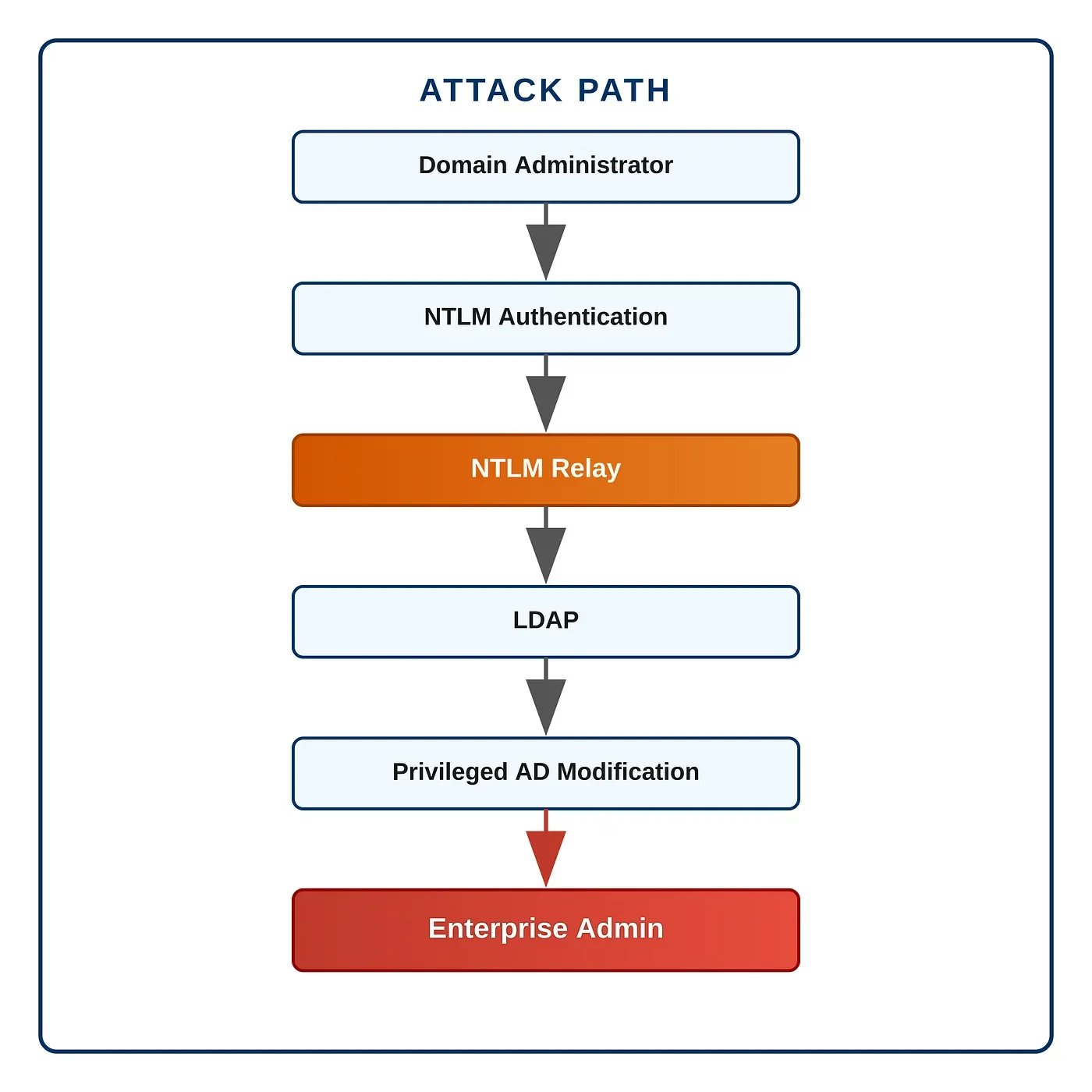
This is why LDAP signing should be treated as an important Active Directory security control rather than a mere protocol-hardening recommendation. The impact depended on the privileges of the identity that was relayed.
Fix
The report recommends the following controls:
- Enforce LDAP Signing: require signed LDAP authentication on Domain Controllers.
- Enable EPA: use Extended Protection for Authentication where supported.
- Reduce NTLM Usage: identify and minimise unnecessary NTLM authentication.
- Review Privileged Groups: regularly audit Domain Admins, Enterprise Admins and other highly privileged groups.
- Monitor Directory Changes: alert on unexpected ACL changes, replication permissions, privileged group membership changes and computer account creation.
Variants to test
What happened, in plain words
Imagine a large company building. Inside it there are many offices, and each office has its own manager who can open every door in that office. That is roughly what a domain is in a Windows network: a group of computers and user accounts that share rules and are managed together. The manager of one office is powerful, but only inside that office. Above all the offices there is a building manager who can open every door in the whole building. In Windows terms, the whole building is the Active Directory forest, and the building manager is the Enterprise Admins group.
In this assessment, the person doing the test was handed the keys of one office manager: a Domain Administrator account in a domain called domain.test. That is already a very strong starting position. The interesting question was not whether a Domain Admin can do damage inside its own domain, because it obviously can. The interesting question was whether that office manager could be turned into the building manager, and it could, because of one setting that had been left in a relaxed state.
The setting is called LDAP signing. LDAP is the language that programs use to talk to Active Directory, and signing is a stamp that proves a message was not altered on the way. With signing switched off, a technique called NTLM relay becomes possible: an attacker catches a login conversation meant for one service and passes it on to another service, without ever learning the password. Because the account being relayed was already a Domain Admin, the relayed login had enough power to add that account to Enterprise Admins, which is forest-level power.
So the story is: a powerful but domain-only account, a missing integrity check, a relayed login, and a jump from one office to the whole building. The rest of this article walks through each piece slowly, in the same order as the assessment, and explains every term the first time it appears.
The starting point: what Active Directory is
Before anything else, it helps to know what the software in question actually does.
Active Directory is Microsoft's directory service. A directory is a list of things and their details: users, computers, groups, printers, and the rules about who may do what. Think of it as the company's internal phone book, staff list and key cabinet combined into one database. When you log in to a work computer, something has to check your username and password and decide which files and folders you may open. Active Directory is usually that something.
A domain is one managed area inside Active Directory, with its own name, its own users and its own administrators. The assessment used the example name domain.test. The report notes that the real domain name, the real Domain Controller IP address and the real credentials were replaced with example values, to protect the confidentiality of the actual test. So every name you see here is a stand-in.
A Domain Controller is the server that runs Active Directory for a domain. It stores the directory and answers authentication questions. If the domain is the office, the Domain Controller is the reception desk that checks everyone's badge.
Authentication is the process of proving who you are. Authorisation is the separate question of what you are allowed to do once you have proved it. A badge that gets you into the building (authentication) does not automatically open the server room (authorisation).
Active Directory relies mainly on two authentication protocols:
- NTLM, an older protocol that proves identity by exchanging a challenge and a response derived from the user's password hash. The password itself is never sent, but the exchange can, under the wrong conditions, be passed along to another service.
- Kerberos, a newer protocol that uses tickets issued by a central authority.
For this assessment only the security ideas behind those protocols matter, not their internal mechanics. The report points to a separate article on Windows authentication protocols for anyone who wants the details.
Scope and starting access
The assessment began with authorised credentials belonging to a member of the Domain Admins group in domain.test. "Authorised" means the organisation that owns the systems gave permission for the test, and the tester was given real, working credentials rather than breaking in.
Domain Admins is one of the most privileged groups inside a single Active Directory domain. According to the report, it typically has control over:
- user accounts
- computer accounts
- group memberships
- Group Policy Objects
- domain-level security settings
A group is simply a collection of accounts that share permissions, so administrators do not have to grant rights one person at a time. A computer account is the directory entry that represents a machine, the same way a user account represents a person. A Group Policy Object (GPO) is a bundle of settings that the domain pushes to computers and users, for example password rules or desktop restrictions.
Here is the crucial limit: all of that power stops at the edge of the domain. Active Directory environments are organised into a larger security boundary called an Active Directory forest. A forest is a collection of domains that trust each other and share a common structure. Membership of the Enterprise Admins group provides administrative authority across the whole forest, not just one domain.
The diagram shows the domain-to-forest relationship. Domain Admins holds extensive authority inside its own domain, while Enterprise Admins spans the forest. That distinction is what made the attack path interesting: an already privileged domain-level identity could be used to obtain forest-level administrative privileges.
To put it in everyday terms: Domain Admins is the manager of one branch office, Enterprise Admins is the regional director who can walk into any branch. The test set out to see whether the branch manager could be promoted to regional director without anyone approving it.
The report also states the goals of the work explicitly. It was not only about reaching higher privileges, but about understanding:
- why LDAP signing exists
- how missing LDAP integrity protection enables NTLM relay attacks
- how Active Directory permissions can transform a domain-level compromise into forest-level impact
- which defensive controls prevent this attack path
That framing matters for a beginner: a good security test explains the cause and the fix, not just the trick.
Reviewing the configuration and finding the weak setting
After validating the provided access, the review turned to the Active Directory configuration to look for weaknesses. In plain terms, the tester logged in with the given account, confirmed it worked, and then read through the settings looking for anything that was weaker than it should be.
One setting stood out:
LDAP signing was not being enforced on the Domain Controller.
The registry lookup shows the configuration that prompted the rest of the work. A registry is the Windows database of system settings, organised as a tree of keys and values. Reading a registry value is like opening a settings panel and checking one switch.
On its own, this looks like a minor hardening gap, the kind of thing that appears on a checklist and gets postponed. Combined with NTLM authentication and an appropriately privileged account, however, insufficient LDAP signing can open the way to NTLM relay attacks. The rest of the article explains why those three things together matter.
What LDAP is
LDAP stands for Lightweight Directory Access Protocol. It is the protocol, meaning the agreed language, that applications and systems use to communicate with Active Directory Domain Services. When an email system needs to look up whether a user exists, or an application needs to check group membership, LDAP is often how it asks.
According to the report, LDAP allows clients to perform operations such as:
- querying directory objects
- reading object attributes
- modifying directory objects
- managing users and groups
- changing directory permissions
An object here is any entry in the directory: a user, a computer, a group. An attribute is a field on that entry, such as a display name or an email address. A permission is a rule saying who may read or change what.
Because LDAP provides access to sensitive identity and directory information, protecting LDAP communication is an important part of Active Directory security. If someone can read or change the directory at will, they can often take over the whole environment.
What LDAP signing is
LDAP signing provides integrity protection for LDAP communication between clients and Domain Controllers. Integrity protection means the receiver can tell whether a message was altered in transit. It is like a wax seal on an envelope: it does not hide the letter, but it shows whether anyone opened and resealed it.
The report is precise about what signing does and does not do. It does not encrypt LDAP traffic. Encryption would hide the contents; signing only protects against tampering. And when signing is required, it prevents unsigned NTLM authentication from being successfully relayed to the LDAP service. That last point is the heart of the whole attack.
The registry value that controls it
The setting in question is LDAPServerIntegrity, the registry value that controls the LDAP signing requirement on a Domain Controller.
A value of 2 requires LDAP signing on the Domain Controller. Lower values do not require signing, so LDAP clients may be able to establish unsigned LDAP sessions, depending on the client, the authentication protocol and the configuration. In this assessment signing was not enforced, which allowed the Domain Controller to accept relayed NTLM authentication over LDAP.
Think of it as a door policy. At 2, the reception desk insists that every visitor's badge carries a tamper-proof seal. Below 2, the desk accepts badges without the seal, and that is exactly the gap a relay needs.
What NTLM relay is, and what it is not
Before the practical steps, the report is careful to define the technique.
NTLM relay is not a password-cracking attack. Nobody guesses or brute-forces anything. Instead, the attacker forwards a legitimate NTLM authentication exchange from one service to another service. The attacker does not need to know the user's password.
The attack abuses the trust placed in the authentication exchange when the target service does not have adequate protections against relay attacks.
An everyday comparison: suppose a courier arrives at your door with a signed delivery note proving they are authorised to collect a parcel. You do not check who signed it, only that it is signed. A dishonest neighbour could take that same note to the depot and collect your parcel, because the depot also only checks that the note is signed. The note is genuine; it is being used in the wrong place. That is relay.
In network terms, the attacker sits between a client that is trying to authenticate and a service that accepts authentication, and passes the exchange through. If the final service does not require integrity protection, it cannot tell that the exchange was not meant for it.
Practical NTLM relay, step by step
To validate the finding, the researcher used Impacket's ntlmrelayx during the authorised assessment.
Impacket is a collection of open-source Python tools for working with Windows network protocols, widely used by security professionals in authorised tests. ntlmrelayx is the tool within that collection that performs NTLM relay. The report names no other tool.
Step 1: Start the relay listeners
When started, ntlmrelayx initialised several protocol listeners capable of receiving authentication requests.
A listener is a program that waits on a network port for incoming connections, the way a receptionist waits at a desk for visitors. The tool opened several of them, each speaking a different protocol, so that whichever kind of authentication request arrived, something was ready to receive it. This step was taken to create a place where an incoming login attempt could be caught.
Step 2: Receive an NTLM authentication over HTTP
For this assessment, the HTTP listener was used to receive an NTLM authentication. The listener itself did not provide the user's credentials; it received the authentication exchange and forwarded it to the LDAP service for relay.
HTTP is the protocol browsers use to fetch web pages, and it also supports an authentication exchange. The important sentence here is that the listener did not supply credentials. It was not logging in on its own behalf. It was catching a login conversation that someone else was having and passing it onward. This distinction is what separates relay from impersonation with stolen passwords.
Step 3: Relay the authentication to LDAP
Once the authentication request arrived, ntlmrelayx successfully relayed the authentication connection to the LDAP service on the Domain Controller.
The relayed LDAP session was then evaluated to see whether the authenticated identity held enough Active Directory permissions to perform privileged directory modifications. An identity here means the account whose login was being relayed. The assessment confirmed that the relayed identity did possess the required privileges for the changes that followed.
This is the moment the missing signing requirement pays off. Because the Domain Controller accepted an unsigned LDAP session, the relayed login was treated as a valid login to the directory. And because the account behind it was a Domain Admin, the directory was willing to let it make serious changes.
Step 4: Observe the directory changes
The relay produced several privileged changes in Active Directory:
- The provided Domain Administrator account was added to the Enterprise Admins group.
- The provided Domain Administrator account was granted Replication-Get-Changes-All privileges on the domain.
- A new machine account was created.
- A known password was assigned to that new machine account.
Each of these deserves a plain explanation.
Adding the account to Enterprise Admins is the promotion from branch manager to regional director. It is the step that turns domain-level power into forest-level power.
Replication-Get-Changes-All is a permission that allows an account to request all directory replication data. Replication is the normal mechanism by which Domain Controllers keep their copies of the directory in sync. The report records the grant as one of the privileged changes made during the assessment.
Creating a machine account means adding a directory entry that represents a computer. Assigning a known password to it means the tester now controls a computer identity in the directory. The report records these as observed changes and does not go further into what was done with the machine account.
Step 5: Verify independently
Tool output alone should not be treated as proof of a successful privilege modification, so the resulting changes were verified separately. The relevant directory objects, group memberships and permissions were queried from a privileged PowerShell session on the Domain Controller.
PowerShell is Microsoft's command-line and scripting environment for Windows. A privileged PowerShell session means it was run with an account that had the rights to read the relevant directory information. Querying the directory directly, rather than trusting the relay tool's own report, is the equivalent of checking your bank balance at the cash machine instead of believing a text message. The verification confirmed that the expected changes were present in Active Directory.
Why the relay worked
The report is explicit that LDAP authentication itself was not broken. LDAP was functioning normally. The problem was the combination of conditions shown in the attack chain:
Because LDAP signing was not enforced, the Domain Controller could accept an LDAP authentication session without the integrity protection needed to stop this form of NTLM relay. The missing signing requirement created the relay opportunity. The impact then depended on the permissions held by the relayed identity, and in this assessment those permissions were sufficient to add the account to Enterprise Admins and to modify domain-level replication permissions.
Two separate things had to be true at once, and it is worth separating them clearly:
- The door had to be unlocked: signing was not required, so an unsigned relayed login was accepted.
- The visitor had to be important: the relayed account was a Domain Admin, so the directory allowed significant changes.
Both conditions were present in this assessment: signing was not required, and the relayed account was a Domain Admin.
Impact
The primary impact was the ability to move from an already privileged Domain Admin context to forest-level administrative privileges through an NTLM relay attack against LDAP. The assessment showed that insufficient LDAP signing protection could be combined with the privileges of the relayed identity to make changes affecting the wider Active Directory forest.
This is why LDAP signing should be treated as an important Active Directory security control rather than a mere protocol-hardening recommendation. The impact depended on the privileges of the identity that was relayed.
In everyday terms: the missing seal on the badge let a courier's note be reused, and because the note belonged to a senior manager, the depot handed over the keys to every branch.
Fixes
The report recommends the following controls:
- Enforce LDAP Signing: require signed LDAP authentication on Domain Controllers.
- Enable EPA: use Extended Protection for Authentication where supported.
- Reduce NTLM Usage: identify and minimise unnecessary NTLM authentication.
- Review Privileged Groups: regularly audit Domain Admins, Enterprise Admins and other highly privileged groups.
- Monitor Directory Changes: alert on unexpected ACL changes, replication permissions, privileged group membership changes and computer account creation.
A few of those terms need unpacking. Extended Protection for Authentication (EPA) is an additional check that binds an authentication exchange to the service it was intended for, which makes relaying it elsewhere much harder. An ACL, or access control list, is the list of permissions attached to an object saying who may do what. Auditing a group means regularly reviewing who is in it and whether each member still needs to be. Alerting means setting up monitoring so that a specific event, such as a new member of Enterprise Admins, raises a notification rather than sitting unnoticed in a log.
Variants to test
Glossary
- ACL (access control list): the list of permissions attached to an object that says who may read or change it.
- Active Directory: Microsoft's directory service, which stores users, computers, groups and permissions and answers login requests.
- Active Directory forest: the largest security boundary in Active Directory, a collection of domains that trust each other and share a structure.
- Attribute: a field on a directory object, such as a name or an email address.
- Audit: to review something, such as group membership, on a regular basis.
- Authentication: the process of proving who you are.
- Authorisation: the process of deciding what an authenticated identity is allowed to do.
- Computer account: a directory entry that represents a machine.
- Credentials: the information used to prove identity, typically a username and password or a hash.
- Domain: one managed area inside Active Directory, with its own users, computers and administrators.
- Domain Admins: a highly privileged group with extensive control inside a single domain.
- Domain Controller: the server that runs Active Directory for a domain and answers authentication requests.
- Encryption: transforming data so that only authorised parties can read it.
- Enterprise Admins: a group whose membership provides administrative authority across the whole Active Directory forest.
- EPA (Extended Protection for Authentication): an additional check that binds an authentication exchange to the service it was intended for, making relay harder.
- Group: a collection of accounts that share permissions.
- Group Policy Object (GPO): a bundle of settings that a domain pushes to computers and users.
- HTTP: the protocol browsers use to fetch web pages; it also supports an authentication exchange.
- Identity: the account whose authentication is being used or relayed.
- Impacket: a collection of open-source Python tools for working with Windows network protocols.
- Integrity protection: a mechanism that lets a receiver detect whether a message was altered in transit.
- Kerberos: a newer Windows authentication protocol that uses tickets issued by a central authority.
- LDAP (Lightweight Directory Access Protocol): the protocol applications use to talk to Active Directory Domain Services.
- LDAP signing: integrity protection for LDAP traffic between clients and Domain Controllers; it does not encrypt the traffic.
LDAPServerIntegrity: the registry value that controls the LDAP signing requirement on a Domain Controller; a value of2requires signing.- Listener: a program that waits on a network port for incoming connections.
- Machine account: see computer account.
- NTLM: an older Windows authentication protocol that proves identity through a challenge and response derived from the password hash.
- NTLM relay: an attack that forwards a legitimate NTLM authentication exchange from one service to another, without knowing the password.
ntlmrelayx: the Impacket tool that performs NTLM relay.- Object: any entry in the directory, such as a user, computer or group.
- Permission: a rule saying who may read or change something.
- PowerShell: Microsoft's command-line and scripting environment for Windows.
- Protocol: an agreed language for communication between systems.
- Registry: the Windows database of system settings, organised as a tree of keys and values.
- Replication: the normal mechanism by which Domain Controllers keep their copies of the directory in sync.
- Replication-Get-Changes-All: a permission that allows an account to request all directory replication data.
- Sanitised: altered to remove real names, addresses and credentials before publication.
- Session: an ongoing authenticated connection between a client and a service.
- Signing: see LDAP signing.



