From Finding Bugs to Getting CVEs: My Journey of How I Got 2 CVEs
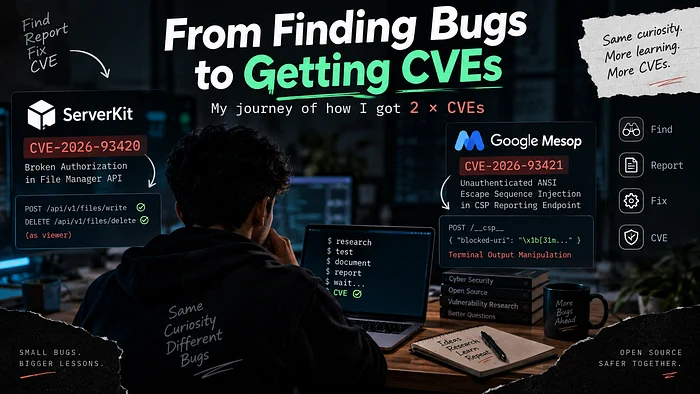
ServerKit's backend did not enforce the viewer role's read-only file permission, allowing a viewer to write and delete files via the API. Google Mesop's unauthenticated CSP reporting endpoint printed unsanitised user input to the terminal, allowing ANSI escape sequences to manipulate log output.

medium.com
Published on medium.com
Ethical Hacking
The full write-up lives on its author's site
It belongs to its author, so we link to it rather than copy it. The other two tabs are our own rewrites, checked against it.
Context
This write-up covers two unrelated vulnerabilities that the author reported and that were later published as GitHub Security Advisories and assigned CVE IDs. Both were responsibly disclosed, fixed, and published as advisories.
| CVE | Product | Weakness | CVSS | Fixed in |
|---|---|---|---|---|
| CVE-2026-93420 | ServerKit | CWE-862: Missing Authorization | 8.8 (High) | ServerKit 1.7.68 |
| CVE-2026-93421 | Google Mesop | CWE-117 and CWE-150 | not stated | Mesop 1.3.4 (affects ≤ 1.3.3) |
The first is a broken access control issue in a file management API. The second is unsafe handling of attacker-controlled data written to a terminal in a CSP reporting endpoint.
Setup
For ServerKit, the author was testing how the application's different user roles and permissions were enforced. The relevant precondition is an account holding the viewer role, whose file permissions are defined as read-only. No tooling, versions or deployment details beyond that are given.
For Google Mesop, the precondition is simply reachability of the CSP reporting endpoint; the reports are accepted without authentication.
Finding it
ServerKit: a permission that only exists in the UI
The application defines a viewer role with the following file permissions:
{ "role": "viewer", "permissions": { "files": { "read": true, "write": false } }}
A viewer should be able to read files but should not be able to modify them. The author wanted to verify whether this restriction was actually enforced by the backend rather than only displayed by the application, so the File Manager API was tested directly.
Google Mesop: user input printed to a terminal
While looking through the application's CSP reporting functionality, the author noticed the endpoint:
POST /__csp__
It accepted unauthenticated JSON reports and printed several user-controlled fields directly to stdout. For example:
blocked_uri = report["csp-report"]["blocked-uri"]
print(f"... Blocked URL: {blocked_uri} ...")
The interesting part was that the input was not sanitised before being written to the terminal. The author then considered what would happen if the input contained ANSI/VT100 escape sequences. Because these sequences are interpreted by ANSI-compatible terminals, an attacker could manipulate how log output appears to an operator, altering, hiding, or injecting misleading terminal output.
Exploitation
Step 1: send write and delete requests as a viewer (ServerKit)
Using the viewer account, the author sent the following requests to the File Manager API:
POST /api/v1/files/write
DELETE /api/v1/files/delete
The requests were accepted, and the operations were actually performed on the filesystem. This meant that although the application reported:
files.write = false
the backend API was not properly enforcing that permission.
Step 2: submit a CSP report containing escape sequences (Google Mesop)
The endpoint accepts unauthenticated JSON reports. The report body is parsed, and fields such as csp-report.blocked-uri are interpolated into a string that is printed to stdout. Because the value is not sanitised, an attacker who controls the report content controls part of the text written to the operator's terminal, including any ANSI/VT100 escape sequences it contains.
Root cause
ServerKit. The permission model and the API enforcement diverged: the role definition says files.write = false, but the write and delete endpoints do not check that permission before acting. This is a missing authorization check on the server side (CWE-862). Any client-side or UI-level restriction is irrelevant once the API can be called directly, which is exactly what the author did.
Google Mesop. Untrusted input from an unauthenticated request is written to a terminal without sanitisation. Terminals interpret ANSI/VT100 escape sequences, so data becomes control instructions for the display. The issue is classified under CWE-117 (improper output neutralization for logs) and CWE-150 (improper neutralization of escape, meta, or control sequences).
Impact
ServerKit. A user holding the viewer role, who should only be able to read files, can write and delete files through the API. The operations were actually performed on the filesystem. The advisory rates this 8.8 (High).
Google Mesop. An unauthenticated attacker can influence what an operator sees in terminal log output: altering, hiding, or injecting misleading output. The author frames this in terms of manipulating how log output appears to an operator, not in terms of code execution.
Fix
ServerKit was fixed in version 1.7.68, and the fix was published as a GitHub Security Advisory (GHSA-4wqh-7f4f-5qmx).
Google Mesop was fixed in version 1.3.4; versions ≤ 1.3.3 are affected. The advisory is GHSA-g7f6-rxc4-qhph.
Variants to test
- Role matrices on file and object APIs. Enumerate every role and every permission flag the application exposes, then call the corresponding API endpoints directly with the lowest-privileged account. A positive result is a request that succeeds and produces a side effect (a write, a delete, a state change) even though the role definition says the action is not permitted.
- Endpoints that mirror UI restrictions. Look for features where the interface hides a button or greys out an action. Replay the underlying request. A positive result is the server performing the action without an authorization error.
- Unauthenticated reporting and telemetry endpoints. CSP report collectors, error reporters and analytics beacons often accept data from anyone. Submit a report containing ANSI/VT100 escape sequences in every string field and watch the server-side log rendering. A positive result is a terminal that renders the escape sequence as a control instruction rather than as literal text.
- Log injection into downstream consumers. Where logs are shipped to a viewer, a SIEM or a dashboard, test whether control characters survive into that consumer. A positive result is altered, hidden or forged entries in the operator-facing view.
- Permission flags reported by the API itself. Compare what the application says about a user's permissions with what the endpoints actually allow, as the author did with
files.write = false. A positive result is any divergence between the declared permission and the enforced behaviour.
What happened, in plain words
A security researcher spent time testing two different pieces of software, found a security problem in each one, reported both to the people who maintain them, and waited. After almost two months of waiting, both problems were officially recognised with a CVE ID each. A CVE ID is a public reference number that is given to a known security flaw so that everyone can talk about the same thing by name. The two flaws were:
- CVE-2026-93420 in a product called ServerKit
- CVE-2026-93421 in a product called Google Mesop
Both were reported responsibly, which means the researcher told the maintainers privately and gave them time to fix the problem before talking about it publicly. Both were fixed, and both were published as GitHub Security Advisories. A GitHub Security Advisory is a public notice, hosted on GitHub, that describes a security flaw in a project, which versions are affected, and which version fixes it.
The two flaws are very different from each other, which is part of why the story is useful for someone starting out. The first is about a program letting a user do something they were never supposed to be allowed to do. The second is about a program printing text it received from a stranger onto a screen in a way that can trick the person watching that screen. Neither one requires advanced exploit tools. Both were found by looking carefully at how the software behaves.
This article walks through both findings, explains the technical ideas from scratch, and shows the requests and code from the report.
The two findings at a glance
| CVE | Product | Type of weakness | Severity score | Fixed in |
|---|---|---|---|---|
| CVE-2026-93420 | ServerKit | CWE-862: Missing Authorization | 8.8 (High) | ServerKit 1.7.68 |
| CVE-2026-93421 | Google Mesop | CWE-117 and CWE-150 | not stated | Mesop 1.3.4 (affects 1.3.3 and earlier) |
A few of those column headings need explaining before we go further.
CWE stands for Common Weakness Enumeration. It is a public catalogue of types of software weakness, each with a number, so that researchers and developers can name a category of mistake consistently. Think of it like a dictionary of known kinds of mistakes, not a list of specific incidents. CWE-862 means "Missing Authorization": the software does not check whether the person making a request is allowed to do what they are asking. CWE-117 means "Improper Output Neutralization for Logs": the software writes untrusted text into a log without cleaning it first. CWE-150 means "Improper Neutralization of Escape, Meta, or Control Sequences": the software lets special control characters through to somewhere they can take effect.
CVSS stands for Common Vulnerability Scoring System. It is a standard way of giving a security flaw a score from 0 to 10, where higher means more serious. 8.8 is in the "High" band. The score is a rough guide to how much damage the flaw could cause, not a precise measurement.
Authorization is the process of deciding whether a user is allowed to do something. It is different from authentication, which is about proving who you are. Logging in with a username and password is authentication. Being told "you may read this file but not delete it" is authorization.
Setting the scene: what the researcher was testing
ServerKit
ServerKit is a piece of software with user accounts and roles. A role is a label attached to a user account that bundles together a set of permissions. Instead of deciding for every single person what they may do, the software says "this account has the viewer role, and the viewer role may do these things". A permission is a single yes/no switch, such as "may read files" or "may write files".
The researcher was looking at how ServerKit enforced these roles and permissions. The specific situation being tested was an account with the viewer role, whose file permissions are defined as read-only. In other words, a viewer is meant to be able to look at files but not change them.
A useful comparison: think of a museum. A visitor may walk through the rooms and look at the paintings (read), but may not repaint them or take them off the wall (write). The museum's rulebook says so. The question the researcher asked is whether the guards actually stop you, or whether the rule only exists on paper.
Google Mesop
Google Mesop is a framework for building web applications. One of its features is CSP reporting. CSP stands for Content Security Policy. It is a set of instructions a website can send to your browser saying which sources of content (scripts, images, styles) are allowed. When the browser blocks something because of that policy, it can send a report back to the website saying "I blocked this, here is what it was". That report is called a CSP report, and the place that receives it is called a CSP reporting endpoint.
An endpoint is simply a specific address on a server that accepts a particular kind of request. If a website is a building, an endpoint is a particular service window: you go to that window for that service. The Mesop endpoint in question is reachable by anyone, with no login required. That is normal for report collectors, because the browser sending the report is not logged in either.
Finding the first flaw: a permission that only exists on screen
The permission that was declared
The application defines a viewer role with the following file permissions:
{ "role": "viewer", "permissions": { "files": { "read": true, "write": false } }}
This is JSON, a text format for structured data. It is just a way of writing down labelled values. Reading it line by line:
"role": "viewer"says this block describes the role called viewer."permissions": { ... }opens the list of permissions that belong to this role."files": { ... }opens the group of permissions that concern files."read": truemeans reading files is allowed."write": falsemeans writing (changing) files is not allowed.
So the rulebook is clear: a viewer should be able to read files but should not be able to modify them. The researcher's next question was whether that restriction was actually enforced by the backend, or only displayed by the application.
The backend is the part of the software that runs on the server and does the real work: storing data, checking permissions, changing files. The frontend is the part you see in your browser. A common mistake is to enforce a rule only in the frontend, for example by hiding a button. Hiding a button does not stop anyone from sending the request that the button would have sent. It is like a shop that puts the expensive items behind a curtain but leaves the shelf unlocked: the curtain is not a lock.
The test: calling the API directly
To check whether the backend really enforced the rule, the researcher talked to the File Manager API directly. An API (Application Programming Interface) is the set of addresses and rules a program uses to talk to another program. When you click a button in a web application, your browser sends a request to an API address behind the scenes. You can send the same request yourself, without the button, using tools that let you craft requests by hand. That is what "testing the API directly" means: skipping the interface and speaking to the server yourself.
Using the viewer account, the researcher sent the following requests to the File Manager API:
POST /api/v1/files/write
DELETE /api/v1/files/delete
These are written in HTTP notation, the language browsers and servers use to talk. Reading them:
POSTis the method used when you are sending data to the server to create or change something. The first line says: send a request of type POST to the address/api/v1/files/write.DELETEis the method used when you want the server to remove something. The second line says: send a request of type DELETE to the address/api/v1/files/delete./api/v1/files/...is the path of the endpoint. Thev1part is just a version label in the address.
The researcher sent these two requests while logged in as a viewer, an account that is only supposed to read. The point of the test was simple: if the backend checks permissions properly, these requests should be refused. If they are accepted, the rule exists only on paper.
The result
The requests were accepted, and the operations were actually performed on the filesystem. In other words, the viewer account managed to perform write and delete operations on the filesystem. The filesystem is the part of the operating system that organises files and folders on disk, so this was not a cosmetic glitch: real files were changed.
This meant that although the application reported:
files.write = false
the backend API was not properly enforcing that permission. The line files.write = false is the application's own statement that writing files is not allowed for this user. The application said one thing and did another. The permission was declared in the model, but the backend API was not properly enforcing it.
This is why the flaw is classified as CWE-862: Missing Authorization. The server was missing the step where it asks "is this user allowed to do this?" before acting. The consequence is that a viewer can write and delete files through the API, even though the permission definition says they cannot. The advisory rates this 8.8, High.
It was fixed in ServerKit 1.7.68 and eventually received the identifier CVE-2026-93420, published as advisory GHSA-4wqh-7f4f-5qmx.
Finding the second flaw: text from a stranger, printed on your screen
The endpoint
While looking through the application's CSP reporting functionality, the researcher noticed the endpoint:
POST /__csp__
This says: the endpoint at the path /__csp__ accepts POST requests, the method used to send data to a server. In this case the data being sent is a CSP report, in JSON format.
It accepted unauthenticated JSON reports. Unauthenticated means the server does not ask who you are: no login, no password, no session. Anyone who can reach the address can send a report. That is by design for this kind of collector, because browsers send these reports automatically and are not logged in.
The server then printed several user-controlled fields directly to stdout. Two terms there:
- User-controlled means the value comes from whoever sent the request. If you can send a request, you control that value.
- stdout stands for standard output. It is the stream of text a program writes when it wants to show something, typically the terminal window where the program is running. When a server prints a message to stdout, an operator watching that terminal sees it.
For example:
blocked_uri = report["csp-report"]["blocked-uri"]
This is Python, a programming language. Reading it:
reportis the parsed JSON report that arrived in the request.["csp-report"]reaches into that data and picks out the section namedcsp-report.["blocked-uri"]reaches further and picks out the field namedblocked-uri, which is the address of the thing the browser blocked.blocked_uri = ...stores that value in a variable calledblocked_uriso it can be used later.
The important point is that the value of blocked-uri comes from the person who sent the report. The server is taking text from a stranger and holding it, ready to print.
print(f"... Blocked URL: {blocked_uri} ...")
This line prints a message to the terminal. Reading it:
print(...)is the instruction to write text to stdout.- The
f"..."syntax means the text inside the quotes is a template, and anything in curly braces is replaced by the value of that variable. {blocked_uri}is replaced by whatever the sender put in theblocked-urifield.- The surrounding text
... Blocked URL:and...is fixed wording added by the program.
So if a report arrives with a blocked-uri of example, the operator's terminal shows something like ... Blocked URL: example .... The sender controls the middle of that line.
The interesting part was that the input was not sanitised before being written to the terminal. Sanitising means cleaning data before using it, for example by removing or escaping characters that have a special meaning. Without sanitising, whatever the sender typed goes straight through.
The idea: escape sequences
The researcher then considered what would happen if the input contained ANSI/VT100 escape sequences. These need a little explanation.
A terminal is not just a sheet of paper. It is a device that understands instructions mixed in with the text. Those instructions are called escape sequences: special character combinations that start with a control character and tell the terminal to do something other than print a letter. For example, an escape sequence can move the cursor to a different position, change the colour of the text, or clear the screen. ANSI and VT100 are the names of the standards that define these sequences, and ANSI-compatible terminals are the ones that understand them.
A comparison: imagine writing a letter to a friend, and the friend's assistant reads it aloud. If you write "please read the next sentence in a whisper", a helpful assistant might actually whisper. The words were meant as text, but they were interpreted as an instruction. Escape sequences work the same way: text that looks like data can be interpreted as a command by the terminal.
Because these sequences are interpreted by ANSI-compatible terminals, an attacker could manipulate how log output appears to an operator. Log output is the running record of messages a program writes so that a human can see what it is doing. If an attacker can put escape sequences into that record, they can alter it, hide parts of it, or inject misleading text. For example, they could make a line appear to say something it does not say, or overwrite a previous line so that it seems never to have existed.
This is why the issue is classified under CWE-117, improper output neutralization for logs, and CWE-150, improper neutralization of escape, meta, or control sequences. The first says the log was written without cleaning untrusted text. The second says control characters were allowed through to a place where they take effect.
It affected Mesop versions 1.3.3 and earlier and was fixed in 1.3.4. The vulnerability was assigned CVE-2026-93421, published as advisory GHSA-g7f6-rxc4-qhph.
The report does not include the exact payload used, so there is no specific escape sequence to show here.
The waiting game
After reporting both vulnerabilities, the maintainers reviewed the findings and fixes were released. The security advisories were published, and the CVE requests were submitted. A CVE request is the formal step of asking the organisation that assigns CVE IDs to register the flaw and give it a number.
Then came the waiting. Almost two months. The researcher kept checking the advisories, waiting to see the CVE IDs appear. Finally, emails arrived from GitHub with the two identifiers: CVE-2026-93420 and CVE-2026-93421.
That wait is a normal part of the process. Fixing software takes time, publishing an advisory takes time, and assigning a CVE ID takes time. For someone new to this, it is worth knowing that the gap between "I found something" and "there is a public CVE number" is measured in weeks or months, not hours.
What the researcher learned
Vulnerability research is not only about finding a bug. The full path is:
Finding, Understanding, Validating, Building a PoC, Responsible Disclosure, Working with Maintainers, Fix, Advisory, CVE.
A few of those steps deserve a plain explanation:
- Validating means confirming that the problem is real and reproducible, not a one-off glitch.
- A PoC, or proof of concept, is a minimal demonstration that shows the problem is real. It is the difference between saying "I think this door is unlocked" and opening it.
- Responsible disclosure means telling the maintainers privately first, giving them time to fix the issue, and only then making details public. It protects the people using the software.
- Working with maintainers means answering their questions and helping them understand and reproduce the issue.
The two vulnerabilities were also very different. One involved authorization and API access control: who is allowed to do what, and whether the server checks it. The other involved unsafe handling of attacker-controlled terminal output: what happens when text from a stranger is printed on a screen that interprets instructions.
Both taught the researcher something new. The two CVE IDs are more than numbers: they represent the time spent researching, testing, documenting, communicating, and patiently waiting for the disclosure process to finish.
Where else to look for the same kinds of mistake
These two patterns are common, and the same questions can be asked of other software.
- Check every role against every action. List the roles and permission flags an application exposes, then call the matching API endpoints directly with the lowest-privileged account. A positive result is a request that succeeds and causes a real change (a write, a delete, a state change) even though the role definition says it is not permitted. This is exactly what happened with ServerKit.
- Look for rules that only exist in the interface. Find features where the interface hides a button or greys out an action, then replay the underlying request. A positive result is the server performing the action without an authorization error. Remember the museum: the rulebook is not the guard.
- Test reporting and telemetry endpoints that need no login. CSP report collectors, error reporters and analytics beacons often accept data from anyone. Submit a report containing ANSI/VT100 escape sequences in every text field and watch how the server-side log renders it. A positive result is a terminal that treats the sequence as an instruction rather than as literal text.
- Follow the logs downstream. Where logs are shipped to a viewer, a SIEM or a dashboard, check whether control characters survive into that consumer. A SIEM is a system that collects and analyses security logs. A positive result is altered, hidden or forged entries in the view an operator sees.
- Compare what the API says with what it allows. Look at the permission flags the application reports about a user, then test whether the endpoints actually respect them, as the researcher did with
files.write = false. A positive result is any difference between the declared permission and the enforced behaviour.
Glossary
- ANSI / VT100: standards that define the special character sequences terminals understand as instructions, such as moving the cursor or changing colour.
- API: the set of addresses and rules that let one program talk to another; the service window a program uses to request work.
- Authentication: proving who you are, for example by logging in.
- Authorization: deciding whether a user is allowed to perform a particular action.
- Backend: the server-side part of an application that does the real work, such as checking permissions and changing files.
- CSP (Content Security Policy): instructions a website gives the browser about which sources of content are allowed.
- CSP report: a message a browser sends to a website when the Content Security Policy blocked something.
- CSP reporting endpoint: the address on a server that receives CSP reports.
- CVE ID: a public reference number assigned to a known security flaw so everyone can refer to it unambiguously.
- CVSS: a standard scoring system that rates the severity of a security flaw from 0 to 10.
- CWE: a public catalogue of types of software weakness, each with a number.
- CWE-117: improper output neutralization for logs; writing untrusted text into a log without cleaning it.
- CWE-150: improper neutralization of escape, meta, or control sequences; letting control characters through to where they take effect.
- CWE-862: missing authorization; the software does not check whether the requester is allowed to perform the action.
- DELETE: an HTTP method used to ask a server to remove something.
- Endpoint: a specific address on a server that accepts a particular kind of request.
- Escape sequence: a special character combination that a terminal interprets as an instruction rather than as text.
- Filesystem: the part of an operating system that organises files and folders on disk.
- Frontend: the part of an application you see and interact with in your browser.
- GitHub Security Advisory: a public notice on GitHub describing a security flaw, the affected versions and the fix.
- HTTP: the language browsers and servers use to exchange requests and responses.
- JSON: a text format for structured data made of labelled values.
- Log output: the running record of messages a program writes for a human to read.
- Permission: a single yes/no switch saying whether an action is allowed.
- PoC (proof of concept): a minimal demonstration that a security problem is real.
- POST: an HTTP method used to send data to a server to create or change something.
- Python: a programming language, used here for the code that prints report fields.
- Responsible disclosure: reporting a flaw privately to the maintainers first and giving them time to fix it before details become public.
- Role: a label attached to a user account that bundles a set of permissions.
- Sanitising: cleaning data before use, for example by removing or escaping characters with special meaning.
- SIEM: a system that collects and analyses security logs.
- stdout (standard output): the stream of text a program writes to show something, typically in a terminal window.
- Terminal: a program or device that displays text and interprets escape sequences as instructions.
- Unauthenticated: not requiring proof of identity; anyone who can reach the address can send a request.
- User-controlled: a value that comes from whoever sent the request.

