From Google Maps to Gemini: How One API Key Created a $375,000 Cloud Bill
An unrestricted and exposed API key from a Google Cloud project was abused to make Gemini API requests, generating approximately Rp6 billion (about US$375,000) in charges over a few days. The attacker did not need console access or IAM permissions, only the usable key.
 Published on medium.com
Security
The full write-up lives on its author's site
It belongs to its author, so we link to it rather than copy it. The other two tabs are our own rewrites, checked against it.
Context
This is an account of a cloud billing incident rather than a vulnerability in a web application. The target is a Google Cloud project that had accumulated API keys over a long life. Some of those keys had been created for public-facing services such as Google Maps, YouTube APIs, Firebase and other public Google APIs. At some point the project enabled the Gemini API, the generative AI service in the same Google Cloud project.
Normally an API key is a credential that identifies a calling application to a Google API. It can be constrained in two ways: application restrictions (which limit who may use the key, for example website referrers, IP addresses, Android applications or iOS applications) and API restrictions (which limit the APIs the key may call). When both are absent the key is unrestricted, and any holder can call any API enabled in the project that accepts API keys.
The incident described here produced approximately Rp6 billion in Gemini API charges, roughly US$350,000 to $400,000 depending on the exchange rate, within a few days. The author's framing is that no zero-day, no compromised service account and no complex infrastructure breach was involved: an API key that was never meant for AI was left unrestricted, became exposed, and the project later enabled Gemini.
Setup
The report does not describe a lab, test accounts or tooling. The preconditions it identifies are properties of the victim project:
- A long-running Google Cloud project with many API keys, some active, some belonging to older applications, some created for Google Maps, YouTube APIs, Firebase and other public-facing Google APIs.
- At least one key that survived without proper restrictions, that is, without application restrictions and without API restrictions.
- That key exposed somewhere public. The report lists the usual places: frontend JavaScript, a mobile application, a public Git repository, old source code, client-side configuration, or a historical deployment artifact.
- The Gemini API enabled in the same Google Cloud project as that key.
No versions, endpoints, parameters or headers are given. The report is written at the level of cloud configuration and billing, not at the level of individual HTTP requests.
Finding it
The author describes the situation after the fact, as a billing incident rather than a vulnerability hunt. The key had originally been used for public-facing services such as Google Maps or YouTube. At some point it became exposed and compromised. Later the project enabled the Gemini API. From the application's point of view the two events were unrelated; from the project's point of view the old credential and the new API sat in the same environment.
The simplified picture the report gives is a project containing an API key with no application restriction and no API restriction, which can potentially call the Google APIs enabled there: Maps, YouTube, and the newly added Gemini API. The attacker or abuser sits outside the project and sends Gemini API requests, and the result is a billing spike.
The usage did not resemble a normal application workload. Gemini API usage can consume requests and tokens extremely quickly, and the spend grew far faster than a normal cloud bill.
Exploitation
The report does not publish a request, a payload, a URL or a command. It describes the abuse at the level of capability, and the only code-like material in it is the ASCII diagrams of the project layout and the risk chain. The steps below follow the report's own account.
Step 1: Obtain a usable key
The key was available somewhere it should not have been. The report does not say which of the listed exposure locations applied in this case. Its point is that once an API key is exposed publicly, it should be assumed that someone else already has a copy; deleting the repository afterwards does not necessarily solve the problem, and removing the key from the current version of the application does not guarantee it was never harvested. "Secrets have a long memory."
Step 2: Use the key against Gemini
The attacker did not need access to the Cloud Console, a service account or IAM permissions. They only needed a usable API key. Because the key had no proper API restrictions, it could be used against an expensive AI service enabled in the same project. The report's diagram of the situation is:
GOOGLE CLOUD PROJECT
┌─────────────────────────────────────────────────────┐
│                                                     │
│   Existing API Key                                  │
│   ┌──────────────────────────────┐                  │
│   │ API Key: ABC123...           │                  │
│   │                              │                  │
│   │ Application Restriction: ❌  │                  │
│   │ API Restriction: ❌          │                  │
│   └──────────────┬───────────────┘                  │
│                  │                                  │
│                  │ Can potentially call             │
│                  ▼                                  │
│        ┌───────────────────────┐                    │
│        │ Google APIs          │                    │
│        │                       │                    │
│        │ Maps                  │                    │
│        │ YouTube               │                    │
│        │ Gemini API  ← NEW     │                    │
│        └───────────┬───────────┘                    │
│                    │                                │
└────────────────────┼────────────────────────────────┘
                     │
                     ▼
               ATTACKER / ABUSER
                     │
                     ▼
              Gemini API Requests
                     │
                     ▼
                💸 BILLING SPIKE
The key point in the diagram is that the credential was created for one purpose and the project later added a service with a very different cost profile, without the credential being re-scoped.
Step 3: Generate volume until the bill is large
The abuse generated enough usage that the financial impact reached approximately Rp6,000,000,000. At a rough exchange rate of Rp16,000 per US dollar the report puts this at approximately US$375,000. The report stresses the speed as much as the total: a cloud bill that normally grows gradually can change dramatically when an exposed credential is used against a high-consumption generative AI service.
Step 4: Keep going while alerts fire
Budget alerts did not stop the workload. The report describes the protection available at the time as a sequence of notifications:
50% Budget
     │
     ▼
📧 Email Alert
80% Budget
     │
     ▼
📧 Email Alert
100% Budget
     │
     ▼
📧 Email Alert
But the API could continue receiving requests. If the attacker was generating requests faster than the billing data was being processed and reviewed, the financial damage could continue growing. The report's summary of this is that visibility is not the same as enforcement.
Root cause
The report is explicit that the root cause was not Gemini. It was a combination of three conditions, each of which it treats as a separate failure.
1. An API key was exposed
The report does not identify the location. Its guidance is that exposure should be treated as permanent compromise regardless of later cleanup.
2. The API key was unrestricted
The key lacked proper restrictions. Instead of allowing only the intended API, the credential had broader access than necessary. The report contrasts this with a safer configuration for a Maps key:
API Key
Allowed Application:
✓ example.com
Allowed APIs:
✓ Maps JavaScript API
✓ Places API
Not Allowed:
✗ Gemini API
✗ Generative Language API
✗ Other unrelated APIs
An unrestricted key effectively creates a much larger blast radius.
3. Gemini API was enabled in the same project
This was the missing piece that connected an old API key to a new financial risk. The report reduces it to:
Legacy API Key
        +
No API Restriction
        +
Gemini API Enabled
        =
Potential Credential Abuse
The key may have been created years earlier for a completely different purpose, but cloud projects evolve: new APIs are enabled, new services are introduced, old credentials remain, and a credential that once represented a relatively small risk becomes much more valuable to an attacker.
The report turns this into a three-condition risk model. A project should be considered at risk if all three are true:
- An API key is exposed, for example in a public frontend, a mobile application, a GitHub repository, a GitLab repository, old repository history, or a public configuration file.
- The API key is unrestricted, meaning it lacks sufficient application restrictions and API restrictions.
- The Gemini API is available in the same project, so the project can accept Gemini API usage that could potentially be associated with that credential.
                ┌──────────────────┐
                │  Exposed Key     │
                └────────┬─────────┘
                         │
                         ▼
                ┌──────────────────┐
                │ Unrestricted     │
                │ API Access       │
                └────────┬─────────┘
                         │
                         ▼
                ┌──────────────────┐
                │ Gemini API       │
                │ Available        │
                └────────┬─────────┘
                         │
                         ▼
                  HIGH RISK
                         │
                         ▼
                    💸 BILLING
Individually, each condition may not immediately create a disaster. Together they can create a very expensive incident.
Why the existing defences did not stop it
Two defences were in place or available, and neither was sufficient.
Budget alerts are primarily an alerting mechanism. They tell you that spending has crossed a threshold, but an alert is not the same thing as stopping the workload. The report notes that Google's documentation explicitly distinguishes alerts-only budgets from spend caps: alerts-only budgets notify you but do not automatically stop usage or spending.
Rate limits control volume, not money. Gemini API rate limits operate on dimensions such as requests per minute, tokens per minute and requests per day, and there are also spend-based rate limits tied to usage tiers. But rate limits depend on the project's usage tier and the model being used, and a system can remain technically within its permitted rate limits and still generate a large bill. The report's conclusion is that rate limits are not a financial firewall.
Traditional monitoring is also a poor fit. It is designed around infrastructure signals such as CPU spikes, memory spikes, disk utilisation and network traffic. Generative AI introduces a different risk shape: a relatively small number of API clients can generate enormous cost depending on model selection, input token size, output token size, request volume, context window size, and batch or automated workloads. The report's summary is that a credential security incident can become a FinOps incident almost immediately.
Impact
Under the conditions above, an attacker holding an exposed, unrestricted key in a project where Gemini is enabled can consume generative AI inference at the victim's expense without any access to the Cloud Console, a service account or IAM permissions. The attacker's own infrastructure cost is effectively close to zero; the victim pays.
In this incident the measured impact was approximately Rp6 billion, roughly US$375,000 at Rp16,000 per dollar, accumulated within a few days.
The report also frames the impact as a change in threat model rather than a one-off. Before generative AI, an exposed API key might produce unexpected Maps API usage, YouTube quota abuse or API quota exhaustion, which were already serious. Generative AI adds large language model inference, large context windows, high-volume automated prompts and expensive model workloads to what a stolen credential can buy.
Fix
The report describes both what the affected team changed and what Google later introduced.
What the team changed
The question driving key management changed from "Does the application work?" to "What happens if this credential is stolen?" That produced four measures.
- Audit every API key. For each key, answer: owner, purpose, application, allowed APIs, restriction, last used, still required. If nobody can explain why a key exists, delete it.
- Remove unrestricted keys. Treat them as technical debt, especially old keys and keys created before current security practices were established.
- Use dedicated credentials. Instead of one key covering Maps, YouTube, Firebase and AI, use a Maps key for Maps APIs only, a YouTube key for YouTube APIs only, and a Gemini credential for Gemini only. Smaller permissions mean a smaller blast radius.
- Enable financial guardrails in layers: rate limits, then budget alerts at thresholds such as 50% and 80%, then cost anomaly detection, then a spend cap as a financial stop.
                  GEMINI API
                        │
                        ▼
              ┌─────────────────┐
              │ Rate Limits     │
              └────────┬────────┘
                       │
                       ▼
              ┌─────────────────┐
              │ Budget Alerts   │
              │ 50% / 80% / ... │
              └────────┬────────┘
                       │
                       ▼
              ┌─────────────────┐
              │ Cost Anomaly    │
              │ Detection       │
              └────────┬────────┘
                       │
                       ▼
              ┌─────────────────┐
              │ Spend Cap       │
              │ Financial Stop  │
              └─────────────────┘
The report also recommends architectural separation: keep public application APIs (Maps, YouTube) in one project and AI workloads in another, with a dedicated credential, dedicated monitoring, a dedicated budget and a dedicated spend cap. Project separation is not always required, but it reduces the blast radius: if a public Maps key is compromised, that should not automatically expose the generative AI budget.
The immediate incident response
The report suggests a response for an incident of this kind that should generally look like this.
- Identify the source of consumption. Start from Cloud Billing reports, the service-level cost breakdown, Gemini API usage, API key usage, and relevant logs and request patterns. Look for abnormal behaviour, contrasting a normal pattern with an abnormal one:
Normal
───────▁▁▁▂▂▂▁▁▂
Abnormal
───────▁▁▁▂██████████
The question to answer is which project, service, credential and workload is generating the cost.
- Revoke or rotate the compromised key. Do not simply hide the key and do not assume changing a frontend configuration is enough. Treat the old key as permanently compromised:
OLD KEY
   │
   ▼
REVOKE / DELETE
   │
   ▼
CREATE NEW KEY
   │
   ▼
APPLY RESTRICTIONS
   │
   ▼
DEPLOY SAFELY
- Restrict every remaining API key. Each key should answer who is allowed to use it and which APIs it may call:
Website:
example.com
Server:
203.x.x.x/32
Android:
Package + SHA certificate
iOS:
Bundle ID
Maps Key
✓ Maps JavaScript API
✓ Places API
✗ Gemini API
✗ Generative Language API
✗ YouTube API
✗ Everything else
The principle is that one key should have one clear purpose.
What Google changed
Three months later, Google Cloud introduced Spend Cap Budgets, currently available as a Preview feature for eligible services. For supported services, including Gemini API, a spend cap can automatically pause new usage when the configured spending threshold is reached. The report's conceptual diagram is:
Gemini API Usage
       │
       ▼
┌──────────────────────┐
│ Monthly Spend Cap    │
│                      │
│ Limit: $10,000       │
└──────────┬───────────┘
           │
           │ Spend reaches limit
           ▼
┌──────────────────────┐
│ SPEND CAP ENFORCED   │
│                      │
│ New Gemini API       │
│ usage is paused      │
└──────────────────────┘
According to the current documentation cited in the report, spend caps can be configured for a single project and a single eligible service, Gemini API is among the supported services, and the service remains paused until the cap is manually lifted. The report is careful about the limits: enforcement uses estimated costs and is not instantaneous, so some overage can still occur, and a spend cap does not replace credential security nor guarantee a bill of exactly zero beyond the cap. It is a financial circuit breaker, not a substitute for restricting keys.
The report also notes that Google's current Gemini API documentation is moving toward stronger key controls: it states that unrestricted standard keys are rejected for Gemini API requests, and new AI Studio keys are created as auth keys by default, with additional migration and restriction requirements described for standard keys. The author's caveat is that organisations should not wait for platform defaults to protect every historical credential.
Variants to test
Each is a check you can run against a project you are authorised to assess.
- Enumerate keys and their restrictions. For every API key in the project, record whether application restrictions and API restrictions are set. A positive result is a key with neither, especially one whose name or creation date ties it to an old application.
- Search for exposed keys in public sources. Look in frontend JavaScript, mobile application bundles, public Git repositories and their history, public configuration files and historical deployment artifacts. A positive result is a key that is still valid and still unrestricted.
- Check whether the exposed key can reach services it was never meant for. If the project has enabled a service with a high per-unit cost, such as a generative AI API, test whether the key is accepted there. A positive result is a successful call from a key whose stated purpose is something else entirely.
- Check whether budget alerts are the only guardrail. If the project relies on alerts-only budgets with no spend cap, a positive result is a configuration where spend can continue after the 100% threshold has been crossed.
- Check whether rate limits are being treated as a cost control. If the only protection on an AI service is RPM, TPM and RPD limits, a positive result is a workload that stays within those limits while producing a large bill.
- Check project separation. If public application keys and AI workloads share a project and a billing account, a positive result is a compromise of the public key that would expose the AI budget.
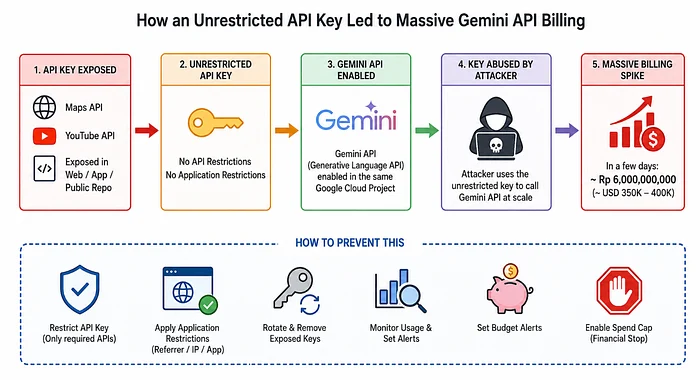
The closing image of the piece makes the point the whole incident turns on: an API key is not just an application configuration value, and in a cloud environment an exposed credential can become a direct path to the billing account.
What happened, in plain words
Imagine you have a key to a building. The key was cut years ago so that cleaners could get into the lobby. Later, the same building added a vault full of expensive equipment, and nobody changed the locks. If that old lobby key turns up in a lost-and-found box on the street, whoever picks it up can walk straight into the vault.
That is the shape of this incident, told by Randi Adhityas Saputra. A company ran a Google Cloud project for a long time. Over the years it created many API keys, the small passwords that let a website or a phone app talk to Google services such as Google Maps or YouTube. Some of those keys were left without restrictions, meaning they were not tied to a particular website or limited to particular services. At some point one of those keys became exposed, that is, it ended up somewhere the public could see it. Later the company switched on the Gemini API, Google's generative AI service, inside the same project. The old key could now potentially be used against the new, expensive AI service. It was used to generate Gemini requests, and within a few days the project built up about Rp6 billion in API charges, roughly US$350,000 to $400,000 depending on the exchange rate.
There was no clever break-in. No zero-day vulnerability (a previously unknown software flaw), no stolen service account (a robot login used by software), no complicated infrastructure breach. Just an old key that was never meant for AI, left unrestricted, exposed, and then pointed at a service that charges by the token.
The author's warning is simple: an API key is not just a line in an application's settings. In the cloud, an exposed credential can become a direct path to your billing account.
The background: a project with more history than anyone expected
Most cloud projects are not built in a day. They grow. Like a house that has had several owners, a long-running project accumulates keys: some in active use, some belonging to applications that were retired years ago, some created for Google Maps, YouTube APIs, Firebase or other public Google services.
The problem is not that those services exist. The problem is that some keys survived without proper restrictions.
To follow the rest of the story you need two ideas.
What is an API? An API (Application Programming Interface) is the counter where one piece of software places an order with another. When a shop's website shows you a map, the website is not drawing every street itself; it asks Google Maps' API for the map and displays the answer. When an app asks an AI service to write a paragraph, it places an order at the AI's API. Each order usually has to be identified, and that is what an API key is for.
What is an API key? It is a long string of characters that identifies the calling application, a bit like a membership card at a warehouse store. The card says which application is calling, and the service lets the holder make requests. Crucially, the bill goes to the account the card belongs to, not to whoever is holding it.
Google lets you constrain an API key in two ways:
- Who can use the key. These are called application restrictions. You can say the key only works when the request comes from your website (a referrer restriction), from a particular IP address (the numeric address of a computer on the internet), from a particular Android app, or from a particular iOS app.
- Which APIs the key can call. These are called API restrictions. You can say the key may call the Google Maps APIs, the YouTube Data API, or other explicitly approved APIs, and nothing else.
When both kinds of restriction are missing, the key is unrestricted. Anyone who holds it can call any API enabled in the project that accepts API keys.
A legacy key can sometimes remain in that unrestricted state. And if such a key is exposed somewhere public, such as:
Frontend JavaScript
Mobile application
Public Git repository
Old source code
Client-side configuration
Historical deployment artifact
Each line is a place where a key can leak:
- Frontend JavaScript: the code your browser downloads to run a website. Anyone can open the browser's developer tools and read it, so a key written into it is public by definition.
- Mobile application: the package you install from an app store. It can be unpacked and inspected, so keys inside it are not secret either.
- Public Git repository: a code storage site where the project's history is visible to the world.
- Old source code: code kept on a laptop or shared drive that people forgot about.
- Client-side configuration: settings files that are sent to the browser along with the page.
- Historical deployment artifact: an old build of the application, still sitting in storage, that contains the key from the day it was built.
If a key appears in any of those places, it should be considered potentially compromised, meaning you must assume a stranger may already have a copy.
The dangerous part came later.
Then Gemini API was enabled
The project eventually switched on the Gemini API. Gemini is Google's generative AI service: you send it text (a prompt) and it sends back generated text. It is billed by usage, in units called tokens, which are small chunks of text roughly the size of a word fragment.
From the application's point of view, this had nothing to do with the old Maps or YouTube keys. From the point of view of the Google Cloud project, though, those credentials and APIs were now part of the same environment. A project is the container that holds your services, your keys and your billing.
The simplified situation looked like this:
GOOGLE CLOUD PROJECT
┌─────────────────────────────────────────────────────┐
│                                                     │
│   Existing API Key                                  │
│   ┌──────────────────────────────┐                  │
│   │ API Key: ABC123...           │                  │
│   │                              │                  │
│   │ Application Restriction: ❌  │                  │
│   │ API Restriction: ❌          │                  │
│   └──────────────┬───────────────┘                  │
│                  │                                  │
│                  │ Can potentially call             │
│                  ▼                                  │
│        ┌───────────────────────┐                    │
│        │ Google APIs          │                    │
│        │                       │                    │
│        │ Maps                  │                    │
│        │ YouTube               │                    │
│        │ Gemini API  ← NEW     │                    │
│        └───────────┬───────────┘                    │
│                    │                                │
└────────────────────┼────────────────────────────────┘
                     │
                     ▼
               ATTACKER / ABUSER
                     │
                     ▼
              Gemini API Requests
                     │
                     ▼
                💸 BILLING SPIKE
Read the diagram from the top down:
- The outer box is the Google Cloud project, the shared container.
- Inside it sits an existing API key, shown as
ABC123...(a placeholder, not a real key). - Next to the key, two crosses mark the missing protections: no application restriction and no API restriction.
- An arrow labelled "Can potentially call" leads from the key to the set of Google APIs enabled in the project: Maps, YouTube, and the newly added Gemini API.
- Outside the project box stands the attacker or abuser, a person who has a copy of the key but no login to the project.
- Their Gemini API requests flow in, and the result at the bottom is a billing spike.
The key point is that the credential was created for one purpose, and the project later added a service with a very different cost profile, without anyone re-scoping the credential.
The attacker did not need access to the Cloud Console (the web dashboard where the project is managed). They did not need a service account. They did not need IAM permissions (the rules that decide which human or robot may do what inside a cloud project). They only needed a usable API key. And because the key had no proper API restrictions, it could be used against an expensive AI service enabled in the same project.
The financial impact
The abuse did not look like a normal application workload. Gemini API usage can consume requests and tokens extremely quickly. Rate limits help regulate usage through dimensions such as requests per minute, tokens per minute and requests per day, but rate limits are not the same thing as a hard financial budget. They also depend on the project's usage tier and the model being used.
In this incident the attacker generated enough usage that the financial impact reached approximately:
Rp6,000,000,000
Using a rough exchange rate of Rp16,000 per US dollar, that is approximately:
US$375,000
The most alarming part was not just the total. It was the speed. A cloud bill that normally grows gradually can change dramatically when an exposed credential is used to access a high-consumption generative AI service.
Traditional monitoring is often designed around infrastructure: CPU spikes, memory spikes, disk utilisation, network traffic. Those are the vital signs of a server, and they are what most alerting watches. Generative AI introduces a different type of risk. A relatively small number of API clients can generate enormous cost depending on:
- Model selection (bigger models cost more per token)
- Input token size (how much text you send)
- Output token size (how much text comes back)
- Request volume (how many times you ask)
- Context window size (how much text the model can consider at once)
- Batch or automated workloads (programs that send many requests without a human in the loop)
This means:
A credential security incident can become a FinOps incident almost immediately.
FinOps is the practice of managing what cloud services cost, the finance side of engineering. The sentence says that a security problem can turn into a money problem almost immediately.
The root cause was not Gemini
It would be easy to describe this as a "Gemini problem". But that would miss the actual lesson. The root cause was a combination of several conditions.
1. An API key was exposed
The key was available somewhere it should not have been. Once an API key is exposed publicly, you should assume that someone else may already have a copy. Deleting the repository later does not necessarily solve the problem. Removing the key from the current version of the application does not guarantee that the key was never harvested. Secrets have a long memory: copies get cloned, cached, indexed and archived.
2. The API key was unrestricted
The key lacked proper restrictions. Instead of allowing only the intended API, the credential had broader access than necessary. For example, a safer configuration for a Maps key would look conceptually like this:
API Key
Allowed Application:
✓ example.com
Allowed APIs:
✓ Maps JavaScript API
✓ Places API
Not Allowed:
✗ Gemini API
✗ Generative Language API
✗ Other unrelated APIs
Line by line:
API Keyis the heading: this is the key's configuration.Allowed Application:introduces the who-can-use-it list.✓ example.commeans the key only works when the request comes from that website.Allowed APIs:introduces the which-services list.✓ Maps JavaScript APIand✓ Places APIare the two services this key is permitted to call.Not Allowed:introduces the exclusions.✗ Gemini API,✗ Generative Language APIand✗ Other unrelated APIsare explicitly refused.
An unrestricted key effectively creates a much larger blast radius. The blast radius is the amount of damage a single stolen thing can cause, the same idea as the distance a bomb can reach.
3. Gemini API was enabled in the same project
This was the missing piece that connected an old API key to a new financial risk. The project contained:
Legacy API Key
        +
No API Restriction
        +
Gemini API Enabled
        =
Potential Credential Abuse
This is a sum, read top to bottom: an old key, plus no limit on which APIs it may call, plus the AI service switched on in the same project, equals the potential for someone to abuse the credential. Each ingredient alone is ordinary. Together they are a recipe.
The API key may have been created years earlier for a completely different purpose. But cloud projects evolve. New APIs are enabled. New services are introduced. Old credentials remain. And suddenly a credential that once represented a relatively small risk can become much more valuable to an attacker.
The three-condition risk model
The incident can be simplified into three conditions. You should consider a project at risk if all three are true.
1. An API key is exposed
For example:
- Public frontend
- Mobile application
- GitHub repository
- GitLab repository
- Old repository history
- Public configuration file
GitHub and GitLab are websites where teams store code; "old repository history" means earlier versions of the code, which stay visible unless someone deliberately removes them.
2. The API key is unrestricted
The key does not have sufficient application restrictions or API restrictions.
3. Gemini API is available in the same project
The project can accept Gemini API usage that could potentially be associated with that credential.
                ┌──────────────────┐
                │  Exposed Key     │
                └────────┬─────────┘
                         │
                         ▼
                ┌──────────────────┐
                │ Unrestricted     │
                │ API Access       │
                └────────┬─────────┘
                         │
                         ▼
                ┌──────────────────┐
                │ Gemini API       │
                │ Available        │
                └────────┬─────────┘
                         │
                         ▼
                  HIGH RISK
                         │
                         ▼
                    💸 BILLING
The diagram is a chain of three boxes. First the key is exposed. Then it is unrestricted. Then the Gemini API is available in the same place. The arrow after the third box says the situation is high risk, and the final arrow points to billing. Individually, each condition may not immediately create a disaster. Together, they can create a very expensive incident.
Why budget alerts were not enough
This is another important part of the story. Traditional Cloud Billing budgets are primarily an alerting mechanism. They tell you that spending has crossed a threshold. But an alert is not the same thing as stopping the workload. Google's documentation explicitly distinguishes alerts-only budgets from spend caps: alerts-only budgets notify you, but do not automatically stop usage or spending.
At the time of this incident, the available protection was much more limited. You could create something like:
50% Budget
     │
     ▼
📧 Email Alert
80% Budget
     │
     ▼
📧 Email Alert
100% Budget
     │
     ▼
📧 Email Alert
This is a ladder of thresholds. When spending reaches 50 per cent of the budget, an email alert is sent. At 80 per cent, another. At 100 per cent, another. Each arrow means "when this level is reached, this happens". What does not happen is any pause: the API could continue receiving requests. If the attacker was generating requests faster than the billing data was being processed and reviewed, the financial damage could continue growing.
This is one of the difficult realities of cloud cost management:
Visibility is not the same as enforcement.
Seeing a problem is not the same as stopping it. A smoke alarm wakes you up; it does not put out the fire.
Three months later, Google introduced a new safety net
The timing is interesting. Google Cloud has since introduced Spend Cap Budgets, currently available as a Preview feature for eligible services. Preview means it is available to try but not yet a finished, universally available product.
For supported services, including Gemini API, a spend cap can automatically pause new usage when the configured spending threshold is reached. Google Cloud also notes that enforcement uses estimated costs and is not instantaneous, so some overage can still occur.
Conceptually, the protection now looks like this:
Gemini API Usage
       │
       ▼
┌──────────────────────┐
│ Monthly Spend Cap    │
│                      │
│ Limit: $10,000       │
└──────────┬───────────┘
           │
           │ Spend reaches limit
           ▼
┌──────────────────────┐
│ SPEND CAP ENFORCED   │
│                      │
│ New Gemini API       │
│ usage is paused      │
└──────────────────────┘
Read it as a flow: Gemini API usage flows into a monthly spend cap, drawn here with an example limit of $10,000. When spending reaches that limit, the cap is enforced, and new Gemini API usage is paused. Unlike the email ladder, the last step actually stops the tap.
This is significantly different from a normal budget alert. Instead of:
"Your spending has exceeded the budget."
The system can move closer to:
"The spending threshold has been reached, so new billable usage is paused."
According to the current documentation, spend caps can be configured for a single project and a single eligible service, and Gemini API is among the supported services. The service remains paused until the cap is manually lifted. This would not replace credential security, and it would not guarantee a bill of exactly zero beyond the cap because enforcement is not instantaneous. But it adds an important financial circuit breaker, the same idea as the switch in your home's fuse box that cuts the power before the wiring melts.
Rate limits are not a financial firewall
Another important lesson is that rate limiting and cost limiting solve different problems. Gemini API rate limits control dimensions such as:
RPM  → Requests Per Minute
TPM  → Tokens Per Minute
RPD  → Requests Per Day
Each line expands an abbreviation: RPM is how many requests you may send in a minute, TPM is how many tokens you may send or receive in a minute, RPD is how many requests you may send in a day. There are also spend-based rate limits tied to usage tiers.
But none of these should be treated as your only protection against unexpected financial exposure. A system can remain technically within its permitted API rate limits and still generate a large bill. Think of a speed limit: driving at the legal speed for hours still burns a lot of fuel.
For cloud engineers, these are different layers:
┌────────────────────────────────────┐
│ Layer 1                            │
│ Credential Security                │
│                                    │
│ Restrict API Keys                  │
├────────────────────────────────────┤
│ Layer 2                            │
│ API Restrictions                   │
│                                    │
│ Allow Only Required APIs           │
├────────────────────────────────────┤
│ Layer 3                            │
│ Application Restrictions           │
│                                    │
│ Referrer / IP / Mobile App         │
├────────────────────────────────────┤
│ Layer 4                            │
│ Rate Limits and Quotas             │
│                                    │
│ Control Request Volume             │
├────────────────────────────────────┤
│ Layer 5                            │
│ Cost Monitoring                    │
│                                    │
│ Budgets + Anomaly Detection        │
├────────────────────────────────────┤
│ Layer 6                            │
│ Financial Circuit Breaker          │
│                                    │
│ Spend Cap                          │
└────────────────────────────────────┘
Six stacked layers, from the most basic to the last resort:
- Credential security: keep keys secret and restrict them.
- API restrictions: allow only the APIs the key actually needs.
- Application restrictions: allow only the website, IP address or mobile app that should use it.
- Rate limits and quotas: cap how much can be asked for in a given time.
- Cost monitoring: budgets and anomaly detection, which flags spending that does not match the usual pattern.
- A financial circuit breaker: a spend cap that stops usage.
Security and FinOps need to work together.
The immediate response
When investigating an incident like this, the first priority is to stop the abuse. The response should generally look like this.
Step 1: Identify the source of consumption
Start with:
- Cloud Billing reports
- Service-level cost breakdown
- Gemini API usage
- API key usage
- Relevant logs and request patterns
These are the places that record what was spent and what was asked for. The billing report is the receipt; the service breakdown says which service the money went to; the usage figures and logs say which key made the calls and in what pattern. Look for abnormal behaviour such as:
Normal
───────▁▁▁▂▂▂▁▁▂
Abnormal
───────▁▁▁▂██████████
The first line is a small, wavy pattern: usage goes up and down gently, the way a real application's traffic does over a day. The second starts the same way and then jumps into a long solid block: a sudden, sustained surge. The important question is:
Which project, service, credential, and workload is generating the cost?
A workload here means the thing doing the work, for example a particular application or script.
Step 2: Revoke or rotate the compromised key
Do not simply hide the key. Do not assume changing a frontend configuration is enough. If the key is compromised:
OLD KEY
   │
   ▼
REVOKE / DELETE
   │
   ▼
CREATE NEW KEY
   │
   ▼
APPLY RESTRICTIONS
   │
   ▼
DEPLOY SAFELY
This is a sequence of five steps, each arrow meaning "then". Start with the old key. Revoke or delete it, which means switching it off at the provider so it stops working everywhere, not just removing it from your own files. Create a new key. Apply restrictions to the new key. Deploy safely, meaning put the new key into your application and release it in a controlled way. Treat the old key as permanently compromised.
Step 3: Restrict every remaining API key
Every key should answer two questions.
Who is allowed to use this key? For example:
Website:
example.com
Server:
203.x.x.x/32
Android:
Package + SHA certificate
iOS:
Bundle ID
Each pair names a kind of caller and how it is identified:
Website: example.commeans only requests coming from that website's pages are accepted.Server: 203.x.x.x/32means only requests from one specific server address. The/32is a way of writing "exactly this one address" in the notation used for IP ranges.Android: Package + SHA certificatemeans only a particular Android app, identified by its package name plus the fingerprint of the certificate it was signed with.iOS: Bundle IDmeans only a particular iPhone app, identified by its bundle identifier.
Which APIs is this key allowed to call? For example:
Maps Key
✓ Maps JavaScript API
✓ Places API
✗ Gemini API
✗ Generative Language API
✗ YouTube API
✗ Everything else
This is a list for one key. The two ticks are the only services it may call: the Maps JavaScript API and the Places API. The crosses are everything it may not call: Gemini API, Generative Language API, YouTube API, and everything else. The principle is simple:
One key should have one clear purpose.
A better architecture: don't share public API keys with AI workloads
One of the biggest architectural lessons from this incident is separation. Instead of this:
        ONE GOOGLE CLOUD PROJECT
        ┌───────────────────────────────┐
        │                               │
        │ Public API Keys               │
        │        │                      │
        │        ├── Maps               │
        │        ├── YouTube            │
        │        └── Gemini             │
        │                               │
        │ Same Project                  │
        │ Same Billing Exposure         │
        └───────────────────────────────┘
Here everything lives in one project: the public keys for Maps, YouTube and Gemini, all sharing the same project and therefore the same billing exposure. Consider stronger separation:
PROJECT A
Public Application APIs
Maps Key
YouTube Key
        │
        │ Restricted only to
        │ required APIs
        ▼
PROJECT B
AI Workloads
Gemini API
Dedicated credential
Dedicated monitoring
Dedicated budget
Dedicated spend cap
Now the public application keys live in Project A, restricted only to the APIs they need, and the AI work lives in Project B with its own credential, its own monitoring, its own budget and its own spend cap. Project separation is not always required, but separating workloads can reduce the blast radius. If a public Maps API key is compromised, that should not automatically expose your generative AI budget.
What we changed
After this incident, the approach to API key management changed. The goal was no longer simply:
"Does the application work?"
The new question became:
"What happens if this credential is stolen?"
That led to a much stronger checklist.
1. Audit every API key
For every key:
Owner?
Purpose?
Application?
Allowed APIs?
Restriction?
Last used?
Still required?
Seven questions to answer for each key: who owns it, what it is for, which application uses it, which APIs it may call, what restrictions it has, when it was last used, and whether it is still needed at all. If nobody can explain why a key exists:
Delete it.
2. Remove unrestricted keys
Unrestricted keys should be treated as technical debt. Technical debt is work you owe because of an earlier shortcut, like a repair you keep postponing. Especially old keys. Especially keys that were created before current security practices were established.
Google's current Gemini API documentation is also moving toward stronger key controls: it states that unrestricted standard keys are rejected for Gemini API requests, and new AI Studio keys are created as auth keys by default. The documentation also describes additional migration and restriction requirements for standard keys. That is an important improvement, but organisations should not wait for platform defaults to protect every historical credential.
3. Use dedicated credentials
Avoid this:
ONE KEY
   │
   ├── Maps
   ├── YouTube
   ├── Firebase
   └── AI
One key, branching into four services: Maps, YouTube, Firebase and AI. Prefer:
Maps Key
    └── Maps APIs only
YouTube Key
    └── YouTube APIs only
Gemini Credential
    └── Gemini only
Three separate keys, each with a single job: the Maps key only for Maps APIs, the YouTube key only for YouTube APIs, the Gemini credential only for Gemini. Smaller permissions mean a smaller blast radius.
4. Enable financial guardrails
For Gemini workloads, configure multiple layers:
                  GEMINI API
                        │
                        ▼
              ┌─────────────────┐
              │ Rate Limits     │
              └────────┬────────┘
                       │
                       ▼
              ┌─────────────────┐
              │ Budget Alerts   │
              │ 50% / 80% / ... │
              └────────┬────────┘
                       │
                       ▼
              ┌─────────────────┐
              │ Cost Anomaly    │
              │ Detection       │
              └────────┬────────┘
                       │
                       ▼
              ┌─────────────────┐
              │ Spend Cap       │
              │ Financial Stop  │
              └─────────────────┘
Usage flows down through four boxes: first rate limits, then budget alerts at thresholds such as 50 per cent and 80 per cent, then cost anomaly detection, which notices spending that does not fit the normal pattern, and finally a spend cap that acts as a financial stop. Google Cloud now offers spend cap budgets for Gemini API as a Preview feature in eligible projects and billing configurations, providing an additional safety mechanism beyond traditional budget alerts.
The bigger lesson: AI changes the cost of credential exposure
Before generative AI, an exposed API key might create:
- Unexpected Maps API usage
- YouTube quota abuse
- API quota exhaustion
A quota is an allowance, like a monthly data bundle. Those were already serious problems. But generative AI changes the financial equation. A compromised credential can now be used to consume:
- Large language model inference (the computing work of running an AI model to answer a prompt)
- Large context windows (very long inputs the model must read)
- High-volume automated prompts (programs sending thousands of questions)
- Expensive model workloads (the priciest models)
The attacker's infrastructure cost is effectively close to zero. The victim pays. This changes the threat model, the list of what you are defending against and how bad it can get.
#Traditional Security Incident
Credential Leak
      │
      ▼
Unauthorized Access
      │
      ▼
Security Impact
Generative AI Incident
Credential Leak
      │
      ▼
Unauthorized API Usage
      │
      ▼
High-Volume AI Consumption
      │
      ▼
💸 Financial Impact
      │
      ▼
Security + FinOps Incident
Two chains are shown. In the traditional one, a credential leak leads to unauthorised access, which is a security impact. In the generative AI one, the same leak leads to unauthorised API usage, then to high-volume AI consumption, then to financial impact, and ends as both a security and a FinOps incident. The first chain stops at security; the second keeps going into money.
Security teams need to think about billing exposure. FinOps teams need to think about credential exposure. And cloud engineers need to design for both.
Final thoughts
The most important lesson from this incident was surprisingly simple:
An API key should never be trusted just because it was created for a different API.
Cloud projects change. New APIs are enabled. Old credentials survive. Applications are migrated. Repositories are forgotten. And technical debt quietly accumulates. A key that was created years ago for Google Maps might not seem related to Gemini today. Until suddenly, it is.
In this case, an unrestricted and compromised API key became part of a chain of events that resulted in approximately Rp6 billion of unexpected Gemini API usage. There was no single catastrophic failure. Instead, it was a combination of small gaps:
Legacy Key
     +
No Restrictions
     +
Credential Exposure
     +
Gemini API Enabled
     +
No Financial Hard Stop
     =
Multi-Billion Rupiah Incident
Five ingredients added together: an old key, no restrictions, exposure, the AI service switched on, and no hard financial stop. The result is the multi-billion rupiah incident. The good news is that every part of that chain can be improved. Restrict your API keys. Separate workloads where appropriate. Rotate exposed credentials. Monitor AI-specific costs. Use anomaly detection. Set budgets. And where available, configure spend caps. Because in the age of generative AI:
Your API key is no longer just a key to an API.
It may also be a key to your cloud budget.
Glossary
- API (Application Programming Interface): the agreed way one piece of software asks another for something, such as a website asking Google for a map.
- API key: a long string that identifies the calling application to an API, like a membership card that puts the bill on your account.
- Application restriction: a limit on who may use an API key, for example only a named website, IP address, Android app or iOS app.
- API restriction: a limit on which APIs an API key may call.
- Unrestricted key: a key with neither application restrictions nor API restrictions.
- Exposed credential: a key or password that has ended up somewhere the public can see it.
- Compromised: assumed to be in someone else's hands, whether or not you can prove it.
- Credential: any secret used to prove identity, such as a key, password or token.
- Google Cloud project: the container in a Google cloud account that holds services, credentials and billing.
- Cloud Console: the web dashboard where a cloud project is managed.
- Service account: a robot login used by software rather than a person.
- IAM permissions: the rules that decide which person or robot may do what inside a cloud project.
- Gemini API: Google's generative AI service, which takes a prompt and returns generated text and is billed by usage.
- Generative AI: software that produces new text or other content in response to a prompt.
- Token: a small chunk of text, roughly a word fragment, used to measure and bill AI usage.
- Prompt: the input text you send to an AI model.
- Context window: how much text a model can consider at once.
- Inference: the computing work of running an AI model to answer a prompt.
- Rate limit: a cap on how much can be requested in a period, such as requests per minute, tokens per minute or requests per day.
- RPM / TPM / RPD: requests per minute, tokens per minute, requests per day.
- Quota: an allowance for how much of a service may be used.
- Usage tier: a level that determines the limits and pricing that apply to an account.
- Budget alert: a notification that spending has crossed a threshold; it does not stop usage.
- Spend cap: a setting that pauses new usage when a spending threshold is reached.
- Preview feature: a product available to try but not yet finished or universally available.
- Anomaly detection: automatically flagging behaviour that does not match the usual pattern.
- FinOps: the practice of managing what cloud services cost.
- Blast radius: how much damage one stolen or broken thing can cause.
- Technical debt: work you owe because of an earlier shortcut.
- Zero-day vulnerability: a software flaw that was previously unknown and has no fix yet.
- Threat model: the list of what you are defending against and how bad it could get.
- Referrer: the website address a browser reports as the origin of a request, used to restrict keys to a site.
- IP address: the numeric address of a computer on the internet.
- Frontend JavaScript: code that runs in your browser and can be read by anyone.
- Git repository: a store of code and its history, which may be public.
- Deployment artifact: a built copy of an application kept from a past release.
- Revoke: switch a key off at the provider so it stops working everywhere.
- Rotate: replace a key with a new one and update the application to use it.
- Deploy: release an application or configuration into use.
- CPU / memory / disk utilisation / network traffic: the basic vital signs of a server that traditional monitoring watches.



