From Information Disclosure to interesting Privilege Escalation
An information disclosure endpoint revealed all users' details, and the same endpoint accepted a PUT request that allowed the attacker to change their own role_id to admin. The attacker could then access the admin panel and perform actions such as deleting users and viewing sensitive information.
 Published on dudy2kk.medium.com
The bug bounty program on which this vulnerability was discovered has not allowed for public disclosure. Therefore I will name the program REDACTED.com.
The full write-up lives on its author's site
It belongs to its author, so we link to it rather than copy it. The other two tabs are our own rewrites, checked against it.
Context
The target was a web application hosted at subdomain.REDACTED.com, part of a bug bounty program the researcher refers to as REDACTED.com. The program did not allow public disclosure, so the hostname and path segments are redacted throughout.
In this application, users can create a money program for their own company. After logging in as a simple user, the researcher found few features to interact with. The one that drew attention was the "Edit Account" feature, which lets a user update their own profile fields.
Setup
The only precondition described is a normal user account on the application. The researcher logged in as a simple user and used Burp Suite to intercept and modify requests. No specific versions of the application or of Burp Suite are given.
Finding it
With Burp Suite running, the researcher edited some fields in the profile and caught the resulting request. It went to the following endpoint:
/ProgramManagerREDACTED/REDACTED/updateuser
The method was PUT and the body carried many parameters. Two of them stood out: role_id and user_info_id.
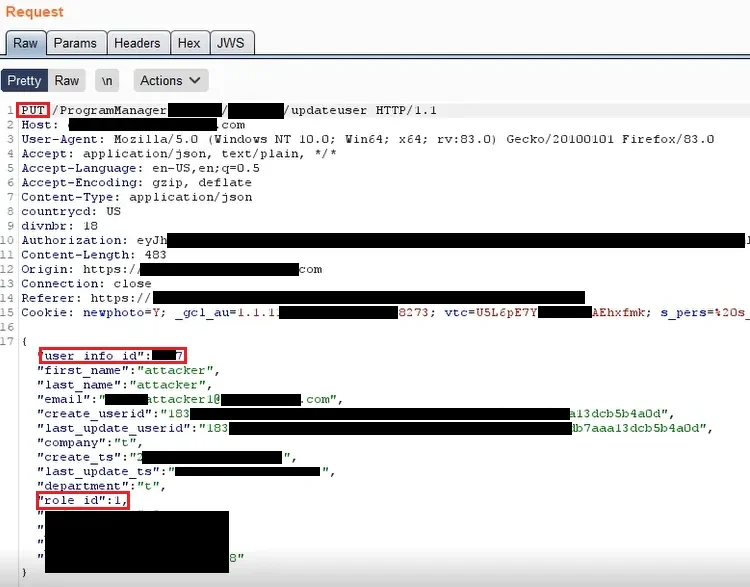
The role_id parameter in a request that updates the user's own profile is what drew the researcher's attention.
Exploitation
Step 1: Trying to change the role directly
The first attempt was to change the role_id parameter value from 1 to 2 in the original PUT request to /ProgramManagerREDACTED/REDACTED/updateuser. The server answered 401 Unauthorized, so this endpoint rejected the change. The researcher noted that the second interesting parameter, user_info_id, was still available to play with later.
Step 2: Truncating the path and switching the method
After some time spent experimenting with the same endpoint, the researcher removed the request body and the two last directories from the path, and changed the PUT request into a GET. The response was 200 OK, and the body contained a large amount of information about hidden endpoints.
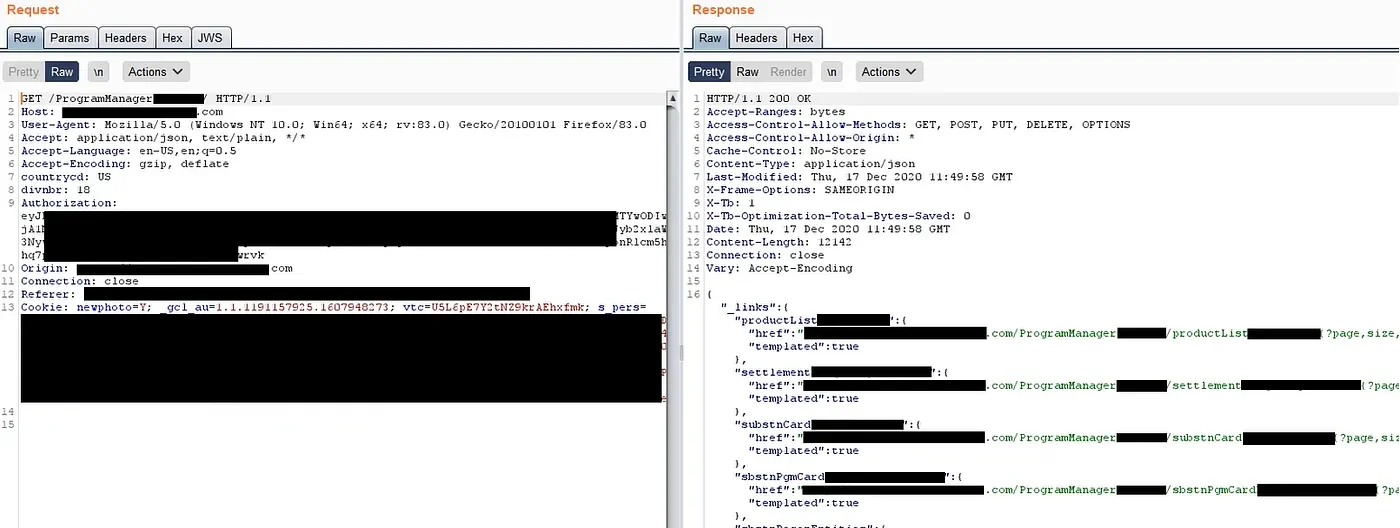
Because the body was huge, the researcher searched it for keywords such as admin, passwords and user. The user keyword led to an interesting endpoint:
Step 3: Reading every user's details
Sending a GET request to /ProgramManagerREDACTED/userInfoDetailsEntities returned a body with large leaks about every user on the web application. From this response the researcher also learned that there are four role ids.
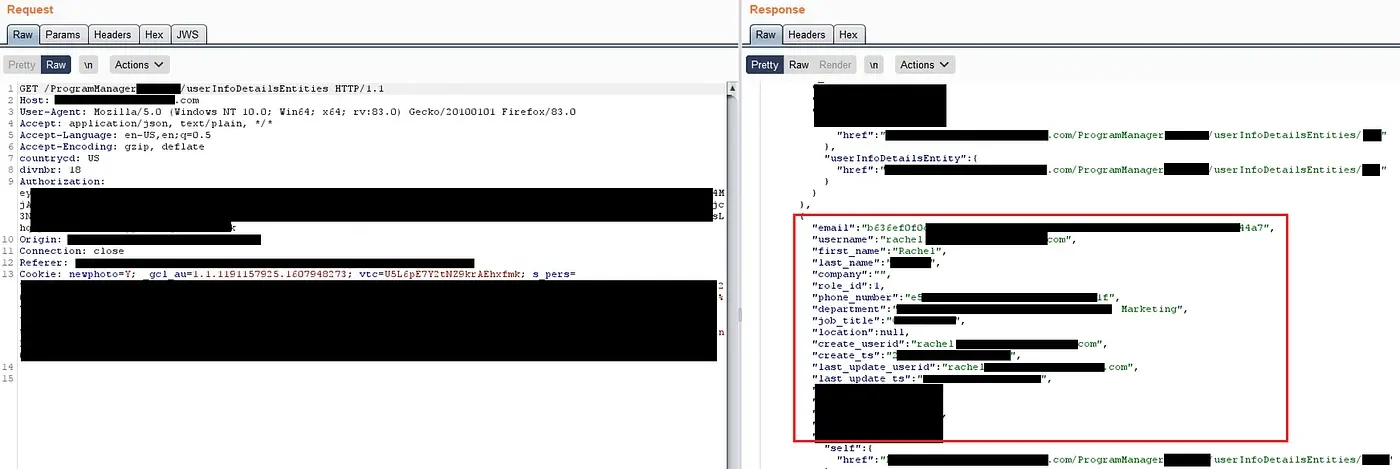
At this point the researcher considered submitting the information disclosure to BugCrowd, but decided to keep digging instead.

Step 4: Narrowing the query to one user
The researcher sent another request to the same endpoint, this time appending their own user_info_id value to search only for their own user information:
The response contained the researcher's user information, including role_id and mail. The mail value was not in cleartext: it was some form of hash.
Step 5: Writing the role through the new endpoint
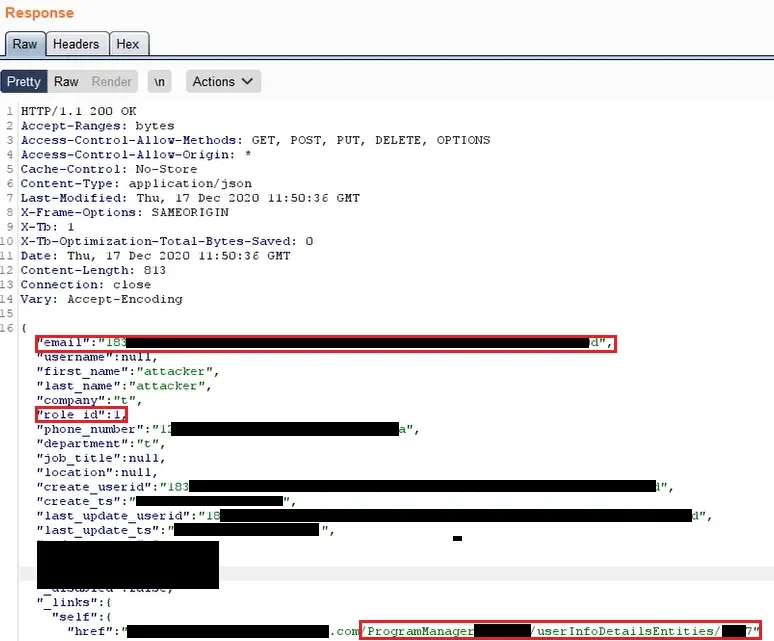
The researcher took the original "Edit Account" request with the same original body, but pointed it at the endpoint just discovered, /ProgramManagerREDACTED/userInfoDetailsEntities/{user_info_id}, and sent it as a PUT. In that body, the role_id parameter value was changed to 4, and the mail parameter value was set to the hashed mail value.
Burp Suite appeared not to respond, and the researcher assumed there was nothing more to do. Five seconds later the response arrived with status code 200 OK, and the role_id had been changed successfully.
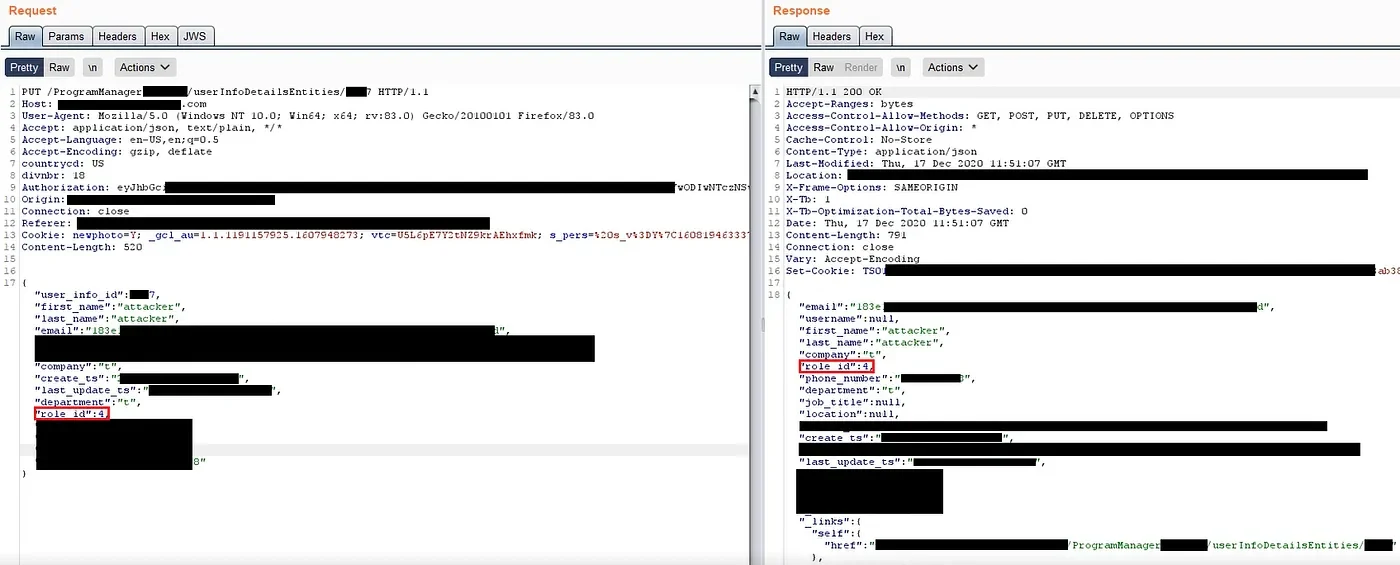
role_id has changed successfully to 4 (admin)
Step 6: Logging back in as admin
The researcher logged out of the application and logged in again, and was now the admin. The admin control panel gave access to features such as deleting users, viewing other users' money applications, and sensitive information.

The bug was submitted to BugCrowd, triaged as a critical vulnerability 10 minutes later, and resolved within 1 day.
Root cause
The report does not include any code or server-side explanation, so the following is inferred from the observed behaviour.
The PUT handler on /ProgramManagerREDACTED/REDACTED/updateuser appears to have had some check that rejected a role_id change with 401 Unauthorized. The PUT handler on /ProgramManagerREDACTED/userInfoDetailsEntities/{user_info_id} accepted the same body shape, including role_id and mail, and applied the change without an equivalent authorisation check. In other words, the role assignment logic was reachable through a second route that did not enforce the restriction present on the first. The mail value was sent as the hash the server itself returned.
The information disclosure on /ProgramManagerREDACTED/userInfoDetailsEntities exposed every user's details and showed that there are four role ids. The truncated GET on the base path exposed hidden endpoints, and searching that response for the user keyword led to the second route.
Impact
An authenticated low-privileged user could escalate their own account to the admin role and reach the admin control panel, with the ability to delete users, view other users' money applications and access sensitive information. The report does not state whether the same technique could be applied to other users' accounts.
Fix
The report says the issue was resolved within 1 day of triage but does not describe the change. Based on the behaviour, the fix should ensure that role assignment is authorised server-side on every route that accepts a role_id, not only on the original update endpoint, and that the user details endpoint does not expose other users' records or accept profile-modifying writes.
Variants to test
- Same body, different route. Take a profile update request that contains a privileged field such as
role_id, and replay its body against other endpoints discovered in error messages or directory listings. A positive result is a200 OKwhere the original endpoint returned401or403. - Path truncation and method swap. Remove trailing path segments and change
PUTtoGET(and vice versa) on update endpoints. A positive result is a200 OKwith a body listing internal endpoints or returning data the UI never shows. - Collection endpoints without filters. Request the base collection path (for example
/userInfoDetailsEntities) with no identifier. A positive result is a body containing records for users other than the authenticated one. - Hashed fields as authorisation material. Where a response returns a hashed value such as
mail, try submitting that hash back in an update request. A positive result is the server accepting the request and applying the change. - Role id enumeration. Once the set of role ids is known from a leak, try each value in an update request. A positive result is a role change reflected after re-login.
What happened, in plain words
A security researcher signed up for a normal, low-privilege account on a web application where companies can create a money program. While editing his own profile, he noticed that the request his browser sent to the server contained a field called role_id, which looks like the number that decides what kind of account you have (normal user, admin, and so on). He tried to change that number directly and the server refused. Then he poked at the same address in a slightly different way, found a page that listed hidden parts of the application, and from there found another address that listed every user's details. Using that second address, he sent the same profile update again, this time with the role number set to the admin value, and the server accepted it. He logged out, logged back in, and he was an admin. The bug was reported, triaged as critical within 10 minutes, and fixed within a day.
Before going further, a few words about the pieces involved, because the rest of the article leans on them.
- Web application: a program that runs on a server somewhere and that you talk to through your browser. When you click a button, your browser sends a message to the server and shows you the answer.
- Request and response: the message your browser sends is the request; the message the server sends back is the response. Every click, every page load, every form submission is one of these pairs.
- Endpoint: the address (the part of the URL after the domain) that a request is sent to. Think of it as a counter in a large building: the building is the domain, the counter number is the endpoint, and the person behind the counter is the code that handles that endpoint.
- HTTP method: a one-word label on each request saying what kind of action you want.
GETmeans "give me something";PUTmeans "replace something with this new content";POSTmeans "create something";DELETEmeans "remove something". The same counter can behave differently depending on which label you use, just as a shop assistant might sell you an item on one request and take a return on another. - Parameter: a named value carried inside a request, like a field on a paper form.
role_id=4means "the parameter named role_id has the value 4". - API: the set of endpoints a web application exposes so that programs (including the JavaScript running in your browser) can talk to it. It is the same idea as a restaurant menu: a fixed list of things you can ask for, each with its own name.
- Burp Suite: a tool that sits between your browser and the server, so you can see every request and response and edit them before they go out. Imagine a postal worker who lets you open, read and rewrite every letter you send, then reseals it and delivers it.
- Information disclosure: a vulnerability where the server hands out information it should have kept private, such as other users' data or a list of internal addresses.
- Privilege escalation: a vulnerability where a user with low permissions manages to gain higher permissions, for example becoming an admin.
- Account takeover: gaining control of an account that is not yours. In this report the researcher escalated his own account, not someone else's, but the same weakness is the kind that can lead to takeover.
The target and the feature
The application lives at subdomain.REDACTED.com and belongs to a bug bounty program the researcher calls REDACTED.com. A bug bounty program is an arrangement where a company invites outside researchers to look for security problems in its systems and pays them for valid findings, under rules about what may be published. This program did not allow public disclosure, so the hostname and the path segments in the addresses below are blacked out.
In this application, users can create a money program for their own company. After logging in as a simple user, the researcher found there was not much to do. The feature that caught his attention was "Edit Account", which lets a user update their own profile.
Setting up
The only precondition described is a normal user account. The researcher logged in as a simple user and turned on Burp Suite so that he could intercept and modify the requests his browser was sending. No specific versions of the application or of Burp Suite are given.
Finding it
With Burp Suite running, the researcher edited a few fields in his profile and caught the request that resulted. It went to this endpoint:
/ProgramManagerREDACTED/REDACTED/updateuser
Reading that line: the request is addressed to a path that starts with ProgramManagerREDACTED, then has another redacted segment, then ends in updateuser. The word updateuser tells you the purpose: this is the counter where profile changes are processed.
The method was PUT, which as noted means "replace the thing with this new content", and the body carried many parameters. Two of them stood out: role_id and user_info_id.
The screenshot shows the intercepted request with its parameters, including the two that drew attention. Seeing role_id in a request that updates your own profile is the first warning sign. A role identifier is the number that says what kind of account you have. If the browser is allowed to send it, the question becomes whether the server simply believes whatever number arrives. If it does, any user can claim to be an admin by editing a form field. That is the whole idea behind privilege escalation: you do not need to break any cryptography, you just need the server to trust a value it should have decided itself.
Trying to change the role directly
The first attempt was simple: in the original PUT request to /ProgramManagerREDACTED/REDACTED/updateuser, change the role_id parameter value from 1 to 2. The server answered 401 Unauthorized.
401 Unauthorized is the status code a server uses to say "you are not allowed to do this". Status codes are three-digit numbers at the start of every response: 200 means "fine, here is your answer", 401 means "not allowed", 403 means "forbidden", 404 means "no such address". So this endpoint did have a check that rejected the role change. The researcher noted that the second interesting parameter, user_info_id, was still there to play with later. user_info_id is an identifier for a user record: a number or string that the server uses to look up which user's data to work with.
Truncating the path and switching the method
After some time experimenting with the same endpoint, the researcher removed the request body and the two last directories from the path, and changed the PUT request into a GET. The response was 200 OK, and the body contained a large amount of information about hidden endpoints.
What does "removing the two last directories" mean? A path is read left to right, like folders on your computer. /ProgramManagerREDACTED/REDACTED/updateuser has three segments after the domain. Removing the last two leaves /ProgramManagerREDACTED. The researcher was asking: what happens if I knock on the corridor door instead of the specific counter? And he changed PUT to GET, which is the method for "give me something" rather than "change something". The server answered 200 OK and returned a body describing internal endpoints. This is a classic information disclosure: the server was willing to tell an ordinary user about parts of itself that the interface never shows.
Because the body was huge, the researcher searched it for keywords such as admin, passwords and user. The user keyword led to an interesting endpoint:
Reading that line: same starting segment as before, then a new segment called userInfoDetailsEntities. The name suggests "the collection of user information details". The word Entities is a common programming term for a record in a database, so this looks like the address of a list of user records.
Reading every user's details
Sending a GET request to /ProgramManagerREDACTED/userInfoDetailsEntities returned a body with large leaks about every user on the web application. From this response the researcher also learned that there are four role ids.
The screenshot shows the response body with the leaked user records. Two things matter here. First, the endpoint returned data for users other than the one who asked, which is the disclosure. Second, the records contained role identifiers, and the researcher could see that there are four distinct values. The records contained role identifiers, and the researcher could see that there are four distinct values.
At this point the researcher considered submitting the information disclosure to BugCrowd, the platform that runs the bug bounty program, but decided to keep digging instead.
Narrowing the query to one user
The researcher sent another request to the same endpoint, this time appending his own user_info_id value to search only for his own user information:
Reading that line: the same collection address, followed by a slash and a placeholder {user_info_id}. In a real request the placeholder is replaced by an actual identifier, for example 12345. This is how APIs usually work: the collection address gives you the list, and the address with an identifier gives you one item from the list. Think of a library: one shelf holds all the books, and each book has its own number so you can ask for that one specifically.
The response contained the researcher's user information, including role_id and mail. The mail value was not in cleartext: it was some form of hash.
A hash is the result of feeding a value through a one-way mathematical function. The same input always gives the same output, but you cannot easily turn the output back into the input. It is like a fingerprint: it identifies the person, but you cannot reconstruct the person from the fingerprint. The server stored the email address in hashed form and returned that hash.
Writing the role through the new endpoint
The researcher took the original "Edit Account" request with the same original body, but pointed it at the endpoint just discovered, /ProgramManagerREDACTED/userInfoDetailsEntities/{user_info_id}, and sent it as a PUT. In that body, the role_id parameter value was changed to 4, and the mail parameter value was set to the hashed mail value.
Why this combination? The first endpoint refused the role change with 401. The second endpoint is a different piece of code behind a different address, and it accepted the same shape of body. The second endpoint accepted the same shape of body. The mail parameter value was set to the hashed mail value.
Burp Suite appeared not to respond, and the researcher assumed there was nothing more to do. Five seconds later the response arrived with status code 200 OK, and the role_id had been changed successfully.
role_id has changed successfully to 4 (admin)
The screenshot is captioned as showing the role_id changed successfully to 4 (admin). 200 OK here is not just "the server is alive": it is the server saying the update was applied. The role number is now 4.
Logging back in as admin
The researcher logged out of the application and logged in again, and was now the admin. Logging out and back in matters because many applications load your permissions at login time and keep them for the session. A session is the period between logging in and logging out, and the server usually remembers who you are by giving your browser a cookie, a small piece of data that the browser sends back with every request. If the role is read from the database when the session starts, an existing session may still carry the old role; a fresh login picks up the new one.
The admin control panel gave access to features such as deleting users, viewing other users' money applications, and sensitive information.
The screenshot shows the admin panel with those features. This is the impact: an ordinary user, with no special tools beyond a proxy and a normal account, could reach administrative functions.
The bug was submitted to BugCrowd, triaged as a critical vulnerability 10 minutes later, and resolved within 1 day. Triaged means the program's staff confirmed the report was valid and assigned it a severity.
Why it worked
The report does not include any code or server-side explanation, so the following is inferred from the observed behaviour.
The PUT handler on /ProgramManagerREDACTED/REDACTED/updateuser appears to have had some check that rejected a role_id change with 401 Unauthorized. The PUT handler on /ProgramManagerREDACTED/userInfoDetailsEntities/{user_info_id} accepted the same body shape, including role_id and mail, and applied the change without an equivalent authorisation check. In other words, the role assignment logic was reachable through a second route that did not enforce the restriction present on the first. The mail value had to be supplied as the hash the server itself returned, which suggests the handler validated or matched that field against the stored value rather than requiring any privileged proof.
The information disclosure on /ProgramManagerREDACTED/userInfoDetailsEntities exposed every user's details and the set of role ids, which gave the researcher both the identifier needed for the targeted request and the knowledge that 4 was the admin role. The truncated GET on the base path additionally exposed hidden endpoints, which is how the second route was found.
Impact
An authenticated low-privileged user could escalate their own account to the admin role and reach the admin control panel, with the ability to delete users, view other users' money applications and access sensitive information. The report does not state whether the same technique could be applied to other users' accounts, though the disclosure endpoint exposed every user's data and the targeted endpoint takes a user_info_id in the path.
Fix
The report says the issue was resolved within 1 day of triage but does not describe the change. Based on the behaviour, the fix should ensure that role assignment is authorised server-side on every route that accepts a role_id, not only on the original update endpoint, and that the user details endpoint does not expose other users' records or accept profile-modifying writes.
Variants to test
These are patterns worth trying on other applications, described so that a beginner can follow the reasoning.
- Same body, different route. Take a profile update request that contains a privileged field such as
role_id, and replay its body against other endpoints discovered in error messages or directory listings. A positive result is a200 OKwhere the original endpoint returned401or403. - Path truncation and method swap. Remove trailing path segments and change
PUTtoGET(and vice versa) on update endpoints. A positive result is a200 OKwith a body listing internal endpoints or returning data the UI never shows. - Collection endpoints without filters. Request the base collection path (for example
/userInfoDetailsEntities) with no identifier. A positive result is a body containing records for users other than the authenticated one. - Hashed fields as authorisation material. Where a response returns a hashed value such as
mail, try submitting that hash back in an update request. A positive result is the server accepting the request and applying the change. - Role id enumeration. Once the set of role ids is known from a leak, try each value in an update request. A positive result is a role change reflected after re-login.
Glossary
- Web application: a program running on a server that you interact with through a browser.
- Request: the message a browser (or tool) sends to a server.
- Response: the message a server sends back.
- Endpoint: the address within a site that a request is sent to, handled by a specific piece of code.
- HTTP method: the one-word label on a request saying what action is wanted, such as
GET,PUT,POSTorDELETE. GET: the method for asking the server to return something.PUT: the method for asking the server to replace something with new content.- Parameter: a named value carried in a request, like a field on a form.
- API: the fixed set of endpoints a web application exposes for programs to talk to it.
- Burp Suite: a tool that sits between browser and server so you can read and edit requests and responses.
- Intercept: to pause a request in a proxy tool so you can inspect or change it before it reaches the server.
- Status code: the three-digit number at the start of a response, such as
200,401or403. 200 OK: the server accepted the request and is returning a normal answer.401 Unauthorized: the server says you are not allowed to perform this action.403 Forbidden: the server says this action is not permitted for you.- Information disclosure: a vulnerability where the server reveals data or internal details it should keep private.
- Privilege escalation: gaining a higher level of permission than your account was given.
- Role: the category of an account that determines what it may do, such as normal user or admin.
role_id: the parameter carrying the numeric identifier of a role.user_info_id: the identifier the server uses to look up a particular user record.- Hash: the output of a one-way function; the same input always gives the same output, but the output cannot easily be turned back into the input.
- Cleartext: data stored or sent in its original, readable form rather than hashed or encrypted.
- Session: the period between logging in and logging out, during which the server remembers who you are.
- Cookie: a small piece of data a server gives your browser, which the browser sends back with later requests so the server can recognise you.
- Bug bounty program: an arrangement where a company invites outside researchers to find security problems and pays for valid findings under agreed rules.
- BugCrowd: the platform that ran the bug bounty program in this report.
- Triaged: reviewed by the program's staff and confirmed as a valid issue, usually with a severity assigned.
- Severity: a rating of how serious a vulnerability is, for example critical, high or low.
- Authorisation check: code on the server that verifies whether the current user is allowed to perform the requested action.
- Server-side: happening on the server, where the user cannot directly change it, as opposed to in the browser.

