From “Just an Error” to Full Read/Write Access on Someone Else’s Data
An internal API endpoint that should return only the caller's own product metadata returned every product when given an unrecognised filter, because the backend silently dropped the WHERE clause. The same resource endpoint also let the author read and then overwrite other users' records, and the creation flow accepted any owner ID supplied.
 Published on mostafa0x.medium.com
Bug Bounty
The full write-up lives on its author's site
It belongs to its author, so we link to it rather than copy it. The other two tabs are our own rewrites, checked against it.
Context
While doing normal testing on the target, Mostafa shaban came across an internal API he had not paid much attention to before. One endpoint on it was meant to return metadata about your own product only, tied to whatever product_id belongs to you. Nothing more than that.
What started as a filter on that endpoint ended up exposing read and write access to other accounts' data, through three separate weaknesses: a filter that silently dropped the WHERE clause, an object-level authorisation gap on /products/{id}, and a creation flow that trusted a supplied owner/account ID.
Setup
The write-up does not describe the target program, the tooling, the accounts used or any version numbers. The only precondition visible in the text is access to the internal API and to the product metadata endpoint, which the researcher reached during ordinary testing.
Finding it
The endpoint is supposed to give you metadata about your own product, scoped by a product_id that belongs to you. The researcher started poking at it with a filter, expecting the backend to apply it to the query.
Exploitation
Step 1: a filter that produces a database error
The first attempt was a filter value containing a quote and a tautology:
{product_id==00000000–0000–0000–0000–000000000000' OR 1=1 - }
The response was a 500 server error that leaked the backend query error:
query product tasks: ERROR: invalid input syntax for type uuid: “00000000–0000–0000–0000–000000000000' OR 1=1 — “ (SQLSTATE 22P02)
The error shows the value being parsed as a UUID, and the SQLSTATE 22P02 code is the invalid text representation error. The researcher kept trying a range of different payloads after that, and every single one returned the exact same error.
Step 2: a simple filter that returns everything
Instead of continuing with injection-style payloads, the researcher went simple:
All products loaded. The researcher initially reported this as SQL injection, and it was flagged as needing more info. It turned out not to be injection at all: an unrecognised filter made the backend silently drop the WHERE clause and return everything. Different cause, same wide-open result.

Step 3: reading another account's resource by id
The endpoint also supported GET and POST on a resource id:
/products/{id}
A GET on a resource that was not the researcher's returned full metadata with no restrictions: actual content tied to someone else's account, not just IDs and timestamps.

Step 4: POST changes one field, PATCH changes all of them
A POST was then sent to modify fields on that resource. Only one field actually changed: the url. Swapping the method to PATCH changed all fields.
That is the point where the issue stopped being "I can read data that isn't mine" and became an integrity problem: one account quietly overwriting data another account depends on.
Step 5: creating resources under other accounts
The creation flow also trusted any owner/account ID supplied, which let the researcher create resources under accounts he did not own.
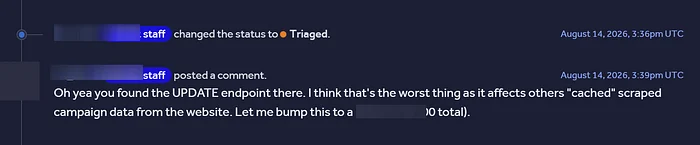
Root cause
The report identifies three distinct causes:
- Filter handling. An unrecognised filter causes the backend to silently drop the
WHEREclause rather than reject the request. The researcher's first payloads failed because the value was parsed as a UUID, so the injection theory did not hold; the actual defect is the fallback behaviour when a filter is not recognised. - Missing object-level authorisation.
/products/{id}accepts GET, POST and PATCH on any resource id without checking that the resource belongs to the caller. POST changed only theurlfield, while PATCH changed all fields. - Trusting client-supplied ownership. The creation flow accepts an owner/account ID from the request and creates the resource under it, without verifying that the caller owns that account.
The report does not describe the server-side code, so the exact implementation behind each of these is not shown.
Impact
Under the conditions described, an attacker with access to the internal API could:
- retrieve metadata and content for products belonging to other accounts by id;
- modify all fields of another account's resource using PATCH;
- create resources under accounts they do not own by supplying an owner/account ID.
The report frames the write side as an integrity problem: one account quietly overwriting data another account depends on.
Fix
Based on the causes it identifies, the changes would be: reject unrecognised filters instead of dropping the WHERE clause, enforce object-level authorisation on /products/{id} for every method, and derive the owner/account ID from the authenticated session rather than accepting it from the request.
Variants to test
- Filter fallback on other list endpoints. Send an unrecognised filter such as
!=*to endpoints that accept filter syntax. A positive result is a response containing records that do not belong to your account. - Method differences on the same resource. Send POST and PATCH to a resource you do not own and compare which fields change. A positive result is any field of another account's resource being modified.
- Client-supplied ownership on creation. Supply another account's owner/account ID in a creation request. A positive result is a resource created under that account.
- UUID parsing errors as a signal. Send a malformed UUID in a filter and check whether the error reveals the backend query and database type. A positive result is a database error message in the response.
What happened, in plain words
Mostafa shaban was testing a website the way security researchers often do: clicking around, watching what the site sends to its servers, and trying small changes to see how it reacts. During that ordinary testing he noticed something he had not paid attention to before: an internal API.
An API (Application Programming Interface) is the set of private doors a website's own pages use to talk to its servers. When you load a product page, your browser does not usually receive a finished picture of the page; it asks the server a question like "give me the details for product 123", and the server answers with raw data. Those questions and answers travel over the API. An internal API is one that is meant for the site's own front end rather than for outside developers, but it is still reachable if you know where to look, for example in the browser's developer tools under the Network tab.
One endpoint on that API was supposed to do one small thing: return metadata about your own product, and only your own product. Metadata means the descriptive details about a thing rather than the thing itself: for a product, things like its name, its identifier, timestamps, and which account it belongs to. The endpoint was tied to whatever product_id belongs to you, so in theory you could only ever see your own records.
What started as a small experiment with a filter on that endpoint ended up exposing both read and write access to other people's data. A filter is a way of narrowing down a list: instead of "give me everything", you say "give me only the rows where the price is above 10". The site passes that condition to its database. A database is the program that stores the records and answers questions about them, and the part of a question that says which rows to return is called the WHERE clause.
Three separate weaknesses combined to cause the exposure:
- A filter the backend did not recognise made it silently drop the
WHEREclause, so instead of returning nothing it returned everything. - The
/products/{id}endpoint did not check that the product belonged to the person asking, so anyone could read or change any product by its id. - The flow that creates a new product trusted an owner/account ID supplied by the person making the request, so you could create products under someone else's account.
Setup
The write-up does not describe the target program, the tooling, the accounts used or any version numbers. The only precondition visible in the text is access to the internal API and to the product metadata endpoint, which the researcher reached during ordinary testing.
In plain terms: you do not need special software to follow this. A browser, its developer tools, and the ability to send a request by hand are enough. The researcher did not start with a plan to break anything; he started by watching normal traffic and then asking the endpoint small questions.
Finding it
The endpoint is supposed to give you metadata about your own product, scoped by a product_id that belongs to you. The researcher started poking at it with a filter, expecting the backend to apply it to the query.
Why start there? Because a filter is where user input meets the database. If the site takes whatever you type in the filter and pastes it into the database question, small changes in what you type can change what the database does. That is the classic shape of an injection bug: your text is treated as instructions rather than as data. Testing the filter is a cheap way to find out whether that is happening.
Exploitation
Step 1: a filter that produces a database error
The first attempt was a filter value containing a quote and a tautology:
{product_id==00000000–0000–0000–0000–000000000000' OR 1=1 - }
Line by line, in plain words:
{and}are the braces that wrap the whole filter expression. They tell the endpoint "here comes a filter".product_idis the field being filtered on: the identifier of the product.==means "equals".00000000–0000–0000–0000–000000000000is a placeholder identifier in the shape of a UUID. A UUID (universally unique identifier) is a long string of letters and digits used to give every record a unique name, so two products never collide. This particular one is all zeros, a dummy value.'is a single quote. In many databases, a quote marks the beginning or end of a piece of text. If the site pastes your input straight into a database question, a stray quote can end the text early and let whatever follows be read as instructions.OR 1=1is a tautology: a condition that is always true, because one always equals one. If it ends up inside a database question,WHERE something OR 1=1matches every row.-at the end is a comment marker in some database languages: it tells the database to ignore the rest of the line, which is useful when you want to get rid of syntax the site added after your input.
The response was a 500 server error that leaked the backend query error:
query product tasks: ERROR: invalid input syntax for type uuid: “00000000–0000–0000–0000–000000000000' OR 1=1 — “ (SQLSTATE 22P02)
Line by line:
query product tasks:is a label the server put in front of the error, telling you which internal operation failed.ERROR:marks the start of the database's own complaint.invalid input syntax for type uuidmeans the database was asked to treat the whole value as a UUID and could not, because it contains a quote and other characters that a UUID never has.- The quoted value after the colon is the input the database rejected, echoed back to you.
SQLSTATE 22P02is the database's standard code for "this text is not valid for the type you asked for". Seeing it tells you the value is being parsed as a UUID before it reaches a query.
A 500 error means "something went wrong on the server". Seeing the database's own error text in a response is itself a small leak: it tells an outsider what database is used and how the input is handled. He kept trying a range of different payloads after that, and every single one returned the exact same error.
Step 2: a simple filter that returns everything
Instead of continuing with injection-style payloads, the researcher went simple:
Line by line:
!=means "is not equal to".*is a wildcard meaning "anything".- Together,
!=*reads as "is not equal to anything", which is not a filter the backend knows how to apply.
All products loaded. The researcher initially reported this as SQL injection, and it was flagged as needing more info. It turned out not to be injection at all: an unrecognised filter made the backend silently drop the WHERE clause and return everything. Different cause, same wide-open result.
Think of a librarian asked for "all books that are not equal to anything". A careful librarian would say "I do not understand that request". This backend instead shrugged, ignored the condition, and handed over the whole shelf. The lesson is that a bug does not have to be clever to be serious: a fallback that fails open is enough.
Step 3: reading another account's resource by id
The endpoint also supported GET and POST on a resource id:
/products/{id}
Line by line:
/products/is the path of the endpoint: the part of the address that says which feature you are talking to.{id}is a placeholder for a product's identifier. In a real request you would put an actual id there, such as the UUID from step 1.- GET and POST are HTTP methods, the verbs of the web. GET means "give me this thing". POST means "here is some data, do something with it", and in many APIs it is used to create or update. PATCH, which appears next, means "change part of this thing".
A GET on a resource that was not the researcher's returned full metadata with no restrictions: actual content tied to someone else's account, not just IDs and timestamps.
This is an IDOR (Insecure Direct Object Reference), also called a missing object-level authorisation check. The site checks that you are logged in, but not that the specific record you asked for belongs to you. It is like a hotel that checks you have a key card at the front door but never checks which room the card opens.
Step 4: POST changes one field, PATCH changes all of them
A POST was then sent to modify fields on that resource. Only one field actually changed: the url. Swapping the method to PATCH changed all fields.
Why try both? Because different methods often go through different code on the server. If POST only touches one field, PATCH may touch more, and comparing the two tells you how much control you really have. Here the answer was: with PATCH, all of it.
That is the point where the issue stopped being "I can read data that isn't mine" and became an integrity problem: one account quietly overwriting data another account depends on. Integrity means the data is correct and has not been tampered with. Reading someone else's data is a confidentiality problem; changing it is worse, because the real owner may never notice and may act on wrong information.
Step 5: creating resources under other accounts
The creation flow also trusted any owner/account ID supplied, which let the researcher create resources under accounts he did not own.
The server should have taken the owner from your logged-in session, the way a bank takes your account number from your card rather than from a note you hand over. Instead it believed the note. Here the field was the owner/account ID. Instead it believed the note.
Root cause
The report identifies three distinct causes:
- Filter handling. An unrecognised filter causes the backend to silently drop the
WHEREclause rather than reject the request. The researcher's first payloads failed because the value was parsed as a UUID, so the injection theory did not hold; the actual defect is the fallback behaviour when a filter is not recognised. - Missing object-level authorisation.
/products/{id}accepts GET, POST and PATCH on any resource id without checking that the resource belongs to the caller. POST changed only theurlfield, while PATCH changed all fields. - Trusting client-supplied ownership. The creation flow accepts an owner/account ID from the request and creates the resource under it, without verifying that the caller owns that account.
The report does not describe the server-side code, so the exact implementation behind each of these is not shown.
Impact
Under the conditions described, an attacker with access to the internal API could:
- retrieve metadata and content for products belonging to other accounts by id;
- modify all fields of another account's resource using PATCH;
- create resources under accounts they do not own by supplying an owner/account ID.
The report frames the write side as an integrity problem: one account quietly overwriting data another account depends on.
Fix
Based on the causes it identifies, the changes would be: reject unrecognised filters instead of dropping the WHERE clause, enforce object-level authorisation on /products/{id} for every method, and derive the owner/account ID from the authenticated session rather than accepting it from the request.
In everyday terms: say no when you do not understand a request, check the room number on the key card, and take the owner's name from your own records rather than from the visitor's form.
Variants to test
- Filter fallback on other list endpoints. Send an unrecognised filter such as
!=*to endpoints that accept filter syntax. A positive result is a response containing records that do not belong to your account. - Method differences on the same resource. Send POST and PATCH to a resource you do not own and compare which fields change. A positive result is any field of another account's resource being modified.
- Client-supplied ownership on creation. Supply another account's owner/account ID in a creation request. A positive result is a resource created under that account.
- UUID parsing errors as a signal. Send a malformed UUID in a filter and check whether the error reveals the backend query and database type. A positive result is a database error message in the response.
Glossary
- API: the set of endpoints a website's own pages use to exchange data with its servers.
- Endpoint: one specific address on an API, such as
/products/{id}, that performs one job. - Metadata: descriptive details about a record (name, id, timestamps, owner) rather than its full content.
- Filter: a condition that narrows a list of records, for example "only rows where the price is above 10".
- Database: the program that stores records and answers questions about them.
- WHERE clause: the part of a database question that says which rows to return.
- UUID: a long, unique identifier string used to name a single record.
- Injection: a bug where user input is treated as instructions by the system that receives it.
- Tautology: a condition that is always true, such as
1=1. - 500 server error: an HTTP response meaning something went wrong on the server side.
- SQLSTATE 22P02: the PostgreSQL error code for text that is not valid for the requested data type.
- HTTP method: the verb of a web request; GET reads, POST sends data (often to create or update), PATCH changes part of a record.
- IDOR: Insecure Direct Object Reference; a missing check that the record you asked for belongs to you.
- Object-level authorisation: checking permission on the specific record, not just on whether you are logged in.
- Integrity: the property that data is correct and has not been tampered with.
- Confidentiality: the property that data is only seen by those allowed to see it.
- Mass assignment: a bug where a server accepts fields from a request and writes them into a record without checking whether you may set them.
- Session: the server's memory of who you are after you log in, usually carried by a cookie or token.
- Cookie / token: a small piece of data your browser sends with each request so the server can recognise your session.
- Payload: the piece of input you send to test how a system handles it.
- Wildcard: a symbol such as
*that stands for "anything". - Remediation: the fix applied to close a vulnerability.



