From Named Pipe to SYSTEM: How I Found a Local Privilege Escalation in a Major Windows Application
A Windows tax software service ran as LocalSystem and exposed a named pipe with FILE_ALL_ACCESS for Everyone, allowing any local user to connect. The service's .NET Remoting endpoint accepted file transfer requests without path validation, letting an attacker write arbitrary files as SYSTEM and then load a malicious DLL via the lock screen's On-Screen Keyboard to gain a SYSTEM shell.
 Published on sneharghya.medium.com
Bug Bounty Writeup
The full write-up lives on its author's site
It belongs to its author, so we link to it rather than copy it. The other two tabs are our own rewrites, checked against it.
Context
This is a local privilege escalation in a major Windows tax and financial software product, found through a private bug-bounty program. The researcher, Sneharghya Roy, has partially redacted the original service and pipe names because they contain vendor-specific identifiers; the exploitation flow is otherwise unchanged.
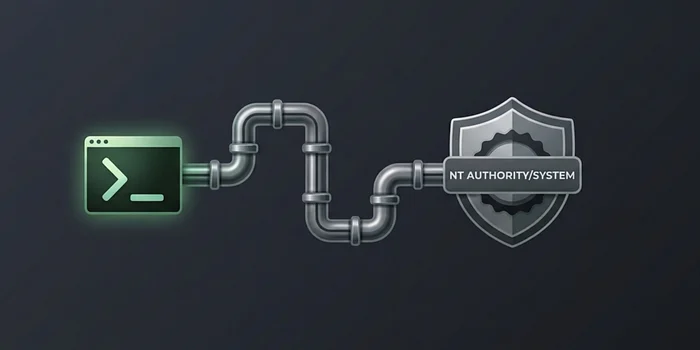
The pipe name suggested an update or client service, and the pipe belonged to UpdateService.exe. The service runs as LocalSystem and hosts a .NET Remoting object that performs file transfers on the caller's behalf.
Setup
The work was done from a non-elevated local user context on a Windows machine. The tools used were all Sysinternals utilities plus a .NET decompiler:
accesschk.exeto enumerate named-pipe DACLs.handle.exeto map a pipe back to its owning process.sc.exeto read the service configuration.strings.exeto identify the binary's technology stack.- dnSpy to decompile the .NET assemblies.
- ProcMon to watch DLL lookups.
- A small C# client, compiled against the application's GAC assemblies, to speak to the remoting endpoint.
The precondition for the whole chain is a local, non-elevated session on the machine. No credentials beyond a standard user account are needed.
Finding it
The starting point was a sweep of named-pipe DACLs:
accesschk.exe -accepteula -w \pipe\* 2>$null
Most pipes are either restricted to specific service accounts or deliberately open to Everyone for legitimate reasons, so the output is noisy. One entry stood out:
\\.\Pipe\UpdateServicev5.Spc.Esd.Client.Common.Utilities.5.3.2.0 Medium Mandatory Level (Default) [No-Write-Up] RW Everyone FILE_ALL_ACCESS RW NT AUTHORITY\SYSTEM FILE_ALL_ACCESS RW BUILTIN\Administrators READ_CONTROL WRITE_DAC
FILE_ALL_ACCESS for Everyone is the anomaly. It is not Authenticated Users, not BUILTIN\Users, and not a standard Windows pipe. The name suggested an update or client service, so the next question was which process owned it:
handle.exe -a "UpdateService"
UpdateService.exe pid: 2992 type: File \Device\NamedPipe\...UpdateService.exe pid: 2992 type: File \Device\NamedPipe\...
The pipe belongs to UpdateService.exe. The service configuration confirms the privilege level:
sc.exe qc UpdateServiceV5
SERVICE_START_NAME : LocalSystemSTART_TYPE : 2 AUTO_START (DELAYED)
So a third-party service running as LocalSystem, starting automatically, serves an unrestricted named pipe. That gives the two ingredients that make a named-pipe finding interesting: an IPC endpoint reachable by an unprivileged local user, and a SYSTEM process on the other end.
Exploitation
Step 1: Prove the pipe is actually usable
Bad ACLs on paper do not always translate into a working connection, so the researcher opened a non-elevated PowerShell session and tried to connect:
$pipe = New-Object System.IO.Pipes.NamedPipeClientStream(".", "UpdateServicev5.Spc.Esd.Client.Common.Utilities.5.3.2.0", [System.IO.Pipes.PipeDirection]::InOut)$pipe.Connect(3000)$pipe.IsConnected
The result was True. There was no authentication challenge, no token validation and no rejection: a standard user had opened a full-duplex connection to an IPC endpoint owned by a SYSTEM process. The ACL was not just theoretically wrong, it was usable.
Step 2: Identify the protocol
Sending gibberish to a pipe achieves nothing, so the next step was to work out what the service expects. strings.exe against the binary gave a quick answer:
v4.0.30319BSJB
That is .NET Framework 4.8, which means dnSpy rather than x64 assembly. Tracing the service's assembly references led to the implementation in the GAC:
C:\Windows\Microsoft.NET\assembly\GAC_64\ xxxxx.Spc.Esd.WinClient.Ipc.Remoting.UpdateServiceWorker\ v4.0_5.3.2.0__3ff6b78e2989595a\ xxxxx.Spc.Esd.WinClient.Ipc.Remoting.UpdateServiceWorker.dll
The namespace, Ipc.Remoting, gives it away: this is .NET Remoting over named pipes, not a custom binary protocol. In the server implementation the researcher found:
dictionary["authorizedGroup"] = OSUtilities.GetLocalizedEveryoneAccountName();
The server code sets authorizedGroup to the localized string for "Everyone", and an object called ElevatedBitsFileTransferor was registered.
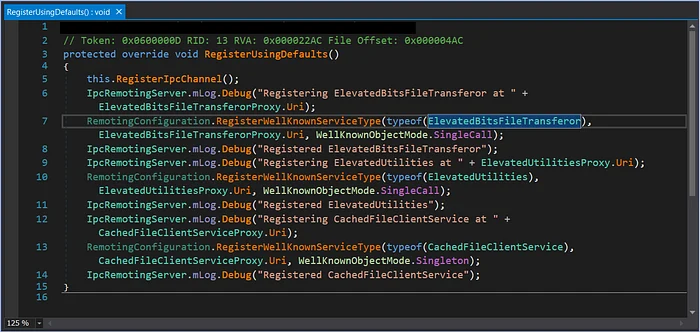
Step 3: Read the file-transfer method
Inside ElevatedBitsFileTransferor there is a method that takes a job ID and a list of file resources:
public void StartForegroundJobInBackground(string esdJobId, List<FileResource> files){ BitsFileTransferor fileTransferor = this.GetFileTransferor(null); foreach (FileResource resource in files) { fileTransferor.Add(resource); } fileTransferor.StartForegroundJobInBackground(esdJobId);}
The FileResource type carries the destination path:
public class FileResource{ public string DestinationFilePath { get; set; } public string RemoteFilePath { get; set; } public FileReferenceData FileReference { get; set; }}
The caller controls DestinationFilePath. There were no path checks, no authorization validations and no sanitisation. The service takes the caller's input, spins up BITS (Background Intelligent Transfer Service) and downloads the file under its own LocalSystem token. The unprivileged user cannot write to C:\Program Files\, but can ask ElevatedBitsFileTransferor to do it on their behalf.
Step 4: Build a client and confirm the write primitive
A small C# client referencing the application's GAC assemblies connects to the exposed endpoint:
ChannelServices.RegisterChannel(new IpcClientChannel(), false);string url = "ipc://UpdateServicev5.Spc.Esd.Client.Common.Utilities.5.3.2.0/ElevatedBitsFileTransferor";ElevatedBitsFileTransferor remote = (ElevatedBitsFileTransferor)RemotingServices.Connect( typeof(ElevatedBitsFileTransferor), url);Console.WriteLine("Available: " + remote.Available);
It connected cleanly from an unprivileged user process. Asking it to drop a harmless test file inside C:\Windows\System32 succeeded: the file appeared, owned by NT AUTHORITY\SYSTEM. That is an arbitrary SYSTEM file-write primitive.
Step 5: Find a DLL that a SYSTEM process loads on demand
An arbitrary write is more useful if a SYSTEM process can be coaxed into executing the written file. Windows has plenty of phantom DLL opportunities where native applications try to load DLLs from protected directories such as System32, but many of them only fire after a reboot, and the researcher wanted a cleaner proof of concept that triggers on demand.
ProcMon was filtered for NAME NOT FOUND results associated with osk.exe, the Windows On-Screen Keyboard, while it launched. One lookup stood out:
C:\Program Files\Common Files\microsoft shared\ink\HID.DLL
The file is not present by default.

More importantly, when osk.exe is launched directly from the Windows lock screen, it executes with NT AUTHORITY\SYSTEM privileges.
Step 6: Drop the payload and trigger it
The PoC tool was pointed at C:\Program Files\Common Files\microsoft shared\ink\HID.DLL to place the malicious DLL. The terminal output confirmed the drop succeeded.
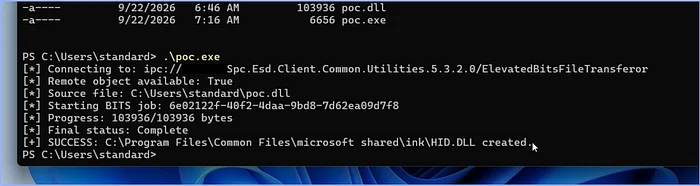
With the DLL in place, the researcher pressed Win+L, clicked Ease of Access, and opened the On-Screen Keyboard. An unrestricted cmd.exe running as SYSTEM appeared on the lock screen.
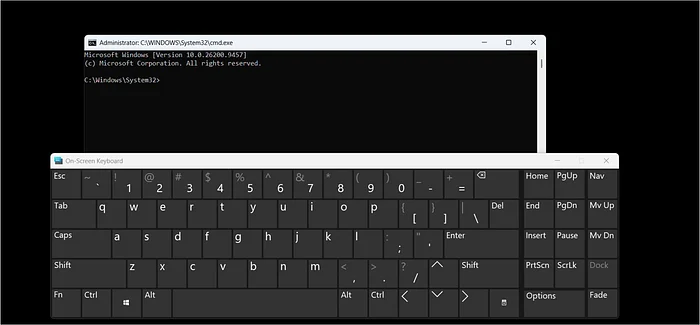
Step 7: The deserialisation surface that was left open
One further detail was buried in the server configuration:

new BinaryServerFormatterSinkProvider{ TypeFilterLevel = TypeFilterLevel.Full}
TypeFilterLevel.Full relaxes object type restrictions during deserialisation, which makes the endpoint susceptible to gadget chains of the kind ysoserial.net produces. Someone evidently knew this was a risk, because the channel dictionary explicitly sets "typeFilterLevel"] = "Low", but the very next line instantiates BinaryServerFormatterSinkProvider with TypeFilterLevel.Full. Whether that is dead code or a mistake, the effect is the same: the restriction was written down and then bypassed.
Microsoft's own documentation warns that BinaryFormatter is dangerous, insecure and "can't be made secure".
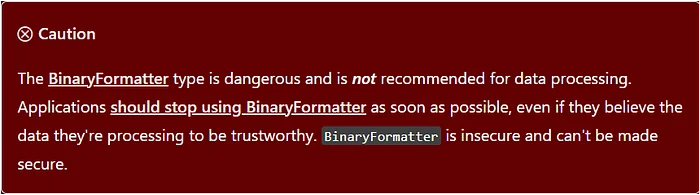
The researcher did not build an unauthenticated deserialisation exploit over the pipe, because the file-write and DLL-hijack chain already produced a SYSTEM shell.
Root cause
This is not one isolated mistake but several assumptions lining up:
- The IPC endpoint trusted Everyone even though it belongs to a privileged service.
- The service ran as
LocalSystem. - It exposed remoting objects that perform privileged operations, including file transfer.
- The destination path was not sufficiently restricted, and the operation ran under the service's privileged security context.
- The remoting channel was configured with
TypeFilterLevel.Full, adding a deserialisation attack surface on top.
None of these is dramatic alone. Together they let an unprivileged local user cross the security boundary into SYSTEM. The channel dictionary sets "typeFilterLevel"] = "Low", but the formatter sink provider was instantiated with TypeFilterLevel.Full.
Impact
A standard local user can obtain code execution as NT AUTHORITY\SYSTEM. The chain demonstrated here is: connect to the pipe as an unprivileged user, ask the remoting object to write an arbitrary file as SYSTEM, place a DLL at a path that osk.exe loads when launched from the lock screen, and trigger it with Win+L followed by Ease of Access and On-Screen Keyboard. The result is an unrestricted cmd.exe running as SYSTEM on the lock screen.
The deserialisation weakness at TypeFilterLevel.Full is a further potential path to the same outcome, but it was not exploited in this report.
Fix
A fix should address each link in the chain:
- Restrict the named-pipe DACL so that only the intended accounts can connect, rather than
EveryonewithFILE_ALL_ACCESS. - Do not expose privileged file-transfer operations to unprivileged callers; validate and restrict
DestinationFilePathto the directories the operation legitimately needs. - Set the remoting formatter to a restrictive
TypeFilterLeveland remove the conflictingFullconfiguration, so the"Low"setting actually applies. - Where possible, move away from .NET Remoting and
BinaryFormatter, which Microsoft documents as unsafe.
The report does not describe a vendor fix or a retest.
Variants to test
- Named-pipe DACL sweeps on other third-party services. Run
accesschk.exe -accepteula -w \pipe\*and look forFILE_ALL_ACCESSgranted toEveryoneon pipes owned by services running asLocalSystem. A positive result is a pipe you can open from a non-elevated session and that belongs to a privileged process. - .NET Remoting over IPC. When a pipe name or namespace contains
Remoting, decompile the server assembly and look for objects registered on the channel. A positive result is an object whose methods perform privileged operations and whose arguments include paths or commands you control. - File-transfer objects with caller-controlled destinations. Look for methods taking a destination path and passing it to BITS or a similar transfer API. A positive result is a file written to a protected directory and owned by
NT AUTHORITY\SYSTEM. TypeFilterLevel.Fullin server formatter sinks. Grep decompiled assemblies forBinaryServerFormatterSinkProviderandTypeFilterLevel.Full. A positive result is a reachable endpoint that accepts serialised objects, which is a candidate for aysoserial.netgadget chain.- On-demand DLL loads in SYSTEM processes. Use ProcMon filtered on
NAME NOT FOUNDfor processes that can be launched from the lock screen, such asosk.exe. A positive result is a missing DLL in a directory your file-write primitive can reach, loaded by a process running as SYSTEM without a reboot.
What happened, in plain words
A security researcher found a way for an ordinary user account on a Windows computer to become the most powerful account on that machine, the one called SYSTEM. He did not need a password, an administrator account or any special access. He only needed a normal, non-administrator user session on the Windows machine.
The product installs a background program, a service, that runs with the highest privileges Windows offers. That service listens for messages from other programs on the same computer through a channel called a named pipe. The pipe granted FILE_ALL_ACCESS to Everyone, and the service could be asked to write files as SYSTEM. The researcher used that power to place a malicious file in a location that a Windows program loads when it starts from the lock screen, then triggered that program. The result was a command prompt running as SYSTEM on top of the lock screen.
The finding came through a private bug-bounty program, which is a scheme where companies pay researchers for reporting security problems privately instead of publishing them. The researcher, Sneharghya Roy, has partly hidden the original service and pipe names because they contain identifiers specific to the vendor. Everything else about how the attack works is unchanged.
The pieces you need to know first
Before walking through the steps, here are the ideas the whole story rests on. Each one is explained from scratch, because none of them require prior security knowledge.
What a service is
On Windows, a service is a program that starts with the computer and runs in the background, without a window and without anyone logging in to start it. Printers, updates and antivirus tools all work this way. Services are started by Windows itself, and they can be configured to run under a particular account. The most powerful of those accounts is LocalSystem, often shortened to SYSTEM. A program running as SYSTEM can read, change or delete almost anything on the machine. It is more powerful than a normal administrator in several respects.
Think of a building: an ordinary user has a key to their own office, an administrator has a master key, and SYSTEM is the building manager who can go anywhere, including the rooms nobody else knows about.
What a named pipe is
A named pipe is a way for two programs on the same computer to send each other data. It behaves like a pipe you can write into at one end and read from at the other, except that it has a name, so both programs can find it. One program creates the pipe and listens; another connects to it and sends messages. Windows keeps a list of all pipes on the machine under a path that looks like \\.\Pipe\SomeName.
A useful comparison is a service window at a train station. The clerk sits behind the glass (the program listening), and passengers queue at the window (the programs connecting). The window has a name so people can find the right one.
What permissions (an ACL) are
Every pipe, file and folder on Windows has a list attached to it saying who is allowed to do what. That list is called a DACL, short for Discretionary Access Control List. Each entry names an account and a set of rights, such as read, write, or the catch-all FILE_ALL_ACCESS, which means full control: read, write, delete, change permissions, everything.
Everyone is a special group that means every account on the computer, including the least privileged ones. Authenticated Users is slightly narrower (accounts that have logged in), and BUILTIN\Users is narrower still (ordinary local users). If a pipe grants FILE_ALL_ACCESS to Everyone, then any program run by any user can connect to it and do anything the pipe allows.
What IPC and .NET Remoting are
IPC stands for inter-process communication: any mechanism that lets two programs on the same machine exchange data. A named pipe is one such mechanism.
.NET Remoting is an older Microsoft technology that lets a program call methods on an object that lives inside another program, as if the object were local. The calling program holds a proxy, a stand-in that looks like the real object, and when it calls a method the call is packaged up, sent over a channel (here, a named pipe), executed on the other side, and the result sent back. The remote object is registered under a URL such as ipc://pipe-name/ObjectName.
A comparison: ordering food by phone. You speak to a person who sounds like they are taking your order, but the kitchen is elsewhere. The phone line is the channel, the person is the proxy, and the kitchen is the remote object.
What BITS is
BITS, the Background Intelligent Transfer Service, is a Windows component that downloads and uploads files in the background, pausing when the network is busy. Programs use it to fetch updates. Crucially, when a privileged service asks BITS to download a file, the file is written with the service's privileges, not the caller's.
What a DLL is, and what DLL hijacking means
A DLL (Dynamic Link Library) is a file full of code that a program loads when it needs it, rather than having all the code built in. When a program starts, Windows looks for the DLLs it needs in a list of folders, in a fixed order. If a program asks for a DLL that is not present, and an attacker can put a file with that name in one of the folders Windows searches, the program will load the attacker's file and run its code. This is called DLL hijacking or a phantom DLL problem: the program expects a file that is not there, and whoever fills the gap gets their code executed inside that program, with that program's privileges.
What ProcMon is
ProcMon (Process Monitor) is a free Microsoft tool that records everything programs do: which files they open, which registry keys they read, which network connections they make. Researchers use it to watch a program start up and see which files it looks for and fails to find.
What deserialisation is, and why TypeFilterLevel.Full matters
When one program sends an object to another, it has to turn the object into a stream of bytes, which is called serialisation. The receiver turns the bytes back into an object, which is deserialisation. If the receiver will happily rebuild any type of object the sender names, an attacker can send a crafted object that, when rebuilt, runs code. Such crafted objects are called gadget chains, and a well-known tool called ysoserial.net builds them for .NET.
TypeFilterLevel is a setting that controls how permissive deserialisation is. Low restricts which types can be rebuilt. Full allows everything, which is exactly what an attacker wants.
What privilege escalation means
Local privilege escalation means going from a lower-privileged account on a machine to a higher-privileged one, on that same machine. It is different from breaking in from outside; the attacker is already a user, and wants to become SYSTEM.
The starting point
The researcher worked from an ordinary, non-administrator account on a Windows machine with the vendor product installed. He used a set of free Microsoft tools, plus a decompiler:
accesschk.exe, to list the permissions on every named pipe.handle.exe, to find out which program owns a given pipe.sc.exe, to read how a service is configured.strings.exe, to peek at text inside a program file and guess what it was written in.- dnSpy, a decompiler that turns a compiled .NET program back into readable source code.
- ProcMon, to watch which files a program tries to open.
- A small C# program of his own, to talk to the service.
The only precondition for the whole attack is a normal, non-administrator user session on the machine. No extra credentials are needed.
Step 1: Looking at every pipe's permissions
The first move was to list the permissions on all named pipes at once:
accesschk.exe -accepteula -w \pipe\* 2>$null
Line by line:
accesschk.exeis the tool being run.-accepteulaaccepts the licence agreement automatically, so the tool does not stop to ask.-wtells it to show objects that anyone can write to, which is the interesting subset.\pipe\*means every named pipe on the machine.2>$nullthrows away error messages, so the output is only the useful results.
Most pipes on a Windows machine are either locked to specific service accounts or deliberately open to Everyone for legitimate reasons, so the output is noisy and you learn to skim it. One line stood out:
\\.\Pipe\UpdateServicev5.Spc.Esd.Client.Common.Utilities.5.3.2.0 Medium Mandatory Level (Default) [No-Write-Up] RW Everyone FILE_ALL_ACCESS RW NT AUTHORITY\SYSTEM FILE_ALL_ACCESS RW BUILTIN\Administrators READ_CONTROL WRITE_DAC
Reading it in pieces:
\\.\Pipe\UpdateServicev5...is the full name of the pipe. The long dotted name suggests a .NET program, because .NET namespaces look like that.Medium Mandatory Level (Default) [No-Write-Up]describes the integrity level, a separate Windows control that limits what a medium-integrity process (a normal user program) can write to.RW Everyone FILE_ALL_ACCESSsays every account on the machine has full control of the pipe. This is the anomaly.RW NT AUTHORITY\SYSTEM FILE_ALL_ACCESSsays the SYSTEM account also has full control, which is expected for the owner.RW BUILTIN\Administrators READ_CONTROL WRITE_DACsays administrators can read the permissions and change them.
The important part is FILE_ALL_ACCESS for Everyone. It was not Authenticated Users, not BUILTIN\Users, and not a standard Windows pipe the researcher already knew. The name suggested an update or client service, so the next question was which program was listening on the other end.
Step 2: Finding the program behind the pipe
Every pipe is created by some process. To find out which, the researcher used handle.exe, a tool that lists the files, pipes and other resources a process has open:
handle.exe -a "UpdateService"
handle.exeis the tool.-ameans look at all types of handles, not just files."UpdateService"is a search term, so only handles whose name contains that word are shown.
The answer was:
UpdateService.exe pid: 2992 type: File \Device\NamedPipe\...UpdateService.exe pid: 2992 type: File \Device\NamedPipe\...
This says the pipe is held by a program called UpdateService.exe, running as process ID 2992, and that from Windows' point of view a pipe is a kind of file. The ... marks where the researcher trimmed the long pipe path.
Next, the service configuration, to see which account the service runs under:
sc.exe qc UpdateServiceV5
sc.exeis the Windows service control tool.qcmeans query configuration: show how the service is set up.UpdateServiceV5is the service name.
The relevant lines were:
SERVICE_START_NAME : LocalSystemSTART_TYPE : 2 AUTO_START (DELAYED)
SERVICE_START_NAME : LocalSystemmeans the service runs as the most powerful account on the machine.START_TYPE : 2 AUTO_START (DELAYED)means Windows starts it automatically shortly after boot, without anyone asking.
So: a third-party service, running as LocalSystem, starting by itself, and serving a pipe that anyone can use. That gives the two ingredients that make a named-pipe finding interesting: a channel an ordinary user can reach, and a SYSTEM-level program on the other side.
Step 3: Proving the pipe actually works
Permissions that look wrong on paper do not always translate into a working connection, because Windows can enforce things in ways that are not obvious. So the researcher opened a normal, non-administrator PowerShell window and tried to connect:
$pipe = New-Object System.IO.Pipes.NamedPipeClientStream(".", "UpdateServicev5.Spc.Esd.Client.Common.Utilities.5.3.2.0", [System.IO.Pipes.PipeDirection]::InOut)$pipe.Connect(3000)$pipe.IsConnected
Line by line:
$pipe = New-Object System.IO.Pipes.NamedPipeClientStream(...)creates a client object that can connect to a named pipe. The first argument,".", means this computer. The second is the pipe name found earlier.PipeDirection::InOutmeans the connection will be two-way, so the client can both send and receive.$pipe.Connect(3000)tries to connect, giving up after 3000 milliseconds (three seconds).$pipe.IsConnectedasks the object whether the connection succeeded.
The result was True. There was no password prompt, no check of who the caller was, and no rejection. An ordinary user had opened a two-way connection to a pipe owned by a SYSTEM process. The permission was not just wrong on paper; it was usable.
Step 4: Working out what the service expects
Connecting to a pipe is useless if you send it nonsense. The next job was to work out what the service on the other end understands. A quick way to guess what a program was written in is to look for readable text inside the compiled file:
v4.0.30319BSJB
v4.0.30319is the version string of the .NET runtime, which tells you the program is a .NET program.BSJBis a marker found at the start of .NET program files.
That means .NET Framework 4.8, which is good news for a researcher: .NET programs can be decompiled back into readable source code, so there is no need to read raw machine code. The researcher loaded the program files into dnSpy, a .NET decompiler.
Following the service's references to other program files led to the actual implementation, stored in the GAC. The GAC (Global Assembly Cache) is a shared folder where Windows keeps .NET libraries that several programs use:
C:\Windows\Microsoft.NET\assembly\GAC_64\ xxxxx.Spc.Esd.WinClient.Ipc.Remoting.UpdateServiceWorker\ v4.0_5.3.2.0__3ff6b78e2989595a\ xxxxx.Spc.Esd.WinClient.Ipc.Remoting.UpdateServiceWorker.dll
GAC_64means these are 64-bit libraries.- The folder name contains
Ipc.Remoting, which is the giveaway: this is .NET Remoting over named pipes, not a custom protocol invented by the vendor. - The
xxxxxreplaces part of the vendor's name, which the researcher redacted.
Inside the server code, he found this line:
dictionary["authorizedGroup"] = OSUtilities.GetLocalizedEveryoneAccountName();
dictionary["authorizedGroup"]is a setting namedauthorizedGroup, meaning the group of accounts allowed to use the channel.OSUtilities.GetLocalizedEveryoneAccountName()fetches the name of theEveryonegroup as it is spelled in the machine's language. On an English system that isEveryone; on a German one it would be something else.
The server code sets authorizedGroup to the localized name for Everyone, and an object called ElevatedBitsFileTransferor was registered. In other words, the code deliberately says: let every account on this machine use this channel. The object's name says what it does: it transfers files, with elevated (SYSTEM) rights.
Step 5: Reading the file-transfer method
Inside ElevatedBitsFileTransferor there is a method that takes a job identifier and a list of files:
public void StartForegroundJobInBackground(string esdJobId, List<FileResource> files){ BitsFileTransferor fileTransferor = this.GetFileTransferor(null); foreach (FileResource resource in files) { fileTransferor.Add(resource); } fileTransferor.StartForegroundJobInBackground(esdJobId);}
Line by line:
public void StartForegroundJobInBackground(string esdJobId, List<FileResource> files)declares a method anyone connected to the channel can call. It takes a job ID and a list of file descriptions.BitsFileTransferor fileTransferor = this.GetFileTransferor(null);obtains the internal helper that actually talks to BITS.foreach (FileResource resource in files)loops over every file the caller supplied.fileTransferor.Add(resource);adds each one to the transfer job.fileTransferor.StartForegroundJobInBackground(esdJobId);starts the job.
The FileResource type is where the destination path lives:
public class FileResource{ public string DestinationFilePath { get; set; } public string RemoteFilePath { get; set; } public FileReferenceData FileReference { get; set; }}
DestinationFilePathis where the file will be written on this computer.RemoteFilePathis where it will be downloaded from.FileReferenceis extra bookkeeping data.
The caller controls DestinationFilePath. There were no checks on the path, no check that the caller was allowed to write there, and no cleaning of the input. The service takes whatever path it is given, asks BITS to download the file, and BITS writes it using the service's own LocalSystem identity. An ordinary user cannot write to C:\Program Files\, but can ask ElevatedBitsFileTransferor to do it on their behalf.
A comparison: you cannot get into the locked records room yourself, but the clerk will fetch any file you name and put it wherever you say, because the clerk has the key and never asks why.
Step 6: Building a client and confirming the write
The researcher wrote a small C# program that references the application's own libraries from the GAC, so it can speak the same remoting language as the service:
ChannelServices.RegisterChannel(new IpcClientChannel(), false);string url = "ipc://UpdateServicev5.Spc.Esd.Client.Common.Utilities.5.3.2.0/ElevatedBitsFileTransferor";ElevatedBitsFileTransferor remote = (ElevatedBitsFileTransferor)RemotingServices.Connect( typeof(ElevatedBitsFileTransferor), url);Console.WriteLine("Available: " + remote.Available);
Line by line:
ChannelServices.RegisterChannel(new IpcClientChannel(), false);sets up the client side of .NET Remoting and tells it to use IPC (the named pipe) as the transport.string url = "ipc://.../ElevatedBitsFileTransferor";is the address of the remote object: the pipe name, then the object name.RemotingServices.Connect(typeof(ElevatedBitsFileTransferor), url)connects to that address and returns a proxy, a stand-in object that looks like the real one.(ElevatedBitsFileTransferor)casts the result to the right type so the compiler allows method calls on it.Console.WriteLine("Available: " + remote.Available);calls a property on the remote object and prints the result, which proves the connection works.
It connected cleanly from an ordinary user process. The researcher then asked it to drop a harmless test file inside C:\Windows\System32, a folder ordinary users cannot write to. It succeeded: the file appeared, and its owner was NT AUTHORITY\SYSTEM. That is an arbitrary SYSTEM file-write: the ability to create any file, anywhere, as the most powerful account on the machine.
Step 7: Finding a file that a SYSTEM program loads on demand
Being able to write any file is powerful, but it becomes a shell only if a SYSTEM program can be made to run that file. Windows has many phantom DLL opportunities, where a built-in program tries to load a DLL from a protected folder such as System32 and the file is not there. Many of them only fire after a reboot, because the relevant program only starts at boot. A local user can reboot a machine, so that is not a real obstacle, but the researcher wanted a cleaner proof of concept that triggers on demand, without restarting anything.
This is where ProcMon came in. He filtered its output for NAME NOT FOUND, which is what Windows reports when a program asks for a file that does not exist, and watched the Windows On-Screen Keyboard, osk.exe, as it started. One lookup stood out:
C:\Program Files\Common Files\microsoft shared\ink\HID.DLL
C:\Program Files\Common Files\microsoft shared\ink\is a folder that ordinary users cannot write to.HID.DLLis the fileosk.exelooks for there, and it is not present by default.
More importantly, when osk.exe is launched directly from the Windows lock screen, it runs with NT AUTHORITY\SYSTEM privileges. The lock screen is the screen you see before logging in, and the Ease of Access button on it can start the On-Screen Keyboard. So there is a program that runs as SYSTEM, can be started on demand without logging in, and loads a DLL from a folder that the file-write primitive can reach.
Step 8: Dropping the payload and triggering it
The researcher pointed his proof-of-concept tool at C:\Program Files\Common Files\microsoft shared\ink\HID.DLL and told it to place a malicious DLL there. The terminal output confirmed the file drop succeeded.
With the DLL in place, he pressed Win+L to lock the screen, clicked Ease of Access, and opened the On-Screen Keyboard. Because osk.exe looked for HID.DLL, found the attacker's file, and loaded it, the attacker's code ran inside a SYSTEM process. An unrestricted cmd.exe running as SYSTEM appeared on the lock screen.
Step 9: The deserialisation hole that was left open
One more detail was buried in the server configuration:
new BinaryServerFormatterSinkProvider{ TypeFilterLevel = TypeFilterLevel.Full}
Line by line:
new BinaryServerFormatterSinkProvidercreates the component that turns incoming bytes back into objects on the server side.TypeFilterLevel = TypeFilterLevel.Fulltells it to allow every type of object to be rebuilt, with no restrictions.
TypeFilterLevel.Full makes the endpoint susceptible to gadget chains of the kind ysoserial.net produces: an attacker sends a crafted serialised object, and the act of rebuilding it runs code. Someone evidently knew this was a risk, because the channel dictionary explicitly sets "typeFilterLevel"] = "Low", which would restrict the types. But the very next line creates the formatter with Full. Whether that is leftover code or a mistake, the effect is the same: the restriction was written down and then bypassed.
Microsoft's own documentation warns that BinaryFormatter is dangerous, insecure and "can't be made secure".
The researcher did not build an unauthenticated deserialisation exploit over the pipe, because the file-write and DLL-hijack chain already produced a SYSTEM shell.
Why it worked
This is not one isolated mistake but several assumptions lining up:
- The pipe trusted
Everyone, even though it belongs to a privileged service. - The service ran as
LocalSystem. - It exposed remoting objects that perform privileged operations, including file transfer.
- The destination path was not restricted, and the operation ran under the service's privileged identity.
- The remoting channel was configured with
TypeFilterLevel.Full, adding a deserialisation attack surface on top.
None of these is dramatic alone. Together they let an ordinary local user cross the security boundary into SYSTEM. The channel dictionary sets "typeFilterLevel"] = "Low", but the formatter was created with TypeFilterLevel.Full.
What an attacker gets
A standard local user can obtain code execution as NT AUTHORITY\SYSTEM. The chain demonstrated here is: connect to the pipe as an ordinary user, ask the remoting object to write an arbitrary file as SYSTEM, place a DLL at a path that osk.exe loads when launched from the lock screen, and trigger it with Win+L, then Ease of Access, then On-Screen Keyboard. The result is an unrestricted cmd.exe running as SYSTEM on the lock screen.
The deserialisation weakness at TypeFilterLevel.Full is a further potential route to the same outcome, but it was not exploited in this report.
How to fix it
A fix should address each link in the chain:
- Restrict the pipe's permissions so that only the intended accounts can connect, rather than
EveryonewithFILE_ALL_ACCESS. - Do not expose privileged file-transfer operations to unprivileged callers; validate and restrict
DestinationFilePathto the folders the operation legitimately needs. - Set the remoting formatter to a restrictive
TypeFilterLeveland remove the conflictingFullconfiguration, so the"Low"setting actually applies. - Where possible, move away from .NET Remoting and
BinaryFormatter, which Microsoft documents as unsafe.
The report does not describe a vendor fix or a retest.
What to look for elsewhere
- Pipe permission sweeps on other third-party services. Run
accesschk.exe -accepteula -w \pipe\*and look forFILE_ALL_ACCESSgranted toEveryoneon pipes owned by services running asLocalSystem. A positive result is a pipe you can open from a non-administrator session that belongs to a privileged process. - .NET Remoting over IPC. When a pipe name or namespace contains
Remoting, decompile the server library and look for objects registered on the channel. A positive result is an object whose methods perform privileged operations and whose arguments include paths or commands you control. - File-transfer objects with caller-controlled destinations. Look for methods taking a destination path and passing it to BITS or a similar transfer API. A positive result is a file written to a protected folder and owned by
NT AUTHORITY\SYSTEM. TypeFilterLevel.Fullin server formatter sinks. Search decompiled libraries forBinaryServerFormatterSinkProviderandTypeFilterLevel.Full. A positive result is a reachable endpoint that accepts serialised objects, which is a candidate for aysoserial.netgadget chain.- On-demand DLL loads in SYSTEM processes. Use ProcMon filtered on
NAME NOT FOUNDfor programs that can be launched from the lock screen, such asosk.exe. A positive result is a missing DLL in a folder your file-write primitive can reach, loaded by a process running as SYSTEM without a reboot.
Glossary
- ACL / DACL: A list attached to a Windows object saying which accounts may do what with it. DACL stands for Discretionary Access Control List.
- Administrator: A Windows account with broad control over the machine, but not as powerful as
SYSTEM. - BITS: Background Intelligent Transfer Service, a Windows component that downloads and uploads files in the background on a program's behalf.
- Bug bounty: A scheme where organisations pay researchers for reporting security problems, often privately.
- C#: A programming language used for .NET programs.
- Channel (in .NET Remoting): The transport used to carry calls between programs, here a named pipe.
- Client: The program that connects to a service and asks it to do something.
- cmd.exe: The Windows command prompt, a program that runs typed commands.
- Code execution: Getting a computer to run code of your choosing.
- DLL: Dynamic Link Library, a file of reusable code that programs load when needed.
- DLL hijacking / phantom DLL: Placing a file with the name of a DLL a program expects but cannot find, so the program loads the attacker's file instead.
- Decompiler: A tool that turns a compiled program back into readable source code.
- Deserialisation: Turning a stream of bytes back into an object inside a program.
- dnSpy: A decompiler for .NET programs.
- Ease of Access: A button on the Windows lock screen that opens accessibility tools, including the On-Screen Keyboard.
Everyone: A Windows group meaning every account on the computer.FILE_ALL_ACCESS: A Windows permission meaning full control: read, write, delete and change permissions.- GAC: Global Assembly Cache, a shared Windows folder holding .NET libraries used by several programs.
- Gadget chain: A crafted serialised object that runs code when a program deserializes it.
- handle.exe: A Sysinternals tool that lists the files, pipes and other resources a process has open.
- accesschk.exe: A Sysinternals tool that shows the permissions on files, pipes and other Windows objects.
- Integrity level: A Windows control that limits what a lower-privileged process can write to, independent of its account.
- IPC: Inter-process communication, any mechanism that lets two programs on the same machine exchange data.
- Local privilege escalation: Going from a lower-privileged account to a higher-privileged one on the same machine.
LocalSystem/SYSTEM: The most powerful account on a Windows machine, used by core services.- Lock screen: The screen shown before logging in, which offers Ease of Access tools.
- Named pipe: A named channel that lets two programs on the same computer exchange data.
- .NET Framework: Microsoft's software platform for running .NET programs; version 4.8 appears here.
- .NET Remoting: An older Microsoft technology that lets a program call methods on an object living in another program, as if it were local.
osk.exe: The Windows On-Screen Keyboard program, which can be launched from the lock screen and then runs as SYSTEM.- Pipe name: The identifier a named pipe is created under, used by clients to find it.
- ProcMon: A Microsoft tool that records which files, registry keys and connections programs use.
- Process ID (pid): The number Windows gives a running program so it can be referred to.
- Proof of concept (PoC): A working demonstration that a vulnerability can be exploited.
- Proxy (in .NET Remoting): A local stand-in object that forwards method calls to a remote object.
sc.exe: The Windows tool for querying and controlling services.- Serialisation: Turning an object into a stream of bytes so it can be sent or stored.
- Service: A program that Windows starts in the background, often at boot, without a user launching it.
strings.exe: A Sysinternals tool that prints readable text found inside a compiled file.- Sysinternals: A set of free diagnostic tools published by Microsoft.
TypeFilterLevel: A .NET Remoting setting controlling which object types may be rebuilt during deserialisation;Lowrestricts them,Fullallows all.BinaryFormatter/BinaryServerFormatterSinkProvider: The .NET components that serialise and deserialise objects for remoting; Microsoft documentsBinaryFormatteras unsafe.ysoserial.net: A tool that builds gadget chains for .NET deserialisation attacks.Win+L: The Windows keyboard shortcut that locks the screen.

