From Oversight to Ownership: How I Discovered the Path to Root on ISP’s Multiple Servers
A publicly accessible backups directory on an ISP management panel exposed shell scripts containing root credentials. The same password was reused across multiple servers, allowing the researcher to gain root SSH access and reach MySQL databases.

As mentioned previously this test was conducted in ablack-box manner, meaning I had no insider knowledge of the ISP’s infrastructure, network architecture, or system configurations. My sole point of entry was the public-facing website hosted on example.com(do consider im using example.com and it’s IPs to maintain…
The full write-up lives on its author's site
It belongs to its author, so we link to it rather than copy it. The other two tabs are our own rewrites, checked against it.
Context
This is an account of a black-box penetration test against an Internet Service Provider, carried out with explicit authorisation from the ISP's chief. The researcher, Hektor Avdyli, had no insider knowledge of the ISP's infrastructure, network architecture or system configurations. The only starting point was the public-facing website, referred to throughout as example.com with the fictional IP [redacted]; names and addresses were changed to protect the parties involved.
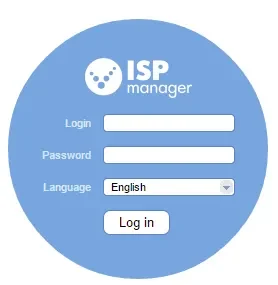
The objective was to reach an "ISP Management Panel" that the ISP had mentioned. That panel was the feature of interest, and in the end it was found not on the main domain but on a separate host at 93.184.216.253.
Setup
The engagement was black-box, so there were no accounts, roles or credentials provided at the start. The tools used were:
- Manual and automated web testing against example.com.
- Angry IP Scanner, for network discovery across an IP range: it scans address ranges to identify active hosts and open ports.
- gobuster, for content discovery on the host that turned out to run the Control Panel.
- ipinfo.io, used while Google Dorking, which is where the IP addresses that seeded the scan came from.
Finding it
The first pass over example.com was a conventional one: automated and manual testing looking for anything exploitable. It turned up a few outdated libraries. Those were worth fixing but gave no access to the ISP's servers, so the trail went cold. A break and a second look followed, and the reminder that the ISP had spoken of an "ISP Management Panel" restarted the search. Scans of example.com showed nothing related to the panel, and there were no subdomains of that kind either. At that point the visible results amounted to outdated libraries, a blind XSS and a leaked info.php.
While Google Dorking, the researcher came across IP addresses on ipinfo.io and decided to find out which devices in a group of addresses were online, on the theory that this could reveal more about the Control Panel. Angry IP Scanner was used for that discovery step, with the range set from [redacted] to [redacted].
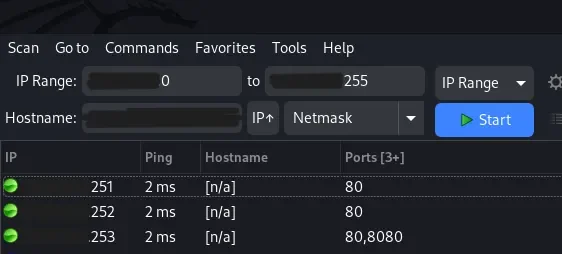
The scan listed the active IP addresses in the range. Port 80 was the one followed up, and it led to the Control Panel hosted at [redacted].
Exploitation
Step 1: Test the Control Panel
With the panel located, testing restarted both manually and automatically. The panel had not been updated since 2021, and the testing surfaced multiple blind SQL injection, XSS and authentication bypass issues. Because the software looked stale, the researcher first suspected it might no longer be in use.
Step 2: Content discovery with gobuster
gobuster was run against the host and found an interesting /backups directory. Inside it were two files:
/backups.sh/program.sh
Step 3: Read the backup script
The files were downloaded. In backups.sh the researcher found the root:password pair, that is, the root account's credentials written into the script.
Step 4: Reuse the credentials
The credentials gave full root access, and not only on the [redacted] Control Panel. The same password was used on multiple other servers, including example.com and other ISP servers. Through it the researcher also had full access to MySQL, with databases, client_tables, encrypted passwords and more.
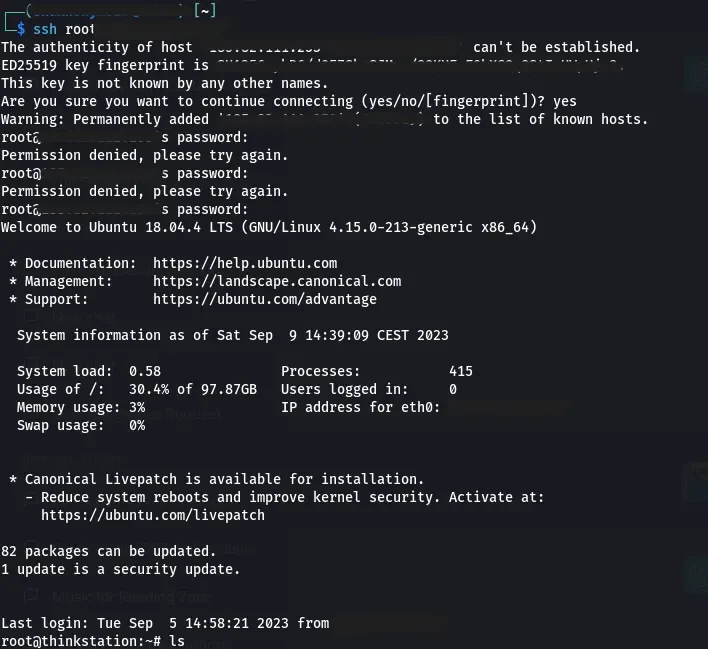
At that point the test was stopped and the report written immediately.
Root cause
The chain rests on two mistakes. First, a backup script containing the root password was found in a /backups directory discovered with gobuster. Second, that password was reused across the Control Panel, example.com and other ISP servers, so a single disclosure escalated from one host to the whole estate, including the MySQL service. The stale panel software, unpatched since 2021 and carrying blind SQL injection, XSS and authentication bypass issues, is a related weakness but was not the route taken here. The report does not describe how the /backups directory was protected, if at all.
Impact
The researcher assessed the weaknesses as high-risk, with significant potential impact on security, and listed them as: information leak, outdated software, OS and libraries, SQL injection and XSS. In practice the disclosed root password gave full root access to the Control Panel host and, through password reuse, to multiple other ISP servers, plus full access to MySQL with its databases, client_tables and encrypted passwords. The report does not state how many servers were affected or what data they held beyond those table names.
Fix
On the evidence presented, the changes needed are: remove credentials from scripts and keep backup files out of the web root, rotate the root password everywhere it was reused, and update the Control Panel software that had gone unpatched since 2021, including the blind SQL injection, XSS and authentication bypass issues found in it.
Variants to test
- Directory brute forcing for backup paths. Run gobuster or a similar tool against each host with a wordlist covering
/backups,/backup,/bakand similar. A positive result is a directory listing or a downloadable archive or script. - Credential hunting in downloaded scripts. Read every shell, SQL dump and configuration file found for hard-coded usernames and passwords. A positive result is a plaintext credential pair such as the root password found here.
- Password reuse checks. Where credentials are recovered and testing is authorised, try them against other hosts in the same estate, including database services. A positive result is a successful login on a host other than the one the credential came from.
- Address-range discovery. Where a target's IP range is known, scan it for live hosts and port 80, as was done here with Angry IP Scanner. A positive result is an additional host serving an administrative interface that is not linked from the main site.
- Stale panel fingerprinting. Check administrative panels for version strings and last-update dates; a panel untouched since 2021 is a candidate for the blind SQL injection, XSS and authentication bypass issues seen in this one.
What happened, in plain words
A security researcher named Hektor Avdyli was allowed by the chief of an Internet Service Provider (ISP) to test the company's systems. An ISP is the company that sells you your internet connection. The permission was explicit, and the whole test was done from the outside: he had no insider knowledge of how the ISP's network was built or configured. This is called black-box testing, because you are looking at a sealed box and can only see what it shows from outside.
He started from one public website, which he calls example.com in the write-up, with the made-up IP address [redacted]. Names and addresses were changed so the real parties stay private. An IP address is the number that identifies a device on the internet, a bit like a postal address for a computer.
The goal was to find something the ISP had mentioned: an "ISP Management Panel". A management panel is a web page where an administrator logs in to control servers and services, like the dashboard of a company's systems. In the end the panel was not on the main website at all. It was on a different machine, at 93.184.216.253.
The tools, and why each one was used
Because the test was black-box, there were no accounts, passwords or roles handed over at the start. Everything had to be discovered. The tools were:
- Manual and automated web testing against example.com. Manual means a person clicking and typing; automated means a program sending many requests quickly.
- Angry IP Scanner, a free program that scans a range of IP addresses to find which machines are switched on and which network doors (ports) are open on them.
- gobuster, a program that guesses file and folder names on a website to find ones that are not linked anywhere.
- ipinfo.io, a website that shows information about IP addresses. It was used while Google Dorking, which means using clever search queries in Google to find pages or data that were not meant to be easy to find.
Step 1: Looking at the main website
The first pass over example.com was ordinary: automated and manual testing, looking for anything that could be abused. It found a few outdated libraries. A library is a bundle of ready-made code a website uses; an outdated one is like running an old version of an app that has known bugs. Those were worth fixing, but they gave no way into the ISP's servers. The trail went cold.
He took a break, came back, and remembered that the ISP had spoken of an "ISP Management Panel". That restarted the search. Scans of example.com showed nothing related to the panel, and there were no subdomains of that kind either. A subdomain is a name that sits under the main one, like shop.example.com under example.com. At that point the visible results were only outdated libraries, a blind XSS and a leaked info.php.
Two of those terms deserve a plain explanation. XSS, short for cross-site scripting, is when an attacker gets their own code to run inside another visitor's browser on a website. Blind XSS is the variant where the attacker cannot see the result directly: the code is stored somewhere, such as an admin panel, and runs later when an administrator views that page. info.php is a common file that shows technical details about the web server; when it is left public, it leaks information about the setup.
Step 2: Finding the panel by scanning addresses
While Google Dorking, he came across IP addresses on ipinfo.io. That gave him an idea: if he could find out which devices in a group of addresses were online, that might reveal more about the Control Panel. So he used Angry IP Scanner for that discovery step, with the range set from [redacted] to [redacted].
[redacted] to [redacted]
This line is the range of addresses he told the scanner to check. The last number of an IP address runs from 0 to 255, so a range ending in .0 to .255 covers 256 possible addresses. The scanner tries each one and reports which are alive.
The scan listed the active IP addresses in the range. He then followed up on port 80. A port is a numbered channel on a machine; port 80 is the standard channel for ordinary, unencrypted web pages. Following it led to the Control Panel hosted at [redacted].
Step 3: Testing the Control Panel
With the panel located, testing restarted, both manually and automatically. The panel had not been updated since 2021, and the testing surfaced multiple blind SQL injection, XSS and authentication bypass issues.
- SQL injection is when an attacker slips database commands into a form or address so the site's database runs them. The database is where a site keeps its data, like a filing cabinet. Blind means the attacker cannot see the data directly and has to infer it from how the site behaves.
- Authentication bypass means getting past the login check without valid credentials, for example by tricking the site into thinking you are already logged in.
Because the software looked stale, he first suspected it might no longer be in use. That is a sensible doubt: an old, forgotten panel might be a decoy or a leftover. But it was worth checking further.
Step 4: Finding hidden folders with gobuster
gobuster was run against the host and found an interesting /backups directory. A directory is a folder on a website. /backups is a folder whose name suggests copies of files kept for safety. Inside it were two files:
/backups.sh/program.sh
The .sh ending means a shell script, a small text file of commands that a computer runs. Backup scripts often contain the details needed to connect to servers, which is exactly why they are dangerous to leave public.
Step 5: Reading the backup script
The files were downloaded. In backups.sh he found the root:password pair. That notation means a username and its password written together, here the username root and its matching password. The root account is the most powerful account on a Linux or Unix machine: it can do anything, like the master key to a building. Finding it written inside a script is a serious leak, because anyone who downloads the file gets the key.
Step 6: Reusing the credentials
The credentials gave full root access, and not only on the [redacted] Control Panel. The same password was used on multiple other servers, including example.com and other ISP servers. This is called password reuse: using one password in many places. It means one leak becomes many leaks, like one key that opens every door in the building.
Through it he also had full access to MySQL, the database software, with databases, client_tables, encrypted passwords and more. A database holds structured data in tables, much like a spreadsheet with rows and columns. client_tables is the name of one such table, and encrypted passwords are passwords stored in scrambled form so they cannot be read directly.
At that point the test was stopped and the report was written immediately.
Why it worked
The chain rests on two mistakes.
- A backup script containing the root password was found inside a
/backupsdirectory discovered with gobuster. - That password was reused across the Control Panel, example.com and other ISP servers. So a single disclosure escalated from one machine to the whole estate, including the MySQL service.
The stale panel software, unpatched since 2021 and carrying blind SQL injection, XSS and authentication bypass issues, is a related weakness, but it was not the route taken here. The report does not describe how the /backups directory was protected, if at all.
What the impact was
The researcher assessed the weaknesses as high-risk, with significant potential impact on security, and listed them as: information leak, outdated software, OS and libraries, SQL injection and XSS. OS means operating system, the core software that runs a machine, such as Linux or Windows.
In practice the disclosed root password gave full root access to the Control Panel host and, through password reuse, to multiple other ISP servers, plus full access to MySQL with its databases, client_tables and encrypted passwords. The report does not state how many servers were affected or what data they held beyond those table names.
What should be fixed
On the evidence presented, the changes needed are:
- Remove credentials from scripts and keep backup files out of the web root. The web root is the folder a web server serves to visitors, so anything inside it can potentially be downloaded.
- Rotate the root password everywhere it was reused. Rotating a password means changing it to a new one.
- Update the Control Panel software that had gone unpatched since 2021, including the blind SQL injection, XSS and authentication bypass issues found in it.
Variants to test
These are the same checks, written so a beginner can follow the idea behind each one.
- Directory brute forcing for backup paths. Run gobuster or a similar tool against each host with a wordlist covering
/backups,/backup,/bakand similar. A wordlist is a long list of common names the tool tries one by one. A positive result is a folder listing or a downloadable archive or script. - Credential hunting in downloaded scripts. Read every shell script, database dump and configuration file you find, looking for hard-coded usernames and passwords. Hard-coded means written directly into the file instead of being stored safely elsewhere. A positive result is a plaintext credential pair such as the root password found here.
- Password reuse checks. Where credentials are recovered and testing is authorised, try them against other hosts in the same estate, including database services. A positive result is a successful login on a host other than the one the credential came from.
- Address-range discovery. Where a target's IP range is known, scan it for live hosts and port 80, as was done here with Angry IP Scanner. A positive result is an additional host serving an administrative interface that is not linked from the main site.
- Stale panel fingerprinting. Check administrative panels for version strings and last-update dates. Fingerprinting means working out what software and version a machine is running. A panel untouched since 2021 is a candidate for the blind SQL injection, XSS and authentication bypass issues seen in this one.
Glossary
- Authentication bypass: getting past a login check without valid credentials.
- Black-box testing: testing a system with no insider knowledge, seeing only what it shows from outside.
- Blind SQL injection: slipping database commands into a site without being able to see the data directly, inferring it from the site's behaviour.
- Blind XSS: cross-site scripting where the attacker cannot see the result directly; the code runs later, for example when an administrator views a page.
- Control Panel / management panel: a web page where an administrator logs in to control servers and services.
- Credentials: a username and password pair used to log in.
- Database: software that stores data in tables, like a filing cabinet or spreadsheet.
- Directory: a folder on a website or computer.
- Encrypted passwords: passwords stored in scrambled form so they cannot be read directly.
- Fingerprinting: working out what software and version a machine is running.
- gobuster: a program that guesses file and folder names on a website to find hidden ones.
- Google Dorking: using clever search queries to find pages or data that were not meant to be easy to find.
- Hard-coded: written directly into a file instead of being stored safely elsewhere.
- High-risk: a severity rating meaning the weakness could cause significant harm.
- Information leak: when technical details that should stay private become visible.
- IP address: the number that identifies a device on the internet, like a postal address for a computer.
- ISP: Internet Service Provider, the company that sells internet connections.
- Library: a bundle of ready-made code a website uses.
- MySQL: a popular database program.
- OS (operating system): the core software that runs a machine, such as Linux or Windows.
- Password reuse: using the same password in many places, so one leak affects all of them.
- Port: a numbered channel on a machine; port 80 is the standard channel for ordinary web pages.
- Remediation: the fix applied to close a weakness.
- Root: the most powerful account on a Linux or Unix machine, able to do anything.
- Rotate: to change a password to a new one.
- Shell script: a small text file of commands that a computer runs, usually ending in
.sh. - SQL injection: slipping database commands into a form or address so the site's database runs them.
- Subdomain: a name under a main domain, like shop.example.com under example.com.
- Web root: the folder a web server serves to visitors, so anything inside it can potentially be downloaded.
- Wordlist: a long list of common names a tool tries one by one.
- XSS (cross-site scripting): getting an attacker's code to run inside another visitor's browser on a website.



