From Remote Viewing to Root Access: The macOS Screen Sharing Flaw Now Being Exploited in the Wild
An authentication bypass in macOS Screen Sharing allowed attackers to authenticate without valid credentials. Attackers exploited internet-exposed systems to gain root access and install cryptocurrency-mining software.

A vulnerability in Apple’s built-in macOS Screen Sharing service has moved from a serious security concern to an active cyberattack problem. What initially appeared to be an authentication flaw requiring an urgent software update has now been linked to real-world compromises in which attackers gained root access to…
The full write-up lives on its author's site
It belongs to its author, so we link to it rather than copy it. The other two tabs are our own rewrites, checked against it.
Context
Apple's built-in macOS Screen Sharing service is a VNC-based remote desktop service that lets a user view and control another Mac's display, applications, files, keyboard and mouse. It is commonly used for technical support, remote administration, troubleshooting and remote work. When enabled, the service listens on TCP port 5900 and can be exposed through the operating system's firewall configuration.
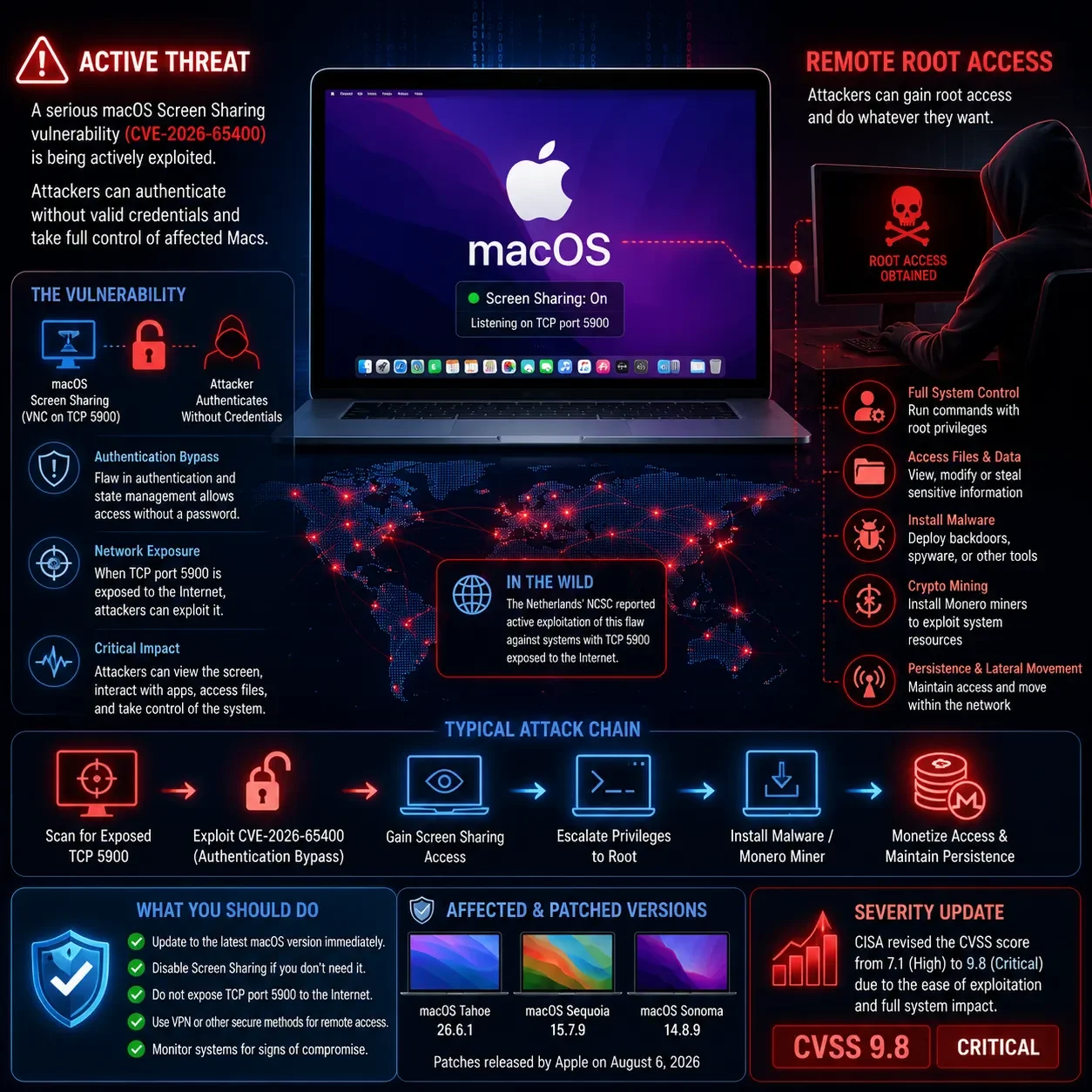
The vulnerability discussed here is tracked as CVE-2026-65400. It affects macOS Screen Sharing and allows an attacker on the network to authenticate without valid credentials. Apple's original description was concise: an attacker on the network could potentially authenticate to Screen Sharing without valid credentials, and the issue was addressed through improved state management in the authentication process.
What began as an authentication flaw requiring an urgent update has since been linked to real-world compromises in which attackers gained root access to exposed Macs and installed cryptocurrency-mining software.
Setup
The report does not describe a researcher-run lab, test accounts or tooling. The relevant preconditions, as described, are:
- A Mac with Screen Sharing enabled.
- The Screen Sharing service reachable over the network, in the reported incidents specifically with TCP port 5900 accessible from the Internet.
- No valid credentials required on the attacker's side, because the flaw is an authentication bypass.
Exposure can arise when a Mac is deliberately configured for remote access through a router or firewall, or when port-forwarding exposes the service externally. A Mac with Screen Sharing disabled presents a substantially different attack surface from one deliberately exposing the service to the Internet.
Finding it
The issue centres on how macOS handles authentication for Screen Sharing. Authentication protects a service whose entire purpose is to give remote users control of the computer, so a bypass at that point is especially dangerous. Once an attacker obtains control of the service, they may be able to interact with applications, files, the keyboard and mouse, and potentially the wider operating environment.
The severity assessment changed over time. The vulnerability was initially assessed with a CVSS score of 7.1, in the high-severity category. Tom's Hardware reports that the U.S. Cybersecurity and Infrastructure Security Agency (CISA) later revised the score to 9.8, or critical, after reassessing the conditions required for exploitation and the potential impact. The revised assessment treats the vulnerability as requiring no privileges and potentially allowing full compromise of confidentiality, integrity and availability. CISA also subsequently assessed the vulnerability as automatable.
That change matters because CVSS scores help security teams prioritise remediation across large environments where thousands of vulnerabilities compete for limited patching resources. A flaw that can be exploited without valid credentials, provides extensive control over a system and can potentially be automated has a substantially different risk profile from one requiring an already-authenticated user.
Exploitation
Step 1: Reach the exposed service
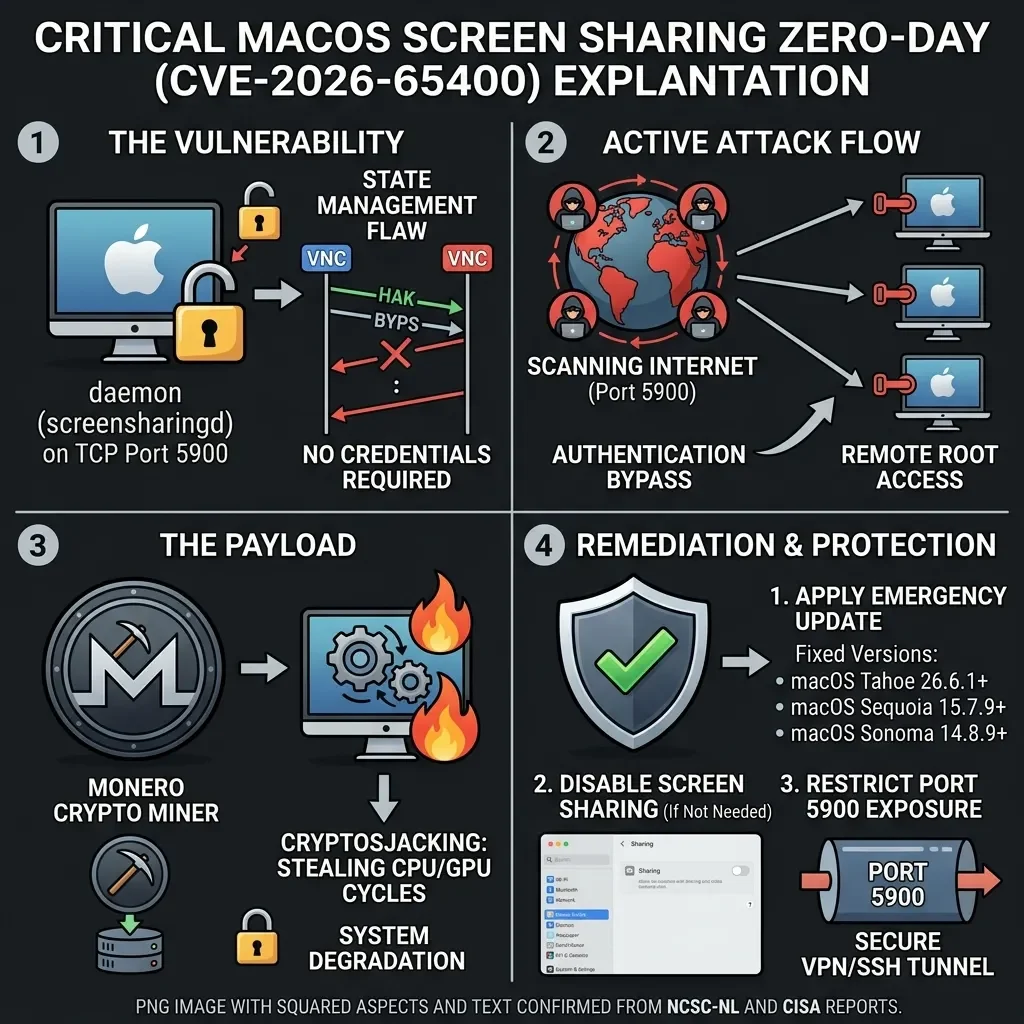
The attacks observed by the Netherlands' National Cyber Security Centre (NCSC-NL) involved multiple systems where TCP port 5900 was accessible from the Internet. The report gives no request, payload or command for this step; the entry condition is simply network reachability of the Screen Sharing service.
Step 2: Authenticate without valid credentials
The attacker authenticates to Screen Sharing without possessing valid credentials, abusing the authentication state handling flaw. The report does not include the specific exchange used.
Step 3: Obtain root access
According to the NCSC-NL information cited by multiple outlets, the affected systems were accessed at the root level. The report does not describe the exact post-authentication steps that produced root access.
Step 4: Install a Monero miner
After obtaining root access, attackers installed Monero cryptocurrency-mining software on the compromised systems. The report does not include the miner's name, delivery mechanism or command lines.
NCSC-NL reported on August 12 that it had received notification of active exploitation. Apple had initially released the security fixes without evidence that CVE-2026-65400 was being actively exploited; that situation changed within days.
Root cause
Apple attributed the flaw to authentication state management and fixed it with improved state management in the authentication process. In design terms, the mistake sits at the boundary between physical and digital access: Screen Sharing is meant to reproduce, remotely, the control that someone sitting in front of a logged-in Mac has, and the authentication layer that is supposed to gate that control could be bypassed.
The vulnerability effectively challenges one of the assumptions behind remote administration: that the person requesting remote access is actually authorised to receive it.
Impact
A successful attacker can view the screen, interact with applications and files, and control the keyboard and mouse. In the reported incidents, access reached the root level, after which Monero mining software was installed.
Cryptomining may appear less destructive than ransomware or data theft, but it demonstrates that an attacker has achieved sufficient control to make the victim's computing resources work for them. The consequences can include:
- Unauthorised use of CPU and system resources
- Increased electricity consumption
- Reduced system performance
- Hardware resource exhaustion
- Persistence mechanisms
- Potential credential theft
- Access to files and applications
- A foothold for additional malicious activity
The miner is only one possible payload. An attacker with root-level control is not necessarily limited to mining Monero; the same access could potentially be used to conduct reconnaissance, harvest credentials, steal sensitive information, deploy additional malware or establish persistence.
For businesses, a compromised employee workstation can become a stepping stone into a broader corporate environment. A Mac used by a finance employee, developer, administrator, executive or security professional could contain credentials, browser sessions, documents, authentication tokens, source code or access to cloud applications. The mining observed by NCSC-NL may therefore represent only the visible consequence of the compromises identified so far.
The exposure condition matters: the existence of the vulnerability does not mean every Mac connected to the Internet is automatically exposed in the same way. The reported incidents specifically involved systems where port 5900 was Internet-accessible.
Fix
Apple released patches for the affected versions on August 6, 2026, as an out-of-band security update rather than waiting for a larger routine operating-system release:
- macOS Tahoe 26.6.1
- macOS Sequoia 15.7.9
- macOS Sonoma 14.8.9
The updates addressed CVE-2026-65400 by improving authentication state management.
Users can check for updates through System Settings → General → Software Update, with the goal of reaching the patched versions rather than merely postponing the update. Users who do not need Screen Sharing should consider disabling it under System Settings → General → Sharing → Screen Sharing.
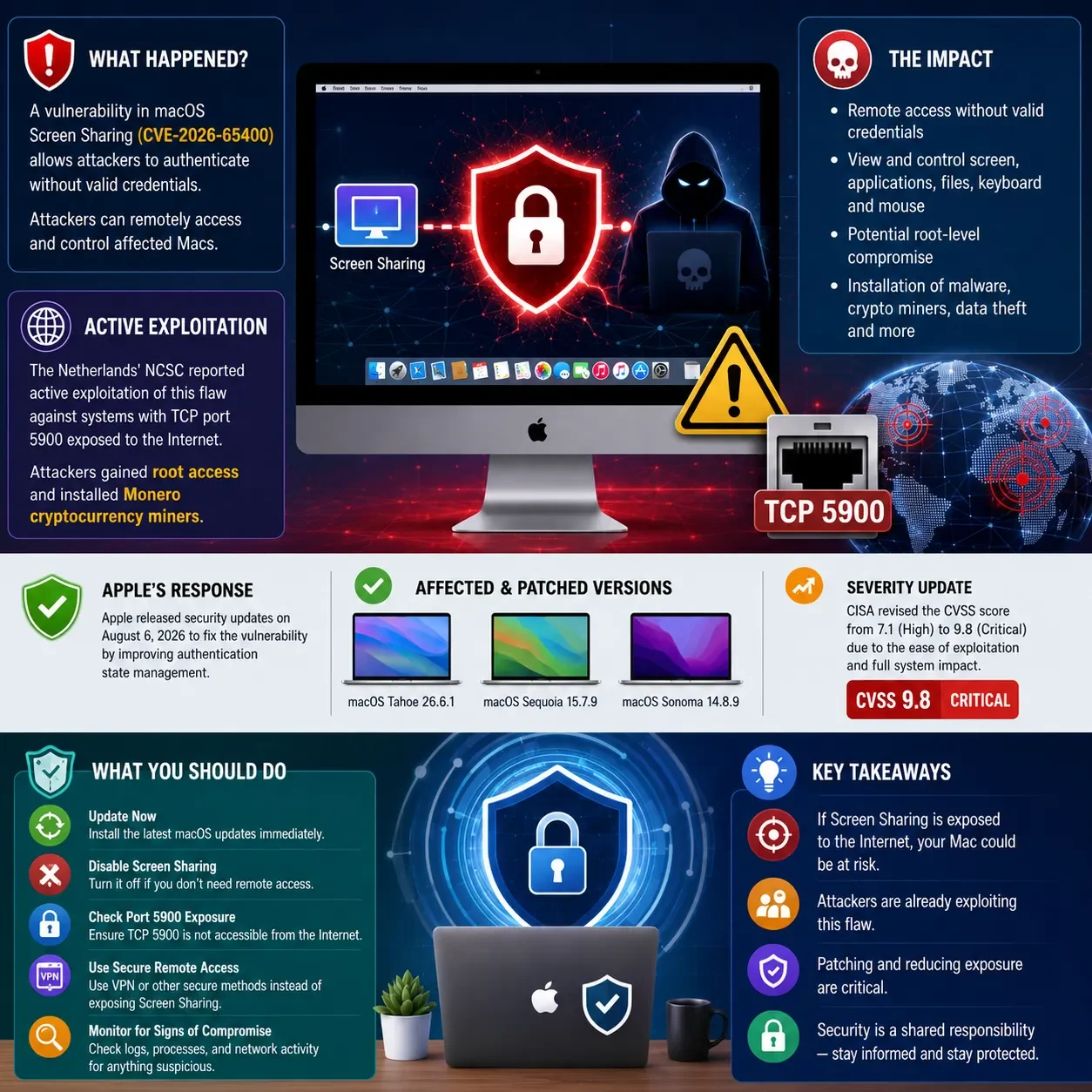
For organisations that genuinely require remote access, Screen Sharing should ideally sit behind a VPN, a properly configured private network, a zero-trust access solution or another controlled remote-access mechanism, rather than being exposed directly to the Internet.
Patching closes the vulnerability but does not necessarily undo actions an attacker may already have taken. If a Mac had Screen Sharing enabled and TCP 5900 was accessible from the Internet before patching, administrators should consider whether the system needs additional investigation, covering:
- External exposure of TCP 5900
- Router and firewall port-forwarding rules
- Screen Sharing configuration
- Authentication and remote-access logs
- Unexpected administrator or root activity
- Unrecognised processes
- Cryptocurrency-mining software
- Unexpected CPU utilisation
- New persistence mechanisms
- Suspicious outbound connections
- Unusual account activity
- Indicators associated with unauthorised remote access
If compromise is suspected, the machine should be treated as potentially compromised rather than assumed clean because the patch was installed.
Variants to test
- Other remote-desktop services with authentication state handling. A positive result is a session established without valid credentials.
- Exposed port 5900 on other networks. A positive result is a reachable service that grants control without credentials.
- Port-forwarding and firewall rules around remote access. A positive result is a remote administration service reachable from outside the network when it should not be.
- Post-exploitation visibility. On systems that were exposed before patching, look for unrecognised processes, unexpected CPU utilisation, mining software and new persistence mechanisms. A positive result is evidence of activity that predates the patch.
- Other Apple platform components with similar authentication state logic.
What happened, in plain words
Apple builds a feature into macOS called Screen Sharing. It lets one person see and control another Mac over a network: the screen, the applications, the files, the keyboard and the mouse. It is the same idea as handing someone the mouse and keyboard of your computer, except they can be in another building or another country. Support staff use it to fix problems, administrators use it to manage machines, and people working from home use it to reach the computer in the office.
That convenience is exactly what makes the flaw described here serious. A weakness in how Screen Sharing checks who is allowed in means an attacker can get in without a valid username and password. The flaw is tracked as CVE-2026-65400. A CVE is a public catalogue number for a known security bug, so people around the world can refer to the same issue unambiguously.
What started as a bug that needed an urgent update has since been linked to real attacks. According to the Netherlands' National Cyber Security Centre (NCSC-NL), attackers reached Macs whose Screen Sharing service was reachable from the Internet, obtained root access (the highest level of control on a computer, the equivalent of the master key), and installed software that mines cryptocurrency called Monero.
This article walks through the whole story in the same order as the technical account: what the feature does, what the flaw is, how the severity was reassessed, how the attacks unfolded, what the attackers did once inside, how Apple fixed it, and what you should do. Every technical term is explained the first time it appears.
Context
What Screen Sharing actually is
Screen Sharing is a remote desktop service. A remote desktop lets you operate another computer as if you were sitting in front of it. The screen is sent to you as a video-like stream, and your keyboard presses and mouse movements are sent back.
Under the surface, macOS Screen Sharing speaks a protocol called VNC (Virtual Network Computing). A protocol is simply an agreed language two computers use to talk. VNC is an old, widely used language for remote desktops, which is why other remote-control tools can often talk to it too.
When Screen Sharing is switched on, the Mac opens a network port. Think of a port as a numbered door on a building: the building's address gets data to the right computer, and the door number gets it to the right service inside. Screen Sharing listens on TCP port 5900. TCP is one of the two main ways computers send data across the Internet; it guarantees that what is sent arrives in order and complete, which is what a remote desktop needs.
A Mac can also be configured so that this door is visible from outside the local network, through the operating system's firewall settings. A firewall is a filter that decides which network traffic is allowed in and out, like a security guard at the entrance who checks a list.
The vulnerability in one sentence
The flaw lets an attacker on the network authenticate without valid credentials. Authentication is the process of proving who you are, normally with a username and password. A flaw that lets you skip that proof is called an authentication bypass.
Apple's own description was short: an attacker on the network could potentially authenticate to Screen Sharing without valid credentials, and the problem was fixed through improved state management in the authentication process. "State management" means keeping track of which stage a conversation is at: has the password been asked for yet, has it been checked, is the session now open? If that bookkeeping goes wrong, a system can be talked into believing a check already happened when it did not.
Setup
This is not a story about a researcher building a test lab. The report does not describe test accounts, tools or a controlled experiment. What it does describe are the conditions that had to be true for the real attacks to work:
- A Mac with Screen Sharing switched on.
- The Screen Sharing service reachable over the network. In the reported incidents, specifically TCP port 5900 accessible from the Internet.
- No valid credentials needed on the attacker's side, because the flaw is an authentication bypass.
How does a Mac end up reachable from the Internet? Usually on purpose, or by accident during a well-meant setup. Someone configures remote access through a router or firewall, or sets up port forwarding. Port forwarding is a rule on a router that says "traffic arriving at this door should be passed to this computer inside". It is like leaving a building's side entrance unlocked and propped open so deliveries can come straight to your desk.
A Mac with Screen Sharing switched off is a completely different situation from one deliberately exposing the service to the Internet. The first has no door to knock on; the second has a door, and the flaw is in the lock.
Finding it
The issue sits in how macOS handles authentication for Screen Sharing. Authentication is the gatekeeper for a service whose entire purpose is to give a remote person control of the computer. A bypass at that exact point is therefore especially dangerous: the thing being protected is not a minor feature but full remote control.
Once an attacker gets control of the service, they may be able to interact with applications and files, use the keyboard and mouse, and potentially reach the wider operating environment of the machine.
Why the severity score changed
Security teams use a scoring system called CVSS (Common Vulnerability Scoring System) to compare vulnerabilities. The score runs from 0 to 10, and higher means more dangerous. It is a bit like a restaurant hygiene rating in reverse: it summarises many factors into one number so people can prioritise.
The vulnerability was first assessed at CVSS 7.1, in the high-severity category. Tom's Hardware reports that the U.S. Cybersecurity and Infrastructure Security Agency (CISA, the American government body that coordinates cybersecurity matters) later revised the score to 9.8, or critical, after reassessing the conditions needed to exploit it and the potential impact.
The revised assessment treats the vulnerability as requiring no privileges and potentially allowing full compromise of confidentiality, integrity and availability. Those three words are the classic trio of security goals:
- Confidentiality: keeping data secret from people who should not see it.
- Integrity: keeping data correct and unaltered.
- Availability: keeping systems usable when legitimate people need them.
A flaw that can damage all three, with no privileges required, is about as bad as it gets. CISA also assessed the vulnerability as automatable, meaning an attack can be carried out by a script at scale rather than needing a person to work through it by hand.
Why does a score change matter? Because CVSS scores are not just labels. They help security teams decide what to fix first in environments where thousands of vulnerabilities compete for limited time and staff. A flaw that needs no valid credentials, gives extensive control and can be automated has a very different risk profile from one that requires an already-logged-in user.
Exploitation
The report describes the attack in four steps. It does not include the specific network exchange, commands or payloads used at any of them, so what follows is the sequence of events, not a recipe.
Step 1: Reach the exposed service
The attacks observed by NCSC-NL involved multiple systems where TCP port 5900 was accessible from the Internet. The entry condition is simply that the Screen Sharing service can be reached over the network. No request, payload or command is given for this step.
Why this step matters: an attacker cannot exploit a door they cannot reach. Internet reachability is what turns a local bug into a global one, because anyone anywhere can try the door.
Step 2: Authenticate without valid credentials
The attacker authenticates to Screen Sharing without possessing valid credentials, abusing the authentication state handling flaw. The report does not include the specific exchange used.
Why this step matters: this is the heart of the vulnerability. Normally this step would stop an intruder dead, because they would not know the password. Here, the check itself can be sidestepped.
Step 3: Obtain root access
According to the NCSC-NL information cited by multiple outlets, the affected systems were accessed at the root level. Root is the administrator account on Unix-like systems such as macOS, with permission to do anything on the machine. The report does not describe the exact post-authentication steps that produced root access.
Why this step matters: root access is the difference between a visitor in the lobby and someone with keys to every room. It is what allows software to be installed system-wide.
Step 4: Install a Monero miner
After obtaining root access, attackers installed Monero cryptocurrency-mining software on the compromised systems. The report does not include the miner's name, how it was delivered, or any command lines.
Mining is the process of doing heavy calculations that earn cryptocurrency. A cryptominer installed on someone else's computer makes that person's machine do the work and pay the electricity bill, while the attacker collects the reward. Monero is a cryptocurrency that is particularly hard to trace, which is why it is a common choice for this kind of abuse.
NCSC-NL reported on August 12 that it had received notification of active exploitation. Apple had initially released the security fixes without evidence that CVE-2026-65400 was being actively exploited. That situation changed within days.
Why this matters: there is a big difference between a vulnerability existing and criminals actually using it. Once exploitation is confirmed, the issue stops being a theoretical future threat and becomes an incident response problem.
Root cause
Apple attributed the flaw to authentication state management and fixed it with improved state management in the authentication process. In design terms, the mistake sits at the boundary between physical and digital access. Screen Sharing is meant to reproduce, remotely, the control that someone sitting in front of a logged-in Mac has. The authentication layer that is supposed to gate that control could be bypassed.
The difference matters: a missing check is like a door with no lock; a state-handling error is like a lock that can be tricked into thinking it has already been opened.
The vulnerability challenges one of the assumptions behind remote administration: that the person requesting remote access is actually authorised to receive it.
Impact
A successful attacker can view the screen, interact with applications and files, and control the keyboard and mouse. In the reported incidents, access reached the root level, after which Monero mining software was installed.
Cryptomining may look less destructive than ransomware (malware that encrypts your files and demands payment) or data theft, but it should not be dismissed. It proves the attacker had enough control to make the victim's computer work for them. The consequences can include:
- Unauthorised use of CPU and system resources
- Increased electricity consumption
- Reduced system performance
- Hardware resource exhaustion
- Persistence mechanisms
- Potential credential theft
- Access to files and applications
- A foothold for additional malicious activity
A few of those terms deserve a plain explanation. CPU is the processor, the part of the computer that does the actual work; a miner keeps it busy. Persistence means the attacker arranging to keep access after a reboot, for example by adding something that starts automatically. Credential theft means stealing usernames, passwords or tokens. A token here is a small piece of data that proves you are logged in, like a temporary wristband at an event; stealing one lets an attacker act as you without knowing your password.
The miner is only one possible payload. An attacker with root-level control is not necessarily limited to mining Monero. The same access could potentially be used to conduct reconnaissance (looking around to see what is valuable), harvest credentials, steal sensitive information, deploy additional malware or establish persistence.
For businesses, a compromised employee workstation can become a stepping stone into a broader corporate environment. A Mac used by a finance employee, developer, administrator, executive or security professional could contain credentials, browser sessions, documents, authentication tokens, source code or access to cloud applications. Browser sessions matter because being logged in to a website in a browser is itself a form of access; anyone controlling the machine can often use those sessions without needing the password again.
The mining observed by NCSC-NL may therefore represent only the visible consequence of the compromises identified so far. Cybercriminals often monetise access in different ways depending on the victim and the value of the environment.
The exposure condition matters: the existence of the vulnerability does not mean every Mac connected to the Internet is automatically exposed in the same way. The reported incidents specifically involved systems where port 5900 was Internet-accessible.
Fix
Apple released patches for the affected versions on August 6, 2026. A patch is a software update that repairs a specific flaw. This one was an out-of-band update, meaning it was released outside the normal schedule rather than waiting for a larger routine operating-system release. The affected versions were:
- macOS Tahoe 26.6.1
- macOS Sequoia 15.7.9
- macOS Sonoma 14.8.9
The updates addressed CVE-2026-65400 by improving authentication state management.
Users can check for updates through System Settings → General → Software Update. The goal is to reach the patched versions, not merely to postpone the update. Postponing is the most common way a fix fails in practice: the vendor has done its part, but the machine still runs the old code.
Users who do not need Screen Sharing should consider disabling it under System Settings → General → Sharing → Screen Sharing.
For organisations that genuinely require remote access, Screen Sharing should ideally sit behind a VPN, a properly configured private network, a zero-trust access solution or another controlled remote-access mechanism, rather than being exposed directly to the Internet. A VPN is an encrypted tunnel between a device and a private network, so the service is reachable only to people who have first entered the tunnel. Zero-trust is an approach where every request is checked as if it came from an untrusted network, rather than trusting anything just because it is inside the building.
Patching closes the vulnerability but does not necessarily undo actions an attacker may already have taken. If a Mac had Screen Sharing enabled and TCP 5900 was accessible from the Internet before patching, administrators should consider whether the system needs additional investigation, covering:
- External exposure of TCP 5900
- Router and firewall port-forwarding rules
- Screen Sharing configuration
- Authentication and remote-access logs
- Unexpected administrator or root activity
- Unrecognised processes
- Cryptocurrency-mining software
- Unexpected CPU utilisation
- New persistence mechanisms
- Suspicious outbound connections
- Unusual account activity
- Indicators associated with unauthorised remote access
If compromise is suspected, the machine should be treated as potentially compromised rather than assumed clean because the patch was installed. A patch is like changing the lock after a break-in: it stops the same entry again, but it does not remove the intruder who is already inside.
Variants to test
- Other remote-desktop services with authentication state handling. A positive result is a session established without valid credentials. In plain terms: if the same bookkeeping mistake exists elsewhere, the same trick may work there.
- Exposed port 5900 on other networks. A positive result is a reachable service that grants control without credentials. This is about finding your own forgotten open doors before someone else does.
- Port-forwarding and firewall rules around remote access. A positive result is a remote administration service reachable from outside the network when it should not be. Many exposures are not deliberate policy but leftover rules from an old project.
- Post-exploitation visibility. On systems that were exposed before patching, look for unrecognised processes, unexpected CPU utilisation, mining software and new persistence mechanisms. A positive result is evidence of activity that predates the patch. A process is a running program; an unfamiliar one using a lot of CPU is a classic mining sign.
- Other Apple platform components with similar authentication state logic.
The bigger picture
The incident is a reminder against the assumption that security is simply a matter of choosing one operating system over another. Apple has invested heavily in platform security, hardware protections, application controls and privacy technologies. Yet vulnerabilities can still emerge in fundamental components such as authentication and remote access.
The lesson is not that macOS is inherently insecure. The lesson is that every technology stack requires continuous patching, monitoring, network segmentation and exposure management. Network segmentation means dividing a network into separate zones so that a problem in one does not spread freely to the others. Exposure management means keeping track of which services are reachable from where, and closing the ones that do not need to be.
Security is not a permanent state achieved by buying a particular device or operating system. It is an ongoing process.
For Mac users, the message is simple: update now, disable Screen Sharing when it is not needed, and avoid exposing remote administration services directly to the public Internet. For businesses, the lesson is broader: a security patch is important, but it is only one part of defence. Organisations also need visibility into exposed services, strong network controls, endpoint monitoring, identity protection and a process for responding quickly when a vulnerability moves from disclosure to active exploitation.
The macOS Screen Sharing incident shows how quickly that transition can happen, and why the difference between "a vulnerability exists" and "attackers are exploiting it" can fundamentally change the urgency of a security response.
Glossary
- Authentication: the process of proving who you are, usually with a username and password.
- Authentication bypass: a flaw that lets someone get past authentication without valid credentials.
- Automatable: able to be carried out by a script at scale, without a person doing each step by hand.
- Availability: the security goal of keeping systems usable when legitimate people need them.
- CISA: the U.S. Cybersecurity and Infrastructure Security Agency, which coordinates cybersecurity matters.
- Confidentiality: the security goal of keeping data secret from people who should not see it.
- CPU: the processor, the part of a computer that does the actual work.
- Credential: a username, password, token or similar piece of data used to prove identity.
- Cryptominer: software that uses a computer's processing power to earn cryptocurrency for someone else.
- CVSS: Common Vulnerability Scoring System, a 0 to 10 scale for comparing how dangerous vulnerabilities are.
- CVE: a public catalogue number for a known security vulnerability, so everyone can refer to the same issue.
- Firewall: a filter that decides which network traffic is allowed in and out.
- Integrity: the security goal of keeping data correct and unaltered.
- Monero: a cryptocurrency that is particularly hard to trace, often used in cryptomining abuse.
- Network segmentation: dividing a network into separate zones so problems in one do not spread freely.
- Out-of-band update: a software update released outside the normal schedule, usually to fix something urgent.
- Patch: a software update that repairs a specific flaw.
- Persistence: an attacker's arrangement to keep access after a reboot, for example something that starts automatically.
- Port: a numbered door on a computer that directs network traffic to the right service.
- Port forwarding: a router rule that passes traffic arriving at a port to a specific computer inside the network.
- Process: a running program on a computer.
- Protocol: an agreed language two computers use to talk to each other.
- Remote desktop: a service that lets you see and control another computer over a network.
- Root: the highest level of control on a Unix-like system such as macOS, with permission to do anything.
- State management: keeping track of which stage a conversation or process has reached.
- TCP: one of the two main ways computers send data across the Internet, guaranteeing that what is sent arrives in order and complete.
- Token: a small piece of data that proves you are logged in, like a temporary wristband at an event.
- VNC: Virtual Network Computing, a widely used protocol for remote desktops.
- VPN: an encrypted tunnel between a device and a private network, so services are reachable only to people who have entered the tunnel.
- Zero-trust: an approach where every request is checked as if it came from an untrusted network, rather than trusted because it is inside the building.

