From Response To Request, Adding Your Own Variables Inside Of GraphQL Queries For Account Take Over
The GraphQL profile query returned the user's id and security answer, and the attacker could add an id variable to the request to retrieve other users' profiles. This allowed account takeover by resetting passwords using the leaked security answers.
 Published on trustwave.com
Change theme to light
The full write-up lives on its author's site
It belongs to its author, so we link to it rather than copy it. The other two tabs are our own rewrites, checked against it.
Context
This is a write-up about a retail-style web application where customers register, log in, buy products, and keep payment details and a shipping address on file. Each user has a profile page where they can view and update their name, e-mail address, home address, security question and security answer. The profile page, and the application as a whole, retrieves its data from the server over GraphQL.
GraphQL, as the post quotes from graphql.org, is "a query language for your API, and a server-side runtime for executing queries using a type system you define for your data. GraphQL isn't tied to any specific database or storage engine and is instead backed by your existing code and data."
The author notes that the usual security conversation around GraphQL is about introspection, the ability to make the server hand over its schema and queries. That is not the subject here. The subject is the ordinary operation of a query: reading the response closely, then feeding what you learn back into the request so the query does something it was not designed to do. In this case that ends in account takeover.
Setup
The post does not name the application, the program or a bounty. It describes a typical retail web application and walks through the profile page as an authenticated customer. The only tooling mentioned is Burp Intruder (or Python/curl) for automating the attack. No versions are given.
The precondition is simply a normal customer account, because the attack starts from the request the application itself sends when you open your own profile page.
Finding it
When the user selects their profile page, the application sends the following GraphQL query.
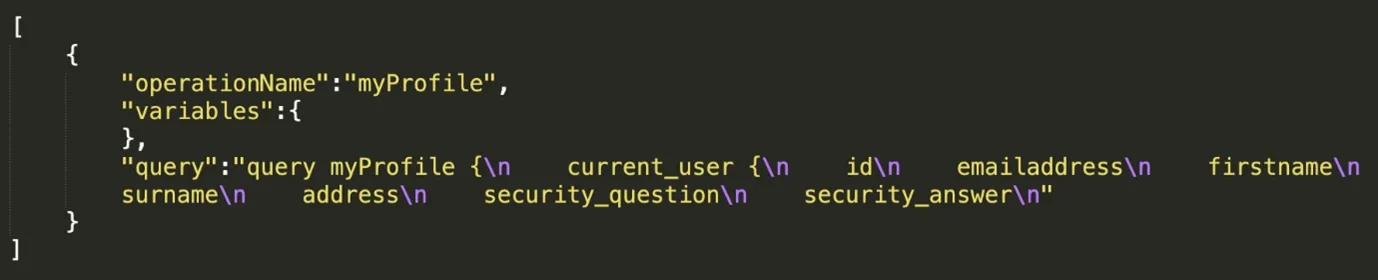
Figure 1. GraphQL request sent off when the user visits their profile page.
The server answers with the response below, which the application uses to populate the UI elements on the profile page.
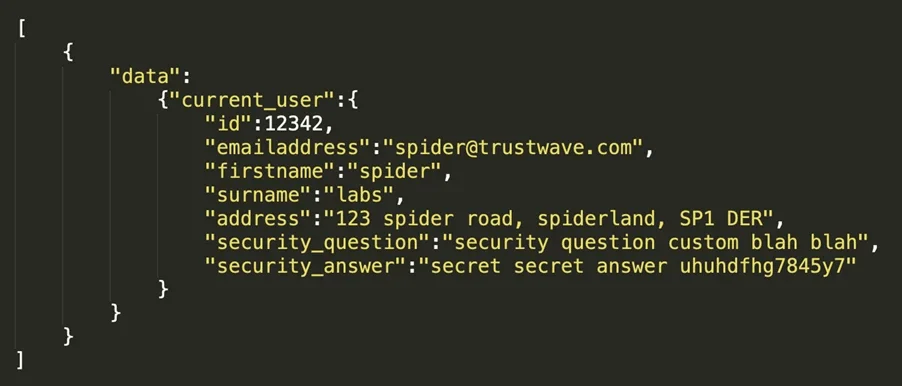
Figure 2. GraphQL response returned which is used to populate UI elements in the profile page.
Two things stand out in that response. First, there is an id reference that looks like an incremental, predictable identifier per customer, which is the classic shape of an indirect object reference (IDOR) vulnerability. Second, and this is the obstacle, the identifier lives in the response rather than in the request. The usual proof of concept, taking your own id (for example 12342) and changing it to 12343 to reach another user's profile, assumes you can edit a value the client sends. Editing a response does not change what the server returns, so that route is closed.
So the author turns back to the request and breaks it down, zooming in on the first part.
Figure 3. The baseline request to retrieve user details has no variables configured.
The first part of the request creates an operation named myProfile, and a query of the same name inside it. The data comes back under current_user: the user's id, e-mail address and so on. The interesting part is the variables section, which is blank. The developer designed this getter call to take no user-defined arguments: the application calls the endpoint in the context of the requesting user and gets that user's data back.
GraphQL variables are arguments to the query, much like argv[] to a program. The fact that the developer did not intend the call to pass any arguments does not mean the endpoint refuses them.
Exploitation
Step 1: learn the identifier from the response
The response to the baseline query contains the id key used to identify customers. In the example it is 12342 for the attacker's own user.
Step 2: rewrite the request with a variable
The author takes that id value out of the response and puts it into the request, this time as an argument in the variables section. The query is also changed to define and reference the new variable: ($id: Int!) declares it, and user(id: $id) passes it as the argument when the call is made. The value is changed from the attacker's own 12342 to 12343, one number above (below would work too), to reach a different user.
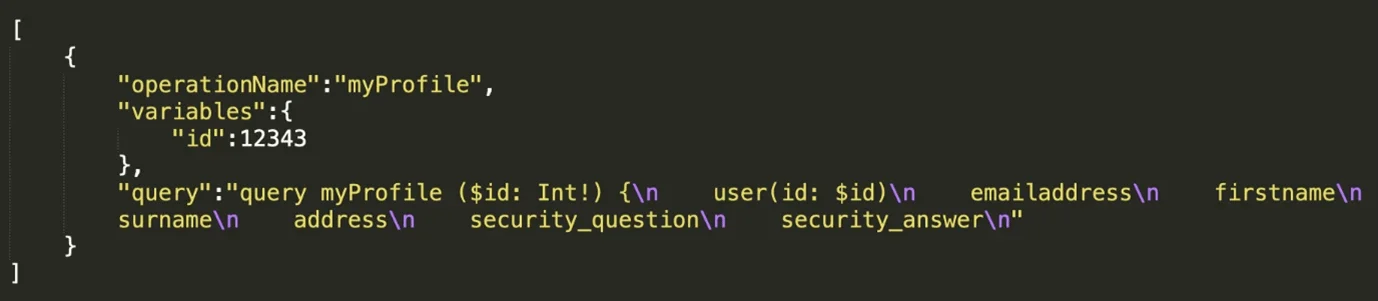
Figure 4. Rolling our own GraphQL query for the profile page, now with added variables, id=12343.
Step 3: read the other user's data
The server receives the request on the same endpoint as before. This time the query carries the variable id with the value 12343, and the server uses it to pull the matching record from its store. The client receives a response containing the profile data of the user whose id is 12343, described in the post as the next-door neighbour in id terms, who happens to be venom.
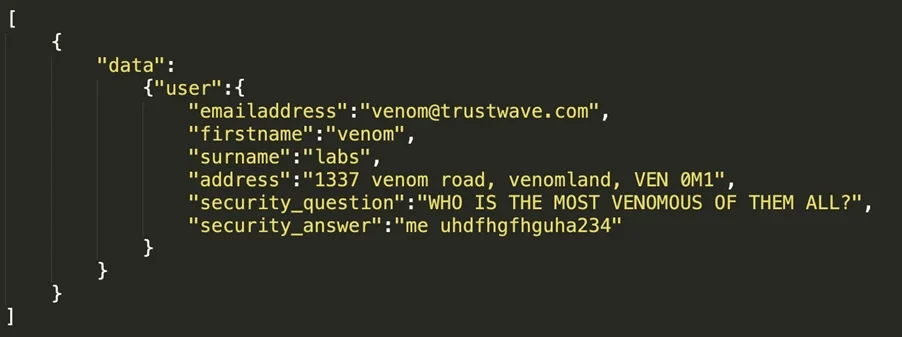
Figure 5. User profile details relating to another user (venom, id=12343) are returned.
Step 4: take over the account
This part is not shown in the post. With the other user's e-mail address and security answer in hand (the answer in the example is me uhdfhgfhguha234), the attacker uses the forgotten password functionality, supplies that e-mail address and the correct security answer, and resets the password to take over the account.
Step 5: scale it
Also not shown: sending the baseline request to Burp Intruder, or scripting it with Python or curl, and incrementing through all id values from 00000 to 99999 returns the e-mail addresses and corresponding security answers for every customer in the application.
Root cause
The server side contains code and logic that parses user-defined id values, because that capability is useful elsewhere in the application. Most likely there is an administrative interface where an administrator queries arbitrary users: pulling up their details, resetting their password and so on. That means the same GraphQL endpoint is shared between the administrative functionality and the customer-facing profile page. The customer-facing query was written without arguments, so nobody ever sent it one, but the endpoint happily accepts one.
The baseline request has no argument to tamper with, which is why this kind of issue gets overlooked: there is nothing obviously editable in the request, and the identifier only appears in the response.
Impact
An authenticated customer can retrieve another customer's profile data, including e-mail address and security answer, by supplying an id the application never intended them to control. Combined with the forgotten password flow, that is account takeover for any user whose id the attacker can guess or enumerate. Because the identifiers are incremental, the attack scales to every account in the application. The post does not state how many accounts existed or whether the issue was fixed, and it gives no bounty or severity.
Fix
From a defensive standpoint, the post says the shared endpoint is the problem. If an administrative interface needs to query arbitrary users, it should be locked down, or the functionality should be divided up and moved to an administrator-only endpoint that is not available in the general, publicly accessible customer endpoint.
Variants to test
- Add variables to argument-less queries. Take any GraphQL request whose
variablessection is empty, and try declaring and passing an identifier you saw in the response, for example($id: Int!)withuser(id: $id). A positive result is a response containing another user's data. - Move response fields into the request. Look for identifiers, tenant keys or object references that appear only in responses, then try them as query arguments. A positive result is data belonging to a different object or user.
- Enumerate the identifier space. Once a variable is accepted, increment or decrement it across a range (the post uses
00000to99999). A positive result is a stream of distinct users' records. - Chain with password reset. Where the leaked fields include an e-mail address and a security question answer, try the forgotten password flow. A positive result is a successful reset of another user's password.
- Check for shared endpoints. If a customer-facing query accepts an argument that only an administrative feature should need, that suggests the endpoint is shared. A positive result is the customer request returning data the UI never asks for.
What happened, in plain words
A security researcher describes a way to take over customer accounts on a retail-style website. The site let you log in, buy things, and keep your payment details and address on file. Each customer had a profile page where they could change their name, e-mail address, home address, security question and security answer.
The profile page got its data from the server using a technology called GraphQL. When you opened your profile, your browser sent a request asking for your details, and the server sent back a response with your name, e-mail, and an internal customer number called id. The researcher noticed that this id looked like a simple, incremental number per customer (like 12342, 12343). That is a classic sign of an Indirect Object Reference (IDOR) vulnerability: if you can change that number, you might see someone else's data.
The problem was that the id appeared only in the response, not in the request. Normally you would edit the request to change the id, but here there was nothing to edit. So the researcher took the id from the response and added it to the request as a new variable. GraphQL lets you define variables (like arguments to a function) even if the original request didn't have any. By adding a variable called id and setting it to 12343 (one more than his own 12342), he made the server return the profile of a different user, named "venom".
With that other user's e-mail address and security answer, he could then use the "forgot password" feature to reset their password and take over their account. He could also automate the process to go through all possible id numbers (00000 to 99999) and get every customer's e-mail and security answer.
The fix is to not let regular customers use the same endpoint that administrators use to look up any user. The endpoint should be locked down or moved to an admin-only area.
Introduction
This is a write-up about a retail-style web application where customers register, log in, buy products, and keep payment details and a shipping address on file. Each user has a profile page where they can view and update their name, e-mail address, home address, security question and security answer. The profile page, and the application as a whole, retrieves its data from the server over GraphQL.
GraphQL, as the post quotes from graphql.org, is "a query language for your API, and a server-side runtime for executing queries using a type system you define for your data. GraphQL isn't tied to any specific database or storage engine and is instead backed by your existing code and data."
If you are new to these terms: an API (Application Programming Interface) is a way for two pieces of software to talk to each other. Think of it as a waiter in a restaurant: you (the client) tell the waiter what you want, the waiter goes to the kitchen (the server), and brings back your order. In web applications, the client is usually your browser, and the server is the computer that holds the data. GraphQL is a specific style of API where the client asks for exactly the data it needs, and the server returns just that. It is like ordering a custom sandwich: you list the ingredients you want, and you get exactly that, no more, no less.
The author notes that the usual security conversation around GraphQL is about introspection, the ability to make the server hand over its schema and queries. That is not the subject here. The subject is the ordinary operation of a query: reading the response closely, then feeding what you learn back into the request so the query does something it was not designed to do. In this case that ends in account takeover.
Account takeover means an attacker gains control of someone else's account, usually by resetting their password or otherwise logging in as them. It is one of the most serious outcomes in web security because it can lead to fraud, data theft, and loss of trust.
Setup
The post does not name the application, the program or a bounty. It describes a typical retail web application and walks through the profile page as an authenticated customer. The only tooling mentioned is Burp Intruder (or Python/curl) for automating the attack. No versions are given.
Think of it as a mail intercept service: you can open letters, read them, and even rewrite them before they reach the recipient. Burp Intruder is a feature of the Burp Suite proxy that automates sending many requests with different values, like a machine that fills in a form with every possible answer. Python and curl are programming and command-line tools that can also send HTTP requests programmatically.
The precondition is simply a normal customer account, because the attack starts from the request the application itself sends when you open your own profile page.
Finding it
When the user selects their profile page, the application sends the following GraphQL query.
Figure 1. GraphQL request sent off when the user visits their profile page.
The server answers with the response below, which the application uses to populate the UI elements on the profile page.
Figure 2. GraphQL response returned which is used to populate UI elements in the profile page.
Two things stand out in that response. First, there is an id reference that looks like an incremental, predictable identifier per customer, which is the classic shape of an indirect object reference (IDOR) vulnerability. Second, and this is the obstacle, the identifier lives in the response rather than in the request. The usual proof of concept, taking your own id (for example 12342) and changing it to 12343 to reach another user's profile, assumes you can edit a value the client sends. Editing a response does not change what the server returns, so that route is closed.
IDOR stands for Insecure Direct Object Reference. It is a type of vulnerability where an application uses a user-supplied value (like a number or a name) to directly access an object (like a database record) without checking if the user is allowed to access that object. Imagine a hotel where your room key is just a number written on a card: if you change the number, you can open other rooms. In this case, the id is like that room number.
So the author turns back to the request and breaks it down, zooming in on the first part.
Figure 3. The baseline request to retrieve user details has no variables configured.
The first part of the request creates an operation named myProfile, and a query of the same name inside it. The data comes back under current_user: the user's id, e-mail address and so on. The interesting part is the variables section, which is blank. The developer designed this getter call to take no user-defined arguments: the application calls the endpoint in the context of the requesting user and gets that user's data back.
In GraphQL, an operation is a request for data. It can have a name (like myProfile) and can include variables, which are like parameters you can pass to the query. Think of a variable as a blank on a form: the form is the query, and you can fill in the blank with different values each time. Here, the form had no blanks; the developer never intended anyone to fill in an id.
GraphQL variables are arguments to the query, much like argv[] to a program. The fact that the developer did not intend the call to pass any arguments does not mean the endpoint refuses them.
Exploitation
Step 1: learn the identifier from the response
The response to the baseline query contains the id key used to identify customers. In the example it is 12342 for the attacker's own user.
Step 2: rewrite the request with a variable
The author takes that id value out of the response and puts it into the request, this time as an argument in the variables section. The query is also changed to define and reference the new variable: ($id: Int!) declares it, and user(id: $id) passes it as the argument when the call is made. The value is changed from the attacker's own 12342 to 12343, one number above (below would work too), to reach a different user.
Figure 4. Rolling our own GraphQL query for the profile page, now with added variables, id=12343.
Let's break down the changes:
($id: Int!)declares a variable namedidof type integer (a whole number). The exclamation mark means it is required (non-null). This is like adding a new field to a form and saying it must be filled.user(id: $id)is the part of the query that uses the variable. It tells GraphQL to fetch a user whoseidmatches the value of the variable. This is like saying "find the user with the ID I provide".- In the
variablessection, the value is set to12343. This is the actual number that will be used.
By doing this, the attacker is essentially telling the server: "I know you didn't expect me to ask for a specific user, but here is a user ID; please give me that user's data." And the server, because it supports this feature for other purposes (like admin functions), complies.
Step 3: read the other user's data
The server receives the request on the same endpoint as before. This time the query carries the variable id with the value 12343, and the server uses it to pull the matching record from its store. The client receives a response containing the profile data of the user whose id is 12343, described in the post as the next-door neighbour in id terms, who happens to be venom.
Figure 5. User profile details relating to another user (venom, id=12343) are returned.
Step 4: take over the account
This part is not shown in the post. With the other user's e-mail address and security answer in hand (the answer in the example is me uhdfhgfhguha234), the attacker uses the forgotten password functionality, supplies that e-mail address and the correct security answer, and resets the password to take over the account.
The forgotten password feature is a common way to recover access to an account. It usually asks for your e-mail address and then either sends a reset link or asks a security question. If an attacker has both the e-mail and the security answer, they can reset the password and log in as the victim.
Step 5: scale it
Also not shown: sending the baseline request to Burp Intruder, or scripting it with Python or curl, and incrementing through all id values from 00000 to 99999 returns the e-mail addresses and corresponding security answers for every customer in the application.
This is called enumeration: trying every possible value in a sequence to find valid ones. Because the id numbers are sequential, an attacker can simply loop through all numbers and collect data for every user.
Root cause
The server side contains code and logic that parses user-defined id values, because that capability is useful elsewhere in the application. Most likely there is an administrative interface where an administrator queries arbitrary users: pulling up their details, resetting their password and so on. That means the same GraphQL endpoint is shared between the administrative functionality and the customer-facing profile page. The customer-facing query was written without arguments, so nobody ever sent it one, but the endpoint happily accepts one.
The baseline request has no argument to tamper with, which is why this kind of issue gets overlooked: there is nothing obviously editable in the request, and the identifier only appears in the response.
Impact
An authenticated customer can retrieve another customer's profile data, including e-mail address and security answer, by supplying an id the application never intended them to control. Combined with the forgotten password flow, that is account takeover for any user whose id the attacker can guess or enumerate. Because the identifiers are incremental, the attack scales to every account in the application. The post does not state how many accounts existed or whether the issue was fixed, and it gives no bounty or severity.
Fix
From a defensive standpoint, the post says the shared endpoint is the problem. If an administrative interface needs to query arbitrary users, it should be locked down, or the functionality should be divided up and moved to an administrator-only endpoint that is not available in the general, publicly accessible customer endpoint.
Variants to test
- Add variables to argument-less queries. Take any GraphQL request whose
variablessection is empty, and try declaring and passing an identifier you saw in the response, for example($id: Int!)withuser(id: $id). A positive result is a response containing another user's data. - Move response fields into the request. Look for identifiers, tenant keys or object references that appear only in responses, then try them as query arguments. A positive result is data belonging to a different object or user.
- Enumerate the identifier space. Once a variable is accepted, increment or decrement it across a range (the post uses
00000to99999). A positive result is a stream of distinct users' records. - Chain with password reset. Where the leaked fields include an e-mail address and a security question answer, try the forgotten password flow. A positive result is a successful reset of another user's password.
- Check for shared endpoints. If a customer-facing query accepts an argument that only an administrative feature should need, that suggests the endpoint is shared. A positive result is the customer request returning data the UI never asks for.
Glossary
- API: Application Programming Interface; a set of rules that lets different software talk to each other.
- GraphQL: A query language for APIs that lets clients request exactly the data they need.
- Introspection: A GraphQL feature that allows clients to query the server for its schema (the list of available queries and types).
- Schema: The definition of the data and operations available in a GraphQL API.
- Query: A request for data in GraphQL.
- Operation: A named GraphQL request that can include a query and variables.
- Variable: A parameter in a GraphQL query that can be filled with a value at runtime.
- IDOR: Insecure Direct Object Reference; a vulnerability where an application exposes an internal object reference (like a database ID) without proper access control.
- Account takeover: Gaining unauthorised access to someone else's account.
- Proxy: A tool that intercepts and modifies traffic between a client and a server.
- Burp Intruder: A tool in Burp Suite for automating requests with varying inputs.
- Enumeration: Systematically trying all possible values (like IDs) to discover valid ones.
- Endpoint: A specific URL or address where an API receives requests.
- Forgotten password flow: A feature that allows users to reset their password, often using e-mail and a security question.
- Security question: A question used as a secondary authentication factor, like "What is your mother's maiden name?"
- Payload: The part of a request that carries the actual data or attack string.
- HTTP request: A message sent by a client to a server asking for a resource or action.
- HTTP response: The message sent back by the server in reply to a request.
- UI: User Interface; the visual part of an application that users interact with.
- Python: A programming language often used for scripting and automation.
- curl: A command-line tool for sending HTTP requests.
- Burp Suite: A set of security testing tools, including a proxy and Intruder.
- argv[]: In programming, an array of arguments passed to a program.
- Non-null: In GraphQL, a type modifier indicating that a value cannot be null (must be provided).
- Integer: A whole number (no decimals).
- Type system: In GraphQL, the set of types that define the shape of data and operations.
- Runtime: The environment in which a program executes.
- Database: An organised collection of data stored electronically.
- Storage engine: The underlying software that stores and retrieves data in a database.
- Administrative interface: A part of an application used by administrators to manage users and data.
- Publicly accessible: Available to anyone on the internet, without special permissions.
- Lock down: To restrict access to something, usually to authorised users only.
- Incremental: Increasing by a fixed amount, often by one each time.
- Predictable identifier: An ID that follows a pattern, making it easy to guess other IDs.
- Proof of concept: A demonstration that a vulnerability can be exploited.
- Baseline request: The original, unmodified request sent by the application.
- Tamper: To modify or interfere with something, often a request.
- Exploit: To take advantage of a vulnerability.
- Vulnerability: A weakness in a system that can be exploited to cause harm.
- Attack surface: The sum of all points where an attacker can try to enter or extract data.
- Authentication: The process of verifying a user's identity.
- Authorisation: The process of checking if a user has permission to perform an action.
- Session: A period of interaction between a user and a system, often tracked with a cookie or token.
- Cookie: A small piece of data stored by the browser and sent with requests to identify a session.
- Token: A piece of data used for authentication, often in place of a password.
- HTTP: Hypertext Transfer Protocol; the foundation of data communication on the web.
- HTTPS: HTTP Secure; HTTP with encryption.
- JSON: JavaScript Object Notation; a common format for data exchange.
- GraphQL endpoint: The URL where a GraphQL API receives queries.
- Mutation: In GraphQL, an operation that changes data (as opposed to a query that reads data).
- Resolver: In GraphQL, a function that provides the data for a field.
- Field: A piece of data in a GraphQL query or response.
- Argument: A value passed to a field or query in GraphQL.
- Schema introspection: The ability to query a GraphQL server for its schema.
- Error message: A message returned by a server when something goes wrong, which can sometimes leak information.
- Verbose error: An error message that reveals too much detail, potentially useful to an attacker.
- Production system: The live environment where real users interact with the application.
- Pentester: Penetration tester; a security professional who tests systems for vulnerabilities.
- Bug bounty: A program where organisations reward researchers for finding and reporting vulnerabilities.
- Severity: A measure of how serious a vulnerability is.
- CVSS: Common Vulnerability Scoring System; a standard for rating severity.
- Bounty: A reward, often monetary, given for finding a vulnerability.
- Disclosure: The act of making a vulnerability public.
- Write-up: A detailed explanation of a vulnerability and how it was found.
- Retail application: A web application for shopping, like an online store.
- Payment details: Information like credit card numbers used for purchases.
- Shipping address: The address where products are delivered.
- Profile page: A page where a user can view and edit their personal information.
- Security answer: The answer to a security question, used for authentication.
- Forgotten password functionality: A feature to reset a password when forgotten.
- Reset password: To change a password, often after proving identity.
- Account: A user's registered identity on a system.
- Customer: A user of a retail application.
- Administrator: A user with elevated privileges to manage the system.
- Endpoint: A specific URL where an API can be accessed.
- Shared endpoint: An endpoint used by multiple features or user roles.
- Lock down: To secure or restrict access.
- Divide up: To separate functionality into different parts.
- Administrator-only endpoint: An endpoint accessible only to administrators.
- Publicly accessible: Open to anyone.
- General customer endpoint: An endpoint meant for regular users.
- Code: Instructions written in a programming language.
- Logic: The decision-making part of code.
- Parse: To analyse and interpret data.
- User-defined: Provided by the user, not hard-coded.
- Arbitrary: Any, without restriction.
- Record: A single entry in a database.
- Store: A database or data storage system.
- Client: The software making a request, usually a browser.
- Server: The software responding to requests, holding data.
- Response: The data sent back by the server.
- Request: The data sent by the client to the server.
- UI element: A part of the user interface, like a text box or button.
- Populate: To fill with data.
- Incremental: Increasing step by step.
- Predictable: Able to be guessed.
- Indirect Object Reference: A reference to an object using an identifier, like a number.
- IDOR: Insecure Direct Object Reference.
- Proof of concept: A demonstration.
- Clock off: Finish work.
- Hacking up responses: Modifying responses, which does not affect the server.
- Pay those bills: Sarcastic remark meaning it won't achieve the goal.
- Park that thought: Set aside for now.
- Zooming in: Looking closely.
- Operation name: The name given to a GraphQL operation.
- Query of the same name: A query with the same name as the operation.
- current_user: The field in the response containing the user's data.
- Variables section: The part of a GraphQL request where variables are defined.
- Blank: Empty.
- Getter call: A request that retrieves data.
- User-defined arguments: Arguments provided by the user.
- Context of the requesting user: The identity of the user making the request.
- argv[]: Array of arguments in programming.
- Black hoody: Metaphor for adopting a hacker mindset.
- Hacker mode enabled: Ready to hack.
- Re-write the request: Modify the request.
- Tweak the query: Adjust the query.
- Define and reference: Declare and use.
- ($id: Int!): GraphQL syntax to declare a variable named id of type integer, required.
- user(id: $id): GraphQL syntax to pass the variable id to the user field.
- Light the fuse and fire the canons: Metaphor for sending the request.
- Fingers in those ears: Metaphor for bracing for impact.
- Microseconds later: Very quickly.
- Next door neighbour in id terms: The user with the next id number.
- venom: The username of the other user.
- Forgotten password functionality: Feature to reset password.
- Piping in: Entering.
- Security answer: The answer to a security question.
- Reset their password: Change their password.
- Take over their account: Gain control of their account.
- Baseline request: The original request.
- Burp Intruder: Tool for automated attacks.
- Busting out Python/curl: Using Python or curl scripts.
- Increment through: Go through one by one.
- 00000 to 99999: Range of id values.
- Return us: Give us.
- Cup of tea and a few biscuits: Celebration.
- Spitting out shellcode: Writing low-level exploit code.
- Spraying any heaps: Exploiting memory corruption.
- Usual IDOR: Typical IDOR.
- Little more effort: Slightly harder.
- Overlooked: Missed.
- Baseline request lacks such an argument: The original request has no argument to manipulate.
- Manipulate: Change.
- Endpoint: API endpoint.
- Happy to support: Willing to accept.
- Poor endpoint: Humorous sympathy for the endpoint.
- Pentester technical wizardry: Advanced hacking skills.
- Re-creating those baseline requests: Modifying the original requests.
- JavaScript: Programming language used in browsers; can contain clues.
- Treasure: Valuable data.
- Defensive standpoint: From a security defence perspective.
- Stop it: Prevent it.
- Server side: On the server.
- Code and logic: Programming instructions and decision-making.
- Parse any user-defined id values: Read and interpret id values provided by users.
- More useful elsewhere: Helpful for other features.
- Administrative interface: Admin panel.
- Arbitrary users: Any users.
- Pull up their details: Retrieve their information.
- Shared: Used by multiple parts.
- Locked down: Secured.
- Divided up: Separated.
- Administrator only endpoint: Endpoint for admins only.
- General customer (publicly accessible) one: Endpoint for all customers.
- About TrustWave: Company info.
- Latest Intelligence: Recent articles.
- Back Up With Care...: Another article title.
- In-the-wild Exploitation...: Another article title.
- Using SQLmap...: Another article title.



