(Response) Splitting Up Reverse Proxies To Reach Internal Only Paths
The author shows that if a back-end application can be made to emit an arbitrary response header, an attacker can inject an X-Accel-Redirect header that NGINX honours, causing it to serve internal-only paths. In the proof of concept this let a request reach a /secret/ path that returned 404 to external users.
 Published on trustwave.com
Change theme to light
The full write-up lives on its author's site
It belongs to its author, so we link to it rather than copy it. The other two tabs are our own rewrites, checked against it.
Context
Many web applications sit behind a reverse proxy, which lets operators do load balancing, deploy WAF rules, set up routing rules and rewrite requests and responses independently of the back-end application server. That extra layer also adds complexity and attack surface. James Kettle's HTTP Desync Attacks research from 2019 abused the link between front-end and back-end by exploiting differences in how each side handled Content-Length and Transfer-Encoding.
This write-up looks at NGINX, one of the most popular reverse proxies, and specifically at nginx/src/http/modules/ngx_http_proxy_module.c. The author was hunting for edge cases: legacy support, features nobody uses, and sources of user input that end up somewhere interesting. While scrolling the module source, a set of proxy-related HTTP response headers used by NGINX caught his eye.
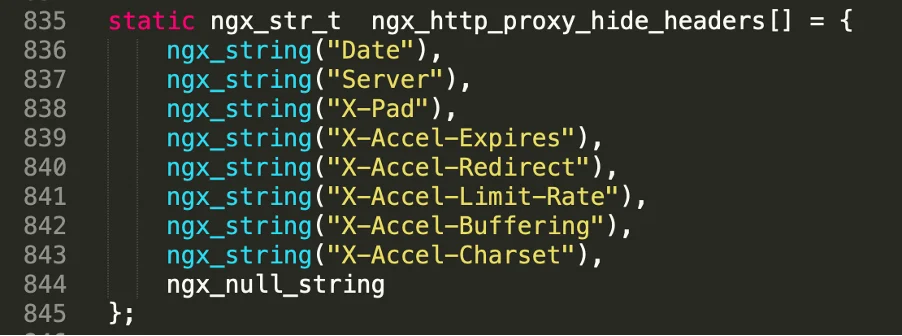
Among them was the X-Accel family, in particular X-Accel-Redirect, which he had not known about before. The NGINX documentation describes it as follows:
'X-Accel-Redirect' performs an internal redirect to the specified URI;
That raised the question the whole piece is built around: can this feature be abused to reach internal things?
Setup
The proof of concept is a local lab. NGINX is installed as the front-end web server on TCP port 80 and forwards requests to a back-end server on TCP port 8000, where a Flask application answers. NGINX routes requests for / and /publicdownload/ to the back end. The Flask application receives requests for /publicdownload/<file_id> and serves files out of the back end at /root/publicdownload/<file_id>, returning the data to NGINX, which then provides it to the requesting user.
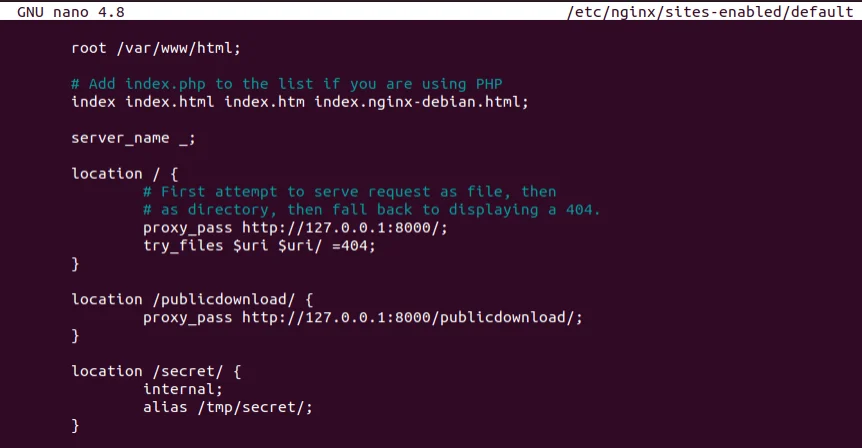
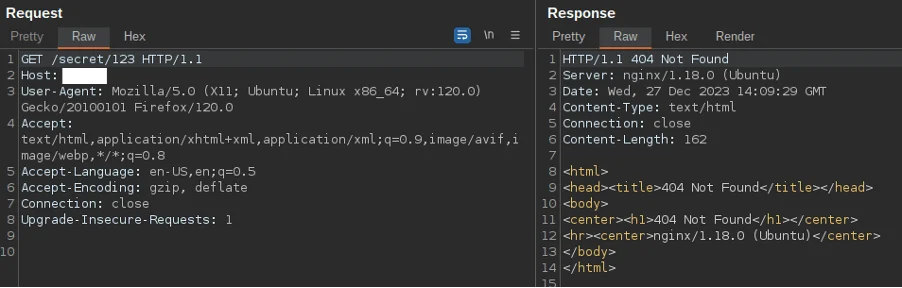
There is also an internal-only path called /secret/, which serves files directly out of /tmp/secret/ from the NGINX front-end server. This is the flag for the proof of concept. It cannot be called or reached directly from an external perspective: requesting the file /secret/123 returns a 404.
The author notes this is typical of how NGINX is used as a reverse proxy in the wild, minus the flag part.
To emulate an HTTP Response Splitting vulnerability, the Flask application was written to accept two optional parameters alongside the file request, goodness1 and goodness2. A new HTTP response header is created from both values: goodness1 constructs the header name and goodness2 supplies the value.
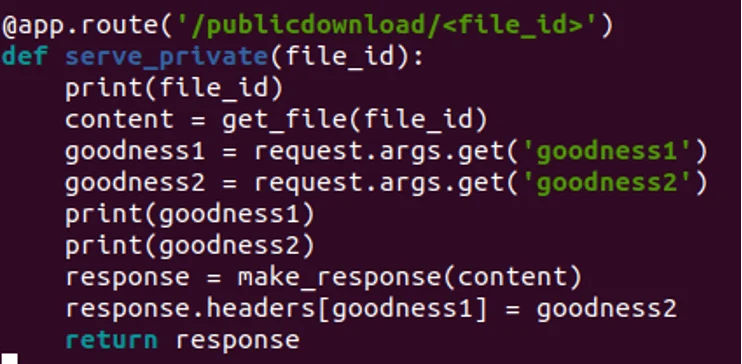
In a real-world scenario you would inject %0D%0A (carriage return line feed) characters into parameters that you find are echoed back into a response header, creating a new header. In the author's experience this typically happens when an application builds a Set-Cookie response header from user input. The optional parameters stand in for that CRLF vulnerability, but the destination is the same: an arbitrary HTTP response header inserted by abusing an application vulnerability.
Finding it
The starting point was the NGINX source and its documentation rather than prior research. The author deliberately avoids googling existing work first, so as not to be swayed by it, and only searches at the end. The X-Accel-Redirect header looked worth poking at because it performs an internal redirect to a specified URI, which is exactly the kind of feature that could bridge the gap between what a user is allowed to request and what the proxy can reach internally.
Exploitation
Step 1: a normal request
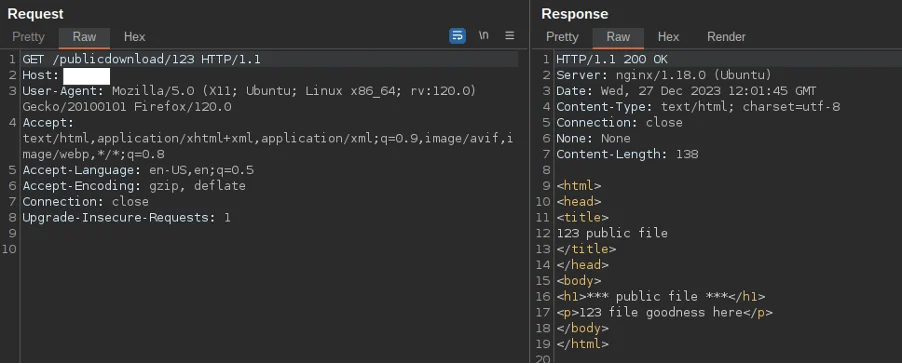
When a normal user requests http://server/publicdownload/123, the request first hits the NGINX front-end on TCP port 80. NGINX checks its configuration and forwards the request to the back-end Flask application on TCP port 8000. Flask checks whether the file 123 exists in /root/publicdownload/ and returns the response to NGINX, which sends it on to the requesting user (the 123 public file). The raw HTTP request and response are shown below.
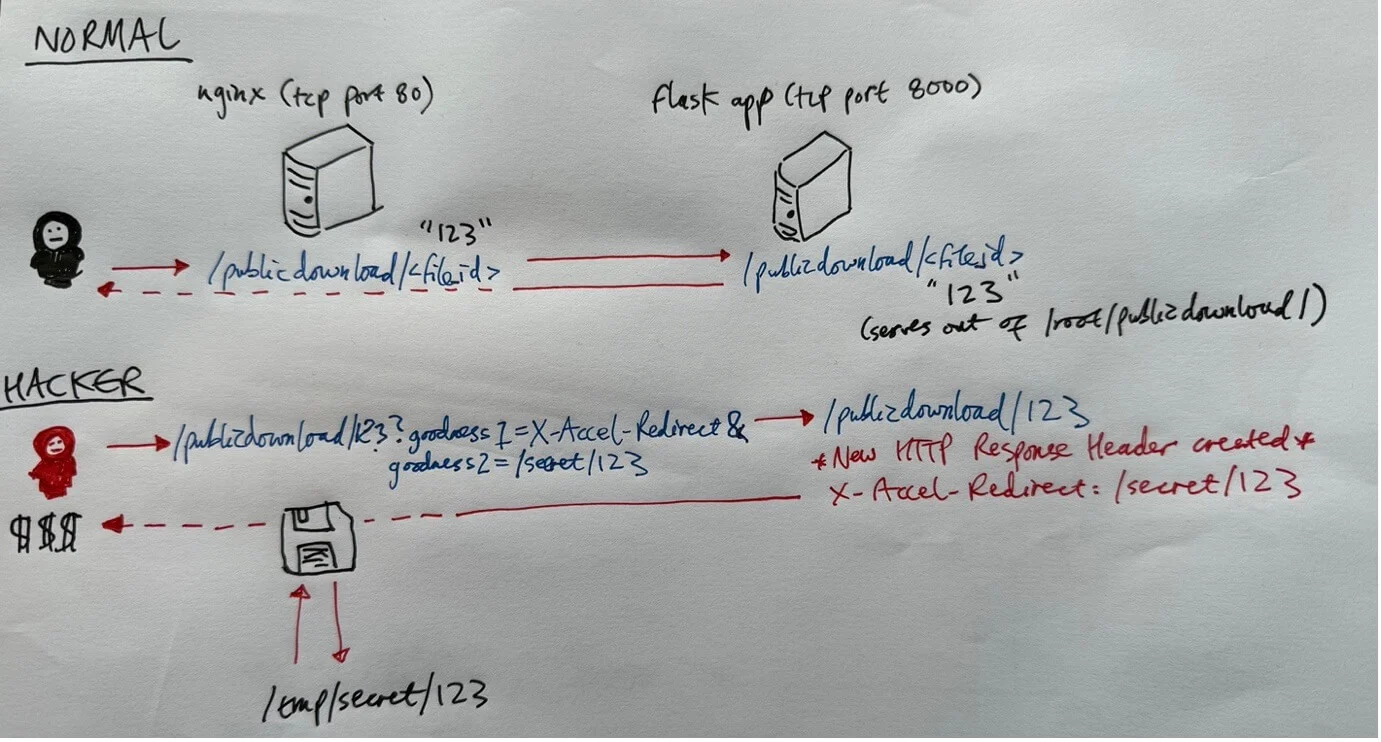
The flows are illustrated in the diagram below.
Step 2: the same request with an injected header
A hacker requests http://server/publicdownload/123 while exploiting an HTTP Response Splitting vulnerability, in this proof of concept via the optional parameters. They abuse the Flask vulnerability to create an arbitrary response header. The request used to exploit this is:
http://server/publicdownload/123?goodness1=X-Accel-Redirect&goodness2=/secret/123
In real life this would be blah%0D%0AX-Accel-Redirect:%20/secret/123, as mentioned earlier. The goodness1 parameter becomes the header name X-Accel-Redirect and goodness2 becomes the value /secret/123.
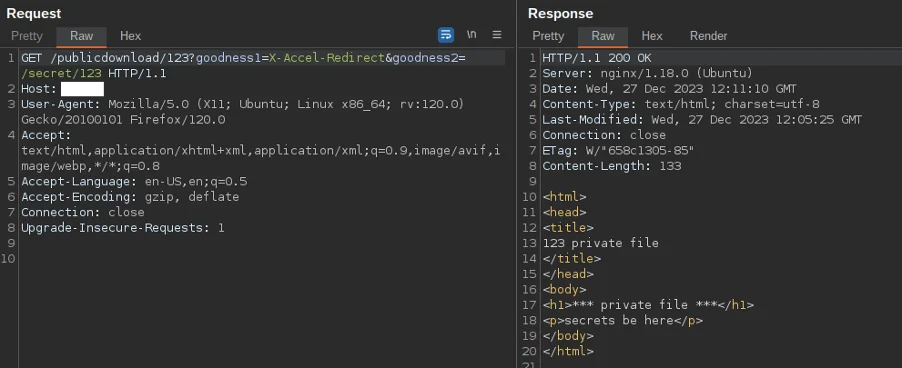
The 123 file is served out of /root/publicdownload/ as usual by the back-end Flask application server. The response is returned to NGINX as before, but this time it carries a new HTTP response header, X-Accel-Redirect: /secret/123. NGINX sees this header and, as the documentation says, uses it to redirect to internal paths instead. NGINX retrieves the 123 file locally from /tmp/secret/ (the 123 private file) and provides it back to the requesting user, I mean hacker.
Step 3: the internal file is returned
The internal /secret path was reached and the /secret/123 file, previously forbidden, was accessed by using a feature of NGINX.
Root cause
The design feature is the problem: X-Accel-Redirect lets a back-end response tell NGINX to perform an internal redirect to a specified URI. Detectify's 2021 post noted this can reach config blocks marked with the internal directive. If an attacker can insert an arbitrary response header through an application-level flaw such as HTTP Response Splitting, they can supply that header themselves and make the proxy serve content from internal-only locations. The author found that Detectify's 2021 blog post on middleware misconfigurations already mentioned that X-Accel-Redirect can be used to access internal NGINX blocks, but it did not go into what scenario one could take advantage of this in.
Impact
Under the conditions shown, an attacker who can inject a response header through the back-end application can reach internal-only paths on the NGINX front end and read files that are otherwise forbidden from the outside, such as /secret/123 served from /tmp/secret/. The proof of concept relies on a deliberately vulnerable Flask application that reflects the two parameters into a response header; in the real world the equivalent precondition is an HTTP Response Splitting vulnerability, typically where user input is echoed into a header such as Set-Cookie. The author does not claim a CVE for this work and states that he was two years too late to the party, as Detectify had already mentioned the header in 2021.
Fix
The report does not describe a fix or a configuration change.
Variants to test
A positive result is a response whose body comes from an internal-only location rather than the requested resource. A positive result is content from a block that returns 404 when requested directly. A positive result is any change in which resource the proxy serves. A positive result is an extra header appearing in the response that was not set by the application itself.
What happened, in plain words
Imagine a large office building with a single reception desk at the front door. Visitors never walk straight to the offices themselves; they talk to the receptionist, who checks a list and then phones the right department. That receptionist is what this article calls a reverse proxy: a piece of software that sits in front of the real application and passes messages back and forth. The real application, hidden behind the receptionist, is the back-end server.
This article is about a feature of one very popular receptionist, a web server called NGINX (pronounced "engine-x"). NGINX is often used as that front desk. The feature is a special instruction that the back-end application can put in its reply, telling NGINX: "actually, don't send the visitor what I just gave you; fetch this other thing from inside the building instead." The instruction is called X-Accel-Redirect.
The author's question was simple: if an attacker can slip that instruction into a reply, can they make NGINX hand over files from inside the building that visitors are never supposed to reach? He built a small lab on his own computer to find out. The answer was yes. He then searched the web and discovered someone else had already described the same idea two years earlier, so this was not a new discovery, but the walkthrough is still a clear demonstration of how the pieces fit together.
Below, we go through the same journey step by step, explaining every term as it appears.
The background: proxies, and why they add risk
Most modern websites are not one computer doing everything. A typical setup has a front-end server that the public talks to, and one or more back-end servers that do the actual work. The front-end is the reverse proxy. Putting a proxy in front lets the operators do several useful things without touching the application code:
- Load balancing: spreading incoming visitors across several back-end servers so no single one is overwhelmed. Think of a supermarket opening more tills when the queue grows.
- WAF rules: a WAF, or Web Application Firewall, is a filter that inspects incoming requests and blocks ones that look malicious, like a bouncer checking IDs at the door.
- Routing rules: deciding which request goes to which back-end service, like a mailroom sorting letters into different pigeonholes.
- Rewriting requests and responses: quietly changing the contents of a message as it passes through, like a translator adjusting wording.
All of this is useful, but every extra layer is another place where things can go wrong. Security people call the sum of all the ways an attacker might get in the attack surface. Adding a proxy increases the attack surface because there are now two systems that must agree on how to interpret messages, and any disagreement can be exploited.
The author mentions James Kettle's HTTP Desync Attacks research from 2019 as a famous example. In that work, the front-end and back-end disagreed about how long a message was, because of two headers called Content-Length and Transfer-Encoding. A header is a labelled line at the top of an HTTP message carrying metadata, like the "From" and "Subject" lines on an envelope. Content-Length says how many bytes the body contains; Transfer-Encoding says how the body is packaged. If the two sides read these differently, an attacker can smuggle a hidden second request inside the first. That is the same theme as this article: the gap between what the front end thinks is happening and what the back end thinks is happening.
The starting point: reading NGINX's source code
Source code is the human-written text that programmers create, which is then turned into the running program. NGINX is open source, meaning its source code is published for anyone to read. The author was reading a specific file inside it, nginx/src/http/modules/ngx_http_proxy_module.c. The path is just a location in the project's folder structure: src for source, http for the HTTP part, modules for optional pieces, and the file itself handles proxying.
He explains his method: he looks for edge cases, meaning unusual situations at the boundaries of normal use. He hunts for legacy support (old features kept for compatibility), features nobody uses, and places where user input ends up somewhere interesting. The reasoning is that many people have already read the obvious parts of a popular open-source project, so the less-travelled corners are where surprises hide.
A quick word on HTTP itself, since everything here is HTTP. HTTP is the language browsers and servers use to talk. Every message, whether a request (browser to server) or a response (server to browser), has two parts: a header section at the top, made of those labelled lines, and a body section below, carrying the actual content. In a request, the body is typically form data from a POST submission; in a response, the body is typically the page or file being returned.
While scrolling through that file, a group of response headers caught his eye. These are headers NGINX uses when it acts as a proxy.
The image shows those proxy-related HTTP response headers in the NGINX source. Among them was a family beginning with X-Accel. The X- prefix is a convention for custom headers not defined in the core HTTP standard. He had not heard of these before, and one in particular, X-Accel-Redirect, looked worth investigating.
To understand it, he went to NGINX's official documentation, which describes the header like this:
'X-Accel-Redirect' performs an internal redirect to the specified URI;
Let us unpack that sentence. A URI (Uniform Resource Identifier) is the technical name for an address of something on a server, such as /secret/123. A redirect normally means the server tells the browser "the thing you want is over there, go and ask for that address instead". An internal redirect is different: the server handles the switch itself, without telling the browser. The browser asked for one address, and the server quietly serves content from another. That is exactly the kind of quiet switch an attacker would love to control.
That gave him the question the whole article is built around: can this feature be abused to reach internal things?
Building the lab
A proof of concept (often shortened to PoC) is a small, deliberately simple demonstration that an idea actually works. Security researchers build them so a claim can be checked rather than just asserted. The author's first move was to install NGINX on his own machine, which on a Debian-style Linux system is done with the command apt-get install nginx. Linux is an operating system, like Windows or macOS, common on servers. TCP port 80 is the standard network doorway for unencrypted web traffic; a port is a numbered channel on a computer, so one machine can run many services at once, each listening on its own number.
His setup had three parts:
- NGINX as the front-end web server, listening on TCP port 80.
- A back-end server on TCP port 8000, running an application written in Flask. Flask is a small web framework, meaning a toolkit for building web applications in the Python programming language. At the time he started, the Flask application did not exist yet; he wrote it afterwards.
- NGINX configured to forward requests for
/and/publicdownload/to that back end.
The image shows the NGINX configuration that sets up this forwarding. In plain terms, the configuration tells NGINX: when a visitor asks for the site root or for anything under /publicdownload/, pass the request along to the back-end server on port 8000.
The Flask application receives requests for /publicdownload/<file_id> and serves files out of the back end at /root/publicdownload/<file_id>, returning the data to NGINX, which then provides it to the requesting user. The <file_id> notation means "whatever value appears in that position"; so a request for /publicdownload/123 asks for the file identified as 123. On the back-end machine, that file lives in the folder /root/publicdownload/. A folder (also called a directory) is a container for files, and the slashes describe the path through nested folders, much like a postal address.
There is also an internal-only path called /secret/, which serves files directly out of /tmp/secret/ from the NGINX front-end server. This is the flag for the proof of concept. In security exercises, a "flag" is a marker you are trying to retrieve to prove you succeeded, like the prize at the end of a treasure hunt. Here the flag is a file that only the front-end machine can see, in a folder called /tmp/secret/ on that machine. It cannot be called or reached directly from an external perspective: requesting the file /secret/123 returns a 404.
The image shows that direct request failing with a 404. A 404 is the standard HTTP status code for "not found". Status codes are three-digit numbers in a response summarising what happened: 200 means success, 404 means the address does not exist (or is hidden), 500 means the server had an error. So the front end is configured to refuse to hand out /secret/123 to anyone asking from outside.
The author notes this is typical of how NGINX is used as a reverse proxy in the wild, minus the flag part. In other words, the shape of the setup is realistic; only the secret file is added for the exercise.
Faking the vulnerability
To emulate an HTTP Response Splitting vulnerability, the Flask application was written to accept two optional parameters alongside the file request, goodness1 and goodness2. A parameter (also called a query parameter) is a named value appended to a URL after a question mark, like ?name=value. Multiple parameters are joined with &. A new HTTP response header is created from both values: goodness1 constructs the header name and goodness2 supplies the value.
The image shows the Flask code that builds a header from the two parameters. In plain words, the application takes whatever text the visitor supplies as goodness1, uses it as the name of a new header, takes goodness2 as that header's value, and adds the result to its reply.
Why build this deliberately? Because the real-world bug the author wants to imitate is HTTP Response Splitting, and he needs a stand-in for it. Let us explain the real bug from scratch.
A response is a sequence of lines: header lines, then a blank line, then the body. The boundary between one header line and the next is marked by two invisible characters: carriage return and line feed, written together as CRLF and encoded in a URL as %0D%0A. %0D is carriage return, %0A is line feed. If an application takes text from a user and pastes it into a header without cleaning it, and the user's text contains %0D%0A, the server will treat everything after those characters as a brand-new header line. The attacker has effectively "split" the response and inserted headers of their own choosing. That is HTTP Response Splitting.
In a real-world scenario you would inject %0D%0A characters into parameters that you find are echoed back into a response header, creating a new header. In the author's experience this typically happens when an application builds a Set-Cookie response header from user input. A cookie is a small piece of data a website asks the browser to store and send back on later requests, commonly used to remember who is logged in. Set-Cookie is the header that delivers a cookie to the browser. If a site builds that header from something the user typed, an attacker can inject CRLF and add extra headers.
The optional parameters stand in for that CRLF vulnerability, but the destination is the same: an arbitrary HTTP response header inserted by abusing an application vulnerability. In other words, the author skipped the fiddly encoding step and simply gave his test application two clean parameters that do the same job: let the visitor choose a header name and a header value.
Finding it
The starting point was the NGINX source and its documentation rather than prior research. The author deliberately avoids googling existing work first, so as not to be swayed by it, and only searches at the end. His reasoning, explained at the top of the article, is that reading other people's work first can steer you down their path; he prefers to explore his own idea purely, and if he goes down a wrong rabbit hole, at least it is his own choice. Only once the idea has succeeded or failed does he check what others have done.
The X-Accel-Redirect header looked worth poking at because it performs an internal redirect to a specified URI, which is exactly the kind of feature that could bridge the gap between what a user is allowed to request and what the proxy can reach internally. In reception-desk terms: the visitor is only allowed to ask for public files, but if the visitor can write a note that the receptionist will obey, the receptionist might fetch something from the locked back room.
Exploitation
Step 1: a normal request
When a normal user requests http://server/publicdownload/123, the request first hits the NGINX front-end on TCP port 80. NGINX checks its configuration and forwards the request to the back-end Flask application on TCP port 8000. Flask checks whether the file 123 exists in /root/publicdownload/ and returns the response to NGINX, which sends it on to the requesting user (the 123 public file). The raw HTTP request and response are shown below.
The image shows the raw HTTP request and response for this ordinary case. "Raw" means the actual text sent over the network, before the browser prettifies it. You can see the request line naming the address, the headers, and then the response with its status code and the file's contents. This is the baseline: everything works as intended, and the visitor gets the public file.
The flows are illustrated in the diagram below.
The diagram draws the two paths side by side: the normal flow, where the visitor asks NGINX, NGINX asks Flask, Flask returns the public file, and NGINX passes it back; and the attack flow, which we come to next. Seeing them together makes the difference obvious: in the normal flow, the file comes from the back end's public folder; in the attack flow, NGINX fetches from its own private folder instead.
Step 2: the same request with an injected header
A hacker requests http://server/publicdownload/123 while exploiting an HTTP Response Splitting vulnerability, in this proof of concept via the optional parameters. They abuse the Flask vulnerability to create an arbitrary response header. The request used to exploit this is:
http://server/publicdownload/123?goodness1=X-Accel-Redirect&goodness2=/secret/123
Line by line, in plain words:
http://is the scheme, telling the browser to use plain HTTP.serveris the hostname, a stand-in for the machine's address./publicdownload/123is the path, asking for the public file numbered 123. This part is identical to the normal request, which is the point: the attacker is asking for something they are allowed to ask for.?marks the start of the parameters.goodness1=X-Accel-Redirectsets the first parameter. The application will use this text as the name of a new response header, so the header will be calledX-Accel-Redirect.&separates the parameters.goodness2=/secret/123sets the second parameter. The application will use this as the header's value, so the header will readX-Accel-Redirect: /secret/123.
In real life this would be blah%0D%0AX-Accel-Redirect:%20/secret/123, as mentioned earlier. Let us decode that too, because it shows what the attack looks like without the training wheels:
blahis harmless filler text that the application would paste into a header value.%0D%0Ais the CRLF pair, the invisible line break that ends the current header line and starts a new one.X-Accel-Redirect:is the name of the header the attacker wants to add, followed by a colon.%20is a URL-encoded space, separating the header name from its value./secret/123is the internal address the attacker wants NGINX to fetch.
So the real-world payload smuggles a whole extra header line into what the application thought was ordinary text. The goodness1 and goodness2 parameters in the lab achieve the same end result more directly.
The 123 file is served out of /root/publicdownload/ as usual by the back-end Flask application server. The response is returned to NGINX as before, but this time it carries a new HTTP response header, X-Accel-Redirect: /secret/123. NGINX sees this header and, as the documentation says, uses it to redirect to internal paths instead. NGINX retrieves the 123 file locally from /tmp/secret/ (the 123 private file) and provides it back to the requesting user, I mean hacker.
The image shows this step in action: the request with the injected parameters, and the response coming back from the private location. The key detail is that the attacker never asked for /secret/123 directly; they asked for a public file and let the injected header do the work.
Why does NGINX obey? Because X-Accel-Redirect is a feature designed for exactly this: letting the back-end application tell the proxy "serve this other internal address instead". It exists so applications can hand off file serving to NGINX efficiently, for example to protect downloads behind application logic. The proxy trusts the back end. The flaw is that the back end can be made to say things the attacker chooses.
Step 3: the internal file is returned
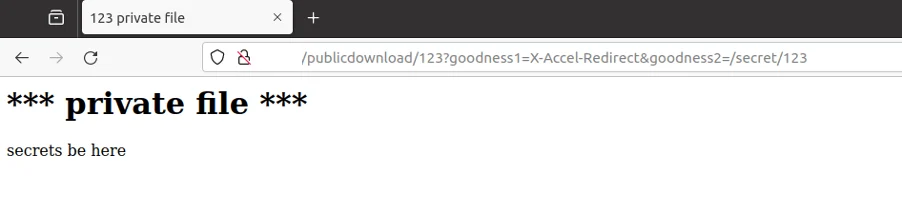
The internal /secret path was reached and the /secret/123 file, previously forbidden, was accessed by using a feature of NGINX.
The image shows the final result: the contents of the private file, delivered to the attacker through the proxy. The file that returned 404 when requested directly is now served, because the request never went to /secret/123 directly; it went to a public address, and the proxy itself performed the internal fetch.
Root cause
The design feature is the problem: X-Accel-Redirect lets a back-end response tell NGINX to perform an internal redirect to a specified URI. Detectify's 2021 post noted this can reach config blocks marked with the internal directive. A directive is an instruction in a configuration file. NGINX's internal directive marks a location as reachable only from inside NGINX, never from an outside request. It is the lock on the back room.
If an attacker can insert an arbitrary response header through an application-level flaw such as HTTP Response Splitting, they can supply that header themselves and make the proxy serve content from internal-only locations. The lock works against visitors at the front door; it does not work against a note the receptionist is trained to obey.
The author found that Detectify's 2021 blog post on middleware misconfigurations already mentioned that X-Accel-Redirect can be used to access internal NGINX blocks, but it did not go into what scenario one could take advantage of this in. Middleware here means the software layer between the front end and the application, the same idea as the reverse proxy. So the behaviour was known in general terms; what was missing was a concrete walkthrough of how an attacker gets there.
Impact
Under the conditions shown, an attacker who can inject a response header through the back-end application can reach internal-only paths on the NGINX front end and read files that are otherwise forbidden from the outside, such as /secret/123 served from /tmp/secret/. Impact is the security term for what damage a flaw allows; here it is unauthorised reading of files the operator intended to keep internal.
The proof of concept relies on a deliberately vulnerable Flask application that reflects the two parameters into a response header; in the real world the equivalent precondition is an HTTP Response Splitting vulnerability, typically where user input is echoed into a header such as Set-Cookie. A precondition is something that must already be true for an attack to work. So the attack is not universal: it needs two things to line up, a header-injection bug in the application and a proxy that honours X-Accel-Redirect.
The author does not claim a CVE for this work. A CVE, or Common Vulnerabilities and Exposures identifier, is a public catalogue number assigned to a specific security flaw so people can refer to it unambiguously. He states that he was two years too late to the party, as Detectify had already mentioned the header in 2021.
Fix
The report does not describe a fix or a configuration change. In reception-desk terms: if the receptionist will obey notes from the back office, then anyone who can write notes must be stopped, and the receptionist's list of trusted instructions should be kept as short as possible.
Variants to test
A positive result is a response whose body comes from an internal-only location rather than the requested resource. In plain words: find a place where your input ends up in a header, try to break out of that header with CRLF, and see whether the proxy then serves something it should not.
A positive result is content from a block that returns 404 when requested directly. A location block is a section of NGINX configuration describing how to handle a particular address pattern. If it returns 404 to a direct request but content through the injected header, the lock has been bypassed.
A positive result is any change in which resource the proxy serves. The idea is that X-Accel-Redirect may not be the only header with this kind of power.
A positive result is an extra header appearing in the response that was not set by the application itself. Sanitising means cleaning input so dangerous characters cannot do harm; if it is missing, CRLF slips through.
Glossary
- 404: the HTTP status code meaning "not found"; the requested address does not exist or is hidden.
- Attack surface: the total set of ways an attacker might try to get into a system.
- Back-end server: the computer or program behind a front-end that does the actual application work.
- Body: the part of an HTTP message below the headers, carrying the actual content.
- Carriage return and line feed (CRLF): the two invisible characters, encoded
%0D%0A, that mark the end of a line in an HTTP message. - Cookie: a small piece of data a site asks the browser to store and send back later, often used to remember a login.
- CVE: a public catalogue number assigned to a specific security vulnerability.
- Directive: an instruction in a configuration file, such as NGINX's
internal. - Edge case: an unusual situation at the boundary of normal use, where bugs often hide.
- Flag: in a security exercise, a marker you try to retrieve to prove you succeeded.
- Flask: a small web framework for building applications in the Python programming language.
- Folder (directory): a container for files; slashes in a path describe nested folders.
- Header: a labelled line at the top of an HTTP message carrying metadata, like the lines on an envelope.
- HTTP: the language browsers and servers use to exchange requests and responses.
- HTTP Response Splitting: a flaw where user input containing CRLF is pasted into a response header, letting an attacker insert extra headers.
- Impact: what damage a flaw allows an attacker to do.
- Internal directive: an NGINX configuration instruction marking a location as reachable only from inside NGINX, never by an outside request.
- Internal redirect: a server-side switch to a different address without telling the browser.
- Linux: an operating system common on servers.
- Load balancing: spreading incoming traffic across several servers so none is overwhelmed.
- Location block: a section of NGINX configuration describing how to handle a particular address pattern.
- Middleware: software sitting between the front end and the application, such as a reverse proxy.
- NGINX: a popular open-source web server often used as a reverse proxy.
- Open source: software whose source code is published for anyone to read.
- Parameter (query parameter): a named value appended to a URL after a question mark, joined with
&. - Port: a numbered channel on a computer, letting one machine run many services at once.
- Precondition: something that must already be true for an attack to work.
- Proof of concept (PoC): a small demonstration showing that an idea actually works.
- Python: a programming language often used for web applications.
- Redirect: a server telling the browser to fetch a different address instead.
- Reverse proxy: a front-end server that receives requests from the public and passes them to a back-end server.
- Sanitising: cleaning input so dangerous characters cannot cause harm.
- Set-Cookie: the response header that delivers a cookie to the browser.
- Source code: the human-written text programmers create, which becomes the running program.
- Status code: a three-digit number in a response summarising what happened, such as 200 for success or 404 for not found.
- TCP: the underlying network protocol that carries HTTP messages reliably.
- URI: the technical name for the address of something on a server, such as
/secret/123. - WAF (Web Application Firewall): a filter that inspects incoming requests and blocks ones that look malicious.
- Web framework: a toolkit for building web applications.
- X-Accel-Redirect: an NGINX response header that tells the proxy to perform an internal redirect to a specified URI.


