CVE-2023-29383: Abusing Linux chfn to Misrepresent /etc/passwd
The chfn utility in the shadow package did not properly block control characters in the GECOS fields, allowing a local user to inject a carriage return and a Unicode character resembling a colon into /etc/passwd. This could mislead an administrator into believing a new root-level user exists, potentially leading to further social engineering attacks.
 Published on trustwave.com
Change theme to light
The full write-up lives on its author's site
It belongs to its author, so we link to it rather than copy it. The other two tabs are our own rewrites, checked against it.
Context
chfn (change finger) changes the finger information that is stored in /etc/passwd and displayed by the finger program. As the man page quoted in the write-up puts it, the Linux finger command displays four pieces of information that chfn can change: your real name, your work room and phone, and your home phone.

Those four values live in the comma-separated GECOS fields of a user's /etc/passwd entry. chfn is one of a small number of Set owner User ID (SUID) programs on a Linux system: it runs with the permissions of root regardless of who executes it, because it has to modify /etc/passwd to do its job. A normal user cannot save changes to /etc/passwd directly, but through chfn they can, in a controlled and restricted way. That makes any injection in chfn a local privilege escalation candidate, since anything injected runs in the context of root.
chfn ships in two packages, util-linux and shadow. On Ubuntu and other Debian-based distributions the resulting chfn binary comes from the shadow package, and that is the build the write-up examines. The bug was assigned CVE-2023-29383.
Setup
The code examined is in the shadow source tree, specifically /shadow-4.5/src/chfn.c and /shadow-4.5/lib/fields.c; the output shown uses a user called ubuntu. The comparison build for util-linux is util-linux-2.37.2. Historical versions examined are shadow-4.0.13 (2006) and shadow-4.0.3 (2004). The write-up uses chfn itself, echo -e to produce control characters, and cat to read /etc/passwd.
Finding it
A room number can be set either interactively or from the command line:
chfn -r 41414141
After that command, /etc/passwd shows the value in the room number GECOS field. The same is true of the full name (-f), home phone (-h) and work phone (-w) parameters, which change the other details between the comma separators.
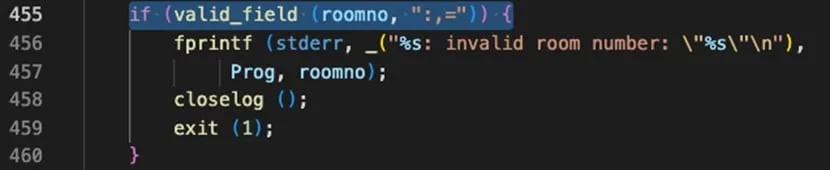
In /shadow-4.5/src/chfn.c, inside the check_fields function on lines 585 to 592, the user input for roomno is passed to the valid_field function together with a set of characters.

That looks like a blacklist. Following it into /shadow-4.5/lib/fields.c, the valid_field function on lines 52 to 81 confirms it:
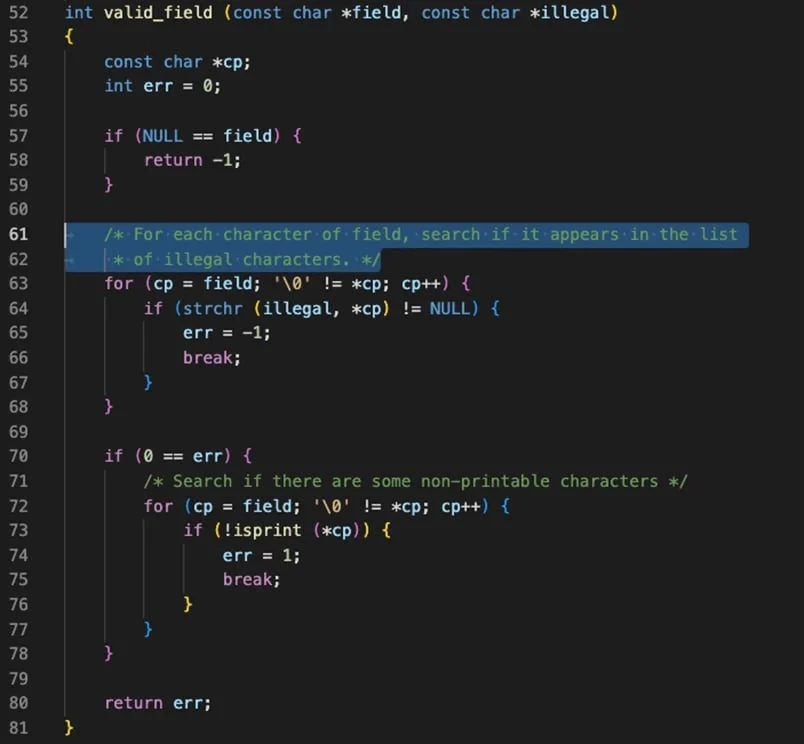
Each character supplied in roomno (or any other GECOS field) is compared against a list of illegal characters. On a match, -1 is returned to err, and chfn exits with the invalid room number message.
Two things stand out. First, a number of characters are not in the illegal list at all: blacklists are not great. Second, non-printable characters are handled differently: for them 1 is returned along with a non-exiting warning message, and chfn does not quit. Looking back at check_fields and valid_field, chfn only quits when err is less than 0. When err is greater than 0, execution continues into the rest of the program.
Exploitation
Step 1: baseline
Before injecting anything, the bottom of /etc/passwd is inspected. The ubuntu user is normal.
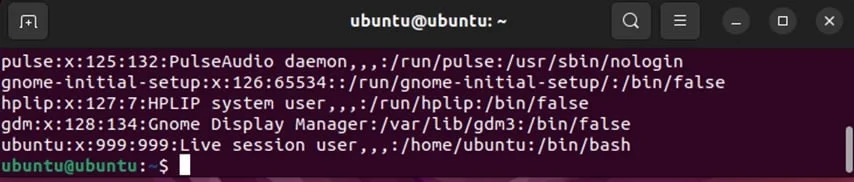
Figure 1: Contents of /etc/password before injection
Step 2: inject a carriage return into roomno
Using echo -e, control characters are fed into the roomno (-r) parameter of chfn. None of them appear in the blacklist. The control character with the biggest impact is CARRIAGE RETURN, \r or \xD in hexadecimal. After the injection, /etc/passwd is viewed again and the entry has been mangled: roominjection has entered the building.
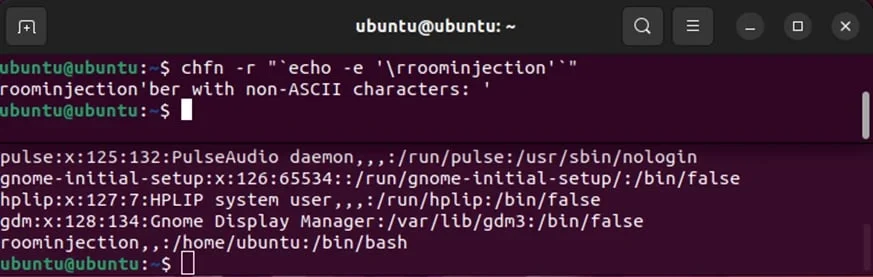
Figure 2: Modified contents of /etc/password after injection
Step 3: the limit
The obvious goal, starting a new line and adding another root-level user, was not reached. The \n character could not be circumvented from the illegal list, so the injection was denied that path.
Step 4: history check
Looking back at shadow-4.0.13 from 2006, the \n was missing from the blacklist, but : was still present. The colon is the delimiter that would be needed to add a new user, so the older build was still not exploitable for that purpose. The same applied to the full name, home phone and work phone fields; the room number is shown only for illustration.
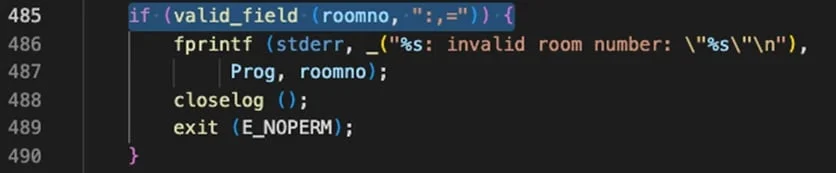
Going back further to shadow-4.0.3 from 2004, the : is still blocking the addition of new users.
At this point the write-up notes CVE-2005-3503, a 2005 local privilege escalation in chfn on SuSE Linux, whose exploit uses both \n and : to add a new root user, exactly the goal of this research. The research was then set aside.
Step 5: revisiting with a new angle
Two years later, a Trail of Bits blog post about exploiting a logic bug in a SUID program (an arbitrary read in chfn via an environment variable) prompted a return to chfn. Weaponising the injection to add a new user, 2005 SuSE style, still did not succeed. The angle changed: if the file cannot be used to add a user, can it be used to fake adding one? The idea is to mangle /etc/passwd so that it misrepresents its contents to an administrator, in the way red team pretexts are built for phishing tests.
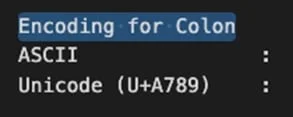
Application security testing habits suggest alternative representations of characters to get past input validation. A real colon is blocked by the blacklist, but non-printables get a free pass. The CARRIAGE RETURN control character \r restarts the line, and the Unicode character \ua789 is used as the closest visual match to a colon, all injected into the roomno parameter.
Step 6: the pretext
The scenario: a local account on the machine has been compromised, and the attacker wants to convince the administrator that a root-privileged user account exists, by telling them to check /etc/passwd and see for themselves. The write-up suggests that if believed, this might trigger another action, such as logging into another box or invoking an incident response process where other tools (Responder, Mimikatz and similar) could grab hashes or tokens.
The attacker makes the injection, and the administrator runs cat /etc/passwd:

Step 7: believability on screen
The screenshots below show how convincing the colon replacement looks on screen. Before injection:

Figure 3: /etc/passwd before injection
After injection, with the hacked account at the bottom of /etc/passwd shown with root privileges:
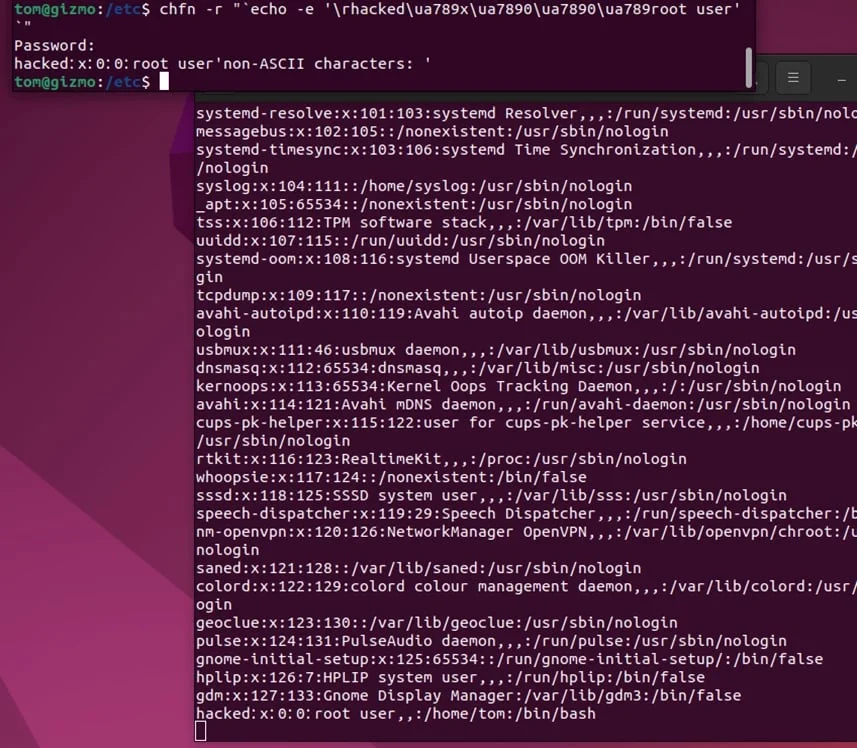
Figure 4: /etc/passwd after injection of the 'hacked' root user
Root cause
The valid_field blacklist in shadow omits control characters, and the function treats non-printable characters differently from illegal ones: it returns 1 with a warning instead of -1. check_fields only aborts when err is less than 0, so a warning lets chfn continue and write the value into /etc/passwd. A carriage return in a GECOS field therefore rewrites how the line is displayed, and a Unicode lookalike for the colon stands in for the blocked delimiter.
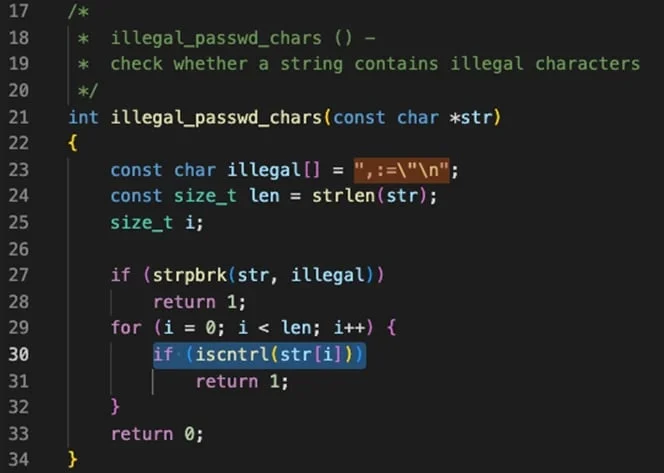
By contrast, the util-linux build blocks control characters via iscntrl in ch-common.c, and also adds the " character to its blacklist. From util-linux-2.37.2/login-utils/ch-common.c (used by chfn.c), lines 17 to 34:
Impact
The write-up says the \n could not be circumvented, so the goal of adding a new root user was not reached. What remains is the ability for a local user to mangle /etc/passwd and misrepresent it, for example to make an administrator believe a root-privileged account called hacked exists. The value of that is social engineering: it can support a pretext that triggers further actions, such as logging into another host or starting an incident response process where other tooling is waiting. The write-up presents screenshots to give a sense of how believable the colon replacement looks on screen.
Fix
Before publication, the shadow package maintainers were contacted with the proof of concept, followed by a pull request on GitHub with a commit that has since been merged into the main shadow repository.
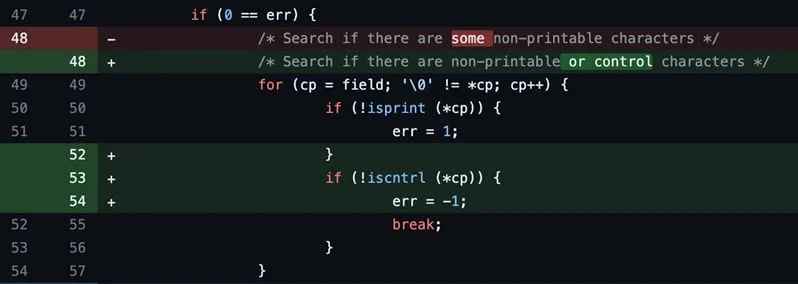
With the fix, control characters are detected and -1 is returned to err, quitting chfn and treating them the same as the illegal characters.
Variants to test
- A positive result is a
cat /etc/passwdline that visually contains an extra account or field that is not really there. - A positive result is any character that changes the rendering of the
/etc/passwdline withoutchfnexiting. - A positive result would be a control character that gets past
iscntrl; the write-up indicates this build blocks them. - A positive result is a character that renders close enough to
:on a terminal to be mistaken for the delimiter. - A positive result is a build where a newline can be injected, which combined with a colon bypass would allow adding a user.
- A positive result is a field that accepts non-printable characters and still writes them.
What happened, in plain words
On a Linux computer, every user account has a small entry in a file called /etc/passwd. That file is a plain text list: one line per account, with fields separated by commas and colons. One of those fields is a "room number", a free-text label that a user can set for themselves with a program called chfn.
chfn is special: it is allowed to write to /etc/passwd even when a normal user runs it, because it needs to do that to save your details. Programs like this are called SUID programs, and they run with the power of the root (administrator) account. If you can trick such a program into writing something it should not, you may be able to do things as the administrator.
Tom Neaves looked at chfn and found that its list of forbidden characters (a "blacklist") did not include certain invisible control characters. One of them, the carriage return, makes a terminal jump back to the start of the line. By putting a carriage return into the room number, he could make /etc/passwd display differently from what it really contains. He could not add a real new administrator account, but he could make it look as if one existed, which is useful for tricking a system administrator. The bug was given the name CVE-2023-29383, and the shadow package maintainers merged his fix after he sent them a proof of concept.
Background: what chfn and /etc/passwd are
Every Linux system keeps a list of its user accounts in a file called /etc/passwd. Despite the name, it does not store passwords in modern systems; it stores the basic facts about each account: the username, a numeric user ID, a numeric group ID, a home directory, a login shell, and a short block of extra details.
Those extra details are called the GECOS fields. GECOS is an old name (General Electric Computer Operating System) that stuck. The fields are separated by commas and typically hold your full name, your room number, your work phone and your home phone.
The program chfn (short for "change finger") lets a user edit those four values. The name comes from an older program called finger, which displayed information about a user. The manual page quoted in the write-up explains it like this:
"chfn (change finger) is used to change your finger information. This information is stored in the /etc/passwd file and is displayed by the finger program. The Linux finger command will display four pieces of information that can be changed by chfn; your real name, your work room and phone, and your home phone."
So chfn is a small utility with one job: take what you type, check it, and write it into your line in /etc/passwd.
Why chfn is interesting to a security researcher
Normally, a regular user cannot edit /etc/passwd. The file belongs to the administrator, and the operating system refuses the write. But chfn has to be able to write to it, otherwise it could not do its job. To make that possible, chfn is marked as a SUID program.
SUID stands for Set owner User ID. When you run a SUID program, it runs with the permissions of the person who owns the file, not with your permissions. For chfn, the owner is root, the administrator account. So even though you are an ordinary user, the chfn process is allowed to modify /etc/passwd.
That is a deliberate and controlled exception. The program is supposed to accept only the four GECOS values, check them, and write only those. The danger is that if the checking is flawed, whatever you sneak in gets written with administrator power. Security people call that a local privilege escalation: "local" because you need an account on the machine already, "privilege escalation" because you go from ordinary user to something more powerful.
A useful comparison: think of a bank clerk who is allowed into the vault, but only to fetch the specific envelope you ask for. If you can trick the clerk into fetching a different envelope, you have not broken the vault yourself, but you have used the clerk's access.
Two packages, one program
chfn is shipped by two different software packages: util-linux and shadow. Different Linux distributions pick one or the other. On Ubuntu and other Debian-based systems, the chfn binary comes from the shadow package, and that is the version the write-up examines. The bug was assigned CVE-2023-29383. A CVE is a public identifier for a known vulnerability, so that everyone can refer to the same issue unambiguously.
The setup used for the research
The researcher worked with the source code of the shadow package, version 4.5, looking at two files:
/shadow-4.5/src/chfn.c, the main program./shadow-4.5/lib/fields.c, a library file with the input-checking function.
The output shown uses a normal user account called ubuntu. For comparison he also looked at the util-linux version 2.37.2, and at much older shadow releases: 4.0.13 from 2006 and 4.0.3 from 2004.
The write-up uses chfn itself, echo -e to produce special characters, and cat to print a file.
Step 1: setting a room number normally
A room number can be set either by running chfn and answering its questions, or directly from the command line:
chfn -r 41414141
Here chfn is the program, -r means "set the room number", and 41414141 is the value. After running it, the value appears in the room number position of the user's line in /etc/passwd.
The same pattern works for the other fields: -f for the full name, -h for the home phone and -w for the work phone. Each one changes a different position between the commas.
Step 2: reading the code that checks the input
Because chfn accepts text from the user and writes it into a system file, it must check that text first. In /shadow-4.5/src/chfn.c, inside a function called check_fields, on lines 585 to 592, the value typed for roomno is passed to another function called valid_field, together with a set of characters.
A function is a named block of code that does one job; check_fields is the block that checks the fields, and valid_field is the block that checks a single value. Passing a set of characters along suggests those characters are forbidden. That is a blacklist: a list of things you are not allowed to use. The opposite approach, a whitelist, lists only the things you are allowed to use, and is generally safer, because anything not on the list is refused.
To confirm the blacklist theory, the researcher followed the call into /shadow-4.5/lib/fields.c, to the valid_field function on lines 52 to 81:
What this code does, in plain words: it takes each character of the value you supplied, one at a time, and compares it against a list of illegal characters. If the character is on the list, the function returns -1. If the character is not on the list, it moves on to the next character. So the blacklist theory is confirmed.
Step 3: two weaknesses in the check
Two things stand out in that checking code.
First, the blacklist is incomplete. Several characters are simply not mentioned, and anything not mentioned is allowed through. A blacklist can only forbid what somebody thought of; a whitelist only allows what somebody thought of. The first fails open, the second fails closed.
Second, non-printable characters are treated differently from illegal ones. A non-printable character is one that does not appear as a visible symbol: things like a carriage return, a tab, or a bell. For those, the function returns 1 and prints a warning, but it does not stop the program.
Why does that matter? Because of how the caller reacts. Back in check_fields, chfn only quits when the returned value is less than zero. If the value is greater than zero, the program prints a warning and carries on. So an illegal character stops chfn, but a non-printable character only produces a warning, and the value still gets written to /etc/passwd.
A comparison: a bouncer with a list of banned faces. If he recognises you, you are turned away. If he does not recognise you but thinks you look odd, he mutters a complaint and lets you in anyway. The warning is the mutter.
Step 4: trying control characters
With that knowledge, the researcher used echo -e to generate control characters and fed them into the room number parameter (-r) of chfn. The -e option tells echo to interpret escape sequences such as \r instead of printing them literally.
Control characters are instructions to a terminal rather than visible symbols. The one that had the biggest effect was CARRIAGE RETURN, written \r, or \xD in hexadecimal. Hexadecimal is just a way of writing numbers in base 16, often used for byte values.
Before injecting anything, the bottom of /etc/passwd looked normal. The ubuntu user was there, nothing unusual.
Figure 1: Contents of /etc/password before injection
Then the carriage return was injected into the room number of the ubuntu user, and /etc/passwd was printed again. The line had been mangled: the text roominjection appeared where it should not.
Figure 2: Modified contents of /etc/password after injection
Why does a carriage return do this? On a terminal, a carriage return moves the cursor back to the beginning of the current line without moving down to the next line. Anything printed after it overwrites what was already there. So a value containing a carriage return can make one line of a file appear to be something else when printed on screen, even though the bytes in the file are unchanged.
Step 5: the limit of the trick
The obvious next goal would be to start a new line and add a whole new administrator account. That requires a newline character, \n, which moves the cursor to the next line. The researcher could not get \n past the blacklist, so that path was closed.
Step 6: looking at older versions
Was the blacklist always there? The researcher went back to shadow-4.0.13 from 2006. In that version, \n was missing from the blacklist. That sounds promising, but the colon : was still forbidden. The colon is the character that separates fields in /etc/passwd, so without a colon you cannot construct a complete new account entry. The same applied to the full name, home phone and work phone fields; the room number is shown only as an illustration.
Going back further, to shadow-4.0.3 from 2004, the colon was still blocked, so adding a new user was still not possible.
At this point the write-up mentions CVE-2005-3503, a local privilege escalation in chfn on SuSE Linux from 2005. Its public exploit used both \n and : to add a new root user, which is exactly what this research had been trying to do. The research was then set aside.
Step 7: a new angle, two years later
Two years later, a blog post from Trail of Bits about exploiting a logic bug in a SUID program prompted a return to chfn. That post described an arbitrary read in chfn through an environment variable. An environment variable is a named setting that the shell passes to programs it starts; an arbitrary read means reading memory the program was not meant to expose.
Weaponising the injection to add a new user, in the style of the 2005 SuSE exploit, still did not work. So the angle changed. If the file cannot be used to add a user, can it be used to fake adding one? The idea is to mangle /etc/passwd so that it misrepresents its contents to an administrator. This is the kind of pretext that red teams build for phishing tests: a believable story that persuades someone to take an action.
Red team is the name for security professionals who simulate an attacker, with permission, to test an organisation's defences. A pretext is the cover story used to persuade a person to do something, such as click a link or run a command.
Application security testing habits suggest using alternative representations of characters to get past input validation. If a real colon is blocked, perhaps something that looks like a colon will do. Non-printable characters get a free pass, so the CARRIAGE RETURN \r can restart the line, and the Unicode character \ua789 can be used as the closest visual match to a colon. Unicode is the standard that assigns a number to every character in every writing system; \ua789 is the code point for one particular character that looks similar to a colon.
All of this is injected into the roomno parameter.
Step 8: the scenario
The scenario is this: an attacker has already compromised an ordinary local account on the machine. They want to convince the administrator that a root-privileged account exists. They tell the administrator to check /etc/passwd and see for themselves. The write-up suggests that if the administrator believes it, this might trigger another action, such as logging into another machine or starting an incident response process where other tools (Responder, Mimikatz and similar) could capture hashes or tokens.
Responder and Mimikatz are well-known tools used by attackers and penetration testers: Responder answers network authentication requests to capture credentials, and Mimikatz extracts credentials from Windows memory. A hash is a fingerprint of a password, and a token is a piece of data that proves you are logged in. Capturing either can let an attacker impersonate a user.
The attacker makes the injection, and the administrator runs cat /etc/passwd:
cat is a standard command that prints the contents of a file to the screen. So the administrator is doing exactly what a careful administrator would do: looking at the file directly.
Step 9: how convincing does it look?
The screenshots below show how convincing the colon replacement looks on screen. Before injection:
Figure 3: /etc/passwd before injection
After injection, with the hacked account at the bottom of /etc/passwd shown with root privileges:
Figure 4: /etc/passwd after injection of the 'hacked' root user
Why it works: the root cause
The valid_field blacklist in shadow omits control characters, and the function treats non-printable characters differently from illegal ones: it returns 1 with a warning instead of -1. check_fields only aborts when the returned value is less than zero, so a warning lets chfn continue and write the value into /etc/passwd. A carriage return in a GECOS field therefore changes how the line is displayed, and a Unicode lookalike for the colon stands in for the blocked delimiter.
By contrast, the util-linux build blocks control characters using a function called iscntrl in ch-common.c, and also adds the " character to its blacklist. iscntrl is a standard C library function that reports whether a character is a control character. From util-linux-2.37.2/login-utils/ch-common.c (used by chfn.c), lines 17 to 34:
What the impact really is
The write-up says the \n could not be circumvented, so the goal of adding a new root user was not reached. What remains is the ability for a local user to mangle /etc/passwd and misrepresent it, for example to make an administrator believe a root-privileged account called hacked exists.
The value of that is social engineering: it can support a pretext that triggers further actions, such as logging into another host or starting an incident response process where other tooling is waiting. Social engineering means persuading a person to do something, rather than breaking a technical control. The write-up presents screenshots to give a sense of how believable the colon replacement looks on screen.
The fix
Before publication, the shadow package maintainers were contacted with the proof of concept, followed by a pull request on GitHub with a commit that has since been merged into the main shadow repository. A pull request is a proposed change to a code repository, which the maintainers review and then accept or reject.
With the fix, control characters are detected and -1 is returned, quitting chfn and treating them the same as the illegal characters.
Variants to test
Each one describes what a positive result would look like.
- A positive result is a
cat /etc/passwdline that visually contains an extra account or field that is not really there. - A positive result is any character that changes the rendering of the
/etc/passwdline withoutchfnexiting. - A positive result would be a control character that gets past
iscntrl; the write-up indicates this build blocks them. - A positive result is a character that renders close enough to
:on a terminal to be mistaken for the delimiter. - A positive result is a build where a newline can be injected, which combined with a colon bypass would allow adding a user.
- A positive result is a field that accepts non-printable characters and still writes them.
Glossary
/etc/passwd: the plain text file on a Linux system that lists user accounts and their basic details, one line per account.- GECOS fields: the comma-separated extra details in a user's
/etc/passwdline, typically full name, room number, work phone and home phone. chfn: the "change finger" program that lets a user edit their GECOS fields.finger: an older program that displays information about a user, including the GECOS fields.- SUID (Set owner User ID): a mark on a program that makes it run with the permissions of the file's owner rather than the person running it; for
chfn, that owner isroot. root: the administrator account on a Linux system, which can do anything.- Local privilege escalation: gaining more power on a machine you already have an account on, for example going from ordinary user to administrator.
- Blacklist: a list of things that are forbidden; anything not on the list is allowed.
- Whitelist: a list of things that are allowed; anything not on the list is forbidden.
- Function: a named block of code that performs one job.
check_fields: the function inchfn.cthat checks the values typed for the GECOS fields.valid_field: the function infields.cthat checks a single value against the blacklist.- Control character: a character that instructs a terminal rather than appearing as a visible symbol, such as carriage return or newline.
- Non-printable character: a character that does not display as a visible symbol.
- CARRIAGE RETURN (
\r,\xD): a control character that moves the cursor back to the start of the current line, so later text overwrites what was there. - Newline (
\n): a control character that moves the cursor to the next line. - Hexadecimal: a way of writing numbers in base 16, often used for byte values.
echo -e: a shell command that prints text, with-emaking it interpret escape sequences such as\r.cat: a standard command that prints the contents of a file to the screen.- Colon (
:): the character that separates fields in/etc/passwd; needed to construct a complete account entry. - Unicode: the standard that assigns a number to every character in every writing system.
\ua789: the code point for a Unicode character that looks similar to a colon.- CVE: a public identifier for a known vulnerability, so everyone can refer to the same issue.
- CVE-2023-29383: the identifier assigned to the bug described in this write-up.
- CVE-2005-3503: an earlier local privilege escalation in
chfnon SuSE Linux, whose exploit used\nand:to add a root user. shadow: the software package that provideschfnon Ubuntu and other Debian-based systems; the version examined here is 4.5.util-linux: the other software package that provideschfn; the version compared here is 2.37.2.iscntrl: a standard C library function that reports whether a character is a control character.ch-common.c: the file inutil-linuxthat contains the shared checking code used bychfn.c.- Environment variable: a named setting that the shell passes to programs it starts.
- Arbitrary read: reading memory that a program was not meant to expose.
- Red team: security professionals who simulate an attacker, with permission, to test an organisation's defences.
- Pretext: the cover story used to persuade a person to do something.
- Social engineering: persuading a person to do something, rather than breaking a technical control.
- Phishing: a message designed to persuade someone to click a link or take an action that helps an attacker.
- Incident response (IR): the process an organisation follows after detecting a security incident.
- Responder: a tool that answers network authentication requests to capture credentials.
- Mimikatz: a tool that extracts credentials from Windows memory.
- Hash: a fingerprint of a password, from which the password can sometimes be recovered.
- Token: a piece of data that proves you are logged in, which can be stolen and reused.
- Proof of concept (PoC): a demonstration that a vulnerability can actually be exploited.
- Pull request: a proposed change to a code repository, which maintainers review and then accept or reject.
- Commit: a recorded change to a code repository.
- Terminal: the text window in which you type commands and see their output.



