From Stack Trace (Laravel) leads to Privilege Escalation Admin | by Caesar Evan
A Laravel error page exposed a stack trace that revealed the MySQL username and password, letting the author log into the database, dump user password hashes and crack them. After logging in as a manager, the author changed a hidden select_level parameter during user creation and editing to promote an account to admin.

caesarevan23.medium.com
Published on caesarevan23.medium.com
Penetration Testing
The full write-up lives on its author's site
It belongs to its author, so we link to it rather than copy it. The other two tabs are our own rewrites, checked against it.
Context
This write-up describes a penetration test against an unnamed vendor's web application, which the author deliberately censors. The application is built on Laravel and exposes a user management area with three privilege levels: User, Manager and Admin. The chain starts with a Laravel stack trace that leaks database credentials, continues through direct MySQL access and offline password cracking, and ends with a privilege escalation in the user management feature that turns a freshly created low-privileged account into an administrator.
The chain runs from a Laravel stack trace to a privilege escalation achieved by tampering with a parameter called select_level.
Setup
The tools used were:
- A browser and BurpSuite, with the proxy intercept feature used to modify requests.
- A MySQL client, invoked from the command line.
- John the Ripper, from https://github.com/openwall/john, with the
rockyou.txtwordlist.
The tester reached a page that produced an error, then logged in with a recovered account and created a low-privileged account through the application's own Add User feature.
Finding it
During reconnaissance the author reached an endpoint that returned an error instead of a page. The response was a Laravel InvalidArgumentException stating that a view could not be found:
InvalidArgumentException > View [auth.xxxxxxxxx] not found.
In the author's notation, xxxxxxxxx stands for the path portion of the view name. The important point is that the framework's exception output was rendered to the client, including the internal view path, rather than being replaced by a generic error page.
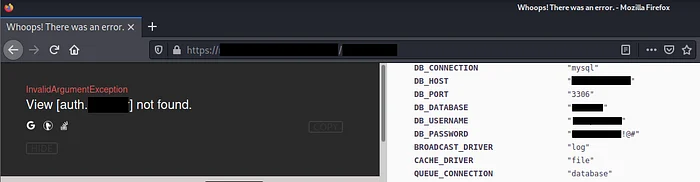
The screenshot shows the leaked MySQL username and password that the author obtained from this stage.
Exploitation
Step 1: Log in to MySQL with the leaked credentials
With the username and password recovered from the stack trace, the author connected directly to the database server:
mysql -h host.com/IP -u User -p
-h points the client at the database host, -u supplies the leaked user and -p prompts for the password interactively.
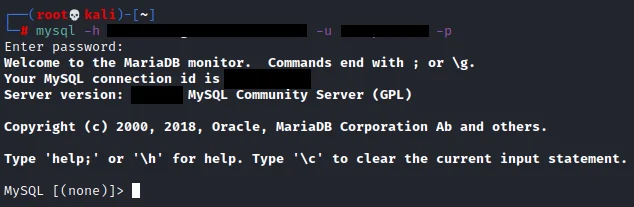
The screenshot shows the successful MySQL login.
Step 2: Confirm write access and enumerate the schema
After logging in, the author tried to create a new database and it worked. This confirms the leaked account was not restricted to read-only access on a single schema.
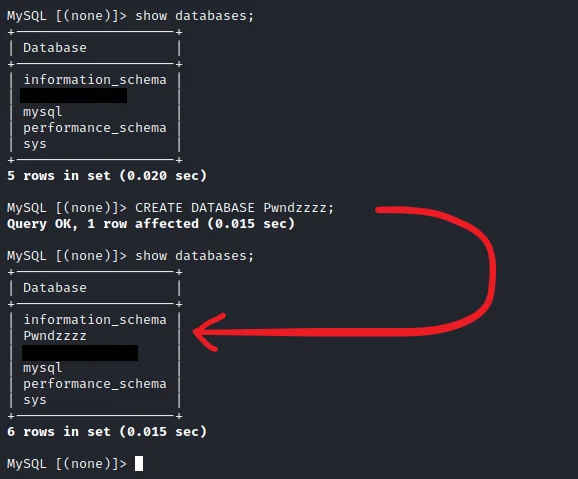
The screenshot shows the commands used to list databases and create a new one.
With the database name known, the author listed the tables in order to find the credentials used by the website.
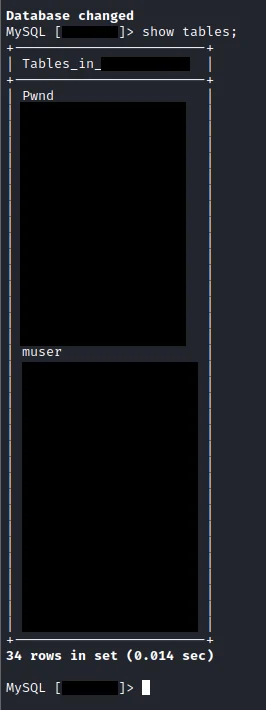
The screenshot shows the table listing. The author notes that a table named Pwnd was one they created themselves, as a check on whether table creation was also permitted.
Step 3: Read the user table
Among the tables was one called muser, which holds the usernames and passwords used to log in to the website.
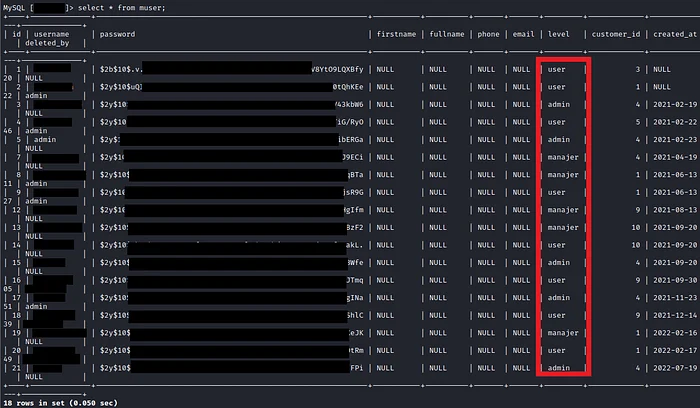
The screenshot shows the contents of the muser table. It contains many usernames and passwords together with each user's level. There are three levels: User, Manager and Admin. The passwords are stored as what the author identifies as Bcrypt hashes.
Step 4: Crack the hashes offline
The hashes were saved into a file named hash.txt and cracked with John the Ripper:
john — wordlist=/usr/share/wordlists/rockyou.txt hash.txt
The wordlist used was rockyou.txt, and the author recovered a password from it.
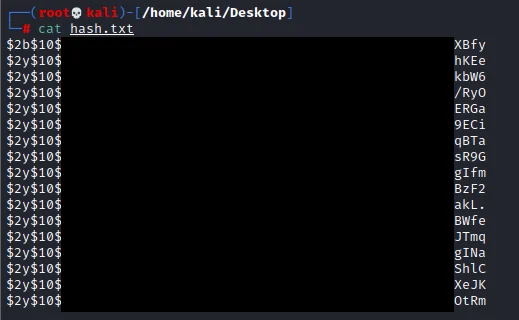
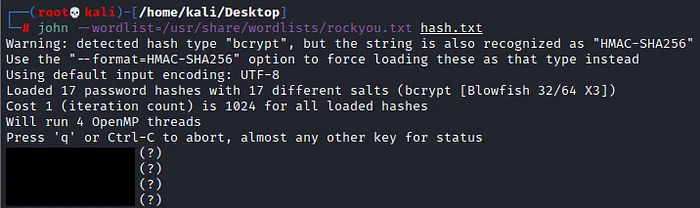
The screenshots show the hashes being collected into hash.txt and the John the Ripper run that recovered the password.
Step 5: Log in and observe the role restriction
Logging in with one of the recovered accounts gave Manager permissions, not Admin. The author inferred the role from the menus available: the Admin menu set was missing.
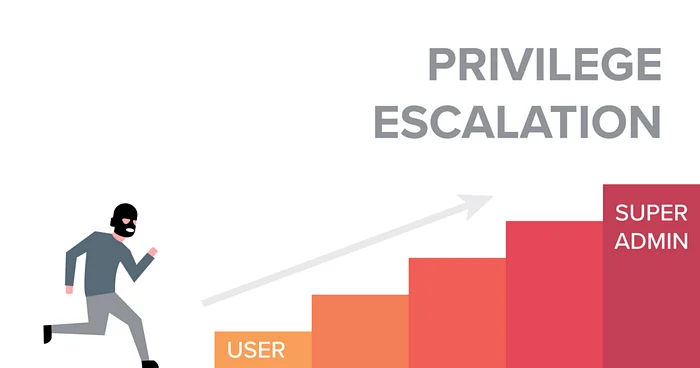
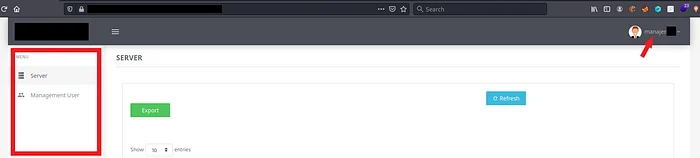
The screenshots show the privilege escalation concept and the reduced menu set of the Manager account.
Step 6: Create a controlled account
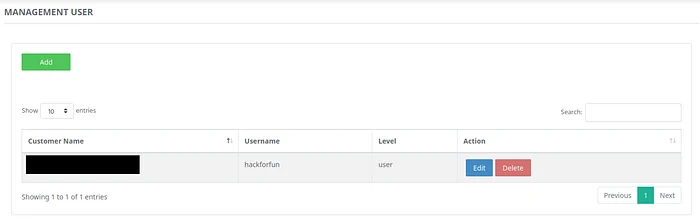
Under the Management User menu there is an Add User feature. The author created an account named hackforfun, but the form only allowed it to be added as a User.
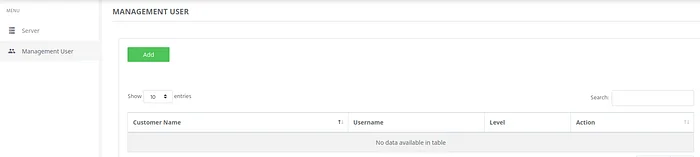
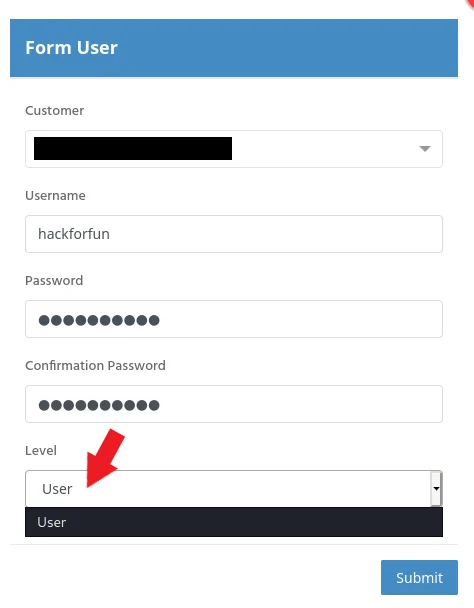
The screenshots show the Management User menu, the Add User form and the new account being created at the User level.
Step 7: Intercept the request and find select_level
With BurpSuite interception enabled, the author examined the request generated by the user management feature and found a parameter called select_level, whose value was user. Because the value is supplied by the client, it is a candidate for tampering.

The screenshot shows the intercepted request with the select_level parameter.
Step 8: Confirm the target value
The author went back to the muser table to check the level values in use. The table contains an Admin level for the highest permissions, alongside the lower levels.

The screenshot shows the level hierarchy: user, then manager, then admin.
Step 9: Tamper with the level on a user edit
The author opened the edit form for the account created earlier, with BurpSuite interception enabled, and changed the value of select_level from User to Admin.
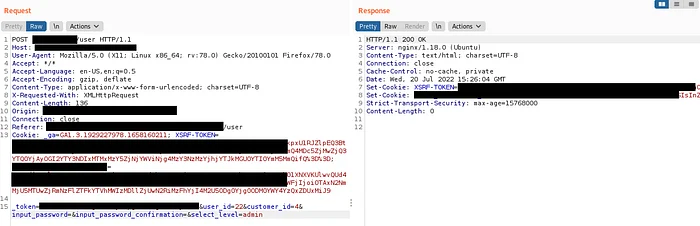
The screenshots show the intercepted user edit request and the modified select_level value.
Step 10: Verify the result
After the request was forwarded, the account disappeared from its original position in the user list. Checking the muser table again showed the account at level Admin. Logging in with that account gave access to everything the author tried.
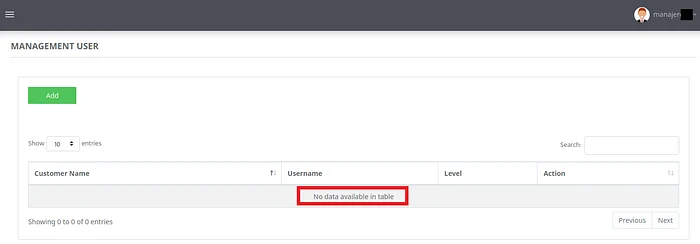

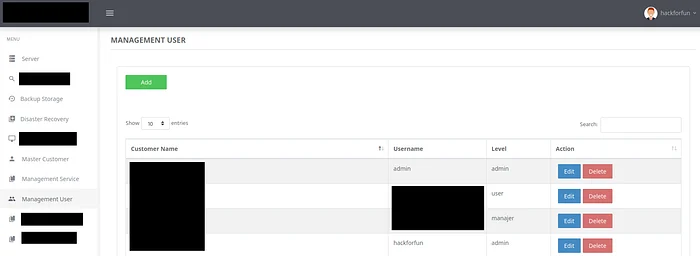
The screenshots show the account moving out of the User listing, its new Admin level in the muser table, and the expanded access after logging in.
Root cause
The privilege escalation appears to be a mass assignment or missing server-side authorisation problem: the level of a user is taken from a client-supplied parameter (select_level) and written to the database. The author does not show the server-side code. The Add User form offers just the User option, yet the edited request with Admin was accepted. The author does not show the server-side code, so the exact mechanism is likely one of these two.
The database exposure has a separate cause: an unhandled InvalidArgumentException for a missing view disclosed internal detail, and the database account could create databases and tables and read the credential table.
Impact
An authenticated user with only the lowest role can promote an account they can edit to Admin, and then access the functions the author tried. The author demonstrates this by logging in afterwards and accessing anything they tried.
The database access is more severe in scope: anyone who can trigger the stack trace obtains working MySQL credentials, can read the muser table containing all usernames, password hashes and levels, and can create databases and tables. Because the passwords are Bcrypt hashes, recovery depends on the strength of each password; the author recovered a password using rockyou.txt.
Fix
The report does not describe any fix applied by the vendor. Based on the findings, the changes needed are:
- Disable debug mode in production so framework exceptions render a generic error page instead of a stack trace.
- Give the application's database account only the privileges it needs on its own schema, with no ability to create databases or tables and no access beyond the required tables.
- Enforce role assignment on the server: derive the permitted level from the authenticated user's own role and reject any
select_levelvalue above it, rather than trusting the submitted value. - Treat the leaked credentials and all passwords in
museras compromised and rotate them.
Variants to test
- Other role-bearing parameters. Look for fields such as
role,level,type,is_adminorgroupin profile, invite and edit requests. A positive result is the account's stored level changing to a value the UI never offers. - Registration and invite flows. Submit a role field during self-registration or team invitation. A positive result is the new account being created above the default role.
- Mass assignment on user objects. Add fields that the form does not display, such as a level or permission flag, to an update request. A positive result is the field being persisted and reflected in the account's access.
- Framework debug output. Request a route or view that does not exist and inspect the error body. A positive result is a framework exception page containing file paths, configuration values or credentials.
- Database account privilege. If credentials are obtained, attempt
CREATE DATABASEandCREATE TABLEas the author did. A positive result is either statement succeeding, which shows the account is over-privileged. - Hash strength. Take any recovered hash set and run it against
rockyou.txt. A positive result is any password recovered, which shows the hashing choice alone is not protecting weak passwords.
What happened, in plain words
A security researcher was looking at a website built with a tool called Laravel (a framework, meaning a set of ready-made building blocks that developers use to build web applications faster). While browsing, he opened a page that returned a detailed technical error instead of a normal page. From this stage he obtained the username and password for the website's database.
A database is the place where a website keeps its information: user accounts, passwords, settings, and so on. Think of it as a big filing cabinet that only the website is supposed to open. With the leaked username and password, the researcher could open that filing cabinet himself, look at the list of users, copy their scrambled passwords, and unscramble one of them.
He then logged in to the website as a Manager, found a form field that decides what kind of user someone is, and changed it from "User" to "Admin" in an intercepted request. The website believed him, and he became an administrator with access to everything.
This article walks through each step slowly, explaining every term as it appears. You only need to know how to use a browser and a computer to follow along.
The two problems in one sentence each
- Stack Trace Disclosure (Laravel): when a website crashes, it sometimes shows a long technical error message to whoever triggered the crash. That message can contain private details, such as file paths or database passwords, that should never be visible to visitors.
- Privilege Escalation: a user with low permissions finds a way to give themselves higher permissions, such as going from ordinary user to administrator. "Privilege" here just means "what you are allowed to do".
The researcher found both on the same website, run by a company he deliberately does not name.
The tools he used
- A normal browser, to visit the website.
- BurpSuite, a program that sits between your browser and the website and lets you look at, pause, and change the messages your browser sends. Think of it as a post office worker who opens your letters before delivering them and lets you rewrite them.
- A MySQL client, a small command-line program for talking directly to a MySQL database. MySQL is one popular brand of database software.
- John the Ripper, a free tool that guesses passwords from scrambled versions of them. It is available at https://github.com/openwall/john.
- A wordlist called
rockyou.txt, which is a long list of commonly used passwords that John the Ripper tries one by one.
Step 1: Finding the leaky error page
During reconnaissance (the phase where a tester explores a website to see what it exposes), the researcher reached an address on the site that returned an error instead of a normal page. The error looked like this:
InvalidArgumentException > View [auth.xxxxxxxxx] not found.
What this means, piece by piece:
InvalidArgumentExceptionis the name Laravel gives to a particular kind of error: "you gave me an argument (an input) that does not make sense".View [auth.xxxxxxxxx] not foundmeans Laravel was asked to display a page template (Laravel calls these "views") and could not find it.auth.xxxxxxxxxis the name of the missing template. The researcher replaced part of it withxxxxxxxxx, which stands for the path.
The important part is not the error itself but the fact that the website showed it to a visitor at all. Normally a website should catch this kind of problem and show a neutral message such as "something went wrong". When the full technical error is shown, it is called a stack trace disclosure: the site is revealing its internal workings.
The screenshot shows the MySQL username and password that the researcher found at this stage. In other words, the error page was not just ugly; it contained the keys to the database.
Step 2: Logging in to the database
With a username and password in hand, the researcher opened a terminal (the text-only command window on a computer) and connected to the database server directly:
mysql -h host.com/IP -u User -p
Line by line:
mysqlis the name of the client program that talks to a MySQL database.-h host.com/IPtells it which computer to connect to.host.com/IPis a placeholder for the address of the database server.-u Usertells it which database user to log in as.Useris a placeholder for the leaked username.-ptells it to ask for the password interactively, so the password is typed at a prompt rather than written into the command.
The screenshot shows the successful login. This is a big moment: a normal visitor should never be able to open the website's database directly.
Step 3: Checking what the database account can do
After logging in, the researcher tried to create a brand new database, and it worked.
The screenshot shows the commands used to list the existing databases and to create a new one. Why does this matter? Because it tells us the leaked account is not limited to reading one small part of the data. It has broad powers, including the power to add new things. In security terms, the account is over-privileged: it can do far more than the website actually needs.
Step 4: Looking at the tables
A database is organised into tables, which are like spreadsheets: rows and columns. One table might hold users, another might hold orders, and so on. The researcher listed the tables to find where the website keeps its login details.
The screenshot shows the list of tables. The researcher notes that one table, called Pwnd, was created by him personally, as a test to see whether he was also allowed to add tables. It was.
Step 5: Reading the user table
Among the tables was one called muser, which holds the usernames and passwords used to log in to the website.
The screenshot shows the contents of muser. It contains many usernames and passwords, plus each user's level. There are three levels: User, Manager and Admin. These levels are the website's way of deciding what each person is allowed to do.
The passwords are not stored as plain text. They are stored as hashes. A hash is the result of running a password through a mathematical recipe that scrambles it into a fixed-length string of characters. The recipe only works one way: you can turn a password into a hash easily, but you cannot turn a hash back into the password by reversing the maths. The researcher identifies the hashes here as Bcrypt, which is one particular hashing recipe designed to be slow, so that guessing is harder.
Step 6: Cracking the hashes
The researcher saved the hashes into a file called hash.txt, then ran John the Ripper against it:
john — wordlist=/usr/share/wordlists/rockyou.txt hash.txt
Line by line:
johnis the program.— wordlist=/usr/share/wordlists/rockyou.txttells it which list of candidate passwords to use.rockyou.txtis a well-known list of millions of real passwords that have leaked over the years, sorted by how common they are. The path/usr/share/wordlists/rockyou.txtis where the file lives on the researcher's machine.hash.txtis the file containing the scrambled passwords to attack.
How cracking works: John takes the first password in the wordlist, hashes it with the same recipe the website used, and compares the result to each hash in the file. If they match, the password has been found. Then it moves to the next candidate. Because Bcrypt is deliberately slow, this takes time, but common passwords fall quickly.
The screenshots show the hashes being collected into hash.txt and the John the Ripper run that recovered a password. The lesson: hashing protects strong passwords, but a weak password that appears in rockyou.txt is effectively unprotected.
Step 7: Logging in and noticing the limits
With a recovered password, the researcher logged in to the website as one of the users. He got Manager permissions, not Admin. How did he know? By looking at the menus: the Admin-only menus were missing.
The screenshots show the general idea of privilege escalation and the reduced menu set of the Manager account. This is a useful habit: the menus a website shows you are a clue to what role it thinks you have.
Step 8: Creating a test account
Under the Management User menu there is an Add User feature. The researcher created an account named hackforfun, but the form only allowed it to be added as a User, the lowest level.
The screenshots show the Management User menu, the Add User form, and the new account being created at the User level. Why create a new account instead of using an existing one? Because it is a clean, controlled test: he knows exactly what this account is and what it should be allowed to do.
Step 9: Intercepting the request
Here is where BurpSuite comes in. When you fill in a form on a website and press submit, your browser sends a request to the website's server. A request is just a message: "please save this user with these details". BurpSuite can pause that message before it leaves your computer, so you can read it and change it.
The researcher enabled interception and looked at the request generated by the user management feature. He found a parameter called select_level, whose value was user.
A parameter is a named piece of data inside a request, like a field on a form. The name is select_level and the value is user. The key insight: this value is supplied by the browser, which means the person using the browser can change it before it is sent. If the server trusts whatever value arrives, that is a vulnerability.
The screenshot shows the intercepted request with the select_level parameter.
Step 10: Checking what values the database uses
The researcher checked the levels in the muser table. There is an Admin level for the highest permissions, alongside the lower ones.
The screenshot shows the hierarchy: user, then manager, then admin. Knowing the exact spelling matters, because the server will only accept a value it recognises.
Step 11: Changing the value
The researcher opened the edit form for the account he had created, with BurpSuite interception enabled, and changed the value of select_level from User to Admin.
The screenshots show the intercepted user edit request and the modified select_level value. This is the whole attack: one word changed in one message. The website's form never offered "Admin" as an option, but the form is only a picture. The real decision is made by the server, and the server accepted the word the researcher sent.
Step 12: Confirming the result
After the request was forwarded, the account disappeared from its original position in the user list. Checking the muser table again showed the account at level Admin. Logging in with that account gave access to everything the researcher tried.
The screenshots show the account moving out of the User listing, its new Admin level in the muser table, and the expanded access after logging in.
Why this works
The privilege escalation appears to be a missing server-side authorisation or mass assignment problem: the level of a user is taken from a value the client sends (select_level) and written to the database. The researcher does not show the server-side code. The Add User form offers just the User option, yet the edited request with Admin was accepted. The researcher does not show the server-side code, so the exact mechanism is likely one of these two.
The database exposure has a separate cause: an unhandled InvalidArgumentException for a missing view disclosed internal detail. On top of that, the database account configured for the application had far more privilege than it needed, including the ability to create databases and tables and to read the credential table.
What an attacker could do with this
An authenticated user with only the lowest role can promote an account they can edit to Admin, and then access the functions the researcher tried. The researcher demonstrates this by logging in afterwards and accessing anything he tried.
The database access is more severe in scope: anyone who can trigger the stack trace obtains working MySQL credentials, can read the muser table containing all usernames, password hashes and levels, and can create databases and tables. Because the passwords are Bcrypt hashes, recovery depends on the strength of each password. The researcher recovered a password using rockyou.txt.
How to fix it
Based on the findings, the changes needed are:
- Disable debug mode in production so framework exceptions render a generic error page instead of a stack trace.
- Give the application's database account only the privileges it needs on its own schema, with no ability to create databases or tables and no access beyond the required tables.
- Enforce role assignment on the server: derive the permitted level from the authenticated user's own role and reject any
select_levelvalue above it, rather than trusting the submitted value. - Treat the leaked credentials and all passwords in
museras compromised and rotate them.
Variants to test
If you are learning to test websites, these are the same ideas applied in slightly different places:
- Other role-bearing parameters. Look for fields such as
role,level,type,is_adminorgroupin profile, invite and edit requests. A positive result is the account's stored level changing to a value the UI never offers. - Registration and invite flows. Submit a role field during self-registration or team invitation. A positive result is the new account being created above the default role.
- Mass assignment on user objects. Add fields that the form does not display, such as a level or permission flag, to an update request. A positive result is the field being persisted and reflected in the account's access.
- Framework debug output. Request a route or view that does not exist and inspect the error body. A positive result is a framework exception page containing file paths, configuration values or credentials.
- Database account privilege. If credentials are obtained, attempt
CREATE DATABASEandCREATE TABLEas the researcher did. A positive result is either statement succeeding, which shows the account is over-privileged. - Hash strength. Take any recovered hash set and run it against
rockyou.txt. A positive result is any password recovered, which shows the hashing choice alone is not protecting weak passwords.
Glossary
- Admin: the highest permission level on this website; an administrator can do everything.
- API: a way for one program to talk to another, usually by sending structured messages back and forth.
- Authorisation: the process of deciding whether a user is allowed to do a particular thing.
- Bcrypt: a password hashing recipe designed to be slow, so that guessing passwords is expensive.
- BurpSuite: a tool that sits between your browser and a website so you can inspect and modify the messages your browser sends.
- Client: the program on your side, usually your browser, that sends requests to a server.
- Cookie: a small piece of data a website stores in your browser so it can recognise you on later visits.
- Cracking: recovering a password from its hash by guessing candidates and comparing hashes.
- Database: organised storage for a website's data, made up of tables.
- Debug mode: a setting that makes software show detailed error information, useful during development and dangerous in production.
- Endpoint: a specific address on a website that accepts requests, such as a login page or a user-edit page.
- Framework: a collection of ready-made code that developers build an application on top of; Laravel is one for the PHP language.
- Hash: the scrambled, fixed-length result of running data through a one-way mathematical recipe.
- Intercept: pausing a request in a proxy tool so you can read or change it before it reaches the server.
- InvalidArgumentException: an error meaning an input did not make sense to the program.
- John the Ripper: a free tool for cracking password hashes using wordlists and other guessing strategies.
- Laravel: a popular framework for building web applications in PHP.
- Level: on this website, the role assigned to a user: User, Manager or Admin.
- Manager: the middle permission level on this website, between User and Admin.
- Mass assignment: a bug where a program accepts many fields from a request and saves them all, including fields the user should not control.
- MySQL: a popular database program.
- Over-privileged: having more permissions than the job actually requires.
- Parameter: a named piece of data inside a request, such as
select_level=user. - Penetration test: an authorised attempt to break into a system in order to find and fix its weaknesses.
- Privilege: what a user is allowed to do.
- Privilege escalation: gaining a higher permission level than you were given.
- Production: the live version of a website that real users see, as opposed to a test version.
- Proxy: a program that sits in the middle of a connection and passes messages through, optionally letting you inspect them.
- Reconnaissance: the exploration phase of a test, where you look around to see what a website exposes.
- Request: a message your browser sends to a server asking it to do something.
- Response: the message the server sends back.
- Rockyou.txt: a well-known wordlist of millions of real leaked passwords, used for cracking.
- Role: a label that determines a user's permissions; here, User, Manager or Admin.
- Schema: the structure of a database, including its tables and how they relate.
- Server: the computer that runs the website and answers requests.
- Stack trace: a technical error report showing the internal steps a program took before failing.
- Stack Trace Disclosure: a vulnerability where that technical error report is shown to visitors, leaking internal details.
- Table: a grid of rows and columns inside a database, like a spreadsheet.
- Tampering: deliberately changing a value in a request before it reaches the server.
- Token: a piece of data, often secret, that proves who you are or grants access to something.
- User: the lowest permission level on this website.
- View: in Laravel, a template file that describes how a page should look.
- Vulnerability: a weakness in software that someone could abuse.
- Wordlist: a file of candidate passwords that a cracking tool tries one by one.

