From Stored XSS to Forced Login via Cookie Tossing
An SVG file uploaded to a CDN was served with an attachment disposition, but changing it to inline caused the embedded script to run as stored XSS. The attacker then used that script to set WordPress session cookies on a sibling subdomain, forcing victims into the attacker's account.

medium.com
Published on medium.com
Bug Bounty
The full write-up lives on its author's site
It belongs to its author, so we link to it rather than copy it. The other two tabs are our own rewrites, checked against it.
Context
The target was app.target.com, a web application with a profile picture upload feature. The researcher also found a second subdomain, courses.target.com, which ran WordPress on PHP. Uploaded files were offloaded to Amazon S3 through presigned URLs and served from public.cdn.target.com. The write-up does not describe the product further.
The chain that follows combines a stored XSS on the CDN with cookie tossing against the WordPress instance, ending in session fixation on courses.target.com.
Setup
The researcher used Burp Suite to intercept upload traffic and responses, and a second browser to act as the victim. No account roles, versions or other tooling are described. The report lists the internal chat feature as the attack vector, where victims click what appears to be a legitimate file from a trusted target domain.
Finding it
The profile picture upload form drew attention because file uploads are a common source of security quirks. The researcher asked why not try an SVG, crafted an SVG payload and triggered the upload while intercepting the traffic in Burp Suite.
The application was offloading uploads directly to Amazon S3 using presigned URLs. The server accepted the file without sanitising its content or checking the Content-Type. The file was then hosted on public.cdn.target.com.
Opening the image caused a download rather than a render. Inspecting the upload response in Burp Suite showed this header:
Content-Disposition: attachment
Exploitation
Step 1: Make the CDN render the SVG
The researcher intercepted the response, changed the header to:
Content-Disposition: inline
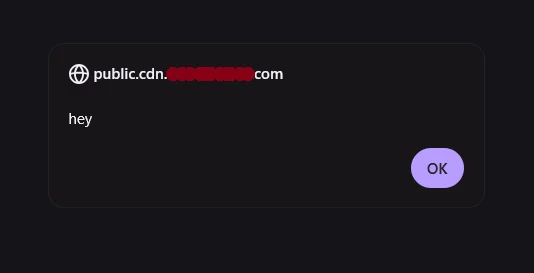
and forwarded it. Opening the image again, the browser rendered the SVG and executed the payload.
Step 2: Look for an escalation path on app.target.com
A stored XSS on a CDN does not carry real impact by itself, so the researcher tried several routes on app.target.com:
- Stealing session cookies with JavaScript: blocked, the cookies carried the
HttpOnlyflag. - CORS misconfigurations to make requests as the victim or steal PII: the server headers were locked down, and there was no direct API access from the CDN origin to steal data.
- Vulnerable
postMessagehandlers in the JavaScript files: none found.
The researcher then pivoted to cookie tossing on app.target.com and managed to toss an attacker-controlled cookie. Forcing the researcher's own session cookies onto the victim did not produce session hijacking, but when the victim opened it, they were kicked out of their account and forced into a clean login. On its own this looked lame and not worth reporting.
Step 3: Recon on courses.target.com
Further recon found courses.target.com, running WordPress on PHP. The same playbook was applied: cookie theft (blocked by HttpOnly), CORS misconfigurations, postMessage handlers and CSRF. Nothing turned up; everything was locked down. The researcher then asked whether cookie tossing would work on the WordPress instance.
After a successful login, WordPress sets two main cookies:
wordpress_logged_in_hashwordpress_sec_hash
The second one, wordpress_sec_hash, is the key to authenticating requests inside the admin panel, specifically /wp-admin/profile.php when editing user profile details.
Step 4: Craft the SVG that tosses the cookies
The researcher wrote a custom SVG to inject the session cookies into the victim's browser:
<svg xmlns="http://www.w3.org/2000/svg" width="1" height="1"> <script type="text/javascript"> document.cookie = "wordpress_logged_in_hash=attackers-cookie; Domain=.target.com; path=//;"; document.cookie = "wordpress_sec_hash=attackers-cookie; Domain=.target.com; path=/wp-admin/;"; </script></svg>
The payload sets Domain=.target.com so the cookie is scoped to the parent domain and its subdomains. The path values matter: the researcher notes that the proper path (such as path=/) must be set explicitly, because browser cookie scoping policies otherwise stop the application from attaching the cookies to requests, and the whole attack falls apart.
Step 5: Deliver and observe
The malicious SVG was uploaded to public.cdn.target.com, and the link was opened in another browser acting as the victim. The victim was logged into the attacker-controlled account: session hijacked through the stored XSS to cookie tossing chain.
The finding was reported and the triage team marked it as a P2.
Root cause
The upload path accepted arbitrary file content without sanitising it or validating the Content-Type, and the file was served from a CDN origin that shares a parent domain with the application. Changing Content-Disposition to inline in the intercepted response made the browser render the SVG and run the payload.
HttpOnly did not help because cookie tossing does not read cookies: it overwrites them from a trusted sibling subdomain. The report does not describe how the application validated the tossed cookie values.
Impact
- Session fixation on
courses.target.com: an attacker can force victims into an attacker-controlled account. Anything the victim enters, any courses completed and any actions taken are logged under the attacker's account, not the victim's. - Bypassing
HttpOnly: cookie tossing overwrites cookies from a trusted sibling subdomain instead of reading them with JavaScript. - Attack vector: delivery through the internal chat feature, where victims click what appears to be a legitimate file from a trusted target domain.
Fix
Based on the chain, the upload path should validate content and Content-Type rather than relying on Content-Disposition, and the application should not accept session cookies whose values it did not issue.
Variants to test
- SVG upload on any file upload feature: upload an SVG with a script and check whether the response carries
Content-Disposition: attachment. A positive result is the browser rendering the SVG and executing the script once the header is changed toinline. - Cookie tossing from a sibling subdomain: set a cookie with
Domain=.parent.comand a matchingpathfrom a less trusted subdomain. A positive result is the application on the sibling accepting the attacker's session and logging the victim into the attacker's account. - WordPress session cookies: check whether
wordpress_logged_in_hashandwordpress_sec_hashcan be overwritten from another subdomain. A positive result is the victim landing in the attacker's admin session at/wp-admin/profile.php. postMessagehandlers and CORS on the CDN origin: test whether the CDN origin can reach APIs or message handlers. A positive result is data exfiltration or actions performed as the victim without cookie tossing.
What happened, in plain words
A security researcher found a way to make a website accept a picture file that secretly contained a small program. Because of how the site stored and served that file, the program could run in the browser of anyone who opened the file. On its own that is annoying but not very dangerous, so the researcher kept digging and found a second trick that turned it into something serious: visitors could be silently logged into the attacker's account instead of their own.
This article walks through the whole chain from zero. You only need to know how to use a browser. Every technical word is explained the first time it appears, and there is a glossary at the end.
The pieces of the puzzle
Before the steps, here is the cast of characters, because the story moves between several web addresses (called subdomains, meaning names that sit under one main domain, like rooms in the same building).
app.target.com: the main web application. It had a feature for uploading a profile picture.courses.target.com: a second subdomain the researcher found later. It ran WordPress, a very common software for building websites, written in PHP, a programming language used by many web servers.public.cdn.target.com: a CDN, short for Content Delivery Network. A CDN is a network of servers whose job is to hand out files (images, videos, scripts) quickly to visitors. Think of it as a separate warehouse where a shop stores its parcels so the shop counter stays free.- Amazon S3: a cloud storage service. The application did not keep uploaded pictures on its own server; it sent them to S3, a bit like a shop that forwards every parcel to an external warehouse.
- Presigned URL: a special web address that already contains permission to upload or download a specific file, so the browser can talk to the warehouse directly without asking the shop each time. It is like a one-use key to a storage locker.
The write-up does not describe the product further than this.
Finding the stored XSS
The researcher started on app.target.com and noticed the profile picture upload form. File upload forms are a classic source of security problems, because the server has to decide what kind of file it is receiving and what to do with it.
The researcher asked a simple question: why not try an SVG? An SVG is an image format, but unlike a photo it is written as text, and it can contain scripts, which are small programs that a browser runs. A normal photo cannot carry a program; an SVG can. That makes it a favourite tool for testing upload features.
The researcher crafted an SVG payload (a payload is the piece of content that does the malicious thing) and uploaded it while intercepting the traffic in Burp Suite. Intercepting means putting a tool between the browser and the server so you can read and change the messages going in both directions. Burp Suite is a popular program for exactly that. Think of it as a postal worker who opens every letter, reads it, and can rewrite it before delivering it.
While watching the traffic, the researcher saw that the application was sending uploads directly to Amazon S3 using presigned URLs. After the upload, the server accepted the file without sanitising its content (sanitising means cleaning or rejecting dangerous parts) and without checking the Content-Type. The Content-Type is a label the browser and server attach to a file saying what kind of thing it is, for example an image or a web page. If nobody checks that label, a file can claim to be one thing and actually be another.
The file ended up hosted on public.cdn.target.com.
When the researcher opened the image, it did not display. It downloaded instead. That is a safety behaviour: the browser was told to treat the file as something to save, not something to show. Looking at the upload response in Burp Suite, the reason was visible in a response header. Headers are small pieces of information that travel with every web request and response, like the label and handling instructions on a parcel. This one said:
Content-Disposition: attachment
Content-Disposition tells the browser whether to display the file in the page (inline) or treat it as a download (attachment). With attachment, the browser saves the file and never runs anything inside it, so the SVG script stayed dormant.
Step 1: make the CDN render the SVG
The researcher intercepted the response and changed the header to:
Content-Disposition: inline
and forwarded it. Forwarding means letting the modified message continue on its way to the browser.
Opening the image again, the browser now rendered the SVG and executed the payload. In other words, the small program inside the image ran.
This is the moment the stored XSS became real. XSS stands for Cross-Site Scripting: a class of vulnerability where an attacker gets their own script to run inside someone else's browser, in the context of a website. Stored means the malicious content was saved on the server (here, as an uploaded file) and is served to whoever opens it later, rather than being slipped in through a link.
One important detail: the researcher changed the header while intercepting their own traffic. The report does not say that the server itself ever sent inline to a victim. What the change demonstrated is that the only thing stopping the SVG from running was that one header, and that the file content itself was never cleaned.
Step 2: looking for a way to make it serious
A stored XSS on a CDN is interesting, but a script that pops up an alert box does not by itself let an attacker do much. The researcher needed to escalate, meaning turn a small proof into real impact. Several routes were tried on app.target.com:
- Stealing session cookies with JavaScript. A cookie is a small piece of data a website asks the browser to keep and send back with every request. It is how a site remembers that you are logged in, like a wristband at an event: show it at the door and you get in without proving who you are again. A session cookie is the wristband that says which logged-in session is yours. If a script can read that cookie, it can send it to the attacker, who can then pretend to be the victim. This attempt failed because the cookies carried the
HttpOnlyflag.HttpOnlyis an instruction to the browser: never let JavaScript read this cookie. It is like a wristband you can show at the door but cannot copy. - CORS misconfigurations. CORS stands for Cross-Origin Resource Sharing. It is the set of rules a browser follows when a page from one origin (one site address) tries to read data from another origin. A misconfiguration would be a rule that is too permissive, letting the attacker's page read data it should not. The researcher hoped to make requests as the victim or steal PII (personally identifiable information, meaning private data about a person). This failed: the server headers were locked down, and there was no direct API access from the CDN origin. An API is the part of a service that other programs talk to, like a service counter where you ask for data instead of browsing the shop floor.
- Vulnerable
postMessagehandlers.postMessageis a browser feature that lets one page send a message to another page, for example an embedded frame talking to the page around it. A handler is the code that receives the message. If a handler trusts messages from anywhere, an attacker can send it instructions. The researcher searched the JavaScript files (the code the browser runs) and found none.
With those doors closed, the researcher turned to cookie tossing. Cookie tossing is a trick that abuses how browsers decide which cookies belong to which site. A cookie can be set for a whole parent domain, for example .target.com, which means every subdomain under it will receive that cookie. If a less trusted subdomain, such as the CDN, can set a cookie for the parent domain, it can plant a cookie that the more trusted application will also read. The name comes from the image of throwing a cookie over the fence from one part of the building into another.
The researcher managed to toss an attacker-controlled cookie on app.target.com. Forcing the researcher's own session cookies onto the victim did not produce session hijacking (taking over the victim's logged-in session). But when the victim opened it, they were kicked out of their account and forced to log in again cleanly. On its own, that looked lame and not worth reporting. The researcher nearly stopped there.
Step 3: recon on courses.target.com
Further recon (reconnaissance, meaning exploring and mapping a target before attacking) found another subdomain: courses.target.com, running WordPress on PHP.
The same playbook was applied there:
- cookie theft, blocked by
HttpOnly; - CORS misconfigurations;
postMessagehandlers;- CSRF, Cross-Site Request Forgery, a class of attack where a victim's browser is tricked into sending a request the victim did not intend, using the victim's existing login.
Nothing turned up. Everything was locked down. Then the researcher asked a new question: what if cookie tossing works here, on the WordPress instance?
After a successful login, WordPress sets two main cookies:
wordpress_logged_in_hashwordpress_sec_hash
The second one, wordpress_sec_hash, is the key to authenticating requests inside the admin panel, specifically /wp-admin/profile.php when editing user profile details. Authenticating means proving to the server that a request comes from a logged-in user. The admin panel is the management area of a WordPress site, and /wp-admin/profile.php is the page where a user edits their profile.
Step 4: crafting the SVG that tosses the cookies
The researcher wrote a custom SVG to inject the session cookies into the victim's browser:
<svg xmlns="http://www.w3.org/2000/svg" width="1" height="1"> <script type="text/javascript"> document.cookie = "wordpress_logged_in_hash=attackers-cookie; Domain=.target.com; path=//;"; document.cookie = "wordpress_sec_hash=attackers-cookie; Domain=.target.com; path=/wp-admin/;"; </script></svg>
Line by line, in plain words:
<svg ... width="1" height="1">opens an SVG image that is one pixel by one pixel, so it is essentially invisible. Thexmlnspart is the standard label that tells the browser this is an SVG document.<script type="text/javascript">starts a script block. This is the program that will run when the image is displayed.document.cookie = "wordpress_logged_in_hash=attackers-cookie; Domain=.target.com; path=//;"asks the browser to store a cookie namedwordpress_logged_in_hashwith the valueattackers-cookie. TheDomain=.target.compart says the cookie belongs to the whole parent domain, so every subdomain, includingcourses.target.com, will receive it. Thepathpart says which addresses on the site the cookie should be sent to.document.cookie = "wordpress_sec_hash=attackers-cookie; Domain=.target.com; path=/wp-admin/;"does the same for the second WordPress cookie, but scopes it to the/wp-admin/path, the admin area.</script></svg>closes the script and the image.
The Domain=.target.com attribute scopes the cookie to the parent domain, so subdomains such as courses.target.com receive it. The path values matter a lot. The researcher notes that the proper path (such as path=/) must be set explicitly, because browser cookie scoping policies otherwise stop the application from attaching the cookies to requests, and the whole attack falls apart. In everyday terms: a cookie is only handed over at certain doors, and if you write the wrong door on it, the browser will never show it where it counts.
Step 5: delivering it and watching what happened
The malicious SVG was uploaded to public.cdn.target.com, and the link was opened in another browser acting as the victim. The victim was logged into the attacker-controlled account. The session was hijacked through the stored XSS to cookie tossing chain.
The finding was reported, and the triage team marked it as a P2. Triage is the first review a report gets, where a team decides whether it is valid and how serious it is.
Why it worked
The upload path accepted arbitrary file content without sanitising it or validating the Content-Type. The file was then served from a CDN origin that shares a parent domain with the application. Changing Content-Disposition to inline in the intercepted response made the browser render the SVG and run the payload.
HttpOnly did not help because cookie tossing does not read cookies: it overwrites them from a trusted sibling subdomain.
Impact
- Session fixation on
courses.target.com: an attacker can force victims into an attacker-controlled account. Anything the victim enters, any courses completed and any actions taken are logged under the attacker's account, not the victim's. Session fixation is the name for this: the attacker fixes which session the victim ends up using. - Bypassing
HttpOnly: cookie tossing overwrites cookies from a trusted sibling subdomain instead of reading them with JavaScript. - Attack vector: delivery through the internal chat feature, where victims click what appears to be a legitimate file from a trusted target domain. An attack vector is simply the route by which the attack reaches the victim.
Fix
Based on the chain, the upload path should validate content and Content-Type rather than relying on Content-Disposition, and the application should not accept session cookies whose values it did not issue.
Variants to test
- SVG upload on any file upload feature: upload an SVG with a script and check whether the response carries
Content-Disposition: attachment. A positive result is the browser rendering the SVG and executing the script once the header is changed toinline. - Cookie tossing from a sibling subdomain: set a cookie with
Domain=.parent.comand a matchingpathfrom a less trusted subdomain. A positive result is the application on the sibling accepting the attacker's session and logging the victim into the attacker's account. - WordPress session cookies: check whether
wordpress_logged_in_hashandwordpress_sec_hashcan be overwritten from another subdomain. A positive result is the victim landing in the attacker's admin session at/wp-admin/profile.php. postMessagehandlers and CORS on the CDN origin: test whether the CDN origin can reach APIs or message handlers. A positive result is data exfiltration or actions performed as the victim without cookie tossing.
Glossary
- API: the part of a service that other programs talk to, like a service counter for software.
- Attachment: a
Content-Dispositionvalue telling the browser to download a file instead of displaying it. - Authenticating: proving to a server that a request comes from a logged-in user.
- Burp Suite: a tool that sits between browser and server so you can read and modify web traffic.
- CDN: Content Delivery Network, a network of servers that hands out files to visitors quickly.
- Cookie: a small piece of data a website asks the browser to store and send back with requests, often used to remember a login.
- Cookie tossing: planting a cookie for a parent domain from one subdomain so that another, more trusted subdomain will read it.
- CORS: Cross-Origin Resource Sharing, the browser rules for when one site may read data from another.
- CSRF: Cross-Site Request Forgery, tricking a victim's browser into sending a request the victim did not intend.
- Content-Disposition: a response header that tells the browser whether to display a file inline or download it.
- Content-Type: a label saying what kind of file something is, such as an image or a web page.
- Escalate: turn a small proof into real impact.
- Handler: code that receives and reacts to an event or message.
- HttpOnly: a cookie flag that stops JavaScript from reading the cookie.
- Inline: a
Content-Dispositionvalue telling the browser to display the file in the page. - Intercepting: catching web traffic in a tool so you can read and change it.
- Payload: the piece of content that does the malicious thing.
- PHP: a programming language commonly used by web servers.
- PII: personally identifiable information, private data about a person.
- postMessage: a browser feature that lets one page send a message to another.
- Presigned URL: a web address that already contains permission to upload or download a specific file.
- Recon: reconnaissance, exploring and mapping a target before attacking.
- Sanitising: cleaning or rejecting dangerous parts of content.
- Script: a small program that a browser runs.
- Session cookie: the cookie that identifies which logged-in session belongs to you.
- Session fixation: forcing a victim to use a session chosen by the attacker.
- Session hijacking: taking over a victim's logged-in session.
- Stored XSS: Cross-Site Scripting where the malicious content is saved on the server and served to later visitors.
- Subdomain: a name under a main domain, like a room in the same building.
- SVG: an image format written as text that can contain scripts.
- Triage: the first review of a security report, deciding validity and severity.
- WordPress: a very common software for building websites.
- XSS: Cross-Site Scripting, getting an attacker's script to run in someone else's browser on a website.



