Full Account Take Over by very simple trick.
The user creation endpoint accepted a list of platform IDs in the 'allowedplatforms' field, allowing the creation of a user with full privileges across multiple platforms. An attacker could then log in as that user and perform administrative actions on any of those platforms.

Hi, This is @xerox0x1, This is my first write-up, So pardon me if anything slipped. And Have fun!
The full write-up lives on its author's site
It belongs to its author, so we link to it rather than copy it. The other two tabs are our own rewrites, checked against it.
Context
The target is a platform that runs multiple assets for any business. Every company assigned to the program has an account, and under every account there are dozens of user roles. The feature at the centre of this write-up is user creation: an administrator of an account can create a new user and assign that user to a platform (account) with a given role.
The researcher started by hunting for access control bugs, on the reasoning that they are the easier class to find. The work covered manipulating requests and responses, and dorking for hidden endpoints on search engines, the Wayback Machine and AlienVault, among others. All user roles turned out to be handled securely, and there was nothing to be done through that route, until the request that creates a new user caught the eye.
Setup
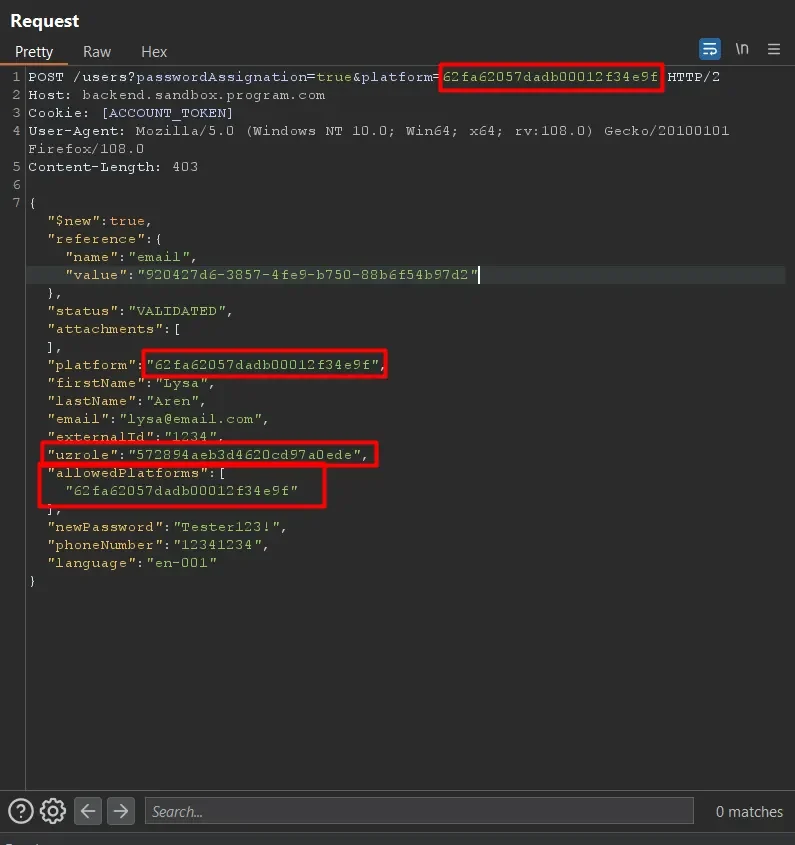
The report does not describe the accounts, roles or tools used beyond the fact that the researcher was working against the user creation request of the platform and had access to it. The request body is JSON and contains three fields that matter:
platform: the platform to which the user is assigned. The report notes that platform ID equals account ID.uzrole: the role assigned to the user. The researcher chose the role that gives full access to the platform.allowedplatforms: a list of platform IDs. This is the field the whole bug turns on.
Finding it
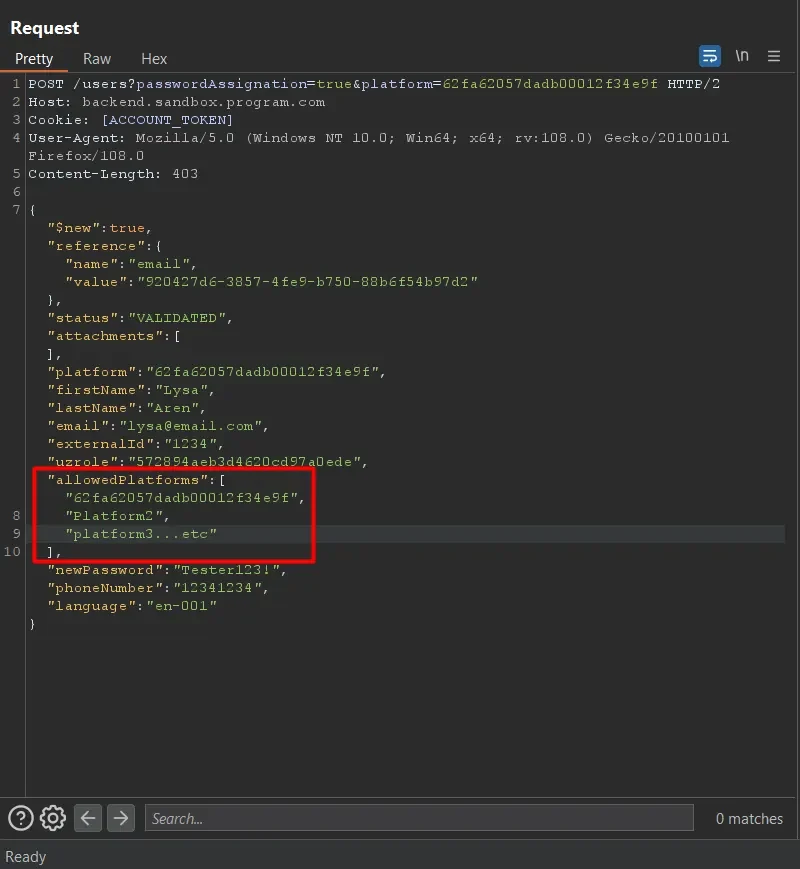
The interesting property of allowedplatforms is that it accepts any number of platform IDs in the JSON, and the report describes that number as countless. The researcher added a couple of extra platforms to the section and forwarded the request. Having checked nearly all requests on the same criteria, the expectation was that it would not work. It did: the server answered 200 OK.
Exploitation
Step 1: add extra platform IDs to the user creation request
The request body was edited so that allowedplatforms contained more platform IDs than the one being assigned. The server accepted it and returned 200 OK with a body like the following:
HTTP/2 200 OKDate: Sun, 15 Jan 2023 22:33:58 GMTContent-Type: application/json; charset=utf-8{ "reference": { "name": "self", "value": "[redacted]" }, "address": { "location": { "type": "Point", "geometry": [] }, "addressLines": [], "geocodeScore": 0, "cleanScore": 0 }, "login": { "failedAttempts": 0, "history": [], "lastActivity": "2023-01-15T22:33:58.285Z", "passwordHistory": [] }, "rating": { "count": 0, "total": 0 }, "position": { "type": "Point", "isMock": false }, "start": { "type": "none", "now": 0 }, "timesheet": { "days": [], "breaks": [] }, "status": "VALIDATED", "termsAccepted": false, "allowedPlatforms": [ "62fa62057dadb00012f34e9f", "62fa62057dadb00012f34e3a", "62fa6204f45cbb00112075d5" ], "gender": "UNKNOWN", "passwordHashAlgorithm": "bcrypt", "verifiedPassword": true, "hubs": [], "preferredZones": [], "external": false, "classic": true, "express": false, "scheduler": false, "roundStartpoint": "default", "roundEndpoint": "default", "skills": [], "unavailable": false, "availabilities": [], "collectionPoints": [], "_id": "63c47f561f30d030e2bf92da", "email": "[redacted]", "firstName": "Lysa", "lastName": "Aren", "invitationCode": "NNH05LsgkgpePhdJ", "uzrole": "572894aeb3d4620cd97a0ede", "platform": "62fa62057dadb00012f34e9f", "language": "en-001", "password": "$2a$10$[redacted]", "pin": "[redacted]", "externalId": "1234", "phoneNumber": "12341234", "emailCheck": { "valid": false }, "phoneNumberCheck": { "valid": false }, "when": "2023-01-15T22:33:58.285Z", "updated": "2023-01-15T22:33:58.292Z", "attachments": [], "devices": [], "workingTimes": [], "holidays": [], "__v": 0, "id": "63c47f561f30d030e2bf92da"}
The response echoes the allowedPlatforms array with the three IDs that were supplied, and the created user object carries the chosen uzrole and the primary platform. The report points the reader at allowedPlatforms in this response as the key detail.
Step 2: confirm the assignment on the platforms
After refreshing the page, the user that had been created was assigned to the platforms whose IDs were added earlier, with full privilege on the account. To make sure this was real, the researcher logged in as that user on a couple of platforms. The login succeeded with full privilege.
Step 3: what full privilege allows
From that position the report states that one can do anything: delete admins, modify things, remove the entire account, and so on.
The vulnerability turned out to be a duplicate. The researcher still wrote it up because something came out of it.
Root cause
The user creation endpoint takes the list of platforms the new user is allowed on directly from the request body and stores it without checking it against the platforms the caller is entitled to administer. The allowedplatforms list is trusted as supplied, so a caller who can create a user can attach that user to any platform ID. so a caller who can create a user can attach that user to any platform ID they supply.. The report does not describe the server-side code, so the exact check that is missing is likely an authorisation check that every ID in allowedplatforms belongs to the caller's account.
Impact
An attacker who can reach the user creation request can create a user with full privilege on the platforms whose IDs they add, not only the platform they are assigned to. With that user they can log in to those platforms with full privilege and delete admins, modify data or remove the entire account.
Fix
The fix that follows from the finding is to validate every entry in allowedplatforms on the server against the set of platforms the authenticated caller is authorised to manage, and to reject the request when any ID falls outside that set.
Variants to test
- Send a user creation or invitation request with extra IDs in any array field that names tenants, organisations or workspaces, and check whether the response echoes them and whether the new user can log in to those tenants. A positive result is a
200response containing the extra IDs and a successful login with privilege on a tenant you do not own. - Try the same on user update requests, adding IDs to the allowed list of an existing user. A positive result is the updated user object showing the added IDs and access to the corresponding tenants.
- Try role fields alongside the tenant list, choosing the highest-privilege role while pointing at a tenant you do not administer. A positive result is a user with that role on that tenant.
- Look for the same pattern in bulk import or CSV user provisioning, where a list of tenants per row may be trusted. A positive result is an imported user attached to tenants outside your account.
Conclusion
The report closes with three points: access control always wins; always try the simplest things, because the vulnerability is usually too obvious and you just need to dig well; and, quoting @stokfredrik, always go for impact.
What happened, in plain words
A security researcher found a way to create a user account with full control over more than one company's account on a business platform, not just the one the user was assigned to. The trick was simple: when creating a new user, the platform let the researcher add extra company IDs to a list called allowedplatforms, and the platform accepted the extra IDs in that list.. The researcher could then log in as that new user with full privilege on those companies, from where one can delete admins, modify things or remove the entire account. The bug was a duplicate of an already-reported issue, but the researcher wrote it up anyway because the lesson is valuable.
The platform and the feature
The target is a platform that runs multiple assets for any business. Think of it like a building manager who looks after many different office buildings for different companies. Each company that signs up gets its own account on the platform, and within each account there are dozens of user roles.
The feature at the centre of this write-up is user creation: an administrator of an account can create a new user and assign that user to a platform (which is the same as an account) with a particular role. In everyday terms, it is like a company admin filling in a form to add a new employee to the company's account and giving them a job title.
How the researcher approached it
The researcher started by hunting for access control bugs, on the reasoning that they are the easier class to find. Access control is about who is allowed to do what: for example, can a regular employee delete an admin? Can someone from Company A see Company B's data? These bugs are common because developers often forget to check permissions on every request.
The work covered manipulating requests and responses, and dorking for hidden endpoints on search engines, the Wayback Machine and AlienVault, among others. Dorking means using special search queries to find pages or files that were not meant to be public. The Wayback Machine is an archive of old web pages, and AlienVault is a service that collects information about internet-facing systems. All user roles turned out to be handled securely, and there was nothing to be done through that route, until the request that creates a new user caught the eye.
The user creation request
The researcher noticed the request that creates a new user. A request is what your browser sends to a server when you click a button or load a page. Here, the request body is in JSON, a text format for structured data that looks like a list of labelled values. The request contains three fields that matter:
platform: the platform to which the user is assigned. The report notes that platform ID equals account ID, so this is the company the user belongs to.uzrole: the role assigned to the user. The researcher chose the role that gives full access to the platform, like choosing "administrator" instead of "employee".allowedplatforms: a list of platform IDs. This is the field the whole bug turns on.
Finding the flaw
The interesting property of allowedplatforms is that it accepts any number of platform IDs in the JSON, and the report describes that number as countless. In other words, there is no limit on how many IDs you can put in that list. The researcher added a couple of extra platforms to the section and forwarded the request. Forwarding means sending the modified request to the server, usually by intercepting it with a tool that lets you edit it before it goes out. Having checked nearly all requests on the same criteria, the expectation was that it would not work. It did: the server answered 200 OK, which is the standard HTTP status code for a successful request.
Exploitation
Step 1: add extra platform IDs to the user creation request
The request body was edited so that allowedplatforms contained more platform IDs than the one being assigned. The server accepted it and returned 200 OK with a body like the following:
HTTP/2 200 OKDate: Sun, 15 Jan 2023 22:33:58 GMTContent-Type: application/json; charset=utf-8{ "reference": { "name": "self", "value": "[redacted]" }, "address": { "location": { "type": "Point", "geometry": [] }, "addressLines": [], "geocodeScore": 0, "cleanScore": 0 }, "login": { "failedAttempts": 0, "history": [], "lastActivity": "2023-01-15T22:33:58.285Z", "passwordHistory": [] }, "rating": { "count": 0, "total": 0 }, "position": { "type": "Point", "isMock": false }, "start": { "type": "none", "now": 0 }, "timesheet": { "days": [], "breaks": [] }, "status": "VALIDATED", "termsAccepted": false, "allowedPlatforms": [ "62fa62057dadb00012f34e9f", "62fa62057dadb00012f34e3a", "62fa6204f45cbb00112075d5" ], "gender": "UNKNOWN", "passwordHashAlgorithm": "bcrypt", "verifiedPassword": true, "hubs": [], "preferredZones": [], "external": false, "classic": true, "express": false, "scheduler": false, "roundStartpoint": "default", "roundEndpoint": "default", "skills": [], "unavailable": false, "availabilities": [], "collectionPoints": [], "_id": "63c47f561f30d030e2bf92da", "email": "[redacted]", "firstName": "Lysa", "lastName": "Aren", "invitationCode": "NNH05LsgkgpePhdJ", "uzrole": "572894aeb3d4620cd97a0ede", "platform": "62fa62057dadb00012f34e9f", "language": "en-001", "password": "$2a$10$[redacted]", "pin": "[redacted]", "externalId": "1234", "phoneNumber": "12341234", "emailCheck": { "valid": false }, "phoneNumberCheck": { "valid": false }, "when": "2023-01-15T22:33:58.285Z", "updated": "2023-01-15T22:33:58.292Z", "attachments": [], "devices": [], "workingTimes": [], "holidays": [], "__v": 0, "id": "63c47f561f30d030e2bf92da"}
Let us go through this response line by line. The first line, HTTP/2 200 OK, tells us the server accepted the request and returned a success status. Date: Sun, 15 Jan 2023 22:33:58 GMT is the server's timestamp. Content-Type: application/json; charset=utf-8 says the body is JSON text encoded in UTF-8. Then the body starts with a JSON object. The reference field contains a name and value, here "self" and an email address. The address field holds location data, with empty geometry and address lines, and scores set to zero. The login field shows failed attempts, history, last activity, and password history, all empty or zero. The rating field has count and total both zero. The position field has a type and a flag. The start field has a type and a number. The timesheet field has empty days and breaks. status is "VALIDATED", meaning the account is active. termsAccepted is false. Then comes allowedPlatforms, an array of three platform IDs: "62fa62057dadb00012f34e9f", "62fa62057dadb00012f34e3a", and "62fa6204f45cbb00112075d5". These are the IDs that were supplied in the request. The rest of the fields include gender, password hashing algorithm (bcrypt), a flag that the password is verified, various empty lists, the user's _id (a unique identifier), email, first name, last name, an invitation code, the uzrole (the role ID), the primary platform ID, language, a hashed password, a PIN hash, an external ID, a phone number, checks for email and phone validity, timestamps, and a version field. The response echoes the allowedPlatforms array with the three IDs that were supplied, and the created user object carries the chosen uzrole and the primary platform. The report points the reader at allowedPlatforms in this response as the key detail.
Step 2: confirm the assignment on the platforms
After refreshing the page, the user that had been created was assigned to the platforms whose IDs were added earlier, with full privilege on the account. To make sure this was real, the researcher logged in as that user on a couple of platforms. The login succeeded with full privilege. In other words, the new user could access those companies' accounts with full privilege.
Step 3: what full privilege allows
From that position the report states that one can do anything: delete admins, modify things, remove the entire account, and so on. This is the impact: from that position one can delete admins, modify things or remove the entire account.
The vulnerability turned out to be a duplicate, meaning someone else had already reported it. The researcher still wrote it up because something came out of it.
Root cause
The user creation endpoint takes the list of platforms the new user is allowed on directly from the request body and stores it without checking it against the platforms the caller is entitled to administer. The allowedplatforms list is trusted as supplied, so a caller who can create a user can attach that user to any platform ID they supply.. The report does not describe the server-side code, so the exact check that is missing is likely an authorisation check that every ID in allowedplatforms belongs to the caller's account.
Impact
An attacker who can reach the user creation request can create a user with full privilege on the platforms whose IDs they add, not only the platform they are assigned to. With that user they can log in to those platforms with full privilege and delete admins, modify data or remove the entire account. The report does not state which accounts or how many were reachable, nor whether the attacker needs any particular role to send the request.
Fix
The fix that follows from the finding is to validate every entry in allowedplatforms on the server against the set of platforms the authenticated caller is authorised to manage, and to reject the request when any ID falls outside that set.
Variants to test
- Send a user creation or invitation request with extra IDs in any array field that names tenants, organisations or workspaces, and check whether the response echoes them and whether the new user can log in to those tenants. A positive result is a
200response containing the extra IDs and a successful login with privilege on a tenant you do not own. - Try the same on user update requests, adding IDs to the allowed list of an existing user. A positive result is the updated user object showing the added IDs and access to the corresponding tenants.
- Try role fields alongside the tenant list, choosing the highest-privilege role while pointing at a tenant you do not administer. A positive result is a user with that role on that tenant.
- Look for the same pattern in bulk import or CSV user provisioning, where a list of tenants per row may be trusted. A positive result is an imported user attached to tenants outside your account.
Conclusion
The report closes with three points: access control always wins; always try the simplest things, because the vulnerability is usually too obvious and you just need to dig well; and, quoting @stokfredrik, always go for impact.
Glossary
- Access control: The rules that decide who is allowed to do what. For example, only an admin can delete a user.
- API: A way for two programs to talk to each other. When you use a website, your browser sends requests to the server's API.
- Request: A message your browser sends to a server asking for something, like a page or an action.
- Response: The server's reply to a request, which can include a status code and data.
- JSON: A text format for structured data, using curly braces and key-value pairs.
- Endpoint: A specific URL that an API exposes, like
/api/users/create. - HTTP status code: A number that tells you whether a request succeeded (200 OK) or failed (404 Not Found, 403 Forbidden).
- 200 OK: The standard HTTP status code meaning the request succeeded.
- Platform ID: A unique identifier for a platform (or account) on the service.
- Account: A company's space on the platform, containing its users and data.
- User role: A set of permissions assigned to a user, such as administrator or employee.
- Full privilege: Having all permissions, like an administrator.
- Duplicate (dup): A bug that has already been reported by someone else.
- Dorking: Using search engines with special queries to find exposed pages or files.
- Wayback Machine: An internet archive that stores old versions of web pages.
- AlienVault: A service that collects information about internet-facing systems.
- Forwarding a request: Sending a modified request to the server, often by intercepting it with a tool.
- bcrypt: A password hashing algorithm designed to be slow, to make guessing passwords harder.
- Hash: A one-way transformation of data (like a password) into a fixed-length string, so the original cannot be easily recovered.
- PIN: A personal identification number, often used as a secondary password.
- Tenant: Another word for an account or organisation in a multi-tenant system, where one platform serves many customers.
- Authorisation: The process of checking whether a user has permission to perform an action.
- Authentication: The process of verifying who a user is, usually by username and password.
- CSV: A plain text format for tabular data, with values separated by commas.
- Bulk import: A feature that lets you upload many records at once, often from a CSV file.
- Provisioning: The process of creating and setting up user accounts.

