Full structure takeover to many brands of company
A publicly reachable directory listing exposed a shell script containing a valid GitHub access token. The token allowed the researcher to clone many private repositories belonging to the company's brands, which contained credentials, panel passwords, backup databases and full application code.
 Published on u-itachi.medium.com
While testing this program I made a brute-force directories and found this directory listing http://sub.target.com/scripts
The full write-up lives on its author's site
It belongs to its author, so we link to it rather than copy it. The other two tabs are our own rewrites, checked against it.
Context
This is a write-up from a private bug bounty program hosted on Bugcrowd. The program covers many brands, and the researcher refers to the target only as sub.target.com, so the real hostname is not disclosed. The chain starts at a directory listing at http://sub.target.com/scripts. and the chain that follows runs from that directory listing to a GitHub access token, from the token to private repositories, and from those repositories to credentials for panels, databases, backups and cloud services.
The feature that starts everything is ordinary: a web server serving a directory of scripts. When directory listing is enabled, the server returns an HTML index of every file in the directory instead of refusing the request, which turns a path that was never meant to be browsable into a file inventory.
Setup
The report does not describe any account, role or tool version. The work was done against a private program on Bugcrowd, and the researcher used directory brute-forcing, a browser or curl to call the GitHub API, a VPS to clone repositories, and grep to search the cloned data. The program rules explicitly forbade trying to connect to databases or internal structure, and the researcher respected that limit, which matters for how far the exploitation went.
Finding it
While testing the program, the researcher brute-forced directories and found a directory listing at:
http://sub.target.com/scripts
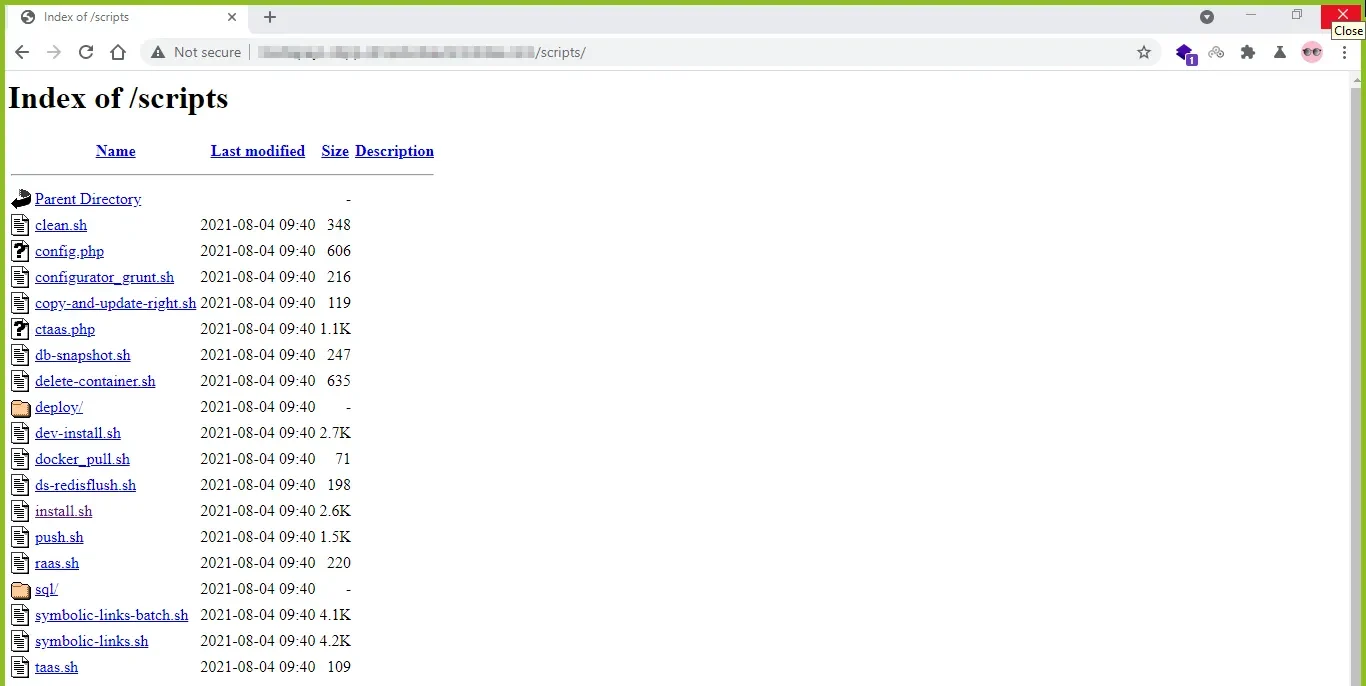
The screenshot shows the directory listing itself: an index of files served under /scripts. Nothing in the listing is a vulnerability on its own, but it exposes files that were presumably only meant to be fetched by name.
Exploitation
Step 1: Read the exposed scripts and find a token
Analysing the files in the listing, the researcher found an interesting token inside install.sh.
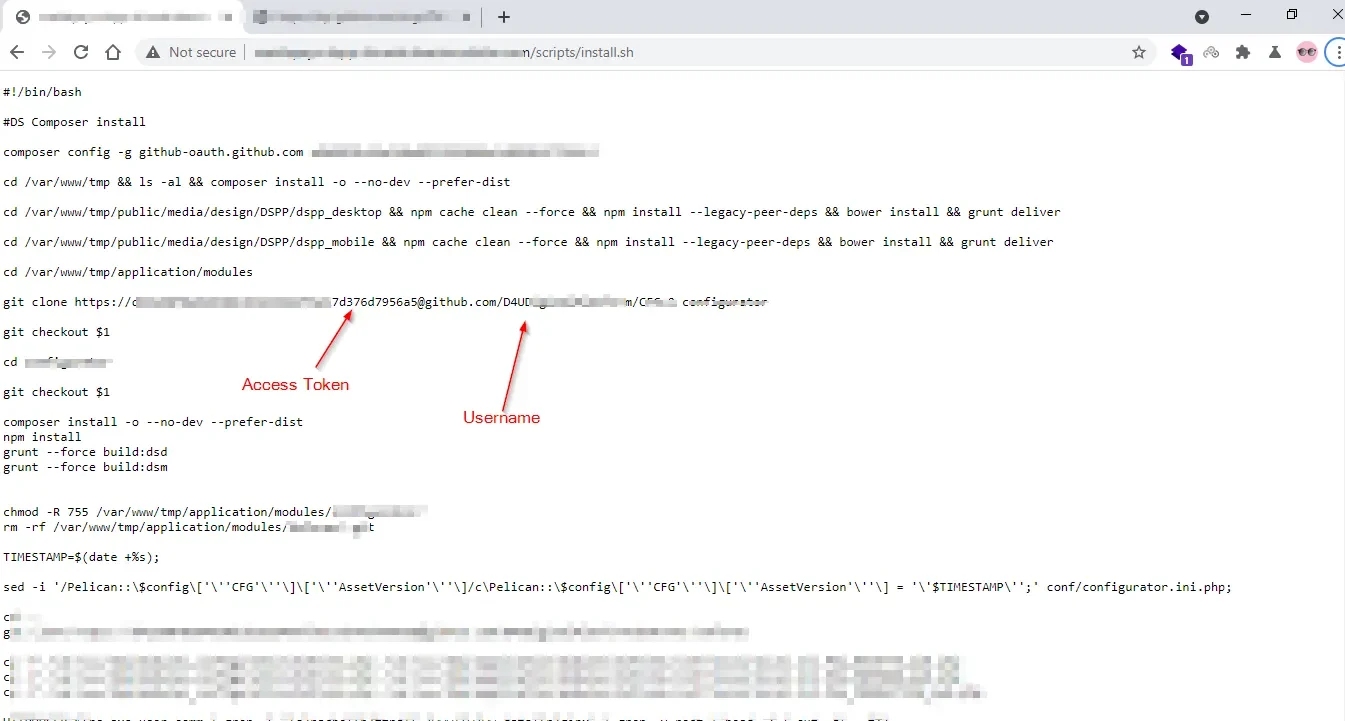
The token is a GitHub access token, shown in the report as d42e9078e94930************ with the tail masked. The researcher's first concern was whether it was still valid, because a developer creating such a token can choose an automatic expiry, as the next screenshot illustrates.
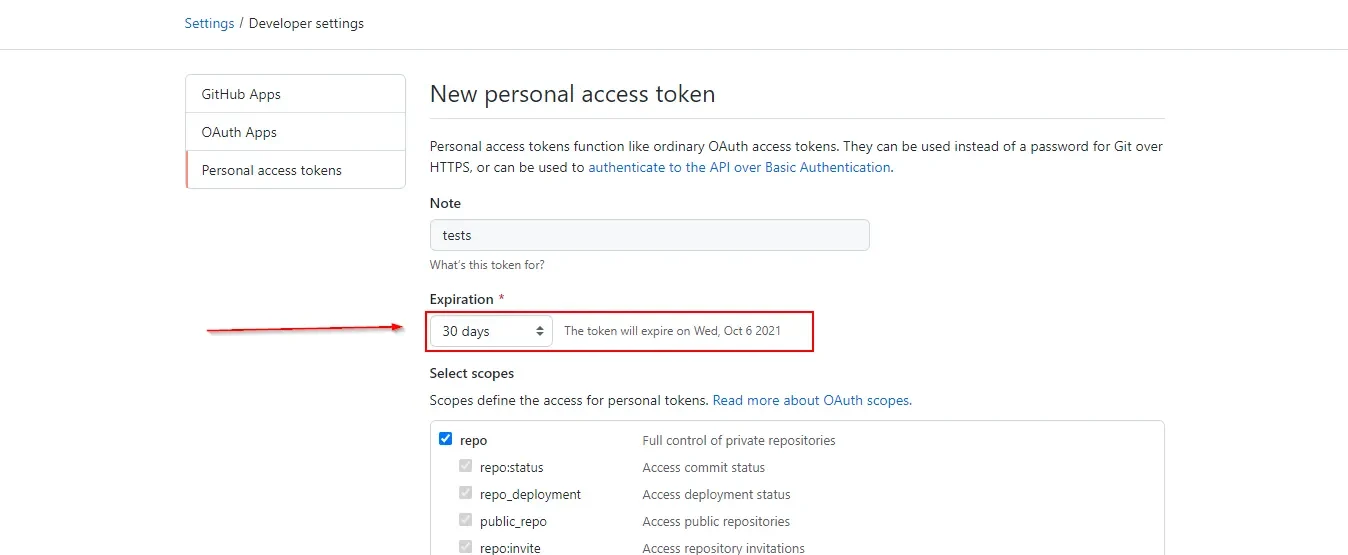
The screenshot shows GitHub's token creation screen with the automatic expiry option set to 30 days, which is the reason the researcher did not assume the token was live.
Step 2: Verify the token against the GitHub API
To check validity, the researcher used the organisation repositories endpoint:
https://api.github.com/orgs/<username>/repos?access_token=<token>
The request can be made from a browser or with curl. If the response returns repositories, the token is valid; if it fails, the token has expired. In this case the response listed private repositories, confirming the token was live.
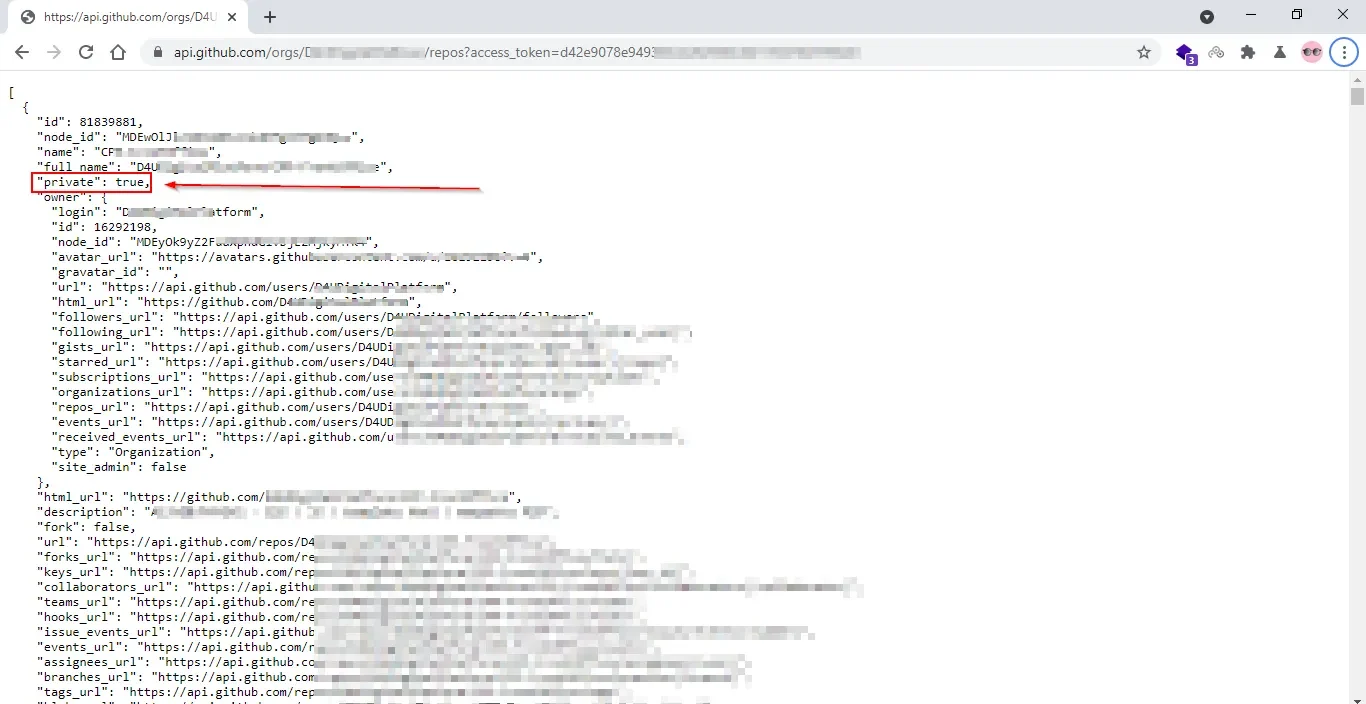
The screenshot shows the API response with the private repositories, labelled as proof that the access token is valid.
Step 3: Confirm the data belongs to the company
Listing private repositories was not enough to report. The researcher reasoned that the token's owner might only work part-time for the company, so the repositories had to be cloned and analysed to confirm the data was related to the target. The plan was to clone every private repository onto a VPS and inspect it.
Step 4: Clone all private repositories
The researcher used this bash code to pull every repository down:
curl https://api.github.com/orgs/<username>/repos?access_token=<token> | grep '\"name\"' | cut -d ":" -f 2 | cut -d '"' -f 2 > privare_repos_name.txtfor repo in $(cat privare_repos_name.txt); do git clone https://<access-token>@github.com/<username>/$repo; done
The first command calls the same organisation repositories endpoint, extracts the name field of each repository with grep and cut, and writes the names to privare_repos_name.txt. The loop then clones each repository over HTTPS, embedding the access token in the clone URL so that private repositories can be fetched without interactive authentication.
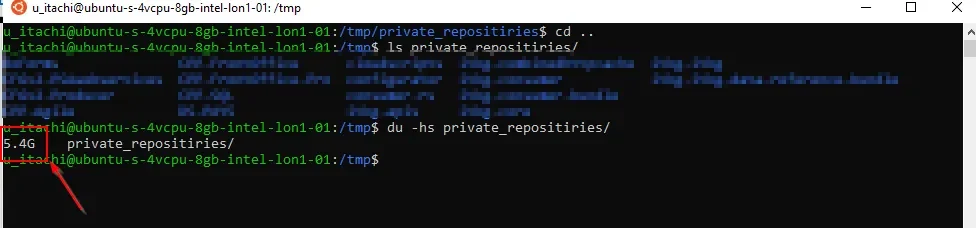
The screenshot shows the 5.4G size of all repositories.
The result was 5.4G of repositories.

The screenshot shows the total size, 5.4G, of the cloned data.
Step 5: Search the cloned data with grep
That volume was too large to review by hand in a short time, so the researcher switched to grep to pull out sensitive data. The report gives this command for extracting private SSH keys:
grep -r -R '(?=[-]*(?=[A-Z]*(?=[-])))(.*)(?=[-]*(?=[A-Z]*(?=[-])))'
The report presents it as the regex used to extract private SSH keys from all repositories.
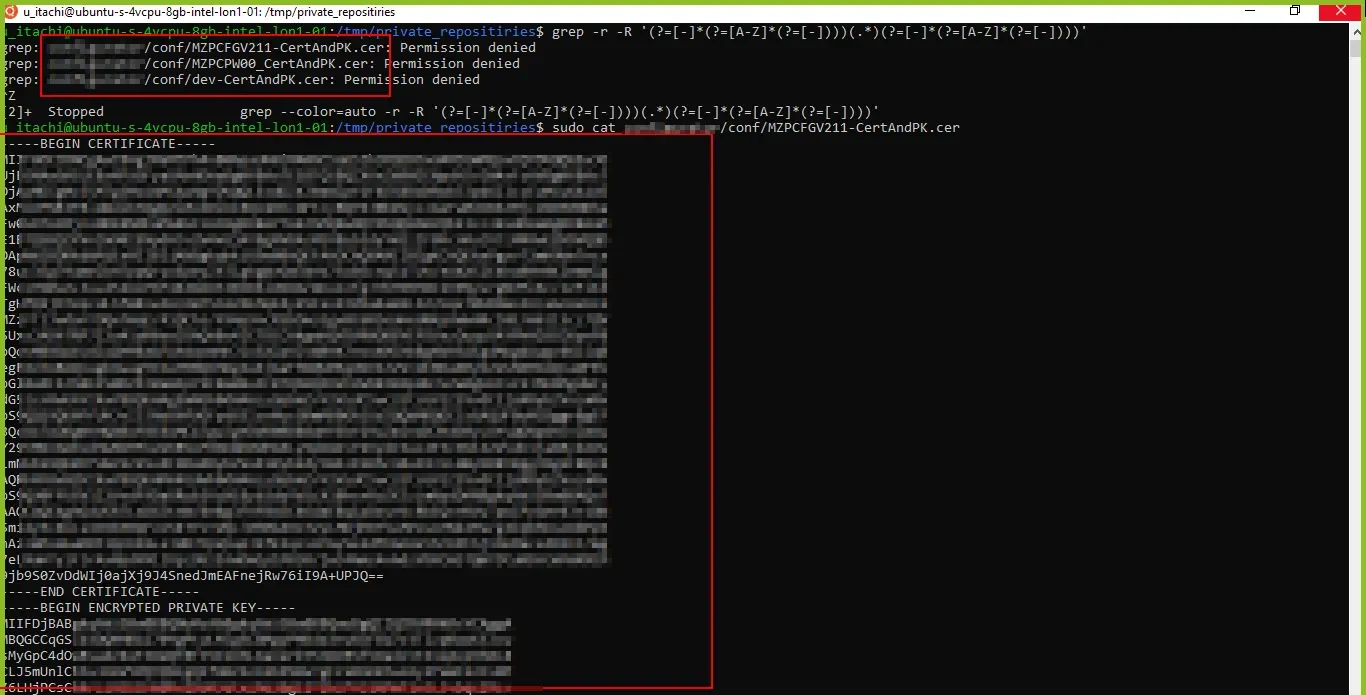
Step 6: Review the credentials found
Among the files, the researcher found a docker-compose.yml containing many credentials and many Docker connections.
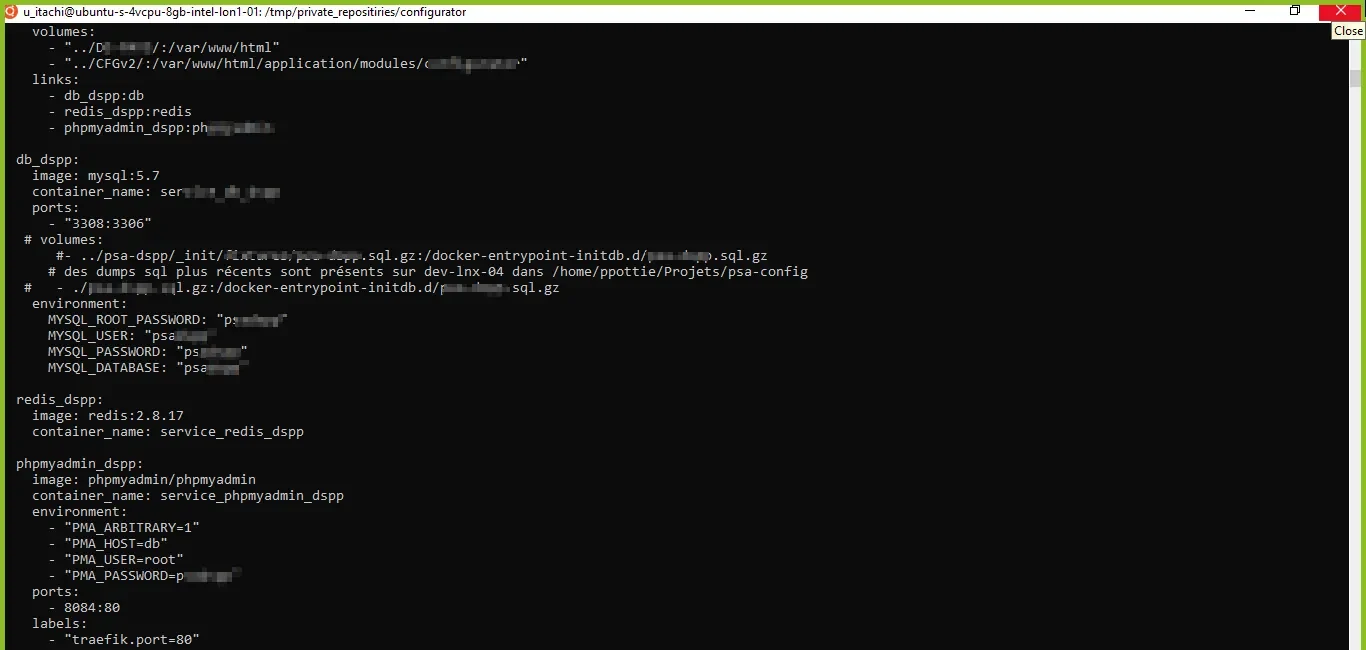
The screenshot shows the credentials in docker-compose.yml. The researcher did not attempt to use the Docker connections, because the program rules said not to try to connect to databases or internal structure, and that activity would have been out of scope.
Step 7: Count the affected brands
The researcher ended up with more than 15 private repositories, related to 15 brands. In every repository the researcher found panel passwords, database backups, full application code and cloud credentials, and states that with these it would be possible to connect and take over all the brands.
Root cause
Two mistakes combine here. The first is that the web server allowed directory listing on /scripts, so files that were only meant to be requested by name became enumerable. The second, and the serious one, is that a script in that directory, install.sh, contained a live GitHub access token with access to the organisation's private repositories. The token had not expired, so the API returned the private repositories. Once the token was valid, GitHub's API returned the private repository list and the token could be embedded in clone URLs, so the repository contents, including credentials, were reachable with nothing more than the token.
Impact
With the token, the researcher could list and clone more than 15 private repositories belonging to 15 brands. Inside them were panel passwords, database backups, full application code and cloud credentials. The researcher states that this would be enough to connect and take over all the brands, but did not do so: connecting to databases or internal structure was out of scope for the program. The researcher also reached the product architecture and product layout and deliberately did not share them, to preserve the confidentiality of the company's data.

Fix
Variants to test
- Fetch every file found in a listing and search for tokens, keys and passwords, especially in install, deploy and setup scripts. A positive result is a credential that authenticates to a service.
- Test any GitHub token found against
https://api.github.com/orgs/<username>/repos?access_token=<token>. A response listing private repositories means the token is live. - Clone the repositories the token can reach and grep for private key blocks,
docker-compose.ymlcredentials, database backups and cloud credentials. A positive result is working credentials for a system in scope.
What happened, in plain words
A security researcher was testing a private bug bounty program on Bugcrowd. A bug bounty program is an arrangement where a company invites outside testers to look for security problems in its systems and pays them for reporting what they find. This particular program covered many brands, and the researcher only ever calls the target sub.target.com, so the real hostname is hidden.
The chain of events is simple to describe even if each link needs a little explaining. A web server had a folder of scripts that anyone could browse like a list of files. One of those scripts contained a GitHub access token. A token is a short string of characters that works like a key: whoever holds it can act as the account it belongs to, without typing a password. That token opened the door to the company's private code repositories on GitHub, which is a website where teams store and share source code. Inside those repositories were passwords, database backups, cloud credentials and more.
The researcher stopped before using any of it to break into anything, because the program rules said not to connect to databases or internal systems. So the report describes what was reachable, not what was done with it.
The starting point: a browsable folder
The feature that started everything is very ordinary. A web server can be configured to serve a folder of files. Normally, if you ask for a folder without naming a specific file, the server says no. But a setting called directory listing changes that: the server replies with an HTML page that lists every file in the folder, like opening a drawer and finding an index card naming everything inside. That turns a path nobody was meant to browse into a full inventory of files.
Setup
The report does not describe any account, role or tool version. The work was done against a private program on Bugcrowd. The researcher used directory brute-forcing, a browser or curl to call the GitHub API, a VPS to clone repositories, and grep to search the cloned data.
A few of those terms deserve a plain explanation before we go further.
- Directory brute-forcing means trying a long list of common folder names, one after another, to see which ones exist. It is like walking down a corridor trying every door handle instead of guessing which door is unlocked.
curlis a command-line tool that fetches a web address and prints the response. It does what a browser does, but in text, which makes it easy to script.- A VPS is a virtual private server: a computer you rent in a data centre, which you can use to run commands and store files.
grepis a command-line search tool. You give it a pattern and it prints the lines that match, across as many files as you point it at.
The program rules explicitly forbade trying to connect to databases or internal structure. The researcher respected that limit, and it matters for how far the exploitation went: the report describes reachable credentials, not systems that were logged into.
Finding it
While testing the program, the researcher brute-forced directories and found a directory listing at:
http://sub.target.com/scripts
The screenshot shows the directory listing itself: an index of files served under /scripts. Nothing in the listing is a vulnerability on its own. What it does is expose files that were presumably only meant to be fetched by name, so a visitor who knows the exact filename can read them, and now a visitor can also learn every filename that exists.
Exploitation
Step 1: Read the exposed scripts and find a token
Analysing the files in the listing, the researcher found an interesting token inside install.sh. A file ending in .sh is a shell script: a list of commands that a computer runs, often used to set up or install software. Setup scripts frequently need to talk to other services, and to do that they sometimes carry credentials.
The token is a GitHub access token, shown in the report as d42e9078e94930************ with the tail masked. The researcher's first concern was whether it was still valid. A developer creating such a token can choose an automatic expiry, as the next screenshot illustrates.
The screenshot shows GitHub's token creation screen with the automatic expiry option set to 30 days. That is the reason the researcher did not assume the token was live: a token can be set to stop working after a fixed period, so finding one in a file does not prove it still opens anything.
Step 2: Verify the token against the GitHub API
To check validity, the researcher used the organisation repositories endpoint:
https://api.github.com/orgs/<username>/repos?access_token=<token>
An API is a way for one program to ask another program for data, using web addresses as the questions. GitHub's API is the set of addresses you can call to read and change things on GitHub. The address above asks GitHub for the list of repositories belonging to an organisation, which is a shared account that groups a team's projects. The <username> part is a placeholder for the organisation name, and <token> is a placeholder for the token itself.
The request can be made from a browser or with curl. If the response returns repositories, the token is valid; if it fails, the token has expired. In this case the response listed private repositories, confirming the token was live. A private repository is one that only authorised people can see, so a list of them coming back is proof that the token carries real access.
The screenshot shows the API response with the private repositories, labelled as proof that the access token is valid.
Step 3: Confirm the data belongs to the company
Listing private repositories was not enough to report. The researcher reasoned that the token's owner might only work part-time for the company, so the repositories had to be cloned and analysed to confirm the data was related to the target. Cloning means making a full local copy of a repository, including its history. The plan was to clone every private repository onto a VPS and inspect it.
This step is about evidence. A token that lists repositories proves access, but a report is much stronger if the contents can be shown to belong to the company being tested.
Step 4: Clone all private repositories
The researcher used this bash code to pull every repository down:
curl https://api.github.com/orgs/<username>/repos?access_token=<token> | grep '\"name\"' | cut -d ":" -f 2 | cut -d '"' -f 2 > privare_repos_name.txtfor repo in $(cat privare_repos_name.txt); do git clone https://<access-token>@github.com/<username>/$repo; done
Line by line, in plain words:
curl https://api.github.com/orgs/<username>/repos?access_token=<token>fetches the same organisation repositories address as before, this time from the command line.- The vertical bar
|is a pipe: it passes the output of one command into the next, like handing a document to the next person in a queue. grep '\"name\"'keeps only the lines that contain the wordname, which in the API response is the field holding each repository's name.cut -d ":" -f 2splits each line at the colon and keeps the second piece, which is the part after"name":.cut -d '"' -f 2splits again at the double quote and keeps the second piece, which strips the surrounding quotes and leaves just the repository name.> privare_repos_name.txtwrites the result into a text file, one repository name per line. The filename is spelled that way in the report.for repo in $(cat privare_repos_name.txt); do ... doneis a loop: it reads each name from the file and runs the commands betweendoanddoneonce per name.git clone https://<access-token>@github.com/<username>/$repocopies that repository.gitis the version control tool GitHub is built on. Putting the token in the address, before the@, lets the clone authenticate as the token's owner, so private repositories can be fetched without anyone typing a password.
The screenshot shows the 5.4G size of all repositories.
The result was 5.4G of repositories.
The screenshot shows the total size, 5.4G, of the cloned data.
Step 5: Search the cloned data with grep
That volume was too large to review by hand in a short time, so the researcher switched to grep to pull out sensitive data. The report gives this command for extracting private SSH keys:
grep -r -R '(?=[-]*(?=[A-Z]*(?=[-])))(.*)(?=[-]*(?=[A-Z]*(?=[-])))'
What each part does:
grepis the search tool.-rand-Rboth tell it to search recursively, meaning inside every folder and subfolder, not just the current one.- The quoted string is a regular expression, a pattern language for describing text. The report presents this as the regex used to extract private SSH keys from all repositories. A private SSH key is a file that proves your identity to a server, so finding one is like finding a copy of someone's house key.
Step 6: Review the credentials found
Among the files, the researcher found a docker-compose.yml containing many credentials and many Docker connections. A docker-compose.yml is a configuration file that describes how to run a set of containers, which are lightweight, packaged pieces of software. Such files often contain the passwords and connection details those containers need.
The screenshot shows the credentials in docker-compose.yml. The researcher did not attempt to use the Docker connections, because the program rules said not to try to connect to databases or internal structure, and that activity would have been out of scope. Out of scope means outside what the program authorises testers to touch.
Step 7: Count the affected brands
The researcher ended up with more than 15 private repositories, related to 15 brands. In every repository the researcher found panel passwords, database backups, full application code and cloud credentials, and states that with these it would be possible to connect and take over all the brands. Panel passwords are the logins for administrative dashboards. Cloud credentials are the keys that let software use a cloud provider's services, such as storage or servers.
Root cause
Two mistakes combine here. The first is that the web server allowed directory listing on /scripts, so files that were only meant to be requested by name became enumerable. The second, and the serious one, is that a script in that directory, install.sh, contained a live GitHub access token with access to the organisation's private repositories. The token had not expired, so the API returned the private repositories. Once the token was valid, GitHub's API returned the private repository list and the token could be embedded in clone URLs, so the repository contents, including credentials, were reachable with nothing more than the token.
Either one alone might be survivable, but together they open the house.
Impact
With the token, the researcher could list and clone more than 15 private repositories belonging to 15 brands. Inside them were panel passwords, database backups, full application code and cloud credentials. The researcher states that this would be enough to connect and take over all the brands, but did not do so: connecting to databases or internal structure was out of scope for the program. The researcher also reached the product architecture and product layout and deliberately did not share them, to preserve the confidentiality of the company's data.
Fix
Rotating means replacing a credential with a new one and retiring the old one, so that anyone holding the old value loses access.
Variants to test
- A 403 means the server refused, and a 404 means the path does not exist; an index page means the folder is browsable.
- Fetch every file found in a listing and search for tokens, keys and passwords, especially in install, deploy and setup scripts. A positive result is a credential that authenticates to a service.
- Test any GitHub token found against
https://api.github.com/orgs/<username>/repos?access_token=<token>. A response listing private repositories means the token is live. - Clone the repositories the token can reach and grep for private key blocks,
docker-compose.ymlcredentials, database backups and cloud credentials. A positive result is working credentials for a system in scope.
Glossary
- API: a way for one program to ask another program for data, usually over web addresses.
- Bash: a command-line shell, a program that runs typed commands.
- Bug bounty program: an arrangement where a company invites outside testers to find and report security problems, often for a reward.
- Bugcrowd: a platform that hosts bug bounty programs.
- Clone: to make a full local copy of a code repository, including its history.
- Cloud credentials: keys that let software use a cloud provider's services.
- Container: a lightweight, packaged piece of software that runs in isolation.
- Credential: any secret that proves identity or grants access, such as a password, token or key.
curl: a command-line tool that fetches a web address and prints the response.- Directory brute-forcing: trying a long list of common folder names to discover which exist.
- Directory listing: a server feature that returns an index of every file in a folder instead of refusing the request.
- Docker: software for running containers.
docker-compose.yml: a configuration file describing how to run a set of containers, often including credentials.- Endpoint: a specific web address that an API accepts requests on.
- Expiry: a setting that makes a token stop working after a fixed time.
git: the version control tool used to track and copy source code.- GitHub: a website where teams store and share source code repositories.
grep: a command-line search tool that prints lines matching a pattern.- HTML: the language web pages are written in.
- Organisation: a shared account that groups a team's projects on GitHub.
- Out of scope: outside what a program authorises testers to touch.
- Pipe (
|): a way to pass the output of one command into the next. - Private repository: a code repository only authorised people can see.
- Regex (regular expression): a pattern language for describing text to search for.
- Repository: a stored collection of source code and its history.
- Revoke: to cancel a credential so it no longer works.
- Rotate: to replace a credential with a new one and retire the old one.
- Shell script: a file of commands that a computer runs, often to set up software.
- SSH key: a file that proves your identity to a server.
- Token: a short string that works like a key, letting whoever holds it act as the account it belongs to.
- VPS: a virtual private server, a computer you rent in a data centre.
- 403 / 404: HTTP status codes meaning the server refused the request (403) or the path does not exist (404).




