GeForce NOW bypassing Kiosk Mode on Free Tier
A free-tier GeForce NOW kiosk could be escaped by chaining Windows URI handlers and the Share contract to launch Copilot, then opening a crafted .url file that started cmd.exe. This gave the attacker a command prompt with kiosk user privileges, allowing arbitrary commands and reconnaissance inside the isolated cloud gaming session.

medium.com
Published on medium.com
Cybersecurity
The full write-up lives on its author's site
It belongs to its author, so we link to it rather than copy it. The other two tabs are our own rewrites, checked against it.
Context
NVIDIA GeForce NOW is a cloud gaming service. Sessions run inside a heavily restricted, isolated Windows environment, a kiosk mode, whose purpose is to let the user interact only with the intended game stream. The user is meant to be blocked from reaching the underlying Windows operating system or executing arbitrary commands. The research here is a black-box test of that isolation on the free tier, and the goal was to find a way out of the kiosk and into a shell.
Setup
The testing was black-box, performed against the GeForce NOW environment on the free tier. The report does not list specific client versions, build numbers or tooling beyond that. The precondition for the first step is an authenticated account that does not own the game being launched, because the ownership error dialog is what opens the first door.
Finding it
While looking for UI pivots inside the applications the kiosk allows, the researcher launched a game that the authenticated account did not own, through the Xbox app. That produced a standard ownership error dialog. The interesting part was the help links inside that dialog: clicking them spawned a restricted Microsoft Edge instance. A browser, even a restricted one, is a much larger attack surface than a game stream, so this looked like a possible pathway out of the sandbox.
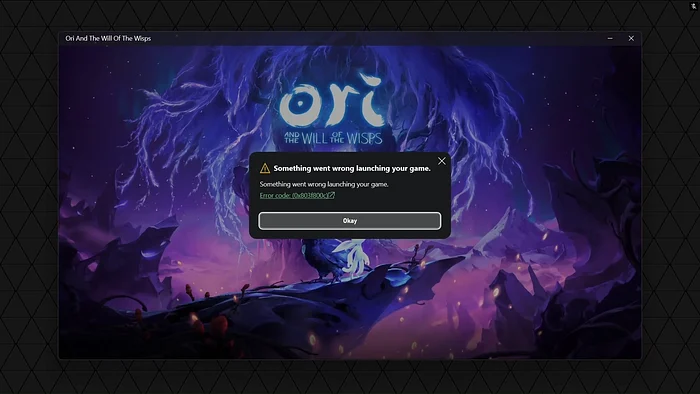
The screenshot shows the Xbox app ownership error dialog whose help links spawned the restricted Edge instance.
Exploitation
The chain works by combining native Windows functionality with URI handlers, which is what lets it get past the environment's watchdog processes.
Step 1: reach a restricted Edge instance
Launch a game the account does not own via the Xbox app, then click a help link in the resulting ownership error dialog. This spawns a restricted Microsoft Edge instance. That browser is the starting point for everything that follows.
Step 2: open the Microsoft Store through a URI handler
From the restricted Edge instance, navigate to the Store URI:
ms-windows-store://
This successfully launched the Microsoft Store. From the restricted Edge instance, navigating to the Store URI successfully launched the Microsoft Store.
Step 3: use the Share contract to launch Copilot
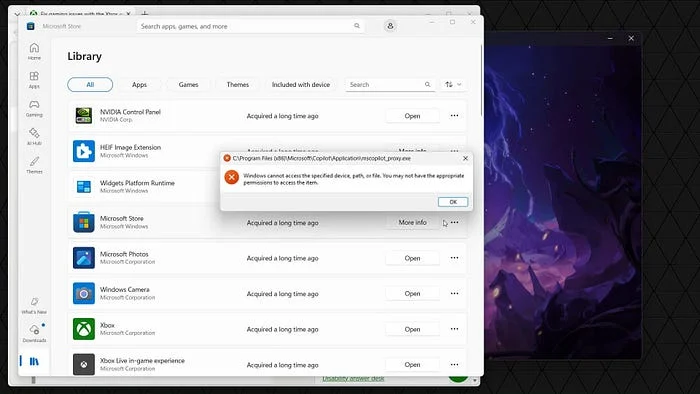
Inside the Store, open an app's page. From that page the researcher used the native Windows "Share" contract, which allowed execution of Microsoft Copilot (mscopilot.exe). The native Windows Share contract allowed execution of Microsoft Copilot.
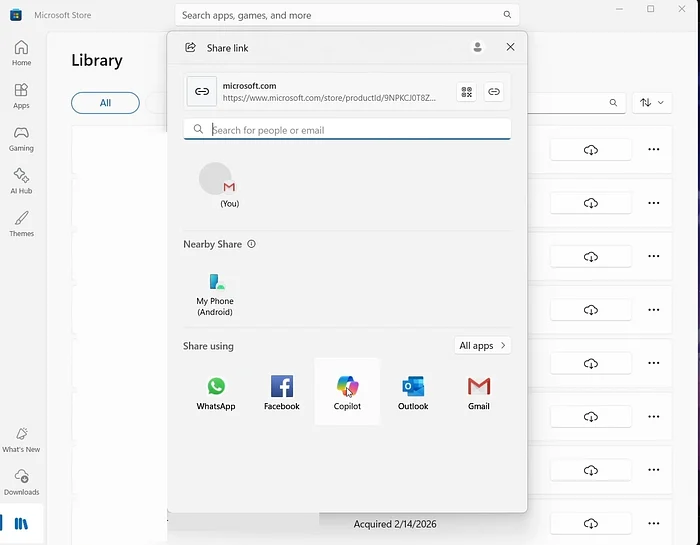
The screenshot shows the Microsoft Store app page and the Share contract used to launch Microsoft Copilot.
Step 4: open a crafted .url file in Copilot
With Copilot running, download and open a crafted .url file directly within Copilot. The file content is:
URL=file:///C:/Windows/System32/cmd.exe
The crafted .url file pointed at a local file:/// path to cmd.exe. Doing this inside Copilot bypassed the internal application restrictions.
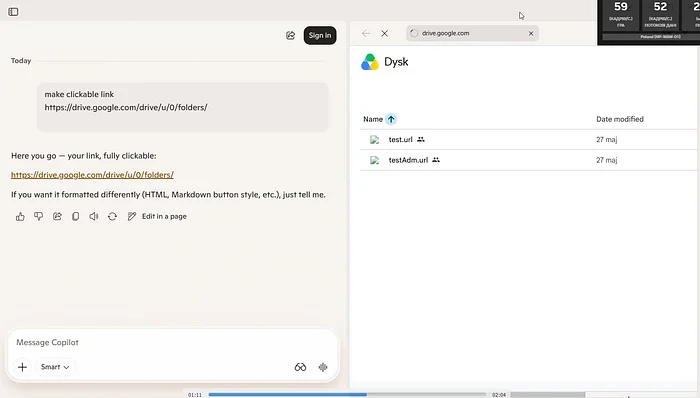
The screenshot shows Microsoft Copilot with the crafted .url file that points at cmd.exe.
Result
The chain spawned a Windows Command Prompt (cmd.exe) running with Kiosk User privileges. From there the researcher had arbitrary system command execution, could perform post-exploitation reconnaissance, and had completely circumvented the cloud gaming isolation.
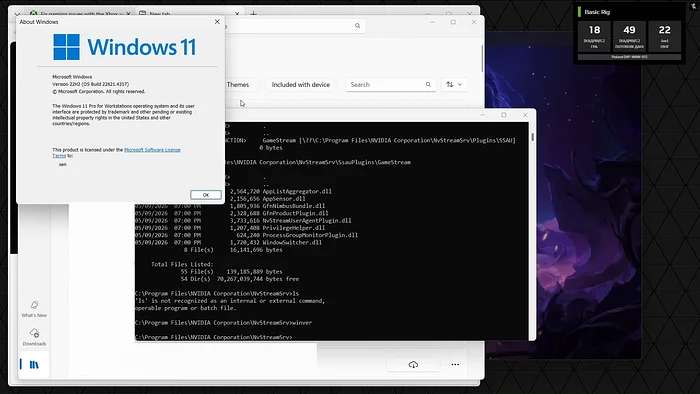
The screenshot shows the command prompt launched with Kiosk User privileges.
Root cause
The escape chained native Windows functionality and URI handlers. The kiosk blocks direct access to the OS, but each allowed application exposes integration points that hand control to another component: the Xbox app's error dialog opens a browser, the browser honours the ms-windows-store:// URI handler, the Store exposes the Share contract, and Copilot opens a downloaded .url file whose target is a local executable. The chain combined native Windows functionality and URI handlers to bypass the environment's watchdog processes. The report does not describe the kiosk's internal policy or why the watchdog failed to stop any individual hop, so the precise design mistake is not stated.
Impact
The chain spawned a Windows Command Prompt with Kiosk User privileges. That allows arbitrary system command execution and post-exploitation reconnaissance, and it completely circumvents the cloud gaming isolation. The chain spawned a command prompt with Kiosk User privileges, allowing arbitrary command execution and post-exploitation reconnaissance.
Fix
NVIDIA mitigated this specific escape path on the live environment by explicitly blocking execution of mscopilot_proxy.exe. Separately, architectural updates to Microsoft Copilot made the vector ineffective: Copilot can still be launched from the system UI, but it no longer functions properly and completely lacks the built-in CEF (Chromium Embedded Framework) browser component that was previously used to execute the downloaded .url payload.
The screenshot shows Copilot after the update, without the CEF browser component that the payload relied on.
Timeline
| Date | Event |
|---|---|
| May 28, 2026 | Vulnerability discovered and reported to NVIDIA PSIRT via Intigriti. |
| June 3, 2026 | Triaged and escalated by the platform. |
| June 4, 2026 | Acknowledged by NVIDIA PSIRT (Ticket #6266237). |
| June 23, 2026 | Silent patch detected and confirmed on the live environment by the researcher. |
| September 9, 2026 | Public disclosure, published after exceeding the 90-day grace period. |
Variants to test
- Other URI handlers from the restricted browser. Try schemes such as
ms-settings:,ms-appinstaller:orms-office:from the Edge instance. A positive result is any handler that launches a native application with more capability than the browser. - Other error dialogs with help links. Trigger ownership or licensing errors in other launchers inside the kiosk and click their help links. A positive result is a new browser or application instance outside the intended stream.
- Other Windows contracts. From Store or other allowed apps, try contracts beyond Share, such as open-with or print. A positive result is execution of a process the kiosk does not normally permit.
- Other shortcut file types. Instead of
.url, try.lnk,.websiteor.scffiles opened from an allowed application. A positive result is a spawned process such ascmd.exeorpowershell.exe. - Other local targets in the
.urlfile. Replace the target with another local executable or script path. A positive result is execution of anything other than the intended game stream. - Watchdog timing. Repeat the chain with pauses or rapid sequences between hops to see whether the watchdog catches any individual step. A positive result is a hop that survives when performed slowly or quickly.
What happened, in plain words
NVIDIA GeForce NOW is a cloud gaming service. Instead of running games on your own computer, it runs them on a computer in a data centre and streams the picture to you, like a very fast video. Because you are effectively sitting at someone else's machine, NVIDIA wraps each session in a very locked-down Windows environment. This is called kiosk mode: a setup where the computer is deliberately limited to one job, in the same way a shop's self-service till only lets you scan and pay, not browse the internet or open a file manager.
The point of the kiosk is that you should only be able to see and control the game stream. You should not be able to reach the real Windows desktop underneath, open a terminal, or run your own programs. The researcher tested that promise on the free tier and found a chain of ordinary Windows features that, joined together, led from a game error message all the way to a Windows Command Prompt. A Command Prompt (also called a shell or terminal) is a window where you type commands as text and the computer obeys them, which is exactly what the kiosk is supposed to prevent.
This kind of testing is called black-box testing: you are given no documentation, no source code and no inside knowledge, and you poke at the product the way any ordinary user could, watching what comes back. The goal here was simple to state: get out of the kiosk and into a shell.
The setup
The testing was black-box, done against the GeForce NOW environment on the free tier. The report does not list client versions, build numbers or specific tools beyond that.
One precondition matters for the very first step: you need a signed-in account that does not own the game you are about to launch. That sounds odd, but it is the key. When you try to start a game you have not bought, the launcher cannot simply start it, so it shows an error message instead. That error message is the door.
Finding the first door
The researcher was looking for UI pivots: places in the interface where clicking something takes you somewhere the designers did not intend. Think of a locked building where every door is sealed, but one noticeboard has a phone number on it that, when dialled, opens a side entrance.
The first step was to launch a game the signed-in account did not own, through the Xbox app inside the kiosk. That produced a standard ownership error dialog: a pop-up saying, in effect, you do not own this game.
The interesting part was the help links inside that dialog. Clicking one spawned a restricted Microsoft Edge instance. Edge is Microsoft's web browser. A browser, even a restricted one, is a far bigger and more complicated program than a game stream, and bigger programs have more features that can be abused. So this looked like a possible way out of the sandbox. A sandbox is an isolated area a program is kept in so that even if it misbehaves, it cannot touch the rest of the system, like a child's playpen in the corner of a room.
The screenshot shows the Xbox app ownership error dialog whose help links spawned the restricted Edge instance.
Getting out, step by step
The chain works by combining built-in Windows features with URI handlers. A URI is a short address that starts with a scheme name, such as https:// for web pages. Windows lets programs register their own schemes, so that when something asks to open ms-windows-store://, Windows knows to launch the Microsoft Store. A URI handler is therefore a bit like a doorbell wired to a specific room: press the right button and that room's occupant comes out, no matter which corridor you pressed it from.
Step 1: reach a restricted Edge instance
Launch a game the account does not own through the Xbox app, then click a help link in the ownership error dialog. This spawns a restricted Microsoft Edge instance. That browser is the starting point for everything that follows.
Step 2: open the Microsoft Store through a URI handler
From the restricted Edge instance, navigate to the Store URI:
ms-windows-store://
This successfully launched the Microsoft Store. Reading the line: ms-windows-store is the scheme name that Windows reserves for the Store app, and the :// part marks it as a URI rather than a web address. Typing or navigating to it tells Windows, through the browser, to start the Store. The reason this matters is that the URI handler is invoked by the browser, so the navigation crosses from the Edge sandbox into a different native application. In plain terms, the browser was allowed to ring a doorbell that opened a different room.
Step 3: use the Share contract to launch Copilot
Inside the Store, open an app's page. From that page the researcher used the native Windows "Share" contract, which allowed execution of Microsoft Copilot (mscopilot.exe).
A contract in Windows is a standard way for apps to hand a task to each other, such as sharing a link or a file. It is like a standard electrical socket: any appliance with the right plug can use it, and the socket does not care which appliance that is. Here the Share contract acted as the bridge from the Store to another executable. An executable is simply a program file that Windows can start, and mscopilot.exe is the Copilot program.
The screenshot shows the Microsoft Store app page and the Share contract used to launch Microsoft Copilot.
Step 4: open a crafted .url file in Copilot
With Copilot running, download and open a crafted .url file directly within Copilot. The file content is:
URL=file:///C:/Windows/System32/cmd.exe
A .url file is a shortcut that points at a target address. Reading the line: URL= is the label the shortcut format expects, and everything after it is the target. file:/// means "a file on this computer" rather than a web page, C:/Windows/System32/ is the folder where core Windows programs live, and cmd.exe is the Windows Command Prompt program. So the shortcut points at the local command prompt. Opening the shortcut therefore starts the command prompt. Doing this inside Copilot bypassed the internal application restrictions.
The screenshot shows Microsoft Copilot with the crafted .url file that points at cmd.exe.
The result
The chain spawned a Windows Command Prompt (cmd.exe) running with Kiosk User privileges. Privileges are the permissions an account has: what it is allowed to read, change or run. Running as the Kiosk User means the shell had whatever rights that restricted account had. From there the researcher had arbitrary system command execution, could perform post-exploitation reconnaissance, and had completely circumvented the cloud gaming isolation. Post-exploitation reconnaissance means looking around the machine after getting in, to see what else is there.
The screenshot shows the command prompt launched with Kiosk User privileges.
Why it worked
The escape relies on a chain of trusted Windows components rather than a single flaw. The kiosk blocks direct access to the operating system, but each allowed application exposes integration points that hand control to another component: the Xbox app's error dialog opens a browser, the browser honours the ms-windows-store:// URI handler, the Store exposes the Share contract, and Copilot opens a downloaded .url file whose target is a local executable. The chain combined native Windows functionality and URI handlers to bypass the environment's watchdog processes.
A watchdog is a background program that keeps an eye on the kiosk and is meant to stop anything that steps outside the rules, like a security guard walking the corridors. The report does not describe the kiosk's internal policy or why the watchdog failed to stop any individual hop, so the precise design mistake is not stated.
What an attacker could do
The chain spawned a Windows Command Prompt with Kiosk User privileges. That allows arbitrary system command execution and post-exploitation reconnaissance, and it completely circumvents the cloud gaming isolation. The chain allowed arbitrary system command execution and post-exploitation reconnaissance.
The fix
NVIDIA mitigated this specific escape path on the live environment by explicitly blocking execution of mscopilot_proxy.exe. Separately, architectural updates to Microsoft Copilot made the vector ineffective: Copilot can still be launched from the system UI, but it no longer functions properly and completely lacks the built-in CEF (Chromium Embedded Framework) browser component that was previously used to execute the downloaded .url payload.
CEF is a ready-made browser engine that other programs can embed so they can display web content without writing a browser from scratch. The CEF browser component was previously leveraged to execute the downloaded .url payload. Without it, the last hop no longer works.
The screenshot shows Copilot after the update, without the CEF browser component that the payload relied on.
Timeline
| Date | Event |
|---|---|
| May 28, 2026 | Vulnerability discovered and reported to NVIDIA PSIRT via Intigriti. |
| June 3, 2026 | Triaged and escalated by the platform. |
| June 4, 2026 | Acknowledged by NVIDIA PSIRT (Ticket #6266237). |
| June 23, 2026 | Silent patch detected and confirmed on the live environment by the researcher. |
| September 9, 2026 | Public disclosure, published after exceeding the 90-day grace period. |
PSIRT stands for Product Security Incident Response Team, the group inside a company that handles security reports. Intigriti is the bug bounty platform the report went through. Triaged means the platform checked the report was real and in scope before passing it on. A silent patch is a fix shipped without a public announcement. The 90-day grace period is the usual window given to a vendor to fix an issue before the researcher publishes.
Other things worth testing
These are follow-up ideas in the same spirit, each with a clear sign of success:
- Other URI handlers from the restricted browser. Try schemes such as
ms-settings:,ms-appinstaller:orms-office:from the Edge instance. A positive result is any handler that launches a native application with more capability than the browser. - Other error dialogs with help links. Trigger ownership or licensing errors in other launchers inside the kiosk and click their help links. A positive result is a new browser or application instance outside the intended stream.
- Other Windows contracts. From Store or other allowed apps, try contracts beyond Share, such as open-with or print. A positive result is execution of a process the kiosk does not normally permit.
- Other shortcut file types. Instead of
.url, try.lnk,.websiteor.scffiles opened from an allowed application. A positive result is a spawned process such ascmd.exeorpowershell.exe. - Other local targets in the
.urlfile. Replace the target with another local executable or script path. A positive result is execution of anything other than the intended game stream. - Watchdog timing. Repeat the chain with pauses or rapid sequences between hops to see whether the watchdog catches any individual step. A positive result is a hop that survives when performed slowly or quickly.
Glossary
- Black-box testing: testing a product with no inside knowledge, only what any user can see and do.
- Bug bounty platform: a service that receives security reports and passes them to the company, such as Intigriti here.
- CEF (Chromium Embedded Framework): a ready-made browser engine that programs can embed to display web content.
- Cloud gaming: running games on a remote computer and streaming the picture to the player.
- Command Prompt / shell / terminal: a window where you type text commands and the computer runs them.
- Contract (Windows): a standard way for one app to hand a task, such as sharing, to another app.
- Executable: a program file that Windows can start, such as
mscopilot.exeorcmd.exe. - Free tier: the no-cost level of a service, with its own limits.
- Grace period: the time a vendor is given to fix an issue before the researcher publishes.
- Kiosk mode: a locked-down setup that limits a computer to one intended job.
- Kiosk User: the restricted account the kiosk session runs under.
- Payload: the file or content used to carry out an attack step.
- Post-exploitation reconnaissance: looking around a machine after getting in, to see what is available.
- Privileges: the permissions an account has, meaning what it may read, change or run.
- PSIRT: a company's Product Security Incident Response Team, which handles security reports.
- Sandbox: an isolated area a program runs in so it cannot affect the rest of the system.
- Silent patch: a fix shipped without a public announcement.
- Triaged: checked and confirmed as a real, in-scope report before being escalated.
- UI pivot: a place in the interface where clicking something leads somewhere the designers did not intend.
- URI: a short address starting with a scheme name, such as
https://orms-windows-store://. - URI handler: the program Windows starts when a particular URI scheme is opened.
.urlfile: a shortcut file that points at a target address, which can be a local file.- Watchdog: a background program that monitors the kiosk and is meant to stop anything outside the rules.

