Good things takes time | Story of my first “valid” critical bug!
A RavenDB instance was exposed on a non-standard port without authentication, allowing anyone to view and modify database settings, dump the full database, and delete databases. The author found it through subdomain enumeration and port scanning.
 Published on infosecwriteups.com
Hello there, I am Krishna Agarwal ( Kr1shna 4garwal ) from India 🇮🇳. An ordinary bug hunter and So called security researcher :)
The full write-up lives on its author's site
It belongs to its author, so we link to it rather than copy it. The other two tabs are our own rewrites, checked against it.
Context
This is the story of my first valid critical finding on a public vulnerability disclosure programme. The programme offered a Hall of Fame for valid submissions and the scope was medium, covering *.domain.tld. Throughout the write-up domain.tld stands in for the real target, which I refer to as target.com.
The finding is an exposed RavenDB instance, reachable on port 8080, with no authentication in front of it. RavenDB is an open-source, fully ACID, document-oriented NoSQL database written in C# and developed by Hibernating Rhinos Ltd. It is cross-platform (Windows, Linux and Mac OS), stores data as JSON documents, and can be deployed in distributed clusters with master-master replication.
Setup
The tooling was my private recon script, of which the write-up shows only a small part:
subfinderfor passive subdomain enumerationsublist3rwith several passive sourcesfindomainassetfinderamassin passive modehttpxfor probing hosts and portsnucleiwith custom templates, run in the background- Burp Suite as a proxy for browsing the results
- the
4-ZERO-3tool for attempting 403 bypasses nmapfor follow-up port scanning
Finding it
I ran the enumeration stage first. The commands below are taken from my private recon script. Medium renders a double hyphen as a single long dash, so where you see one long dash in the commands it is really a double hyphen.
subfinder -d domain.tld -all -o .temp/subfinder.txt

sublist3r -d domain.tld -e baidu,yahoo,google,bing,ask,netcraft,threatcrowd,ssl,passivedns -o .temp/sublist3r.txt

findomain -t domain.tld| sort -u | tee -a .temp/findomain.txt

assetfinder –subs-only domain.tld | tee -a .temp/assetfinder.txt

amass enum — passive -d domain.tld -o .temp/amass.txt
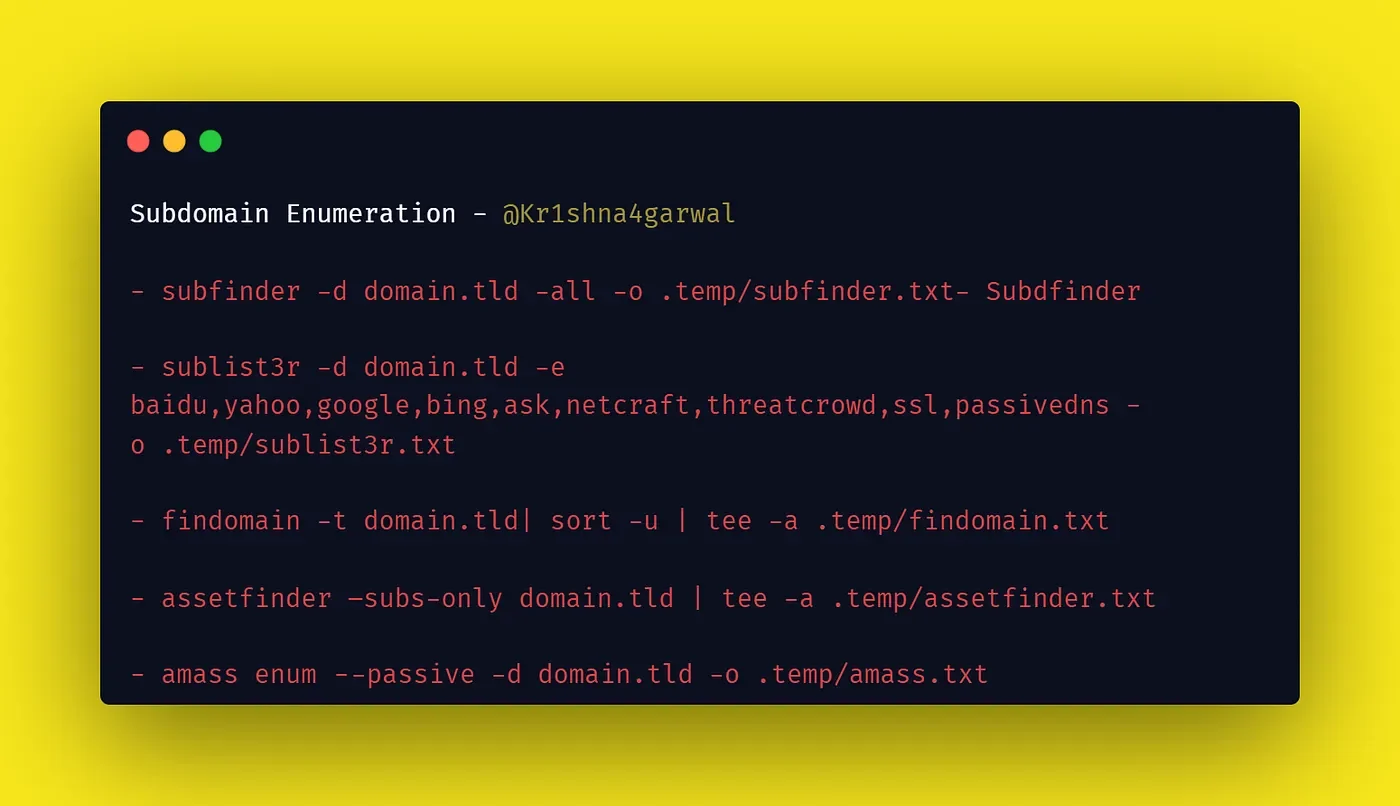
This stage produced 594 subdomains. I then merged every result file, de-duplicated, kept only names belonging to the target domain, and passed the list to httpx across a set of common alternative web ports:
cat .temp/*.txt | sort -u | grep -i domain.tld | tee -a all.txt

cat all.txt| httpx -silent -ports 80,443,3000,8080,8000,8081,8008,8888,8443,9000,9001,9090 | tee -a alive.txt
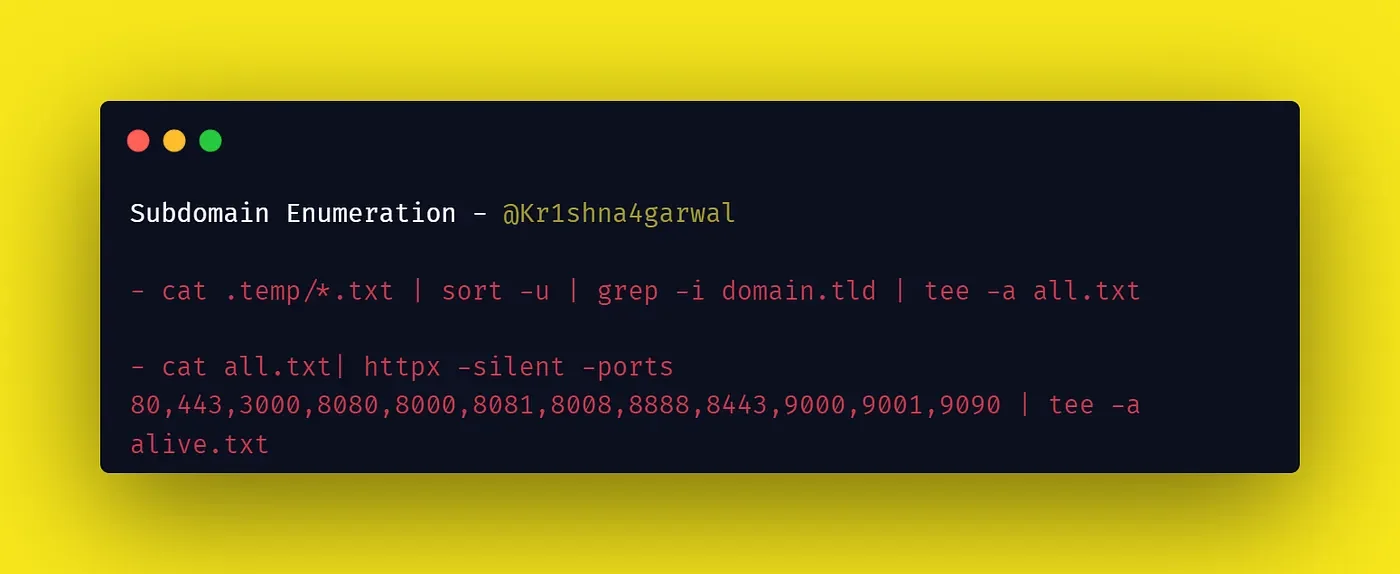
After httpx I had 684 probed subdomains.

With the list in hand I started nuclei with my custom templates in the background and began visiting hosts through a Burp-configured browser, 50 subdomains per window. Many hosts returned 403. I ran 4-ZERO-3 in the background to try to get past those forbidden responses, but had no luck. The other 200 OK hosts were featureless, with no signup, login or anything else worth testing, so I set them aside for later.
The interesting part came from the port scan that httpx had already performed. Because it reported 8080, 8443, 9090 and 8081 open on some hosts, I started checking subdomains with explicit ports in the form subdomains.domain.tld:<PORT>. One subdomain stood out: it was running RavenDB on port 8080 with no authentication at all.
Exploitation
Step 1: Open the dashboard
I opened subdomain.domain.tld:8080 in the browser and was presented with the RavenDB dashboard directly, with no login prompt. The report does not include the raw HTTP exchange, only the browser result.
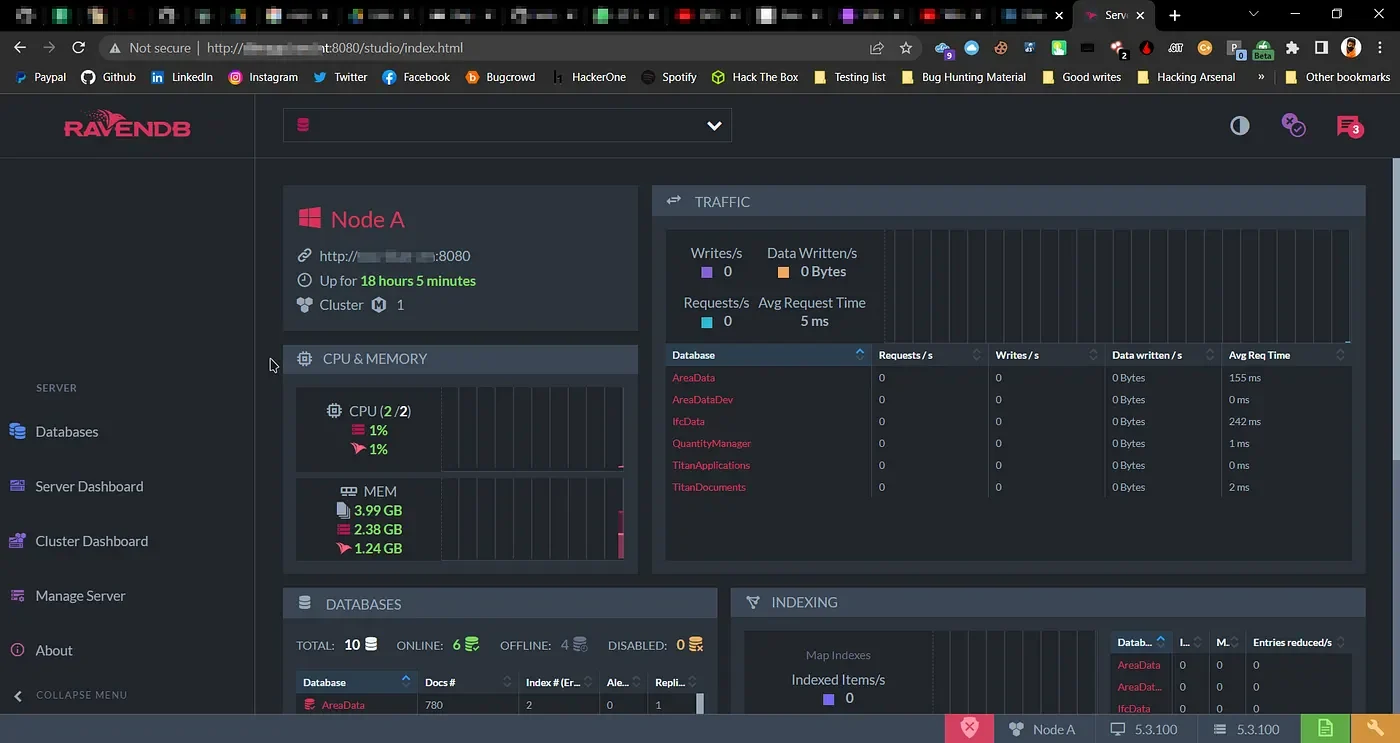
RavenDB Dashboard
Step 2: Confirm what the unauthenticated session allows
From that session I could change settings, dump the full database, view system configurations, and delete a database. I did not delete anything, since I had no permission to do so. The screenshots below show the databases view and the settings view as they appeared without authentication.
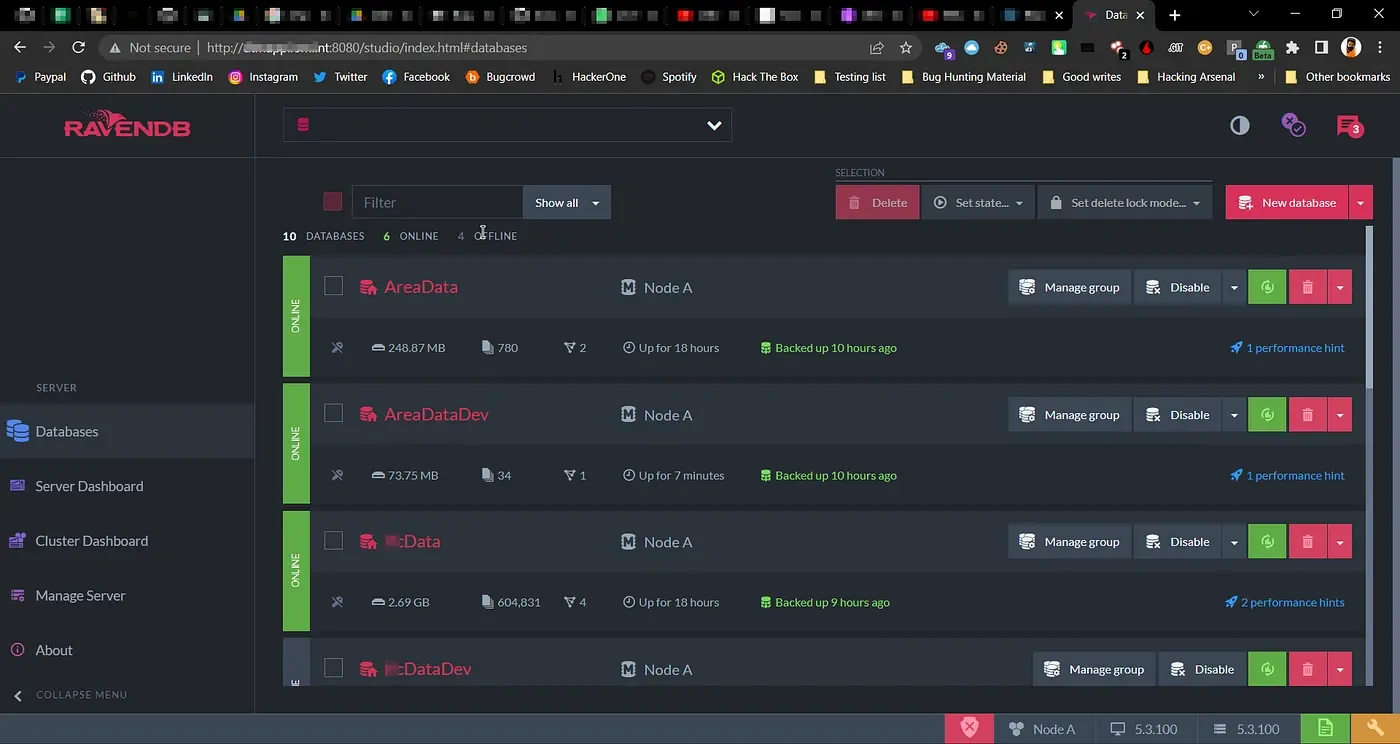
RavenDB Databases
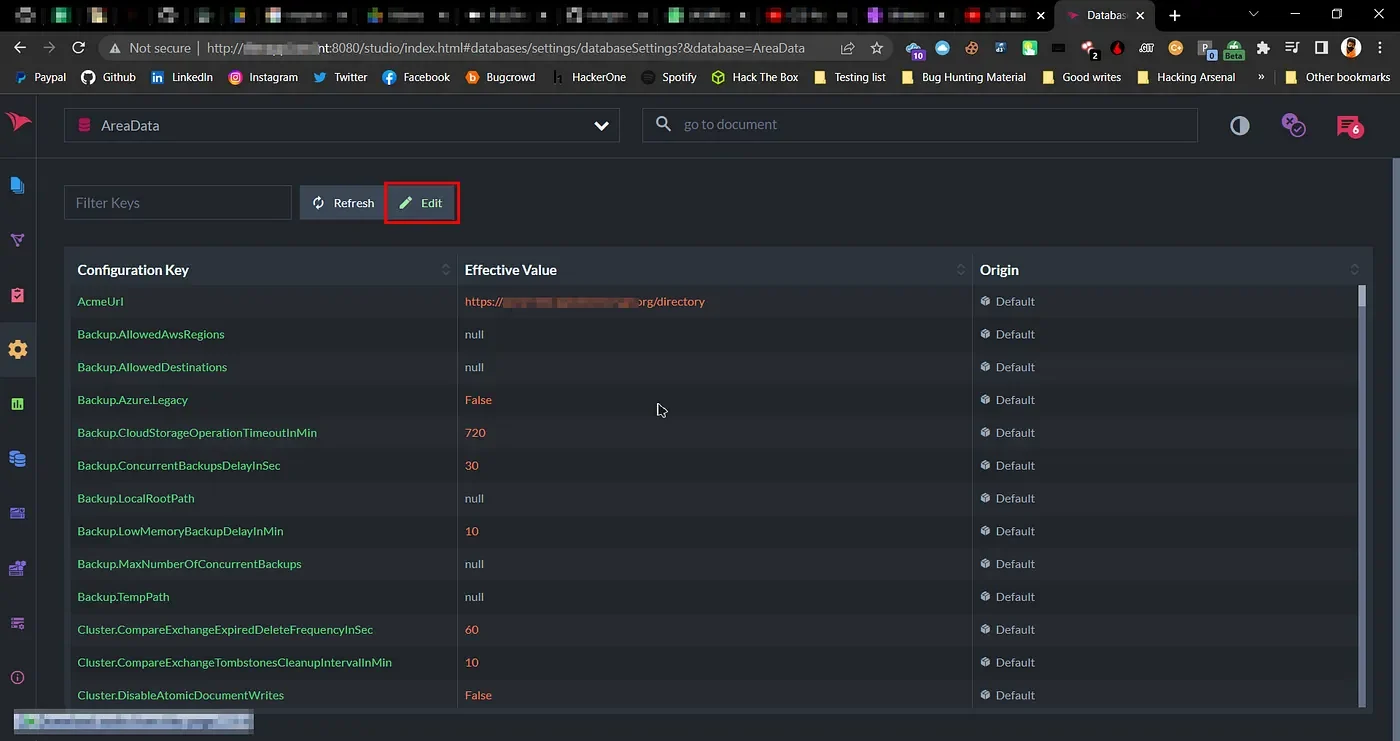
RavenDB settings
Step 3: Report
I wrote a detailed professional report and sent it to the security team. Later I also found some anonymous FTP, XSS and some common misconfigurations on the same target. That was enough for me, so I stopped hunting on it.
Root cause
The RavenDB administrative interface was reachable from the internet on port 8080 and was not protected by authentication. The RavenDB dashboard on port 8080 loaded with no authentication, so anyone who could reach the port could use it. The report does not describe the server configuration, so the exact setting that was missing is not stated.
Nothing in front of the port required a login. The port was found by the httpx port probe rather than by anything targeted.
Impact
Anyone who could reach subdomain.domain.tld:8080 could interact with the RavenDB dashboard without credentials. In the session I had, that meant the ability to change settings, dump the full database, view system configurations and delete a database. The database dump is a confidentiality risk. Deleting a database is an integrity and availability risk, and I did not delete anything because I had no permission to do so. The report does not state what data the instance actually held or how many records were exposed.
Fix
What should be done is to put authentication in front of the RavenDB dashboard and restrict who can reach the port at all, for example by binding it to internal interfaces or allowing it only through a firewall or VPN. Put authentication in front of the RavenDB dashboard and restrict who can reach the port.
Variants to test
- Port probing beyond 80 and 443. Run
httpxwith a list of common alternative ports on every enumerated host. A positive result is a host answering on 8080, 8081, 8443, 9090 or similar with an administrative interface rather than a normal website. - Database and admin dashboards without login. For each such port, open it in a browser and look for a management UI that loads without a credential prompt. A positive result is a dashboard where you can read data or change configuration, as happened here.
- Shodan search for the same product. The report gives this dork for finding RavenDB instances:
http.favicon.hash:442225173
The report gives this dork for finding RavenDB instances.
4. Faster port scanning during follow-up. The report suggests this nmap invocation to speed up a scan:
nmap [redacted] -sS -sV -Pn -n — max-rate 1000 — open -p 21 -oN Active_21.txt
and a reminder not to forget the commonly open ports 21, 22, 3000, 8080, 8000, 8081, 8008, 8888, 8443, 9000, 9001 and 9090. A positive result is an open service on one of those ports that was missed by the initial web-only pass. 5. Anonymous FTP. The report mentions finding anonymous FTP on the same target later. The report mentions finding anonymous FTP on the same target later.
What happened, in plain words
I found a database management screen on the internet that anyone could open, with no username or password. From that screen I could look at the data, change settings and even delete things. I did not delete anything, because I had no permission to do so. I wrote it up and sent it to the security team.
This article walks through exactly how I got there, starting from nothing. If you have never done this kind of work, every term is explained as it appears, and there is a glossary at the end.
Who I am
Hello there, I am Krishna Agarwal ( Kr1shna 4garwal ) from India. An ordinary bug hunter and so called security researcher.
The ground rules first
Before touching anything, you need to know what you are allowed to test. Companies publish these rules on what is called a vulnerability disclosure programme: a page where they say which of their systems you may look at, and what you may do there. This programme provided a Hall of Fame for valid submissions, a public list of people who reported valid issues.
The area you are allowed to test is called the scope. Here the scope was medium and covered *.domain.tld. The * is a wildcard, meaning "anything in front of the dot": shop.domain.tld, api.domain.tld, mail.domain.tld and so on all count. Throughout this article domain.tld stands in for the real target, which I call target.com.
What I was looking for
The finding is not a mistake in the target's own website code. It is a RavenDB instance sitting on the internet with no login in front of it.
So what is RavenDB? In my own words from the write-up: RavenDB is an open-source fully ACID document-oriented database written in C#, developed by Hibernating Rhinos Ltd. It is cross-platform, supported on Windows, Linux, and Mac OS. RavenDB stores data as JSON documents and can be deployed in distributed clusters with master-master replication.
In short: RavenDB is an open-source No-SQL Database.
Let me unpack that for a beginner:
- A database is where an application keeps its data. Think of a very large, very organised filing cabinet.
- NoSQL means it does not use the classic table-with-rows-and-columns model. Instead it stores documents, which are chunks of text in a format called JSON. JSON looks like
{"name": "widget", "price": 10}: labels paired with values. - ACID is a promise about reliability: transactions either fully happen or do not happen at all, and data stays consistent. You do not need the details to follow this story; it just tells you this is a serious, production-grade database.
- Open-source means the code is publicly available for anyone to read and use.
- A cluster is several servers working together as one system, so that if one fails the others keep going.
RavenDB has a web dashboard where databases, settings and system configuration can be managed. Here, nobody had to log in.
Setting up
The tooling was my private recon script, of which the write-up shows only a small part:
subfinderfor passive subdomain enumerationsublist3rwith several passive sourcesfindomainassetfinderamassin passive modehttpxfor probing hosts and portsnucleiwith custom templates, run in the background- Burp Suite as a proxy for browsing the results
- the
4-ZERO-3tool for attempting 403 bypasses nmapfor follow-up port scanning
A few of those words need explaining before we go on.
Recon (short for reconnaissance) is the information-gathering phase: finding out what exists on the target before you test anything. It is like walking around a building writing down which doors exist, before trying any of them.
Subdomain enumeration is finding all the subdomains of a domain. A domain is the main address, like domain.tld. A subdomain puts something in front of it, like shop.domain.tld or dev.domain.tld. Companies often have dozens or hundreds, and forgotten ones are where the interesting things hide. The tools above (subfinder, sublist3r, findomain, assetfinder, amass) each collect subdomain names from different public sources, such as certificate records and search engines. Passive means gathering names from public sources rather than brute-forcing the target directly.
Ports are numbered channels on a single server. One machine can run many services at once, each listening on its own port. Port 80 is the usual web port, 443 is the encrypted web port, and others like 8080 or 8443 are commonly used for secondary web services and admin panels. Think of a server as an office building and ports as numbered doors: the address gets you to the building, the port number tells you which door to knock on.
HTTPX is a tool that takes a list of hostnames and probes them, here across a list of ports. Nuclei is a scanner that runs ready-made checks (templates) against hosts to spot known issues. Burp Suite is a program that sits between your browser and the website, so you can see and record every request and response. A proxy in this sense is exactly that middleman. Nmap is a classic port scanner.
Finding it
I ran the enumeration stage first. The commands below are taken from my private recon script. Medium renders a double hyphen as a single long dash, so where you see one long dash in the commands it is really a double hyphen.
subfinder -d domain.tld -all -o .temp/subfinder.txt

sublist3r -d domain.tld -e baidu,yahoo,google,bing,ask,netcraft,threatcrowd,ssl,passivedns -o .temp/sublist3r.txt

findomain -t domain.tld| sort -u | tee -a .temp/findomain.txt

assetfinder –subs-only domain.tld | tee -a .temp/assetfinder.txt

amass enum — passive -d domain.tld -o .temp/amass.txt
Line by line:
subfinder -d domain.tld -all -o .temp/subfinder.txtasks subfinder to look up subdomains ofdomain.tld, using all of its sources (-all), and write the results to a file in a temporary folder (-omeans output).sublist3r -d domain.tld -e baidu,yahoo,google,bing,ask,netcraft,threatcrowd,ssl,passivedns -o .temp/sublist3r.txtdoes the same job with a different tool, and-elists which public search engines and data sources to use. More sources means more names found.findomain -t domain.tld| sort -u | tee -a .temp/findomain.txtruns a third tool. The|symbol means "take the output of the thing on the left and feed it to the thing on the right".sort -usorts the lines and removes duplicates.tee -aboth shows the result on screen and appends it to a file.assetfinder –subs-only domain.tld | tee -a .temp/assetfinder.txtasks assetfinder for subdomains only (--subs-only) and saves them.amass enum — passive -d domain.tld -o .temp/amass.txtruns amass in passive mode, meaning it gathers names from public sources without touching the target directly, and saves them.
Why five tools? Because each one knows about different sources, and no single tool finds everything. Running several and combining the lists gives better coverage.
This stage produced 594 subdomains. I then merged every result file, de-duplicated, kept only names belonging to the target domain, and passed the list to httpx across a set of common alternative web ports:
cat .temp/*.txt | sort -u | grep -i domain.tld | tee -a all.txt

cat all.txt| httpx -silent -ports 80,443,3000,8080,8000,8081,8008,8888,8443,9000,9001,9090 | tee -a alive.txt
Line by line:
cat .temp/*.txtprints the contents of every text file in the temporary folder. The*here means "every file matching this pattern".sort -usorts and removes duplicates.grep -i domain.tldkeeps only lines containingdomain.tld, ignoring upper or lower case (-i).tee -a all.txtsaves the combined list toall.txt. The point is one clean list instead of five messy ones.cat all.txt| httpx ...feeds that clean list to httpx.-silenthides the tool's own chatter so only results show.-portsgives the list of ports to try: 80, 443, 3000, 8080, 8000, 8081, 8008, 8888, 8443, 9000, 9001 and 9090.tee -a alive.txtsaves the hosts that answered.
Why those ports? Because web services are not always on 80 and 443. Admin panels, development servers and internal tools are often put on 8080, 8443 or similar, and those are exactly the ones people forget to protect.
After httpx I had 684 probed subdomains.
With the list in hand I started nuclei with my custom templates in the background and began visiting hosts through a Burp-configured browser, 50 subdomains per window. Many hosts returned 403. I ran 4-ZERO-3 in the background to try to get past those forbidden responses, but had no luck. The other 200 OK hosts were featureless, with no signup, login or anything else worth testing, so I set them aside for later.
What do those numbers mean? When your browser asks a web server for a page, the server answers with a three-digit status code. 200 OK means "here is the page". 403 Forbidden means "I understood you, but you are not allowed". A 403 is not a dead end in itself: sometimes the page is there but hidden behind a rule, and tools like 4-ZERO-3 try different tricks to get around that rule. In this case I had no luck.
Why visit hosts by hand at all, if a scanner is running? Because scanners only find what they have templates for. A human looking at a page notices things a template does not: an odd login form, a version number, a control panel. I ran nuclei in the background so it could work while I browsed.
The interesting part came from the port scan that httpx had already performed. Because it reported 8080, 8443, 9090 and 8081 open on some hosts, I started checking subdomains with explicit ports in the form subdomains.domain.tld:<PORT>. One subdomain stood out: it was running RavenDB on port 8080 with no authentication at all.
That notation, subdomains.domain.tld:<PORT>, is just how you tell a browser which door to knock on. subdomain.domain.tld:8080 means "go to this host, on port 8080". Without the colon and number, the browser assumes the usual web port.
Exploitation
Step 1: Open the dashboard
I opened subdomain.domain.tld:8080 in the browser and was presented with the RavenDB dashboard directly, with no login prompt. The report does not include the raw HTTP exchange, only the browser result.
RavenDB Dashboard
Why is this the key moment? Because a login prompt is the lock on the door. When the dashboard loads without one, the lock is missing. I did not guess a password or exploit a clever bug: the door was simply open. That is what missing authentication means.
Step 2: Confirm what the unauthenticated session allows
From that session I could change settings, dump the full database, view system configurations, and delete a database. I did not delete anything, since I had no permission to do so. The screenshots below show the databases view and the settings view as they appeared without authentication.
RavenDB Databases
RavenDB settings
A database dump means exporting all the data the database holds, in one go. Viewing system configurations means seeing how the server is set up. Changing settings means altering how it behaves. Deleting a database means destroying it. All four are administrator actions, and I could reach all four as an anonymous visitor.
Why did I stop at looking? Because the programme's rules define what you may do, and destroying data is never part of it. Proving you could delete something, without deleting it, is enough for a valid report. This restraint is not optional politeness; it is the difference between a researcher and an attacker.
Step 3: Report
I wrote a detailed professional report and sent it to the security team. Later I also found some anonymous FTP, XSS and some common misconfigurations on the same target. That was enough for me, so I stopped hunting on it.
A good report says what you found, where it is, what you could do with it, and how to reproduce it. Screenshots help enormously, because they show the reviewer exactly what you saw.
Two terms from that paragraph: anonymous FTP is a file transfer service that lets anyone log in without a username or password, which usually means files are exposed. XSS (cross-site scripting) is a flaw where a website displays text supplied by an attacker as if it were part of the page, so a script can run in another visitor's browser. Misconfiguration means a setting left in an unsafe state, which is exactly what happened with RavenDB here.
Root cause
The RavenDB administrative interface was reachable from the internet on port 8080 and was not protected by authentication. In RavenDB terms, the instance was effectively running without the authentication and authorisation layer that should guard the dashboard and its management endpoints, so anyone who could reach the port got the same view an administrator would. The report does not describe the server configuration, so the exact setting that was missing is not stated; likely the instance was deployed with authentication disabled or left at a default that does not require credentials.
Authentication is proving who you are, like showing ID at a door. Authorisation is what you are then allowed to do, like which rooms your ID opens. Here both were absent: no ID was asked for, and every room was open.
Existing defences did not stop it because nothing in front of the port required a login. The host was not hidden either: it appeared in ordinary passive subdomain enumeration, and the port was found by a routine httpx port probe rather than by anything targeted.
That last point is worth sitting with. Nobody leaked this host to me, and I did not guess it. It turned up in public sources, and a standard port check found the open door. If a routine scan finds it, so will anyone else's.
Impact
Anyone who could reach subdomain.domain.tld:8080 could interact with the RavenDB dashboard without credentials. In the session I had, that meant the ability to change settings, dump the full database, view system configurations and delete a database. The database dump is the most direct confidentiality risk: whatever JSON documents the instance stored would be readable. Changing settings or deleting a database is an integrity and availability risk, and I deliberately did not exercise the destructive options because I had no permission to do so. The report does not state what data the instance actually held or how many records were exposed.
Security people split harm into three kinds, and it helps to know them:
- Confidentiality: someone sees data they should not see. The dump falls here.
- Integrity: data or settings are changed when they should not be. Changing settings falls here.
- Availability: a service is taken down or destroyed. Deleting a database falls here.
This finding touches all three.
Fix
What should be done is to put authentication in front of the RavenDB dashboard and restrict who can reach the port at all, for example by binding it to internal interfaces or allowing it only through a firewall or VPN. Put authentication in front of the RavenDB dashboard and restrict who can reach the port.
In plain terms: turn the login on, and stop the whole internet from reaching the port. A firewall is a filter that allows or blocks network traffic by rule. A VPN is a private tunnel that only authorised people can use. Binding a service to an internal interface means telling it to listen only on the private side of the machine, not the public one.
Variants to test
These are the same ideas applied more widely, so you can look for the same class of mistake on targets you are allowed to test.
- Port probing beyond 80 and 443. Run
httpxwith a list of common alternative ports on every enumerated host. A positive result is a host answering on 8080, 8081, 8443, 9090 or similar with an administrative interface rather than a normal website. - Database and admin dashboards without login. For each such port, open it in a browser and look for a management UI that loads without a credential prompt. A positive result is a dashboard where you can read data or change configuration, as happened here.
- Shodan search for the same product. The report gives this dork for finding RavenDB instances:
http.favicon.hash:442225173
Shodan is a search engine for internet-connected devices and services, rather than for web pages. A dork is a search query written to find a particular kind of system. This one matches hosts whose small site icon (the favicon, the little image in a browser tab) has a particular fingerprint, which is a common way to identify a product. The report gives this dork for finding RavenDB instances.
4. Faster port scanning during follow-up. The report suggests this nmap invocation to speed up a scan:
nmap [redacted] -sS -sV -Pn -n — max-rate 1000 — open -p 21 -oN Active_21.txt
Line by line: nmap is the scanner. [redacted] is the address being scanned, which here is a placeholder for your own target. -sS is a fast, stealthy scan technique. -sV tries to identify which service and version is running. -Pn skips the initial "are you alive" check and assumes the host is up. -n skips looking up names for addresses, which saves time. --max-rate 1000 caps the scan at 1000 packets per second. --open shows only ports that are actually open. -p 21 scans port 21 only. -oN Active_21.txt saves the output in normal text format. As noted above, the long dashes in the published command are really double hyphens.
And a reminder not to forget the commonly open ports 21, 22, 3000, 8080, 8000, 8081, 8008, 8888, 8443, 9000, 9001 and 9090. A positive result is an open service on one of those ports that was missed by the initial web-only pass. 5. Anonymous FTP. The report mentions finding anonymous FTP on the same target later. The report mentions finding anonymous FTP on the same target later.
Takeaway
Good things take time. The finding came from ordinary recon and checking subdomains with explicit ports. Then it came from restraint: proving what was possible without causing harm, and writing it up clearly.
Glossary
- 403 Forbidden: an HTTP status code meaning the server understood the request but refuses to allow it.
- 200 OK: an HTTP status code meaning the request succeeded and the page or data is being returned.
- ACID: a set of guarantees that database transactions are processed reliably.
- Anonymous FTP: a file transfer service that accepts logins without a username or password.
- Authentication: proving who you are, usually with a username and password.
- Authorisation: what an authenticated (or anonymous) user is permitted to do.
- Availability: the property that a service stays up and usable; destroying data harms it.
- Binding: configuring a service to listen only on specific network interfaces, for example internal ones.
- Bug bounty: a programme that pays rewards for valid security findings.
- Burp Suite: a tool that sits between your browser and a website so you can inspect and record traffic.
- Cluster: several servers working together as one system.
- Confidentiality: the property that data is only seen by those allowed to see it.
- Database: an organised store of an application's data.
- Database dump: an export of all the data a database holds.
- Document (in a database): a single stored record, here in JSON format.
- Domain: the main name of a site, such as
domain.tld. - Dork: a search query crafted to find a particular kind of system or page.
- Favicon: the small icon shown in a browser tab for a site; its fingerprint can identify a product.
- Firewall: a filter that allows or blocks network traffic according to rules.
- Hall of Fame: a public list of people credited for valid reports.
- HTTP status code: a three-digit number a web server returns to describe the outcome of a request.
- Integrity: the property that data and settings are not changed improperly.
- JSON: a text format for structured data, made of labels and values.
- Misconfiguration: a setting left in an unsafe state.
- NoSQL: a database that does not use the classic table model, often storing documents instead.
- Nuclei: a scanner that runs template-based checks against hosts.
- Open-source: software whose code is publicly available.
- Passive (recon): gathering information only from public sources, without sending traffic to the target.
- Port: a numbered channel on a server through which a particular service is reached.
- Proxy: a middleman program that traffic passes through, here used to inspect it.
- Recon: reconnaissance; the information-gathering phase before testing.
- RavenDB: an open-source NoSQL document database with a web-based administrative dashboard.
- Scope: the set of systems a programme allows you to test.
- Shodan: a search engine for internet-connected devices and services.
- Status code: see HTTP status code.
- Subdomain: a name placed in front of a domain, such as
shop.domain.tld. - Subdomain enumeration: finding all subdomains of a domain.
- Template (nuclei): a ready-made check that a scanner runs against a host.
- Vulnerability disclosure programme: a published set of rules under which a company invites security testing of specified systems.
- VPN: a private, encrypted tunnel that only authorised users can use.
- Wildcard: the
*symbol, meaning "anything in this position".



