Got Another XSS using Double Encoding
A search input field reflected user input into the page but filtered single quotes, so the author used double URL encoding to slip a quote and an event handler past the filter. The result was reflected cross-site scripting that fired an alert when the field was focused or the page loaded.

Recently I started my bug hunting journey and got an XSS by Bypassing Cloudflare WAF (you can read about it here). Now I am back with another XSS by Double Encoding.
The full write-up lives on its author's site
It belongs to its author, so we link to it rather than copy it. The other two tabs are our own rewrites, checked against it.
Context
This is a short account of a reflected cross-site scripting finding obtained by double encoding the payload. The researcher had recently started bug hunting and had previously obtained an XSS by bypassing the Cloudflare WAF; this write-up is the follow-up. The target is described only as one of several targets being tested, and the vulnerable feature is a search box: an input field that takes a search term and reflects it back into the page. The report does not name the site, the application or the backend technology.
The technique used is double encoding, which OWASP describes as encoding user request parameters twice in hexadecimal format to bypass security controls or cause unexpected behaviour from the application. It works because the web server accepts and processes client requests in many encoded forms.
Setup
No accounts, roles, tools or versions are mentioned. The only precondition is a reflected input field, here a search box, and the researcher's working assumption that if there is an input field there is a chance of cross-site scripting.
Finding it
While testing input fields on the targets, the researcher found an interesting search box and entered the usual input.
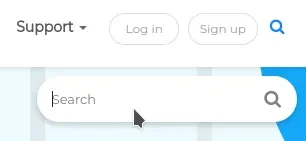
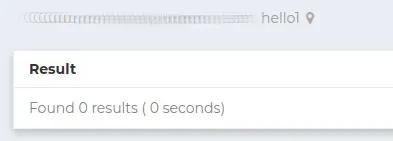
Search Bar
The input was then checked in the page source.
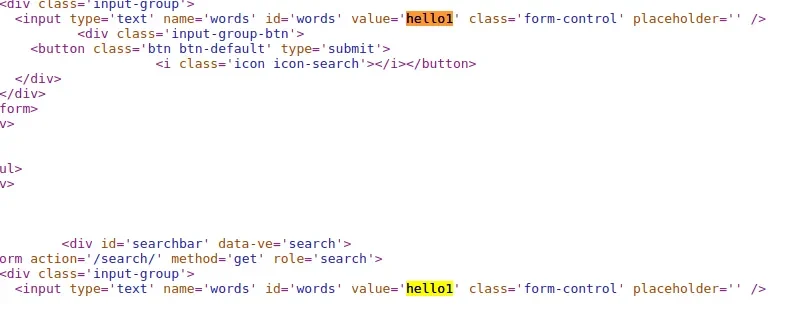
source code
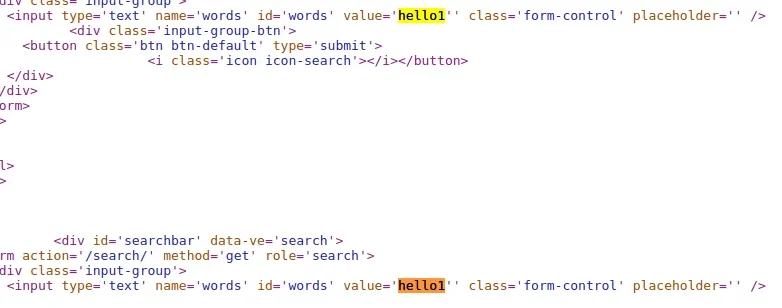
A single quote was added next. The input was filtered: in some places it was replaced with hello1&, and in the target fields with &.
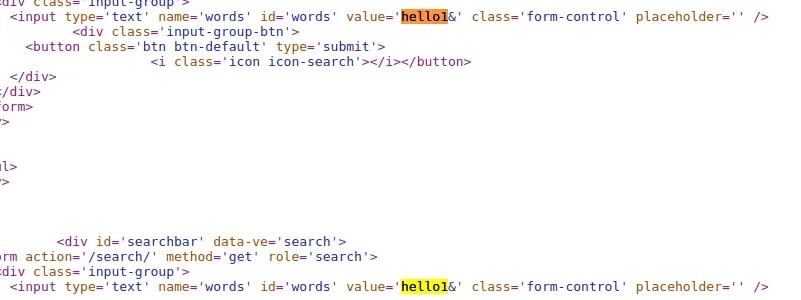
URL encoding was tried next and produced the same output, which showed that the application decodes the input. That observation is what pointed to double encoding: a filter that decodes only once can be bypassed when a second decoding step happens later, in the backend platform or in modules that handle encoded data properly but lack the corresponding security checks.
Exploitation
Step 1: confirm that double encoding survives the filter
Double encoding was applied and it worked: the encoded input passed the filter that had been rewriting the single quote.
Step 2: try the basic script payload
The basic payload '><script>alert(1)</script> was tried with double encoding:
%2527%253E%253Cscript%253Ealert%25281%2529%253C%252Fscript%253E
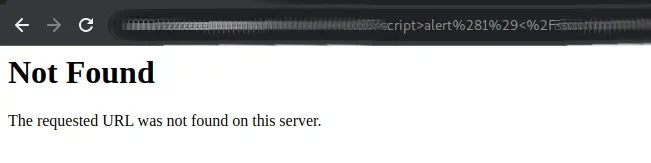
Each character is percent-encoded twice: %27 is the single quote, so %2527 is the % of %27 encoded again, and the same applies to > (%253E), < (%253C), the parentheses (%2528, %2529) and the slash (%252F). The double-encoded form passed the filter, and the second decoding step later produced the original characters. This payload created an error.
Step 3: switch to an event handler attribute
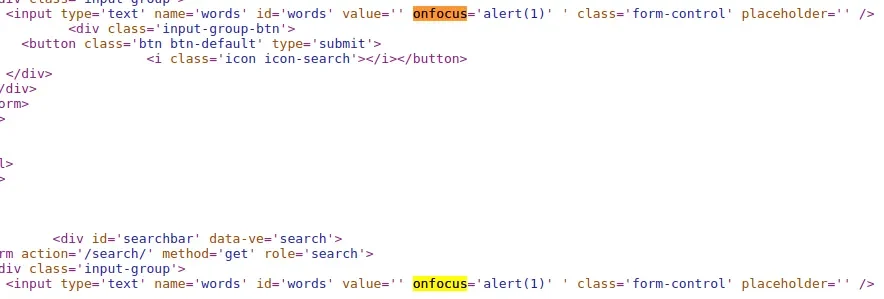
Since the script tag did not work, the researcher looked at attributes of the input tag to exploit instead, and chose onfocus, the event that occurs when an element gets focus. The payload was:
' onfocus='alert(1)'
and its double-encoded form:
%2527%2520onfocus%253D%2527alert%25281%2529%2527%2520
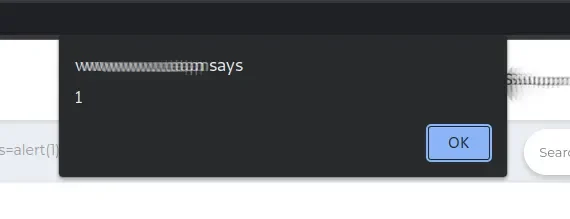
Clicking on the search bar gave the popup alert.
Step 4: make it fire without interaction
The payload was then modified with autofocus, which makes the text field get focus automatically on page load, so the alert appears simply by visiting the page:
' onfocus='alert(1)' autofocus='
and double encoded:
%2527%2520onfocus%253D%2527alert%25281%2529%2527%2520autofocus%253D%2527
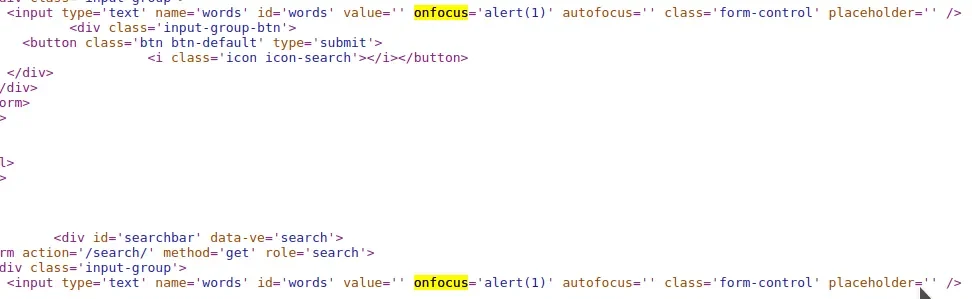
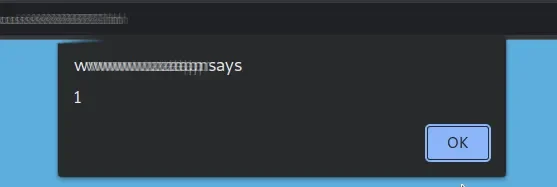
XSS
It worked.
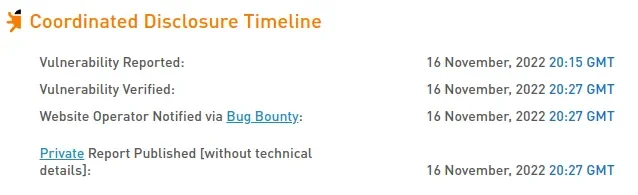
OpenBugBounty
Step 5: alternative handler
The report also notes that a payload such as
' onmouseover='alert(1)'
can be used, in double-encoded form:
%2527%2520onmouseover%253D%2527alert%25281%2529%2527%2520
Root cause
The application decodes user input, and the filter that rewrites the single quote operates on a single decoding pass. Because a second decoding step takes place later, in the backend platform or in modules that handle encoded data without the corresponding security checks, the double-encoded characters reach the page as literal ', space and = after the filter has already run. The payloads use a quote to break out of the surrounding markup and add an event handler attribute, which is enough to execute script. The exact component performing the second decode is not identified in the report; the description of it is general.
Impact
An attacker who can get a victim to load a crafted search URL can run script in the victim's browser in the context of the site. With the autofocus variant no click is needed: the payload fires on page load. The report does not describe what an attacker could do beyond the alert(1) proof, nor which users or data would be exposed. The finding was reported through OpenBugBounty.
Fix
The implied fix is to stop the double decoding, or to apply the output encoding and filtering after the final decoding step, so that the value reflected into the attribute is encoded for its context and cannot break out of it.
Variants to test
- Send a double-encoded single quote to any reflected parameter and inspect the response: if
%2527comes back as'in the page source, a second decode is happening. - Try the double-encoded script payload
%2527%253E%253Cscript%253Ealert%25281%2529%253C%252Fscript%253Ewhere the reflection sits outside an attribute; a positive result is the script executing rather than an error page. - Where the reflection lands inside an attribute, try
%2527%2520onfocus%253D%2527alert%25281%2529%2527%2520and click the field; a popup confirms the breakout. - Add
autofocusas in%2527%2520onfocus%253D%2527alert%25281%2529%2527%2520autofocus%253D%2527to check whether execution needs no interaction. - Try other handlers such as
%2527%2520onmouseover%253D%2527alert%25281%2529%2527%2520when focus-based events are blocked. - Where a filter rewrites one character, check whether triple encoding or a different encoding layer (for example HTML entities applied before URL encoding) reaches the same second decode.
What happened, in plain words
A security researcher who had recently started hunting for bugs found a cross-site scripting (XSS) flaw in a search box on a website. XSS is a class of bug where a site takes something a visitor typed and puts it back into the page without cleaning it up properly, so that text can turn into code that runs in the visitor's browser. In this case the site did try to clean the input: it filtered a single quote character and replaced it in places with hello1& and in the target fields with &. The researcher then tried a trick called double encoding, which hides characters from the filter by encoding them twice, so the filter sees something harmless while the browser later sees the real character. That let the researcher slip a working payload past the filter and make the browser show a popup alert, first when clicking the search bar and then automatically when the page loaded. The finding was reported through OpenBugBounty.
The report does not name the site, the application or the backend technology. It describes the target only as one of several being tested, and the vulnerable feature as a search box: an input field that takes a search term and reflects it back into the page.
Background: what the researcher had done before
The researcher had recently started bug hunting and had previously found an XSS by getting around the Cloudflare WAF. A WAF, or web application firewall, is a filter that sits in front of a website and inspects incoming requests, blocking ones that look malicious. This write-up is the follow-up to that earlier finding. The technique used here is double encoding, which OWASP describes as encoding user request parameters twice in hexadecimal format to bypass security controls or cause unexpected behaviour from the application. It works because the web server accepts and processes client requests in many encoded forms.
Setup
No accounts, roles, tools or versions are mentioned. The only precondition is a reflected input field, here a search box, and the researcher's working assumption that if there is an input field there is a chance of cross-site scripting. A reflected input field is one where whatever you type is echoed straight back into the page you receive, rather than being stored and shown to other people later.
Finding it
While testing input fields on the targets, the researcher found an interesting search box and entered the usual input.
Search Bar
The input was then checked in the page source. The page source is the raw text of the page that the browser receives before it draws anything on screen; you can view it in most browsers with a right-click and an option like "View page source". Looking there shows exactly where your typed text ended up in the page's markup, which is the key question for this kind of bug.
source code
A single quote was added next. A single quote (') is interesting to testers because in HTML it is often used to wrap attribute values, so if your quote appears unescaped in the page source it may be possible to close an attribute early and add your own. Here the input was filtered: in some places it was replaced with hello1&, and in the target fields with &. That replacement is the site's attempt at cleaning, and it told the researcher that a plain quote would not get through.
URL encoding was tried next and produced the same output, which showed that the application decodes the input. URL encoding (also called percent encoding) is a way of writing characters that are awkward in a URL using a percent sign and two hexadecimal digits, so a space becomes %20 and a single quote becomes %27. The fact that the encoded quote came back as the same filtered output meant the site was decoding it before the filter ran, so simply encoding once would not help.
That observation is what pointed to double encoding: a filter that decodes only once can be bypassed when a second decoding step happens later, in the backend platform or in modules that handle encoded data properly but lack the corresponding security checks. In everyday terms, imagine a bouncer who checks bags once at the door, while a second person further inside unpacks them again; anything hidden inside a second layer gets past the first check and is revealed later.
Exploitation
Step 1: confirm that double encoding survives the filter
Double encoding was applied and it worked: the encoded input passed the filter that had been rewriting the single quote. This was the proof of concept for the bypass itself, before any script was involved.
Step 2: try the basic script payload
The basic payload '><script>alert(1)</script> was tried with double encoding:
%2527%253E%253Cscript%253Ealert%25281%2529%253C%252Fscript%253E
Each character is percent-encoded twice: %27 is the single quote, so %2527 is the % of %27 encoded again, and the same applies to > (%253E), < (%253C), the parentheses (%2528, %2529) and the slash (%252F). The first decoding pass leaves the single-encoded form, which the filter does not recognise, and the second pass produces the original characters. This payload created an error.
In plain words, the payload is built from three parts. The '> is meant to break out of the surrounding markup and end the tag. The <script>alert(1)</script> is a script element that, if it lands in the page as real markup, makes the browser run the JavaScript alert(1), which shows a small popup box containing the number 1. The payload created an error, so the researcher tried a different approach.
Step 3: switch to an event handler attribute
Since the script tag did not work, the researcher looked at attributes of the input tag to exploit instead, and chose onfocus, the event that occurs when an element gets focus. An attribute is an extra setting written inside an HTML tag, such as the type of an input box. An event handler attribute is a setting whose value is a piece of JavaScript that the browser runs when a particular thing happens, such as a click or a key press. Focus means the element is currently selected, for example because you clicked into it or tabbed to it. The payload was:
' onfocus='alert(1)'
and its double-encoded form:
%2527%2520onfocus%253D%2527alert%25281%2529%2527%2520
Here %2520 is the double-encoded space and %253D the double-encoded =.
Clicking on the search bar gave the popup alert. That click gave the search box focus, which triggered the onfocus handler the researcher had injected.
Step 4: make it fire without interaction
The payload was then modified with autofocus, which makes the text field get focus automatically on page load, so the alert appears simply by visiting the page:
' onfocus='alert(1)' autofocus='
and double encoded:
%2527%2520onfocus%253D%2527alert%25281%2529%2527%2520autofocus%253D%2527
autofocus is a standard HTML attribute that tells the browser to put the cursor in that field as soon as the page opens. Combining it with onfocus means the handler runs by itself, with no click from the victim. That matters because a victim only has to open a link, not interact with the page.
XSS
It worked.
OpenBugBounty
OpenBugBounty is a platform where researchers can report vulnerabilities to site owners. The report does not describe what happened after the report was submitted.
Step 5: alternative handler
The report also notes that a payload such as
' onmouseover='alert(1)'
can be used, in double-encoded form:
%2527%2520onmouseover%253D%2527alert%25281%2529%2527%2520
onmouseover is another event handler attribute: it runs its JavaScript when the mouse pointer moves over the element.
Root cause
The application decodes user input, and the filter that rewrites the single quote operates on a single decoding pass. Because a second decoding step takes place later, in the backend platform or in modules that handle encoded data without the corresponding security checks, the double-encoded characters reach the page as literal ', space and = after the filter has already run. The reflected value is placed inside an attribute of the input tag, so breaking out of that attribute with a quote and adding an event handler is enough to execute script. The exact component performing the second decode is not identified in the report; the description of it is general.
Impact
An attacker who can get a victim to load a crafted search URL can run script in the victim's browser in the context of the site. Running in the context of the site means the script is treated as if it came from the site itself, so the script is treated as if it came from the site itself. A cookie is a small piece of data a site stores in your browser, often used to remember that you are logged in. With the autofocus variant no click is needed: the payload fires on page load.
Fix
The implied fix is to stop the double decoding, or to apply the output encoding and filtering after the final decoding step, so that the value reflected into the attribute is encoded for its context and cannot break out of it. Output encoding means converting characters that have special meaning in HTML into harmless equivalents before putting them in the page, so a quote stays a visible quote instead of ending an attribute.
Variants to test
- Send a double-encoded single quote to any reflected parameter and inspect the response: if
%2527comes back as'in the page source, a second decode is happening. - Try the double-encoded script payload
%2527%253E%253Cscript%253Ealert%25281%2529%253C%252Fscript%253Ewhere the reflection sits outside an attribute; a positive result is the script executing rather than an error page. - Where the reflection lands inside an attribute, try
%2527%2520onfocus%253D%2527alert%25281%2529%2527%2520and click the field; a popup confirms the breakout. - Add
autofocusas in%2527%2520onfocus%253D%2527alert%25281%2529%2527%2520autofocus%253D%2527to check whether execution needs no interaction. - Try other handlers such as
%2527%2520onmouseover%253D%2527alert%25281%2529%2527%2520when focus-based events are blocked. - Where a filter rewrites one character, check whether triple encoding or a different encoding layer (for example HTML entities applied before URL encoding) reaches the same second decode.
Glossary
- Reflected input: input that the site echoes straight back into the page it returns, rather than storing it for later.
- Search box: an input field that takes a search term and shows results; here it also echoed the term back into the page.
- Payload: the piece of text an attacker sends to try to trigger a bug.
- WAF (web application firewall): a filter in front of a website that inspects requests and blocks ones that look malicious.
- Cloudflare WAF: the WAF product from Cloudflare, mentioned as the subject of the researcher's earlier finding.
- Encoding: rewriting characters in an alternative form so they can travel safely through systems that would otherwise treat them specially.
- URL encoding (percent encoding): writing characters as a percent sign plus two hexadecimal digits, such as
%27for a single quote. - Double encoding: encoding a value twice, so the first decoding pass reveals only an encoded form and the real characters appear only after a second pass.
- Decoding: turning an encoded value back into its original characters.
- Hexadecimal: a base-16 number system using digits 0 to 9 and letters A to F, used in percent encoding.
- Page source: the raw HTML text a browser receives for a page, viewable in the browser.
- HTML: the markup language that describes the structure of a web page.
- Tag: an HTML element written between angle brackets, such as
<script>or<input>. - Attribute: a setting written inside an HTML tag, such as
typeoronfocus. - Event handler attribute: an attribute whose value is JavaScript that runs when a particular event happens.
onfocus: the event that fires when an element gets focus.onmouseover: the event that fires when the mouse pointer moves over an element.autofocus: an HTML attribute that makes a field get focus automatically when the page loads.- Focus: the state of an element being currently selected, for example after a click or a tab.
- JavaScript: the programming language browsers run to make pages interactive.
alert(1): a JavaScript call that shows a popup box containing the number 1, commonly used as a harmless proof that script ran.<script>: an HTML tag that marks its contents as code for the browser to run.- Output encoding: converting characters with special meaning in HTML into harmless equivalents before placing them in a page.
- Filter: code that inspects input and removes or rewrites parts it considers unsafe.
- Backend: the server-side software behind a website that processes requests and builds responses.
- Cookie: a small piece of data a site stores in a browser, often used to remember a logged-in session.
- OpenBugBounty: a platform for reporting vulnerabilities to site owners.
- OWASP: an organisation that publishes guidance on web application security, cited here for its description of double encoding.





