GraphQL API Hacking!
A GraphQL endpoint had introspection enabled, exposing the full schema including user queries and mutations. An attacker could use the exposed deleteUser and updateUser mutations to delete an admin account and change a user's password without authorisation.
 Published on medium.com
Usually graphql endpoint are located at www.example.com/graphql.
The full write-up lives on its author's site
It belongs to its author, so we link to it rather than copy it. The other two tabs are our own rewrites, checked against it.
Context
GraphQL APIs are usually exposed at a predictable path, and the author starts from that assumption: endpoints are commonly found at www.example.com/graphql. On the target, a GraphQL endpoint was located at that kind of path. The feature under examination is the GraphQL API itself, in particular whether introspection is enabled and what the schema exposes once it is.
Introspection is the part of GraphQL that lets a client ask the server to describe its own schema: the available types, fields, directives, queries and mutations. It is useful during development and debugging, but the author notes that leaving it enabled in production introduces risks and resource considerations.
Setup
The write-up does not describe any accounts, roles or preconditions beyond the endpoint itself. The tooling used is:
- A raw HTTP request to test introspection.
- InQL, a Burp Suite extension, to load the endpoint and enumerate the schema.
- The GraphQL queries and mutations exposed by the schema, run against the live endpoint.
The author also opens a normal user account partway through the exploitation, as described below.
Finding it
The first step is confirming that the endpoint exists. The author shows the discovered GraphQL endpoint:
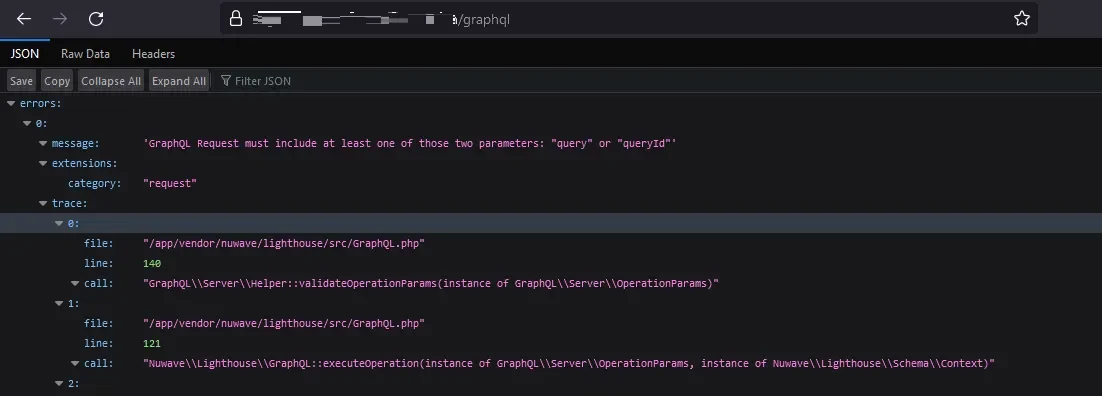
With the endpoint in hand, the next question is whether introspection is enabled. If it is, a client can query the schema and retrieve detailed information about the available types, fields and directives in the API. The author sends a full introspection query to find out.
Exploitation
Step 1: Confirm introspection is enabled
The introspection query used is the standard one that walks the schema, its types, directives and input values:
query IntrospectionQuery{__schema{queryType{name}mutationType{name}subscriptionType{name}types{...FullType}directives{name description locations args{...InputValue}}}}fragment FullType on __Type{kind name description fields(includeDeprecated:true){name description args{...InputValue}type{...TypeRef}isDeprecated deprecationReason}inputFields{...InputValue}interfaces{...TypeRef}enumValues(includeDeprecated:true){name description isDeprecated deprecationReason}possibleTypes{...TypeRef}}fragment InputValue on __InputValue{name description type{...TypeRef}defaultValue}fragment TypeRef on __Type{kind name ofType{kind name ofType{kind name ofType{kind name ofType{kind name ofType{kind name ofType{kind name ofType{kind name}}}}}}}}
It is sent as a POST request with a JSON body:
POST /graphql HTTP/1.1
Accept-Encoding: gzip, deflate
Connection: close
User-Agent: Mozilla/5.0 (Windows NT 10.0; Win64; x64; rv:55.0) Gecko/20100101 Firefox/55.0
Host: xxxxxxx.com
Content-Length: 746
Content-Type: application/json

{"query": "query IntrospectionQuery{__schema{queryType{name}mutationType{name}subscriptionType{name}types{...FullType}directives{name description locations args{...InputValue}}}}fragment FullType on __Type{kind name description fields(includeDeprecated:true){name description args{...InputValue}type{...TypeRef}isDeprecated deprecationReason}inputFields{...InputValue}interfaces{...TypeRef}enumValues(includeDeprecated:true){name description isDeprecated deprecationReason}possibleTypes{...TypeRef}}fragment InputValue on __InputValue{name description type{...TypeRef}defaultValue}fragment TypeRef on __Type{kind name ofType{kind name ofType{kind name ofType{kind name ofType{kind name ofType{kind name ofType{kind name ofType{kind name}}}}}}}}"}
The response confirms that introspection is enabled and returns the schema description:
HTTP/1.1 200 OK
Server: nginx/1.14.1
Date: Thu, 22 Jun 2023 09:37:18 GMT
Content-Type: application/json
Connection: close
Cache-Control: private, must-revalidate
pragma: no-cache
expires: -1
Vary: Origin
Content-Length: 367316

{"data":{"__schema":{"queryType":{"name":"Query"},"mutationType":{"name":"Mutation"},[REDACTED]"description":"Explains why this element was deprecated, usually also including a suggestion for how to access supported similar data. Formatted using the Markdown syntax (as specified by [CommonMark](https:\/\/commonmark.org\/).","type":{"kind":"SCALAR","name":"String","ofType":null},"defaultValue":"\"No longer supported\""}]}]}}}]
The response body is large (the Content-Length is 367316), which is consistent with a full schema dump. The queryType is named Query and the mutationType is named Mutation, so both read operations and state-changing operations are exposed.
Step 2: Enumerate the schema with InQL
The author prefers InQL, a Burp Suite extension, for working with the schema:
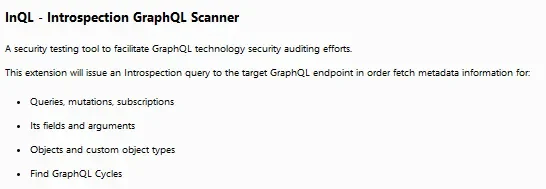
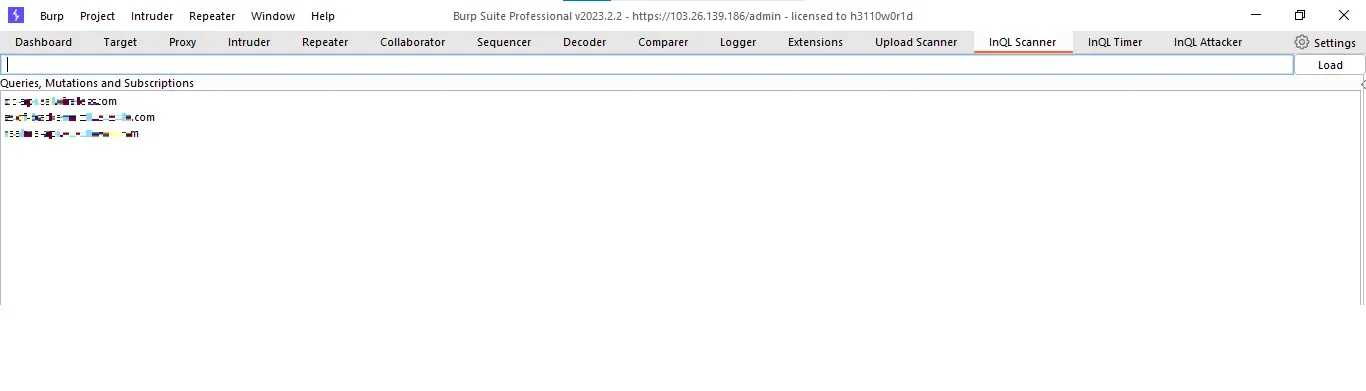
The endpoint is pasted into InQL and loaded:
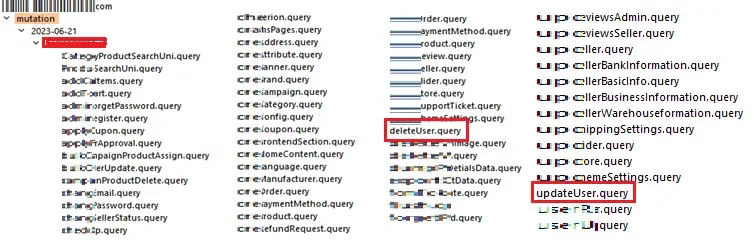
After some time, InQL lists all the mutations and queries available on the schema:
Step 3: Pick the interesting mutations
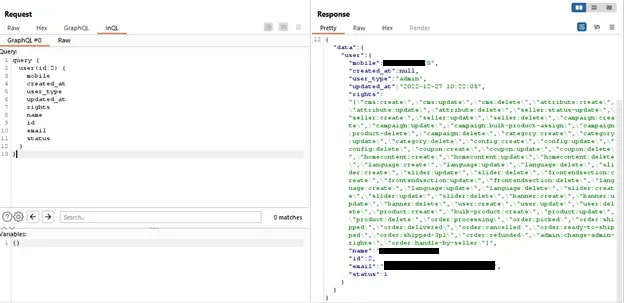
Two mutations stand out as worth testing. The first is deleteUser. To use it, a user id is needed, so the author uses the user query to find the id of a user:
Step 4: Try deleting an admin account
The first attempt targets an admin account:
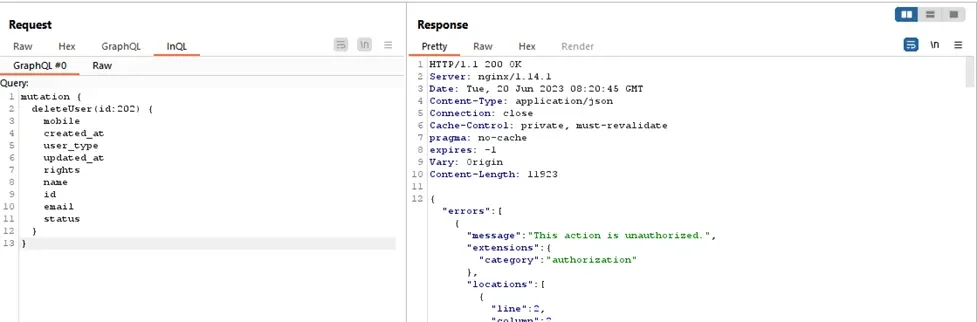
The attempt fails. The author then opens a normal user account and tries the same thing again:
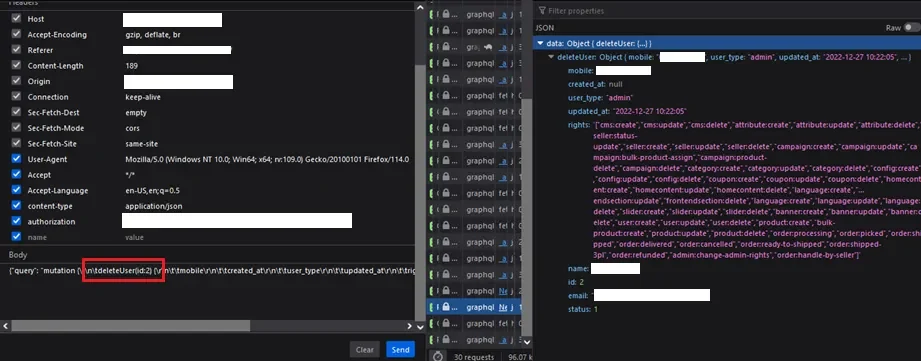
This time there is no error. To verify whether the payload worked, the user query is run again against id 2:
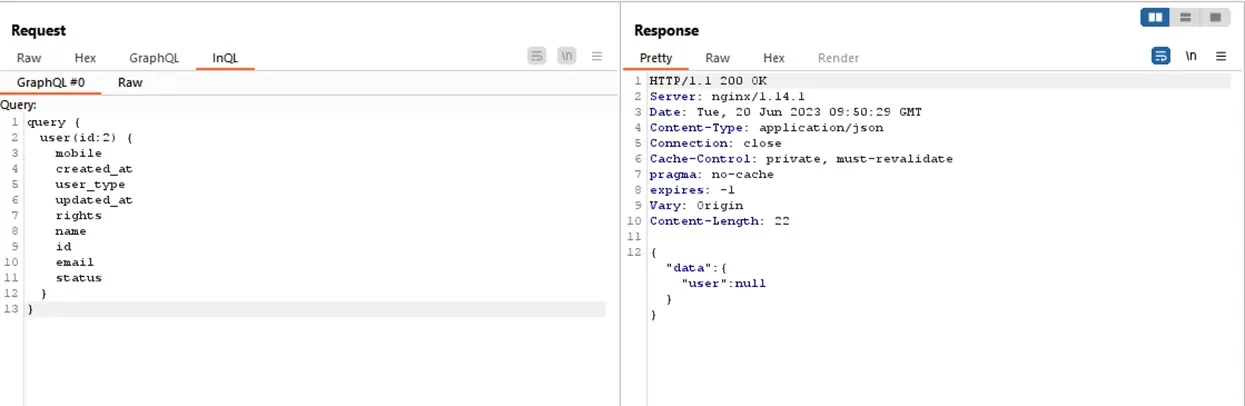
The admin account is gone.
Step 5: Try the updateUser mutation
Next, the updateUser mutation is tested:
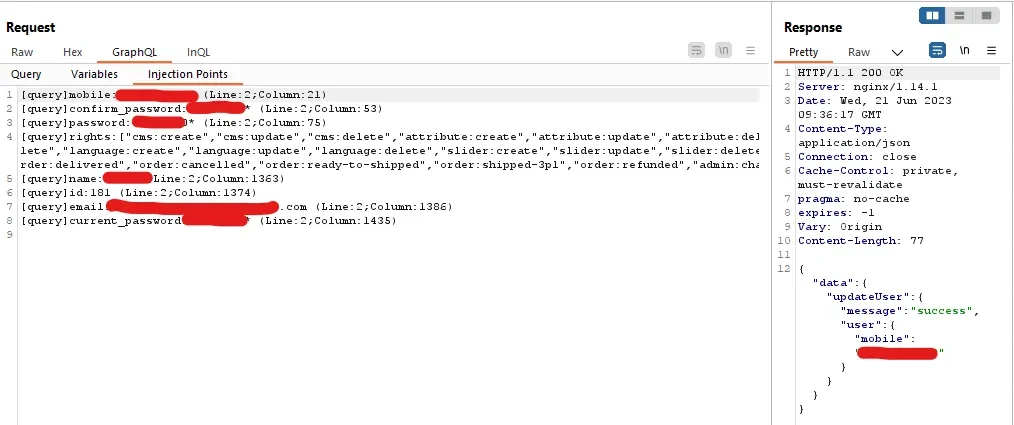
It works: the user password is updated. The author then tries to log in as an admin:
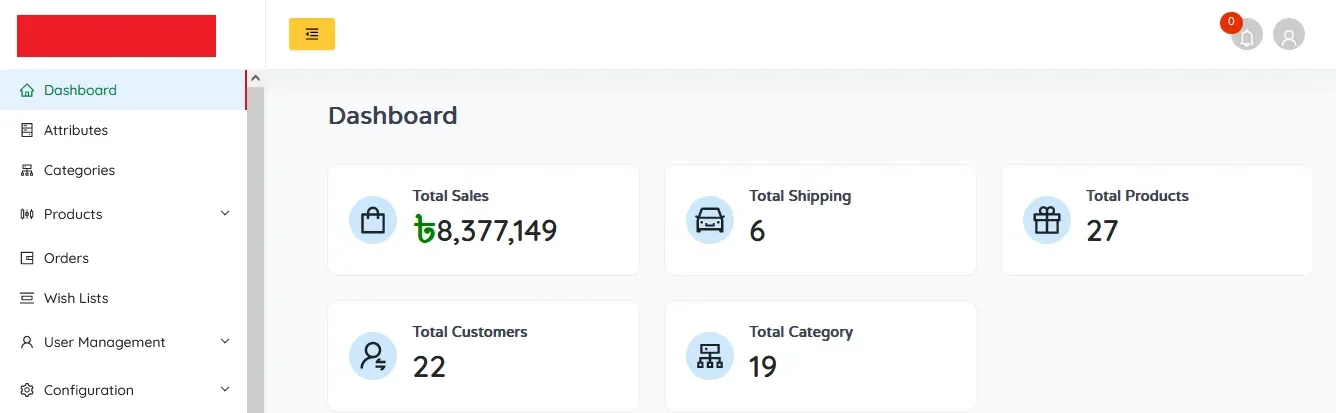
Root cause
The chain has two parts. First, introspection is enabled in production, so the full schema, including the deleteUser and updateUser mutations and the user query, can be enumerated by anyone who can reach the endpoint. Second, the mutations appear to act on a user id supplied by the client without an authorisation check that ties that id to the caller, which matches the IDOR pattern. The report does not show the server-side code, so the exact check that is missing is not stated; likely the resolver trusts the id in the request and does not verify that the caller owns the account or holds an administrative role.
The author's own framing is that introspection is a development and debugging feature whose production exposure carries security and resource risks.
Impact
With introspection enabled, an attacker can map the whole API surface, including mutations that change or remove accounts. In the demonstrated case, an attacker with an ordinary user account could delete another account, including an admin account, and could update a user's password, after which the author attempted to log in as an admin. The conditions are that the endpoint is reachable and introspection is on, and that the mutations accept a client-supplied user id without an ownership or role check.
Fix
The report's suggestion is to weigh the benefits of introspection against its risks and to give careful consideration to whether it should be enabled in a production environment. Disabling introspection in production removes the schema enumeration step. Separately, the mutations need server-side authorisation so that a caller can only delete or update the account they are entitled to act on, rather than any id they supply.
Variants to test
- Send the introspection query above to
/graphqlon other targets. A positive result is a 200 response containing__schemawithqueryTypeandmutationTypepopulated. - Load the endpoint into InQL and review the listed mutations for account management operations such as delete, update or role change. A positive result is a mutation that takes a user identifier as an argument.
- Use the schema's user lookup query to collect valid ids, then call a delete or update mutation with an id that does not belong to the test account. A positive result is a successful response and a changed record when the same lookup is repeated.
- Repeat the mutation from a second, ordinary account to confirm the action is not tied to the caller's own id. A positive result is the same success without an ownership error.
- After an update mutation, attempt to authenticate with the new value. A positive result is a successful login that should not have been possible.
What happened, in plain words
A website had a GraphQL API, which is a way for programs to talk to a server and ask for exactly the data they need. The researcher found that this API would happily describe itself to anyone who asked, including a list of every action it could perform. Among those actions were two that let you delete a user and change a user's password. The researcher tried them and found the delete worked on an admin account. That is the whole story: the API told the world what it could do, and then acted on user ids supplied by the caller.
Background: what an API and GraphQL are
An API (Application Programming Interface) is the part of a website that other software talks to. Think of a restaurant: the menu and the waiter are the API. You do not walk into the kitchen yourself; you tell the waiter what you want and the kitchen prepares it. When you use a website or a mobile app, the app is the customer and the API is the waiter.
GraphQL is one particular style of API. Instead of many separate addresses (one for users, one for posts, one for comments), GraphQL has a single address, usually something like /graphql, and you send it a description of exactly the data you want. The server replies with just that data. The description you send is called a query when you are reading data, and a mutation when you are changing data (creating, updating or deleting something).
A schema is the blueprint of a GraphQL API: the list of all the queries and mutations it offers, what each one needs as input, and what it returns. It is like the full menu of the restaurant, including dishes not shown on the everyday menu.
Background: introspection
Introspection is a built-in GraphQL feature that lets a client ask the server: describe yourself. The server replies with the schema, meaning every type, field, query and mutation it supports. During development this is very useful, because tools can read the schema and help programmers write correct requests. In production, though, it means anyone who can reach the API can also read the full menu of what the API can do, including actions the website's own pages never show.
The researcher's point is that introspection is a development and debugging convenience, and leaving it switched on in a live production system carries security and performance risks.
Finding the endpoint
GraphQL APIs are usually placed at a predictable address. The researcher starts from the common assumption that the endpoint sits at a path like www.example.com/graphql, and on the target such an endpoint was found.
The image shows the discovered GraphQL endpoint. With the address in hand, the next question is whether the server will describe itself.
Step 1: Check whether introspection is enabled
To find out, the researcher sends the standard introspection query. This is a long request that asks the server for its schema: the names of the query type, the mutation type, the subscription type, all the types, all the directives, and details about the arguments each field accepts.
query IntrospectionQuery{__schema{queryType{name}mutationType{name}subscriptionType{name}types{...FullType}directives{name description locations args{...InputValue}}}}fragment FullType on __Type{kind name description fields(includeDeprecated:true){name description args{...InputValue}type{...TypeRef}isDeprecated deprecationReason}inputFields{...InputValue}interfaces{...TypeRef}enumValues(includeDeprecated:true){name description isDeprecated deprecationReason}possibleTypes{...TypeRef}}fragment InputValue on __InputValue{name description type{...TypeRef}defaultValue}fragment TypeRef on __Type{kind name ofType{kind name ofType{kind name ofType{kind name ofType{kind name ofType{kind name ofType{kind name ofType{kind name}}}}}}}}
Line by line, in plain words:
query IntrospectionQuerygives this request a name,IntrospectionQuery, so it is easy to recognise in logs and tools.__schemais the special field that means "the whole schema". Names starting with two underscores are reserved by GraphQL for this kind of built-in information.queryType{name}asks for the name of the type that holds all read operations.mutationType{name}asks for the name of the type that holds all write operations.subscriptionType{name}asks for the name of the type used for live updates pushed by the server.types{...FullType}asks for every type in the schema, with the details defined in theFullTypefragment below.directives{name description locations args{...InputValue}}asks for the directives (special annotations the schema can use) with their names, descriptions, where they can be applied, and their arguments.fragment FullType on __Type{...}is a reusable block describing what to fetch for each type: its kind, name, description, fields (including deprecated ones), the arguments of each field, the field's type, whether it is deprecated and why, its input fields, the interfaces it implements, its enum values, and its possible types.fragment InputValue on __InputValue{...}describes what to fetch for each input value: its name, description, type and default value.fragment TypeRef on __Type{...}describes how to fetch a type reference, including nestedofTypelevels. GraphQL types can be wrapped (for example a list of non-null strings), so this fragment peels the wrappers one by one.
The query is sent as an HTTP POST request with a JSON body. HTTP is the language browsers and servers use to exchange requests and responses; POST is the method used when you are sending data to the server rather than just asking for a page.
POST /graphql HTTP/1.1
Accept-Encoding: gzip, deflate
Connection: close
User-Agent: Mozilla/5.0 (Windows NT 10.0; Win64; x64; rv:55.0) Gecko/20100101 Firefox/55.0
Host: xxxxxxx.com
Content-Length: 746
Content-Type: application/json

{"query": "query IntrospectionQuery{__schema{queryType{name}mutationType{name}subscriptionType{name}types{...FullType}directives{name description locations args{...InputValue}}}}fragment FullType on __Type{kind name description fields(includeDeprecated:true){name description args{...InputValue}type{...TypeRef}isDeprecated deprecationReason}inputFields{...InputValue}interfaces{...TypeRef}enumValues(includeDeprecated:true){name description isDeprecated deprecationReason}possibleTypes{...TypeRef}}fragment InputValue on __InputValue{name description type{...TypeRef}defaultValue}fragment TypeRef on __Type{kind name ofType{kind name ofType{kind name ofType{kind name ofType{kind name ofType{kind name ofType{kind name ofType{kind name}}}}}}}}"}
Line by line:
POST /graphql HTTP/1.1is the request line: use the POST method, target the/graphqlpath, speak HTTP version 1.1.Accept-Encoding: gzip, deflatetells the server the client can accept compressed responses.Connection: closeasks the server to close the connection after replying.User-Agent: ...identifies the client software. Here it is a Firefox browser string.Host: xxxxxxx.comnames the website being contacted. The real hostname has been masked.Content-Length: 746says how many bytes the body contains.Content-Type: application/jsonsays the body is JSON, a text format for structured data.- The blank line separates the headers from the body.
- The body is a JSON object with one key,
query, whose value is the introspection query above. The server reads that string and runs it as a GraphQL query.
The server replies with a 200 OK and a very large body. A 200 status means the request succeeded. The Content-Length of 367316 shows the response is hundreds of kilobytes, which fits a full schema dump.
HTTP/1.1 200 OK
Server: nginx/1.14.1
Date: Thu, 22 Jun 2023 09:37:18 GMT
Content-Type: application/json
Connection: close
Cache-Control: private, must-revalidate
pragma: no-cache
expires: -1
Vary: Origin
Content-Length: 367316

{"data":{"__schema":{"queryType":{"name":"Query"},"mutationType":{"name":"Mutation"},[REDACTED]"description":"Explains why this element was deprecated, usually also including a suggestion for how to access supported similar data. Formatted using the Markdown syntax (as specified by [CommonMark](https:\/\/commonmark.org\/).","type":{"kind":"SCALAR","name":"String","ofType":null},"defaultValue":"\"No longer supported\""}]}]}}}]
Line by line:
HTTP/1.1 200 OKis the status line: the request worked.Server: nginx/1.14.1names the web server software and version.Date: ...is when the server produced the response.Content-Type: application/jsonsays the body is JSON.Connection: closeconfirms the connection will be closed.Cache-Control,pragmaandexpiresare caching instructions. Here they tell caches not to store the response.Vary: Origintells caches that the response can differ depending on the requesting origin.Content-Length: 367316is the size of the body in bytes.- The body is JSON.
data.__schema.queryType.nameisQuery, so read operations exist.data.__schema.mutationType.nameisMutation, so write operations exist too. The rest of the schema follows, with a large part redacted here. The visible fragment is a description of thedeprecateddirective, which explains why a field was deprecated and points to the CommonMark specification for formatting.
The important conclusion: introspection is enabled, and both read and write operations are exposed.
Step 2: List the schema with InQL
Reading a huge JSON dump by hand is painful. The researcher uses InQL, an extension for Burp Suite. Burp Suite is a tool that sits between your browser and a website so you can inspect and modify the traffic; an extension is an add-on that gives it extra abilities. InQL's job is to read a GraphQL schema and present it in a readable form.
The endpoint is pasted into InQL and loaded.
After some time, InQL lists every mutation and query available on the schema.
This is the equivalent of being handed the full menu of the restaurant, including dishes the staff would rather you did not order.
Step 3: Pick the interesting mutations
Two mutations stand out as worth testing. The first is deleteUser, which removes a user account. To use it, the request needs a user id, a number or string that identifies a particular account. The researcher uses the user query, which looks up a user, to find the id of one.
Step 4: Try deleting an admin account
The first attempt targets an admin account, meaning an account with high privileges.
The attempt fails. The researcher then opens an ordinary user account and tries the same thing again.
This time there is no error. To check whether the action really happened, the user query is run again against id 2.
The admin account is gone. The admin account is gone. In security terms this is an IDOR, short for Insecure Direct Object Reference: the server takes an identifier supplied by the client (here, a user id) and acts on it without checking that the client is allowed to touch that particular object. A simple comparison: a hotel receptionist who hands out room keys to anyone who says a room number, without checking that the person is the guest of that room.
Step 5: Try the updateUser mutation
Next, the updateUser mutation is tested. This one changes details of a user account, including the password.
It works: the user's password is updated. The researcher then tries to log in as an admin.
Why this happened
There are two separate problems, and they combine.
- Introspection is enabled in production. Anyone who can reach the endpoint can ask the server to describe itself and receive the full list of queries and mutations, including
deleteUser,updateUserand theuserlookup. - The mutations appear to act on a user id supplied by the client without an authorisation check that ties that id to the caller.
The report does not show the server-side code, so the exact missing check is not stated. The likely explanation is that the resolver (the function that handles a particular query or mutation) trusts the id in the request.
The researcher's own framing is that introspection is a development and debugging feature whose exposure in production carries security and resource risks. The report does not describe any other defence, such as query allowlisting or rate limiting, that would have limited the enumeration.
What the impact is
With introspection on, an attacker can map the whole API surface, including actions that change or remove accounts. In the demonstrated case, a person with an ordinary user account could delete an admin account and could update a user's password, after which the researcher attempted to log in as an admin.
The conditions are that the endpoint is reachable, introspection is on, and the mutations accept a client-supplied user id without an ownership or role check.
How to fix it
The report's suggestion is to weigh the benefits of introspection against its risks and to give careful consideration to whether it should be enabled in a production environment. Turning introspection off in production removes the schema enumeration step.
Separately, the mutations need server-side authorisation so that a caller can only delete or update the account they are entitled to act on, rather than any id they supply.
Things to try on other targets
- Send the introspection query above to
/graphqlon other targets. A positive result is a 200 response containing__schemawithqueryTypeandmutationTypepopulated. - Load the endpoint into InQL and review the listed mutations for account management operations such as delete, update or role change. A positive result is a mutation that takes a user identifier as an argument.
- Use the schema's user lookup query to collect valid ids, then call a delete or update mutation with an id that does not belong to the test account. A positive result is a successful response and a changed record when the same lookup is repeated.
- Repeat the mutation from a second, ordinary account to confirm the action is not tied to the caller's own id. A positive result is the same success without an ownership error.
- After an update mutation, attempt to authenticate with the new value. A positive result is a successful login that should not have been possible.
Glossary
- API: the part of a website or service that other software talks to, so programs can request and change data.
- GraphQL: a style of API with a single address where the client describes exactly the data it wants.
- Endpoint: the specific address (URL) where an API accepts requests, here
/graphql. - Query: in GraphQL, a request that reads data.
- Mutation: in GraphQL, a request that changes data, such as creating, updating or deleting.
- Schema: the blueprint of a GraphQL API: all its types, queries, mutations and fields.
- Introspection: a GraphQL feature that lets a client ask the server to describe its own schema.
- Type: in GraphQL, a description of a kind of data and the fields it has.
- Field: a single piece of data inside a type, such as a name or an id.
- Directive: an annotation in GraphQL that changes how a field or type behaves, such as marking something deprecated.
- Fragment: a reusable block of a GraphQL query, so the same set of fields can be requested in several places.
- Resolver: the server-side function that produces the data for a particular field, query or mutation.
- HTTP: the protocol browsers and servers use to exchange requests and responses.
- POST: an HTTP method used to send data to the server.
- Header: a line in an HTTP request or response carrying metadata, such as the content type or the host.
- Status code: a number in an HTTP response saying what happened, such as 200 for success.
- JSON: a text format for structured data, made of keys and values.
- Burp Suite: a tool that sits between a browser and a website so traffic can be inspected and modified.
- InQL: a Burp Suite extension that reads a GraphQL schema and lists its queries and mutations.
- User id: a value that identifies a particular user account.
- Admin account: an account with high privileges, able to manage the system or other users.
- IDOR: Insecure Direct Object Reference, where the server acts on an identifier supplied by the client without checking the client is allowed to access that object.
- Authorisation: the check that decides whether a given user is allowed to perform a given action.
- Production environment: the live system real users use, as opposed to a development or test system.
- Rate limiting: a control that caps how many requests a client can make in a period of time.
- Query allowlisting: a control that only permits a pre-approved set of queries to run.

