How it all began
A Jira instance redirected unauthenticated users to a login page, but a path normalisation trick allowed access to sensitive endpoints. This exposed filters shared with 'everyone', revealing employee emails, tickets and company priorities.
 Published on blog.detectify.com
{{media:0}}
The full write-up lives on its author's site
It belongs to its author, so we link to it rather than copy it. The other two tabs are our own rewrites, checked against it.
Context
Eray Mitrani works for Nokia Deepfield, where he provides network analytics and DDoS protection, and is a security researcher in the Detectify Crowdsource community. This guest blog walks through finding and submitting his first module to Detectify Crowdsource: an authorization bypass on a Jira instance.
Detectify Crowdsource is the platform where external researchers submit web vulnerability findings. If Detectify can validate a finding, they build security checks into the automated scanner and make them available to all customers, paying the researcher a financial kickback for each customer profile finding generated.
The finding is on a Jira instance found while looking at versions deployed across bug bounty programs. Filters and dashboards can be shared with "everyone", and the admin in this case relied on the login redirect to keep that content away from unauthenticated visitors.
Setup
The researcher had been teaching himself to hack for barely a year, mostly by iterating on things other people had already done. The starting point was Orange Tsai's research on a path normalization issue found on Uber's internal Jira instance, used to bypass their OneLogin.
Path normalization is part of how a URL is parsed server side. https://example.com/a/../b might for example actually be treated as https://example.com/b in some places, while kept in full in others. This difference often leads to authorization issues.
Jira was interesting because it is ubiquitous software, so one original find can lead to numerous bounties across many bug bounty programs. CVE-2017-9506, an SSRF that affected many vendors and was easy to discover with a simple GET-request, is cited as an example. Using Shodan, the researcher checked whether people were still running old versions of the software and found around 5% of the domains were still unpatched. That is what motivated him to build on past research and contribute modules to Detectify Crowdsource.
No accounts, roles or specific Jira versions are described beyond the observation that most up-to-date Jira instances redirect to Atlassian ID to log in.
Finding it
The work started from a recon folder where the researcher keeps track of all his bug bounty targets. This allows him to quickly look for newly published vulnerabilities in old targets he has already tested. Since different hackers have access to different private programs, it is always a good idea to quickly look for easily automated tasks there. He keeps a .txt record of all active hosts on a target and the directory structure in a different folder, which lets him both track changes to past targets and look for new vulnerabilities he has picked up. If there is a new Cisco vulnerability, for example, he can look for all subdomains that include the word "vpn". In this case he ran:
grep -r –include=\*.txt “jira”
which gave him all subdomains that have the string jira in them.
He then started looking at different versions of Jira deployed across bug bounty programs. Most up-to-date Jira instances nowadays redirect to Atlassian ID to log in, but he found one that would redirect to login.jsp (their old login) regardless of which path you tried to visit under "/secure". That behaviour is what made the target worth pursuing.
Exploitation
Step 1: apply Orange Tsai's technique
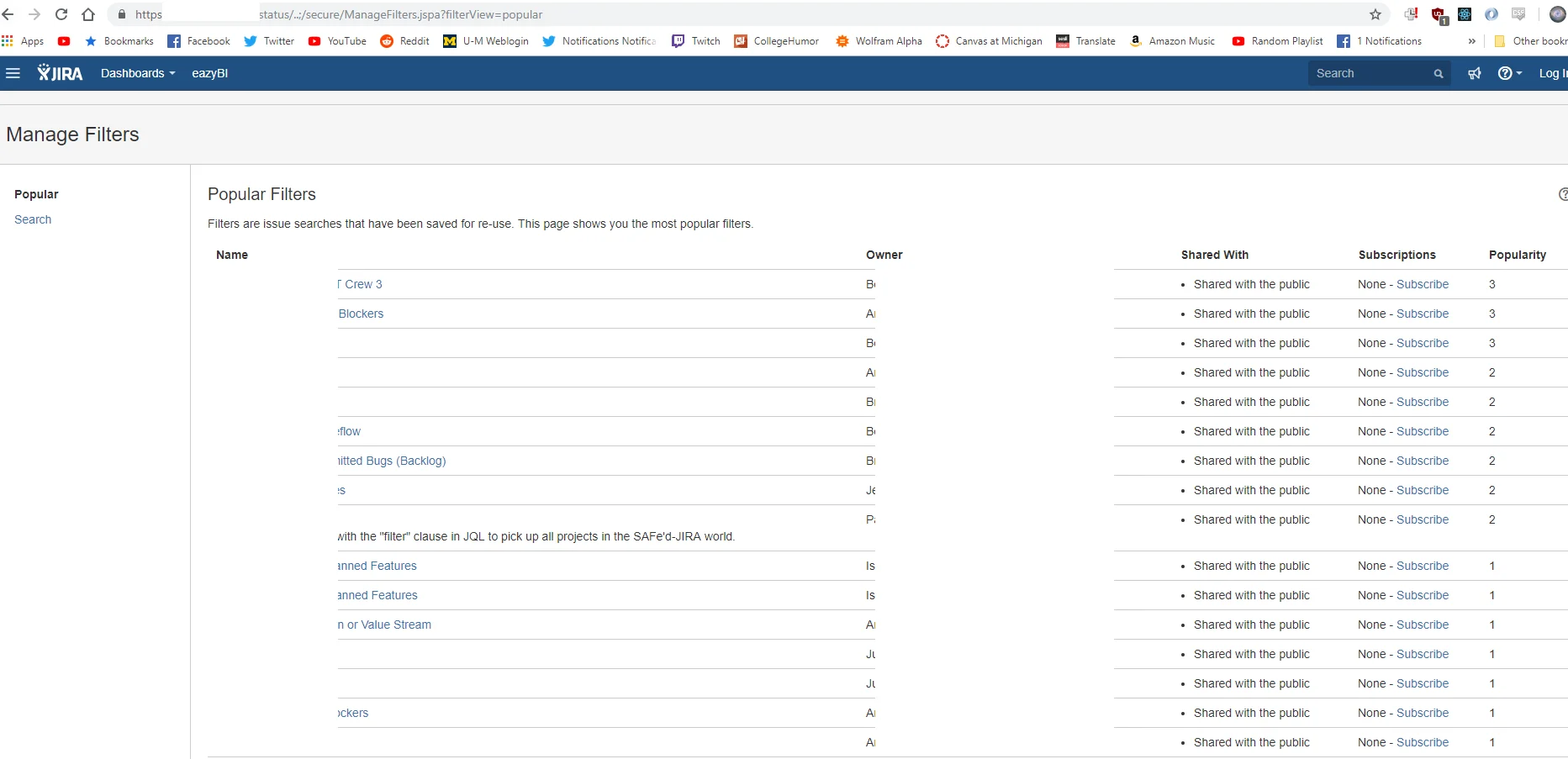
Knowing that Orange's trick potentially allowed bypassing redirects to a login page, as in the OneLogin and Uber case, he tried it to access sensitive endpoints on Jira such as /browse, ManageFilters.jspa and Dashboard.jspa. He could not find any dashboards like the example in Orange's article, but he was able to list all filters that were shared with "everyone", which includes unauthenticated users. This revealed employee emails, tickets that were being worked on and the company priorities.
Step 2: understand what the exposure means
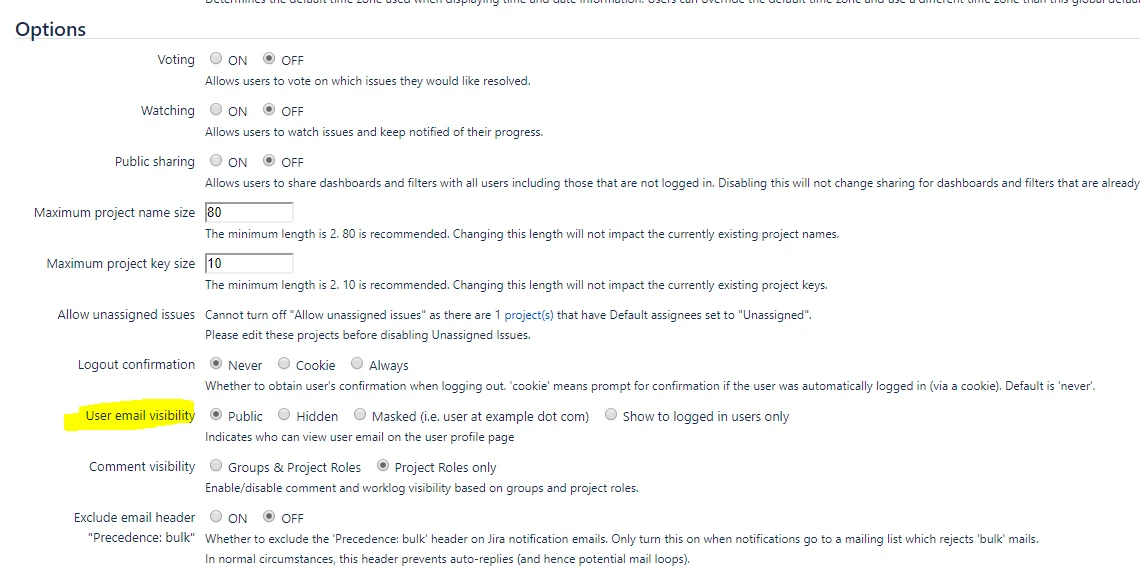
The main issue is that the admin relied on the login redirect to hide filters and dashboards shared with everyone, or was not aware that sharing with everyone includes unauthenticated users as well. On top of that, by default all email addresses are public information, so by being able to see filters and dashboards one can also get valid company email addresses. The default setting looks like this:
Step 3: turn it into a module
At this point the researcher thought this would make an easy module to implement for Detectify, as you only need two GET-requests to check for it. First you try to list the filters via the regular path, and if that does not work you try the same thing with Orange's /status/..;/ trick. He was pretty confident that is why it worked. However, after submitting the module to Detectify and discussing it with them, he realised /..;/ is actually not needed. He is still a bit unsure why /status/ is let through, but assumes it has something to do with the status endpoint being accessible for unauthenticated users on most Jira instances.
Root cause
The exposure comes from two design decisions combined. First, sharing a filter or dashboard with "everyone" includes unauthenticated users, and the admin treated the login redirect as the control that kept that content private. Second, Jira's default makes all email addresses public information, so the shared objects leak valid company email addresses as well.
The bypass appears to be a path normalization difference, though the author is unsure why /status/ is let through. The researcher's original assumption was that the /status/..;/ trick was responsible, but after discussion with Detectify he established that /..;/ is not needed. Why /status/ is let through is still not fully understood by the author; he assumes it relates to the status endpoint being reachable without authentication on most Jira instances. As he puts it, this is a good example of finding interesting things before fully understanding them.
Impact
An unauthenticated attacker against a Jira instance that is not sitting behind a VPN can list filters shared with "everyone". In this case that revealed employee emails, tickets that were being worked on and the company priorities. Because email addresses are public by default, the same access yields valid company email addresses. The impact depends on what admins have shared with "everyone" and on the email visibility setting; the report does not quantify it further.
Fix
The recommendation is aimed at Jira administrators rather than at the vendor. If your Jira instance is not sitting behind a VPN, the best thing you can do is avoid setting any permissions to "everyone" while setting up a new dashboard or shared filter, as that permits unauthenticated users as well. He also suggests adjusting the "User email visibility" setting from "Public" to show to logged in users only.
Variants to test
- Other Jira instances with the old login. Look for instances that redirect to login.jsp rather than Atlassian ID for paths under "/secure". A positive result is that a request to a sensitive endpoint such as /browse, ManageFilters.jspa or Dashboard.jspa returns content instead of the login redirect.
- The two-request check. First request the filter listing via the regular path; if that fails, repeat it with the
/status/..;/trick. A positive result is a listing of filters shared with "everyone" without authentication. Remember that the/..;/segment turned out not to be required, so also try the plain path. - Path normalization differences generally. Any product where a URL such as https://example.com/a/../b is normalised in one component but kept in full in another is a candidate, since the difference often leads to authorization issues.
- Default email visibility. On any Jira instance you can reach, check whether email addresses are exposed to unauthenticated users through shared filters or dashboards. A positive result is valid company email addresses appearing in that output.
- Ubiquitous software with known CVEs. Use recon records to find hosts running software with recently published vulnerabilities, as with the Shodan check that found around 5% of domains still unpatched for CVE-2017-9506. A positive result is an unpatched host that responds to the known check.
What happened, in plain words
Eray Mitrani works for Nokia Deepfield, where he provides network analytics and DDoS protection. He is also a security researcher in the Detectify Crowdsource community. In this guest blog he walks through finding and submitting his first module to Detectify Crowdsource: an authorization bypass on a Jira instance.
Detectify Crowdsource is the platform where external researchers submit web vulnerability findings. If Detectify can validate a finding, they build security checks into the automated scanner and make them available to all customers, paying the researcher a financial kickback for each customer profile finding generated.

The finding is on a Jira instance found while looking at versions deployed across bug bounty programs. Filters and dashboards can be shared with "everyone", and the admin in this case relied on the login redirect to keep that content away from unauthenticated visitors.
A few words on the pieces before we start, because the rest of the article leans on them.
- Jira is a web application that teams use to track work: bugs, tasks, tickets. Think of it as a shared noticeboard with lots of columns, where each card is a piece of work. People log in to see the cards they are allowed to see.
- A filter in Jira is a saved search. You tell Jira "show me all open tickets assigned to my team", you save that search under a name, and you can share it with colleagues. A dashboard is a page that collects several of these saved searches and other widgets side by side, like a pinboard of summaries.
- Sharing with "everyone" is a permission setting. It means the object is visible to every user of the instance. The catch, which is the heart of this story, is that "everyone" also includes people who have not logged in at all.
- An unauthenticated user is a visitor with no account and no login. The server does not know who they are. Authenticated means the opposite: the server knows who you are because you logged in.
- A login redirect is what a website does when you ask for a page you are not allowed to see: instead of showing the page, it sends your browser to the login form. It is like a receptionist who, instead of letting you into the office, walks you to the sign-in desk. The admin in this case treated that receptionist as the lock on the door.
- An authorization bypass is when you get to see or do something your account (or lack of account) should not allow. Authentication is about proving who you are; authorization is about what you are then allowed to do. A bypass means the second check was skipped or fooled.
- A module, in the Detectify context, is a packaged security check that the automated scanner can run against a customer's site. The researcher writes the check once, Detectify validates it, and it runs for every customer.
Setup
The researcher had been teaching himself to hack for barely a year, mostly by iterating on things other people had already done. The starting point was Orange Tsai's research on a path normalization issue found on Uber's internal Jira instance, used to bypass their OneLogin.
Path normalization is part of how a URL is parsed server side. https://example.com/a/../b might for example actually be treated as https://example.com/b in some places, while kept in full in others. This difference often leads to authorization issues.
Let us unpack that, because it is the single idea the whole finding rests on. A URL is the address you type in the browser bar. The two dots .. mean "go up one folder", the same as in a file manager on your computer. So /a/../b logically means "enter folder a, go back up, then enter b", which is the same place as plain /b. Humans and most software agree on that. The problem is that a website is not one program but several: a front door (a proxy or load balancer) that receives the request, and the application behind it. If the front door tidies the address up before deciding whether you may pass, but the application behind it reads the raw address, the two can disagree about which page you asked for. One of them checks the rules against /b, the other serves /a/../b. Whenever two components disagree about what a request means, access rules can be applied to the wrong thing. That is why this class of difference so often turns into an authorization issue.
Jira was interesting because it is ubiquitous software, so one original find can lead to numerous bounties across many bug bounty programs. A bug bounty program is a scheme where a company pays researchers for reporting security problems in its systems. Ubiquitous means the software is everywhere: the same finding can be reported to many different companies, each running their own copy.
CVE-2017-9506, an SSRF that affected many vendors and was easy to discover with a simple GET-request, is cited as an example. Two terms there:
- CVE is a public catalogue number for a known vulnerability. Think of it as a library shelf mark: everyone refers to the same bug by the same identifier.
- SSRF, server-side request forgery, is a bug where the server can be tricked into making a request on your behalf, for example fetching an address you supply. The server has access to internal things your browser does not, so making it fetch on command can expose them.
- A GET-request is the simplest kind of request a browser makes: "give me this page". When you type an address and press Enter, that is a GET. It carries no form data, just the address.
Using Shodan, the researcher checked whether people were still running old versions of the software and found around 5% of the domains were still unpatched. Shodan is a search engine for internet-connected devices and servers: instead of indexing page text, it indexes what services are answering on the internet, so you can search for hosts running a particular piece of software. Unpatched means the fix for a known bug has not been installed. That is what motivated him to build on past research and contribute modules to Detectify Crowdsource.
No accounts, roles or specific Jira versions are described beyond the observation that most up-to-date Jira instances redirect to Atlassian ID to log in. Atlassian ID is the vendor's central login service: instead of each Jira instance holding your password, it hands you over to one shared sign-in page.
Finding it
The work started from a recon folder where the researcher keeps track of all his bug bounty targets. Recon, short for reconnaissance, is the information-gathering phase: before attacking anything you collect what is out there. This folder allows him to quickly look for newly published vulnerabilities in old targets he has already tested. Since different hackers have access to different private programs, it is always a good idea to quickly look for easily automated tasks there. A private program is a bounty scheme you can only join by invitation, so the list of targets differs from researcher to researcher.
He keeps a .txt record of all active hosts on a target and the directory structure in a different folder, which lets him both track changes to past targets and look for new vulnerabilities he has picked up. A host here means a server name, such as a subdomain of a company's main site. A subdomain is a name in front of the main domain: if the company is example.com, then vpn.example.com and jira.example.com are subdomains. If there is a new Cisco vulnerability, for example, he can look for all subdomains that include the word "vpn". In this case he ran:
grep -r –include=\*.txt “jira”
Line by line, in plain words:
grepis a small command-line tool that searches text for a pattern and prints the matching lines. It is the same idea as Ctrl+F in a browser, but for files on disk.-rmeans recursive: search inside every file in the current folder and all folders beneath it, rather than a single file.–include=\*.txtrestricts the search to files whose names end in.txt, so the tool does not waste time on other file types. The backslash before the asterisk is there so the shell passes the asterisk through literally instead of expanding it into a list of file names.“jira”is the pattern being searched for. The curly quotes around it are how they appear in the report.
The result was a list of all subdomains that have the string jira in them, pulled out of his saved notes. Why do this at all? Because it turns a vague question ("which of my targets run Jira?") into a one-line command over records he already has, instead of manually opening dozens of notes.
He then started looking at different versions of Jira deployed across bug bounty programs. Most up-to-date Jira instances nowadays redirect to Atlassian ID to log in, but he found one that would redirect to login.jsp (their old login) regardless of which path you tried to visit under "/secure". That behaviour is what made the target worth pursuing.
A word on login.jsp: .jsp is a file extension for pages built with Java Server Pages, a way of writing web pages on Java servers. The point is not the technology but the age: this was the old, built-in login page, not the modern central one. And /secure is simply a folder-like prefix in the site's address space where Jira keeps pages that are supposed to require a login. The observation was that every path under /secure bounced to the old login page.
Exploitation
Step 1: apply Orange Tsai's technique
Knowing that Orange's trick potentially allowed bypassing redirects to a login page, as in the OneLogin and Uber case, he tried it to access sensitive endpoints on Jira such as /browse, ManageFilters.jspa and Dashboard.jspa. An endpoint is a specific address on a server that does one job, like a counter in a building: /browse shows issues, ManageFilters.jspa deals with saved filters, Dashboard.jspa shows dashboards. He could not find any dashboards like the example in Orange's article, but he was able to list all filters that were shared with "everyone", which includes unauthenticated users. This revealed employee emails, tickets that were being worked on and the company priorities.
The screenshot accompanies the listing of filters shared with everyone. What makes it serious is not that a list of filter names appeared, but what those filters contained. A saved filter is a stored search, and its results are real tickets. So the page handed over employee email addresses, the work in progress, and by implication what the company was prioritising. None of that required a password.
Step 2: understand what the exposure means
The main issue is that the admin relied on the login redirect to hide filters and dashboards shared with everyone, or was not aware that sharing with everyone includes unauthenticated users as well. On top of that, by default all email addresses are public information, so by being able to see filters and dashboards one can also get valid company email addresses. The default setting looks like this:
The screenshot shows the default setting the author refers to. The lesson is a general one about defaults: a setting that is permissive out of the box will be permissive on every instance where nobody changed it, and most admins never change settings they do not know exist. Two separate mistakes stack here. The first is a misunderstanding of what "everyone" means. The second is a default that publishes email addresses. Together they let an anonymous visitor obtain valid company email addresses.
Step 3: turn it into a module
At this point the researcher thought this would make an easy module to implement for Detectify, as you only need two GET-requests to check for it. First you try to list the filters via the regular path, and if that does not work you try the same thing with Orange's /status/..;/ trick. He was pretty confident that is why it worked.
Let us look closely at that trick, because it is the part beginners find strangest. The segment /status/..;/ is a path fragment you insert into a URL. Reading it piece by piece:
/status/is a folder-like part of the address. On many Jira instances the status page is reachable without logging in, which matters in a moment...means "go up one level", as before.;is a semicolon. In some server software a semicolon introduces extra parameters attached to a path segment, and different components disagree about whether what follows the semicolon is part of the folder name or not.
So the fragment is a deliberate ambiguity: depending on who reads it, it may mean "go up from status" or "a folder literally named ..;". If the front door resolves it one way and the application the other, you can end up somewhere the front door did not intend to let you reach. That is the same disagreement described in the Setup section, just with a semicolon added to widen the gap.
However, after submitting the module to Detectify and discussing it with them, he realised /..;/ is actually not needed. He is still a bit unsure why /status/ is let through, but assumes it has something to do with the status endpoint being accessible for unauthenticated users on most Jira instances. In other words, the piece he was confident about turned out to be unnecessary, and the piece that remained is not fully explained. He says so plainly, and that honesty is worth more than a tidy story: a check that works for a reason you do not understand is still a working check, but you should label it as such.
Root cause
The exposure comes from two design decisions combined. First, sharing a filter or dashboard with "everyone" includes unauthenticated users, and the admin treated the login redirect as the control that kept that content private. Second, Jira's default makes all email addresses public information, so the shared objects leak valid company email addresses as well.
The bypass appears to be a path normalization difference, though the author is unsure why /status/ is let through. The researcher's original assumption was that the /status/..;/ trick was responsible, but after discussion with Detectify he established that /..;/ is not needed. Why /status/ is let through is still not fully understood by the author; he assumes it relates to the status endpoint being reachable without authentication on most Jira instances. As he puts it, this is a good example of finding interesting things before fully understanding them.
Impact
An unauthenticated attacker against a Jira instance that is not sitting behind a VPN can list filters shared with "everyone". A VPN is a private tunnel into a company network: if the Jira instance only answers inside that tunnel, an outsider on the open internet cannot reach it at all, and the whole problem disappears. That is why the recommendation below starts with "if your instance is not behind a VPN".
In this case the listing revealed employee emails, tickets that were being worked on and the company priorities. Because email addresses are public by default, the same access yields valid company email addresses. Credential guessing means trying likely passwords against known accounts, which is far easier once you know which accounts exist. The impact depends on what admins have shared with "everyone" and on the email visibility setting; the report does not quantify it further.
Fix
The recommendation is aimed at Jira administrators rather than at the vendor. If your Jira instance is not sitting behind a VPN, the best thing you can do is avoid setting any permissions to "everyone" while setting up a new dashboard or shared filter, as that permits unauthenticated users as well. He also suggests adjusting the "User email visibility" setting from "Public" to show to logged in users only.
Both fixes are configuration changes for Jira administrators. The durable lesson is to read a sharing option as literally as possible. "Everyone" means everyone, including the stranger who has not signed in.
Variants to test
- Other Jira instances with the old login. Look for instances that redirect to login.jsp rather than Atlassian ID for paths under "/secure". A positive result is that a request to a sensitive endpoint such as /browse, ManageFilters.jspa or Dashboard.jspa returns content instead of the login redirect.
- The two-request check. First request the filter listing via the regular path; if that fails, repeat it with the
/status/..;/trick. A positive result is a listing of filters shared with "everyone" without authentication. Remember that the/..;/segment turned out not to be required, so also try the plain path. - Path normalization differences generally. Any product where a URL such as https://example.com/a/../b is normalised in one component but kept in full in another is a candidate, since the difference often leads to authorization issues.
- Default email visibility. On any Jira instance you can reach, check whether email addresses are exposed to unauthenticated users through shared filters or dashboards. A positive result is valid company email addresses appearing in that output.
- Ubiquitous software with known CVEs. Use recon records to find hosts running software with recently published vulnerabilities, as with the Shodan check that found around 5% of domains still unpatched for CVE-2017-9506. A positive result is an unpatched host that responds to the known check.
Glossary
- Atlassian ID: the vendor's central login service, used by modern Jira instances instead of a per-instance password.
- Authenticated: the server knows who you are because you have logged in.
- Authorization: what a known (or unknown) user is allowed to do, as opposed to authentication, which is about proving identity.
- Authorization bypass: getting access to something your account, or lack of account, should not permit.
- Bug bounty program: a scheme where a company pays researchers for reporting security problems in its systems.
- Credential guessing: trying likely passwords against known accounts, made easier once you know which accounts exist.
- CVE: a public catalogue number for a known vulnerability, so everyone refers to the same bug by the same identifier.
- Dashboard: a Jira page that collects several saved searches and widgets side by side.
- DDoS protection: defences against floods of traffic intended to knock a service offline.
- Endpoint: a specific address on a server that performs one job, such as
/browseorDashboard.jspa. - Filter: a saved search in Jira, which can be shared with other users.
- GET-request: the simplest browser request, "give me this page", carrying only an address and no form data.
- grep: a command-line tool that searches text for a pattern and prints matching lines.
- Host: a server name on the internet, often a subdomain of a company's main domain.
- Jira: an issue tracker used by teams to record and follow work items such as bugs and tasks.
- JSP: Java Server Pages, a way of building web pages on Java servers;
login.jspis Jira's old built-in login page. - Login redirect: sending a visitor to the login form instead of the page they asked for, used as a guard on protected content.
- Module: a packaged security check that Detectify's automated scanner runs against customer sites.
- Path normalization: the process of tidying up a URL path, for example turning
/a/../binto/b; different components can do it differently. - Phishing: sending a convincing message to a known address to trick someone into revealing information or clicking something harmful.
- Private program: a bug bounty scheme you can only join by invitation.
- Recon: reconnaissance, the information-gathering phase before testing a target.
- Shodan: a search engine that indexes internet-connected services rather than page text, so you can find hosts running particular software.
- SSRF: server-side request forgery, a bug where the server is tricked into making a request on your behalf.
- Subdomain: a name in front of a main domain, such as
jira.example.comunderexample.com. - Unauthenticated: a visitor with no account and no login, so the server does not know who they are.
- Unpatched: a known bug for which the fix has not been installed.
- VPN: a private tunnel into a company network, which keeps a service unreachable from the open internet.


