It’s time toInspect the application heap memory
An Android app encrypted its request bodies, but the AES key and IV were recoverable from the running app's heap memory. An attacker with a debuggable build of the app could decrypt and modify the encrypted request body.
 Published on secureitmania.medium.com
In the recent private bugbounty program, I faced a challenge. In which the application request body was encrypted with some kind of cryptography mechanism.
The full write-up lives on its author's site
It belongs to its author, so we link to it rather than copy it. The other two tabs are our own rewrites, checked against it.
Context
This write-up comes from a private bug bounty program. The target is an Android application whose request bodies are encrypted with a cryptography mechanism, so the traffic cannot be read or modified directly. The researcher's goal was to recover the encryption mechanism in order to assess the rest of the application.
The author opens with a caveat about severity: a broken cryptography flaw in an Android application typically has no significant impact, and in general the severity is low, unless there is a strong dependency between the application workflow and its cryptography functions. That dependency is what makes this case interesting.
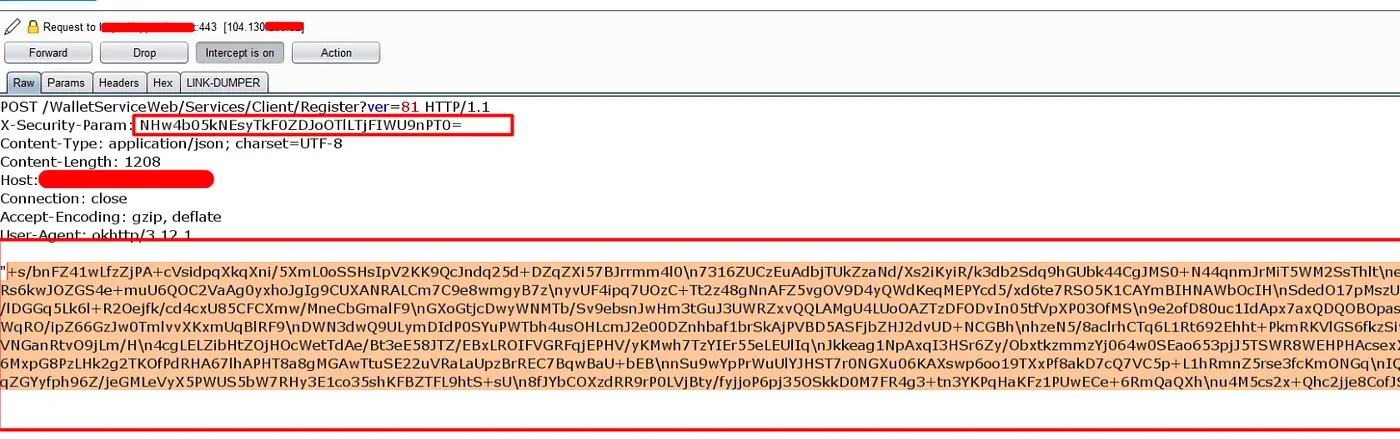
The screenshot shows the encrypted request body that started the investigation.
Setup
The tools used were:
- Android reverse engineering tools, to decompile the APK and read the encryption code.
- apk-mitm, to rebuild the target application with
android:debuggable="true". - adb, to dump the heap of the running application.
hprof-convfrom[Android-SDK]\platform-tools, to convert the heap dump into a format Eclipse MAT can read.- Eclipse MAT, including its OQL (Object Query Language) feature, to search the heap for strings.
The rebuilt, debuggable build of the application has to be installed and used. The original app is uninstalled first and the recompiled version installed in its place.
Finding it
Decompiling the APK and analysing the code for the encryption mechanism and for sensitive key material did not turn up any hard-coded secret in the reversed source code. The keys were not in the code, so the next place to look was the application's heap memory.
The reasoning is that the heap is used for dynamic memory allocation, and Android sets a hard limit on the heap size for each running application, a limit that varies by device and depends on how much RAM the device has. Objects are allocated in the heap whenever they are created. Because development time is short, developers focus on features, functionality and UI and may not inspect app memory usage with the Memory Profiler, which leaves a chance of obtaining cryptography secret keys through memory leakage.
One detail from the decompiled source did help: analysing the bytes array function showed that the AES secret starts with TbTS. That prefix became the search pattern for the heap.
Exploitation
Step 1: rebuild the app as debuggable
Recompile the target application with android:debuggable="true". The author used apk-mitm for this. Then uninstall the original app, install the recompiled version, navigate through all the features of the application and use it as a normal application for a few minutes, and use it as a normal application for a few minutes..
Step 2: dump the heap with adb
With the app running, take a memory profile using adb:
adb shell am dumpheap <PID of target app> /path/to/store/heap-dump.hprof#get the heapdump file to PCadb pull /path/to/the/hprof .
The first command asks the running process, identified by its PID, to write a heap dump to the given path on the device. The second pulls that file to the PC. The commands appear in the report run together on one line; in practice they are two separate commands, the second being adb pull /path/to/the/hprof ..
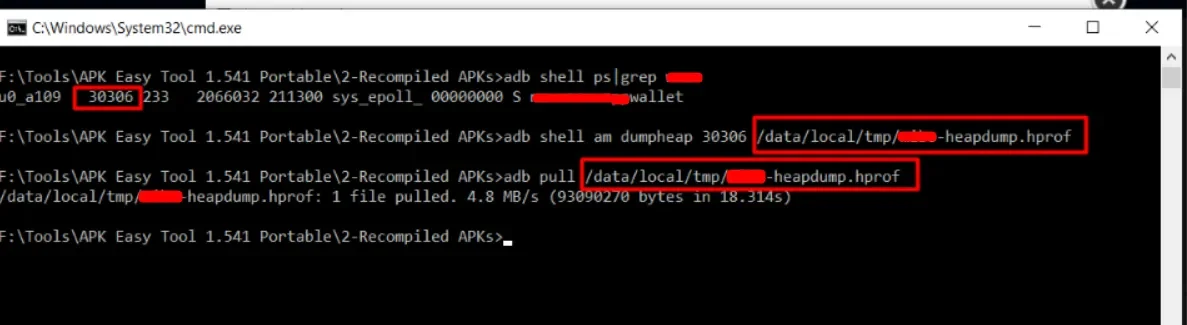
The screenshot shows the heap profile dump being taken via adb.
Step 3: convert the dump for MAT
To analyse the hprof file in MAT, convert it with hprof-conv, which lives in [Android-SDK]\platform-tools:
cd "C:\android-sdk\platform-tools"hprof-conv.exe "heapdump.hprof" "MAT-format-heapdump.hprof"
This produces a heap dump in the format MAT supports. As above, the report shows the cd and the hprof-conv.exe invocation on one line; they are separate commands.
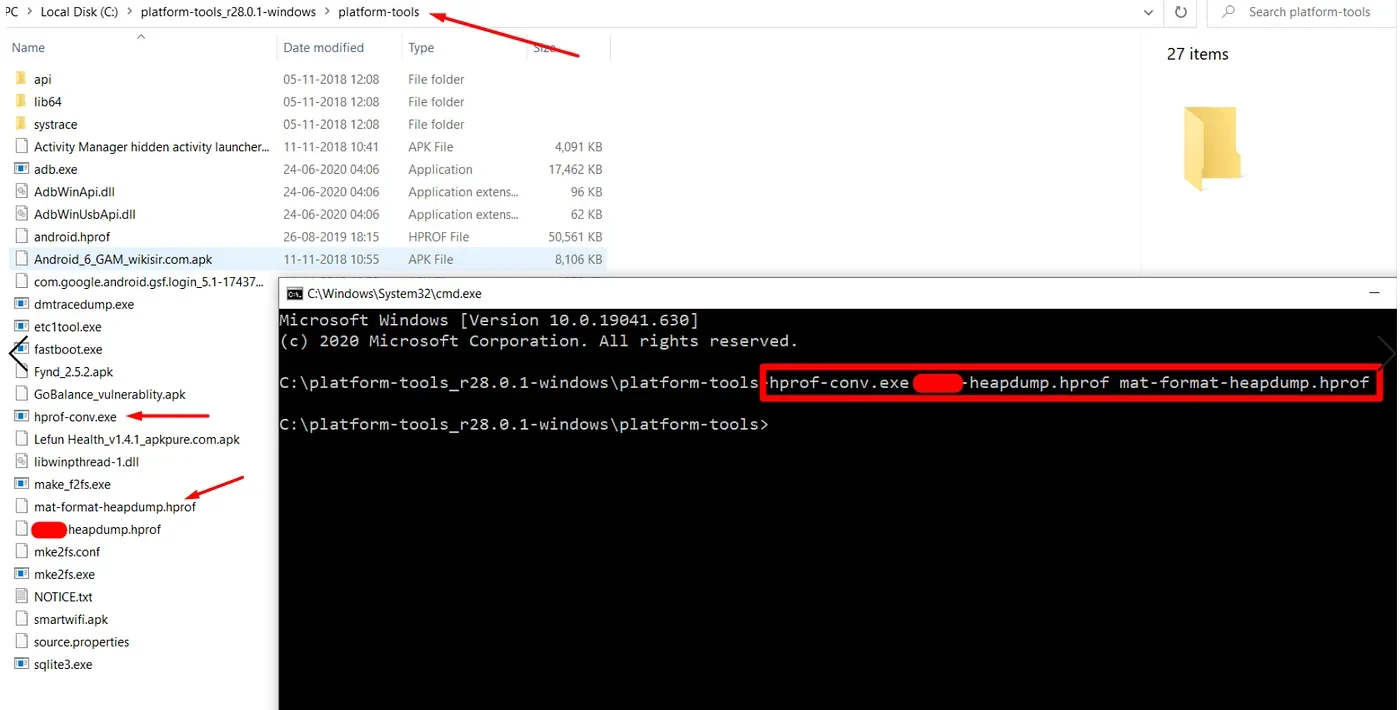
Step 4: search the heap for the key
Download Eclipse MAT, open the converted hprof file, and search for the known prefix with OQL:
SELECT s.count, toString(s) FROM java.lang.String s WHERE (toString(s) LIKE "TbTS.*")
This query searches the heap for strings matching the TbTS prefix. It found the AES secret key.
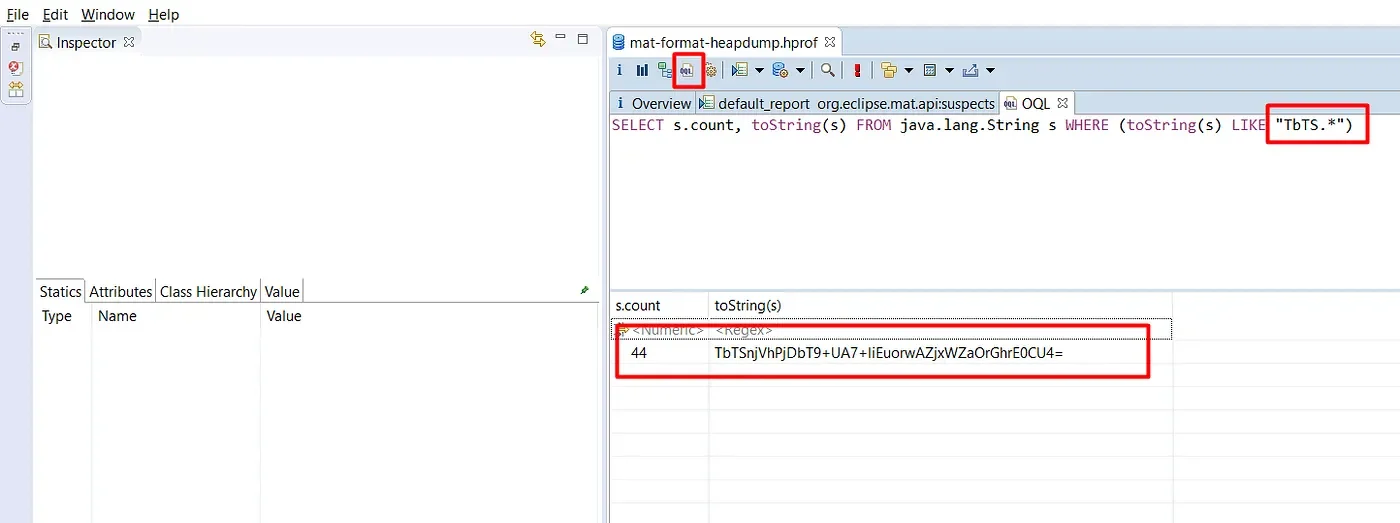
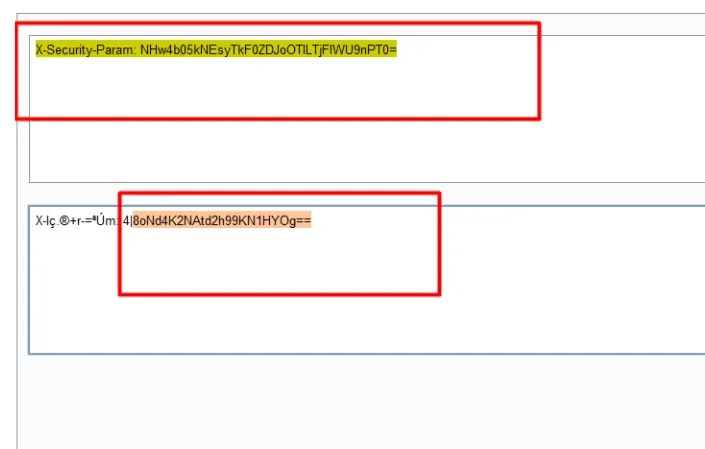
The AES key alone was not enough: an IV random key was also needed to decrypt or encrypt the data. After some further analysis the author's attention went to the X-Security-Param header. Decoding that header value produced a value that the author strongly believed to be the IV key of the digest.
Step 5: decrypt and modify the request
With the AES secret from the heap and the IV recovered from the X-Security-Param header, the author decrypted and modified the encrypted request body.
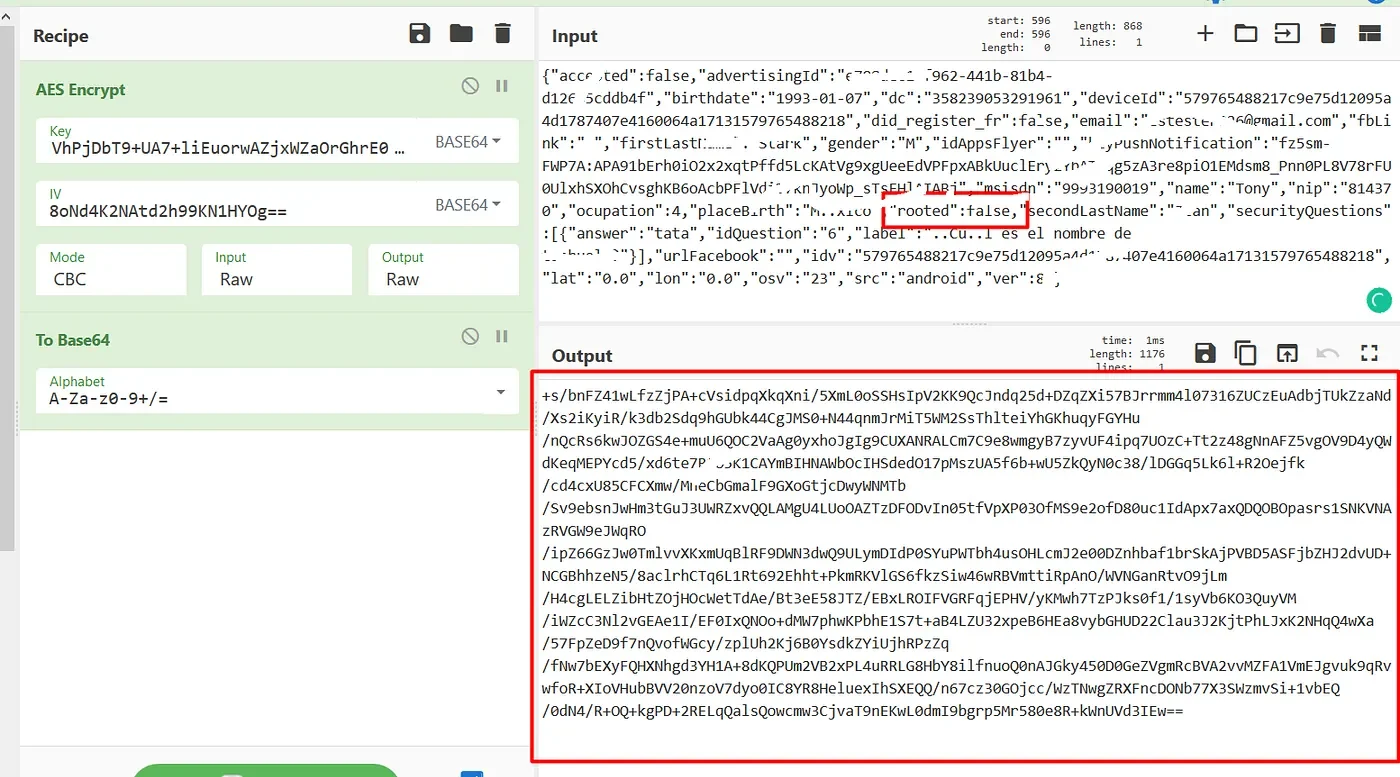
The screenshot shows the encrypted body request together with the AES secret and IV.
Root cause
The AES key was recovered from heap memory as a string with the TbTS prefix, and the author strongly believed the decoded X-Security-Param header value was the IV. The code itself contains no hard-coded secret, so static review of the decompiled APK finds nothing; the weakness only appears at runtime. The report does not describe any obfuscation or memory protection that would have prevented the strings from being found, and it does not say how the key is generated or stored before it reaches the heap.
The precondition for reading the heap is a debuggable build of the app. The researcher obtained one by rebuilding the APK with android:debuggable="true". The report does not describe any integrity check or tamper detection that would have blocked the rebuilt app.
Impact
With the AES key and the IV, an attacker can decrypt the encrypted request bodies and modify them, which is exactly what the author did. The author notes that a broken cryptography flaw stops being low severity when there is a strong dependency between the application workflow and its cryptography functions.
Fix
Variants to test
- Heap search for key prefixes. Decompile the APK, find how the key material is built (for example a bytes array function), and search the heap for a distinctive prefix with OQL. A positive result is the full key appearing in the query output.
- Header-borne IVs. Look for headers such as
X-Security-Paramwhose values decode to a value that may be the IV. A positive result is a decoded value that, combined with the recovered key, decrypts a captured body. - Debuggable rebuilds. Rebuild the APK with
android:debuggable="true"and check whether the app still runs and talks to the backend. A positive result is a working app whose heap can be dumped withadb shell am dumpheap. - Memory profiling of other secret types. Repeat the heap dump and OQL search for tokens, session identifiers and API keys, not just AES keys. A positive result is any live secret found as a string in the dump.
What happened, in plain words
A security researcher was testing an Android app as part of a private bug bounty program. A bug bounty program is a scheme where a company invites independent researchers to look for security problems in its software and pays them for reporting what they find. This particular program was private.
The app had a protection that made it hard to test: every time it sent data to its server, the data was scrambled using cryptography. Cryptography is the maths of keeping information secret, so that only someone holding the right secret can read it. Because the request bodies were scrambled, the researcher could not simply read or change what the app was sending. The first job was therefore to work out how the scrambling was done, so that the rest of the app could be tested properly.
To do that, the researcher did not attack the server. Instead, they looked inside the phone's memory while the app was running, found the secret key the app uses to scramble its data, and used it to unscramble and then change a request. This is a good example of a "broken cryptography" problem: the maths itself may be fine, but the way the app handles its secrets is not.
The screenshot above shows the scrambled request body that started the investigation. It is the kind of unreadable text you get when data has been encrypted, and it is the reason the researcher could not just read the traffic.
Why this kind of bug is usually rated low
The author starts with an important warning about how serious this class of problem normally is. A broken cryptography flaw in an Android app typically has no significant impact, and in general the severity is low. Severity is the rating a program gives a bug to say how much harm it could cause.
The reason for the low rating is that if encryption is only used for a small side feature, breaking it does not get an attacker very far. But there is an exception: if the app's whole workflow depends on the cryptography, then breaking it matters a lot. The author notes that a broken cryptography flaw matters more when the application workflow strongly depends on its cryptography functions. That is what makes this case interesting.
The tools, and what each one is for
Before walking through the steps, here is what each tool does. You do not need to install any of them to follow the story, but knowing their role makes the steps easier to understand.
- Android reverse engineering tools: software that takes an installed Android app file (an APK) and turns it back into readable code. An APK is the package you download and install, a bit like a zip file containing the app's code and resources. Decompiling means converting the compiled code back into something a human can read, so the researcher could study how the app builds its encryption key.
- apk-mitm: a command-line tool that automatically prepares Android APK files for HTTPS inspection. In this case the researcher used it to rebuild the app with a setting called
android:debuggable="true". That setting marks the app as debuggable, which the researcher needed in order to dump its heap. - adb: the Android Debug Bridge, a program on your computer that talks to a phone or emulator over a cable or network. It can install apps, run commands on the device and copy files back and forth. Think of it as a remote control for the phone.
- hprof-conv: a small converter that lives in
[Android-SDK]\platform-toolson the computer. A heap dump (explained below) is saved in a format called hprof, and the analysis tool used later cannot read that format directly, so this tool converts it. - Eclipse MAT: a free memory analysis program. MAT stands for Memory Analyzer Tool. It opens a heap dump and lets you browse and search everything that was in the app's memory. It includes a feature called OQL, Object Query Language, which lets you write database-style queries against the objects in memory.
The precondition for all of this is a phone or emulator on which the rebuilt, debuggable version of the app can be installed and used. The original app is uninstalled first and the recompiled version installed in its place.
What a heap is, and why secrets end up there
To follow the next steps you need one idea: the heap.
When a program runs, it needs somewhere to keep the things it is working with: the text of a message, a list of items, a key used for encryption. The heap is the area of memory used for this dynamic allocation, meaning memory handed out while the program runs, as needed. Android sets a hard limit on the heap size for each running application, so that one app cannot use up all the phone's memory. That limit varies from device to device and depends on how much RAM the phone has. RAM is the fast working memory a phone uses while it is switched on.
The key sentence is this: whenever a program creates an object, that object is created in the heap. An object is just a bundle of data and behaviour in the program. So if the app needs an encryption key to scramble a request, that key has to exist somewhere in memory while the request is being built, and that somewhere is the heap.
Why does this become a security problem? Because development time is short. Developers focus on building features, functionality and the user interface, and they may not inspect how their app uses memory with a tool called the Memory Profiler, which is built into Android Studio, Google's official app development environment. If nobody checks, there is a chance of obtaining cryptography secret keys through memory leakage. The author calls this memory leakage. Leakage here does not mean the data is sent somewhere; it means it stays in memory where someone with access to a memory dump can read it.
Step 1: rebuild the app so its memory can be dumped
The first step is to recompile the target application with android:debuggable="true". The author used apk-mitm for this. Recompiling means taking the app apart, changing a setting, and building it back into an installable APK.
Why is this needed? The researcher rebuilt the app with the debug flag on before dumping its heap. By rebuilding the app with the debug flag on, the researcher makes the dump possible.
After rebuilding, the researcher uninstalled the original app and installed the recompiled version. Then they navigated through all the features of the app and used it like a normal user for a few minutes. The researcher used the app as a normal user for a few minutes before dumping the heap.
Step 2: take a memory dump with adb
With the app running, the next step is to ask Android to write the contents of the app's memory to a file. That file is called a heap dump. The report gives these commands:
adb shell am dumpheap <PID of target app> /path/to/store/heap-dump.hprof#get the heapdump file to PCadb pull /path/to/the/hprof .
Line by line, in plain words:
adb shell am dumpheapasks the phone to run Android's activity manager command calleddumpheap, which produces a heap dump.<PID of target app>is a placeholder for the process ID of the app. Every running app on Android is a process, and each process has a number, the PID. You need the right number so the phone dumps the app you care about and not something else./path/to/store/heap-dump.hprofis a placeholder for where on the phone the dump should be saved. The.hprofending is the file format used for heap dumps.- The second part,
adb pull /path/to/the/hprof ., copies that file from the phone to the computer. The final dot means "the current folder on my computer".
One practical note: in the report the two commands appear run together on one line. They are really two separate commands, the second being adb pull /path/to/the/hprof .. If you typed them exactly as shown, the shell would treat them as one long command and it would not work.
The screenshot shows the heap profile dump being taken via adb, with the commands running in a terminal on the computer.
Step 3: convert the dump into a format the analyser can read
Eclipse MAT cannot open the raw hprof file directly, so it has to be converted first. The converter, hprof-conv, lives in [Android-SDK]\platform-tools, which is a folder inside the Android software development kit installed on the computer. The report gives:
cd "C:\android-sdk\platform-tools"hprof-conv.exe "heapdump.hprof" "MAT-format-heapdump.hprof"
Line by line:
cd "C:\android-sdk\platform-tools"changes the current folder in the terminal to the folder where the converter is stored, so the computer knows where to find it.hprof-conv.exeis the converter program itself. The.exeending means it is a Windows program."heapdump.hprof"is the input file, the dump you pulled from the phone."MAT-format-heapdump.hprof"is the output file, a new copy in the format MAT supports.
As in the previous step, the report shows the cd and the hprof-conv.exe invocation on one line, but they are separate commands. The result is a heap dump that the analysis tool can open.
The screenshot shows the conversion step in the terminal.
Step 4: search the memory for the key
Now the researcher downloads Eclipse MAT, opens the converted heap dump, and searches it. But searching for what? You cannot search for a key you do not know. This is where the earlier decompiling pays off.
When the researcher read the decompiled source code, they did not find a hard-coded secret. A hard-coded secret is a password or key written directly into the app's code, which is the classic mistake: anyone who decompiles the app can read it. Here the code contained no such secret, so static review, meaning reading the code without running it, found nothing.
However, reading the code did reveal one useful detail. By analysing the bytes array function, the researcher could see that the AES secret starts with the characters TbTS. AES stands for Advanced Encryption Standard, a widely used encryption method. A bytes array is simply a list of raw bytes, the smallest units of data, and a function is a named block of code that does a job. So the code that builds the key works on a list of bytes, and from that the researcher learned the key's first four characters.
That prefix is enough to search for. The researcher used OQL, the Object Query Language feature in Eclipse MAT, with this query:
SELECT s.count, toString(s) FROM java.lang.String s WHERE (toString(s) LIKE "TbTS.*")
Line by line:
SELECT s.count, toString(s)says: for each match, return the count and the text of the string. A string is a piece of text in a program.FROM java.lang.String ssays: look through every string object in the heap.java.lang.Stringis the standard name for a text object in Java, the language Android apps are commonly written in.WHERE (toString(s) LIKE "TbTS.*")is the filter. It keeps only strings whose text matches the patternTbTS.*. In this pattern,.*means "anything can follow". So it matches any string that begins withTbTS.
In everyday terms, imagine a huge warehouse of labelled boxes and a list of every label. This query says: show me every label that starts with the letters TbTS. If the key is sitting in memory as text, it will appear in the results.
The screenshots show the OQL search in Eclipse MAT and the result: the AES secret key was found in the heap.
The second secret: the IV
Finding the AES key was not the end. To decrypt or encrypt data with AES, you also need a second value called the IV, or initialisation vector. A simple way to picture it: if the key is the lock combination, the IV is a random starting position that makes sure the same message encrypted twice does not produce the same scrambled output. Without the IV, the key alone is not enough to reproduce the encryption.
After some further analysis, the researcher's attention went to a header called X-Security-Param. A header is a small piece of information sent alongside a web request, like the label on an envelope. When the researcher decoded the value of this header, they got a value, and they strongly believed this was the IV key of the digest. Decoding here means converting the header's value from its encoded form back into the underlying value.
The author strongly believed the decoded X-Security-Param header value was the IV.
Step 5: decrypt and modify the request
With the AES secret recovered from the heap and the IV recovered from the X-Security-Param header, the researcher had everything needed. Using the identified values, they decrypted and modified the encrypted request body. Decrypting means turning the scrambled text back into readable data; modifying means changing that data before it is sent.
The screenshot shows the encrypted body request together with the AES secret and the IV, the two values that made decryption possible.
Why this works: the root cause
The application keeps its cryptography secrets in heap memory in a form that can be recovered from a heap dump. The AES key was found in the heap as a string with the TbTS prefix, and the author strongly believed the decoded X-Security-Param header value was the IV.
The code itself contains no hard-coded secret, so reading the decompiled app finds nothing. The weakness only appears at runtime, when the app is actually running and building requests. The report does not describe any obfuscation or memory protection that would have prevented the strings from being found, and it does not say how the key is generated or stored before it reaches the heap. Obfuscation means deliberately making code hard to read, for example by renaming things.
There is also a precondition: to read the heap, you need a debuggable build of the app. The researcher got one by rebuilding the APK with android:debuggable="true", which was possible because the APK could be modified and reinstalled. The report does not describe any integrity check or tamper detection that would have blocked the rebuilt app. An integrity check is a mechanism that notices when an app has been modified and refuses to run.
What an attacker could do with this
With the AES key and the IV, an attacker can decrypt the encrypted request bodies and modify them, which is exactly what the author did. The author says a broken cryptography flaw stops being low severity when there is a strong dependency between the application workflow and its cryptography functions.
How it should be fixed
Variants worth testing
If you are learning this kind of testing, here are the same ideas written as things to try. Each one names what a positive result looks like, so you know when you have found something.
- Heap search for key prefixes. Decompile the APK, find how the key material is built (for example a bytes array function), and search the heap for a distinctive prefix with OQL. A positive result is the full key appearing in the query output.
- Header-borne IVs. Look for headers such as
X-Security-Paramwhose values decode to a value that may be the IV. A positive result is a decoded value that, combined with the recovered key, decrypts a captured body. - Debuggable rebuilds. Rebuild the APK with
android:debuggable="true"and check whether the app still runs and talks to the backend. A positive result is a working app whose heap can be dumped withadb shell am dumpheap. - Memory profiling of other secret types. Repeat the heap dump and OQL search for tokens, session identifiers and API keys, not just AES keys. A positive result is any live secret found as a string in the dump.
Glossary
- ADB (Android Debug Bridge): a program on a computer that sends commands to an Android phone or emulator, installs apps and copies files.
- AES (Advanced Encryption Standard): a widely used method for encrypting data with a secret key.
- APK: the file format of an Android app, containing its code and resources; the thing you install on a phone.
- apk-mitm: a command-line tool that automatically prepares Android APK files for HTTPS inspection, used here to rebuild the app as debuggable.
- API: an interface that lets one piece of software talk to another; here, the way the app sends requests to its server.
- Bug bounty program: a scheme where a company invites researchers to find security problems and pays for reports.
- Bytes array: a list of raw bytes, the smallest units of data; the code that built the key worked on one.
- Cryptography: the maths of keeping information secret so only someone with the right secret can read it.
- Debuggable: a setting on an Android app that allows diagnostic actions such as taking a memory dump; normal store apps do not have it.
- Decompile: convert a compiled app back into readable code.
- Decrypt: turn scrambled data back into readable data.
- Digest: in this report, the scrambled data being worked on.
- Eclipse MAT (Memory Analyzer Tool): a free program for opening and searching heap dumps.
- Encrypt: scramble data so that only someone with the right secret can read it.
- Hard-coded secret: a password or key written directly into an app's code, readable by anyone who decompiles it.
- Header: a small piece of information sent alongside a web request, like a label on an envelope.
- Heap: the area of memory a running program uses for objects it creates while it runs.
- Heap dump: a file containing a copy of everything in a running app's memory at one moment.
- hprof: the file format used for heap dumps.
- hprof-conv: a converter that changes a heap dump into the format Eclipse MAT can read.
- IV (initialisation vector): a random starting value used alongside an encryption key so the same message encrypted twice does not produce the same output.
- Memory leakage: here, secrets staying in memory where someone with a memory dump can read them.
- Memory Profiler: a tool built into Android Studio for inspecting how an app uses memory.
- Obfuscation: deliberately making code hard to read, for example by renaming things.
- Object: a bundle of data and behaviour in a program; objects are created in the heap.
- OQL (Object Query Language): a database-style query language in Eclipse MAT for searching objects in a heap dump.
- PID (process ID): the number Android gives each running app, used to identify it.
- Process: a running instance of an app on the phone.
- RAM: the fast working memory a phone uses while switched on.
- Request body: the main part of a web request, carrying the data the app sends to the server.
- Severity: a rating of how much harm a security bug could cause.
- Static review: reading code without running it.
- String: a piece of text in a program.
- Token: a value used to identify or authorise a user or session.
- X-Security-Param: the header in which the IV was found.



