Let’s know How I have explored the buried secrets in Xamarin application
Hard-coded Azure storage credentials were found in a Xamarin Android application's DLL file. An attacker could use these keys to access the Azure blob storage container.
 Published on secureitmania.medium.com
Xamarin is a free and open source mobile app platform for building native and high-performance iOS, Android, tvOS, watchOS, macOS, and Windows.
The full write-up lives on its author's site
It belongs to its author, so we link to it rather than copy it. The other two tabs are our own rewrites, checked against it.
Context
This write-up looks at reverse engineering a Xamarin-based Android application. Xamarin is described here as a free and open source mobile app platform for building native and high-performance iOS, Android, tvOS, watchOS, macOS and Windows applications. The point of the article is that Xamarin apps need a different approach from the usual Android reverse engineering methodology, and that this different approach is what surfaced the buried secrets.
The author frames it as a follow-up to an earlier write-up on React Native reverse engineering, and says a bug was found in a Xamarin based application using a different approach instead of the old reverse engineering methodology. The weakness class is hardcoded API keys and information disclosure: sensitive hard-coded credentials sitting in a commented section of the application code.
Setup
The tools and preconditions named in the report are:
- The APK under test, referred to generically as
com.example.apk. - A zip/unzip utility, used to unpack the APK.
- dnSpy, described as a debugger and .NET assembly editor that can be used to edit and debug assemblies.
- The Azure CLI, installed on the local machine, used later to exploit the disclosed keys.
- The Keyhacks GitHub repository, which the author consults first whenever an API key is found.
No application version, package identity, account or role is given. The work is done on a local machine, with the commands shown running from a Windows command prompt.
Finding it
The reasoning starts with why the old-fashioned way does not fit. Typically an Android application is de-compiled using apktool and dex2jar and then analysed with JD-GUI. That is useful when the application has native code you want to analyse. But, the author notes, most of the time the core logic of the application lies in the .dll files, and those can be obtained without needing dex2jar at all.
So the first question is whether the target was built on the Xamarin framework, and the answer is found by looking at the APK's contents.
Exploitation
Step 1: confirm the app is built on Xamarin
Rename the APK with a zip extension, then extract it to a new folder with the following command:
cp com.example.apk example-apk.zipunzip -qq example-apk.zip -d unzipped-apk
The first part copies the APK to a file named with a .zip extension; the second unpacks that archive quietly into a folder called unzipped-apk. Browse to the newly created unzipped-apk folder and find the assemblies folder. Inside it are several dll binaries, which is the signal that the application was built on the Xamarin framework.
Step 2: find the right dll
Next, locate the dll file that contains the core logic of the application. The author says this is easy: typically the dll file is named with the package name or the application name.

The screenshot shows the Xamarin Android application reverse engineering step, illustrating the extracted APK contents used to pick out the relevant dll.
Step 3: decompile with dnSpy
De-compile the dll file using the dnSpy tool, linked in the report to its GitHub project.
Step 4: search for sensitive credentials and endpoints
In this phase you identify the sensitive keywords to analyse in the de-compiled code. A pattern popular with Android applications is the use of third party services such as Firebase, Azure, AWS s3 service endpoints, private keys and so on. After a long, deep analysis of the code review, the author found sensitive hard-coded credentials in the commented section of code.
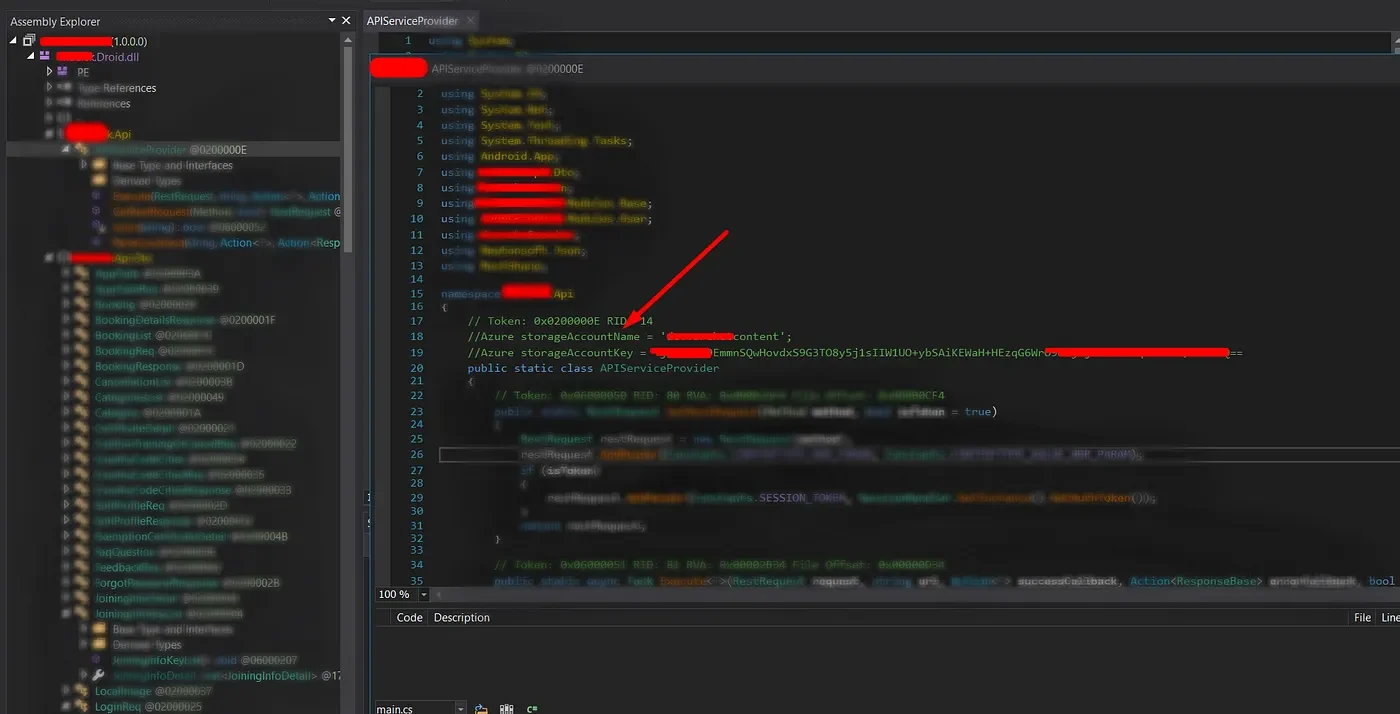
The screenshot shows the dll code being analysed in dnSpy, where the commented section holding the credentials was found.
Exploiting the disclosed keys
Whenever the author finds an API key, the first stop is the Keyhacks GitHub repository. In this case there was no valid approach there related to the disclosed keys. Further analysis of the Azure blob storage API documentation and some tutorials about the Azure CLI showed how to use these credentials through the Azure CLI. The process is below.
Install the Azure CLI on your local machine, then set the environment variables below, replacing the values with the disclosed keys:
C:\Users\admin>set AZURE_STORAGE_ACCOUNT=<replace this with storageAccountName>C:\Users\admin>set AZURE_STORAGE_ACCESS_KEY=<replace this with storageAccessKey>C:\Users\admin>set AZURE_STORAGE_CONNECTION_STRING=DefaultEndpointsProtocol=https;EndpointSuffix=core.windows.net;AccountName=<replace this with storageAccountName>;AccountKey=<replace this with storageAccessKey>C:\Users\admin>az storage blob list --container-name <container_name>
The three set commands export the storage account name, the storage access key and a full connection string built from the same two values, with DefaultEndpointsProtocol=https and EndpointSuffix=core.windows.net. The final command is az storage blob list --container-name <container_name>, run with those credentials set. The report does not show the output of that command.
Root cause
The mistake is that sensitive hard-coded credentials were left in the application's code, specifically in a commented section of the code inside a dll that ships with the APK. The dll sits in the APK's assemblies folder, so extracting the APK and opening the dll in a .NET assembly editor exposes it. The author's point is that the build framework has to be identified first, since the core logic lies in the dll files and can be obtained without dex2jar.
Impact
The disclosed keys are Azure storage credentials, and the author demonstrates that they can be used through the Azure CLI to list blobs in a container. The author shows the credentials being used through the Azure CLI to list blobs in a container. The report does not state which container, account or data was involved, nor what the listing returned, so the exact scope of exposure is not established here.
Fix
The implied remedy is to remove the credentials from the code entirely, including commented-out code, and not to ship storage account keys inside a client application.
Variants to test
- Check the build framework before choosing a decompiler. Unzip the APK and look for an
assembliesfolder with dll files; a positive result means the Xamarin path applies and dnSpy is the right tool. - Search decompiled dll code for third party service keywords: Firebase, Azure, AWS s3 endpoints and private keys. A positive result is a hard-coded endpoint or key in the decompiled code.
- Read commented-out code, not just active code. A positive result is credentials left in comments, as in this report.
- When a key is found, check Keyhacks for a known exploitation path first. If none exists, read the relevant service's API documentation and CLI reference, as the author did for Azure blob storage.
- With Azure storage credentials, set
AZURE_STORAGE_ACCOUNT,AZURE_STORAGE_ACCESS_KEYandAZURE_STORAGE_CONNECTION_STRING, then runaz storage blob list --container-name <container_name>. A successful listing of blobs would show the credentials work for that container.
What happened, in plain words
A security researcher took an Android app, opened it up on a computer, and found secret login details that the app's developers had left inside the app's own files. Those details were Azure storage credentials, and the researcher showed how to use them through the Azure CLI to list blobs in a container.
The interesting part is how the secrets were found. Most guides to taking Android apps apart assume the app was built with the standard Android toolkit. This app was built with a different toolkit called Xamarin, which packs the app's real logic into files with a .dll extension. The core logic lives in those files, and they can be obtained without dex2jar at all. Once the researcher worked out which toolkit had been used, the right tool for that toolkit opened the files up and the secrets were visible.
This is a beginner's walkthrough of that process. You do not need to know how to program. You need a computer, a browser, and the patience to follow a handful of steps. Every technical word is explained the first time it appears, and there is a glossary at the end.
Background: what Xamarin is, and why it matters
Xamarin is a free and open source platform for building mobile apps. "Open source" means the underlying code is publicly available for anyone to read and reuse. With Xamarin you write your app once and it runs on many systems: iOS (Apple phones), Android (most other phones), tvOS and watchOS (Apple TV and Apple Watch), macOS and Windows.
Think of it like a recipe written in one language that a kitchen can translate into several cuisines. The kitchen (Xamarin) does the translating; the recipe (your app's logic) stays the same.
The consequence for security is simple: the app's logic is not stored in the same shape as a normal Android app. It is stored in .dll files, which are a format from the Microsoft .NET world. If you use the standard Android tools, you are looking in the wrong cupboard.
This article follows an earlier write-up by the same researcher about React Native, another cross-platform toolkit. That earlier piece used a different technique. Here the target was a Xamarin app, and the approach had to change to match.
The old-fashioned way, and why it was not enough
When people take an Android app apart (this is called reverse engineering: working backwards from a finished product to understand how it was built), the traditional recipe is:
- Use a tool called apktool to unpack the app.
- Use a tool called dex2jar to convert the app's compiled code into a format Java analysis tools can read.
- Open the result in JD-GUI, a program that displays Java code in a readable form.
This works well when the app contains native code, meaning code written specifically for the phone's processor rather than for a general-purpose runtime. But the researcher points out that most of the time the core logic of the app lives in the .dll files, and those can be obtained without dex2jar at all. So the old recipe sends you looking in the wrong place.
An everyday comparison: imagine you want to read a book that has been shipped inside a sealed box. The old method is a set of tools for opening one kind of box. If the book is actually in a different kind of box, your tools are fine, they are just aimed at the wrong box.
The tools used
The report names these tools and ingredients:
- The app file itself, referred to generically as
com.example.apk. An APK is the file format Android uses to install an app; it is a single file that contains everything the app needs. - A zip/unzip utility, a program for packing files into one archive and unpacking them again. An APK is, underneath, a zip archive, which is why renaming it works.
- dnSpy, described in the report as a debugger and .NET assembly editor. A debugger is a tool that lets you step through a program while it runs; an assembly editor lets you open and change compiled .NET code. dnSpy is the tool that can read
.dllfiles. - The Azure CLI, installed on the local machine. Azure is Microsoft's cloud service: rented computers and storage that you reach over the internet. A CLI (command line interface) is a way of controlling a service by typing commands instead of clicking buttons.
- The Keyhacks GitHub repository. GitHub is a website where people publish code and documentation. A repository is a project folder hosted there. Keyhacks is a collection of notes on how to test whether a given kind of leaked key is still usable.
No app version, package name, account or user role is given in the report. The work is done on a local machine, and the commands shown are typed at a Windows command prompt.
Step 1: confirm the app was built with Xamarin
The first question is whether the target app was built with Xamarin at all. You answer it by looking at what is inside the APK.
Rename the APK so it ends in .zip, then extract it into a new folder with this command:
cp com.example.apk example-apk.zipunzip -qq example-apk.zip -d unzipped-apk
Line by line, in plain words:
cp com.example.apk example-apk.zipcopies the app file to a new file whose name ends in.zip. Nothing about the contents changes; only the label on the box changes. This matters because your computer's unzip program recognises.zipfiles and will happily open them, while it may refuse to open a file called.apk.unzip -qq example-apk.zip -d unzipped-apkunpacks that zip file into a folder calledunzipped-apk. The-qqpart tells the unzip program to stay quiet and not print a long list of every file it handles. The-dpart says "put the output in this folder".
(As printed in the report, the two commands run together on one line. In practice you would run them one after the other.)
Now browse into the newly created unzipped-apk folder and look for a folder called assemblies. Inside it you will find several dll files. That is the signal: the app was built on the Xamarin framework. A normal Android app would not have this folder.
Why this step first? Because the choice of tool for every later step depends on the answer. If you skip this check, you may spend hours with the wrong tool and conclude there is nothing to find.
Step 2: find the right dll
An app can contain many .dll files, and only one or a few of them hold the interesting logic. The researcher says this is easy: typically the .dll file is named after the app's package name or the app's name.
A package name is the unique identifier Android gives an app, usually written in reverse-domain style, like com.example.myapp. It is the app's surname, in effect, and it is a good clue for which file to open.
The screenshot shows this stage of the Xamarin Android reverse engineering: the extracted APK contents, used to pick out the relevant dll file.
Step 3: open the dll with dnSpy
Use dnSpy to decompile the .dll file. Decompiling means turning compiled code, which is designed for a machine to run, back into something a human can read. It is the difference between a cake and the recipe for the cake: the cake is what the oven produced, the recipe is what you can actually study.
dnSpy is linked in the report to its GitHub project page, and the dll is decompiled with it.
Step 4: search for credentials and endpoints
Now you read through the decompiled code looking for sensitive keywords. A keyword here is a word that hints at something valuable nearby, such as the name of a cloud service or the word for a key.
The researcher notes a pattern common in Android apps: they use third-party services, and the code that talks to those services often contains the address and the login details. The examples given are Firebase, Azure, AWS S3 service endpoints, and private keys.
A few of those terms, from zero:
- An API (application programming interface) is the set of doors and windows a service offers so that programs can talk to it. When an app stores a photo in the cloud, it knocks on the API's door.
- An endpoint is the address of one of those doors, usually a web address.
- Firebase, Azure and AWS S3 are three well-known cloud services from Google, Microsoft and Amazon respectively. S3 is Amazon's file storage service; Azure Blob Storage is Microsoft's equivalent.
- A private key is a secret string that proves an identity, like the only copy of a door key. Anyone holding it can act as the owner.
- Hard-coded means the value is written directly into the program's source code as fixed text, rather than being fetched from a safe place at run time. It is like writing your bank PIN on the back of your card: convenient, and visible to anyone who picks up the card.
- Credentials is the general word for the things that prove who you are: usernames, passwords, keys, tokens.
After a long, deep review of the code, the researcher found sensitive hard-coded credentials in a commented section of the code. A comment is text a programmer leaves in the code for notes; the computer ignores it. Developers often comment code out, meaning they disable it by turning it into a comment, instead of deleting it. The habit is common and the risk is real: commented-out code still ships inside the app, and anyone who opens the app can read it.
The screenshot shows the dll code being analysed in dnSpy, where the commented section holding the credentials was found.
Using the keys that were found
Finding a key is only half the job. The next question is whether the key still works, and what it lets you do.
Whenever the researcher finds an API key, the first stop is the Keyhacks GitHub repository, which collects known ways to test keys from various services. In this case, Keyhacks had no valid approach for the kind of key that was disclosed.
So the researcher read the Azure blob storage API documentation and some tutorials about the Azure CLI, and worked out how to use the credentials through the Azure CLI. The process is below.
First install the Azure CLI on your own machine. Then set the environment variables shown, replacing the placeholders with the disclosed keys:
C:\Users\admin>set AZURE_STORAGE_ACCOUNT=<replace this with storageAccountName>C:\Users\admin>set AZURE_STORAGE_ACCESS_KEY=<replace this with storageAccessKey>C:\Users\admin>set AZURE_STORAGE_CONNECTION_STRING=DefaultEndpointsProtocol=https;EndpointSuffix=core.windows.net;AccountName=<replace this with storageAccountName>;AccountKey=<replace this with storageAccessKey>C:\Users\admin>az storage blob list --container-name <container_name>
Line by line, in plain words:
C:\Users\admin>is the Windows command prompt waiting for input. It is not part of the command; it is the prompt telling you where you are.set AZURE_STORAGE_ACCOUNT=<replace this with storageAccountName>stores the storage account's name in an environment variable. An environment variable is a named value kept in the current session, like a sticky note on the desk that any program you run can read. The Azure CLI reads these notes so you do not have to type the secrets into every command.set AZURE_STORAGE_ACCESS_KEY=<replace this with storageAccessKey>stores the access key, the secret half of the credentials, the same way.set AZURE_STORAGE_CONNECTION_STRING=DefaultEndpointsProtocol=https;EndpointSuffix=core.windows.net;AccountName=<replace this with storageAccountName>;AccountKey=<replace this with storageAccessKey>stores a connection string: a single line that bundles everything needed to reach the storage.DefaultEndpointsProtocol=httpssays to talk over HTTPS, the encrypted version of the web's protocol.EndpointSuffix=core.windows.netsays which Azure address family to use.AccountNameandAccountKeyrepeat the two values above. The semicolons separate the parts.az storage blob list --container-name <container_name>is the actual test.azis the Azure CLI program.storage blob listasks it to list the blobs in a container. A blob is a stored file; a container is the folder-like grouping that holds blobs. You supply the container's name in place of<container_name>.
The report does not show the output of that command, so we do not know what, if anything, came back.
Why this happened
The mistake is that sensitive credentials were written directly into the app's code, and then left there inside a commented section of a .dll file that ships with the APK. Because that .dll sits in the APK's assemblies folder, anyone who downloads the app can extract it and decompile it with a .NET assembly editor.
The core logic lives in the .dll files, which can be obtained without dex2jar at all. That is the researcher's central point: identify the build framework first, so you examine the right artefacts.
A comparison: hiding a spare key under the doormat feels safe because you know it is there and visitors do not. But anyone who lifts the mat finds it in seconds. Commenting code out is the doormat.
What the exposure means
The disclosed keys are Azure storage credentials, and the researcher demonstrates that they can be used through the Azure CLI to list blobs in a container. In plain terms: the researcher showed the credentials being used through the Azure CLI to list blobs in a container.
The report does not state which container, account or data was involved, nor what the listing returned, so the exact scope of the exposure is not established here.
How to fix it
The implied remedy is straightforward: remove the credentials from the code entirely, including commented-out code, and do not ship storage account keys inside a client application. Anything that ships to a user's phone should be treated as public.
Things to try on your own targets
- Check the build framework before choosing a decompiler. Unzip the APK and look for an
assembliesfolder with dll files. If it is there, the Xamarin path applies and dnSpy is the right tool. - Search decompiled dll code for third-party service keywords: Firebase, Azure, AWS S3 endpoints and private keys. A hit is a hard-coded endpoint or key in the decompiled code.
- Read commented-out code, not just active code. A hit is credentials left in comments, as in this report.
- When you find a key, check Keyhacks for a known exploitation path first. If none exists, read the relevant service's API documentation and CLI reference, as the researcher did for Azure blob storage.
- With Azure storage credentials, set
AZURE_STORAGE_ACCOUNT,AZURE_STORAGE_ACCESS_KEYandAZURE_STORAGE_CONNECTION_STRING, then runaz storage blob list --container-name <container_name>. A successful listing of blobs would show the credentials work for that container.
Glossary
- APK: the file format Android uses to install an app; a single archive containing everything the app needs.
- API: the set of doors a service offers so that programs can talk to it.
- apktool: a tool that unpacks Android apps.
- assembly editor: a tool that opens and can change compiled .NET code.
- AWS S3: Amazon's cloud file storage service.
- Azure: Microsoft's cloud service, offering rented computers and storage over the internet.
- Azure CLI: the command line program for controlling Azure by typing commands.
- blob: a stored file in Azure storage.
- CLI: command line interface; controlling a program or service by typing commands.
- comment: text in code that the computer ignores, used for notes or to disable code without deleting it.
- commented section: a part of the code that has been turned into a comment and is therefore inactive but still shipped.
- connection string: one line bundling everything needed to reach a service, such as address, account name and key.
- container: the folder-like grouping that holds blobs in Azure storage.
- credentials: the things that prove who you are, such as usernames, passwords, keys and tokens.
- debugger: a tool that lets you step through a running program.
- decompile: turn compiled code back into something a human can read.
- dex2jar: a tool that converts Android's compiled code into a Java-readable format.
- dnSpy: a debugger and .NET assembly editor used to open
.dllfiles. - .dll: a file format from the Microsoft .NET world that holds compiled code; Xamarin apps keep their logic here.
- endpoint: the address of one of a service's doors, usually a web address.
- environment variable: a named value kept in the current session that programs you run can read.
- Firebase: Google's app development and cloud service.
- GitHub: a website where people publish code and documentation.
- hard-coded: written directly into the program's source as fixed text rather than fetched safely at run time.
- HTTPS: the encrypted version of the web's protocol.
- JD-GUI: a program that displays Java code in readable form.
- Keyhacks: a GitHub collection of notes on testing whether leaked keys are still usable.
- native code: code written specifically for the phone's processor rather than a general-purpose runtime.
- open source: software whose underlying code is publicly available to read and reuse.
- package name: the unique identifier Android gives an app, usually in reverse-domain style.
- private key: a secret string that proves an identity.
- repository: a project folder hosted on a code-sharing site.
- reverse engineering: working backwards from a finished product to understand how it was built.
- Xamarin: a free and open source platform for building apps that run on iOS, Android, tvOS, watchOS, macOS and Windows.
- zip/unzip utility: a program for packing files into one archive and unpacking them again.




