Hacking a Large Company in MINUTES by Reading Docs
A third-party framework's login page exposed an unauthenticated command endpoint that returned session tokens for logged-in users. By replacing a session cookie with a leaked token, an attacker could gain admin access to the company's platform.

The vulnerability discussed in this blog post has been reported to the relevant company by the author, and it has been promptly addressed. To protect privacy and security, specific details are omitted.
The full write-up lives on its author's site
It belongs to its author, so we link to it rather than copy it. The other two tabs are our own rewrites, checked against it.
Context
This write-up describes a chain of access control and authentication problems found on the website of a company the author calls "BIC" (Big Italian Company). The author states that the vulnerability was reported to the company and promptly addressed, and that specific details are omitted to protect privacy and security. The article was edited with the help of AI to improve readability and flow.
The entry point is the ordinary account registration flow: a visitor creates an account and receives a confirmation email containing a link. The link, however, points to a different domain from the one the user was interacting with, and that domain hosts a login page belonging to a third-party framework. That framework exposes a command-style endpoint, and one of its documented commands turns out to list session tokens for logged-in users without any authentication.
Setup
The only precondition described is the ability to register an account on BIC's website. The author created a new account, received the confirmation email, and worked from there. No specific tools, versions or roles are named in the report.
Finding it
The first anomaly appeared in the confirmation email. The link it contained did not lead to the familiar BIC domain the author had just used, but to a different domain.
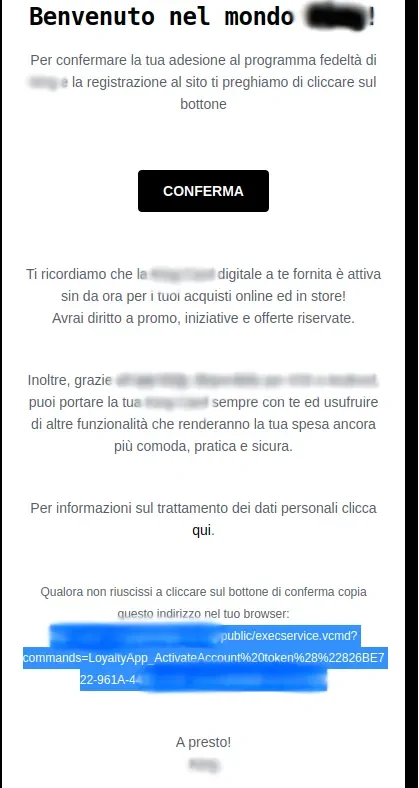
Isolating the domain part and entering it directly into the browser's address bar revealed a login page that the author describes as clandestine: a login interface on a host separate from the main site.
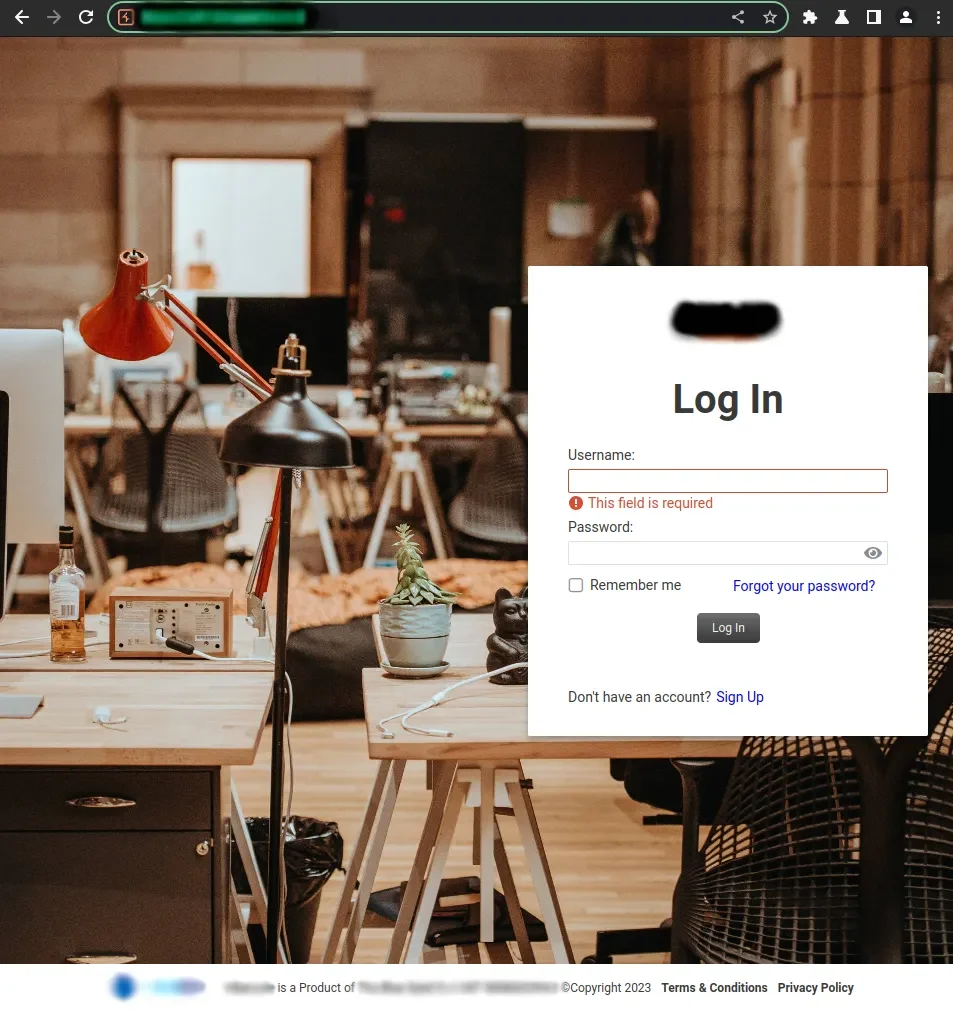
Looking at the footer of that site showed it was built on a third-party framework. Searching for the framework's official website led the author to its documentation, which contained the key to the next step.
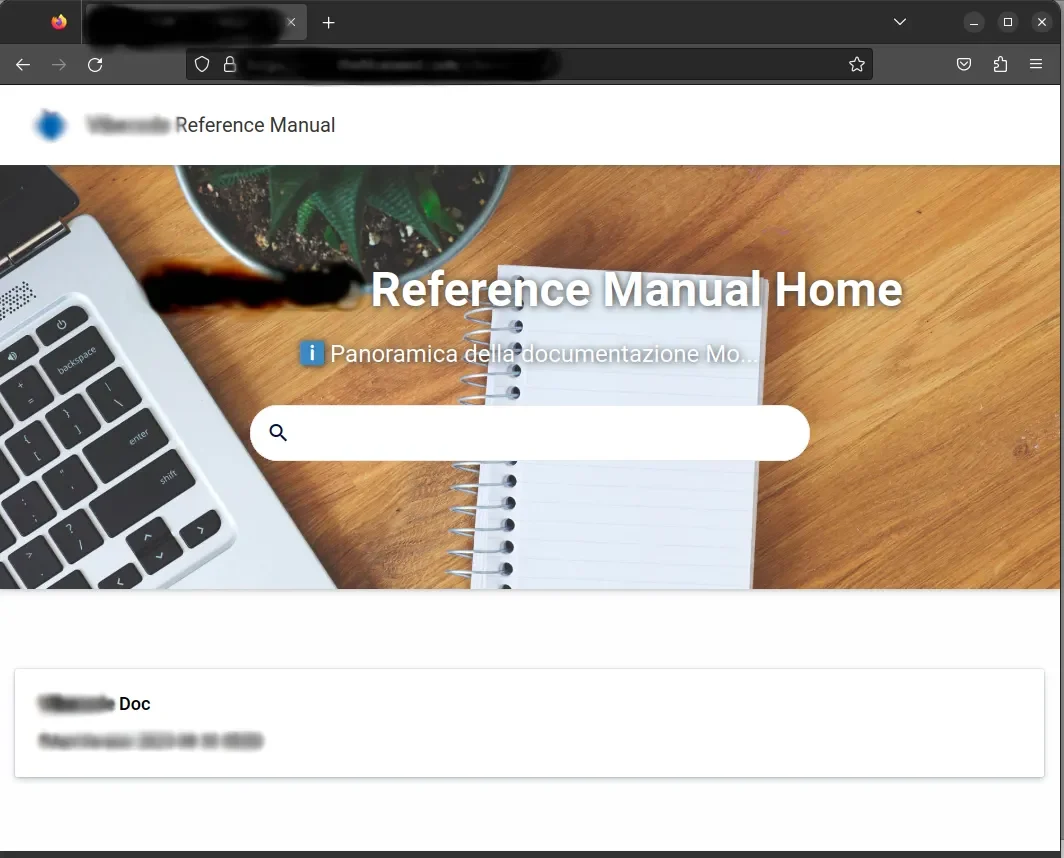
The documentation mirrored the unease the author had felt when dissecting the confirmation link, in particular the segment execservice.vcmd?commands=. The reasoning was that the commands GET parameter might select which function the endpoint runs, and that changing it could reach functions that were not meant to be exposed.
Exploitation
Step 1: identify the command endpoint
The confirmation link contained a path of the form execservice.vcmd?commands=.... The commands GET parameter appeared to name the function to execute on the framework's service endpoint. The author's hypothesis was that any function known to the framework could be invoked simply by altering that parameter.
Step 2: find a useful command in the documentation
While reading the documentation, the author came across a function called getsessionview. The documentation was vague about it and gave no clear description of what it returned.
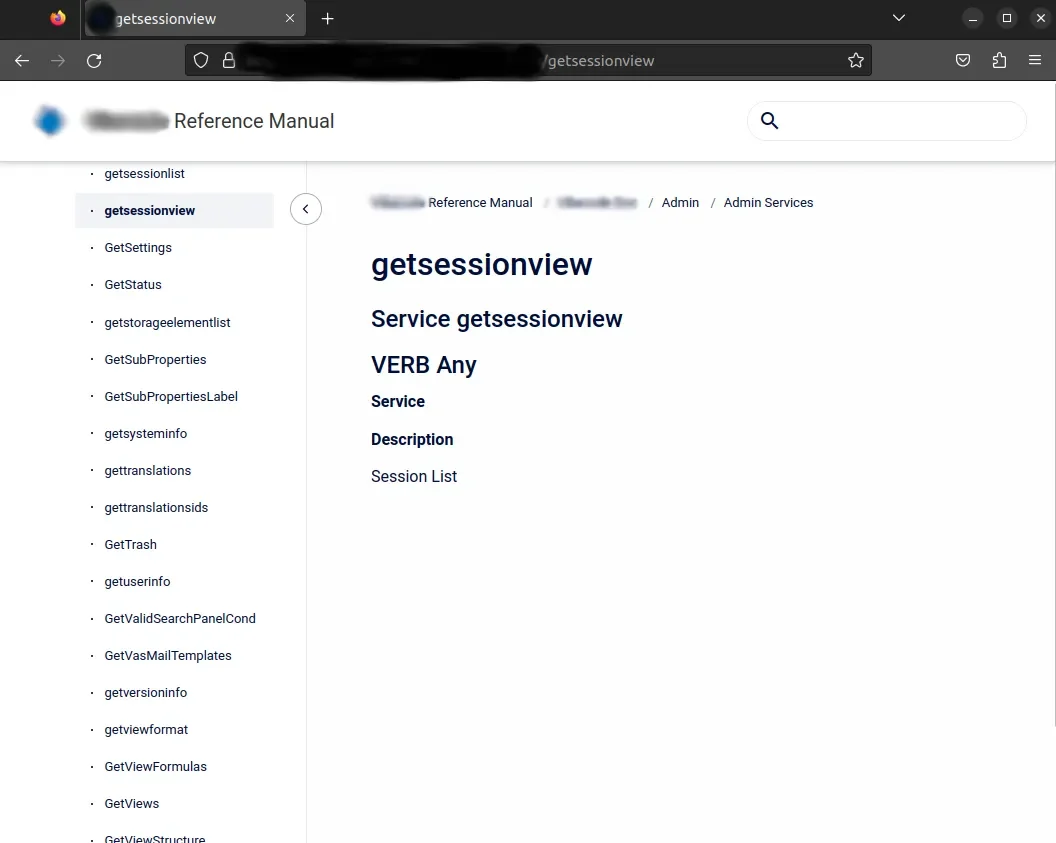
Step 3: invoke the command
The author executed the command by requesting the following URL path:
/execservice.vcmd?commands=getsessionview
The request worked without any authentication. The response granted access to the session data of logged-in users.
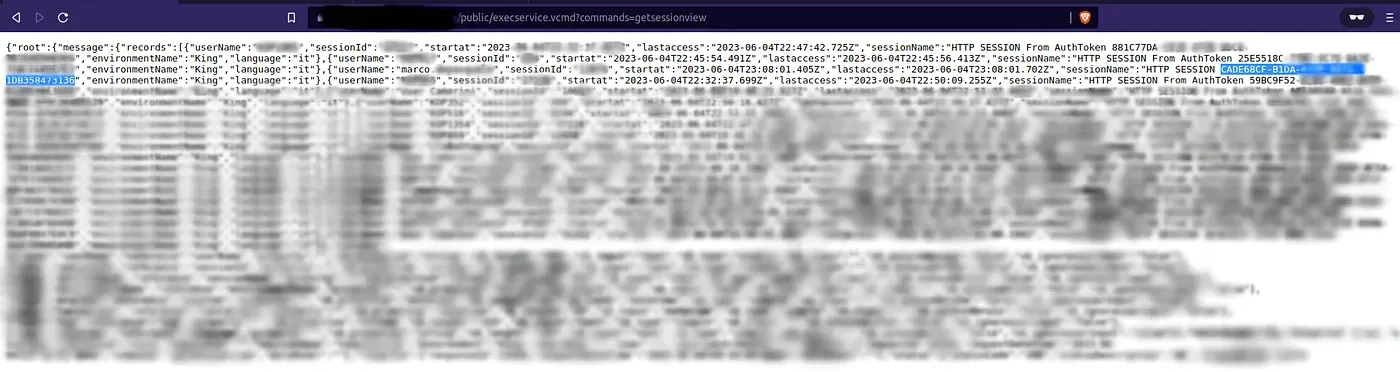
The author describes this as access to the realm of logged-in users "without a whisper of authentication". The session tokens returned bore a striking resemblance to the session cookie used by the site.
Step 4: swap the cookie for a harvested token
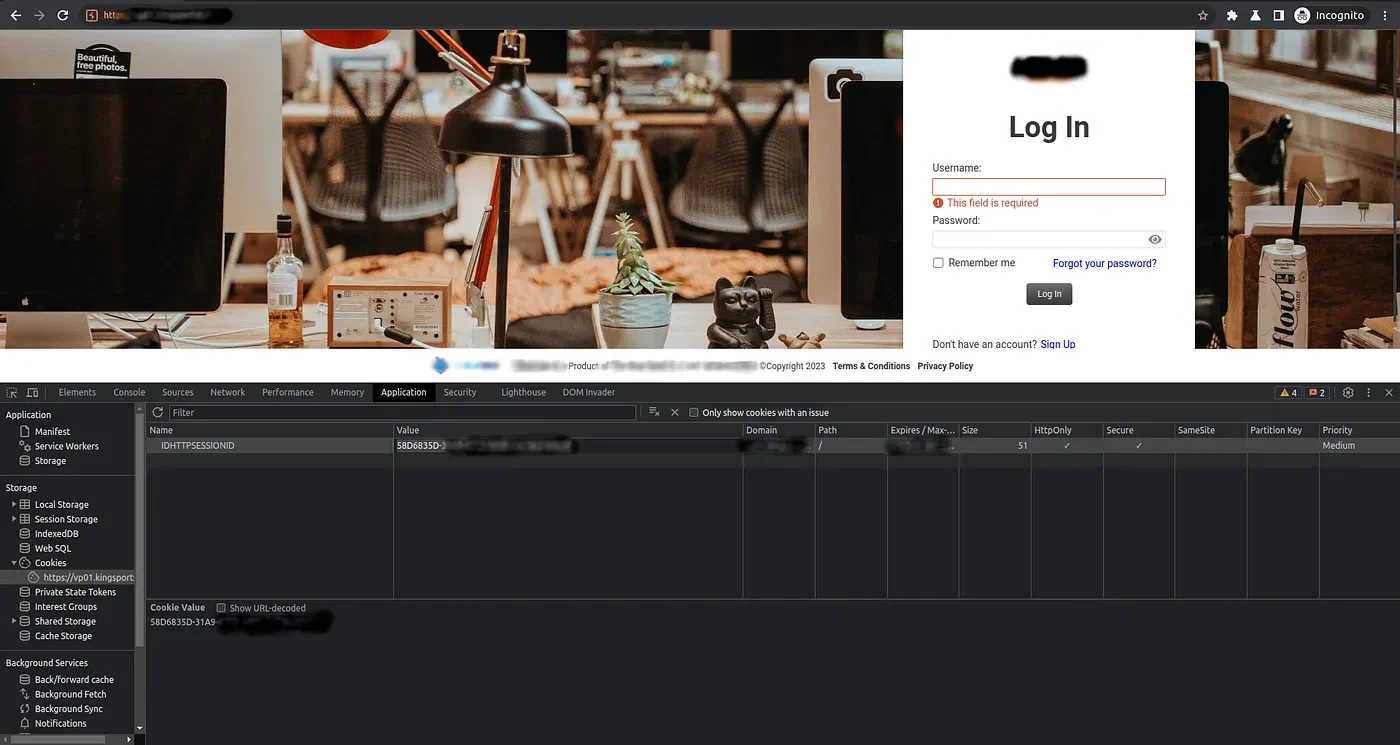
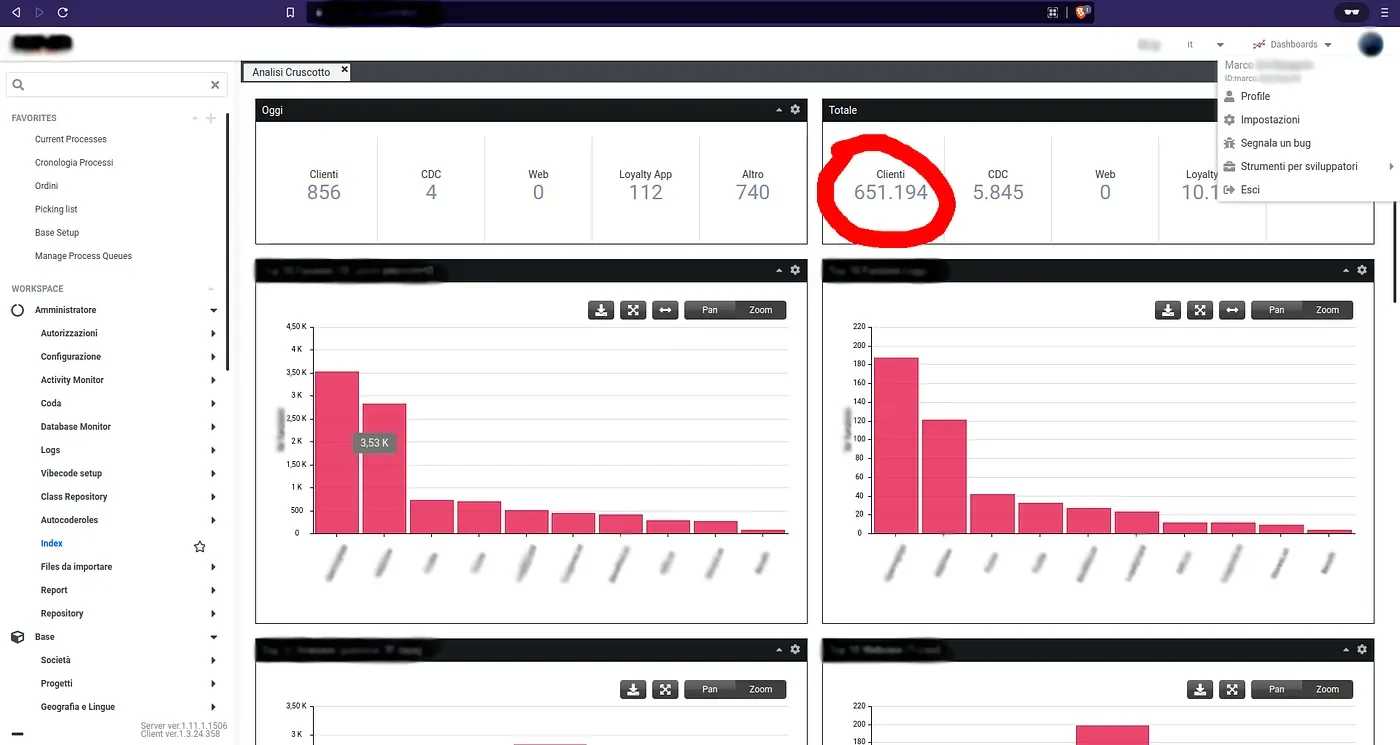
In a final experiment, the author replaced their own session cookie with one of the tokens returned by getsessionview. The substitution succeeded, and the resulting session had access to the website's admin panel.
Root cause
The report does not include source code, so the following is inferred from behaviour. The framework's execservice.vcmd endpoint dispatches on the commands GET parameter and exposes internal functions, including getsessionview, to unauthenticated callers. There is no authorisation check on the endpoint before the command runs, and the tokens it returns are usable directly as session cookies, so harvesting a token is equivalent to stealing a session. The separate domain used in the confirmation email is likely the same framework deployment, which is why the endpoint was reachable from a link in a registration email. Existing defences did not stop the chain because the endpoint itself performed no authentication, and the tokens it disclosed were accepted as-is by the main site.
Impact
With a token taken from getsessionview, an attacker can take over the session of a logged-in user. In the author's case, swapping in a harvested token gave access to the admin panel. According to the author, that access allowed modifying product information, manipulating prices, forging new coupons and gift cards, and reading confidential customer data. The author also states the company had over 500,000 clients, which indicates the scale of data potentially exposed. The report does not state which accounts' tokens were exposed beyond the one used, nor how long tokens remained valid.
Fix
The report says the vulnerability was reported to the company and promptly addressed, but it does not describe the fix. A reasonable remediation, consistent with the behaviour described, would be to require authentication and authorisation on execservice.vcmd before dispatching any command, to remove or restrict getsessionview so it cannot disclose session tokens, and to ensure tokens returned by internal functions cannot be used directly as session cookies.
Variants to test
- Command dispatch endpoints. Look for parameters that name a function, such as
commands=,action=,method=orop=, on service endpoints referenced in emails, footers or JavaScript. A positive result is a response that changes behaviour when the parameter value is altered to a function named in the framework's documentation. - Documented but vague functions. Enumerate functions in the framework's documentation that lack clear descriptions, such as session viewers or debug helpers, and call them unauthenticated. A positive result is any response containing session identifiers, user records or configuration data.
- Token reuse across contexts. Take any token returned by an internal endpoint and substitute it for the session cookie. A positive result is an authenticated session, especially one with elevated privileges.
- Third-party hosts in transactional emails. Follow domains in confirmation, password reset and invitation emails and inspect the hosts they resolve to. A positive result is a login page or service endpoint on a host separate from the main application that accepts unauthenticated requests.
- Framework fingerprinting via footers. Check page footers for framework names and search for their documentation. A positive result is a documented endpoint or parameter that matches something reachable on the target.
What happened, in plain words
A security researcher signed up for an account on the website of a large Italian company, which the write-up calls "BIC" (Big Italian Company). The sign-up itself was ordinary. What was not ordinary was the confirmation email: the link inside it pointed to a different web address from the one the researcher had just been using.
Following that link led to a login page on a separate host. Looking at the page footer showed the site was built on a third-party framework, a ready-made piece of software that provides features a company does not write itself. The researcher found that framework's official documentation online. The documentation described a way to ask the framework to run named functions through a web address, by putting the function name in a part of the URL. One of those functions, getsessionview, was documented only vaguely. Calling it directly, with no login at all, returned session tokens for users who were already signed in. A session token is a short piece of text that a website uses to recognise a logged-in user, a bit like the wristband you get at an event: show it and you are treated as the person it was issued to.
The researcher then replaced their own session cookie in the browser with one of the harvested tokens. A cookie is the small file a browser stores and sends back to a site on every request, and the session cookie is the one that carries the wristband. With the swapped cookie, the researcher was inside the site's admin panel. According to the write-up, that access would have allowed changing product information, manipulating prices, creating coupons and gift cards, and reading confidential customer data, at a company with over 500,000 clients. The researcher reported the problem to BIC, and the write-up says it was promptly addressed.
The write-up also notes that it was edited with the help of AI to improve readability and flow, and that specific details are omitted to protect privacy and security.
The ideas you need before starting
A few concepts come up again and again, so here they are from zero.
- Domain: the part of a web address that names the site, such as
example.com. Two different domains are two different sites as far as your browser is concerned, even if the same company runs both. - URL path and query string: in
https://example.com/shop/item?colour=red, the path is/shop/itemand the query string iscolour=red. The query string is a list of name and value pairs after a?, separated by&. A GET parameter is one of those pairs. Websites often use a parameter to decide what to do, for example which product to show. - Endpoint: a specific address on a server that accepts requests and does something. Think of it as a service counter: you go to the right counter with the right form and the clerk performs the task.
- API: a set of endpoints and rules that lets one piece of software talk to another. It is like a restaurant menu: you do not walk into the kitchen, you order from the list and the kitchen does the work.
- Framework: pre-built software that a developer uses as a foundation, so they do not have to write everything from scratch. Many frameworks ship with documentation describing every feature they offer.
- Authentication: proving who you are, usually by logging in with a username and password. Authorisation is the next question: now that we know who you are, are you allowed to do this particular thing? A site can authenticate you correctly and still fail to authorise an action.
- Session cookie and session token: after you log in, the server gives your browser a long random-looking value. The browser stores it as a cookie and sends it with every later request, and the server looks it up to know it is still you. The value itself is the session token; the cookie is the container that carries it.
- Broken access control: the general name for bugs where the server lets someone do something they should not be allowed to do, because it does not check permissions properly. Authentication bypass is a specific kind: reaching something that should require a login without logging in at all.
Setup
The only precondition described in the write-up is being able to register an account on BIC's website. The researcher created a new account, received the confirmation email, and worked from there. No specific tools, software versions or user roles are named.
Finding it
Step 1: notice the wrong domain in the confirmation email
The first anomaly was in the confirmation email. The link it contained did not lead to the familiar BIC domain the researcher had just used, but to a different domain.
Why this matters: a confirmation link is supposed to bring you back to the site you registered on. When it points somewhere else, either the company runs a separate system for this step, or something is misconfigured. Either way, it is worth a look, because separate systems are often less carefully protected than the main site.
Step 2: open the domain on its own
The researcher isolated the domain part of the link and typed it directly into the browser's address bar, rather than following the full link. That revealed a login page on a host separate from the main site.
Typing the domain alone is a simple habit: it shows you what lives at the front door of that host, without the extra path and parameters of the original link steering you somewhere specific.
Step 3: identify the framework from the footer
Looking at the footer of that site showed it was built on a third-party framework. Searching the internet for the framework's official website led the researcher to its documentation.
A footer often names the software a site runs on, the way a product label lists the manufacturer. Once you know the manufacturer, you can read its public manual, and the manual describes features the site owner may not have intended to leave switched on.
Step 4: spot the command parameter
The documentation echoed something the researcher had already seen in the confirmation link: the segment execservice.vcmd?commands=. The reasoning was that the commands GET parameter probably selects which function the endpoint runs, and that changing its value might reach functions that were never meant to be exposed to the public.
This is the core idea of the whole finding. The address is not just a location, it is an instruction: "run the function named in commands". If the server trusts whatever name arrives and does not check who is asking, then anyone who can read the documentation can pick a function.
Exploitation
Step 1: identify the command endpoint
The confirmation link contained a path of the form execservice.vcmd?commands=.... The commands GET parameter appeared to name the function to execute on the framework's service endpoint. The hypothesis was that any function the framework knows about could be invoked simply by altering that parameter.
In plain words: the URL is a form you fill in, and the commands field is the box where you write what you want done. The researcher's question was whether the clerk behind the counter reads the box and obeys, or checks first.
Step 2: find a useful command in the documentation
While reading the documentation, the researcher came across a function called getsessionview. The documentation was vague about it and gave no clear description of what it returned.
A vague entry in a manual is interesting precisely because it is vague. Functions that list sessions, show debug information or dump configuration are the kind of helper a developer uses internally and forgets is reachable from outside.
Step 3: invoke the command
The researcher executed the command by requesting the following URL path:
/execservice.vcmd?commands=getsessionview
Line by line, in plain words:
/execservice.vcmdis the endpoint, the service counter on the framework's host.?starts the query string, the list of instructions attached to the address.commands=getsessionviewis the single GET parameter: the namecommands, an equals sign, and the valuegetsessionview. It tells the endpoint which function to run.
The request worked without any authentication. The response granted access to the session data of logged-in users. The researcher describes this as access to the realm of logged-in users "without a whisper of authentication". The session tokens returned bore a striking resemblance to the session cookie used by the site.
Why this is serious: no password, no login, no cookie of your own was needed. The endpoint simply answered. And the values it handed back looked exactly like the wristbands the main site issues to logged-in users.
The resemblance is the bridge between the two systems. If the token in the response is the same kind of value the main site accepts as proof of login, then the response is not just information, it is a set of keys.
Step 4: swap the cookie for a harvested token
In a final experiment, the researcher replaced their own session cookie with one of the tokens returned by getsessionview. The substitution succeeded, and the resulting session had access to the website's admin panel.
In browser terms: a site stores its cookies for you, and developer tools in every modern browser let you view and edit them. Replacing the value of the session cookie with a different token and reloading the page is enough to make the site believe you are whoever that token belongs to. Here, the page that loaded was the admin panel.
Root cause
The write-up does not include source code, so the explanation below is inferred from the observed behaviour. The framework's execservice.vcmd endpoint dispatches on the commands GET parameter and exposes internal functions, including getsessionview, to unauthenticated callers. There is no authorisation check on the endpoint before the command runs, and the tokens it returns are usable directly as session cookies, so harvesting a token is equivalent to stealing a session. The separate domain used in the confirmation email is likely the same framework deployment, which is why the endpoint was reachable from a link in a registration email. Existing defences did not stop the chain because the endpoint itself performed no authentication, and the tokens it disclosed were accepted as-is by the main site.
Put simply, two mistakes lined up. First, a service counter anyone can walk up to, which runs whatever job name you write on the form. Second, the wristbands that counter hands out are the same wristbands the main building accepts at every door.
Impact
With a token taken from getsessionview, an attacker can take over the session of a logged-in user. In the researcher's case, swapping in a harvested token gave access to the admin panel. According to the write-up, that access allowed modifying product information, manipulating prices, forging new coupons and gift cards, and reading confidential customer data. The researcher also states the company had over 500,000 clients, which indicates the scale of data potentially exposed. The write-up does not state which accounts' tokens were exposed beyond the one used, nor how long tokens remained valid.
The researcher chose to report the issue to BIC rather than use the access further, and the write-up says the vulnerability was promptly addressed.
Fix
The write-up says the vulnerability was reported to the company and promptly addressed, but it does not describe the fix. A reasonable remediation, consistent with the behaviour described, would be to require authentication and authorisation on execservice.vcmd before dispatching any command, to remove or restrict getsessionview so it cannot disclose session tokens, and to ensure tokens returned by internal functions cannot be used directly as session cookies.
In everyday terms: put a guard in front of the service counter, take the session-listing job off the public menu, and stop accepting the counter's internal paperwork as a wristband at the main door.
Variants to test
These are the same checks, phrased for someone who has only a browser.
- Command dispatch endpoints. Look for parameters that name a function, such as
commands=,action=,method=orop=, on service endpoints referenced in emails, footers or page scripts. A positive result is a response that changes behaviour when you alter the parameter value to a function named in the framework's documentation. - Documented but vague functions. Go through the framework's documentation for functions with no clear description, such as session viewers or debug helpers, and call them without logging in. A positive result is any response containing session identifiers, user records or configuration data.
- Token reuse across contexts. Take any token returned by an internal endpoint and substitute it for your session cookie in the browser's developer tools. A positive result is an authenticated session, especially one with elevated privileges.
- Third-party hosts in transactional emails. Follow the domains in confirmation, password reset and invitation emails and look at the hosts they resolve to. A positive result is a login page or service endpoint on a host separate from the main application that accepts unauthenticated requests.
- Framework fingerprinting via footers. Check page footers for framework names and search for their documentation. A positive result is a documented endpoint or parameter that matches something reachable on the target.
Glossary
- Admin panel: the part of a website where administrators manage products, prices, users and other settings.
- API: a set of endpoints and rules that lets software talk to other software, like a menu you order from instead of entering the kitchen.
- Authentication: proving who you are, usually by logging in.
- Authentication bypass: reaching something that should require a login without logging in at all.
- Authorisation: the check of whether an authenticated user is allowed to perform a specific action.
- Broken access control: a class of bug where the server lets someone do something they should not be permitted to do because permissions are not checked properly.
- Command dispatch endpoint: an endpoint that runs a named function chosen by a request parameter, such as
commands=. - Cookie: a small piece of data a browser stores for a site and sends back with later requests to that site.
- Endpoint: a specific address on a server that accepts requests and performs a task.
- Framework: pre-built software used as a foundation for building a site or application.
- GET parameter: a name and value pair in a URL's query string, used to pass instructions to the server.
- Query string: the part of a URL after the
?, made of name and value pairs separated by&. - Session: the server-side record of a logged-in user, looked up using a token the browser presents.
- Session cookie: the cookie that carries the session token and identifies you to the site.
- Session token: the random-looking value that proves a session belongs to you, like a wristband at an event.
- URL path: the part of a URL after the domain, such as
/shop/item.

