Hacking Moodle Apps Via External Functions
Moodle's external function endpoint can be called by users whose role should not permit the action, because role-based access and capability-based access are checked separately. An attacker with a low-privileged account could read other users' names and email addresses, and in one case students could delete or update a curriculum.
 Published on medium.com
So say you’re trying to hack an app that uses Moodle. You start by googling something like “hacking moodle” or “moodle common misconfigurations” and… you don’t really find anything besides a few CVEs on Exploit-DB and a rather short page on HackTricks.
The full write-up lives on its author's site
It belongs to its author, so we link to it rather than copy it. The other two tabs are our own rewrites, checked against it.
Context
Moodle is a widely used learning platform, and the researcher's starting point is that public material on attacking it is thin: a few CVEs on Exploit-DB and a short HackTricks page. This article is about one attack surface found during a long penetration test against a Moodle app: External Functions.
Moodle exposes a Web Service framework. The official documentation describes it as a "full-featured Web Service framework, allowing you to use and create web services for use in external systems. The Web Service framework and the External API work closely together providing a number of Endpoints, and self-describing classes to support a wide range of uses."
In practice, while testing a Moodle app you will see one endpoint called constantly:
POST /lib/ajax/service.php
That endpoint accepts four parameters:
sesskey, used for CSRF protectionmethodname, the name of the function to callargs, the arguments passed to the called functioninfo, which always seemed to hold the same value asmethodname. The researcher always omitted it, because requests worked without it and its purpose was not understood.
External functions cover essentially any CRUD operation: querying users, deleting courses, updating curriculums and so on. Many are built into Moodle, and apps may add their own custom functions, invoked the same way. Custom code is the more interesting target, since the odds of a vulnerability are higher than in Moodle itself.

Setup
The work was done during a penetration test against a Moodle app. The researcher describes himself as no Moodle expert, and the explanations of root cause are presented as his own reasoning rather than confirmed fact. No versions, accounts or tooling beyond a proxy (Burp Proxy history is mentioned) are given.
The endpoint is called with a sesskey, and the exploitation relies on the capabilities the logged-in user holds.
Finding it
The endpoint POST /lib/ajax/service.php stood out because it is called all the time and dispatches to named functions. Documentation for the built-in functions is limited: a list that may or may not be comprehensive lives at https://docs.moodle.org/dev/Web_service_API_functions.
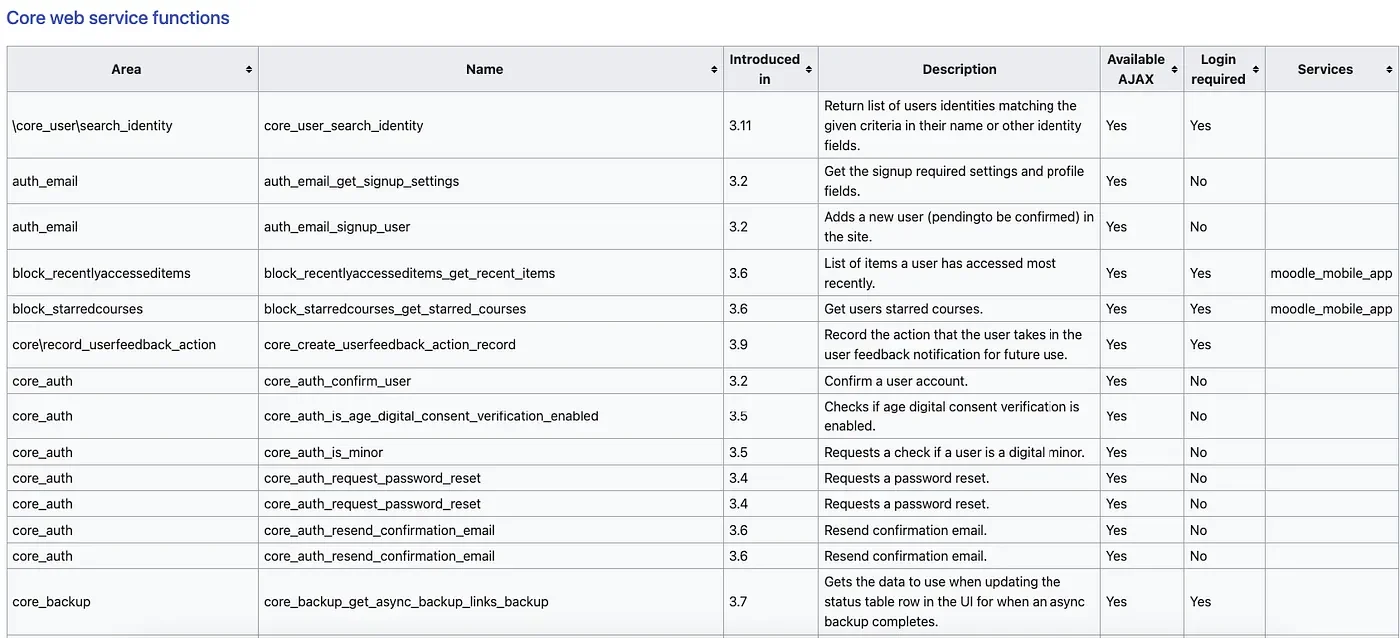
A list of some built-in Functions
One example of a built-in method is core_user_search_identity, which takes a query argument and searches users. A query for the string "bobby" returns a user called "Bobby Fischer".
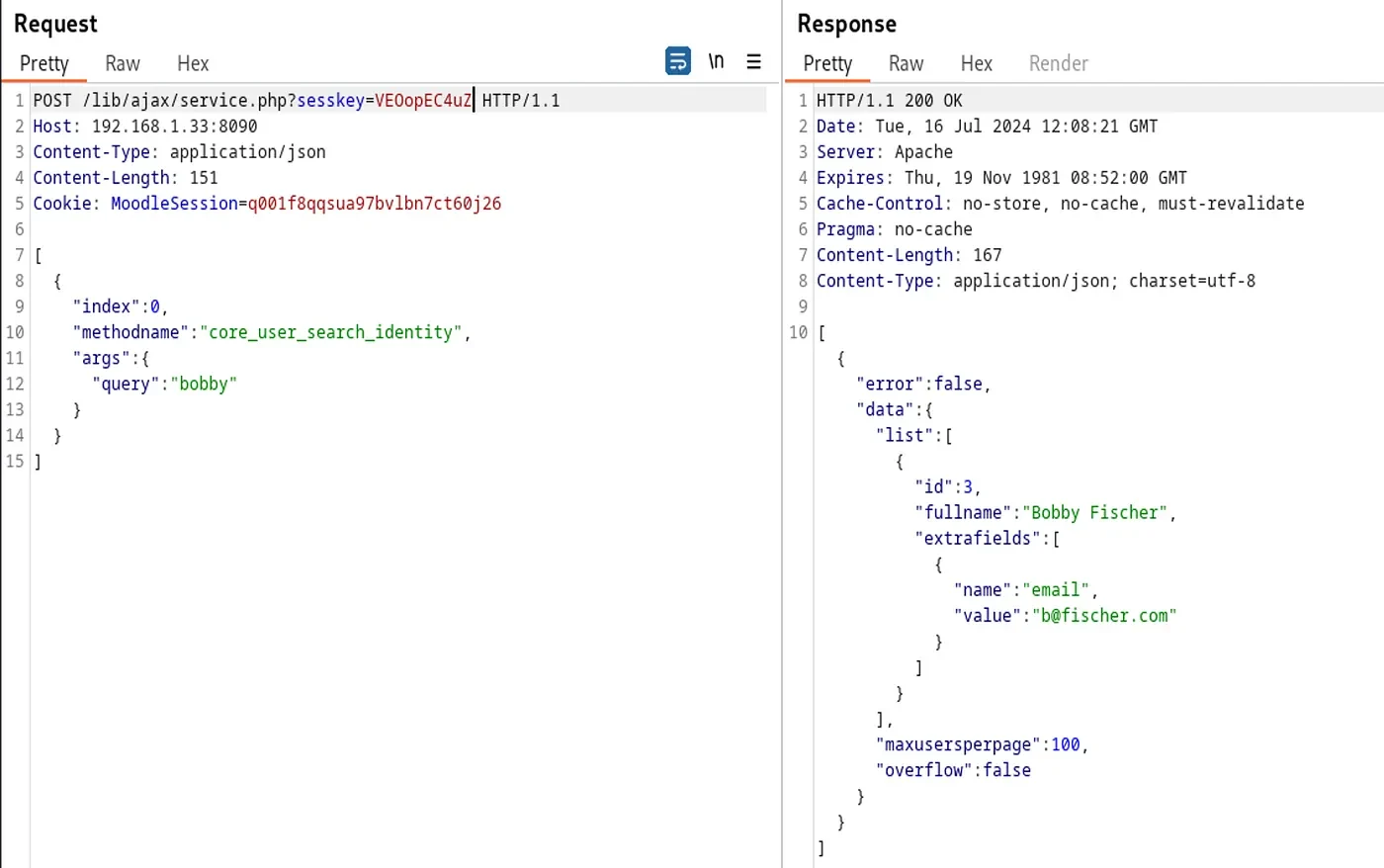
The hard part is working out how to invoke a function correctly. Examples of functions the tested app already uses can be read from proxy history, but the rest need another source. Googling sometimes helps; the most reliable approach the researcher found was reading the Moodle source code.
Exploitation
Step 1: a simple function, core_user_search_identity
- The function was found by scrolling through https://docs.moodle.org/dev/Web_service_API_functions; it sounded interesting because it retrieves user information.

- The Moodle source is at https://github.com/moodle/moodle. In the repository, search for the string "core_user_search_identity".
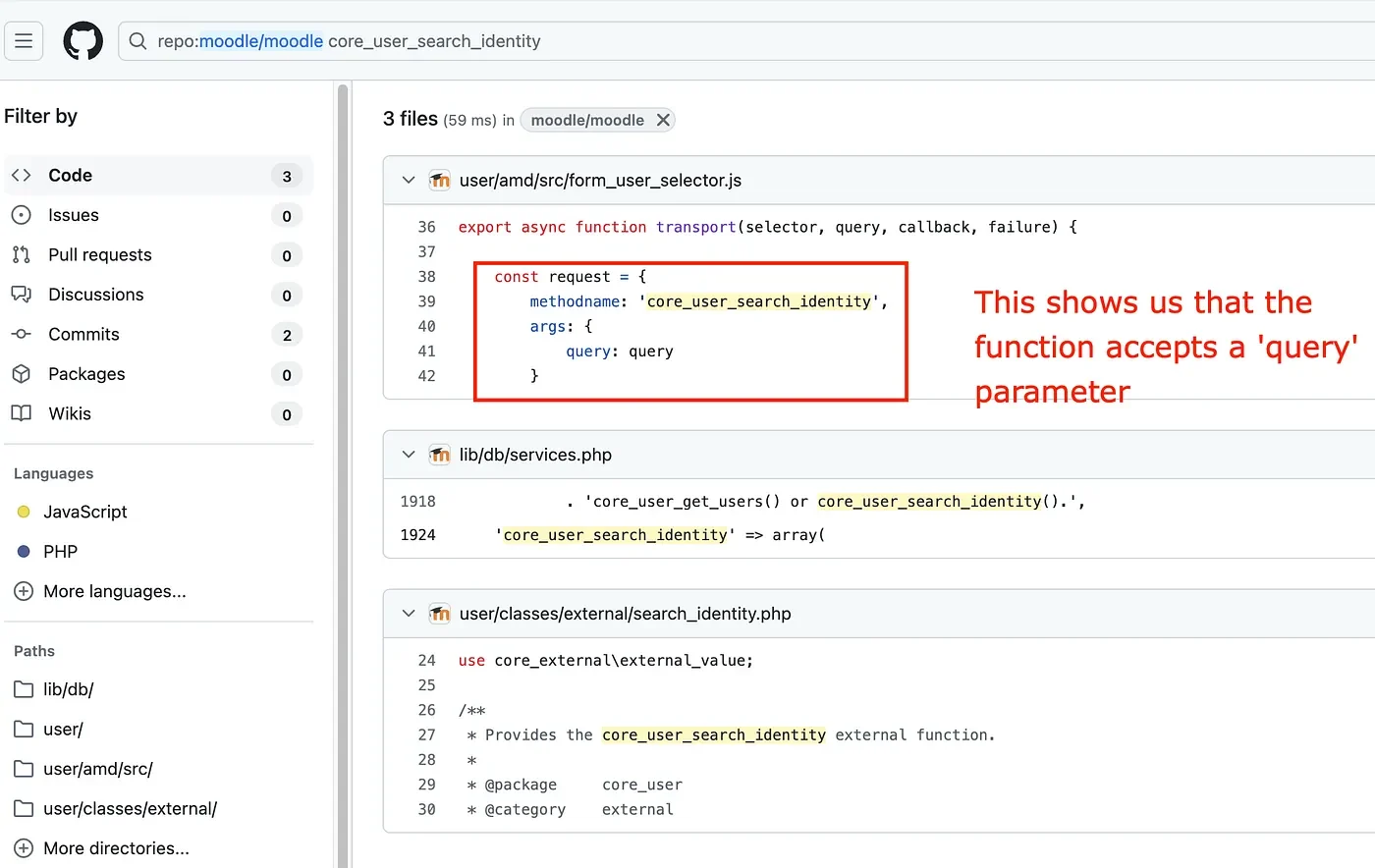
Because the documentation already says the function searches users, the query argument can be inferred at this point: it identifies the user being searched for. For simple functions, no deeper code reading is needed.
Step 2: a complex function, core_table_get_dynamic_table_content
A second function was chosen because its description on the same documentation page reads "Get the dynamic table content raw html", which sounds like a way to extract data from the database.
Searching the Moodle GitHub repository for core_table_get_dynamic_table_content returns several hits.
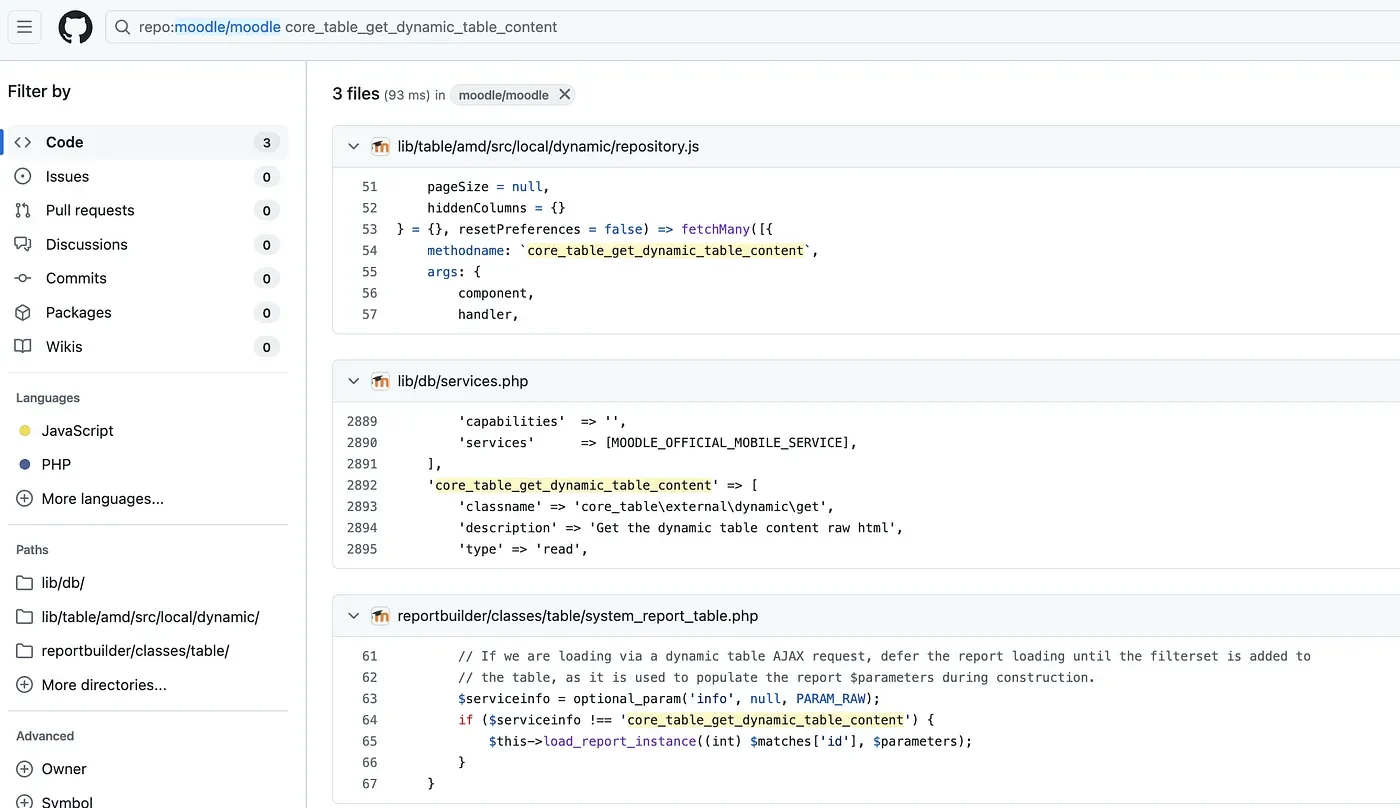
The first hit, repository.js, shows all the arguments we need to pass to this function.
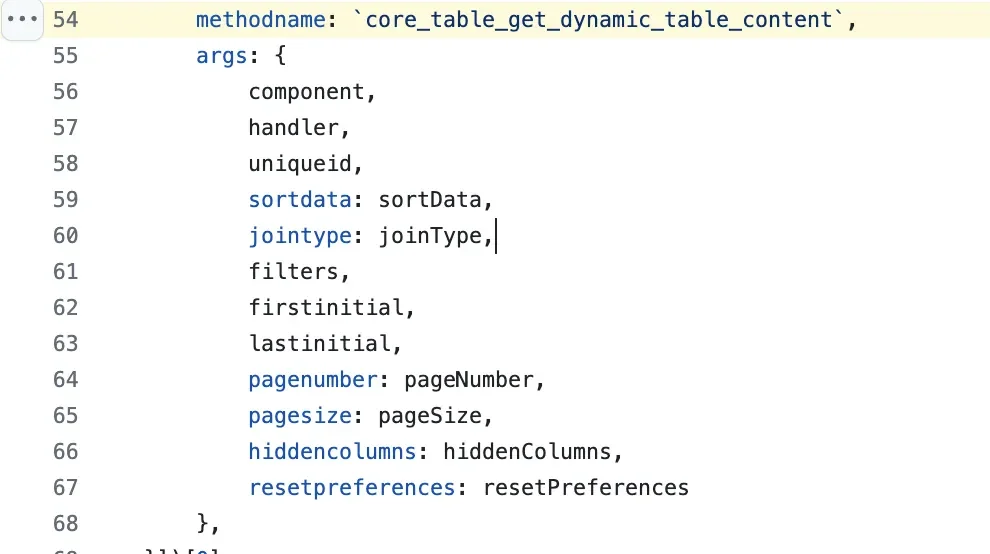
That is a large number of parameters, and the JavaScript alone does not show how to use the method properly. The second hit, services.php, is more useful.
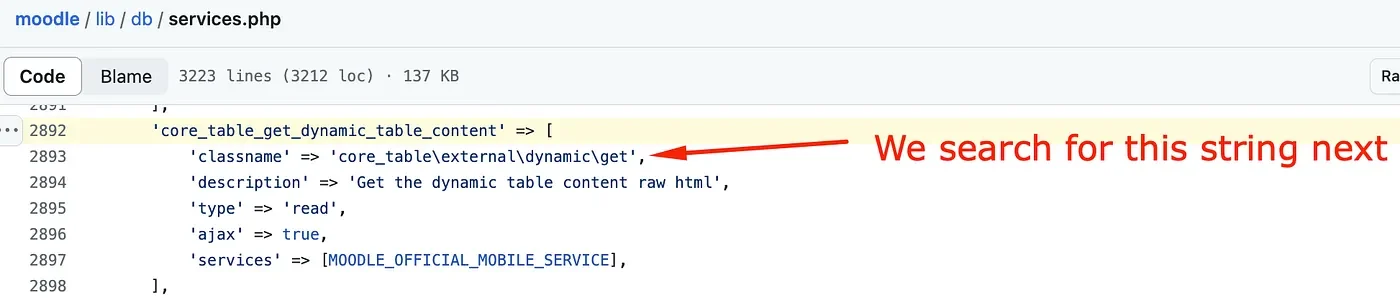
It gives the actual class name, the capabilities required to call the external function (that is, the permissions needed), and other metadata. The classname is the key: it can be searched in the repository to find further usage.
Searching the whole repository for core_table\external\dynamic\get leads to the class and, more importantly, to its unit tests.
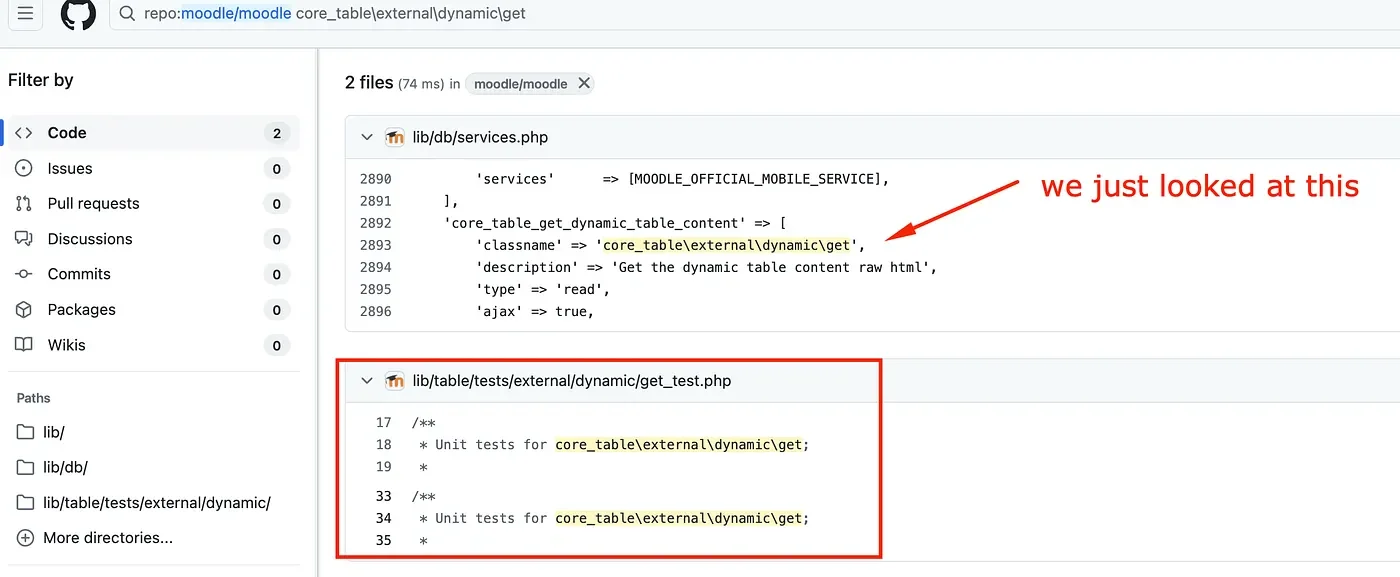
Unit and integration tests are described as one of the most valuable pieces of documentation available. Reading get_test.php reveals several tests showing how not to use the function, plus test_table_get_execute, which shows correct usage.
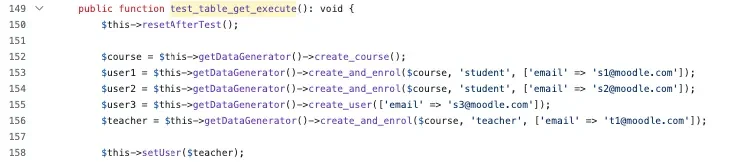
The first part of that test just creates dummy data. The interesting part is the call itself.
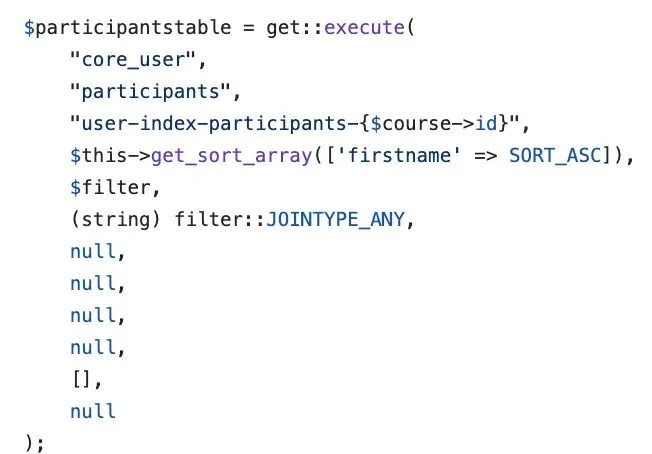
This shows exactly what kind of JSON object must be sent to the external function. Reading it, the test appears to fetch all participants of a particular course. To turn it into a request against the tested app:
- The first two parameters are copied as they are, because they are hardcoded and appear to work in a vanilla Moodle environment.
- The third parameter uses the string
user-index-participants-followed by a validcourseId, matching the dummy data created at the start of the test. The ID of a course that exists in the target app is appended. - The sort parameter in the test is
$this->get_sort_array(['firstname' => SORT_ASC]). The test file contains aget_sort_arrayfunction showing that the external function accepts"sortdata": [{"sortby": "firstname", "sortorder": "ASC"}].
Combining the purpose of the function, the arguments from repository.js, the capabilities from services.php and the shape of the call from the test, a valid request is built bit by bit.
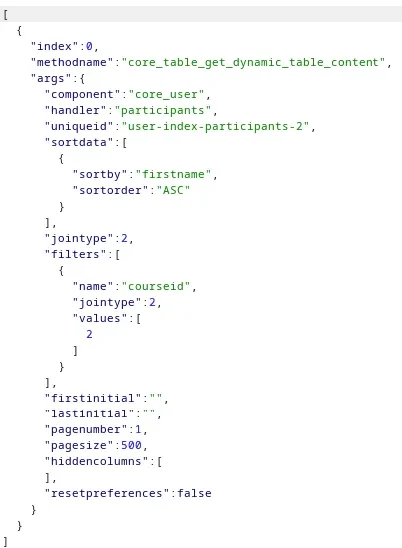
The resulting call queries the participants of courseId => 2, a course that existed in the researcher's setup. It returns a large JSON document with "error": false and a "data" property containing the course participants as a formatted HTML table. That table leaks user names, userIds, email addresses, roles and more.
Step 3: the exploitation strategy
The main exploitation primitive is Broken Access Control. The researcher's reasoning is that external functions add a layer of complexity: much functionality can now be reached in two ways.
- "Directly", by talking to the corresponding PHP modules. For example,
/coursecontains functionality to manage courses. - Via external functions.
These two paths appear to use different authorisation mechanisms. Direct access seems to be governed by the role a user is assigned to (student, teacher, admin and so on). External functions instead use capabilities (see https://docs.moodle.org/19/en/Roles_and_capabilities). A user's role may allow one set of actions while their capabilities allow another, and that disconnect is what gets exploited.
The strategy:
- Browse the app and record what the current user can view, add, edit and delete.
- For actions the user is not allowed to perform, work out how to achieve the same thing through external functions.
- If the user happens to hold the right capabilities, the restricted action succeeds.
Step 4: viewing other users' data
On the tested app, the developers had created their own roles and locked them down far beyond Moodle's default configuration. In a vanilla Moodle instance users can view the profiles of other course participants; on this app they could not.
The external function call to core_table_get_dynamic_table_content described above bypassed that restriction and returned other users' email addresses and names. The researcher's explanation is that either no capabilities are required for this function, or every user holds the required capability by default.
Step 5: deleting or updating a curriculum as a student
The app also implemented custom external functions to delete and update a curriculum, intended for admins and teachers. Access to these custom functions was misconfigured, so students could delete and update a curriculum as well.
Root cause
The design issue is the parallel authorisation model. Role-based checks on the direct PHP modules and capability checks on external functions can disagree, so a hardened role does not necessarily restrict what the same user can do through /lib/ajax/service.php. For core_table_get_dynamic_table_content, the researcher's explanation is that either no capabilities are required or all users hold the required capability by default. For the custom curriculum functions, access was misconfigured and also allowed students to delete and update a curriculum.
Impact
With a low-privileged authenticated account, an attacker can read data the UI hides: names, userIds, email addresses and roles of course participants, via core_table_get_dynamic_table_content. Where custom external functions are misconfigured, the impact extends to state changes, such as a student deleting or updating a curriculum. The researcher notes that custom external functions are also more likely to be vulnerable to other classes of attack, such as injections, though no such case is demonstrated here.
Fix
The report does not describe any remediation applied by the app's developers.
Variants to test
- A positive result is
"error": falsewith data the UI does not show. - For any function of interest, search the Moodle repository for its name, then for the
classnamefromservices.php, and read the unit tests. A positive result is a test that reveals the exact JSON body, astest_table_get_executedid. - Try
core_table_get_dynamic_table_contentwithuser-index-participants-plus a valid course ID and"sortdata": [{"sortby": "firstname", "sortorder": "ASC"}]. A positive result is an HTML table of participants in"data". - A positive result is a successful state change.
What happened, in plain words
Moodle is a learning platform: schools and universities use it to host courses, hand out materials, run quizzes and let students and teachers talk to each other. It is very widely used, and yet the researcher noticed that public material on how to attack it is thin. Searching for "hacking moodle" or "moodle common misconfigurations" turns up a few known vulnerabilities on Exploit-DB and a short page on HackTricks, and not much else. The researcher does not claim to know why that is.
During a long penetration test against a Moodle app, he found one attack surface worth writing about: External Functions. A penetration test (often shortened to pentest) is an authorised, paid attempt to break into a system, done with the owner's permission so that the problems can be fixed before a real attacker finds them.
This article walks through what external functions are, how to work out how to call one when the documentation is poor, and how a low-privileged user can abuse them to see or change things they should not be able to touch.
What are "External Functions"?
When you use a web app, your browser sends requests to a server and the server sends answers back. Some of those requests are made by the page itself, quietly, in the background, rather than by you clicking a link. While testing a Moodle app, the researcher noticed that one particular request was being made all the time:
POST /lib/ajax/service.php
Read this line as a single instruction from the browser to the server. POST is the type of request used when the browser wants to send data to the server, rather than just ask for a page. /lib/ajax/service.php is the address on the server being called, a bit like a specific counter in a large building. "ajax" is the name for the technique where a page talks to the server in the background without reloading. So this line means: "send some data to the service counter at this address".
That endpoint accepts four parameters. A parameter is a named piece of information sent along with a request, like the fields on a paper form.
sesskey, used for CSRF protectionmethodname, the name of the function to callargs, the arguments passed to the called functioninfo, which always seemed to hold the same value asmethodname. The researcher always omitted it, because requests worked without it and its purpose was not understood.
A few of those words need unpacking.
A function here is a named piece of code on the server that does one job, such as "search for a user" or "list the participants of a course". You call it by name and hand it the information it needs.
CSRF stands for Cross-Site Request Forgery. It is an attack where a malicious website tricks your browser into sending a request to another site where you are already logged in, using your existing login. The sesskey is a short random value that the server gives your session and expects back with each request, so that a request forged by another site, which does not know the value, is rejected. Think of it as a cloakroom ticket: the attendant only hands over the coat if you show the matching ticket.
Arguments (or args) are the inputs to the function, the same way a recipe needs ingredients. If the function is "search for a user", the argument is the text you are searching for.
External functions cover essentially any CRUD operation. CRUD stands for Create, Read, Update, Delete, the four basic things you can do with stored data. In Moodle terms that means querying users, deleting courses, updating curriculums and so on. A curriculum here is the structured plan of study in the app.
Many of these functions are built into Moodle itself. Apps built on Moodle may also add their own custom functions, written by the app's developers, and those are called in exactly the same way. Custom code is the more interesting target, because the odds that a developer made a mistake are higher than the odds that the Moodle project itself did.
The official Moodle documentation describes the framework like this:
"Moodle has a full-featured Web Service framework, allowing you to use and create web services for use in external systems. The Web Service framework and the External API work closely together providing a number of Endpoints, and self-describing classes to support a wide range of uses."
In plain words: Moodle ships with a general-purpose way for other software to talk to it, and that way is made of endpoints (addresses you can send requests to) plus descriptions of what each one expects. A web service is simply a service offered over the network for other programs to use, rather than for a human to click through.
Setup
The work was done during a penetration test against a Moodle app. The researcher describes himself as no Moodle expert, and presents his explanations of why things work as his own reasoning rather than confirmed fact. No versions, accounts or tooling beyond a proxy are given; Burp Proxy history is mentioned, which is a tool that records every request and response passing through your browser so you can read them afterwards.
The endpoint is called with a sesskey, which you only get once you are logged in. Authenticated means logged in with a valid account. This matters because the endpoint is called with a sesskey, which you only get once you are logged in, and because the whole exploitation relies on the permissions that this particular user holds.
Finding it
The endpoint POST /lib/ajax/service.php stood out because it is called all the time and it dispatches to named functions. Dispatching means the server looks at the methodname you sent and routes your request to the matching piece of code, like a switchboard operator connecting a call.
Documentation for the built-in functions is limited. A list that may or may not be comprehensive lives at https://docs.moodle.org/dev/Web_service_API_functions.
A list of some built-in Functions
One example of a built-in method is core_user_search_identity, which takes a query argument and searches users. A query for the string "bobby" returns a user called "Bobby Fischer".
The hard part is working out how to invoke a function correctly. Invoke just means call. Examples of functions the tested app already uses can be read from proxy history, because every call the app makes is recorded there. But the rest of the functions, the ones the app never calls, need another source. Googling sometimes helps. The most reliable approach the researcher found was reading the Moodle source code.
Source code is the human-written text that makes up the program, before it is turned into something the computer runs. Moodle's source code is public, which means anyone can read it. That is a gift to a tester: the program's own instructions tell you exactly what it expects.
Exploitation
Step 1: a simple function, core_user_search_identity
- The function was found by scrolling through https://docs.moodle.org/dev/Web_service_API_functions. It sounded interesting because it retrieves user information.
- The Moodle source is at https://github.com/moodle/moodle. GitHub is a website that hosts source code and lets you search through it. In the repository, search for the string "core_user_search_identity". A repository (repo) is a project's collection of code files kept together with their history.
Because the documentation already says the function searches users, the query argument can be inferred at this point: it identifies the user being searched for. Infer means to work something out from clues rather than being told directly. For simple functions, no deeper code reading is needed.
Why start here? Because it shows the general method on an easy case before applying it to a hard one. Once you have seen that a function name plus its documentation plus a search in the source is enough, the same routine can be repeated for anything.
Step 2: a complex function, core_table_get_dynamic_table_content
A second function was chosen because its description on the same documentation page reads "Get the dynamic table content raw html", which sounds like a way to extract data from the database. A database is the organised store where the app keeps its data: users, courses, grades, messages. "Raw html" means the answer comes back as HTML, the language web pages are written in, rather than as tidy structured data.
Searching the Moodle GitHub repository for core_table_get_dynamic_table_content returns several hits. A hit is one file in the search results that contains the string you searched for.
The first hit, repository.js, shows all the arguments we need to pass to this function. The .js ending tells you it is a JavaScript file, the language that runs inside the browser.
That is a large number of parameters, and the JavaScript alone does not show how to use the method properly. Seeing a long list of ingredients does not tell you the recipe.
The second hit, services.php, is more useful. The .php ending tells you it is a PHP file, the language Moodle's server-side code is written in.
It gives the actual class name, the capabilities required to call the external function, and other metadata. A class is a named block of code that bundles related behaviour together; the class name is the internal label for the code that actually does the work. Capabilities are Moodle's word for permissions: a named ability such as "may view course participants". Metadata is simply data about data, here the descriptive details around the function.
The classname is the key: it can be searched in the repository to find further usage. Searching for the internal label rather than the public function name takes you closer to the code that runs.
Searching the whole repository for core_table\external\dynamic\get leads to the class and, more importantly, to its unit tests.
A unit test is a small program written by the developers to check that one piece of code behaves as expected. It calls the code with sample inputs and checks the output. Integration tests do the same for several pieces working together. Unit and integration tests are described as one of the most valuable pieces of documentation available, and the reason is simple: a test has to contain a working example of how to call the code, otherwise it could not test it.
Reading get_test.php reveals several tests showing how not to use the function, plus test_table_get_execute, which shows correct usage.
The first part of that test just creates dummy data. Dummy data is made-up sample content, created so the test has something to work on. The interesting part is the call itself.
This shows exactly what kind of JSON object must be sent to the external function. JSON is a text format for structured data, built from names and values in curly braces, and it is what the browser and server exchange here. Reading the test, it appears to fetch all participants of a particular course.
To turn it into a request against the tested app, three things are adjusted:
- The first two parameters are copied as they are, because they are hardcoded and appear to work in a vanilla Moodle environment. Hardcoded means written directly into the code as fixed values. Vanilla means a plain, unmodified installation.
- The third parameter uses the string
user-index-participants-followed by a validcourseId, matching the dummy data created at the start of the test. The ID of a course that exists in the target app is appended. An ID is the unique number the app uses to tell one course from another. - The sort parameter in the test is
$this->get_sort_array(['firstname' => SORT_ASC]). The test file contains aget_sort_arrayfunction showing that the external function accepts"sortdata": [{"sortby": "firstname", "sortorder": "ASC"}]. In plain words: sort the list by first name, ascending, meaning A to Z.
Combining the purpose of the function, the arguments from repository.js, the capabilities from services.php and the shape of the call from the test, a valid request is built bit by bit. This is the heart of the method: no single source tells you everything, but each one fills a gap the others leave.
The resulting call queries the participants of courseId => 2, a course that existed in the researcher's setup. It returns a large JSON document with "error": false and a "data" property containing the course participants as a formatted HTML table. "error": false is the server saying the call succeeded. The "data" property is where the answer is placed. That table leaks user names, userIds, email addresses, roles and more. Leaks here means hands over information the app was not meant to show to this user.
Step 3: the exploitation strategy
The main exploitation primitive is Broken Access Control. An exploitation primitive is the basic trick you repeat to get results. Broken Access Control means the app fails to check properly whether you are allowed to do what you are asking; the door is there, but nobody checks your key. It is one of the most common classes of web vulnerability because it is easy to get subtly wrong.
The researcher's reasoning is that external functions add a layer of complexity: much functionality can now be reached in two ways.
- "Directly", by talking to the corresponding PHP modules. For example,
/coursecontains functionality to manage courses. - Via external functions.
A module is one self-contained part of a program. These two paths appear to use different authorisation mechanisms. Authorisation is the process of deciding whether a logged-in user is allowed to do a particular thing; authentication, by contrast, is proving who you are in the first place. Two different mechanisms means two different sets of rules, and two sets of rules can disagree.
Direct access seems to be governed by the role a user is assigned to: student, teacher, admin and so on. External functions instead use capabilities (see https://docs.moodle.org/19/en/Roles_and_capabilities). A role is a bundle of expectations about what kind of user you are; a capability is a single named permission. A user's role may allow one set of actions while their capabilities allow another, and that disconnect is what gets exploited.
Think of a building where the front desk checks your job title, but the side door checks a list of keycards. If your title says "visitor" but your keycard happens to open the archive, the front desk's opinion no longer matters.
The strategy:
- Browse the app and record what the current user can view, add, edit and delete. This gives you the baseline, the set of things the app openly allows.
- For actions the user is not allowed to perform, work out how to achieve the same thing through external functions. The UI blocks you; the API may not.
- If the user happens to hold the right capabilities, the restricted action succeeds.
An API (Application Programming Interface) is the set of addresses and rules a program offers so that other programs can ask it to do things. The web page you click is one customer of the API; the external functions are another. When the page hides a button, it is only hiding the button, not necessarily closing the API behind it.
Step 4: viewing other users' data
On the tested app, the developers had created their own roles and locked them down far beyond Moodle's default configuration. In a vanilla Moodle instance users can view the profiles of other course participants; on this app they could not.
The external function call to core_table_get_dynamic_table_content described above bypassed that restriction and returned other users' email addresses and names. Bypassed means got around without breaking anything. The researcher's explanation is that either no capabilities are required for this function, or every user holds the required capability by default. Either way, the careful role configuration did not protect the data, because the role was never the thing being checked on this path.
Step 5: deleting or updating a curriculum as a student
The app also implemented custom external functions to delete and update a curriculum, intended for admins and teachers. Access to these custom functions was misconfigured, so students could delete and update a curriculum as well. Misconfigured means the setting was set up wrongly, here the check that should have limited the function to admins and teachers.
This finding is not just reading data: it changes it.
Root cause
The design issue is the parallel authorisation model. Parallel here means two systems running side by side. Role-based checks on the direct PHP modules and capability checks on external functions can disagree, so a hardened role does not necessarily restrict what the same user can do through /lib/ajax/service.php. Hardened means deliberately tightened beyond the defaults.
For core_table_get_dynamic_table_content, the researcher's explanation is that either no capabilities are required or all users hold the required capability by default. For the custom curriculum functions, access was misconfigured and also allowed students to delete and update a curriculum.
Impact
With a low-privileged authenticated account, an attacker can read data the UI hides: names, userIds, email addresses and roles of course participants, via core_table_get_dynamic_table_content. Low-privileged means an ordinary account with few rights, such as a student.
Where custom external functions are misconfigured, the impact extends to state changes, such as a student deleting or updating a curriculum. A state change means the stored data is altered, not just read. The researcher notes that custom external functions are also more likely to be vulnerable to other classes of attack, such as injections, though no such case is demonstrated here. An injection is when input you supply is interpreted as instructions by the system, for example text that ends up being run as a database command.
Fix
The report does not describe any remediation applied by the app's developers. Remediation means the repair work done after a finding. Enforces means actually checks, every time, rather than merely declaring the rule somewhere.
Variants to test
These are the same ideas turned into a checklist you could follow on another Moodle app.
- Enumerate means go through the list one by one. A positive result is
"error": falsewith data the UI does not show. - For any function of interest, search the Moodle repository for its name, then for the
classnamefromservices.php, and read the unit tests. A positive result is a test that reveals the exact JSON body, astest_table_get_executedid. - Try
core_table_get_dynamic_table_contentwithuser-index-participants-plus a valid course ID and"sortdata": [{"sortby": "firstname", "sortorder": "ASC"}]. A positive result is an HTML table of participants in"data". - A positive result is a successful state change.
Glossary
- API: the set of addresses and rules a program offers so other programs can ask it to do things.
- Argument: an input handed to a function, like an ingredient in a recipe.
- Authenticated: logged in with a valid account.
- Authentication: proving who you are.
- Authorisation: deciding whether a logged-in user is allowed to do a particular thing.
- Broken Access Control: a vulnerability where the app fails to check whether you are allowed to do what you are asking.
- Burp Proxy: a tool that records every request and response passing through your browser so you can read them afterwards.
- Capability: Moodle's word for a single named permission, such as "may view course participants".
- Class: a named block of code bundling related behaviour together.
- CRUD: Create, Read, Update, Delete, the four basic operations on stored data.
- CSRF: Cross-Site Request Forgery, an attack where another site tricks your browser into sending a request using your existing login.
- Custom function: an external function written by the app's own developers rather than shipped with Moodle.
- Database: the organised store where the app keeps its data.
- Dummy data: made-up sample content created so a test has something to work on.
- Endpoint: an address on a server that accepts requests.
- Enumerate: go through a list one item at a time.
- External function: a named piece of server code that can be called remotely through Moodle's web service endpoint.
- Function: a named piece of code that does one job.
- Hardcoded: written directly into the code as a fixed value.
- Hardened: deliberately tightened beyond the default configuration.
- HTML: the language web pages are written in.
- ID: the unique number an app uses to tell one record from another.
- Injection: when input you supply is interpreted as instructions by the system.
- Integration test: a test that checks several pieces of code working together.
- Invoke: call a function.
- JavaScript: the language that runs inside the browser.
- JSON: a text format for structured data, built from names and values in curly braces.
- Leak: hand over information the app was not meant to show to this user.
- Metadata: data about data, here the descriptive details around a function.
- Misconfigured: set up wrongly.
- Module: one self-contained part of a program.
- Parameter: a named piece of information sent along with a request.
- Penetration test: an authorised attempt to break into a system so the problems can be fixed.
- PHP: the language Moodle's server-side code is written in.
- POST: the type of request used when the browser sends data to the server.
- Remediation: the repair work done after a finding.
- Repository: a project's collection of code files kept together with their history.
- Role: a bundle of expectations about what kind of user you are, such as student or teacher.
- Sesskey: a short random value tied to your session and expected back with each request, used to stop CSRF.
- Source code: the human-written text that makes up a program.
- State change: an alteration to stored data, as opposed to merely reading it.
- Unit test: a small program that checks one piece of code behaves as expected.
- Vanilla: a plain, unmodified installation.
- Web service: a service offered over the network for other programs to use.

