How A Blackbox Target Turned To Whitebox With Recon
An open Docker registry allowed the attacker to pull private images containing backend source code and hardcoded API keys, and also to push images. The attacker could use the API keys to access administrative APIs and read or alter user data, and potentially achieve RCE by pushing a malicious image.

I was invited to a private bug bounty program of a tech company, one of the biggest tech companies in its country. The scope was pretty much the entire company’s external infrastructure, that was big enough for a few days of only recon the attack surface.
The full write-up lives on its author's site
It belongs to its author, so we link to it rather than copy it. The other two tabs are our own rewrites, checked against it.
Context
I was invited to a private bug bounty program of a tech company, one of the biggest tech companies in its country. The scope covered pretty much the entire external infrastructure of the company, which was large enough to spend a few days on reconnaissance of the attack surface alone.
The target here is not a single application but the whole external estate: IPs, domains, subdomains and third party accounts. The feature that eventually mattered was a Docker Registry reachable at rg.target.com. A Docker Registry is the HTTP service that stores container images and serves their manifests and layers; the /v2/_catalog endpoint of the Registry API lists the repositories it holds. When such a registry is exposed without authentication, anyone who can reach it can enumerate images, read manifests and, if the service allows it, pull and push images.
Setup
The engagement was a private bug bounty program. The rules of engagement stated that any action that might harm or interrupt the company's production infrastructure was completely out of scope.
The tools used during the work were:
- crt.sh, dnsdumpster, subdomainfinder and Sublist3r for certificate and subdomain lookups, with OWASP Amass as the preferred subdomain enumerator.
- Shodan, and optionally Censys, Fofa, ZoomEye and Onyphe, as passive scanners. The Shodan filter used for certificate searches was
ssl.cert.subject.c: target.com. - httpx to probe the collected hosts and ports.
- ffuf with a short custom wordlist of 100 to 150 words.
- Arjun for parameter fuzzing on the main API.
- curl against the registry, and the Docker client for pulling images.
Finding it
Recon started from two goals: finding every internet asset of the target (IPs, domains, subdomains and even accounts on third party services such as Slack), and OSINT to understand the services supplied and hopefully harvest valid credentials.
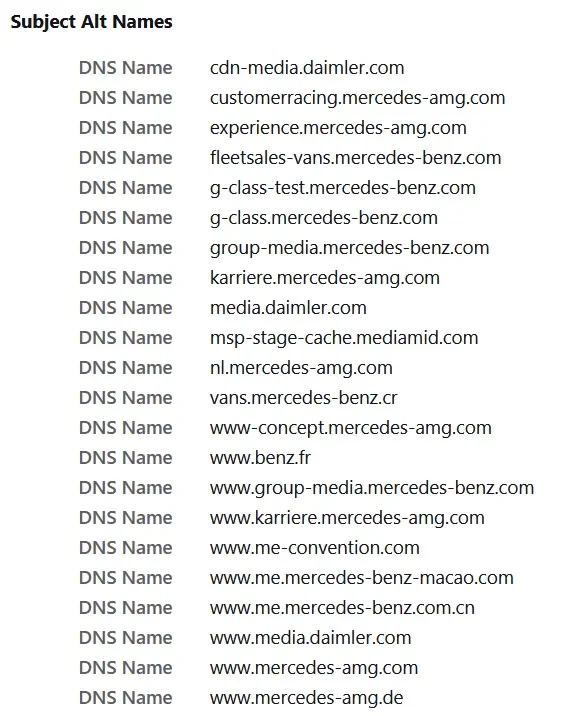
For domains, the first step was the target's SSL certificate. Certificates can hold fields useful for finding more domains, subdomains and even IPs that use the same certificate. Searching crt.sh for the content of the Organization field can reveal more domains of the target with completely different domain names. The Subject Alternative Name (SAN) field holds more domains and subdomains related to the same certificate. As an illustration, the certificate of Mercedes-Benz exposes more TLDs related to mercedes-benz and more company domains such as benz.fr, media.daimler.com and mercedes-amg.com.
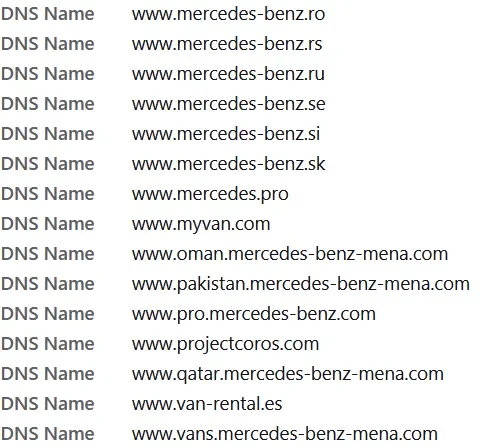
With big companies it is necessary to view the certificates of many assets, because the company may be using several. The mercedes-benz.be certificate, for example, contains company domains that were not in the mercedes-benz.com certificate.
After enriching the domain list, subdomain enumeration followed with Amass, while Shodan was used in parallel to find assets that sometimes have no DNS record at all, by searching for certificates holding the target name or for the target's name in HTTP headers. Other online scanners that may cover different port ranges than Shodan were recommended: Censys, Fofa, ZoomEye and Onyphe. These are public scanners that have already scanned the target, so results can be queried without direct contact with the target's infrastructure. Active scanning with Masscan or Naabu is possible, but on large scale targets passive scans are usually more cost-effective, and scanners are noisy and disclose your IP address, which might get blocked by firewalls and security products.
All collected domains, subdomains, IP addresses and open ports were put in a text file and fed to httpx:
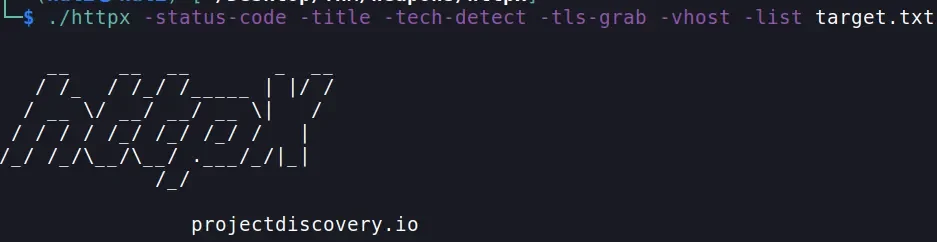
httpx has useful features that shed light on the web service behind a port, and its results were used to prioritise where to spend time. After cleaning and filtering, around 100 IP addresses and domains or subdomains remained interesting. Efforts were divided between vulnerability research on the main assets (client panels, administration panels and so on) and a background fuzzing run for quick wins on those 100 assets.
For the fuzzing task, ffuf was used with a short custom wordlist of only 100 to 150 words. The list must be short and hold words where a status code 200 automatically means a vulnerability is in front of you, most of the time a severe information disclosure. Some of the words in the list:
/config.json/.git/web.config/server-status/backup.zip/.DS_Store/v2/_catalog
While ffuf ran against the 100 addresses, API recon was done on the main web application. After some time on the API, no juicy vulnerability was found: at most some parameters that had to be fuzzed with Arjun, but without permissions to use them. Everything ended with an invalid input error or an authorisation problem, so the application was good with authorisation validation.
Going back to the ffuf results, one was interesting: status code 200 on rg.target.com at the path /v2/_catalog. That means a publicly open Docker Registry.
Exploitation
Step 1: confirm the open registry
A GET request was sent with curl to https://rg.target.com/v2/_catalog. The response came back immediately, full of JSON containing all the Docker images stored in the registry. Some images had indicative names such as admin or frontend, and some had names that were not familiar yet.
Step 2: enumerate tags
Requests were sent to the registry to get every tag of each Docker image:
curl https://rg.target.com/v2/admin-REDACTED/tags/list
The response contained the tags, which helps to know which is the latest Docker image that was uploaded.

Step 3: read manifests
After a few more requests to other images, every image manifest was examined to reveal secrets:
curl https://rg.target.com/v2/admin-REDACTED/manifests/1.10
The results were very interesting: some sensitive data was exposed, but it was not yet useful to exploit a vulnerability.
Step 4: pull the images
Analysing a Docker image is reading the code of the application you research, because the image contains every file the program needs to run. Accessing a Docker registry of a target is just like accessing the target's git.
To pull images from a private registry, the file at /etc/docker/daemon.json must be created or edited, adding the new registry in JSON format as an insecure registry that images can be pulled from and pushed to:

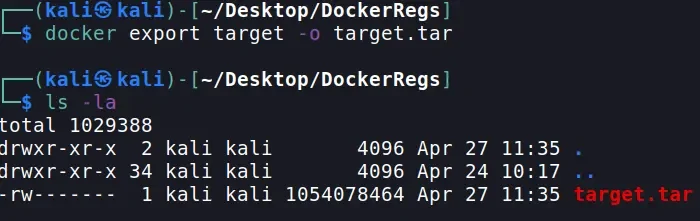
Selected images that could store the source code of the main application's backend server were pulled. The images could not simply be run as they were, because dependencies were missing in the entry point and could not be guessed. To extract the file system and code files, the image was run for the first 2 seconds while its files were exported to a tar file:
The files were then extracted from the tar file:
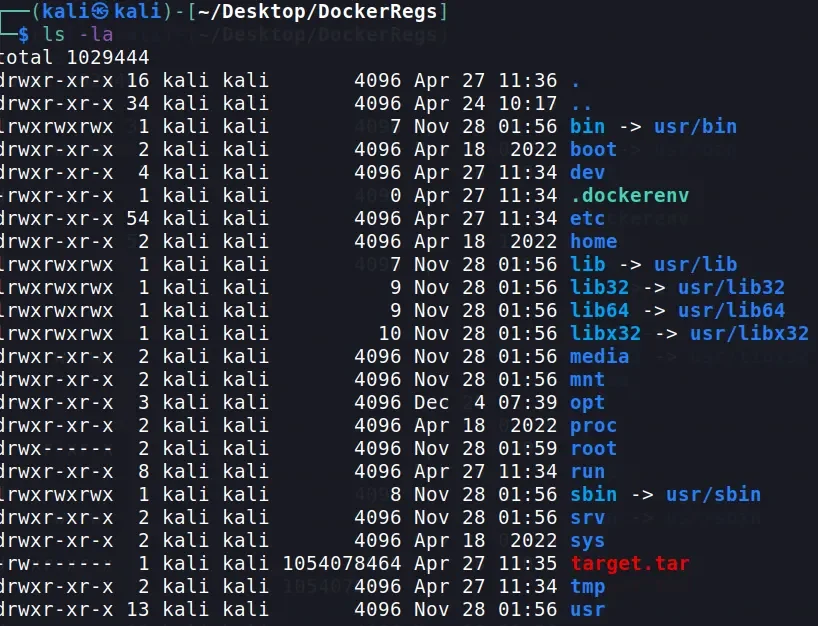
Step 5: read the backend source
Digging into the directories for the files containing the backend code, the relevant directory was located under /home, and the search for vulnerabilities and code secrets in its source code began.
The secured API mentioned earlier was now fully visible, and the code contained hardcoded valid API keys. With these API keys, every API could be used with administrative privileges, which in fact allowed grabbing any user's data and even altering user's data.
More time was spent looking for further vulnerabilities inside the code, such as SQLi or even RCE, but the code was well secured and written with best practices, so nothing came up.
Step 6: test write permissions
One last thing was tried before reporting: whether, besides read permissions to the registry, write permissions also existed. Pushing to a Docker registry means that someone or something should pull the pushed image and use it to affect the target. Registries tend to be part of the CI/CD pipeline or of the development process. At that point the use cases of this registry could not be told, but three main ones were assumed:
- The application is based on a Docker container, so chances are it is managed by an orchestration utility such as Kubernetes. Pushing a new image with a
latesttag may override the original image and replace it with a replicated image containing a webshell. - Software engineers working on the backend use this registry in their development process, so at some point, if the original image is replaced with a replicated image with a
latesttag, they might download the replicated image, which could contain a script from the attacker. - The least fun case, but still possible: the registry is just a backup registry that only receives push requests and never gets pulls of the images. In this case, overriding current images would have no special effect on the target.
The rules of engagement were read again: any action that might harm or interrupt the company's infrastructure in production is completely out of scope. So a much more humble PoC was chosen, just validating push permissions to the registry. The latest NodeJS image was taken from DockerHub and pushed to the target's registry. As expected, it worked.
Root cause
The registry at rg.target.com was reachable from the internet and answered /v2/_catalog with a JSON list of all stored images, so the repository list, tags and manifests were exposed. Pulling images exposed the backend source code and hardcoded API keys, and a push was confirmed with the NodeJS image. The application itself validated authorisation well, as the API research showed; the exposure came from the registry being left open rather than from a flaw in the application's own checks.
Impact
With read access, an attacker can enumerate every image and tag, read manifests, and pull images to recover the backend source code. In this case the source contained hardcoded valid API keys that allowed using every API with administrative privileges, grabbing any user's data and altering user's data.
With write access, the impact depends on how the registry is used. If an orchestration utility pulls a latest tag, a pushed image could replace the original with one containing a webshell. If engineers pull from the registry during development, they might download a replicated image containing an attacker's script. If the registry only receives pushes and is never pulled from, overriding images would have no special effect. The report notes that the company came to understand, after explanations about the impact, that this was not only an information disclosure vulnerability but could easily also be a severe RCE vulnerability affecting many different points of the company's infrastructure.
Fix
The report does not describe the remediation the company applied.
Variants to test
- Add
/v2/_catalogto a short ffuf wordlist and run it across every host in scope. A positive result is status code 200 with a JSON body listing repositories. - Request
/v2/<repo>/tags/liston any registry found. A positive result is a JSON list of tags, which identifies the newest image. - Request
/v2/<repo>/manifests/<tag>for each tag. A positive result is a manifest that may reference configuration or layers worth pulling. - Attempt a pull of a selected image after adding the registry to
/etc/docker/daemon.jsonas insecure. A positive result is the image downloading, after which its file system can be extracted and searched for source code and secrets. - Attempt a push of a harmless public image, such as the latest NodeJS image from DockerHub, to confirm write permissions. A positive result is the push succeeding; keep within the rules of engagement and avoid anything that could affect production.
- Search certificates through crt.sh by Organization field and through Shodan with
ssl.cert.subject.c: target.comto find hosts that have no DNS record, then probe them with httpx for services such as registries.
What happened, in plain words
A security researcher was invited to test the systems of a large technology company as part of a private bug bounty programme. A bug bounty programme is an arrangement where a company gives permission to outside researchers to look for security problems in its systems, usually with a reward for anything serious that is found. "Private" means only invited people take part, and there are written rules about what is and is not allowed.
The company owned a very large number of machines and websites on the internet. The researcher spent several days just mapping out what the company had, before trying to break anything. That mapping work is called reconnaissance, or recon for short. Think of it like a burglar walking around a neighbourhood writing down every door and window before touching any of them, except here it is all done with permission and the goal is to get the problems fixed.
During that mapping, the researcher found a service that stores software packages called Docker images. This service, called a Docker Registry, was reachable by anyone on the internet, and its catalogue could be listed without authentication. Through it, the researcher could list every stored image, download them, read the company's backend source code, find secret keys inside that code, and even upload a new image. The company had built its own application well, but this one storage service had been left open.
The starting point
The researcher was invited to a private bug bounty programme of a tech company, one of the biggest tech companies in its country. The scope, meaning the list of things that are allowed to be tested, covered pretty much the entire external infrastructure of the company. External infrastructure means everything the company exposes to the internet: its websites, its servers, its domains and so on. It was large enough that a few days could be spent on reconnaissance of the attack surface alone. The attack surface is simply the total set of things an outsider can reach and potentially attack.
The target here was not a single application but the whole external estate: IP addresses, domains, subdomains and third party accounts. An IP address is the numeric address of a machine on the internet, like a postal address for a computer. A domain is a human friendly name such as example.com that points to an IP address. A subdomain is a name that sits under a domain, such as shop.example.com. A third party account is an account the company holds on someone else's service, for example a chat service.
The feature that eventually mattered was a Docker Registry reachable at rg.target.com. To understand what that is, start with a Docker image. A Docker image is a packaged bundle of a program together with everything it needs to run: the program's files, its libraries, its configuration. It is like a sealed lunchbox containing a complete meal, so that whoever opens it gets exactly the same contents every time, on any kitchen. A Docker Registry is the HTTP service that stores these images and serves them out on request. HTTP is the language browsers and servers use to talk to each other. The registry also serves manifests, which are short index files describing what is inside an image, and layers, which are the individual chunks that make up the image's contents.
The Registry API has an endpoint at /v2/_catalog. An API is a defined set of addresses a program offers so that other programs can ask it questions or give it instructions, like a restaurant menu: you can only order what is listed. An endpoint is one specific address on that menu. The /v2/_catalog endpoint lists every repository the registry holds. A repository is a named collection of images, for example all versions of one program.
When such a registry is exposed without authentication, anyone who can reach it can enumerate images, read manifests and, if the service allows it, pull and push images. Authentication means proving who you are, usually with a password or a key. Enumerate means to list things one by one. Pull means download an image from the registry to your own machine. Push means upload an image from your machine to the registry.
Setting up
The engagement was a private bug bounty programme. The rules of engagement stated that any action that might harm or interrupt the company's production infrastructure was completely out of scope. Production infrastructure means the systems real customers are using right now. So the researcher was allowed to look, but not to do anything that could break things for real users.
The tools used during the work were:
- crt.sh, dnsdumpster, subdomainfinder and Sublist3r for certificate and subdomain lookups, with OWASP Amass as the preferred subdomain enumerator. A certificate is the digital ID card a website presents so browsers can confirm it is genuine; it is issued by a trusted authority and contains details about the site. A subdomain enumerator is a tool that tries to discover subdomains that are not publicly advertised.
- Shodan, and optionally Censys, Fofa, ZoomEye and Onyphe, as passive scanners. A passive scanner is a search engine for internet connected devices: it has already visited and recorded huge parts of the internet, so you can search its records instead of touching the target yourself. The Shodan filter used for certificate searches was
ssl.cert.subject.c: target.com. A filter is a search query that narrows results down to what you want. - httpx to probe the collected hosts and ports. A port is a numbered doorway on a machine; different services listen on different doorways. Probing means sending a small request to see what answers.
- ffuf with a short custom wordlist of 100 to 150 words. A wordlist is a list of names to try, and ffuf is a tool that tries each one against a target address very quickly to see which ones exist.
- Arjun for parameter fuzzing on the main API. A parameter is an extra piece of information attached to a request, for example a search term or a user ID. Fuzzing means trying many variations automatically to see how the system reacts.
- curl against the registry, and the Docker client for pulling images. curl is a command line tool for sending web requests; the Docker client is the program that talks to Docker registries on your behalf.
Credentials are the username and password, or key, that prove identity. Network reachability means the machine could be contacted at all from the internet.
Finding it
Recon started from two goals: finding every internet asset of the target (IP addresses, domains, subdomains and even accounts on third party services such as Slack), and OSINT to understand the services supplied and hopefully harvest valid credentials. OSINT stands for open source intelligence: gathering information from public sources such as websites, certificates and search engines. Harvesting credentials means collecting usernames and passwords that may have leaked somewhere.
For domains, the first step was the target's SSL certificate. SSL is the technology that encrypts traffic between a browser and a website, and the certificate is the ID card used in that process. Certificates can hold fields useful for finding more domains, subdomains and even IP addresses that use the same certificate. Searching crt.sh for the content of the Organization field can reveal more domains of the target with completely different domain names. crt.sh is a public website that records certificates as they are issued, so it works like a public register of ID cards. The Organization field is the part of the certificate that names the company it belongs to.
The Subject Alternative Name (SAN) field holds more domains and subdomains related to the same certificate. In plain terms, one certificate can cover several names at once, and the SAN field is the list of all of them. As an illustration, the certificate of Mercedes-Benz exposes more TLDs related to mercedes-benz and more company domains such as benz.fr, media.daimler.com and mercedes-amg.com. A TLD, or top level domain, is the last part of a domain name, such as .com or .fr.
The image shows the SAN field of the Mercedes-Benz certificate, with the extra company domains listed inside it.
With big companies it is necessary to view the certificates of many assets, because the company may be using several. The mercedes-benz.be certificate, for example, contains company domains that were not in the mercedes-benz.com certificate.
The image shows the SAN field of the mercedes-benz.be certificate, which lists further company domains not present in the .com certificate.
After enriching the domain list, subdomain enumeration followed with Amass, while Shodan was used in parallel to find assets that sometimes have no DNS record at all, by searching for certificates holding the target name or for the target's name in HTTP headers. A DNS record is the entry that maps a domain name to an IP address; a machine with no DNS record has no public name, only a numeric address. An HTTP header is a small piece of metadata sent alongside a web request or response, for example saying which server software is running.
Other online scanners that may cover different port ranges than Shodan were recommended: Censys, Fofa, ZoomEye and Onyphe. These are public scanners that have already scanned the target, so results can be queried without direct contact with the target's infrastructure. Active scanning with Masscan or Naabu is possible, but on large scale targets passive scans are usually more cost-effective, and scanners are noisy and disclose your IP address, which might get blocked by firewalls and security products. A firewall is a filter that decides which traffic is allowed in or out.
All collected domains, subdomains, IP addresses and open ports were put in a text file and fed to httpx:
The image shows httpx being run against the collected list of hosts and ports, with its output describing what web service answers on each one.
httpx has useful features that shed light on the web service behind a port, and its results were used to prioritise where to spend time. After cleaning and filtering, around 100 IP addresses and domains or subdomains remained interesting. Efforts were divided between vulnerability research on the main assets (client panels, administration panels and so on) and a background fuzzing run for quick wins on those 100 assets. A client panel is the part of a website where customers log in; an administration panel is the part where staff manage the system. A quick win is a problem that is easy to find and clearly serious.
For the fuzzing task, ffuf was used with a short custom wordlist of only 100 to 150 words. The list must be short and hold words where a status code 200 automatically means a vulnerability is in front of you, most of the time a severe information disclosure. A status code is the three digit number a web server sends back to say how a request went; 200 means "here is the content you asked for". Information disclosure means the server is handing out something it should have kept private. Some of the words in the list:
/config.json/.git/web.config/server-status/backup.zip/.DS_Store/v2/_catalog
This is a list of file and folder names that are commonly left on a web server by mistake. Each line is one guess that ffuf will try against every host. /config.json is a configuration file that may hold settings and secrets. /.git is the folder where the version control system Git keeps its history; if it is readable, the whole source code history can often be downloaded. /web.config is a configuration file used by Microsoft web servers. /server-status is a status page some servers expose. /backup.zip is a guessed backup archive. /.DS_Store is a small file created by Apple's Finder that can reveal folder contents. /v2/_catalog is the Docker Registry endpoint that lists every stored image. The point of such a short list is that any hit is almost certainly a real problem, so there is no need to sift through noise.
While ffuf ran against the 100 addresses, API recon was done on the main web application. After some time on the API, no juicy vulnerability was found: at most some parameters that had to be fuzzed with Arjun, but without permissions to use them. Everything ended with an invalid input error or an authorisation problem, so the application was good with authorisation validation. Authorisation is the check that decides whether a logged in user is allowed to do a particular thing; validation is the act of checking. In everyday terms, the front door staff were doing their job properly.
Going back to the ffuf results, one was interesting: status code 200 on rg.target.com at the path /v2/_catalog. That means a publicly open Docker Registry.
Exploitation
Step 1: confirm the open registry
A GET request was sent with curl to https://rg.target.com/v2/_catalog. A GET request is the simplest kind of web request: it asks the server to send something back, without changing anything. The response came back immediately, full of JSON containing all the Docker images stored in the registry. JSON is a text format for structured data, made of names and values in curly brackets, easy for both people and programs to read. Some images had indicative names such as admin or frontend, and some had names that were not familiar yet.
Step 2: enumerate tags
Requests were sent to the registry to get every tag of each Docker image:
curl https://rg.target.com/v2/admin-REDACTED/tags/list
This command asks the registry for the list of tags belonging to one repository. curl is the tool sending the request. The address points at the registry, then at a repository whose name begins with admin- and has been shortened here to admin-REDACTED so the real name is not published, then at the tags/list endpoint. A tag is a label attached to one particular version of an image, like a sticker on a jar saying which batch it is. The response contained the tags, which helps to know which is the latest Docker image that was uploaded.
The image shows the registry answering with a list of tags for an image, which is how the newest uploaded version can be identified.
Step 3: read manifests
After a few more requests to other images, every image manifest was examined to reveal secrets:
curl https://rg.target.com/v2/admin-REDACTED/manifests/1.10
This command asks the registry for the manifest of the image tagged 1.10 in that repository. The manifest is the index card for the image: it says which pieces the image is made of and where to fetch them. Reading it can already reveal details about how the software was built. The results were very interesting: some sensitive data was exposed, but it was not yet useful to exploit a vulnerability.
Step 4: pull the images
Analysing a Docker image is reading the code of the application you research, because the image contains every file the program needs to run. Accessing a Docker registry of a target is just like accessing the target's git. Git is the tool developers use to keep track of every change to their code; having access to it means having access to the source itself.
To pull images from a private registry, the file at /etc/docker/daemon.json must be created or edited, adding the new registry in JSON format as an insecure registry that images can be pulled from and pushed to. This file is the settings file for the Docker program on the researcher's own machine. By default Docker only talks to registries it trusts with a proper certificate; marking one as insecure tells Docker to accept it anyway. This changes nothing on the target, only on the researcher's computer.
The image shows the settings file with the target registry added as an insecure registry, in JSON format.
Selected images that could store the source code of the main application's backend server were pulled. The backend is the part of an application that runs on the server and does the real work, as opposed to the frontend that runs in the browser. The images could not simply be run as they were, because dependencies were missing in the entry point and could not be guessed. A dependency is another piece of software that a program needs in order to work. The entry point is the instruction that starts the program. To extract the file system and code files, the image was run for the first 2 seconds while its files were exported to a tar file. The file system is the arrangement of folders and files inside the image. A tar file is a single archive file that bundles many files together, like a box packed with everything from a cupboard.
The image shows the image being started briefly while its file system is exported into a tar archive.
The files were then extracted from the tar file:
The image shows the contents of the tar archive unpacked into ordinary folders and files on disk.
Step 5: read the backend source
Digging into the directories for the files containing the backend code, the relevant directory was located under /home, and the search for vulnerabilities and code secrets in its source code began. A directory is simply a folder.
The secured API mentioned earlier was now fully visible, and the code contained hardcoded valid API keys. Hardcoded means written directly into the source code instead of being kept in a safe place outside it. An API key is a long secret string that acts like a password for a program, letting it call an API without a human logging in. With these API keys, every API could be used with administrative privileges, which in fact allowed grabbing any user's data and even altering user's data. Privileges are the permissions an account has; administrative privileges are the highest level.
More time was spent looking for further vulnerabilities inside the code, such as SQLi or even RCE, but the code was well secured and written with best practices, so nothing came up. SQLi, short for SQL injection, is a trick where specially crafted input makes a database run commands the developer did not intend, rather like slipping an extra instruction into a form. RCE, short for remote code execution, is the ability to make the target machine run code of your choosing, which is usually the most severe outcome possible.
Step 6: test write permissions
One last thing was tried before reporting: whether, besides read permissions to the registry, write permissions also existed. Read permission means you may look; write permission means you may add or replace. Pushing to a Docker registry means that someone or something should pull the pushed image and use it to affect the target. Registries tend to be part of the CI/CD pipeline or of the development process. CI/CD stands for continuous integration and continuous delivery: the automated assembly line that builds, tests and ships software whenever developers make changes.
At that point the use cases of this registry could not be told, but three main ones were assumed:
- The application is based on a Docker container, so chances are it is managed by an orchestration utility such as Kubernetes. A container is a running instance of an image. Orchestration is software that decides which containers run where and restarts them when needed. Pushing a new image with a
latesttag may override the original image and replace it with a replicated image containing a webshell. Thelatesttag is the default label many systems use to mean "the current version". A webshell is a small program hidden inside a server that lets an attacker run commands through the web. - Software engineers working on the backend use this registry in their development process, so at some point, if the original image is replaced with a replicated image with a
latesttag, they might download the replicated image, which could contain a script from the attacker. A script is a small program that runs automatically. - The least fun case, but still possible: the registry is just a backup registry that only receives push requests and never gets pulls of the images. In this case, overriding current images would have no special effect on the target.
The rules of engagement were read again: any action that might harm or interrupt the company's infrastructure in production is completely out of scope. So a much more humble PoC was chosen, just validating push permissions to the registry. A PoC, or proof of concept, is a small, safe demonstration that a problem is real. The latest NodeJS image was taken from DockerHub and pushed to the target's registry. NodeJS is a popular programming environment, and DockerHub is the public registry where official images are published. As expected, it worked. Uploading a harmless public image proved the write permission without risking any harm to the company.
Why it happened
The registry at rg.target.com was reachable from the internet and answered /v2/_catalog with a JSON list of all stored images, so the repository list, tags and manifests were exposed. Pulling images exposed the backend source code and hardcoded API keys, and a push was confirmed with the NodeJS image. The application itself validated authorisation well, as the API research showed; the exposure came from the registry being left open rather than from a flaw in the application's own checks.
What it means
With read access, an attacker can enumerate every image and tag, read manifests, and pull images to recover the backend source code. In this case the source contained hardcoded valid API keys that allowed using every API with administrative privileges, grabbing any user's data and altering user's data.
With write access, the impact depends on how the registry is used. If an orchestration utility pulls a latest tag, a pushed image could replace the original with one containing a webshell. If engineers pull from the registry during development, they might download a replicated image containing an attacker's script. If the registry only receives pushes and is never pulled from, overriding images would have no special effect. The report notes that the company came to understand, after explanations about the impact, that this was not only an information disclosure vulnerability but could easily also be a severe RCE vulnerability affecting many different points of the company's infrastructure.
How to fix it
The report does not describe the remediation the company applied.
Things to try on your own targets
- Add
/v2/_catalogto a short ffuf wordlist and run it across every host in scope. A positive result is status code 200 with a JSON body listing repositories. - Request
/v2/<repo>/tags/liston any registry found. A positive result is a JSON list of tags, which identifies the newest image. - Request
/v2/<repo>/manifests/<tag>for each tag. A positive result is a manifest that may reference configuration or layers worth pulling. - Attempt a pull of a selected image after adding the registry to
/etc/docker/daemon.jsonas insecure. A positive result is the image downloading, after which its file system can be extracted and searched for source code and secrets. - Attempt a push of a harmless public image, such as the latest NodeJS image from DockerHub, to confirm write permissions. A positive result is the push succeeding; keep within the rules of engagement and avoid anything that could affect production.
- Search certificates through crt.sh by Organization field and through Shodan with
ssl.cert.subject.c: target.comto find hosts that have no DNS record, then probe them with httpx for services such as registries.
Glossary
- API: a defined set of addresses a program offers so other programs can ask it questions or give it instructions.
- API key: a long secret string that acts like a password for a program calling an API.
- Attack surface: the total set of things an outsider can reach and potentially attack.
- Authentication: proving who you are, usually with a password or a key.
- Authorisation: the check that decides whether an identified user is allowed to do a particular thing.
- Backend: the part of an application that runs on the server and does the real work.
- Bug bounty programme: an arrangement where a company invites outside researchers to look for security problems, usually with a reward.
- Certificate: the digital ID card a website presents so browsers can confirm it is genuine.
- CI/CD: continuous integration and continuous delivery, the automated assembly line that builds, tests and ships software.
- Container: a running instance of a Docker image.
- Credentials: the username and password, or key, that prove identity.
- crt.sh: a public website that records certificates as they are issued.
- curl: a command line tool for sending web requests.
- Dependency: another piece of software that a program needs in order to work.
- Directory: a folder.
- DNS record: the entry that maps a domain name to an IP address.
- Docker image: a packaged bundle of a program together with everything it needs to run.
- Docker Registry: the HTTP service that stores Docker images and serves them out on request.
- DockerHub: the public registry where official Docker images are published.
- Domain: a human friendly name such as example.com that points to an IP address.
- Endpoint: one specific address on an API.
- Enumerate: to list things one by one.
- Entry point: the instruction that starts a program.
- ffuf: a tool that tries many names from a wordlist against a target address very quickly.
- File system: the arrangement of folders and files inside an image or on a machine.
- Firewall: a filter that decides which traffic is allowed in or out.
- Fuzzing: trying many variations automatically to see how a system reacts.
- GET request: the simplest kind of web request, asking the server to send something back without changing anything.
- Git: the tool developers use to keep track of every change to their code.
- Hardcoded: written directly into the source code instead of being kept in a safe place outside it.
- HTTP: the language browsers and servers use to talk to each other.
- HTTP header: a small piece of metadata sent alongside a web request or response.
- httpx: a tool that probes hosts and ports to describe the web service behind each one.
- Information disclosure: the server handing out something it should have kept private.
- IP address: the numeric address of a machine on the internet.
- JSON: a text format for structured data, made of names and values in curly brackets.
- Kubernetes: orchestration software that decides which containers run where.
- Manifest: the index file describing what is inside a Docker image.
- Network reachability: whether a machine can be contacted at all from the internet.
- NodeJS: a popular programming environment.
- Orchestration: software that decides which containers run where and restarts them when needed.
- OSINT: open source intelligence, gathering information from public sources.
- Parameter: an extra piece of information attached to a request, such as a search term.
- Passive scanner: a search engine for internet connected devices that has already recorded them, so you search its records instead of touching the target.
- PoC: proof of concept, a small, safe demonstration that a problem is real.
- Port: a numbered doorway on a machine; different services listen on different doorways.
- Privileges: the permissions an account has.
- Production infrastructure: the systems real customers are using right now.
- Pull: download an image from a registry to your own machine.
- Push: upload an image from your machine to a registry.
- RCE: remote code execution, the ability to make the target machine run code of your choosing.
- Reconnaissance: the mapping work done before attacking, to discover what exists.
- Repository: a named collection of images in a registry.
- Rules of engagement: the written rules of a bug bounty programme saying what is and is not allowed.
- SAN: Subject Alternative Name, the field of a certificate listing all the names it covers.
- Scope: the list of things that are allowed to be tested.
- Script: a small program that runs automatically.
- SQLi: SQL injection, a trick where crafted input makes a database run unintended commands.
- SSL: the technology that encrypts traffic between a browser and a website.
- Status code: the three digit number a web server sends back to say how a request went; 200 means the content was returned.
- Subdomain: a name that sits under a domain, such as shop.example.com.
- Tag: a label attached to one particular version of an image.
- Tar file: a single archive file that bundles many files together.
- TLD: top level domain, the last part of a domain name such as .com or .fr.
- Validation: the act of checking.
- Webshell: a small program hidden inside a server that lets an attacker run commands through the web.
- Wordlist: a list of names to try against a target.
- Write-up: a public account of a security finding, describing how it was found and what it meant.



