How a Single Leaked Client Secret Exposed a Private GitHub Repo
A hardcoded OAuth app secret in a public JavaScript bundle allowed minting an app access token, which exposed internal webhook callback URLs. One webhook returned a production debug page that leaked a git remote URL containing an admin-scoped GitHub personal access token, enabling read and push access to a private repository.

Cybersecurity
The full write-up lives on its author's site
It belongs to its author, so we link to it rather than copy it. The other two tabs are our own rewrites, checked against it.
Context
This is a case study in exploit chaining: a single hardcoded credential in a public JavaScript bundle, followed through four unauthenticated steps, ended in administrative access to the target's private GitHub repository. The author describes it as work done during a recent assessment, with no user interaction, no victim and no privileged account involved. The only starting material was the public frontend bundle.
The chain, as the author summarises it:
hardcoded OAuth app secret (public JS) → mint an app access token → enumerate webhook callback URLs (internal hosts leak) → hit a leaked webhook → production debug page → git remote in the debug page contains an admin-scoped GitHub PAT
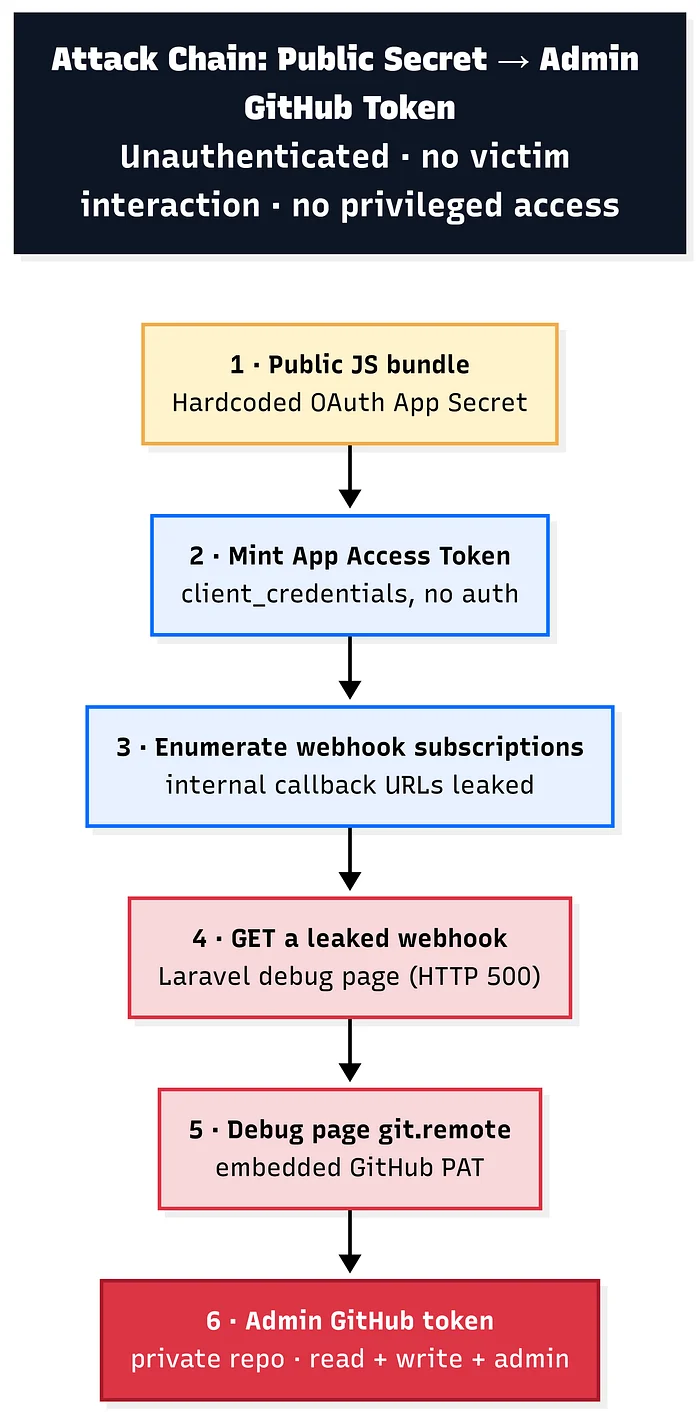
The report does not name the target, the provider or the application. Hostnames in the requests are shown as graph.example.com, and every credential value is redacted.
Setup
The assessment required no accounts, roles or special tooling beyond the ability to read the public frontend and send HTTP requests. The preconditions were all properties of the target:
- An OAuth App Secret shipped in plaintext inside the frontend JavaScript bundle.
- An OAuth token endpoint that accepts the
client_credentialsgrant with that secret. - A Graph-style API that returns the application's webhook subscriptions to a token minted this way.
- A webhook endpoint in production running with framework debug mode enabled.
- A git remote URL, embedded in the debug output, containing a Personal Access Token.
Each of these is individually common. The report's point is what happens when they line up.
Finding it
The starting point was the frontend bundle itself, which shipped an OAuth App Secret in plaintext. The author's framing is that secrets of this kind are server-only by definition: the browser cannot use them without exposing them to anyone who reads the bundle. Nothing in the report suggests the secret was obfuscated or otherwise protected; it was simply present in the public JavaScript.
Exploitation
Step 1: mint an app access token from the leaked secret
With the client secret in hand, the author exchanged it for an application token using the client credentials grant:
The request passes the leaked client_secret together with the client_id and grant_type=client_credentials as query parameters to the provider's token endpoint. The response is a bearer token, shown redacted with a | separator in the value. The author notes that the token authenticated as the company's own application.

Step 2: enumerate webhook subscriptions and internal callback URLs
App tokens are usually treated as low value. Here the provider's API returned the application's webhook subscriptions, including internal callback URLs, to the token minted in step 1.

The screenshot shows the Graph API subscriptions response with the internal callback URLs. The author's summary is that a public credential leak had become a map of internal hosts and endpoints. The report does not reproduce the raw response body, so the specific hosts and paths are not available here.
Step 3: a leaked webhook exposes a production debug page
One of the callback URLs from the subscriptions response was requested with a plain GET. It answered with an HTTP 500 and a full Laravel framework debug page.
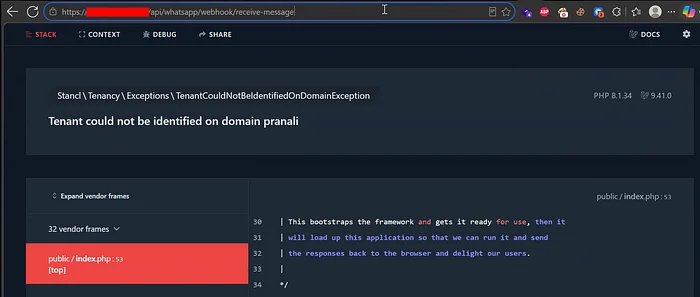
The debug page disclosed:
debug: truetogether withenv: production- framework and language versions
- full filesystem paths
- a git commit hash and commit message
The author calls debug mode in production a classic finding on its own, but notes the page contained something worse.
Step 4: the debug page leaks an admin GitHub token
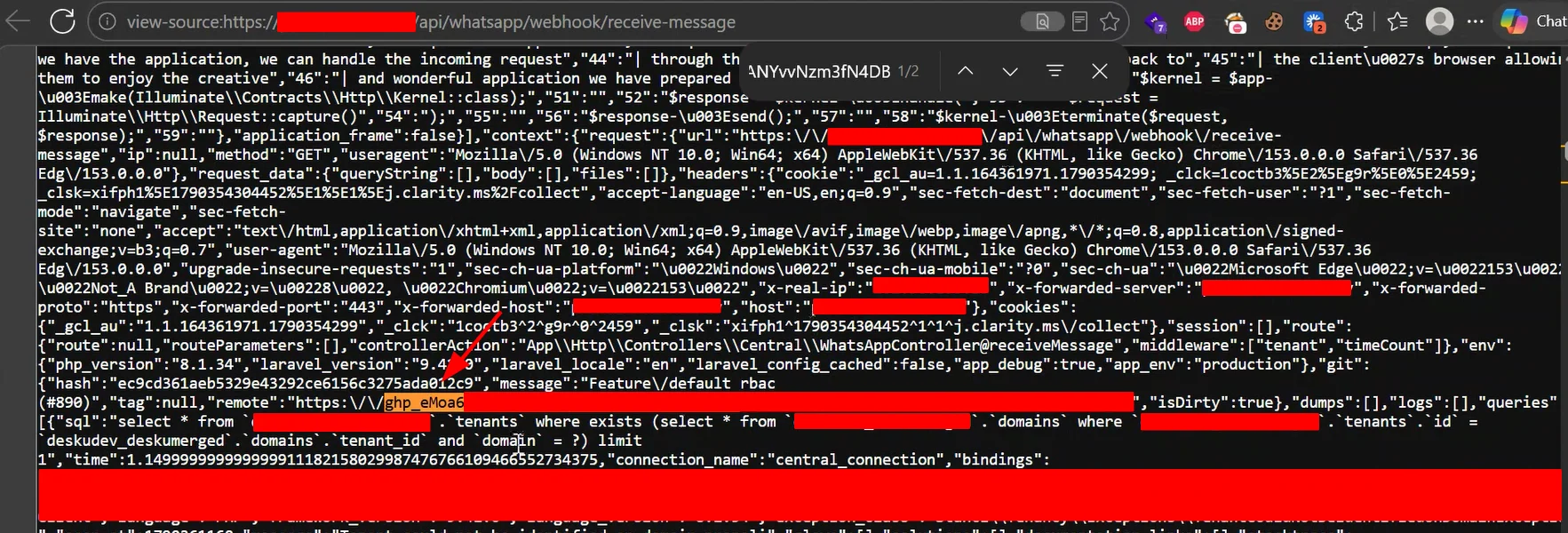
Framework debug pages often embed a JSON report with application metadata, and that metadata can include the deployed application's git remote URL. In this case the remote URL had a Personal Access Token baked into it.
Validation (metadata-only)
The token was confirmed without touching source code, using metadata-only API calls.
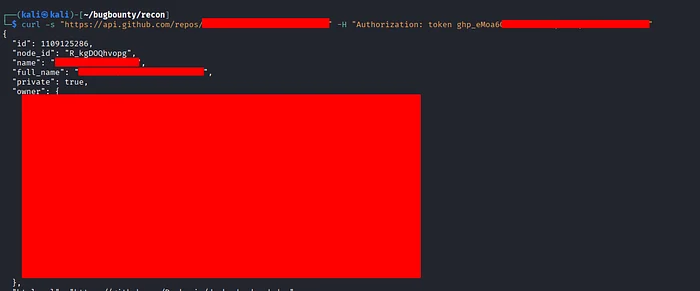
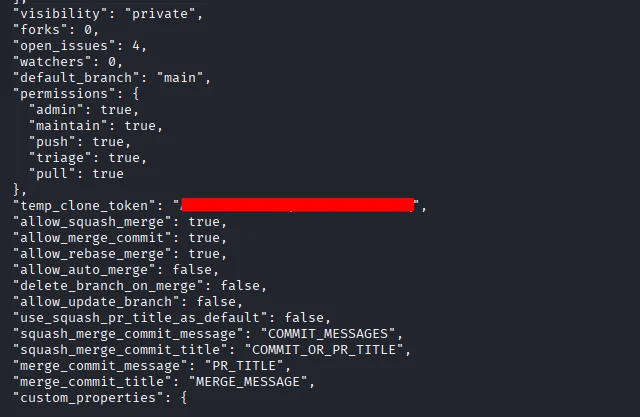
The report does not reproduce the validation requests or their responses, so the specific endpoints called and the fields returned are not shown here. The constraint the author states is that no source code was read or modified during validation.
Root cause
The author lists three root causes, each a common mistake on its own:
- Hardcoded secrets in the client. The OAuth secret should live server-side, behind a proxy or a backend-for-frontend, so the browser never holds it.
- Debug mode in production.
debug: truerendered stack traces and application metadata to the public, including the git remote. - Token in the git remote. A PAT was embedded in the repository's remote URL, and that URL then leaked through error reporting.
Chained together, the author rates the combined issue Critical. The report does not describe any control that detected or blocked the chain along the way.
Impact
The author lists four consequences:
- Source disclosure: full read of the private backend.
- Supply-chain risk: push access allows code tampering.
- Secrets exfiltration: CI and deploy secrets readable by an admin token.
- Infrastructure mapping: webhook URLs and admin IDs leaked earlier in the chain.
Fix
After disclosure, the organisation revoked the token and rotated their secrets.
The structural fixes implied by the root causes are: move the OAuth secret server-side behind a proxy or BFF, turn debug mode off in production, and keep credentials out of git remote URLs.
Variants to test
- Secrets in frontend bundles. Grep public JavaScript for OAuth client secrets, API keys and tokens. A positive result is a value that the provider's token endpoint accepts, for example returning a bearer token to a
client_credentialsrequest. - App tokens with more reach than expected. Take any app-scoped token and query the provider's API for the application's own configuration, such as webhook subscriptions. A positive result is a response listing callback URLs on internal hosts.
- Webhook and callback endpoints in production. Request each callback URL with a plain
GET. A positive result is an HTTP 500 carrying a framework debug page withdebug: trueandenv: production. - Metadata in debug output. Read the JSON report embedded in framework error pages for git remote URLs, commit hashes and environment values. A positive result is a remote URL containing embedded credentials.
- Credential validation without touching data. Confirm any recovered token with metadata-only API calls, as the author did, so that no source code is read or modified.
What happened, in plain words
Imagine a company building a house. They leave the front door key under the doormat, and on the same keyring there is a note with the address of a back door, and behind that back door there is a safe, and inside the safe there is a master key to every room. Nobody broke anything. Each key was simply left where the next person could find it.
That is roughly what this case study describes. During an assessment, the author found a single secret value sitting in a public JavaScript file, the kind of file every visitor's browser downloads when they open a website. From that one value, in four steps that required no login and no trick against any person, the author reached administrative access to the target's private GitHub repository.
The author summarises the whole chain like this:
hardcoded OAuth app secret (public JS) → mint an app access token → enumerate webhook callback URLs (internal hosts leak) → hit a leaked webhook → production debug page → git remote in the debug page contains an admin-scoped GitHub PAT
Read that line left to right and it is a story of escalation. A secret in public code is traded for a token. The token is used to list the application's webhook subscriptions, which reveal internal addresses. One of those addresses is visited and returns an error page that shows too much. Inside that error page is a git remote URL, and that URL carries a GitHub Personal Access Token with admin scope.
No user interaction, no victim, no privileged account. Just the public bundle.
A few words before we start, because they come back constantly:
- JavaScript bundle: websites send small programs to your browser so pages can react to clicks and load data. These files are public by nature. Anyone can open the browser's developer tools, or simply download the file, and read it.
- Secret: a password-like value that proves an identity. If someone else learns it, they can pretend to be whoever owns it.
- Token: a temporary pass issued by a server after you prove who you are. Instead of sending your password with every request, you send the token. It is like a cloakroom ticket: the ticket is not your coat, but whoever holds it gets the coat.
- API: the counter where programs talk to a server. You send a request with a specific address and some parameters, and the server sends back data. Think of a restaurant menu: you do not walk into the kitchen, you order from a list of dishes the kitchen is willing to make.
- OAuth: a standard way for applications to get permission to act, usually on behalf of a user or as an application itself. It defines how tokens are requested and what they allow.
- Webhook: a URL that one system calls automatically when something happens, to notify another system. It is a doorbell wire: when an event occurs, the server rings the address you gave it.
- Debug page: an error page that a development framework shows when something goes wrong, full of technical detail to help the programmer. Useful on a developer's laptop, dangerous on a public server.
- Git remote URL: the address a code project uses to talk to its hosting service, such as GitHub. It is how the local copy knows where to push and pull code.
- PAT (Personal Access Token): a token that stands in for a person's password when talking to a code hosting service. It carries permissions, sometimes very broad ones.
The report does not name the target, the provider or the application. Hostnames in the requests appear as graph.example.com, and every credential value is redacted.
What was needed before starting
The assessment needed no accounts, no special roles and no tooling beyond the ability to read the public frontend and send HTTP requests. HTTP requests are simply the messages a browser sends to a server; you can send them by hand with a command-line tool such as curl, which is what the report uses.
All the preconditions were properties of the target:
- An OAuth App Secret shipped in plaintext inside the frontend JavaScript bundle.
- An OAuth token endpoint that accepts the
client_credentialsgrant with that secret. - A Graph-style API that returns the application's webhook subscriptions to a token minted this way.
- A webhook endpoint in production running with framework debug mode enabled.
- A git remote URL, embedded in the debug output, containing a Personal Access Token.
Each of these is individually common. The point of the report is what happens when they line up.
A note on client_credentials: it is an OAuth mode where an application authenticates as itself, using its own ID and secret, rather than on behalf of a user. There is no human in the loop. That is exactly why the secret must never be public: whoever holds it can become the application.
Finding it
The starting point was the frontend bundle itself, which shipped an OAuth App Secret in plaintext. The author's framing is that secrets of this kind are server-only by definition: the browser cannot use them without exposing them to anyone who reads the bundle. Nothing in the report suggests the secret was obfuscated or otherwise protected; it was simply present in the public JavaScript.
Why does this matter so much? Because a browser is not a safe. Anything the browser receives, the visitor receives. If a secret is needed to make a request, the request should be made by a server the visitor does not control, and the browser should only talk to that server. The report mentions the usual pattern for this later: a proxy or a backend-for-frontend, a small server-side component that holds the secret and forwards requests on the browser's behalf.
Step 1: turning the leaked secret into an app token
With the client secret in hand, the author exchanged it for an application token using the client credentials grant:
Line by line:
curlis a command-line tool that sends HTTP requests and prints the response.-smeans silent: do not print progress noise, only the result.- The URL points at the provider's token endpoint,
/oauth/access_token, on the hostgraph.example.com. This is the counter where tokens are issued. client_id=REDACTEDidentifies which application is asking. It is public by design, like a username.client_secret=REDACTEDis the leaked secret. It is the proof that the request really comes from the application. In the report the value is redacted.grant_type=client_credentialstells the endpoint which OAuth flow is being used: the application is authenticating as itself, with no user involved.- The comment after
#shows the response: a JSON object with anaccess_tokenand atoken_typeofbearer. The token value is redacted and shown with a|separator. - Bearer means the token is presented as-is in a request header, like showing a ticket at the door. Whoever bears it is treated as the holder.
The author notes that the token authenticated as the company's own application. Step 1 was done: a valid app token existed, issued by the provider itself, with no password guessing and no user tricked.
Why take this step at all? Because the secret alone is not useful by itself. It is a credential for one specific purpose: asking the provider for a token. The token is what the rest of the API will accept. The secret is the raw material; the token is the usable pass.
Step 2: the token maps out internal infrastructure
App tokens are usually treated as low value. The assumption is that an application token can only do application-level things, nothing interesting. Here the provider's API returned the application's webhook subscriptions, including internal callback URLs, to the token minted in step 1.
The screenshot shows the Graph API subscriptions response with the internal callback URLs. The author's summary is that a public credential leak had become a map of internal hosts and endpoints. The report does not reproduce the raw response body, so the specific hosts and paths are not available here.
Why does this matter? A webhook subscription is a registration that says: when an event happens, call this address. Those addresses are often internal, meant only for the company's own systems. Seeing them from the outside is like finding a building's internal phone directory taped to the front door. You now know which doors exist and where they lead, without having opened any of them.
This is the moment the chain changes character. Up to here the author had a credential. Now there is a list of targets.
Step 3: a leaked webhook exposes a production debug page
One of the callback URLs from the subscriptions response was requested with a plain GET. A GET is the ordinary request a browser makes when you type an address and press Enter: give me what is at this address. It answered with an HTTP 500 and a full Laravel framework debug page.
HTTP 500 is the server's way of saying something went wrong on its side. Normally that is the end of the story: an error, nothing more. Here the error page was rendered by Laravel, a PHP web framework, with debugging turned on, so it included the details a developer would want while fixing a bug.
The debug page disclosed:
debug: truetogether withenv: production- framework and language versions
- full filesystem paths
- a git commit hash and commit message
Each of those is worth pausing on. debug: true means detailed error reporting is switched on. env: production means this is the live environment, the one real users touch, not a test machine. Together they are a contradiction: the most verbose error mode, running where the public can reach it. Framework and language versions tell an attacker which known weaknesses might apply. Full filesystem paths reveal how the server is laid out internally. A commit hash and message reveal the state of the code and often hint at what changed recently.
The author calls debug mode in production a classic finding on its own, but notes the page contained something worse.
Why request the callback URL at all? Because a webhook address is a door that is meant to be called by machines, often with less protection than the main site. If it errors, and the error page is verbose, the error page itself becomes a source of information. A plain GET was enough to make it fail loudly.
Step 4: the debug page leaks an admin GitHub token
Framework debug pages often embed a JSON report with application metadata, and that metadata can include the deployed application's git remote URL. JSON is a plain text format for structured data, easy for programs to read and for humans to skim. In this case the remote URL had a Personal Access Token baked into it.
Why would a token be in a remote URL? Because git lets you write a remote as https://user:token@host/project.git, which saves you from typing credentials every time you push. It is convenient on a private machine. It becomes a leak the moment that URL is printed anywhere public, and an error page that dumps application metadata is exactly such a place.
So the chain closes. The debug page, meant to help a developer, handed over a credential that grants access to the code repository itself.
Checking the token without touching the code
The token was confirmed without touching source code, using metadata-only API calls.
Metadata-only means asking the service about the token and the account, not about the contents of the repository. It is the difference between checking that a key fits the lock and actually opening the door and walking through the house. The author's stated constraint is that no source code was read or modified during validation.
The report does not reproduce the validation requests or their responses, so the specific endpoints called and the fields returned are not shown here.
Why be this careful? Because the goal of validation is to prove impact, not to cause it. Confirming that a credential is live and what it can reach is enough to report the issue responsibly. Reading private code would go beyond what is needed.
Why this happened
The author lists three root causes, each a common mistake on its own:
- Hardcoded secrets in the client. The OAuth secret should live server-side, behind a proxy or a backend-for-frontend, so the browser never holds it.
- Debug mode in production.
debug: truerendered stack traces and application metadata to the public, including the git remote. - Token in the git remote. A PAT was embedded in the repository's remote URL, and that URL then leaked through error reporting.
Chained together, the author rates the combined issue Critical. The report does not describe any control that detected or blocked the chain along the way.
That last point is the lesson. None of the three mistakes is exotic. Secrets end up in bundles because it is easy to put them there. Debug mode stays on because it helps during development and nobody switches it off. Tokens end up in remote URLs because it saves typing. Each one alone might be a low-severity note. Together they form a path from public code to private source.
What the access allowed
The author lists four consequences:
- Source disclosure: full read of the private backend.
- Supply-chain risk: push access allows code tampering.
- Secrets exfiltration: CI and deploy secrets readable by an admin token.
- Infrastructure mapping: webhook URLs and admin IDs leaked earlier in the chain.
Supply chain here means the chain of people and systems that produce software. If someone can push to the repository, they can change code that later gets built and deployed, which affects everyone downstream. CI stands for continuous integration, the automated system that builds and tests code; it usually holds its own secrets for deployment, which is why an admin token that can read them matters.
The fix
After disclosure, the organisation revoked the token and rotated their secrets. Revoking makes a token stop working; rotating replaces a secret with a new one, so the old value is useless even if it is still lying around somewhere.
The structural fixes implied by the root causes are: move the OAuth secret server-side behind a proxy or BFF, turn debug mode off in production, and keep credentials out of git remote URLs.
Things worth testing elsewhere
- Secrets in frontend bundles. Grep public JavaScript for OAuth client secrets, API keys and tokens. A positive result is a value that the provider's token endpoint accepts, for example returning a bearer token to a
client_credentialsrequest. - App tokens with more reach than expected. Take any app-scoped token and query the provider's API for the application's own configuration, such as webhook subscriptions. A positive result is a response listing callback URLs on internal hosts.
- Webhook and callback endpoints in production. Request each callback URL with a plain
GET. A positive result is an HTTP 500 carrying a framework debug page withdebug: trueandenv: production. - Metadata in debug output. Read the JSON report embedded in framework error pages for git remote URLs, commit hashes and environment values. A positive result is a remote URL containing embedded credentials.
- Credential validation without touching data. Confirm any recovered token with metadata-only API calls, as the author did, so that no source code is read or modified.
Glossary
- API: the set of addresses and rules a program uses to ask a server for data or actions, like a menu you order from.
- App token: a token that represents an application itself rather than a person, usually obtained with the application's own ID and secret.
- Backend-for-frontend (BFF): a small server-side component that sits between the browser and the real API, holding secrets the browser must never see.
- Bearer token: a token presented as-is with a request; whoever holds it is treated as the holder.
- CI (continuous integration): automated systems that build, test and deploy code, often holding their own deployment secrets.
- Client credentials grant: an OAuth flow where an application authenticates as itself using its ID and secret, with no user involved.
- Client ID: the public identifier of an application in OAuth, like a username.
- Client secret: the private value that proves an application's identity in OAuth, like a password; it must stay server-side.
- Commit hash: a short unique code identifying a specific change in a code repository.
- curl: a command-line tool for sending HTTP requests and printing the responses.
- Debug mode: a setting that makes software show detailed error information, useful in development and dangerous in production.
- Debug page: the error page produced with debug mode on, often containing paths, versions and configuration details.
- Environment (
env): the setting that says which stage a system is running in, such as development, staging or production. - Exfiltration: getting data out of a system without permission.
- Filesystem path: the internal address of a file or folder on a server, such as where the application is installed.
- GET: the ordinary HTTP request a browser makes to fetch whatever is at an address.
- Git: the version control system used to track changes in code.
- Git remote URL: the address a code project uses to reach its hosting service for pushing and pulling code.
- Graph API: an API style, associated with a well-known provider, that exposes an application's configuration and data through structured endpoints.
- Hardcoded secret: a credential written directly into source code or a shipped file instead of being stored securely and injected at runtime.
- HTTP 500: a server response meaning something failed on the server side while handling the request.
- JavaScript bundle: the file or files of JavaScript a website sends to the browser, publicly readable by anyone.
- JSON: a plain text format for structured data, made of keys and values.
- Laravel: a web framework for the PHP language; its debug pages are known for detailed error reports.
- Metadata: information about something rather than its contents, such as an account's settings rather than its files.
- OAuth: a standard for granting applications limited access through tokens instead of passwords.
- OAuth App Secret: the private credential an OAuth application uses to prove its identity to the provider.
- PAT (Personal Access Token): a token that stands in for a person's password when accessing a code hosting service, carrying whatever permissions it was granted.
- Production: the live environment that real users and real data touch.
- Proxy: a server that forwards requests on behalf of another party, often used to keep secrets off the client.
- Push access: permission to upload changes to a code repository.
- Revoke: to make a credential stop working permanently.
- Rotate: to replace a secret with a new value so the old one is useless.
- Scope: the set of permissions a token carries.
- Source disclosure: unauthorised reading of private source code.
- Stack trace: the list of internal function calls a program was executing when it failed, shown on debug pages.
- Supply chain: the chain of people, systems and code that produce and deliver software; compromising it affects everyone downstream.
- Token endpoint: the API address where tokens are requested and issued.
- Webhook: a URL that a system calls automatically when an event happens, to notify another system.
- Webhook subscription: a registration that tells a provider which URL to call for which events.




